

Quick answer
Cloud ERP for small business runs from $0 for one Odoo app to $80-$110 per user a month for Microsoft Dynamics 365 Business Central, as of October 2026. NetSuite, Acumatica, SAP Business One and Sage Intacct only quote. If you're under about 10 people with one company, you probably don't need ERP yet.
Cloud ERP for small business is one rented system that keeps your books, inventory, orders, purchasing and often CRM and manufacturing in a single database, run on the vendor's servers. NIST calls this kind of rental software as a service: you use "the provider's applications running on a cloud infrastructure" and don't manage the servers (NIST SP 800-145).
We wrote this for a US owner or operations lead who has outgrown spreadsheets and is wary of a five-figure software project. It covers when you need ERP, what eight vendors charge on their own pages, setup effort, and how to get your data back out.
Key takeaways
- Most small businesses need ERP only once their accounting software hits a hard limit.
- QuickBooks Online Plus caps you at 5 billable users; Advanced allows 25.
- Only 2 of the 8 pricing pages showed a US dollar list price.
- Setup hours often cost more than the licence, so get them quoted.
- Ask how you get your data back out before you sign.
ERP keeps your books, stock and orders in one database
ERP means enterprise resource planning, a clunky name for a simple idea. Every department writes to the same records. A sale lowers stock, creates the invoice and posts to the ledger in one step, so nobody re-keys it at 9 p.m.
Most systems sell that idea in modules. Finance and accounting come first, then inventory, sales orders and purchasing. Manufacturing, service management, HR, projects and a CRM sit on top, and you usually pay more for each layer.
That's where cost creeps in.
"Cloud" changes who runs it, not what it does. The vendor hosts, patches and backs up the system, and you pay a subscription. NIST puts it plainly: the customer "does not manage or control the underlying cloud infrastructure" (SaaS definition). That's a relief for a small team, and it's also why the exit terms later in this guide matter so much.
When does a small business need ERP instead of QuickBooks?
So when do you actually need one? For most small businesses, not until their accounting software hits a hard limit. QuickBooks Online Plus caps you at 5 billable users, 250 accounts in the chart of accounts and 40 combined classes and locations. Advanced lifts that to 25 users and unlimited accounts, classes and locations (QuickBooks usage limits, updated August 2026).
Those numbers make a better test than any vendor's "are you ready for ERP" quiz.
Before that limit, the cheaper path is accounting software plus a few connected add-ons: an inventory app, your store, a CRM. Our guide to third-party integrations explains how those connections work and what they cost to keep running. If the CRM is the gap, our CRM software comparison is a faster fix than a whole new system.
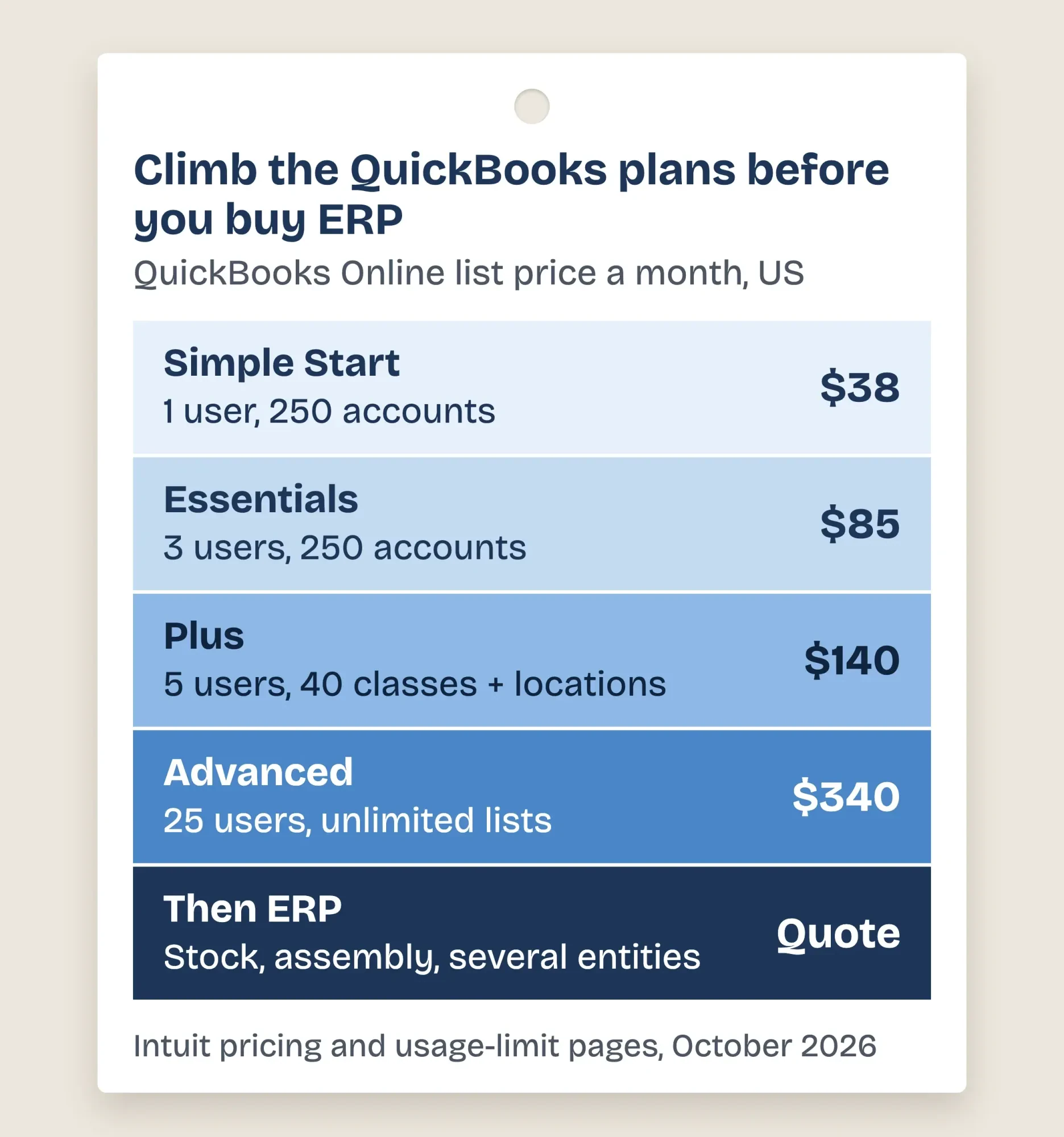 Diagram by DigitalTreed, from Intuit's QuickBooks Online usage limits help page (updated August 2026) and pricing page, read October 25, 2026.
ERP starts to earn its price when several of these are true at once:
- More people need the books than your plan allows, and you're paying for workarounds.
- Stock sits in two or more places, or you assemble, roast, bottle or kit products.
- You run more than one legal entity and consolidate by hand.
- Someone re-types orders from the store into the books every day.
- Month-end close takes a week because numbers live in five spreadsheets.
One or two of these? Fix the connection. Four or five? Start shopping.
We checked 8 pricing pages and 4 wouldn't show a price
Those limits are free to check. Prices are harder. On October 25, 2026, we opened the pricing page of every vendor in this roundup without signing in, starting a trial or booking a demo. Microsoft's Business Central page showed dollar prices even from our office in India. Odoo showed us rupees, because it sets prices by the visitor's country. Intuit's site wouldn't load on our network at first; later that day its pricing and help pages opened normally in a browser. NetSuite's old pricing address returned "Page Not Found" in a normal browser, so we used its own February 2026 article on how ERP pricing works.
The result: 2 of the 8 pages showed us a US dollar list price we could confirm. Four only quote.
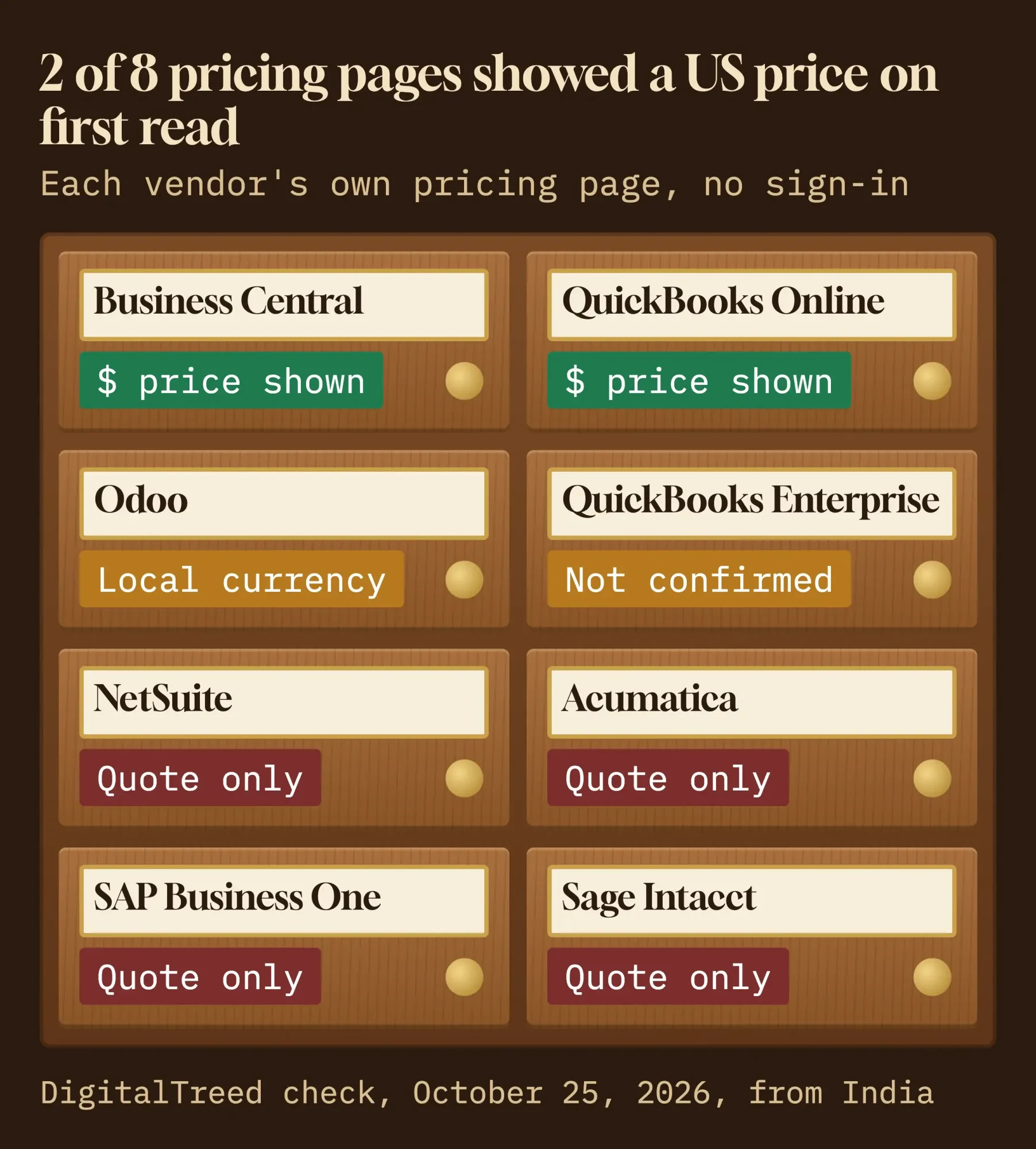 Diagram by DigitalTreed: what each vendor's own pricing page showed us on October 25, 2026, without sign-in.
Here's the full picture. "Best for" is our read of who each product suits, based on the vendor's own description; the catch is what we'd want a client to know first.
| Vendor | Best for | Price shown on October 25, 2026 | The catch |
|---|---|---|---|
| Microsoft Dynamics 365 Business Central | Stock-heavy firms, light manufacturing | $80 Essentials, $110 Premium, $8 Team Members per user a month, paid yearly | Bought and set up through a partner; AI agents need credits sold separately |
| QuickBooks Online Advanced | Finance-led firms up to 25 users | $340 a month list (50% off for 3 months that day) | Accounting, not full operations; 25-user cap |
| QuickBooks Enterprise | Desktop users who need deeper inventory | Not confirmed in our first read; a later recheck showed from $2,210 a year (Gold) | Desktop software; cloud hosting costs extra |
| Odoo | Tight budgets, adding apps one by one | One app free; other plans priced by country (we saw rupees) | Odoo.sh hosting extra; first-year discount ends after 12 months |
| Oracle NetSuite | Firms planning to add entities and modules | Quote only | Ongoing costs can match the licence and setup |
| Acumatica | Growing teams with many occasional users | Quote only | Price depends on apps, usage and partner package |
| SAP Business One | Distributors and light manufacturers | Quote only | No price until you request a quote |
| Sage Intacct | Finance-heavy service firms | Quote only | Finance-first, not built around inventory |
Prices change often, so treat that column as a snapshot with a date on it, not a promise.
Microsoft Dynamics 365 Business Central publishes its price
Of the full ERP systems, Business Central is the easiest to budget for, because Microsoft prints the price. As of October 2026, Essentials costs $80 per user a month and Premium $110, both paid yearly. Team Members, who can read data, approve workflows and update a few records, cost $8 (Business Central pricing).
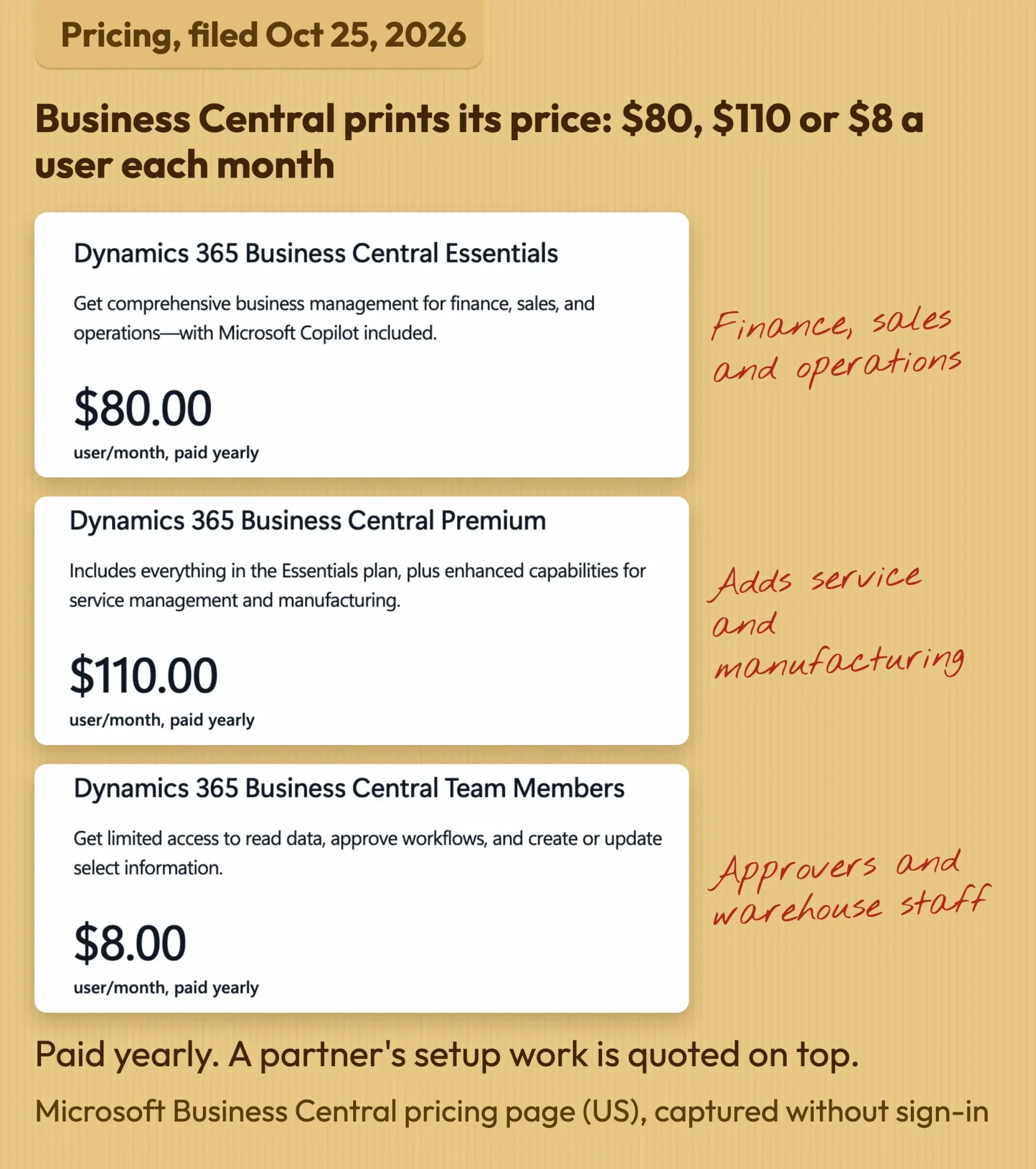 Screenshot: Microsoft, Dynamics 365 Business Central pricing page (US), captured October 25, 2026 without signing in; notes by DigitalTreed.
Premium adds service management and manufacturing on top of Essentials. Copilot comes with Essentials, but the newer sales-order and payables agents need Copilot Credits, sold separately. There's a free 30-day trial.
The catch is the partner. Every plan's button says "Contact us", and Microsoft's own admin docs assume a reselling partner handles trials, extensions and moving your data in (trials and subscriptions). So the $80 list price, as of October 2026, is only the licence.
Best for: a distributor, maker or multi-location retailer already living in Microsoft 365.
QuickBooks Online Advanced is the cheapest step up
But if your problem is users and reporting rather than stock, QuickBooks Online Advanced may be all the "ERP" you need. Its list price was $340 a month as of October 25, 2026, for up to 25 billable users, with no annual contract. That day Intuit was offering 50% off for the first 3 months (QuickBooks pricing).
It isn't a full operations suite. You'll still bolt on inventory, manufacturing or a warehouse app once the business gets physical.
QuickBooks Enterprise is the other Intuit route: desktop software sold by subscription in Gold, Platinum and Diamond tiers, with cloud hosting at extra cost (Enterprise pricing). Its page lists prices.
Our first read of those figures didn't come back clean. When we reopened the page in a normal browser later that day, it showed "Starting at" prices of $2,210 a year for Gold, $2,717 for Platinum and $5,363 for Diamond. It suits a firm that already runs QuickBooks Desktop and needs deeper inventory without leaving it.
The natural fit is a services or light-retail firm where 6 to 25 people need the books.
Odoo is free to start and priced by country after that
Odoo is the straight answer to "is there a free cloud ERP?" Its One App Free plan gives you one app, plus any apps it depends on, for unlimited users. Odoo says that use is free "forever, whatever the dependencies of the app" (Odoo pricing).
Odoo comes in two editions. Community is open source under the LGPLv3 licence; you host it yourself and pay for the server and the expert (Odoo licence). Enterprise is the licensed version built on that same core, with the hosted Standard and Custom plans (Odoo editions).
Here's the snag for a US price list.
Odoo sets prices by the visitor's country. From our office we saw rupees, so we can't give you a confirmed US dollar figure. Check the page from a US connection. Two details hold everywhere: the first-year discount is "valid for 12 months, for initial users ordered", and Odoo.sh hosting isn't included. Customers and suppliers using the portal aren't paying users.
Pick Odoo if you're a small team that wants to start with invoicing or inventory and add apps later.
NetSuite is built to grow into, and priced by quote
Oracle NetSuite doesn't publish a price list. Its own February 2026 article describes "tailored, customer-specific pricing" and notes that businesses "often spend as much, if not more, on those ongoing costs than on the initial licensing and implementation" (NetSuite, How Much Does ERP Cost?, vendor article).
That's unusually frank for a vendor, and worth taking at its word.
Ask for year two and year three in writing, not just year one.
Best for: a company that expects to add locations, subsidiaries or modules within a few years and wants one system for the trip.
Acumatica charges for apps and usage, not seats
Acumatica's pitch is "Unlimited Users". Its price is built from three factors: "the applications you need, your expected usage and resource requirements, and your deployment preferences" (Acumatica pricing). There's no dollar figure on the page.
That model suits a business with lots of occasional users, like warehouse staff or field techs who log in twice a day. A partner builds the package, which Acumatica says can include support and implementation.
The catch: support and implementation sit inside the partner's package, so get both itemized.
It fits a growing distributor or contractor that would pay heavily under per-seat pricing.
SAP Business One and Sage Intacct both go through a sales conversation
SAP Business One is SAP's small-business ERP, and its US page offers "Request a quote" rather than a price. SAP says over 85,000 customers use it, in wholesale distribution, light manufacturing, retail and professional services (SAP Business One, vendor claim). Pricing starts with that quote request.
Sage Intacct is a different animal. Sage calls it accounting software and builds "an accounting software pricing plan tailored to your industry and size", quote only (Sage Intacct pricing). It's a strong fit for finance-heavy service firms.
It isn't the tool for a roaster or a parts distributor.
Best for: SAP Business One if you make or move goods; Sage Intacct if your complexity is in the ledger, not the warehouse.
Setup hours cost more than most owners expect
Once you've picked a system, the licence is the easy part to price. Setup means mapping your processes, importing clean data, connecting your store and payment tools, and training people. Odoo is one of the few vendors that publishes the effort: its Success Packs run 4, 25, 50, 100 and 200 consultant hours. For its default estimate, Odoo says "80% of projects within this scope are put in production in 200 hours or less" (Odoo Success Packs).
Integrations add their own hours. Card payments need a gateway that talks to the ledger, which we price out in our payment gateway integration guide. A custom connector may need a developer; the rates and red flags are in our full stack developer hiring guide. And every custom piece adds lock-in, the trade-off in our no-code vs custom development comparison.
This is the step where outside help pays off most. DigitalTreed builds store and accounting connectors and moves data between systems through our web development work (we sell this service, so weigh that).
Example (made up): Juniper Hollow Coffee Roasters in Ogden, Utah, has 12 staff. It sells to cafes and through an online store, and it roasts green coffee into retail bags. It has hit QuickBooks Online Plus's 5-user cap. Eight people need full access; four warehouse staff mostly check orders and approve stock counts.
| Option (list prices as of October 2026) | Seats | Year-one licence math | Per year |
|---|---|---|---|
| QuickBooks Online Advanced | Up to 25 users | $340 x 12 | $4,080 |
| Business Central Essentials + Team Members | 8 full, 4 light | ($80 x 8 + $8 x 4) x 12 | $8,064 |
| Business Central Premium + Team Members | 8 full, 4 light | ($110 x 8 + $8 x 4) x 12 | $10,944 |
| Odoo, NetSuite, Acumatica, SAP Business One, Sage Intacct | Varies | No US dollar price shown to us | Quote |
Juniper Hollow roasts in batches, so it's really asking a manufacturing question, which points at Business Central Premium or Odoo's manufacturing apps rather than QuickBooks. On licences alone that's $10,944 a year before a partner touches it (Microsoft list prices, October 2026).
Setup hours come on top of that.
Read the exit terms before you sign
That setup work is also what makes leaving hard. Every cloud ERP contract ends someday, and what you can take with you differs a lot. NIST's cloud guidance says it directly: "Consumers should analyze provider termination and data retention policies" (NIST SP 800-146).
Three vendors put their exit terms on public pages; the four quote-only vendors didn't on the pages we read.
- QuickBooks Online: after you cancel, you get read-only access to your data for one year (Intuit help).
- Business Central: admins can export the database as a BACPAC file, but only on a paid subscription, up to 10 times a month, and into your own Azure storage (Microsoft Learn). Retention after a subscription ends "depend[s] on the subscription type".
- Odoo Online: you can download a ZIP backup of your database from the database manager (a very large database needs Odoo Support instead); Odoo's pricing FAQ adds, "You own your data!" (Odoo docs).
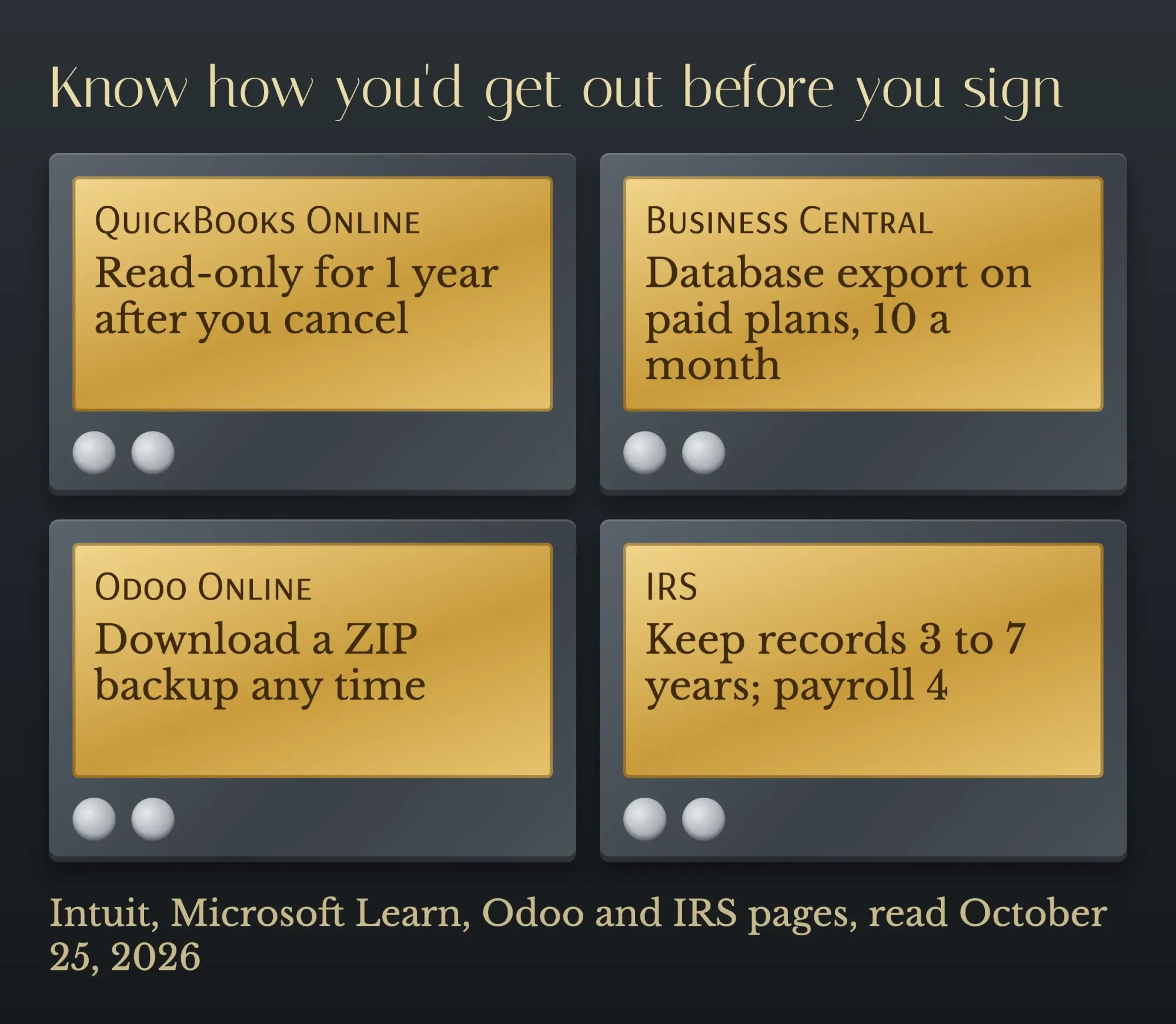 Diagram by DigitalTreed, from Intuit, Microsoft Learn, Odoo and IRS pages read October 25, 2026.
Your obligations outlast the subscription. The IRS says to keep records for 3 years in the usual case, 6 or 7 in some situations, and employment tax records for at least 4 years (IRS: how long to keep records).
So plan where old books will live, readable, before you switch.
None of this is tax advice for your situation. Your CPA can tell you which periods apply to your returns.
Ask the quote-only vendors the same three questions in writing: how long you keep access after you leave, in what format, and at what cost. And ask what uptime they promise; our guide to uptime monitoring explains how to check a promise like that yourself.
A shortlist checklist you can take into a demo
Those exit answers belong on the same sheet as everything else. Bring these questions to every demo and get the answers in the quote:
- What is the price per full user, per light user and per module, and for how long is it fixed?
- Who sets it up, how many hours are quoted, and what is the hourly rate?
- Which of our current tools connect out of the box, and which need custom work?
- How many years of data will you import, and who cleans it first?
- What happens to our data, and in what format, when we leave?
- Can we see a live system running a business like ours, not a slide deck?
- What does year three cost, including support and price rises?
If the online store is part of the plan, check it before you connect anything. Still picking a store platform? The per-sale fees each one adds are laid out in our WordPress and Shopify cost breakdown. A slow or broken store becomes a slow, broken order feed. Run it through our website audit tool first; it flags the basics in a minute.
Our take: start with the cheapest system that clears your hard limits. For most firms under 25 people that's QuickBooks Online Advanced plus a good inventory app. Move to Business Central or Odoo when stock, assembly or several locations make the add-ons more trouble than they're worth. Bring NetSuite, Acumatica or SAP in when you're planning several entities and can budget a partner project.
If you'd like a second pair of eyes on a shortlist or a partner's quote, request a quote from DigitalTreed. It's paid work, and we'll tell you if you don't need us.
Setup time, QuickBooks history and 1099s
Frequently asked
How long does a small-business ERP setup take?
It depends on scope, but Odoo says 80% of projects in its default estimate go live in 200 hours or less (Odoo Success Packs). Business Central's trial runs 30 days, and a partner can extend it for up to 90 days in total while you decide (Microsoft Learn).
Can I take my QuickBooks history with me?
Yes, for a while. Intuit says you can export data to Excel or to a desktop version of QuickBooks up to a year after you cancel. If you cancel during a free trial, your data stays for only 90 days (Intuit help).
Will an ERP handle my 1099 filing?
Check before you buy. Since tax year 2023, if you file 10 or more information returns, the IRS says you must file them electronically (IRS e-file rules). Make sure the system exports 1099 data or connects to an e-file service.
How we made this guide: on October 25, 2026, our team opened the pricing pages of all eight products named here, from seven vendors. We read every vendor, NIST and IRS page we cite and checked each quote and price against it. We captured Microsoft's public Business Central pricing page in headless Google Chrome without signing in. Intuit's site wouldn't load from our office in India on the first try; we read its pages in a normal browser later the same day.
We did not start trials, book demos, create accounts or install anything, Odoo Community included. Juniper Hollow Coffee Roasters is made up, and we checked its arithmetic twice. Sources are linked where each fact appears. Aijaz Alam reads and approves this rewrite before it's published.
First published April 2025. Rewritten October 25, 2026: replaced the unpriced list (which included enterprise suites like Oracle ERP Cloud and Workday) with eight small-business options and the prices each vendor's page showed that day. We added a test for when you need ERP, setup effort, a worked example, exit terms and US record rules.
Sources
- NIST SP 800-145: The NIST Definition of Cloud Computing
- NIST SP 800-146: Cloud Computing Synopsis and Recommendations
- Microsoft: Dynamics 365 Business Central pricing (vendor page)
- Microsoft Learn: Business Central trials and subscriptions
- Microsoft Learn: Export databases in the Business Central admin center
- Intuit: QuickBooks Online pricing (vendor page)
- Intuit: Learn about usage limits in QuickBooks Online
- Intuit: What happens to my data after cancelling QuickBooks Online
- Intuit: QuickBooks Enterprise pricing (vendor page)
- Odoo: Pricing (vendor page)
- Odoo: Community and Enterprise editions
- Odoo source code: LICENSE (LGPLv3)
- Odoo documentation 19.0: Odoo Online database management
- Odoo: Success Packs (vendor page)
- Acumatica: Pricing (vendor page)
- Oracle NetSuite: How Much Does ERP Cost? ERP Pricing Explained (vendor article, February 6, 2026)
- SAP: SAP Business One (vendor page)
- Sage: Sage Intacct pricing (vendor page)
- IRS: How long should I keep records?
- IRS: E-file information returns
Comments
No comments yet. Start the conversation below.