
Quick answer
ChatGPT image generation makes and edits pictures inside a chat. Plans run from Free ($0) to Plus ($20 a month) and up, as of October 2026, but OpenAI's docs don't publish a daily image limit. Use it for scenes, drafts and backgrounds, keep your real product in the shot, and leave the logo to a designer.
In spring 2025, half the internet turned its selfies into soft anime portraits. Free users were promised three images a day, and the limit was meant to be temporary, 9to5Google reported at the time. The fun part faded. The business question didn't: can ChatGPT image generation make your next product post, flyer or ad?
Mostly yes, with rules attached. On October 25, 2026, we read OpenAI's current ChatGPT and API docs, the U.S. Copyright Office's position and the FTC's ad rules. Here's what holds up for a shop like yours.
Key takeaways
- OpenAI's docs don't publish a daily image limit for any ChatGPT plan.
- A good image prompt is often one to three clear sentences.
- Change one element per edit round and say what must stay the same.
- Let ChatGPT make the scene, then place your real product photo on top.
- Never generate customer photos or reviews from people who don't exist.
ChatGPT image generation is a fast draft machine, not a finished brand
ChatGPT image generation is a feature that draws a new picture from your words, or changes a picture you attach. OpenAI's ChatGPT image docs list "banners, backgrounds, illustrations" and placeholders among the jobs it does. You type in a normal web chat. Attach a photo and ChatGPT can edit it or use it "as visual guidance."
That covers a lot of small-business work: a seasonal banner, a background for a product photo, a mockup of a menu board, a picture for a blog post.
It's weaker at the jobs a brand repeats. OpenAI's image generation guide warns that its models "can still struggle with precise text placement" on a sign or label. They may also occasionally have trouble keeping "visual consistency for recurring characters or brand elements across multiple generations." So the mascot in Monday's post may look slightly different on Friday.
Think of it as a quick sketch artist who never sleeps.
What each plan costs, and why nobody can tell you the image limit
So what does it cost? As of October 2026, OpenAI's pricing docs list Free at $0, Go at $8 a month, Plus at $20 and Pro from $100 a month. Business seats cost $25 per user a month, or $20 billed annually with 2 or more users.
| Plan | Price as of October 2026 | Good fit for |
|---|---|---|
| Free | $0 | Trying a few images |
| Go | $8 a month | Light, regular use |
| Plus | $20 a month | A one-person shop posting weekly |
| Business | $25 per user a month ($20 billed annually) | A team that needs shared admin |
| Pro | $100, $200 or $500 a month | Heavy daily use |
The image allowance is the fuzzy part. The same ChatGPT docs say image "usage limits in ChatGPT web depend on your plan and workspace settings." They don't give a number. OpenAI's pricing page, where plan features are listed, blocked our checker that day, so we won't repeat what other sites claim it says.
Plan around that gap.
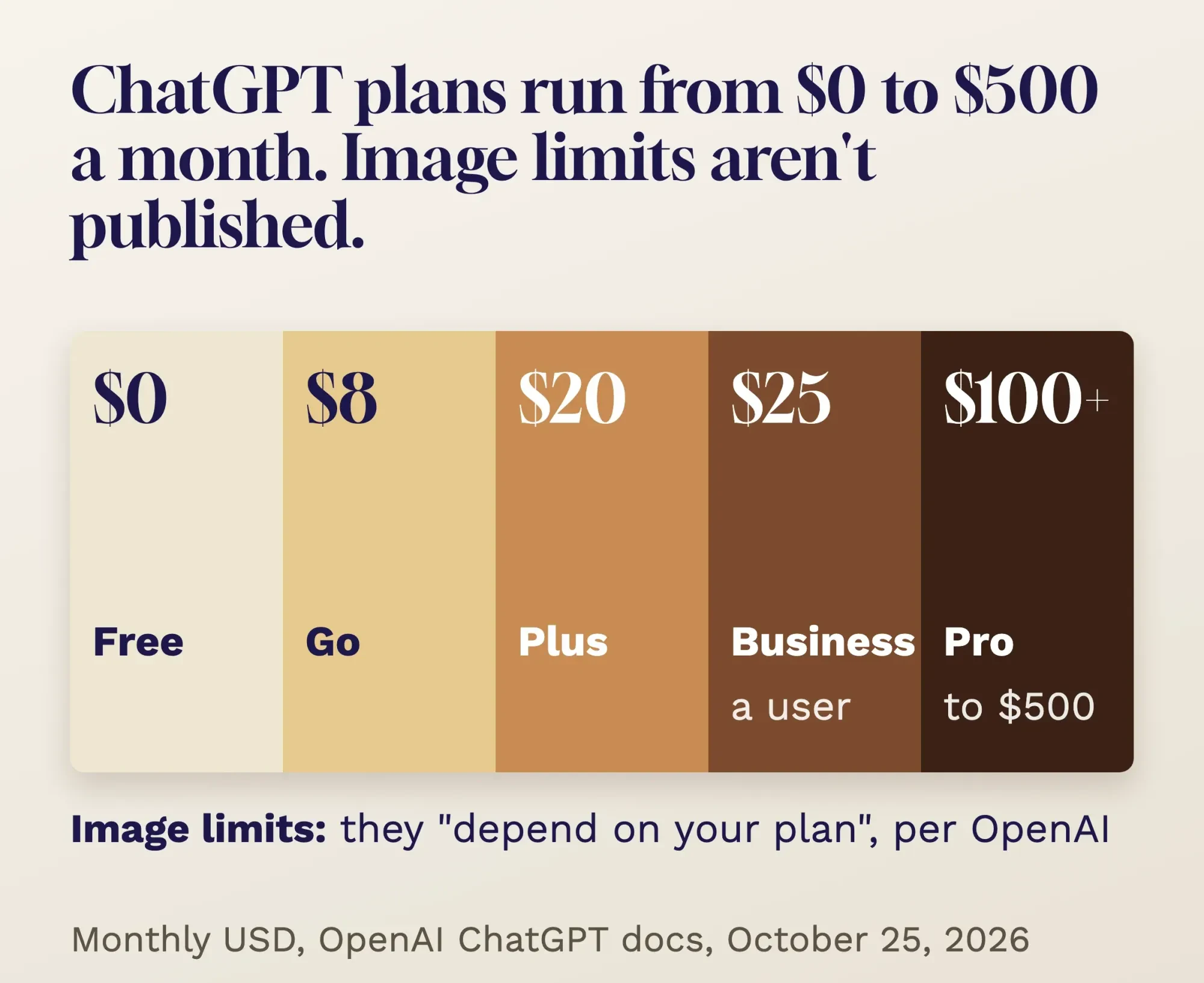 Source: OpenAI ChatGPT docs (pricing), October 2026. Monthly USD. Chart by DigitalTreed.
That explains the "chatgpt image generation limit" searches. People hit a wall, and there's no public table to check. The old "three per day" number came from March 2025, when demand from the anime-portrait trend was so high that OpenAI's chief executive said its graphics chips were "melting," per the same report. It doesn't describe today.
If you need hundreds of images, the API is the metered route. OpenAI's API pricing charges $30 per million image output tokens for its GPT Image 2.5 models, as of October 2026, and points you to a calculator for per-image costs. That's a developer job, not a chat. Our Grok vs ChatGPT comparison covers the plans, privacy settings and team seats in more depth.
Write the prompt like a brief for a photographer
Once you're in, the prompt carries the result. OpenAI's ChatGPT docs say a useful image prompt "is often only one to three clear sentences" long. They list five things to cover: the purpose, the main subject, the setting and style, framing and light, and anything the image "must not contain."
Most weak prompts skip the purpose and the "must not."
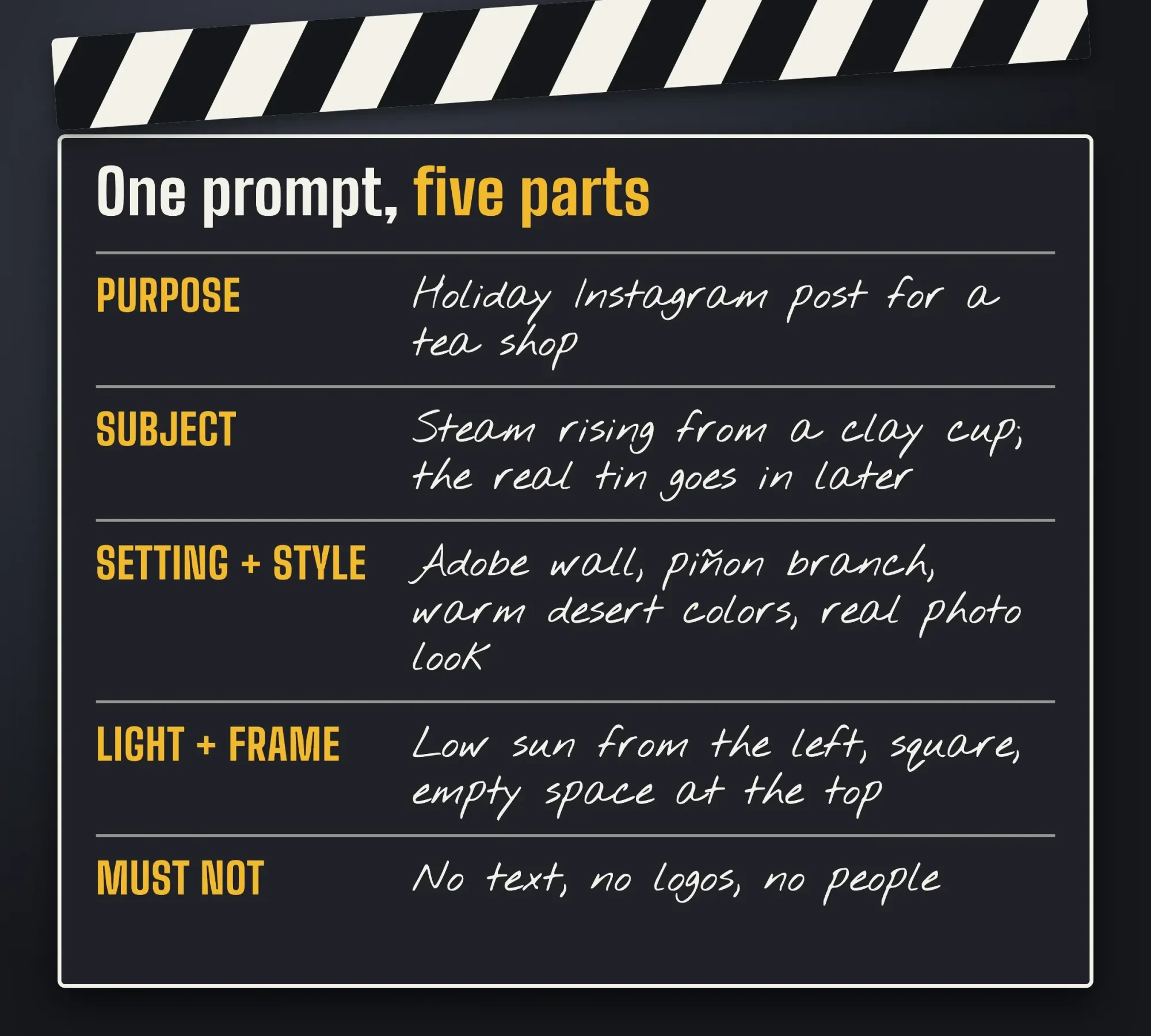 Diagram by DigitalTreed, built from the five prompt elements in OpenAI's ChatGPT image docs, October 2026. The tea shop is made up.
Example: Copperleaf Tea Co. is a made-up two-person tea shop in Santa Fe, New Mexico. It wants a holiday Instagram post. A prompt like "make a cozy holiday tea picture" leaves every choice to the model. The version on the slate above tells it the job, the scene, the light, the shape and what to leave out. OpenAI's prompting guide adds one trick: ask for "photorealistic" or "real photograph" when you want a photo look.
Specific beats pretty.
Here are three starting prompts you can adapt. Swap in your own product and colors.
- Product shot: "Real photograph for an online store listing. A matte copper tea tin on a pale stone counter, low morning light from the left, soft shadow, square frame, plain background. No text, no logos, no hands."
- Social graphic: "Square holiday post for a small tea shop. A clay cup with steam in front of an adobe wall, warm desert colors, empty space in the top third for a headline. No text."
- Ad concept: "Wide banner idea for a winter tea sale. A table set for two by a window with snow outside, our tea in plain cups, cozy and quiet. Add only the words "Winter Blends" in bold white letters, top left."
Text inside an image needs extra care. OpenAI's ChatGPT docs say to put the exact words in quotation marks and describe the font, size, color and placement. Then read every letter before you post. If you're using ChatGPT for other marketing jobs too, our guide to ChatGPT, Perplexity and Gemini for SEO tasks has prompts and checks for those.
Edit one thing per round, and keep your real product
The first image is rarely the one you post. OpenAI's advice is to "adjust one element at a time" in each round. Then say "exactly what should change and what must stay the same" in the prompt. You can also select a part of the picture and describe the change for just that area, according to the ChatGPT docs.
An edit prompt can be as plain as this: "Edit the attached image. Change only the cup to a glass teapot. Keep the wall, light, colors and crop exactly the same."
Here's the catch for anyone selling a physical product.
ChatGPT redraws your product rather than pasting the real one in. Labels, logos and small print can come back slightly wrong. OpenAI's own checklist asks whether "product shapes, labels, and reference details remain intact." For a shop, the safe workflow is to let ChatGPT make the scene, then place your real product photo on top. Our free background remover cuts the product out of your photo first.
Finish the layering in any photo editor; our free photo editors comparison shows which ones export without a watermark. And if you've seen viral "drag a point to reshape the photo" demos, our DragGAN explainer covers why that research tool isn't licensed for business use.
Why does ChatGPT refuse some image requests?
ChatGPT refuses an image when the prompt or the result trips OpenAI's filters. Its image guide says "all prompts and generated images are filtered in accordance with our content policy." Real people, brands and named artists are the usual tripwires for a business user.
OpenAI's ChatGPT docs spell out two of those rules. When you depict a real person, "confirm that you have permission to use their likeness." And "request a generic or original design instead of imitating a specific brand, product, artist, or artwork."
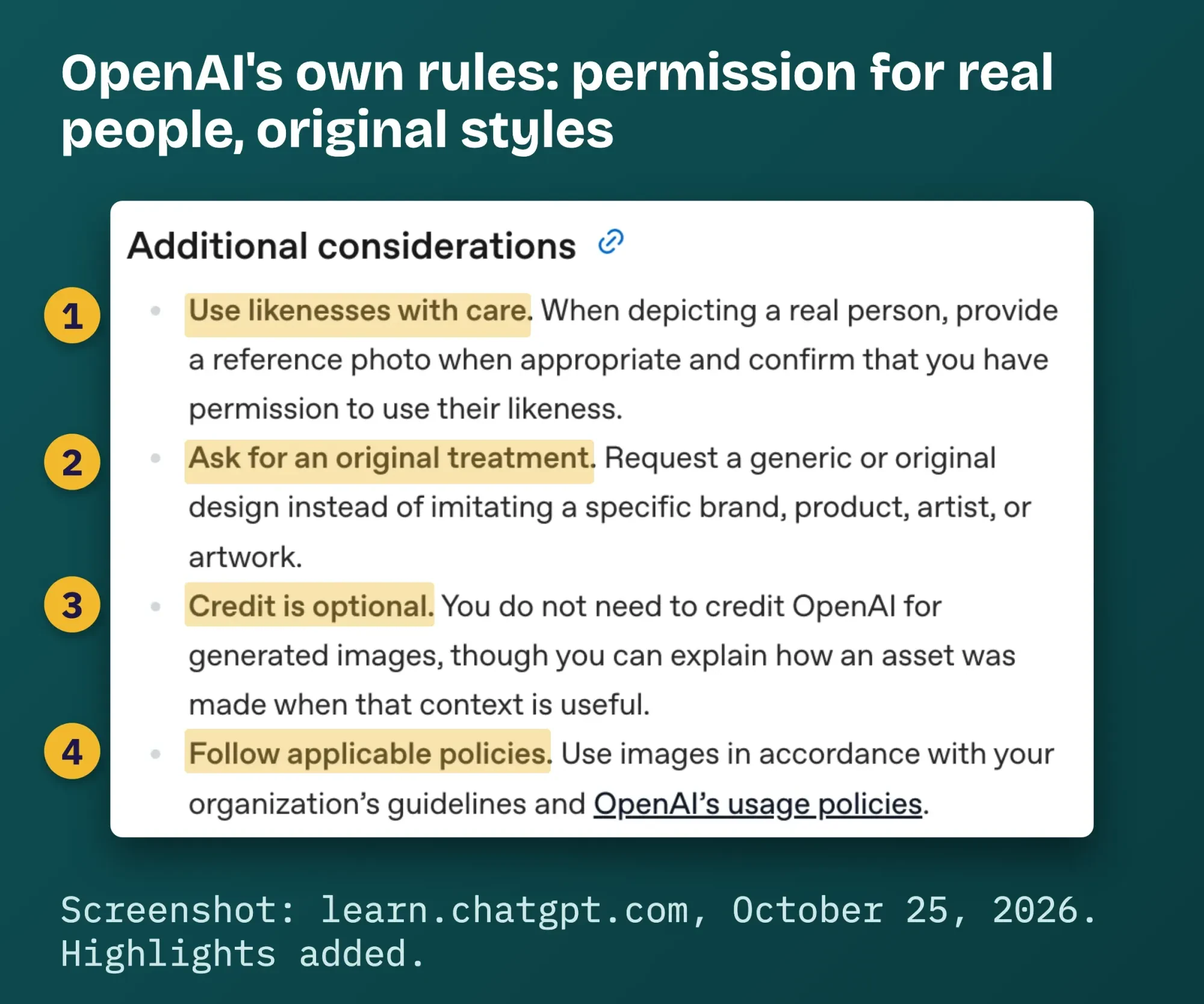 Screenshot: "Additional considerations" in OpenAI's ChatGPT image generation docs on learn.chatgpt.com, October 25, 2026. Highlights added by DigitalTreed.
That second rule is where the 2025 trend lands for a brand. During it, TechCrunch reported that an OpenAI spokesperson said ChatGPT wouldn't copy "the style of individual living artists" but allowed "broader studio styles." For your marketing, we'd skip both. A post that looks like a famous studio's films borrows someone else's look and their fans' goodwill. Describe the style you want in plain words instead: soft watercolor, flat shapes, warm light.
Our take: if the picture only works because it looks like someone famous made it, it isn't your brand.
When ChatGPT image generation isn't working at all, the cause is usually one of three things:
- You've hit your plan's image limit. Wait, or move up a plan.
- A filter blocked the prompt. Remove real names, brands and artist names, and describe the scene instead.
- OpenAI has an outage. Try again later rather than rewording ten times.
Who owns an image ChatGPT makes?
You can use the image, but you may not be able to stop others from copying it. OpenAI's docs say you "do not need to credit OpenAI for generated images." Copyright is a separate, legal question.
The U.S. Copyright Office answered it in Part 2 of its AI report, released January 29, 2025. AI output "can be protected by copyright only where a human author has determined sufficient expressive elements," the Office wrote. Writing prompts doesn't count: the Office excludes "the mere provision of prompts." What can count is your own work, such as "creative arrangements or modifications of the output."
In plain terms, a picture ChatGPT made from your prompt alone probably isn't yours to protect. A flyer where you arranged that picture with your photos, your text and your layout has human authorship you may be able to protect. The full report has the detail.
This matters most for logos.
If your logo came straight out of ChatGPT, copyright may not stop a rival from copying it. Trademark law is a separate question for a lawyer. Our guide to protecting your content covers the images you do own. Treat this as background on US copyright law; it isn't legal advice for your business.
AI pictures in ads still have to show what you sell
Ownership aside, an ad has to be honest. When we read it on October 25, 2026, the FTC's small-business advertising guide said ads "must be truthful and non-deceptive" and that the agency looks at "words, phrases, and pictures" together. That rule comes from Section 5 of the FTC Act. An AI background is fine. An AI version of your product that's shinier, bigger or fuller than the real one isn't.
Never generate customers. Some guides suggest AI "customer" photos that look like reviews. The FTC's fake reviews rule, announced August 14, 2024, bans testimonials from people who don't exist, "such as AI-generated fake reviews," and lets the agency seek civil penalties.
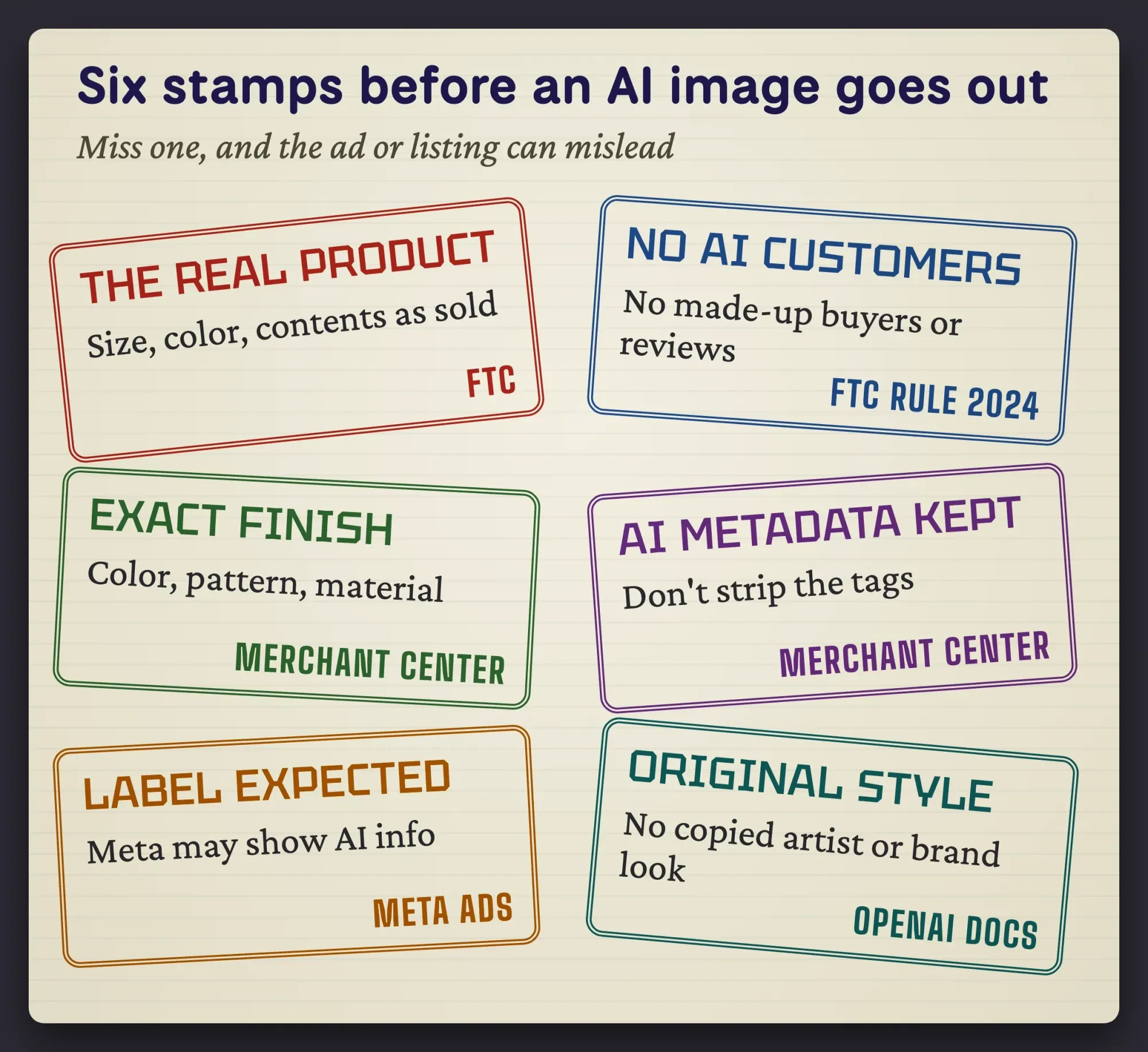 Drawn by us, based on the FTC small-business ad guide and fake-reviews rule, Google Merchant Center image rules, Meta AI ad labels and OpenAI's ChatGPT docs, October 2026.
Shopping ads add their own checks. Google Merchant Center says "all images created using generative AI must contain meta data" saying so, and tells sellers not to remove it. The photo must also reflect "the exact color, pattern, finish, and material." That's one more reason to keep your real product photo in the shot.
Keep the original file, too.
OpenAI's content provenance docs describe how it checks images for its own signals: C2PA metadata and a SynthID watermark. They also warn that "editing, converting, or sharing a file can remove its metadata." So don't run AI images through tools that strip file data before you upload them to Merchant Center.
Meta labels some AI ads with "AI info." Its help page said on October 25, 2026 that resizing or color correction won't usually get a label. A June 1, 2026 update says Meta will "begin automatically detecting ads created or edited using third-party AI tools" through "industry-standard signals." ChatGPT is a third-party tool to Meta, so that metadata matters there too. Our post on AI in digital marketing covers labels across channels.
Those six stamps are our checklist. Print it and run every AI image past it before it goes into an ad, a listing or a post. It sums up the FTC, Google and Meta rules as we read them, not legal advice, so have a lawyer look at a big campaign.
Frequently asked
Can ChatGPT make an image with a transparent background?
Through the API, yes. As of October 2026, OpenAI's image generation guide says to set the background to transparent and pick PNG or WebP output. JPEG files can't keep transparency, so save logos and product cut-outs as PNG.
What size are ChatGPT images?
For API images, OpenAI's image generation guide recommends 1024x1024 for square, 1536x1024 for landscape and 1024x1536 for portrait, as of October 2026. Custom sizes are allowed up to 3840 pixels on an edge. OpenAI calls anything above 2560x1440 experimental, so check large prints closely.
Can I trademark a logo ChatGPT made?
Trademark is separate from copyright. The USPTO's trademark basics page says you become a trademark owner as soon as you start using the mark with your goods or services. Registration isn't required, but federal registration gives nationwide rights. Ask a trademark attorney before you print it on signs.
When a designer is the better buy
So where does ChatGPT stop being the cheap option?
Anywhere the image has to last.
A logo you'll put on signs, vans and packaging for ten years. Packaging that a printer needs at exact sizes with exact colors. A brand system, meaning the colors, type and layouts that make your posts look like yours. Those need a person who can explain choices, hand over source files and fix the details ChatGPT keeps drifting on.
Use ChatGPT for drafts, mood boards and one-off posts, then bring the best ideas to a designer. That's often the cheapest mix. Our graphic designer cost guide lists US rates by hiring route, as of October 2026.
If you want help, we design product images, ad sets and brand graphics as part of the graphics and video service we sell, and you can see a price before you commit. We'd profit if you hire us, of course, so compare a few options.
How we made this guide: on October 25, 2026, we read OpenAI's ChatGPT docs (image generation and pricing) and API docs (image generation, prompting, pricing and content provenance) and took the screenshot above from the public docs page. OpenAI's pricing page, help center and policy pages turned our checker away that day, so no fact here rests on them. We checked the law parts against the Copyright Office and FTC pages linked inline.
The FTC pages and Meta's help page loaded when we first read them but didn't load on a second check later the same day, so those lines report what the pages said on October 25, 2026. We didn't generate test images, because that needs a signed-in account. Eram N., the author, reads this version line by line and has to approve it first.
First published April 2025. Rewritten October 25, 2026: the old post was a news piece about the 2025 portrait trend and a three-a-day limit that no longer applies. This version covers current plans, prompts, editing, refusals, copyright, ad rules and when to hire a designer.
Sources
- OpenAI ChatGPT docs: Image generation
- OpenAI ChatGPT docs: Pricing
- OpenAI API docs: Image generation guide
- OpenAI API docs: Image prompting guide
- OpenAI API docs: Pricing
- OpenAI API docs: Content provenance
- U.S. Copyright Office: Copyright Office Releases Part 2 of Artificial Intelligence Report, NewsNet 1060, January 29, 2025
- U.S. Copyright Office: Copyright and Artificial Intelligence, Part 2: Copyrightability (PDF)
- FTC: Advertising FAQ's, A Guide for Small Business
- FTC: Final rule banning fake reviews and testimonials, August 14, 2024
- 15 U.S.C. 45, FTC Act Section 5 (Cornell LII)
- Google Merchant Center Help: Image link [image_link] requirements
- Meta Help: How AI-generated images in ads are identified and labeled
- Meta: Expanding GenAI transparency for Meta's ads products (updated June 1, 2026)
- TechCrunch: OpenAI's viral Studio Ghibli moment highlights AI copyright concerns, March 26, 2025
- 9to5Google: ChatGPT image generation feature and the free tier, March 28, 2025
Comments
No comments yet. Start the conversation below.