
Quick answer
As of October 28, 2026, a business podcast can start with a $109 USB mic and a host costing $0 to $204 a year. Budget $507 for gear if you want a boom arm and over-ear headphones, and our example first year reaches $687. Plan the episode format first, then submit your host's feed to Apple Podcasts, Spotify and YouTube.
Say you own a small US service firm and answer the same customer questions every week. A business podcast is a series of audio episodes, delivered through an RSS feed, that answers those questions once in your own voice. Most of how to start a podcast for business is deciding things before you buy anything, so the plan comes ahead of the shopping list here.
We start with one listener and a repeatable format, price the gear in two kits, then record and export one MP3. Next come hosting plans priced by the year, getting listed on Apple Podcasts, Spotify and YouTube, and six mistakes in our draft feed. Then we turn episodes into a blog post and clips, and add up the first-year cost. Our view: buy the cheap kit, pay for hosting, and put the effort into episodes.
Key takeaways
- Our hand-written draft feed failed 8 of our 14 local checks.
- The example starter kit costs $109, and the upgraded kit costs $507.
- Five hosts' entry plans run $0 to $204 a year on yearly billing.
- A 30-minute episode at 128 kbps mono is a 28.8 MB file.
- Python's and PHP's built-in dev servers both ignored a byte-range request.
Pick one listener and one repeatable format
Before any gear, decide who the show is for. Picture one customer, say a bakery owner who calls your firm every April, and list every question that person asked you last year. The Quiet Ledger, a made-up show from the made-up Sparrowgate Accounting, would open with cash flow, quarterly taxes and hiring a first employee. Each of those is an episode whose answer you already know. If the list runs past 10 questions, you've got a first season, and its order can follow the calendar your customers already live by. Sparrowgate's April list might also hold "Can I deduct my van?" and "When is my estimated tax due?", each a short episode.
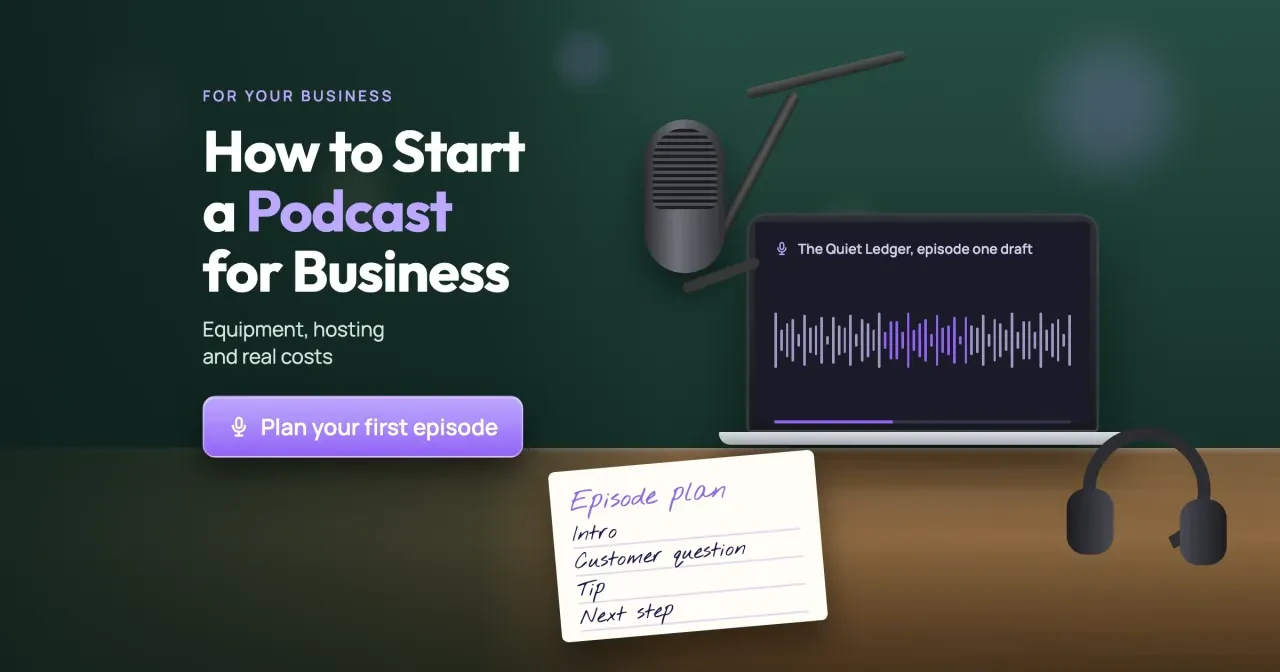
Then give every episode the same four parts, so recording never starts from a blank page. It's the plan on the card in our cover image:
- Intro: who you are and the one question, in under a minute.
- Customer question: read it the way a customer asked it, with names taken out.
- Tip: your answer, with one example from a kind of job you do often.
- Next step: one thing the listener can do this week, plus where the show notes are.
Let the question set the length. A cash-flow answer might run 12 minutes and a hiring answer 30. Both are fine. Pick a schedule you can keep for three months, like every other Tuesday morning, and record two full episodes before the first one goes out to anyone. That spare episode covers the week a client emergency eats your recording slot.
What gear do you need for a business podcast?
A four-part show needs one voice and one mic. A USB microphone plugs straight into a laptop, so you don't need a mixer or an audio interface to begin.
We priced two kits from one brand's US store, so every price comes from the same kind of page. The NT-USB Mini costs $109 as of October 28, 2026. For the bigger kit, RØDE lists the PodMic USB at $209, the PSA1+ boom arm at $139 and NTH-100 headphones at $159.
| Part | Example starter kit | Example upgraded kit |
|---|---|---|
| Microphone | NT-USB Mini, $109 | PodMic USB, $209 |
| Mic arm | None (desk) | PSA1+ boom arm, $139 |
| Headphones | A pair you already own, $0 | NTH-100, $159 |
| Editing software | Audacity, $0 | Audacity, $0 |
| Total, as of October 28, 2026 | $109 | $507 ($209 + $139 + $159) |
We'd buy the starter kit first. If you're still recording after six episodes, the arm and headphones are the next $298 ($139 + $159, as of October 28, 2026).
The PodMic USB comes last. RØDE says it has both XLR and USB connections, so it can move to an audio interface if the show grows to two mics. Both mics in the table plug in over USB. That keeps the laptop and the Audacity setup the same when you upgrade. Any USB mic priced near the NT-USB Mini could fill the starter row instead, and any arm or over-ear pair could fill the upgraded rows.
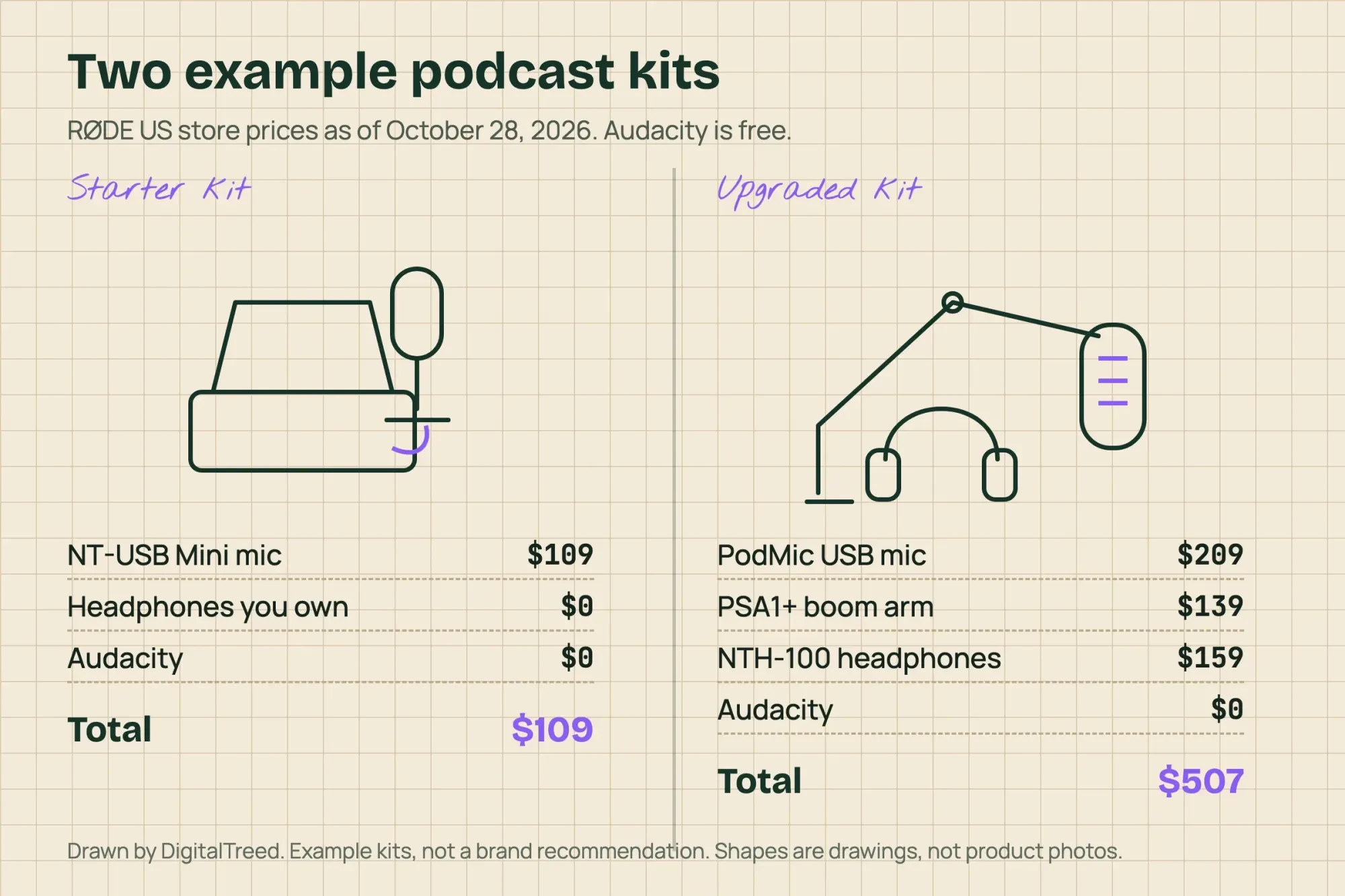 Drawn by us. Prices from RØDE US store pages as of October 28, 2026; example kits, not a recommendation of one brand
Record in a quiet room and export one MP3
Once the mic is on the desk, the next job is the room. We'd pick a small office with a rug and curtains over a bare conference room, then let a test recording decide.
Record in Audacity. Its makers say it has always been free and will stay that way. Talk through the four parts once as a test, then play it back on headphones. If you hear the room more than your voice, move rooms before you buy anything else.
When the edit's done, export one file per episode. Our test used 128 kbps mono MP3. At that rate the file grows by 16,000 bytes a second (128,000 bits divided by 8). So a 30-minute episode comes to 28.8 MB (16,000 x 1,800 seconds), and our 60-second test file was 960,931 bytes, which is 960,000 plus a little MP3 framing. Name the file in plain letters, digits and hyphens, like our ep001-cash-flow.mp3, to match Apple's file-name rule covered below. Keep that 28.8 MB figure, because Podbean caps uploads by size.
Podcast hosting plans, priced by the year
Once the MP3 is exported, it needs a podcast host. The host stores your files and writes the RSS feed that every app reads, so you never upload to Apple or Spotify yourself.
We read five hosts' pricing pages on October 28, 2026: Buzzsprout, RSS.com, Transistor, Captivate and Podbean. Each row is the entry paid plan for one audio show:
| Host and plan | Billed monthly, per year | Billed yearly, per year | Main limit |
|---|---|---|---|
| Buzzsprout Audio | $216 ($18 x 12) | $180 ($15 x 12) | 72 upload hours a year |
| RSS.com Plus | $239.88 ($19.99 x 12) | $180 ($15 x 12) | Unlimited episodes |
| Transistor Starter | $228 ($19 x 12) | $190 ($19 x 10) | 20,000 downloads a month |
| Captivate Personal | $228 ($19 x 12) | $204 ($17 x 12) | 30,000 downloads a month |
| Podbean Unlimited Audio | $204 ($17 x 12) | $144 ($12 x 12) | 1GB of uploads a month |
By yearly total, Podbean's $144 is the lowest of the five paid entry plans and Captivate's $204 is the highest, at October 28, 2026 prices. Transistor's figure looks odd until you read its page. It bills a year as 12 months for the price of 10 ($19 x 10 = $190), after a 14-day free trial. Captivate's $204 is its per-month price paid yearly ($17 x 12), and its $19 monthly figure comes from the page's line that plans start at $19 per month. Buzzsprout's Monthly view shows the Audio plan at $18 a month with 6 upload hours a month. The $60 spread ($204 - $144) matters less than whether your episodes fit each plan's limit.
A weekly 30-minute show adds up to 26 hours a year (52 x 0.5), well inside Buzzsprout's 72 on yearly billing. On monthly billing it's 2 to 2.5 hours a month (4 or 5 x 0.5) against 6. On Podbean, the same 28.8 MB episode fits about 34 times into 1GB a month (1,000 / 28.8). Podbean's own card puts 1GB at 16 hours of audio, so a weekly audio show won't come close.
Free plans come with strings. As of October 28, 2026, RSS.com Free costs $0 and doesn't expire, but it wants a credit card before your second episode.
Buzzsprout's free plan gives 2 upload hours a month and keeps each episode for only 90 days, which is wrong for a business archive. We'd take a paid yearly plan. Pick whichever host's dashboard you like after a trial, since moving later is possible but it's extra work.
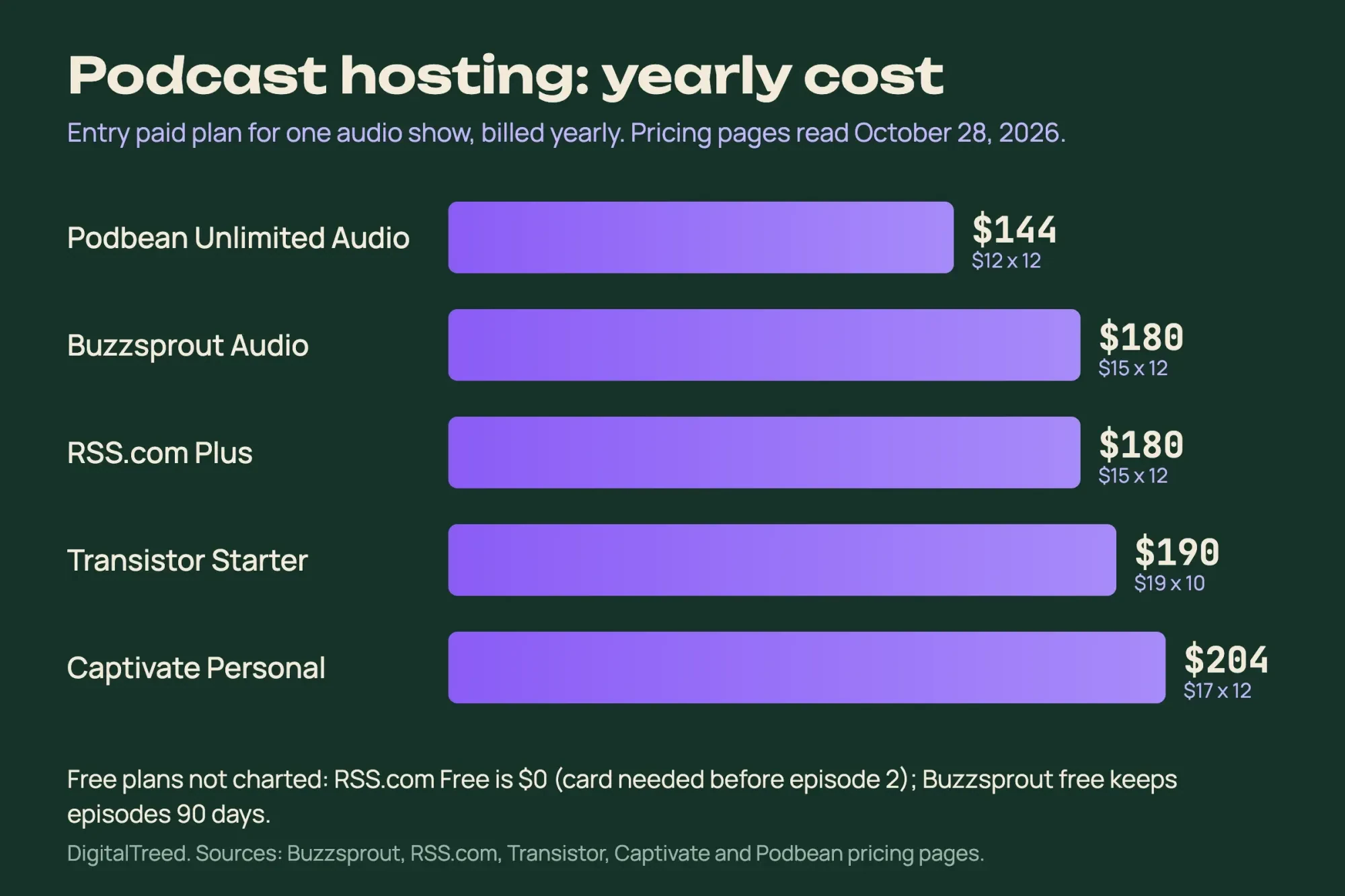 Diagram by DigitalTreed from Buzzsprout, RSS.com, Transistor, Captivate and Podbean pricing pages, read October 28, 2026
Get listed on Apple Podcasts, Spotify and YouTube
That feed is what every app reads, so listing is one submission per app, done once. Apple asks for an Apple Podcasts Connect account first.
Its submit steps then run Add, New Show, "Add a show with an RSS feed" and the feed URL. You also set Content Rights, which confirms you hold the rights to any third-party content, like music. Under Availability you pick countries or regions, whether the feed is shared through Apple's catalog API, who supplies transcripts, and the release date. Apple checks the feed first. A content review follows, and you'll get an email when the status changes.
The feed itself has to meet Apple's RSS feed requirements. They include RSS 2.0, a server that answers HTTP HEAD and byte-range requests, and an enclosure with URL, length and type for every episode. Each episode also needs a GUID that never changes, ASCII-only file names, and dates in RFC 2822 form. Apple also ignores duplicate enclosure URLs, so two episodes can't point at the same file. The cover has rules of its own: Apple's Show Cover page asks for a square PNG or JPG from 1,400 to 3,000 pixels, with no transparency. It prefers the largest size, so our fixed test cover is 3,000 pixels square, and it warns that art showing Apple logos or hardware may be rejected.
Spotify is shorter. All five hosts above are on Spotify's list of hosting partners, so you follow your host's guide and Spotify checks ownership by emailing the address in your feed. Its help page on feed emails says that address is public. Use a shared inbox like podcast@yourdomain, not your own.
YouTube can import the same feed. The United States is on its RSS delivery locations list, and in YouTube Studio the path is Create, New podcast, Submit RSS feed. Its publishing steps say the first import may take a few days. YouTube's RSS delivery rules turn each episode into a still-image video from your show art. They also reject "<", ">" and HTML in titles and descriptions, and ask you to declare host-read promotions and sponsorships. Its playlist page sorts RSS episodes by the release date in your feed, a date YouTube says it doesn't verify. No channel yet? Our guide to creating a YouTube channel covers the setup.
What we tested
We hand-wrote two RSS feeds for The Quiet Ledger on a Mac on October 28, 2026: a draft with six mistakes we planted and a fixed copy. Our own script ran 14 checks on each. Twelve come from Apple, Spotify and YouTube pages, and we added an XML parse test and a file-length match. Python's and PHP's built-in development servers then served the files.
Six mistakes in our draft feed
That draft passed 6 of the 14 checks and failed 8. Six failures map to a rule on a platform's own page, and the other two are our parse and length checks. Here's what broke:
- A curly-quote entity (’) in a title. Apple says to avoid it, and it also made our XML parse check fail.
- A guessed file length of 1,000,000 bytes for a 960,931-byte file. Apple requires a length, and our own length-match check found this one 39,069 bytes off (1,000,000 - 960,931).
- A date written as 10/28/2026 9:00 AM, where Apple wants RFC 2822, like Wed, 28 Oct 2026 09:00:00 -0500.
- HTML tags in the episode description, which YouTube's import rejects.
- A 1,200-pixel cover with transparency, which failed Apple's size check and its no-alpha check.
- No owner email, so Spotify's verification email and YouTube's verification code would have nowhere to go.
The fixed copy passed all 14 once we'd made six edits. The entity left the title, the length became 960,931 and the date moved to RFC 2822. The description lost its HTML, the cover became a 3,000-pixel square without alpha, and an owner email went in. Then we served the files from Python's and PHP's built-in servers on 127.0.0.1 and asked each for bytes 0-99 of the episode. Both sent all 960,931 bytes with a plain 200 status instead of a 206 partial reply, so neither meets Apple's byte-range rule.
That result covers only those two built-in servers, which exist for local testing, and says nothing about Apache, nginx or a shared web host, since we didn't test them. Serving files to podcast apps is part of what a podcast host is paid for. Apple's validation page also points you to your hosting provider when an error is hard to read. Passing validation, Apple adds, doesn't necessarily mean approval. If you'd rather keep the feed on your own website, ask your web host whether it answers HEAD and byte-range requests before episode 1. Our script isn't an official validator, and we submitted nothing, so 14 passes only mean the feed is clean on those 14 checks.
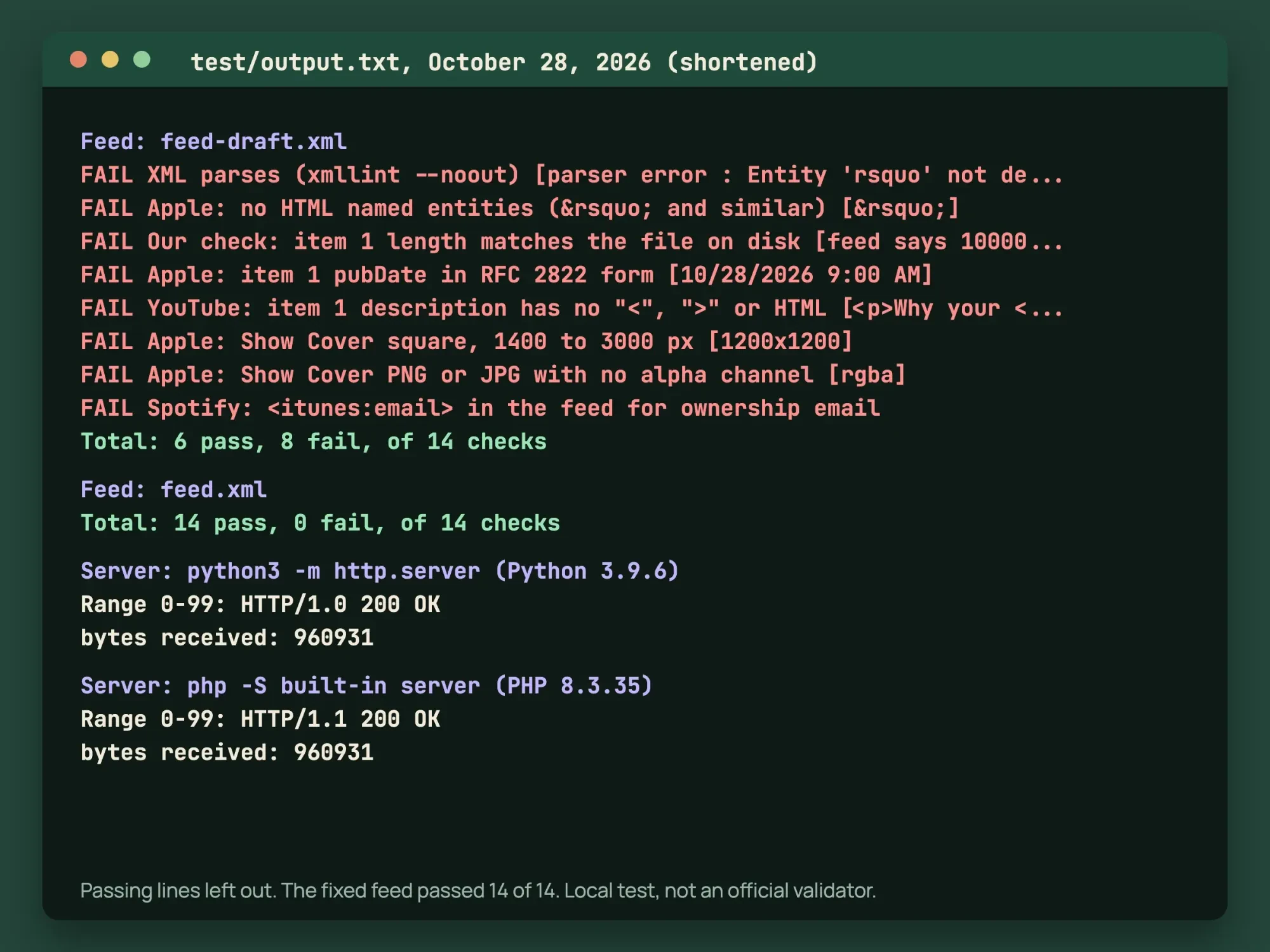 Source: failing lines and totals from our October 28, 2026 feed run in test/output.txt, with passing lines removed
Turn each episode into a blog post and clips
Once an episode is live, it can feed your other channels for a week or two. Start with a written version on your site, built from the show notes and transcript, using the steps in our how to write a blog post guide. If you can't decide between recording and writing as your main channel, our video vs blog comparison covers that choice.
Short clips come next. Pull the best 30 to 60 seconds of the Tip part and add captions. Then slot the clips into your social media content calendar across the two weeks before the next episode. Every link in show notes or clips should carry campaign tags from our UTM builder, so your analytics show which episode sent each visit. We'd publish the written version before the clips, so every clip has one URL to point back to. Give each episode its own campaign name, like ep01, and keep using it when you share the written version with our steps for promoting your blog posts.
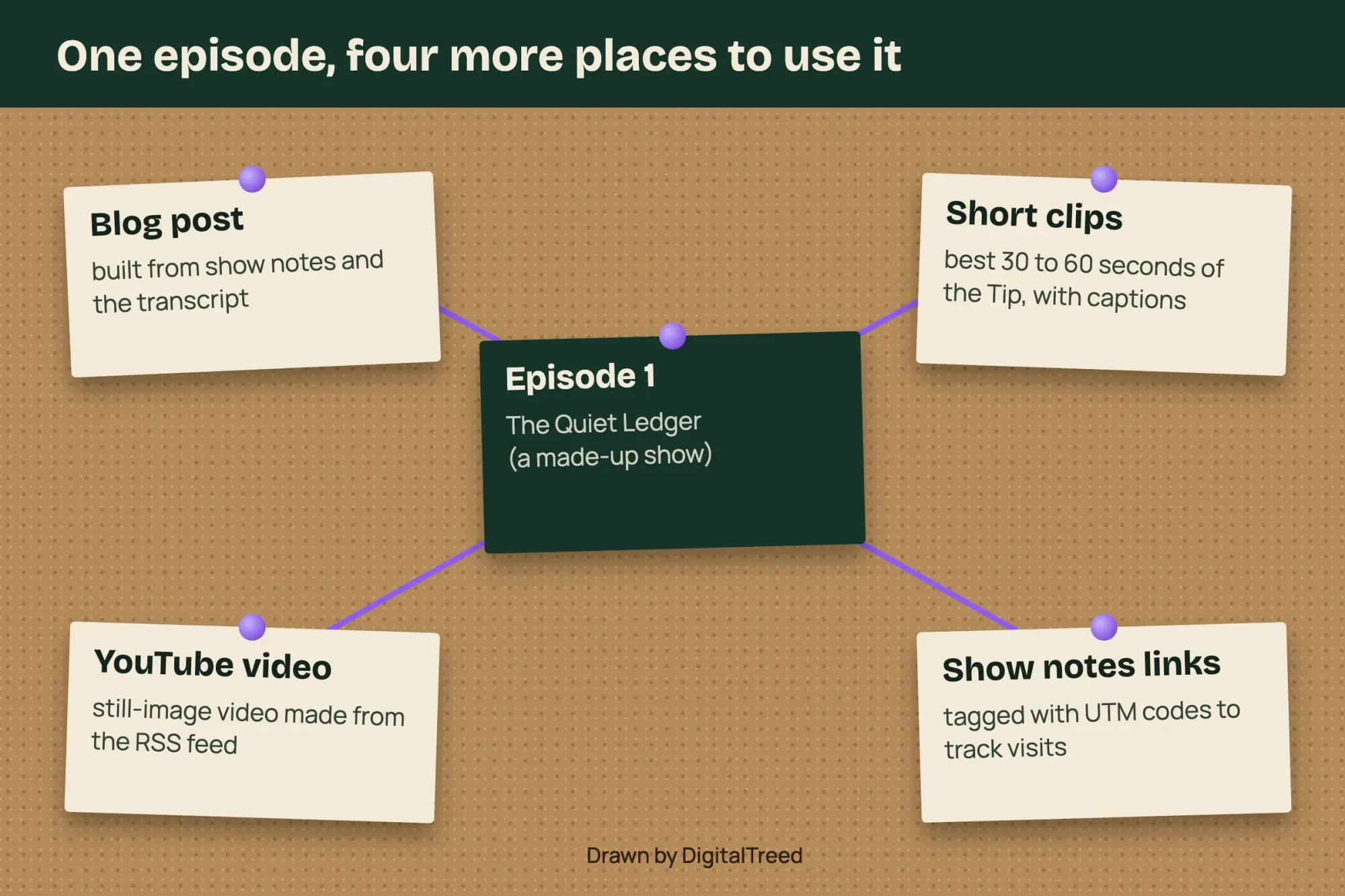 Drawn by us: one way to reuse an episode, not a required workflow
First-year cost for the two kits
Now add gear and hosting for three example first years at October 28, 2026 prices. They're not quotes, and they leave out your time:
| Example first year | Formula | Total |
|---|---|---|
| Starter kit, free host | $109 kit + RSS.com Free $0 | $109 |
| Starter kit, lowest paid yearly plan | $109 kit + Podbean $144 | $253 |
| Upgraded kit, Buzzsprout yearly | $507 kit + Buzzsprout $180 | $687 |
Our take: the middle row is where we'd start. It costs $253 at October 28, 2026 prices, keeps every episode online, and leaves $434 of the top budget ($687 - $253) unspent until you know you'll keep going. Put a date in your calendar six episodes out, and decide on the $298 arm-and-headphones upgrade then, not on launch day. Before episode 1 goes out, paste its page into our social preview checker to see the card people get when you share it. The free row saves another $144, and since RSS.com Free doesn't expire, it's a fair pick for a trial season if the card request before episode 2 doesn't bother you.
Where our money comes from: clients pay us to write show notes and episode posts under the content marketing service we run. Nothing in this guide needs us, from buying the kit to checking the feed.
Frequently asked
How long do feed changes take to show on Apple Podcasts?
Up to 24 hours. Apple's metadata page says it detects RSS changes and updates the show within that time.
Does a podcast need its own website?
Not to start. RSS.com's Free plan includes a free podcast website, and Transistor lists a built-in podcast website on its plans.
What if we stop publishing for a while?
Buzzsprout's Archive plan keeps a show live without new uploads for $5 a month, priced on October 28, 2026.
Can I fix an episode after YouTube imports it?
Only by re-uploading. YouTube's RSS help page says it won't automatically update audio files you re-upload to your feed. Its Re-upload from RSS feed option creates a new video and sets the old one to private.
How we made this guide: Our feed test ran on one Mac at 127.0.0.1, with a made-up show and a 60-second tone in place of a voice. Nothing went to Apple, Spotify or YouTube, and we didn't sign up for a host or buy gear. Prices and rules come from each company's own pages, linked where they're used. Facts checked by the DigitalTreed team on October 28, 2026.
First published March 2025. Rewritten October 28, 2026 for business owners, with two priced kits, five hosting plans and a local feed test.
Sources
- RØDE: NT-USB Mini (US store)
- RØDE: PodMic USB (US store)
- RØDE: PSA1+ (US store)
- RØDE: NTH-100 (US store)
- Audacity: Home page
- Buzzsprout: Pricing
- RSS.com: Pricing
- Transistor: Pricing
- Captivate: Pricing
- Podbean: Podcast hosting pricing
- Apple Podcasts for Creators: Create an account
- Apple Podcasts for Creators: Submit a show
- Apple Podcasts for Creators: Review process
- Apple Podcasts for Creators: Podcast RSS feed requirements
- Apple Podcasts for Creators: Show Cover
- Apple Podcasts for Creators: Validate your podcast
- Apple Podcasts for Creators: Update your podcast metadata
- Spotify for Creators: Getting your show on Spotify
- Spotify for Creators: Adding your email address to your RSS feed
- YouTube Help: Deliver podcasts using an RSS feed
- YouTube Help: RSS feed delivery available locations
- YouTube Help: Publish or disconnect episodes from an RSS feed
Comments
No comments yet. Start the conversation below.