
Quick answer
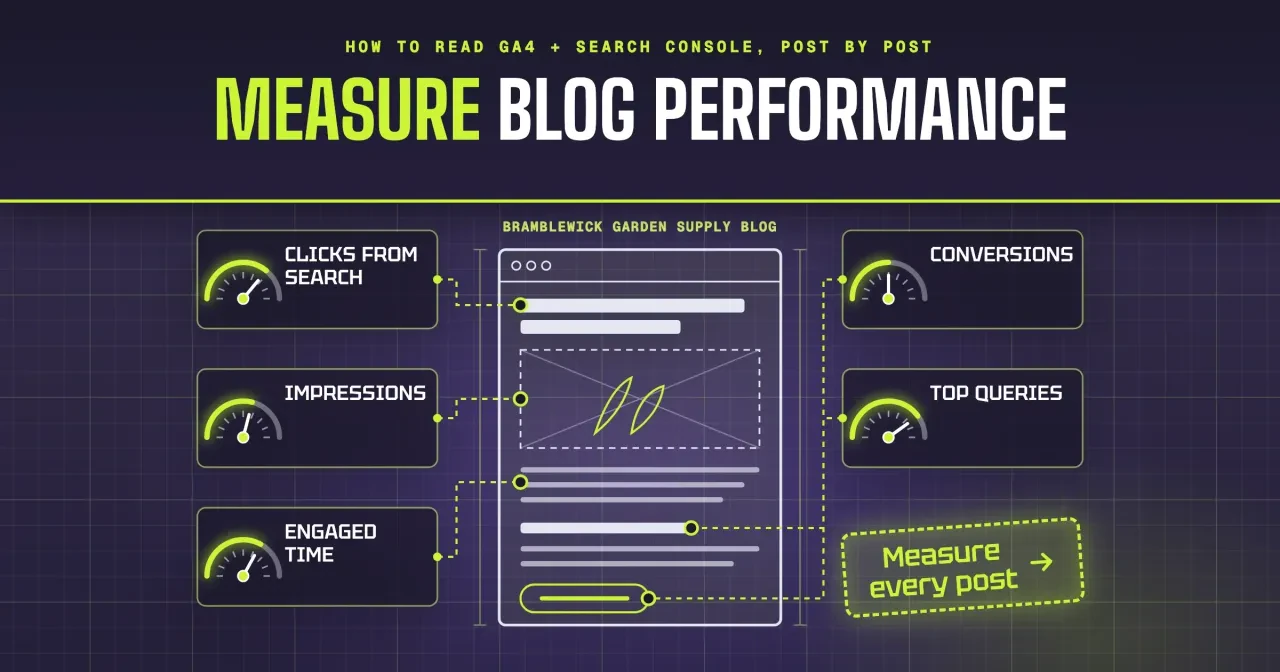
As of October 2026, measure blog performance with five numbers per post: clicks from search, impressions and top queries from Search Console, plus engaged time and conversions from GA4. Under our example rule, a post with fewer than 1,000 impressions and 50 active users in three months isn't judged yet. Start by exporting both tools' per-page reports.
If you blog for your shop twice a month and haven't opened GA4 since setup, you're probably guessing which posts earn their keep. Blog performance is a post-by-post read of how often Google shows each article, how often people click, how long they stay and whether they act. That's how to measure blog performance in a way a sitewide traffic line can't.
Below, the five numbers come first, then the Search Console Pages tab for clicks and impressions, then what a post's top queries tell you. After that come GA4's engaged time and conversions, the join on the page path, a Keep, Update or Leave call, and how long a post should run.
Key takeaways
- Score each post on clicks, impressions, top queries, engaged time and conversions.
- Search Console exports full URLs while GA4 exports paths, so strip the domain.
- GA4 now reports conversions as key events, up to 30 per standard property.
- Our example rules sorted 8 made-up posts into Keep 2, Update 4, Leave 2.
- Our example rule waits on posts under 1,000 impressions and 50 active users.
Blog performance comes down to five numbers per post
So which numbers should you watch? On a shop blog, we'd track five for every post: clicks from search, impressions, top queries, engaged time and conversions. The first three come from Google Search Console, which reports how a page does in Google Search before anyone visits. The last two come from Google Analytics 4, which reports what people do after they arrive. Neither tool answers the real question alone. You want to know whether a given post brings in customers. That takes a Search Console row and a GA4 row for the same post, read side by side every month.
Picture Bramblewick Garden Supply, a made-up garden store with eight posts on its blog. Its garlic planting post might pull steady search clicks every fall. A recap of its spring open house might get almost none, and that's fine, since it was written for people who already shop there. A sitewide chart blends both into one line. If you only watched the total, a strong fall for garlic could hide a dead post about compost bins, and you'd never know which one to fix. That's the point of going post by post.
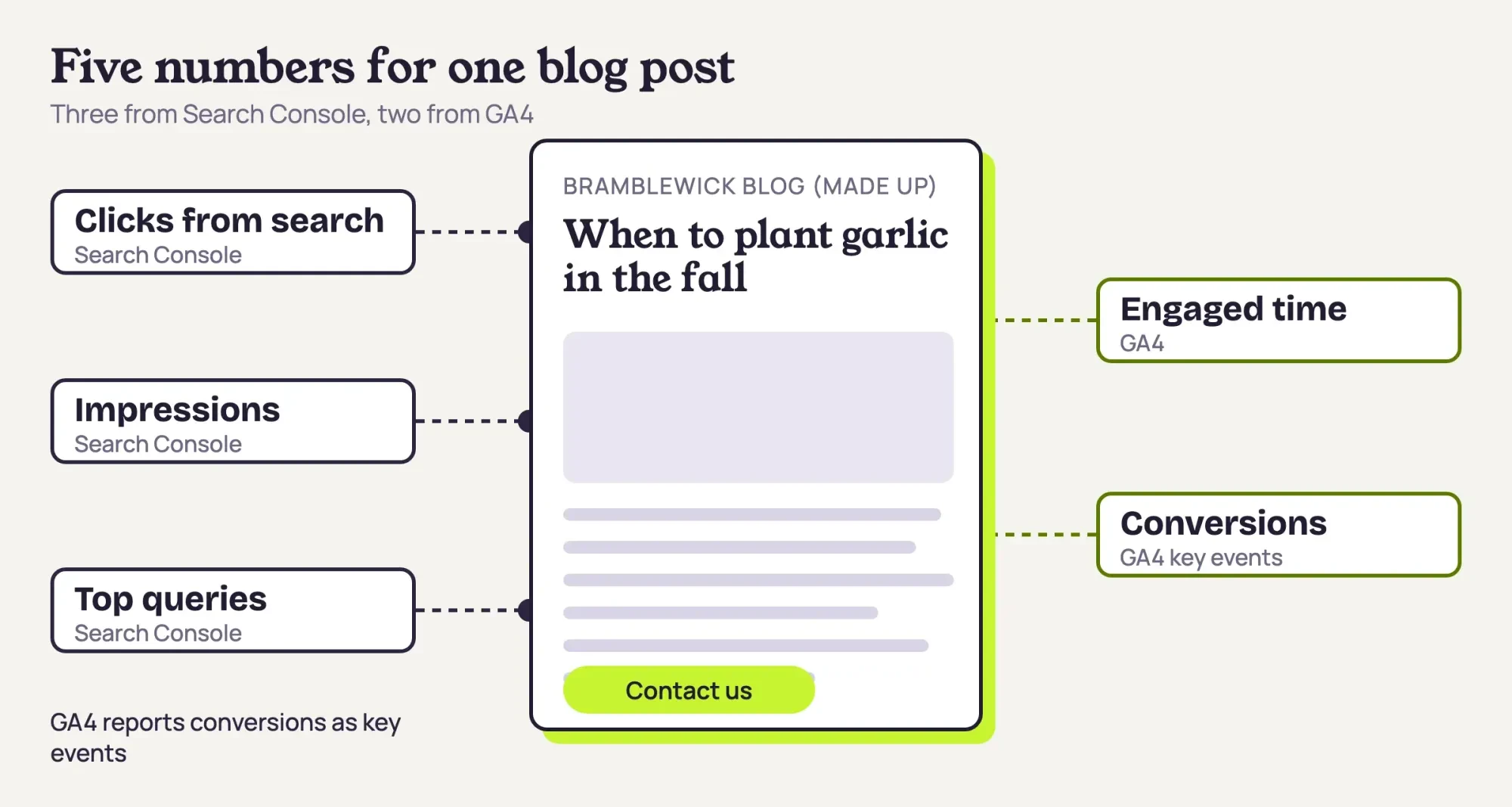 Diagram by DigitalTreed. The five measures and the tool that holds each one; Bramblewick Garden Supply is made up.
Still deciding whether a blog is worth running at all? Our guide to whether blogging pays for a business comes first, and our side-by-side look at free analytics tools covers installing both.
Clicks and impressions come from the Search Console Pages tab
Start with Search Console, since it counts what happens before the visit. Google's Performance report overview defines clicks as "the number of times a user clicked your site from Google Search results." Impressions are "how many times your site appeared in Search results." CTR, the click-through rate, is the click count divided by the impression count. So a post with 46 clicks from 4,200 impressions has a CTR of 46 / 4,200 = 1.10%. Our example rule flags a CTR under 2.0% once a post passes 1,000 impressions.
Average position is the number people misread most. Google's page on impressions, position and clicks says "a link must get an impression for its position to be recorded." A post that ranks 4th for one search and 30th for another shows a blend of the two, which reads as 17th if both searches show it equally often. Google's common tasks page for the report recommends you "focus more on trends in impressions and clicks than on position alone."
We read position last. Our example rules ignore it.
To get those numbers per post, change three settings in the same report:
- Open the Performance report for Search results. Its default view covers the past three months.
- Select the Pages tab, so the table groups clicks and impressions by page.
- Add a filter for URLs containing /blog/, so only your posts are listed.
- Turn on the CTR and Average position metrics next to Clicks and Impressions.
- Export the table and save it with the date range in the file name.
The export gives one row per address. Google's dimensions and groupings page says the page dimension uses "the final URL linked by a Search result after any redirects." A post you moved shows under its new address. Values shown as ~ or - in the report arrive as zeros in the download. Totals can differ too. Google's common tasks page says the Pages tab counts by page, so its totals "may differ from the property-level totals shown in the chart." The DigitalTreed walkthrough of Google Search Console covers site verification if that step isn't done.
What do a post's top queries tell you?
Once you've got the Pages tab, the next question is what people typed to find each post. Per Google's filtering and comparison page, you can "click any row in a table to automatically filter data by that row." Click a post's address, switch to the Queries tab, and the table shows the search terms for that one page. Sort by impressions and write down the top one. The common tasks page notes that queries in that table are exact matches, not case-sensitive.
Expect gaps, because the dimensions page says some queries are anonymized and "omitted from the report to protect user privacy."
The useful part is setting the top query next to the post's title. In our example, the dahlia post is titled How to store dahlia tubers over winter, but its top query is "rotting dahlia bulbs in garage." Only one of that query's four main words, dahlia, appears in the title. People arrive with a rot problem the title never promises to solve. Google's common tasks page says a page with low CTR may need a new title and description, or content that fits "the queries that show the page." For Bramblewick, we'd add a short section on spotting rot in stored tubers. Then the title can say so.
Rewriting the post is a refresh job, and the refresh chapter of the Intermediate SEO guide covers reworking a page without faking its date. For the monthly review, one line per post does it: the top query, and whether the title answers it.
Engaged time and conversions sit in GA4's Pages and screens
Search Console stops at the click, so GA4 picks up the story from there. Google's user engagement page defines engagement as "the amount of time someone spends with your web page in focus." That's what our featured graphic calls engaged time. In other words, a reader who opens the post and then switches to another tab stops adding engaged time until the page is back in focus. Google's engagement help also notes that the Pages and screens report includes engagement metrics by default, so there's nothing to build. GA4's average engagement time is total user engagement time divided by active users, per Google's dimensions and metrics reference.
Engaged sessions are a separate count, and they're easy to mix up with engaged time. Google's engagement rate page counts a session as engaged once it passes 10 seconds, includes a key event, or reaches a second page view. Most reports leave out engagement rate and bounce rate, which an Editor or Administrator can add to a detail report.
For a blog, we'd start with average engagement time per post. Our example scorecard reads only that number for the hold flag.
Conversions need a vocabulary note, because GA4 renamed them. Google's page on conversions and key events says actions that matter to a business "are now called 'key events'" in GA4. A conversion in GA4 now means an action you use to measure ad campaigns and bidding, which a shop blog without paid ads may never need at all. So for a blog post, the column you read is Key events.
For a small shop's blog, that usually means a contact form sent, a tap on the phone number from a mobile screen, or a newsletter signup.
Key events don't appear by themselves. Google's key events setup page puts the limit at 30 key events on a standard property and says marking one "doesn't change historic data." Google says to allow as long as 24 hours before a newly marked one shows in standard reports. With nothing marked, every post shows 0 and the review can't tell a post that sells from one that doesn't, so mark them before your first review. Our GA4 guide for SEO covers key event setup.
Join the two exports on the page path
With both files saved, you'll notice they don't line up. The Search Console export lists full addresses, such as https://bramblewick.example/blog/compost-bin-sizes. GA4's Pages and screens report lists the page path, /blog/compost-bin-sizes. Strip the domain from the Search Console column, and the two files match row for row. In a spreadsheet, that's one find-and-replace that deletes https://bramblewick.example from every row, followed by a lookup that pulls each path's GA4 numbers into the same row. Our script does the same thing.
Don't expect the numbers to agree once they're side by side. Search Console counts only clicks from Google Search results. The Pages and screens report isn't limited to search, so it also counts people who came from email, social posts and bookmarks. In our example, the garlic post shows 410 clicks and 380 active users.
Neither number is wrong. Search Console counts clicks while GA4 counts active users from every channel, so the review reads them as two separate checks rather than one funnel.
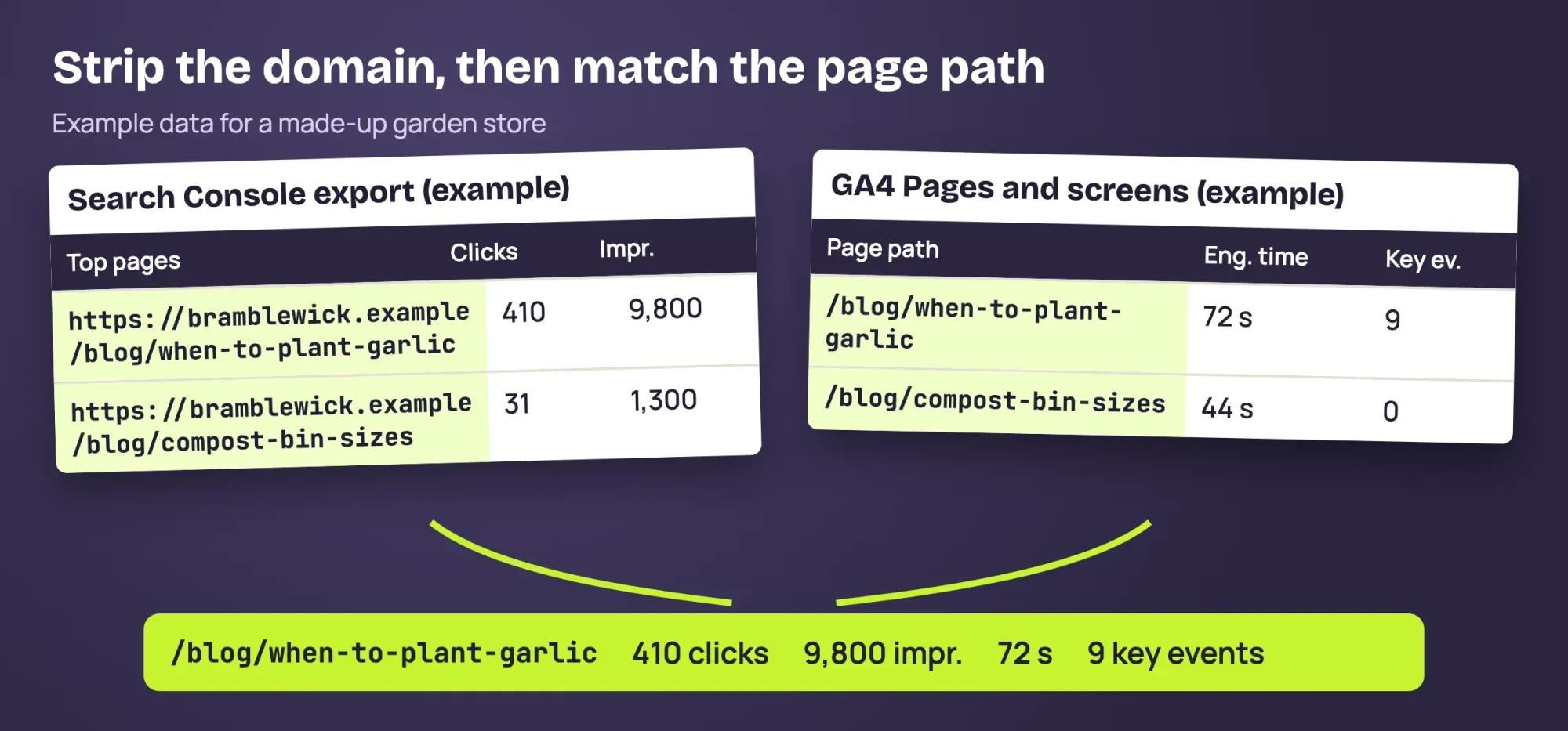 Diagram by DigitalTreed. How the two example exports join on the page path; the rows are example data for a made-up store.
There's a shortcut inside GA4 if you link the two tools. Google's page on connecting Search Console to Analytics says the link adds a Google Organic Search Traffic report that "displays landing pages with associated Search Console and Analytics metrics." That collection is "unpublished by default," so you publish it from Library first, and creating the link takes the Editor role on the property. Each day's numbers reach that report 48 hours after collection. We still like the two exports for a monthly review, since a saved file keeps last month's numbers next to this month's. For a chart instead, our Looker Studio dashboard walkthrough builds a free GA4 report.
What we tested
On October 29, 2026, our Python script, test/run_test.py, read three example CSV files we made for Bramblewick's blog. They hold a Search Console Pages export, a top-query list and a GA4 Pages and screens export, 8 posts each. It joined 8 of 8 rows after stripping the domain. Its CTR recomputation found 0 rows off by more than 0.01 points. Result: Keep 2, Update 4, Leave 2, all example data.
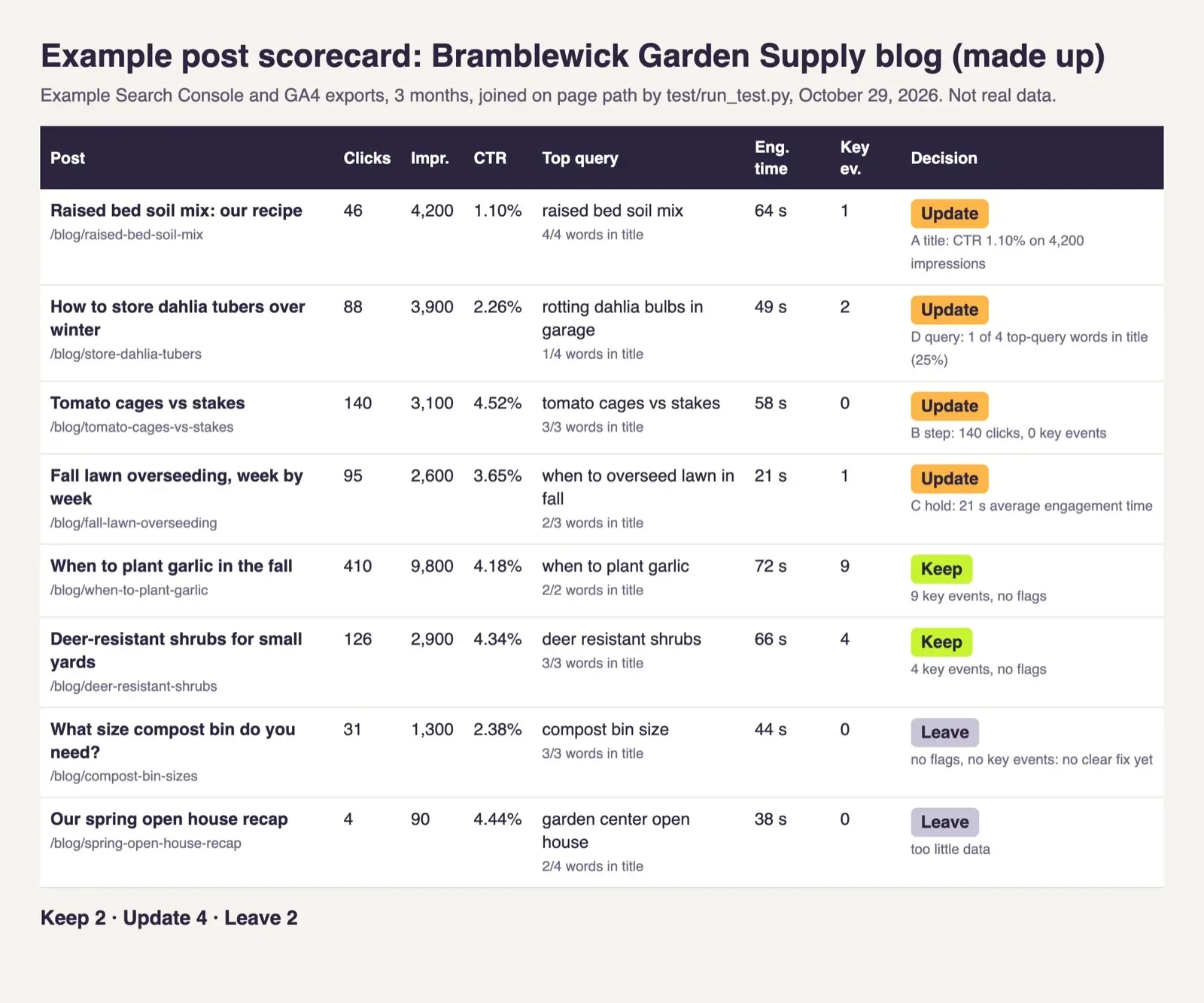 Screenshot: our example post scorecard for Bramblewick Garden Supply (made up), from test/run_test.py served on 127.0.0.1, October 29, 2026.
Give every post a Keep, Update or Leave call
Now the joined sheet can make a call for each post. We wrote the rules down before running them, so the result doesn't depend on mood. These thresholds are our choices for an example shop, not Google rules, and Google's help pages give no benchmark CTR for a blog. A post with enough data, meaning 1,000 or more impressions or 50 or more active users in three months, gets four checks:
- Title flag: 1,000 or more impressions, with a CTR under 2.0%.
- Next-step flag: 50 or more clicks, with 0 key events.
- Hold flag: 50 or more active users, with under 30 seconds of average engagement time.
- Query flag: 1,000 or more impressions, and under half of the top query's main words in the title.
Any flag means Update, a clean post with at least 1 key event is a Keep, and everything else is a Leave. Here's how the eight example posts came out:
| Example post (made up) | Clicks | Impressions | CTR | Engaged time | Key events | Call |
| Raised bed soil mix | 46 | 4,200 | 1.10% | 64 s | 1 | Update: title flag |
| Store dahlia tubers | 88 | 3,900 | 2.26% | 49 s | 2 | Update: query flag (1 of 4 words) |
| Tomato cages vs stakes | 140 | 3,100 | 4.52% | 58 s | 0 | Update: next-step flag |
| Fall lawn overseeding | 95 | 2,600 | 3.65% | 21 s | 1 | Update: hold flag |
| When to plant garlic | 410 | 9,800 | 4.18% | 72 s | 9 | Keep: 9 key events |
| Deer-resistant shrubs | 126 | 2,900 | 4.34% | 66 s | 4 | Keep: 4 key events |
| Compost bin sizes | 31 | 1,300 | 2.38% | 44 s | 0 | Leave: no clear fix |
| Open house recap | 4 | 90 | 4.44% | 38 s | 0 | Leave: too little data |
In the example, only the raised bed post sits under a 2.0% CTR. At a 2.0% CTR, its 4,200 impressions would bring 4,200 x 2.0% = 84 clicks, against 46 now, a gap of 38 clicks in three months. We'd fix that one first. The tomato post has the opposite problem. It gets 140 clicks and holds readers for 58 seconds, yet nobody acts, so it needs a clear next step to a product, not a new title. The lawn post averages 21 seconds of engagement time. We'd read that as an opening that doesn't answer what the searcher came for, so the first screen gets rewritten before anything else.
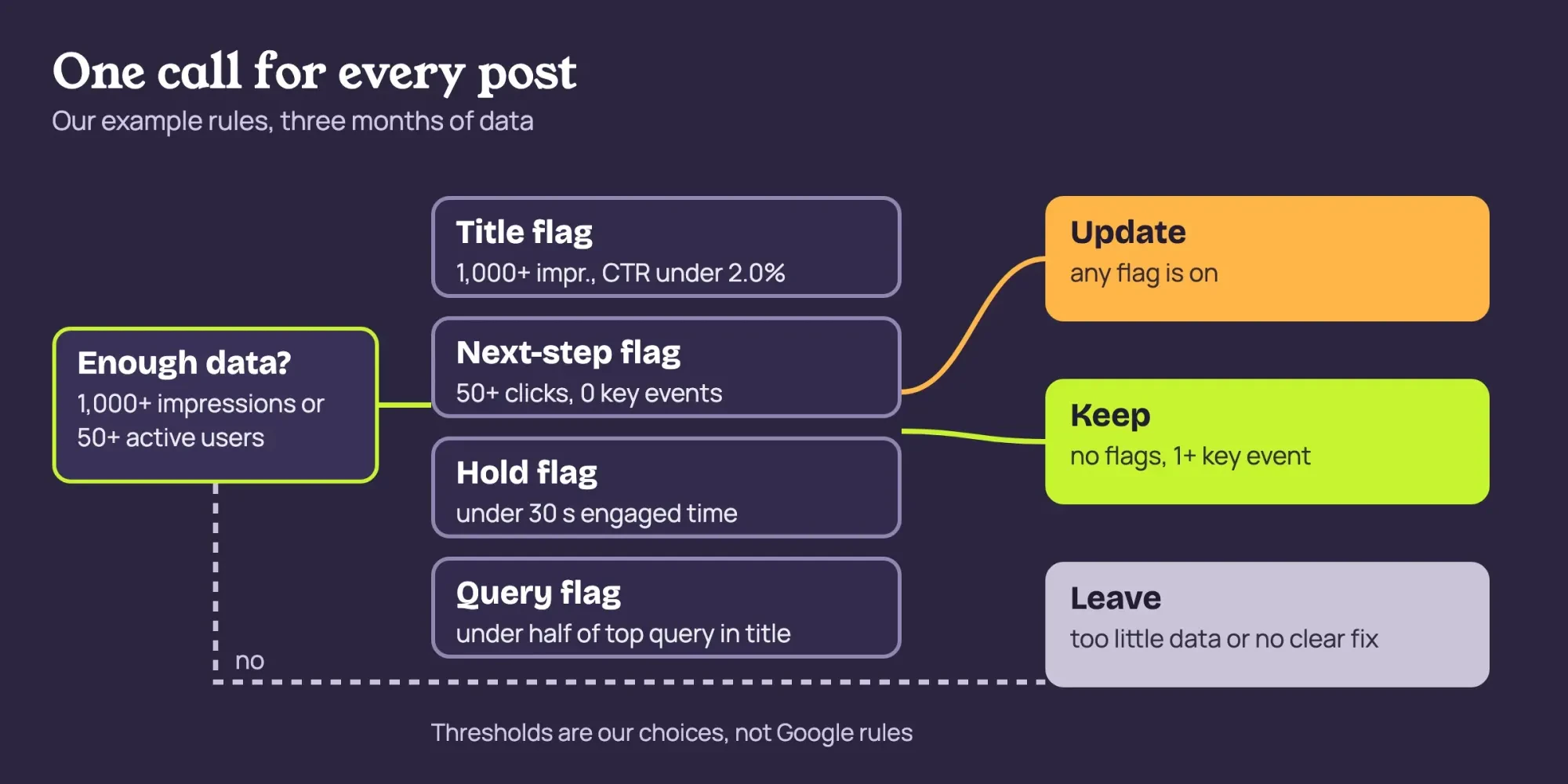 Diagram by DigitalTreed. Our example decision rules; the thresholds are our choices, not Google rules.
Keep posts earn promotion, not edits. Share them again, and tag those links in the DigitalTreed UTM builder so visits from a newsletter or a Facebook post land under their own source in GA4. Our blog promotion plan lists channels worth trying.
The compost post stays a Leave this round, because 31 clicks and no key events don't point at a single fix.
How long should a post run before you judge it?
That leaves timing, and three months is where we'd start. Search Console's default view already covers the past three months, and we set GA4 to the same dates so both files match. A post published three weeks ago hasn't had a fair run yet, and with fewer than 1,000 impressions and 50 active users, our data rule would mark it Leave anyway. The newest days are shaky, too. Google's page about the report data says recent data can be preliminary and "may change in the next few hours."
For month-over-month checks, compare date ranges inside the Performance report. The filtering page suggests weekly or monthly granularity to smooth out the day-of-the-week effect. The common tasks page adds a Difference column you can sort to find pages that changed most. When every post drops in the same week, we check the site before the writing, because a template or server problem hits all of them at the same moment. The DigitalTreed website audit tool checks for broken links and heavy JavaScript.
Our take: one review a month, with the same two exports and the same written rules, beats a dashboard nobody opens.
Measure every post this way each month: update the flagged ones first, promote the Keeps, and recheck the Leaves. DigitalTreed's content marketing service is paid work, so we gain when owners hire us for it. Everything above works with free Google tools and a spreadsheet.
More questions about blog numbers
Frequently asked
Why don't Search Console clicks match GA4 users for one post?
Search Console counts search clicks, while GA4 counts visitors from every channel. Grouped by page, Google's Search Console data page says "each unique URL in a Search result is counted separately."
Are conversions and key events the same thing in GA4?
No. Per Google's conversions and key events page, a new GA4 conversion from a key event needs a linked Google Ads account.
How far back can I compare a post's search data?
Google's Search Console linking page says "Search Console keeps data for the last 16 months."
Does GA4's data retention setting change the Pages and screens report?
No. Google's data retention page says it "only affects explorations and funnel reports."
How we made this guide: Metric definitions and report names come only from Google's Analytics Help and Search Console Help, saved as text on October 29, 2026. No GA4 property or Search Console account was opened. The scorecard ran on three invented CSV files with our own thresholds. Facts checked by the DigitalTreed team on October 29, 2026.
First published November 2025 as a general performance analytics explainer. Rewritten October 29, 2026: this version shows a small business how to review each blog post's numbers in GA4 and Search Console.
Sources
- Search Console Help: Performance report (Search results), overview and basic setup
- Search Console Help: What are impressions, position, and clicks?
- Search Console Help: Performance report, dimensions and data groupings
- Search Console Help: Performance report, advanced filtering and comparison
- Search Console Help: Performance report, common tasks and use cases
- Search Console Help: Performance report, about the data
- Analytics Help: User engagement
- Analytics Help: Analytics dimensions and metrics
- Analytics Help: Engagement rate and bounce rate
- Analytics Help: Conversions vs. key events
- Analytics Help: Mark events as key events
- Analytics Help: Connect Search Console to Google Analytics
- Analytics Help: Data retention


Comments
No comments yet. Start the conversation below.