

Quick answer
As of October 29, 2026, a store reaches Google AI Mode through a $0 Merchant Center feed plus matching product markup on each page. ChatGPT and Copilot read Shopify's catalog by default for eligible stores that sell to the US; elsewhere, ChatGPT needs OpenAI's approved-partner feed. Start by making your feed price match your page price.
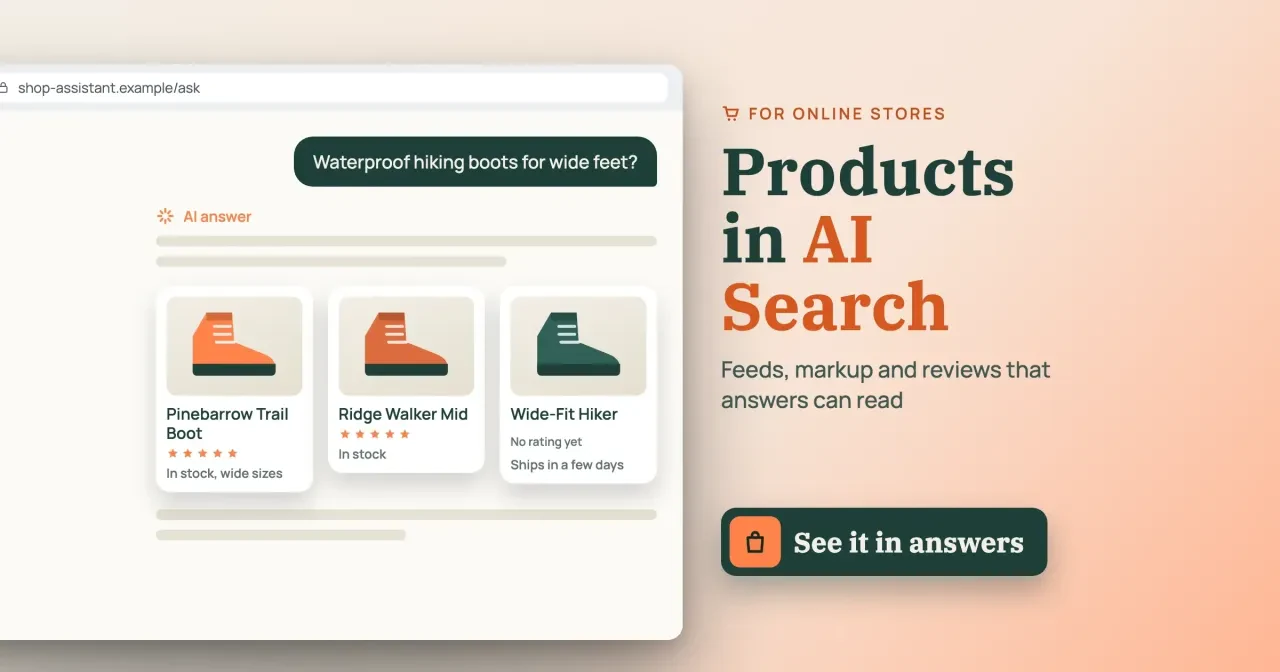
Say you sell hiking boots from a small US store, and a shopper asks ChatGPT for waterproof boots in wide sizes. Three boots come back with stock notes, and yours isn't one. Product visibility in AI search is a store's chance of being named, with the right price and stock, in answers like that.
We start with which file each AI shopping answer reads, then fix the Merchant Center feed, the markup and your reviews. Next come Shopify's AI channels, ChatGPT and Copilot for stores not on Shopify, our test and a monthly check. Our view: fix the data you already own first, and be wary of anyone selling AI placement.
Key takeaways
- A product page with JavaScript-only markup failed all 6 of our markup checks.
- A sale price missing from both feeds failed both feed checks.
- Shopify shares eligible US-selling stores' products with ChatGPT and Copilot by default.
- Google's star ratings need at least 50 reviews across your whole catalog.
- Ten $30 GTINs cost $300 once; a 10-item prefix costs $350 by year three.
Which file each AI shopping answer reads
Each assistant reads a different file, so it helps to know which one you're feeding. Google's free listings page names Gemini next to Search, Maps, YouTube, Images and Lens as places your products can show at no cost. Those listings come from a Merchant Center feed. Its guide to AI features adds no special requirement for AI Mode. Among its best practices, though, is "Checking that your Merchant Center and Business Profile information is up-to-date."
ChatGPT and Copilot work differently. Shopify's agentic storefronts page lists ChatGPT, Google AI Mode and Gemini, Microsoft Copilot and Meta as AI channels for Shopify stores. Outside Shopify, OpenAI's own commerce getting-started page says feed onboarding is "currently available to approved partners." And any assistant can still find a product page the old way, by crawling it.
Here's how the three assistants line up as of October 29, 2026:
| Assistant | Where product data comes from | What a store controls |
|---|---|---|
| Google AI Mode and Gemini | Merchant Center feed, plus crawled product pages | The feed, the page markup, free listings status |
| ChatGPT | Shopify Catalog for eligible Shopify stores; an OpenAI feed for approved partners; the open web | Sales channels > Agentic in Shopify; the OpenAI partner form |
| Microsoft Copilot | Shopify Catalog for eligible Shopify stores; the open web | Sales channels > Agentic in Shopify |
One dated note on Google's side. On May 20, 2025, Google said AI Mode shopping draws on its Shopping Graph, which then held "more than 50 billion product listings." It added that more than 2 billion of them refresh every hour, and price is one of the details it lists for each listing. If you want the wider trend first, our ecommerce trends for 2026 covers agentic commerce.
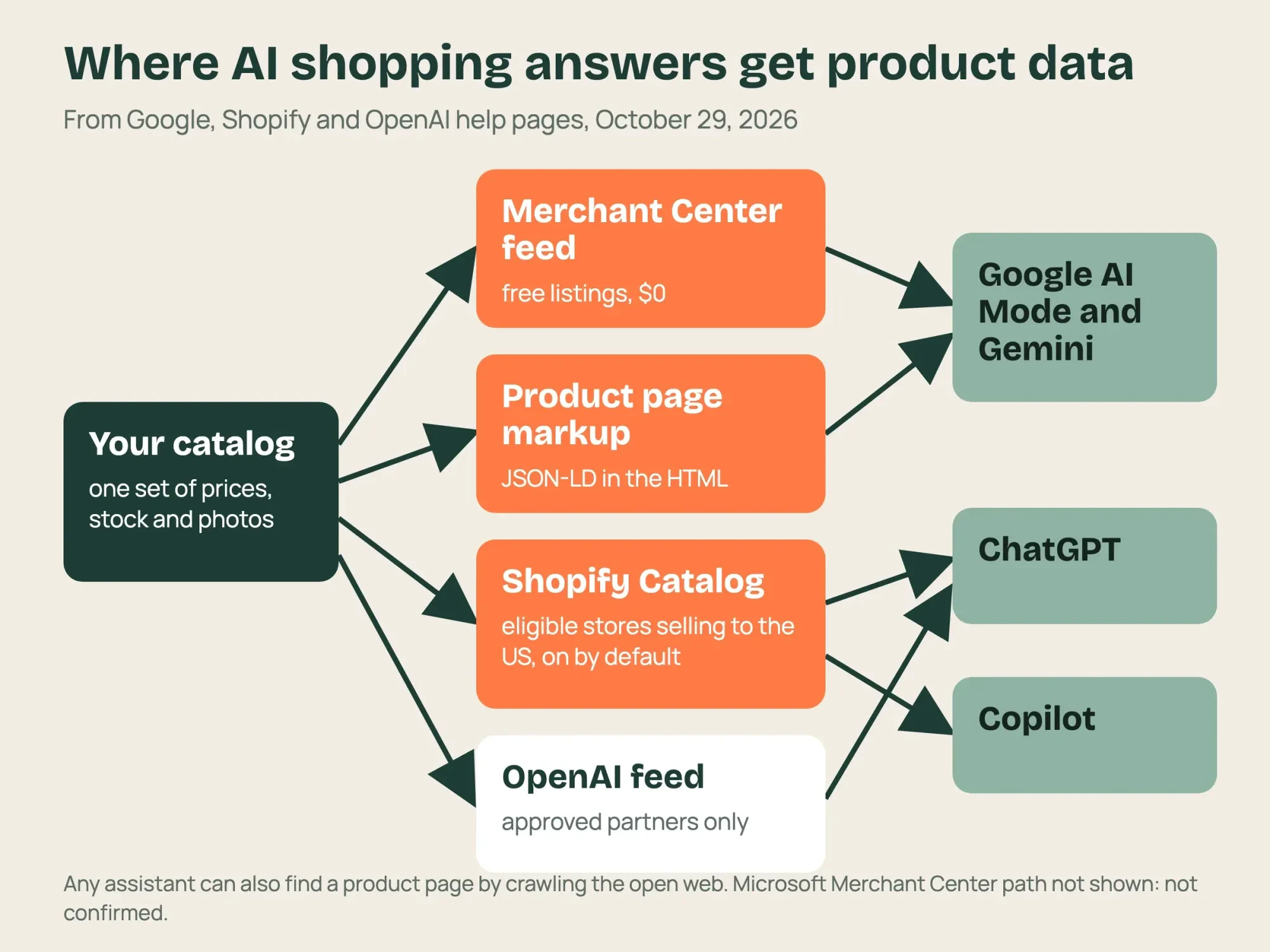 Diagram by DigitalTreed from Google, Shopify and OpenAI help pages read October 29, 2026
Send Google a Merchant Center feed that matches your pages
For most small stores, two jobs cover all three rows of that table: a clean feed and honest product pages. The feed comes first. Shopify's Google AI Mode and Gemini page puts it plainly: "Product discovery is powered by Google Merchant Center." A Merchant Center feed is a file or sync that lists every product with its price, stock and photos, one row per item.
Google's product data specification marks id, title, description, link, image_link, availability and price as required for every product. Brand is required too for new products, except movies, books and music. Google caps it at 70 characters and asks for "the brand name of the product generally recognized by consumers." Titles can run to 150 characters and descriptions to 5,000, and Google's free listings page says every new Merchant Center account is opted into free listings by default. That page adds that the status "doesn't guarantee that your products will be shown."
Here's one row from the Google feed of our made-up test store, written out in words. The id is PINEBARROW-TRAIL-BOOT, the title is Pinebarrow Trail Boot, and the link points to that boot's own page rather than to a category page. Availability reads in_stock, the price reads 149.00 USD, the brand is Hemlock Gap Outfitters and the GTIN has 12 digits. Every one of those values also sits on the boot's own page, in the text and the markup, and our check script compared the price in all three places. It also read the feed row back and found all 8 required Google fields filled.
Our test planted a fault that a field-by-field checker would miss: every required field filled, but a feed price that doesn't match the page.
Say your site runs a weekend sale at $139 while the feed still says $159 (example prices, the ones from our test). The shopper sees one price in the answer and another at checkout. In our test below, that exact gap failed both feed checks, for Google and for OpenAI, while the page markup itself looked fine. So feed Merchant Center from the same product data your store runs on, as often as your platform allows. Then recheck it after every sale. If your store isn't live yet, our ecommerce site build guide covers Merchant Center setup at launch.
GTINs: when you need one and what it costs
A GTIN is a Global Trade Item Number, the digits under a barcode, and in North America it's usually a 12-digit UPC that Google's spec calls GTIN-12. Google lists it as "strongly recommended if available," so if you resell another company's brand, send the maker's GTIN exactly as it's printed on the box. If you make your own products, you license GTINs from GS1 US.
GS1 US pricing below is as of October 29, 2026, and we worked the 3-year totals ourselves, with the initial fee as year one plus two renewals:
| GS1 US option | Initial fee | Yearly renewal | 3-year total (formula) | Per GTIN over 3 years |
|---|---|---|---|---|
| 1 GS1 US GTIN | $30 | $0 | $30 | $30.00 |
| 10 single GTINs | $300 | $0 | 10 x $30 = $300 | $30.00 |
| Prefix for 10 items | $250 | $50 | $250 + 2 x $50 = $350 | $35.00 |
| Prefix for 100 items | $750 | $150 | $750 + 2 x $150 = $1,050 | $10.50 |
As of October 2026, for a store with 10 own-brand products, single GTINs come out $50 lower than the 10-item prefix by year three, and they never renew. GS1 says single GTINs "might be the most cost-effective option" for a company with only a few products.
Past 35 items, at October 2026 prices, the 100-item prefix wins on the same 3-year formula, since 35 single GTINs x $30 = $1,050.
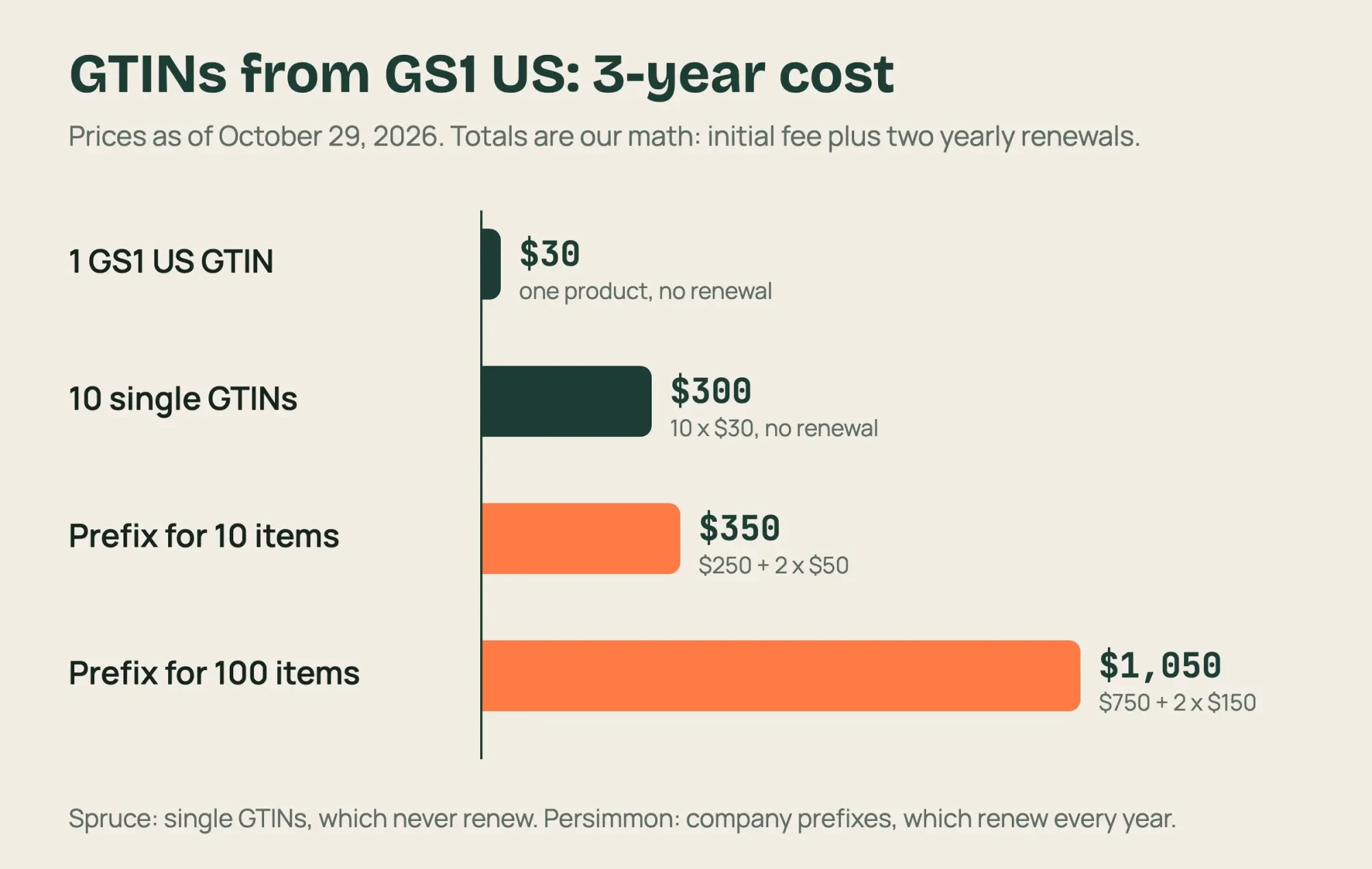 Diagram by DigitalTreed from GS1 US prices as of October 29, 2026; 3-year totals are our math
Put product markup in the HTML, not in a script
With the feed in order, each product page has to say the same thing in code. Google's introduction to Product structured data says that doing both "maximizes your eligibility to experiences." Structured data is a block of code, usually JSON-LD, that labels the name, price and stock for machines. For pages where people can buy, Google's merchant listing documentation requires four things: name, image, an offer price above zero and the price currency. It recommends shipping details and a return policy, and it says Google may try to verify the product data before showing it. Here's the block for the Pinebarrow Trail Boot from our made-up store, Hemlock Gap Outfitters. We shortened the shipping and return parts:
<script type="application/ld+json">
{
  "@context": "https://schema.org/",
  "@type": "Product",
  "name": "Pinebarrow Trail Boot",
  "image": ["https://example.com/img/pinebarrow-trail-boot.jpg"],
  "brand": {"@type": "Brand", "name": "Hemlock Gap Outfitters"},
  "gtin12": "201234000013",
  "offers": {
    "@type": "Offer",
    "price": "149.00",
    "priceCurrency": "USD",
    "availability": "https://schema.org/InStock",
    "shippingDetails": {"...": "free US shipping"},
    "hasMerchantReturnPolicy": {"...": "30 days, by mail, free"}
  }
}
</script>
Don't hand-type that for 80 products. Your theme or platform may already print it, and our schema markup generator writes a starting block when it doesn't. What matters is where the block lives. Google's page on structured data made with JavaScript warns that "dynamically-generated markup can make Shopping crawls less frequent and less reliable." Price and stock are the fields that change fastest.
You can check your own theme in two minutes. Open a product page, choose View Page Source rather than the inspector, and search the source for ld+json. If a Product block shows up with the price you expect, your theme prints the markup itself and you're done. Repeat it on a product with size or color options too, in case that page uses a different template. If it's missing from the source but appears in the inspector, an app or tag manager is adding it after the page loads, which is the case Google's warning describes. Note which pages fail, since a theme renders every product of one type from a single template.
That's why our test fetched raw HTML, the way a crawler that runs no JavaScript sees it. A tag manager or app that injects the block after the page loads can pass a browser check and still leave that raw HTML empty.
How do reviews get into AI shopping answers?
After price and stock, reviews are the next fact an answer card tends to carry, and Google gathers them from several places. Its Product Ratings basics page says the star ratings shoppers see combine reviews from merchants, review aggregators, review sites and Google users, so reviews you never collected can count too. To join, a store needs "at least 50 reviews across all your products." Even then, ratings may need as long as 2 weeks to appear while the account is onboarded. If you don't collect reviews yet, the same page points to Google Customer Reviews, which it says you can sign up for free.
Matching is where GTINs pay off a second time. Google matches reviews to products mainly by GTIN, and it says that SKUs, brand plus part number pairs, or product URLs often end up matching fewer reviews. That's why the wrong check digit we planted in our test matters beyond the feed. A typo there can strand a product's reviews. OpenAI's product feed specification takes reviews as two optional fields, review_count and star_rating. It asks stores to "Exclude seller and store reviews," so only reviews of that product count.
In our test only the two boots with reviews carried a rating, and the Wide-Fit Hiker, with none, carried no rating.
How you collect reviews is also covered by federal rules. The FTC review rule in the eCFR bars rewards "conditioned expressly or by implication on, the writing or creation of consumer reviews expressing a particular sentiment." That line is Section 465.4, and Section 465.7 covers hiding reviews "based upon their ratings or their negative sentiment" while implying you show them all.
This is a plain reading of the rule's text, not legal advice. A lawyer can say how it applies to your review emails and display.
In practice, the safe habit is dull. Ask every buyer the same way, at the same point after delivery, and publish the low ratings with the high ones. That keeps you inside the rule's text, and it gives Google and OpenAI honest numbers to show.
Shopify turns on most AI channels for you
Reviews and feeds apply on any platform, but Shopify stores get one big shortcut. Shopify says agentic storefronts are "active by default for eligible stores," and you manage them in Sales channels > Agentic in your admin. Its ChatGPT channel page lists what eligibility takes:
- Your store sells to customers in the United States; it can be based elsewhere.
- Your products are eligible for Shopify Catalog.
- You've accepted the Shopify Agentic Storefronts Supplemental Terms of Service.
- Your terms of service, privacy policy, and return and refund policy are filled in under Settings > Policies.
Copilot has nearly the same list on Shopify's Microsoft Copilot page, and its direct checkout is on by default but shows only to US customers. ChatGPT works as a referrer instead, so a shopper who picks your product there finishes on your own checkout, inside ChatGPT's in-app browser or a new tab. Shopify also wants legal disclosures inside the first 6,000 characters of a product description. So a safety or legal warning that sits at the bottom of a long description may be cut before ChatGPT or Copilot shows it to a shopper.
Selling only to Canada or Australia? Shopify's Google channel lists both countries; its ChatGPT and Copilot channels require US customers.
Google AI Mode and Gemini are the exception. That channel needs a valid Merchant Center account, synced through Shopify's Google & YouTube channel or a feed of your own. So the feed section above still applies to you. Still picking a platform? Our comparison of WordPress and Shopify covers fees and setup. One more setting trips people up. Shopify's catalog and discovery page calls robots.txt rules "directional and advisory," and blocking AI crawlers there changes only open-web discovery, not what Shopify Catalog shares. Our AI crawler checker shows which bots your robots.txt lets in. For Google's own token, read our explainer on what blocking Google-Extended does.
ChatGPT and Copilot for stores not on Shopify
Stores on WooCommerce, BigCommerce or a custom build don't get that catalog switch, so the ChatGPT route has an extra gate. OpenAI limits onboarding to approved partners and links an application form from its getting-started page. That's slower than flipping a switch, but it's the only documented route we found. Approved stores upload a full snapshot of the catalog over SFTP, overwriting the same file each time, and OpenAI recommends sending a fresh snapshot at least once a day. The good news is that the two feeds overlap. OpenAI's specification requires nine fields, and eight of them carry the same data as Google's attributes, sometimes under a new name, which leaves seller_name as the odd one out:
| Google Merchant Center attribute | OpenAI feed field | Same data? |
|---|---|---|
| id | item_id | Yes |
| title / description | title / description | Yes |
| link / image_link | url / image_url | Yes |
| availability / price | availability / price | Yes; pre-order is preorder for Google, pre_order for OpenAI |
| brand (new products) | brand and seller_name | seller_name has no Google twin |
In our test we wrote both feeds from one list of three product records, so a price typed once lands in both files. The build script that does it is under 20 lines of Python, so the mapping isn't a big job. Keep prices as plain numbers with a currency code, the way both specs show them, and use the same availability words in each file. Ours used in_stock and backorder in both, and price was the only feed field that failed. If two different plugins write your two feeds, open both files after each price change and compare one sale item, since our test only covered one shared source.
Microsoft's side is harder to pin down from public pages. Microsoft Learn's Content API overview says Microsoft Merchant Center catalogs can be managed in the web page, by FTP or SFTP, or through the API. It also notes that a store with a small catalog, or little way to connect its inventory system, may be better off with a plain feed file than the API. Microsoft's advertising help pages load their text by script and returned none to our reader. That means we can't say how Copilot uses a Microsoft Merchant Center catalog for stores outside Shopify, and we've left that claim out.
What we tested on a three-boot store
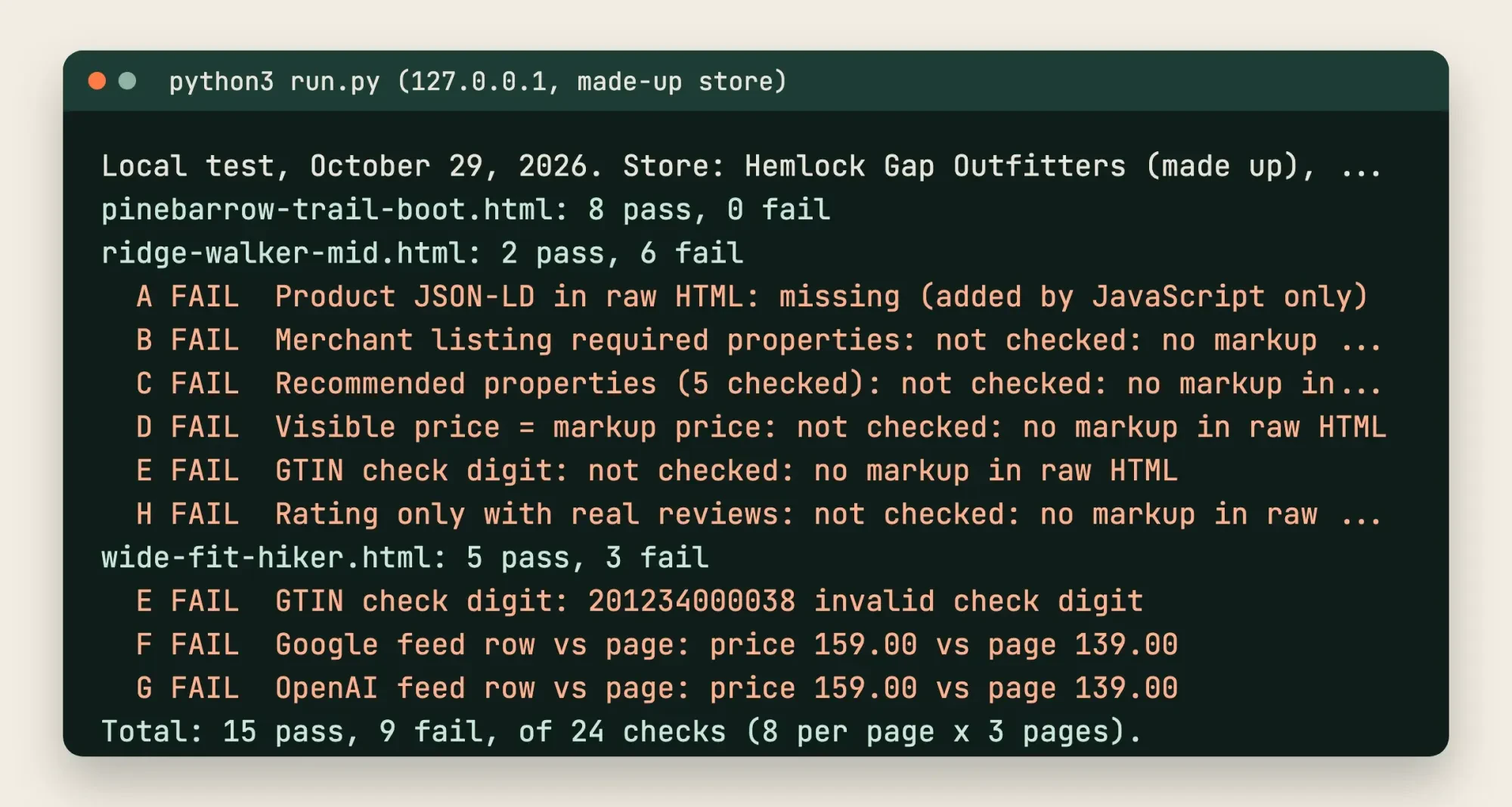
On October 29, 2026, we served a made-up store, Hemlock Gap Outfitters, on 127.0.0.1: three boot pages, a Google feed and an OpenAI feed. We planted three faults. Ridge Walker Mid got its markup from JavaScript only. Wide-Fit Hiker showed a $139 sale price while both feeds said $159, and its GTIN had one wrong digit. A Python script read each page's raw HTML and ran 8 checks per page.
Pinebarrow Trail Boot passed all 8. Ridge Walker Mid passed only its 2 feed checks; the other 6 had no markup to read. Its feeds looked clean anyway. Wide-Fit Hiker passed 5 and failed 3: the GTIN check digit and both feed price checks. In total, 15 of 24 checks passed and 9 failed.
The script doesn't render pages or stand in for Google's tests, so it shows gaps in data a store controls, not what an assistant will display.
 Source: our local test of a made-up store, test/output.txt, October 29, 2026 (shortened)
A first-Monday check for your products in AI answers
With the data fixed and tested, a short monthly routine tells you whether any of it reached the answers. Google's AI features guide says AI Mode visits count inside Search Console's Performance report, under the "Web" search type. So there's no separate AI Mode report to wait for. We'd run these five checks on the first Monday of each month:
- In Merchant Center, open Marketing methods and confirm the free listings card is active.
- In Search Console, compare product-page clicks in the Web report with last month.
- In Shopify, look for orders that show attribution to an AI channel or agent.
- Ask ChatGPT, Gemini and Copilot the same five shopping questions and log the products named, as in the prompt log from our GEO guide.
- Run any product page you changed through our schema markup validator.
Log the five answers in a spreadsheet with the date, so you see a pattern over three months instead of reacting to one odd reply from one assistant. For visits that arrive from AI assistants outside Shopify, the traffic acquisition chapter of our GA4 guide shows where referral sessions appear.
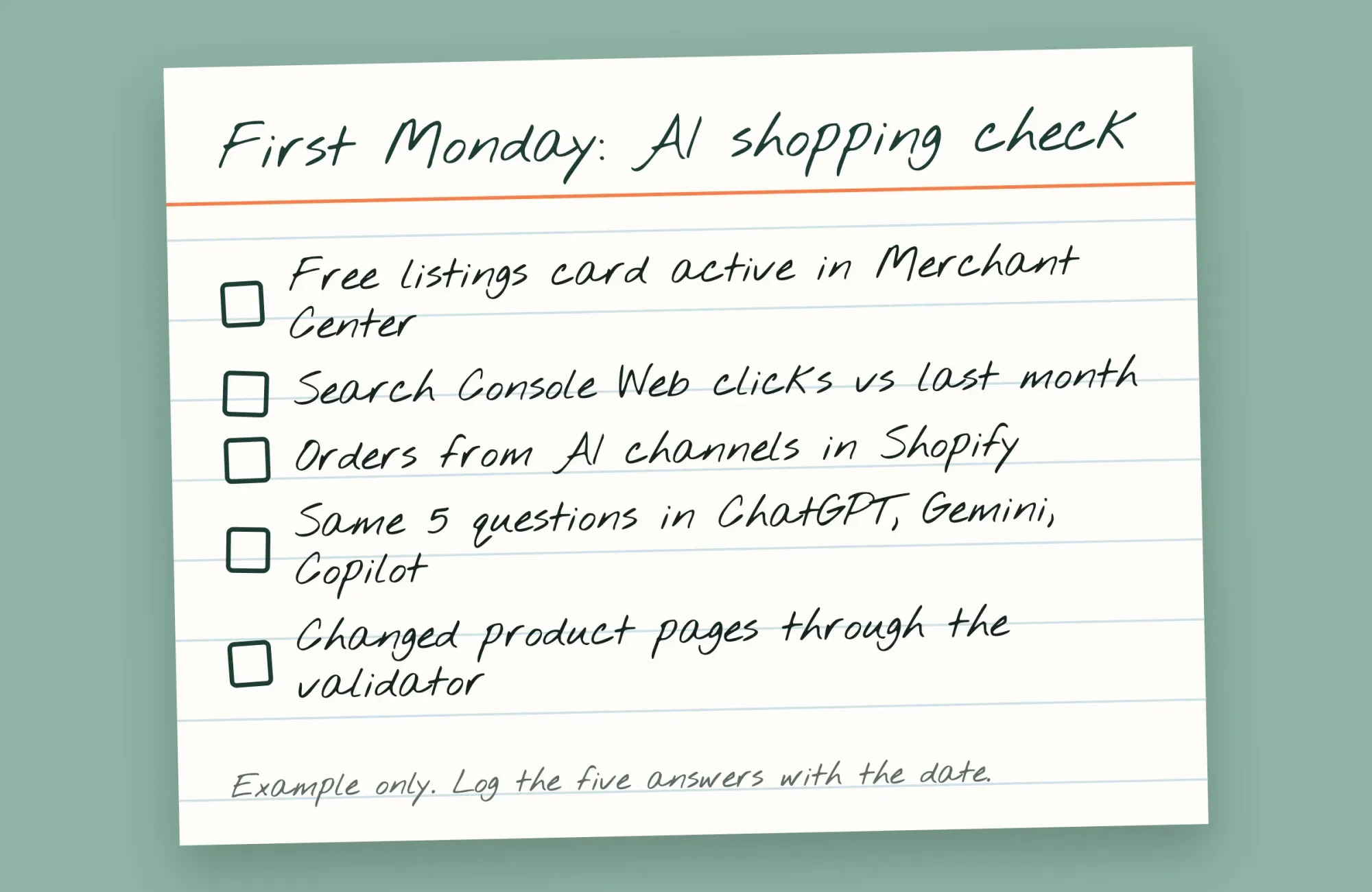 Drawn by us: an example monthly check for a small online store
With a store under a few hundred products, we'd treat the feed, the markup and honest reviews as the whole job. The same feed also runs your free listings in Search, Images and the Shopping tab.
Have a physical shop as well? Google's AI features guide names your Business Profile in the same breath as Merchant Center, while our walkthrough on local business visibility in AI search covers that map side.
Where we come in: we don't sell feeds, apps or AI placement, and we earn nothing from any page linked above. Our SEO team audits product pages and feeds for stores that'd rather hand off the feed, the markup and the review setup than work through all of it alone.
Frequently asked
Do I need an llms.txt file for my products to show in AI answers?
Not for Google. Its AI features guide rules out new "machine readable files, AI text files, or markup" for its AI features.
Does selling through ChatGPT cost a Shopify store a fee?
No, as of October 29, 2026. Shopify's ChatGPT page lists no ChatGPT selling fee, only your standard payment processing fees.
Can I hide one Shopify product from AI channels but keep it on Google?
Not with one switch. Shopify's catalog page says setting a product to Unlisted hides it from AI channels, and also from sitemaps, Google and your store search.
How long does ChatGPT keep a product after I drop it from the feed?
Up to 14 days. OpenAI's file upload overview says it keeps the last processed record that long, and suggests setting is_eligible_search to false for a faster removal.
How we made this guide: The 19 sources below are public help, spec and price pages from Google, Shopify, OpenAI, Microsoft, GS1 US and the eCFR. Then we tested markup and feeds on the made-up Hemlock Gap store, served locally. We used no Merchant Center, Shopify or OpenAI account, so the menu paths here come from those help pages, not from our own screens. Facts checked by the DigitalTreed team on October 29, 2026.
First published October 2025 as a general piece on generative engines. Rewritten October 29, 2026 as a product data how-to for US online stores.
Sources
- Google Merchant Center Help: Free listings for products
- Google Merchant Center Help: Product data specification
- Google Search Central: Merchant listing structured data
- Google Search Central: Introduction to Product structured data
- Google Search Central: Generate structured data with JavaScript
- Google Search Central: AI features and your website
- Google Merchant Center Help: Product Ratings basics
- Google blog: Shop with AI Mode (May 20, 2025)
- Shopify Help Center: Shopify agentic storefronts
- Shopify Help Center: Selling on ChatGPT
- Shopify Help Center: Selling on Google AI Mode and Gemini
- Shopify Help Center: Selling on Microsoft Copilot
- Shopify Help Center: Shopify Catalog and product discovery
- OpenAI Developers: Commerce, get started
- OpenAI Developers: Product feed specification
- OpenAI Developers: File upload overview
- Microsoft Learn: Content API overview
- eCFR: 16 CFR Part 465, consumer reviews and testimonials
- GS1 US: How to get UPC barcodes for products

Comments
No comments yet. Start the conversation below.