
A customer asks a question at 10 p.m., and no one is available to answer. Your support inbox fills with the same questions every week. A promising lead fills out a form, but by the time someone follows up, they have moved on.
These are common problems for growing businesses. A chatbot can help with them, but only if it is set up with a clear job, simple limits, and a way to hand off to a person.
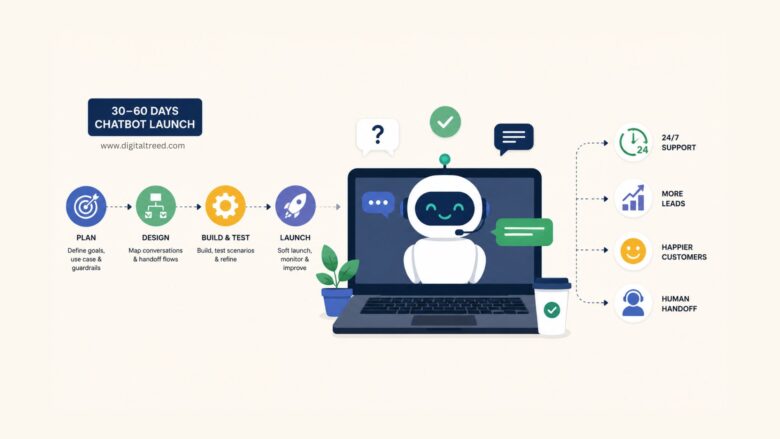
This guide walks through a low-risk path to launching a useful chatbot in 30 to 60 days. You will pick one high-impact use case, design clear conversation flows, set up human handoff, and track results with practical metrics.
Your Quick Game Plan
Think of this as a 30-to-60-day project with three phases: plan in week one, build and test in weeks two through four, and launch and measure in weeks four through eight. Each phase should have a clear deliverable, so you know what “done” looks like.
Pick One Job First
Resist the urge to automate everything at once. Choose a single task where volume is high and answers are predictable. Good starting points include answering your top five FAQs, covering common after-hours questions, or qualifying inbound leads with a short set of questions.
Write your success statement in one sentence. For example: “The bot will resolve at least 40% of after-hours support questions without a human stepping in.”
Choose Where It Lives
Start with the channel where you already receive the most conversations. For many small businesses, that is a website widget. If your audience uses WhatsApp or Facebook Messenger more often, start there instead. You can add channels later once the first one works well. When the site is your main channel, compare website chatbot tools only after the first use case, handoff path, and data needs are clear.

Set Goals and Guardrails
Before you build anything, define what success looks like and where the bot should stop.
Goals That Matter
Pick two or three KPIs and define them in plain language. These are the most useful starting points:
- Containment rate: Sessions resolved by the bot without human intervention, divided by total bot sessions. This shows how much support load the bot is absorbing.
- Time to resolution: How long it takes from the first message to a resolved answer. Compare bot-handled sessions with human-handled ones.
- CSAT (customer satisfaction): A short post-conversation rating, such as a thumbs-up or one-to-five score.
- Leads captured: For sales-focused flows, the number of qualified contacts the bot collects.
Record your baselines before launch. Check your help desk and CRM for current numbers so you have a real comparison point.
Guardrails
Write down what the bot must not do. A short list is enough to start:
- No pricing promises or discount approvals.
- No collecting or storing sensitive personal data, such as payment details or health information. Route those requests to secure, human-assisted channels.
- Always disclose that the visitor is chatting with an automated assistant.
- Escalate to a person after two failed attempts to understand the question.
If your bot touches any area where privacy regulations may apply, consult legal counsel before going live.
Design the Conversation
Keep the experience simple, predictable, and short. Most visitors want a quick answer, not a long dialogue.
Opening and Intent Capture
Start with a friendly greeting and a few quick-reply buttons. For example: “Hi there! How can I help? Pick one: Order status, Pricing, Contact support.” Include a free-text fallback so visitors can type their own question if none of the buttons fit.
Clarify and Confirm
When a visitor picks a topic, use one brief follow-up to confirm what they need. For instance: “Got it, you are asking about your order status. Can you share your order number?” Then explain what the bot will do next: “Let me look that up for you.”


Human Handoff
Define clear triggers for switching to a person. Common triggers include frustration signals, sensitive topics such as billing disputes or complaints, VIP accounts, and any question the bot cannot answer after two tries. When a handoff happens, create a support ticket or live-chat transfer so the visitor does not have to repeat the same information.


Choose a Platform
This is where many teams stall. You do not need the most complex tool. You need one that fits your current setup and lets you start small.
Build Approach
Decide between a no-code builder and a developer-friendly platform. If you do not have engineering resources, a no-code tool with drag-and-drop flows will usually get you live faster. Check that it integrates with tools you already use, such as your CRM, help desk, or calendar.
Knowledge and Retrieval
Your bot needs a source of truth. Most platforms let you upload help docs, FAQ pages, or product files so the bot can pull answers from approved content. Some vendors call this a retrieval-augmented approach, meaning the bot searches your documents before generating a reply. Terminology and capabilities vary, so confirm the details in your chosen platform’s documentation.
Channels and Compliance
Make sure the platform supports the channel you picked earlier and offers basic privacy controls, such as data-consent prompts and session expiration. If you plan to expand to more channels later, check that the platform supports them now so you do not need to migrate soon after launch.
Background Reading
Before you shortlist tools, scan a vendor-published overview of AI chatbot solutions to understand common categories, feature sets, retrieval-based options, and deployment considerations. Treat it as background reading rather than an independent market ranking.
Build, Test, and Launch
Ship a safe, lightweight first version. You can add more once the first use case is working.
Seed Knowledge
Load your top 20 FAQs, office hours, and contact paths into the bot. Add a polite fallback response for anything the bot cannot answer, such as: “I am not sure about that one. Let me connect you with someone who can help.”
Test with Scripts
Write 10 to 15 real scenarios based on actual customer questions. Run each one through the bot and watch for wrong answers, stalled loops, and unclear next steps. Fix every issue before launch. Ask a teammate who was not involved in the build to test it cold.
Soft Launch
Limit your launch to one channel, or restrict the bot to business hours at first so a human can step in quickly if something goes wrong. Make sure there is a visible “talk to a person” option at every stage of the conversation.
Measure and Improve
Your first version will not be perfect. That is expected. The goal is to learn quickly and improve the experience over time.
Baseline vs. After
Compare your pre-launch KPIs with the first two weeks after launch. Sample actual conversations and tag common failure reasons, such as “bot misunderstood the question” or “visitor wanted a topic we have not loaded yet.”


Tune and Expand
Add new intents based on the questions that come up most often. Refine prompts and source content where the bot struggles. Once your metrics hold steady for two to three weeks, consider adding a second channel or extending bot coverage to 24/7.
Launch Checklist
- Goals set with plain-language KPI definitions
- Guardrails written and reviewed
- Single use case selected
- Platform chosen and integrations confirmed
- Conversation flows drafted
- Human handoff wired and tested
- KPI baselines recorded from help desk and CRM
- 10 to 15 test scenarios run with issues fixed
- Soft launch plan ready with one channel and a visible escalation option
- Weekly review cadence scheduled for the first month
FAQs
Should we buy a tool or build our own?
For most small and mid-sized teams, a no-code or low-code platform is the faster and safer choice. Building from scratch gives you full control, but it requires engineering time and ongoing maintenance. Start with an off-the-shelf tool, prove the value, and revisit the build-vs-buy question once you know what you need.
What tasks are safe for a bot to handle first?
Stick with questions that have predictable, well-documented answers. Shipping status, office hours, return policies, and basic pricing tiers are good candidates. Avoid tasks involving sensitive personal data, complex troubleshooting, or situations where a wrong answer could create liability. Route those to a person.
How do we reduce wrong answers and keep replies consistent?
Limit the bot’s knowledge base to vetted, up-to-date content. Review conversation logs weekly and tag incorrect or confusing responses. Update the source documents and refine prompts based on what you find. A small, accurate knowledge base usually works better than a large, messy one.
What team roles are needed to run this well over time?
You need someone to own the bot’s content and keep it current, usually a support lead or marketing manager. You also need someone to review conversation logs and flag issues each week. For technical changes like new integrations, a developer or IT admin may step in occasionally. In most small teams, this takes a few hours per week, not a full-time role.
Start Small, Learn Fast
You do not need a large project to get value from a chatbot. Pick one job, set clear guardrails, launch a lightweight version, and measure what happens. Teams that do this well start simple, pay attention to the data, and improve a little each week. The first version does not need to be perfect. It just needs to be helpful.

