
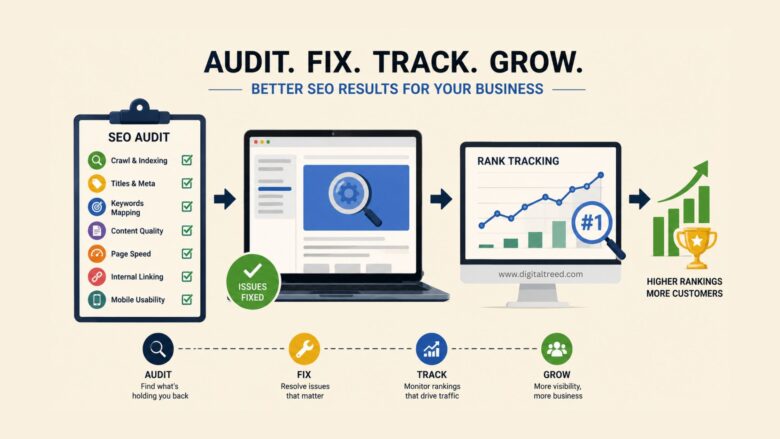
If you own a small business and your website is sitting on page four of Google, you already know the problem. The harder question is what to actually do about it. Most advice you find online jumps straight to “fix your technical SEO” or “build backlinks” without telling you what’s broken on your site in the first place.
The honest answer is that you need two things before you spend a single rupee or dollar on SEO services: a clear picture of what’s wrong with your website right now (an audit), and away to measure whether anything you change is actually helping (rank tracking). This guide walks you through both in plain language, with no SEO jargon and no upsell.
Why You Need to Audit Before You Optimize
A lot of small business owners skip the audit and dive straight into “doing SEO.” or running Amazon PPC Services without first understanding what is actually holding their website or product listings back. They installa plugin, change a few page titles, maybe write a blog post, and then wonder six months later why nothing happened.
The reason nothing happened is usually one of three things. Either Google can’t properly crawl the site, or the content on the site doesn’t match what people are searching for, or the technical setup (slow loading, broken links, missing tags) is dragging everything down. An The audit tells you which of these is your actual problem. Without one, you’re guessing. Think of it like going to a doctor. You wouldn’t accept a prescription before any examination. Yet that’s exactly what happens when a business owner buys an SEO package without knowing what’s wrong with their site.
What a Basic SEO Audit Actually Covers
You don’t need a 200-point checklist. For a small business site, there are seven things that genuinely matter:
Indexing and crawlability. Can Google actually see your pages? Open Google Search Console (it’s free), connect your site, and look at the Pages report. If important pages are listed as “not indexed,” that’s a fixable problem and a common one.
Page titles and meta descriptions. These are the blue link and grey text that show up in Google results. Each page needs a unique title between 50 and 60 characters and a description between 140 and 150 characters. The main keyword for that page should come first in both. Most small business sites either repeat the same title across every page or leave the description blank.
Keyword-to-page mapping. Every page on your site should target one main search term. Your homepage might target “wedding photographer in Pune,” your services page “wedding photography packages,” your contact page nothing in particular. If two pages target the same keyword, Google gets confused and may rank neither. Content quality and length. Pages with under 300 words rarely rank for anything competitive. Your service pages should be at least 600 to 800 words, written for the customer, not stuffed with keywords. Read your page out loud. If it sounds like a robot wrote it, rewrite it.
Page speed. Run your homepage through Google’s PageSpeed Insights. If the score is below 50 on mobile, you have a problem. The fix is usually image compression, removing unused plugins, and switching to faster hosting.
Internal linking. Pages that no other page links to are effectively invisible to Google. Your important pages (services, location pages, key blog posts) should be linked to from your homepage and from each other where it makes sense.
Mobile usability. Over 60 percent of small business searches happen on mobile. Open your site on your phone. If you have to pinch to zoom, your customers are leaving. That’s the entire core audit. Seven items. You can work through them in an afternoon.
Tools That Make This Easier (Without Costing You Anything)
The paid SEO industry would have you believe you need a $200-a-month subscription to do any of this. You don’t, at least not when you’re starting out.
For the crawl side, Google Search Console is free and shows you exactly what Google sees.
For technical issues across a whole site, Screaming Frog’s free version handles up to 500 URLs, which covers most small business sites. For an automated audit that pulls everything together in one report, Website audit tools generates a full site audit covering on-page issues, technical errors, content gaps, and mobile usability without requiring a signup or a credit card. It’s particularly useful for small business owners who want a starting point but I don’t want to read through five different tool dashboards.
Run the audit, save the report, and work through the issues in order of severity. Don’t try to fix everything in one weekend. Pick the three biggest issues and address those first.
Why Rank Tracking Is the Other Half of the Job
Here’s where most small business SEO efforts fall apart. The owner fixes a few things, waits a month, googles their own business, sees themselves still on page three, and gives up. The problem isn’t that the work didn’t help. The problem is that googling yourself is a terrible way to measure SEO. Google personalises results based on your location, your search history, whether you’re logged in, and dozens of other factors. The result you see is almost never the result your customers see.
Rank tracking solves this. A proper rank tracker checks your position from a neutral location, on a clean browser, for the specific keywords you care about, and shows you how Those positions change over time. Without this, you have no idea whether your changes are working.
For a free option, Free SERP checker is a SERP rank tracker that lets you check positions for any keyword in any country without creating an account. You enter a keyword, your domain, and a location, and it shows you exactly where you rank along with the top ten competing pages. For ongoing tracking across multiple keywords, signing up gives you projects that update automatically.
Which Keywords to Actually Track
A common mistake is tracking 50 keywords from day one. You don’t need 50. You need ten or fifteen that genuinely matter to your business.
Start with your branded keywords (your business name and variations). These should rank number one. If they don’t, something is badly wrong. Then add your top three to five service keywords, each combined with your city or service area. A plumber in Birmingham tracks “plumber Birmingham,” “emergency plumber Birmingham,” “boiler repair Birmingham,” and so on. Then add three to five informational keywords your customers actually search before buying: “how much does a boiler service cost,” “signs your boiler needs replacing,” and similar.
Track these weekly. Don’t check daily. Rankings fluctuate naturally, and obsessing over day- to-day movement will drive you mad. What you’re looking for is the direction over weeks and months.
Putting It Together: A 30-Day Plan
Week one, run the audit. Note the top ten issues. Don’t fix anything yet, just understand the scope.
Week two, fix the basics. Update page titles and meta descriptions with the right format. Add missing alt text to images. Submit your sitemap to Google Search Console if you haven’t already.
Week three, work on content. Rewrite the three weakest service pages so they’re at least 600 words, written for humans, with the focus keyword in the first sentence and the page title. Add internal links between related pages.
Week four, set up rank tracking for your fifteen target keywords. Take a screenshot of where you rank today. This is your baseline.
Then keep going. Each month, run the audit again, fix what’s still broken, publish one new piece of content targeting a customer question, and check your rankings. Real SEO progress for a small business shows up in two to four months, not two to four weeks.
The Honest Bit at the End
SEO isn’t magic, and no tool replaces actually understanding your customers and writing for them. What the tools do is take the guesswork out of the technical side so you can focus on the part only you can do, which is knowing your business and your customers better than any competitor.
Run the audit. Fix what’s broken. Track what matters. Repeat for six months. That’s the entire game.

