

Picture a typical Tuesday morning sprint planning session. Your specialized math tutoring platform faces a brutal six-month roadmap. Product teams must overhaul student dashboards, completely redesign onboarding flows, and launch an external marketing site. That required visual asset list feels incredibly intimidating. You need 25 empty states, 12 onboarding cards, and 40 unique lesson headers right away. Daily social media graphics stack up on top of that massive workload.
Hiring a freelance illustrator creates immediate logistical hurdles for extended development cycles. Commissioning that sheer volume of custom work burns through your design budget by month two. Waiting for initial sketches and processing constant revisions creates a predictable, frustrating bottleneck. Startups need fast-paced output without sacrificing crucial visual consistency across their app. Professional illustration libraries like Ouch by Icons8 fix that exact workflow problem.
Beating the Asset Squeeze
Visual consistency goes far beyond mere aesthetics in digital educational products. Students absolutely rely on distinct visual cues to navigate their daily learning journeys. Disjointed graphics increase cognitive load and confuse users immediately. Trust drops fast.
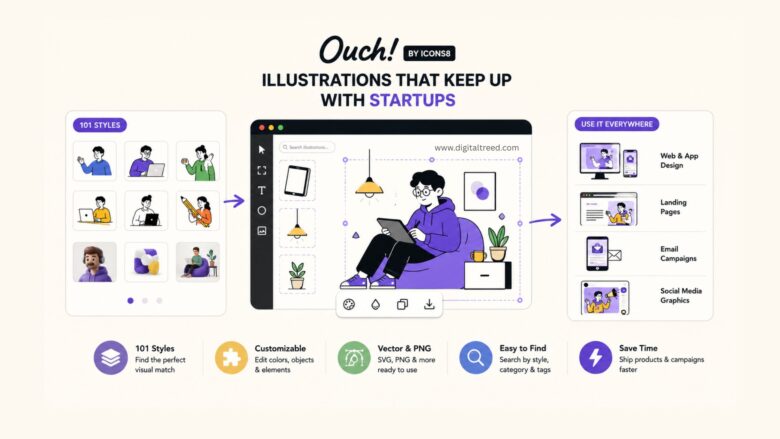
Building cohesive UX flows with Ouch means picking one of 101 distinct styles. Take a recent student dashboard redesign project as a practical example. Product designers might filter the entire library for minimal monochrome artwork. Clean lines match a distraction-free digital learning environment perfectly. First, identify key user interaction points across the web app. Add-to-cart screens, checkout confirmations, and 404 error pages need immediate graphical coverage. Login screens require welcoming, branded imagery too.
Drawing these interactions from scratch wastes valuable frontend production time. Skip the sketching phase and download SVG files from your chosen category. Layered vector graphics open directly in any standard editor like Figma or Adobe Illustrator. Select primary accent paths and apply your startup’s exact brand color palette. One afternoon yields beautifully detailed, production-ready illustrations across an entire core flow. Replicating that exact workflow via custom artist commissions takes weeks of conceptualizing and endless feedback loops.
Building Marketing Scenes Fast
Library utility shifts dramatically outside core product user interfaces. Landing pages demand dynamic, narrative-driven visuals to convert incoming traffic. Email campaigns need punchier graphics. Standard app empty states simply fail here.
Imagine drafting a hero image for a new coding bootcamp curriculum. Your marketing team spots bold, colorful tech artwork in the primary library. We see a character typing on a standard laptop, but the current advertising campaign targets iPad users specifically.
Flat, pre-made scenes usually break down right at this specific stage. Ouch solves that rigidity by splitting complex illustrations into tagged, searchable objects. Marketing designers open base images in Mega Creator, a free online editor built by Icons8. Search for new clipart within that exact same style family. Swap the laptop object for a modern tablet instantly. Rearrange surrounding background elements to fit specific header aspect ratios perfectly.
Want a trendy mixed-media composition instead? Mix in assets from 44 available 3D styles directly within the editor. Build out a custom room with floating geometric shapes and textured materials. Export the final rendered scene as a high-resolution file. Publish immediately.
Sourcing Alternatives Explained
Deciding how to source platform visuals requires understanding distinct industry trade-offs.
Custom Freelance Illustration
Dedicated professionals ensure perfect brand alignment and deliver completely unique concepts. Resulting artwork fits proprietary software or specialized pedagogy perfectly every single time. Pure economics present a major downside here. Six-month product cycles
require massive upfront financial investments. Artist timelines stay rigid and rarely accommodate sudden marketing sprints. You simply can’t pivot quickly for tomorrow’s sudden campaign.
unDraw
Early-stage startups flock here entirely because it costs absolutely nothing. Instant color customization helps non-designers ship functional prototypes much faster. Then saturation ruins its appeal. Tech companies use that single, distinctive unDraw style so heavily that it screams generic template. Building a truly unique visual identity demands far more artistic variety.
Freepik
Massive vector repositories win on sheer artistic volume alone. Finding one single great image takes just a few seconds. Locating fifty matching illustrations drawn by the exact same hand proves nearly impossible. Covering specific UX use cases like error messages becomes an endless hunting game. Products don’t look cohesive. They end up looking like fragmented patchworks of fifty different artists.
Ouch occupies a highly valuable middle ground between these extremes. Professional quality meets massive stock volume in one organized place. Production speed and deep searchability blend nicely for fast-moving teams.
Recognizing Library Limitations
Relying on off-the-shelf assets isn’t a flawless magic bullet. Specific educational scenarios break this generalized approach completely.
Teaching advanced organic chemistry or proprietary engineering requires highly accurate visual metaphors. Ouch excels at general business, technology, healthcare, and basic education concepts. It can’t accurately illustrate newly patented hardware devices or complex mathematical theorems. Generic science art doesn’t communicate nuanced technical lessons. Specialized academic subjects will always demand custom artist intervention.
Pricing structures also dictate actual tool usability for enterprise teams. Free tiers exist but carry heavy restrictions on file formats. Unpaid accounts only receive flat PNG files with hardcoded dimensions. Every single empty state requires a mandatory attribution link back to Icons8. Professional digital platforms can’t accept scattered external links across their premium dashboards. Paid Pro upgrades remain absolutely necessary for serious commercial work. Subscribing unlocks editable SVGs, Lottie JSON animations, and full no-attribution rights.
Advanced file formats demand serious technical knowledge from your team. Implementing animated assets means handling Lottie JSON, Rive, or After Effects project files directly. Moving beyond static MOV or PNG exports creates friction for junior designers. Using 3D
models requires deep familiarity with FBX formats and rendering engines. Lighting custom 3D scenes takes specialized software skills that many marketers simply lack.
Workflow Rules for Scaling
Busy product cycles demand strict internal design rules. Setting clear boundaries keeps everything cohesive across different departments.
- Standardize style names: Pick one or two specific styles from the 101 available options. Document them clearly in your official brand guidelines. Never mix sketchy pencil looks with trendy 3D elements on the exact same landing page.
- Install desktop tools: Get the Pichon app installed on every designer’s machine immediately. It stores every illustration locally for instant offline access. Drag and drop transparent PNGs directly onto your Figma canvas. Bypass web interfaces entirely for rapid wireframing and prototyping sessions.
- Manage download credits: Paid subscription plans roll unused downloads into the next billing period automatically. Batch your asset generation during slower weeks of the product cycle. Build a solid digital stockpile for the inevitable mid-launch content squeeze.
- Unify with vectors: Always download SVG formats over flat raster images. Adjust vector stroke weights to match your primary typography accurately. Apply exact brand hex codes to make stock assets feel entirely custom-made for your specific platform
