

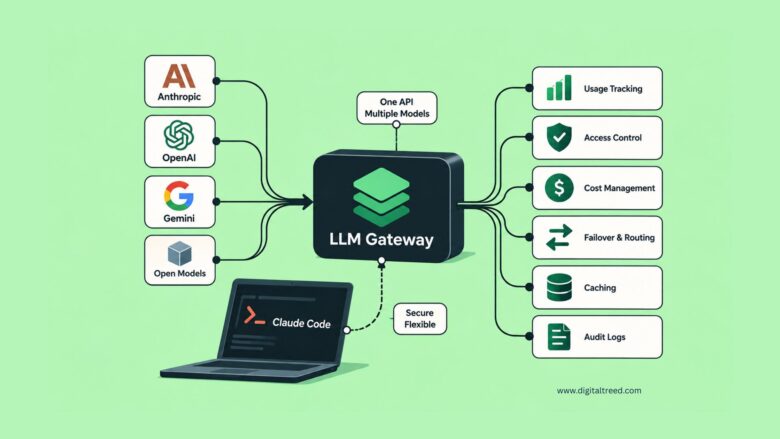
If you work with more than one AI model provider — say, Anthropic’s Claude alongside OpenAI, Gemini, or a self-hosted open-weight model — you’ve probably run into the same annoyance twice: every provider has its own SDK, its own API shape, and its own dashboard for tracking spend. An LLM gateway (also called an LLM proxy or router) sits in front of all of them and gives your applications and tools, including coding assistants like Claude Code, one consistent way to talk to any model.
This guide covers what these tools actually do, how they fit into a legitimate developer workflow, the leading options on the market, and what to watch out for — because not everything marketed as a “free unlimited AI” shortcut is what it claims to be.
What Is an LLM Gateway, Exactly?
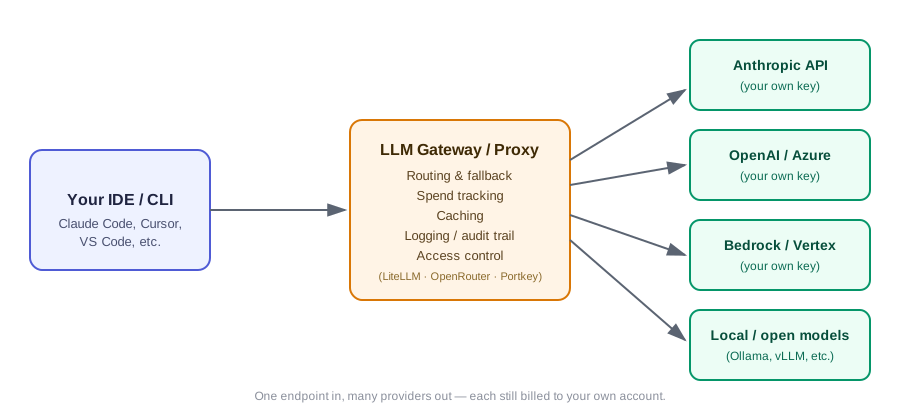
An LLM gateway is a thin layer that sits between your code (or your IDE) and the model providers you use. Instead of writing separate integration code for Anthropic, OpenAI, and Google, you point everything at one endpoint. The gateway translates that single request into whatever format each underlying provider expects, then returns a normalized response.
Most gateways bundle a handful of practical features on top of that basic translation layer:
- Failover and load balancing — if one provider has an outage or hits a rate limit, the request automatically retries against a different one
- Centralized spend and usage tracking — one dashboard instead of five separate billing pages
- Caching — repeated or similar prompts can be served from cache instead of hitting the model again
- Access control — issuing separate virtual keys per team, project, or environment
- Audit logging — a record of which model handled which request, useful for debugging and compliance
None of this requires bypassing anyone’s billing. You still hold accounts and API keys with each provider; the gateway just gives you one interface and one set of controls across all of them.
Why Developers Add a Gateway in Front of Claude Code
Claude Code, like most CLI-based coding agents, reads its connection details from environment variables and a settings file rather than hard-coding a single provider. According to Anthropic’s own Claude Code settings documentation, the CLI supports an ANTHROPIC_BASE_URL override specifically so it can be pointed at a proxy, a staging environment, or another Anthropic-API-compatible endpoint, alongside dedicated variables for routing through AWS Bedrock or Google Vertex AI. That’s a documented, supported extension point — not a workaround.
Teams typically use that extension point for reasons like:
- Governance — a company wants every developer’s Claude Code usage flowing through one gateway so it can apply budgets, rate limits, and logging per team
- Provider flexibility — testing whether a task performs better or cheaper on a different model without rewriting tooling
- Regional or infrastructure requirements — routing through Bedrock or Vertex because that’s where the organization already has its cloud spend and compliance sign-off
- Local development — pointing at a self-hosted open-weight model (via Ollama or a similar runtime) for offline or low-cost experimentation, then switching back to a hosted model for production work
In every one of these cases, the developer or the organization is still paying each provider directly. The gateway changes how the request is routed and what visibility you get — it doesn’t change who’s footing the bill.
The Major Players: LiteLLM, OpenRouter, and Portkey
There are dozens of tools in this space, but three names come up most often in developer conversations.
LiteLLM
LiteLLM is an open-source proxy and Python SDK, released under the MIT license, that you typically self-host. It translates OpenAI-format calls to more than 100 providers — Anthropic, Azure OpenAI, Bedrock, Vertex AI, Hugging Face, and others — and adds YAML-configured budgets, virtual API keys, rate limiting, and spend logs that can be exported to storage like S3 or GCS. Full configuration options are covered in the official LiteLLM documentation. Because you run it yourself, request data stays inside your own infrastructure, which matters for teams with strict data-residency requirements. The tradeoff is that you own the operational burden of running and maintaining the proxy.
OpenRouter
OpenRouter is a hosted, managed aggregator. You sign up, get a single API key, and immediately have access to hundreds of models through an OpenAI-compatible REST API, with no infrastructure to run. It handles provider failover and shows usage and billing in a consumer-friendly dashboard; the provider routing documentation covers how fallback between providers is configured. The convenience comes at the cost of a platform margin on top of the underlying provider’s price, and your requests do pass through OpenRouter’s infrastructure rather than staying entirely within your own.
Portkey
Portkey positions itself less as a simple proxy and more as a full LLM-operations platform: a unified gateway to well over a thousand models, paired with observability (latency, cost, and quality metrics per request), guardrails such as PII redaction and schema validation, prompt versioning, and role-based access control. It’s available as a hosted SaaS product or as a self-hosted deployment, which makes it a common choice for teams that need Portkey’s compliance and governance features but still want to keep data in-house.
Quick Comparison
| LiteLLM | OpenRouter | Portkey | |
|---|---|---|---|
| Hosting | Self-hosted (open source) | Managed SaaS only | Managed SaaS or self-hosted |
| Pricing model | Free to run; you pay each provider directly | Per-token markup over provider price | Free tier plus paid plans; provider costs pass through |
| Best for | Teams wanting full data control and no markup | Fast setup, broad model catalog, minimal ops | Production observability, guardrails, and governance |
| Setup effort | Higher — you deploy and maintain it | Lowest — sign up and get a key | Moderate, lower if using the hosted option |
None of these tools require you to abandon your existing provider accounts. You still authenticate with your own Anthropic, OpenAI, or cloud-provider credentials — the gateway just becomes the single place those credentials are configured and monitored.
Connecting a Gateway to Claude Code: The Legitimate Setup
If you decide a gateway fits your workflow, the setup follows the same pattern regardless of which tool you choose:
- Deploy or sign up for the gateway — run LiteLLM’s proxy server locally or in your infrastructure, or create an account with a hosted option like OpenRouter or Portkey.
- Add your own provider credentials to the gateway — your real Anthropic API key, OpenAI key, cloud credentials, and so on. The gateway needs these to make calls on your behalf; it does not supply them for you.
- Point Claude Code at the gateway, either as a one-off shell session:
bash
   export ANTHROPIC_BASE_URL="http://localhost:4000"   # or your gateway's URL
   export ANTHROPIC_API_KEY="your-gateway-issued-key"
   claude
or persistently in ~/.claude/settings.json using the env block Anthropic documents for exactly this purpose. 4. Restart your terminal or editor so the new environment variables take effect, then verify the connection with a simple prompt before relying on it for real work. 5. Keep an eye on the gateway’s dashboard for spend, latency, and error rates so you notice quickly if a provider degrades or a budget is close to its limit.
This is the same mechanism system administrators use to route Claude Code through Bedrock, Vertex, or an internal company gateway — it’s a supported integration path, and Anthropic’s own documentation and troubleshooting guides cover it directly.
What to Watch Out For
Because this space has legitimate infrastructure tools sitting right next to services that market themselves very differently, a few red flags are worth knowing before you connect anything to your coding environment:
- “Unlimited free” or “bypass the subscription” framing. A real gateway routes to accounts you own and pay for. If a tool’s main pitch is that you’ll never need to pay any provider, ask where the model access is actually coming from.
- Accepting arbitrary or placeholder values as a valid API key. Kaspersky’s analysis of rogue AI proxy services notes that low-cost or “free” AI aggregators frequently rely on pooled or improperly obtained credentials, and that the proxy operator has full visibility into every prompt and response passing through it — including proprietary code, business logic, and any secrets accidentally included in a prompt.
- No transparency about which underlying provider is actually serving the request. If you can’t tell whether a response came from a legitimate account in good standing, you can’t reason about its reliability, its data-handling terms, or whether it will simply stop working.
- Encouragement to disable normal security prompts or login flows. A gateway should add controls, not remove the ones already built into your tools.
None of this means self-hosting or aggregating providers is inherently risky — LiteLLM, OpenRouter, and Portkey are widely used in production specifically because they’re transparent about routing to accounts you control. The risk sits specifically with services built around obscuring where the model access comes from.
Choosing the Right Tool for Your Team
A reasonable way to narrow it down:
- Solo developer or small team wanting the fastest setup — OpenRouter’s hosted model gets you running in minutes with no infrastructure.
- Company with data-residency or compliance requirements — self-hosted LiteLLM keeps every request inside your own network.
- Team that needs production-grade observability and guardrails, not just routing — Portkey’s combination of gateway, monitoring, and access control covers more of that surface out of the box.
- Mixed environment with Bedrock, Vertex, and direct API access — LiteLLM’s broad native provider support tends to need the least glue code.
It’s also common to combine approaches — for example, a company running LiteLLM internally for governance while individual developers use OpenRouter for quick side-project experiments.
The Bottom Line
Multi-provider routing is a normal, well-supported part of a modern AI development stack, and Claude Code’s documented ANTHROPIC_BASE_URL setting exists specifically to make that possible. The tools that do this well — LiteLLM, OpenRouter, Portkey, and others in the same category — earn developer trust by being upfront about the fact that you’re still paying providers directly and simply gaining one interface, better visibility, and stronger controls across all of them. Anything positioning multi-provider access as a way to avoid paying for a service altogether is solving a different problem than the one a gateway is designed for, and it’s worth treating that framing with real skepticism before connecting it to a tool that has access to your codebase.
