
Quick answer
A social media content calendar is a spreadsheet with one row per post, and ours uses 12 columns planned a month ahead. If you post to Pinterest, schedule in two rounds, because as of October 2026 it holds only 10 scheduled pins at once. Copy our template below and put the holidays in first.
Maybe you run a small US shop and post whenever there's a spare minute, so dates like Thanksgiving hours slip past. A social media content calendar is a shared plan that lists each post's date, platform, format, topic and status. We built one for a made-up coffee shop, checked it and share the file.
We start with what goes in a social media content calendar, then platforms, pace and pillars. Next come the free template, a 4-week sample for a coffee shop and the US holidays to plan around. After what we tested, we cover how far ahead you can schedule each post and how to keep the calendar going week to week.
Key takeaways
- Put holidays in the Notes column before you write a single post.
- Pinterest holds 10 scheduled pins, so a 12-pin month needs two rounds.
- Quote captions in a CSV, or commas split one post across cells.
- Give every link the three UTM tags Google Analytics asks for.
- Buffer calls 3 to 5 Instagram posts a week the sweet spot.
What goes in a social media content calendar?
A calendar earns its keep when anyone on your team can open it and know what goes out tomorrow, on which platform and in what format. That takes more than a date. Our template uses 12 columns, and each one answers a question you'd otherwise ask out loud on a busy morning. Here's the full set.
| Column | What goes in it | Example from week 1 |
| Date and Day | Posting date, and its weekday | 2026-11-02, Mon |
| Platform | One channel per row | |
| Format | Reel, Photo, Story, Event, Pin... | Reel |
| Pillar | The theme the post serves | Product |
| Topic | What the post is about | Latte art in slow motion |
| Caption draft | The words, ready to paste | Slow pour, fast morning... |
| Link | Page URL with UTM tags | /menu?utm_source=instagram... |
| Alt text | A short description of the image | Barista pouring a leaf pattern |
| Owner | Who posts it | Owner |
| Status | Idea, Draft, Scheduled or Posted | Scheduled |
| Notes | Holiday, deadline or closure | Veterans Day (federal holiday) |
Two columns are easy to skip, and they're the ones that save time later. The Link column tells you which posts sent visitors, once each link carries tags your analytics can read, which is why it sits by the caption. The Alt text column is where you describe the image, so it's written before posting day. The W3C's tutorial says an informative image needs "at least a short description" of what it shows, and one plain sentence usually does it.
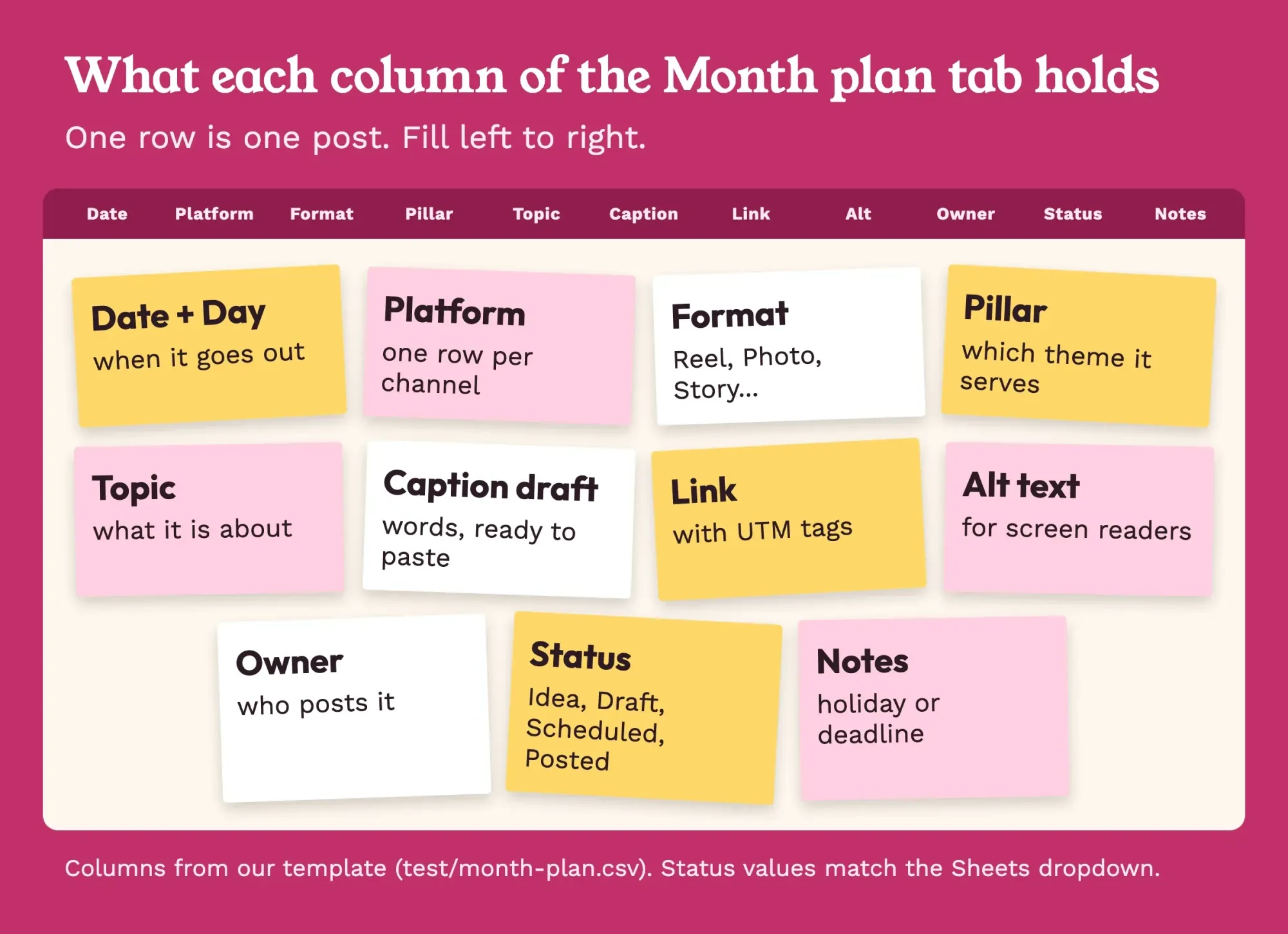 Diagram by DigitalTreed. Columns from our template, test/month-plan.csv, October 28, 2026.
Keep one row per platform, not one row per day, even when an idea goes to two places. On Monday, November 23, our sample posts the Thanksgiving hours to Facebook and a thank-you Reel to Instagram. Each one gets its own caption, link and status, because they rarely go out at the same minute. Across the month, the Owner column splits the 36 rows into 20 for the owner and 16 for the shift lead, so nobody writes everything.
Start with platforms, pace and pillars
Before you fill rows, pick the platforms, since a calendar can't fix the wrong mix. Pew's October 2026 fact sheet says "YouTube and Facebook are the most widely used" platforms in the United States, and about half of US adults use Instagram. Our step-by-step plan for small-business social media covers choosing platforms and goals. Here, the calendar needs just two answers from that work: which platforms, and how often.
On pace, the only public numbers with a stated method we found come from Buffer, a scheduling tool. Its study of over 2 million posts from 100,000+ Instagram accounts calls 3 to 5 posts a week "likely the sweet spot" for reach and growth. Our sample starts lower, at 2 Instagram posts a week. Two people write all 36 rows by hand, so every pace in it is our own choice, not a study result; adjust them to your hours. Treat Buffer's numbers as a ceiling to grow toward, since they come from accounts already using a scheduler, not a cafe owner posting between orders.
For our sample cafe, that came to 9 rows a week: 2 Instagram, 2 Facebook, 3 Pinterest, 1 LinkedIn and 1 TikTok. Over 4 weeks, 9 × 4 = 36 posts. Then each row got one of 4 pillars, Product, Behind the scenes, Community or Offer, so no week turns into a run of sales posts. How those posts should sound belongs in your one-page brand voice guide, not in the calendar itself.
We kept five platforms to show every format the template handles; with fewer hours, start with two.
The free template: copy it into Google Sheets
Now here's the template as plain CSV text, which any spreadsheet app can open, so you don't need an account with us or with any planner. These are the header and the first 3 rows of our sample month. Copy the block into a plain text editor, save it as a file ending in .csv, and import it with the 5 steps below.
Date,Day,Platform,Format,Pillar,Topic,Caption draft,Link,Alt text,Owner,Status,Notes
2026-11-02,Mon,Instagram,Reel,Product,Latte art in slow motion,"Slow pour, fast morning. Our maple latte, start to finish.",https://wrenhollow.example/menu?utm_source=instagram&utm_medium=social&utm_campaign=nov_2026,Barista pouring a leaf pattern into a latte,Owner,Scheduled,
2026-11-03,Tue,Facebook,Photo,Product,New fall menu,"Fall menu is here: maple latte, pear scone, chai. Which one first?",https://wrenhollow.example/menu?utm_source=facebook&utm_medium=social&utm_campaign=nov_2026,Fall menu board with three drinks and a scone,Owner,Draft,
2026-11-03,Tue,Pinterest,Pin,Product,Maple latte recipe card,"Maple latte at home, the way we make it at the bar.",https://wrenhollow.example/menu?utm_source=pinterest&utm_medium=social&utm_campaign=nov_2026,Recipe card for a maple latte,Shift lead,Scheduled,
Look at the quote marks around the captions. A caption like "Slow pour, fast morning" holds a comma, and without the quotes a spreadsheet splits it into two cells. Keep them when you add rows by hand; in our test, splitting on commas alone broke 30 of 36 lines. In Google Sheets, these 5 steps turn the file into a working calendar:
- Open a blank spreadsheet, click File, then Import, and pick your .csv file.
- Choose "Insert new sheets" so the file lands in its own tab. Name it Month plan, then add Holidays and Ideas tabs by hand.
- Select the Status column, click Insert, then Dropdown, and add Idea, Draft, Scheduled and Posted.
- Add a color rule through Format, then Conditional formatting, so Scheduled rows turn yellow.
- Freeze the header row so the column names stay put.
Google describes "Insert new sheets" as adding "new sheets with the imported data to your existing spreadsheet." A CSV holds one tab only, which is why the Holidays and Ideas tabs start blank. To start a blank month of your own, keep only the first line of the block.
The Link column is the fiddliest to fill. Google Analytics says you "should always use utm_source, utm_medium, and utm_campaign", and DigitalTreed's UTM builder tool makes each tagged link in one step.
A 4-week sample for a coffee shop
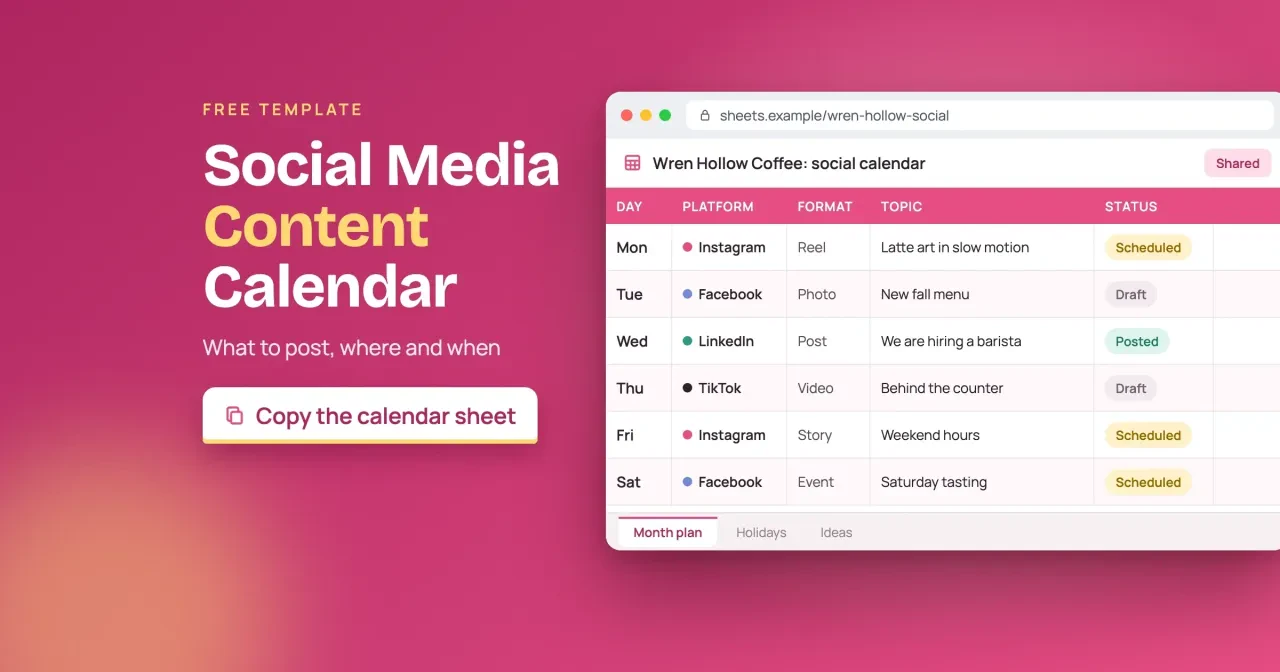
Next, we filled a whole month for Wren Hollow Coffee, a made-up cafe in Walla Walla, Washington, using real 2026 dates, the holidays below and the same 12 columns. The plan runs from Monday, November 2, to Sunday, November 29, 2026. It's planned on the Friday before, October 30. Week 1's six posts outside Pinterest follow the same pattern as the sheet in this post's cover image, from the latte art Reel on Monday to the Saturday tasting event.
The weeks follow the calendar, not a script. Holidays shape three of the four weeks. Week 2 adds a Veterans Day thank-you on Wednesday, November 11, and week 3 opens Thanksgiving pie orders. Week 4 posts the closed-Thursday hours on Monday, then builds up to Small Business Saturday with a makers market. Week 1 mixes Draft, Scheduled and Posted to show each stage, and later weeks stay at Idea until their Wednesday fill-in.
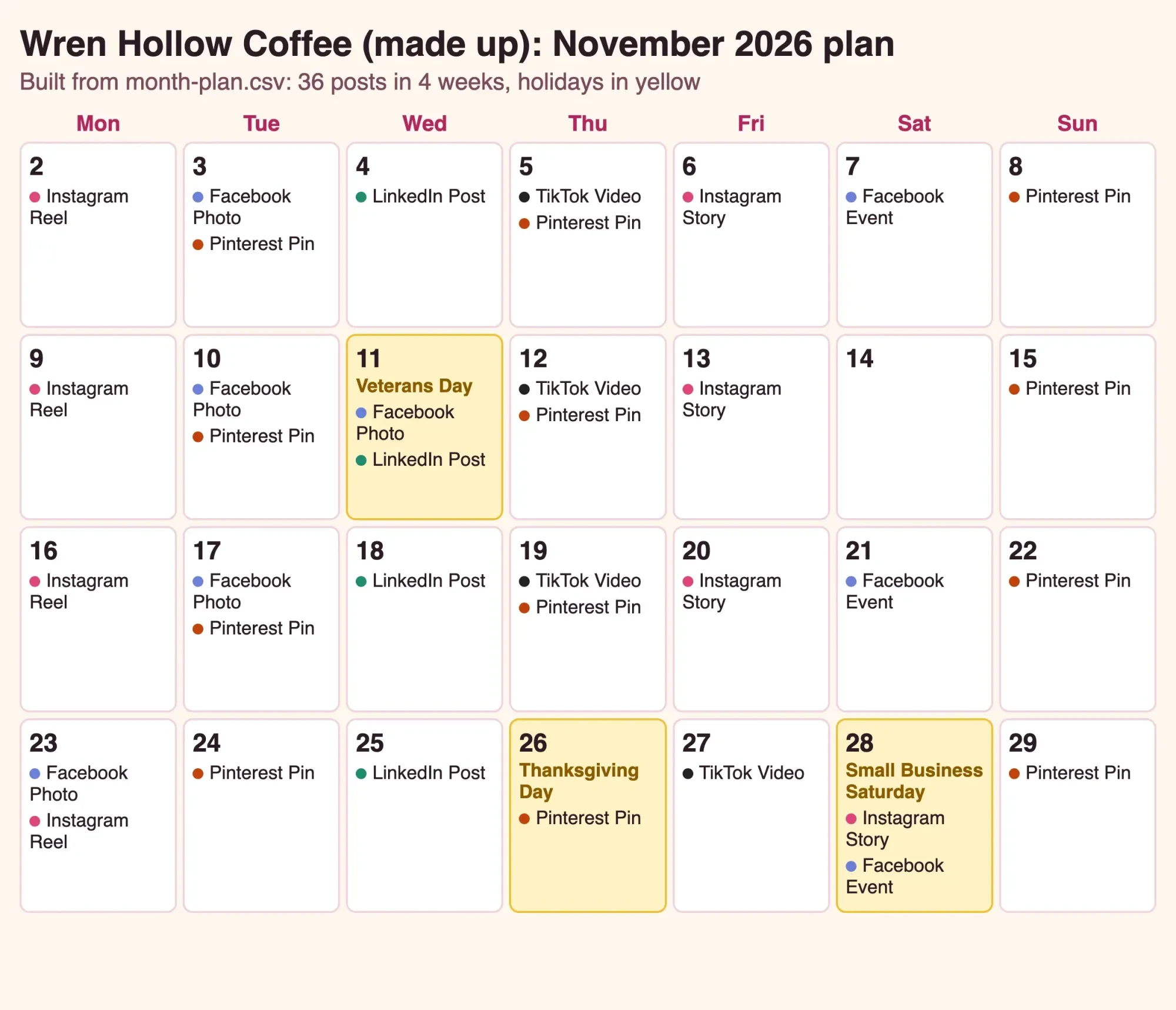 Screenshot: our calendar.html, built from month-plan.csv and served on 127.0.0.1, October 28, 2026. Wren Hollow Coffee is made up.
The pillar mix came out at 11 Product posts, 10 Community, 9 Behind the scenes and 6 Offer. Divide each count by 36 and round down, and that's 30%, 27%, 25% and 16% of the month. It's close to even on purpose. Our own limit is a third: past that, we'd swap an Offer row for a Community post so the feed doesn't read like a flyer. Short on topics for the Ideas tab? Our Facebook post ideas sorted by goal map onto the same 4 pillars.
The only day without a post is Saturday, November 14.
US holidays and dates to plan around
Those holiday rows in the sample came from one official list. The Office of Personnel Management's 2026 federal holiday schedule puts Veterans Day on Wednesday, November 11. It lists Thanksgiving Day on Thursday, November 26, and Christmas Day on Friday, December 25. They matter when they change your hours, your staffing or your customers' plans, so each one goes in the Holidays tab and the Notes column first.
Small Business Saturday isn't a federal holiday, but small shops plan their late fall around it. The SBA, quoted by the Census Bureau, says it "was founded by American Express in 2010 and officially cosponsored by SBA since 2011." The SBA's observances page says it's "Observed every year on the Saturday after Thanksgiving." With Thanksgiving on November 26 in OPM's list, that's November 28, 2026; American Express's own page didn't load for us. In our sample, that puts the hours post, the makers market and the gift-card story inside one 6-day stretch, November 23 to 28.
For spring, the SBA lists National Small Business Week 2027 as May 2-8. It's a natural week for a thank-you post to regulars, and it's worth a row in the Holidays tab now.
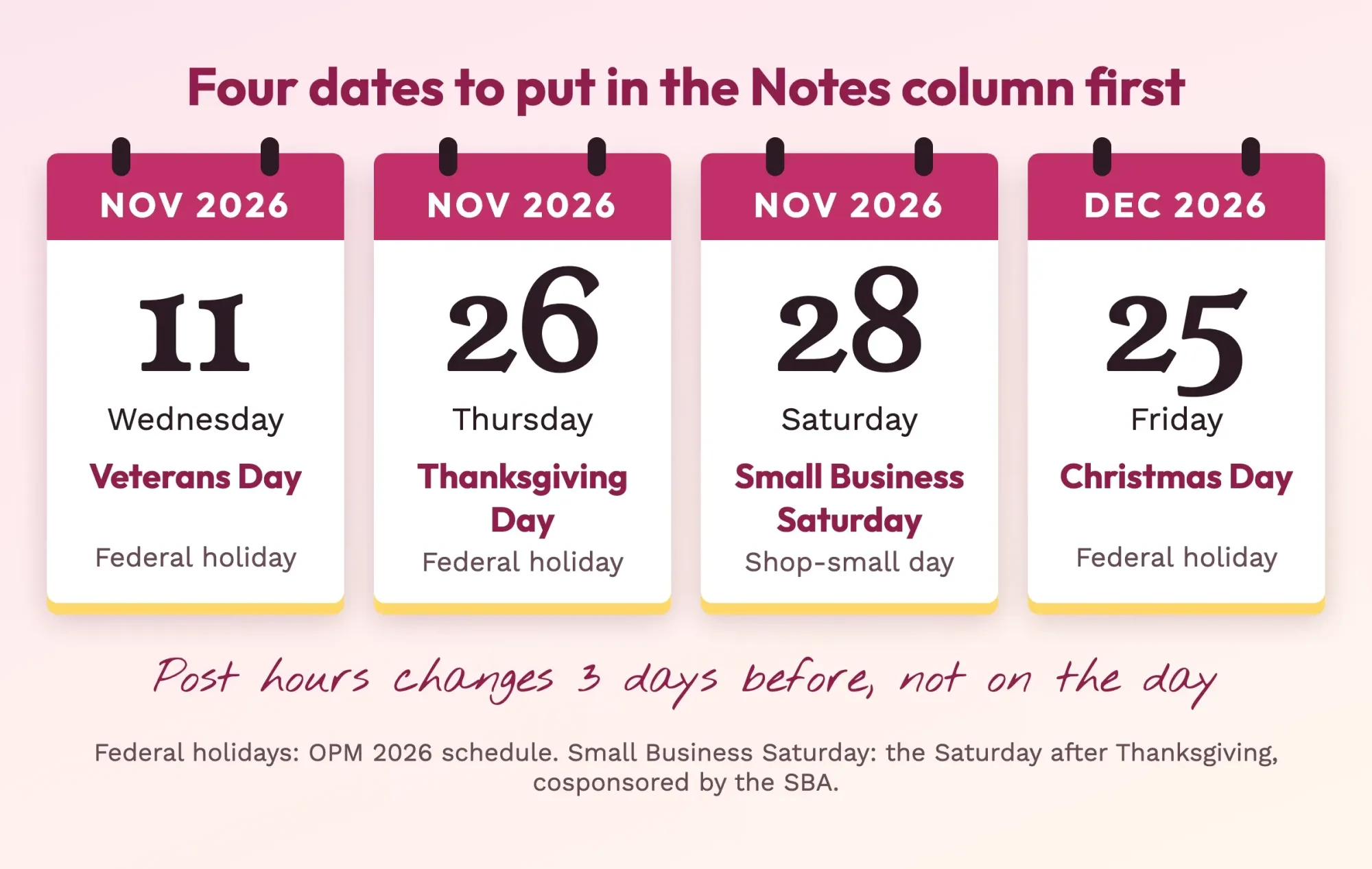 Drawn by us. Federal dates from OPM's 2026 holiday schedule; Small Business Saturday worked out from the SBA's Saturday-after-Thanksgiving rule, read October 28, 2026.
Post hours changes 3 days early, not on the day.
What we tested
Before calling it done, we ran a Python script on October 28, 2026, that builds the files and checks them. No accounts were used.
- Dates: 0 of 36 rows had the wrong weekday.
- Holidays: all 3 matched OPM's weekdays.
- Links: 36 of 36 carried all 3 UTM tags.
- Commas: 29 captions held one; a naive split broke 30 lines.
- Pinterest: 12 pins, 2 over the 10-pin cap.
Python's csv module quoted every caption that needed it. The file read back identically.
How far ahead can you schedule each post?
That Pinterest result points to a wider question, since each platform decides how much of the month you can load ahead. Pinterest's help page says "You can schedule a Pin up to 30 days in advance" and that you "can have up to 10 Pins scheduled for the future." Our 12-pin month hit that cap. Twelve pins, ten slots. So pins 1 to 10 can go in on October 30 once they're written, and the last 2 wait until the first pins go live. In our file, only week 1's 3 pins are at Scheduled so far.
In our file, those first 10 pins run through Tuesday, November 24. The last pin, on November 29, sits exactly 30 days after the planning day, right at Pinterest's limit. We'd set a reminder for the second week of November to load the last 2, since a slot only frees up after an earlier pin goes out.
YouTube adds a time zone to the date.
Its help page tells you to set the video to scheduled or private, then "Set the date, time, and time zone" for publishing. If your team spans two states, put your time zone in the sheet's header so nobody schedules an hour off.
For Facebook and Instagram, Meta Business Suite is Meta's own planner. Meta's help pages didn't load for us on October 28, 2026, so we don't quote its limits here. Check them inside the tool before you load a full month. Whatever you use, keep the spreadsheet as the master copy, because a scheduler only shows what's already loaded. With five platforms in play, the sheet is also the one place that shows the whole week side by side. The time of day is a separate question, and our Facebook posting-time comparison of 5 studies covers it.
Keep the calendar going week to week
Once posts are scheduled, the calendar still needs a short weekly loop, or it goes stale by week 2. Five stops do it. We'd check last week's posts on Monday and reply on Tuesday. Wednesday is for filling next week's Idea rows, Thursday for writing and shooting, and Friday for scheduling. On the Wednesday of week 1, that means turning the 9 Idea rows for November 9 to 15 into drafts with a caption, a tagged link and alt text.
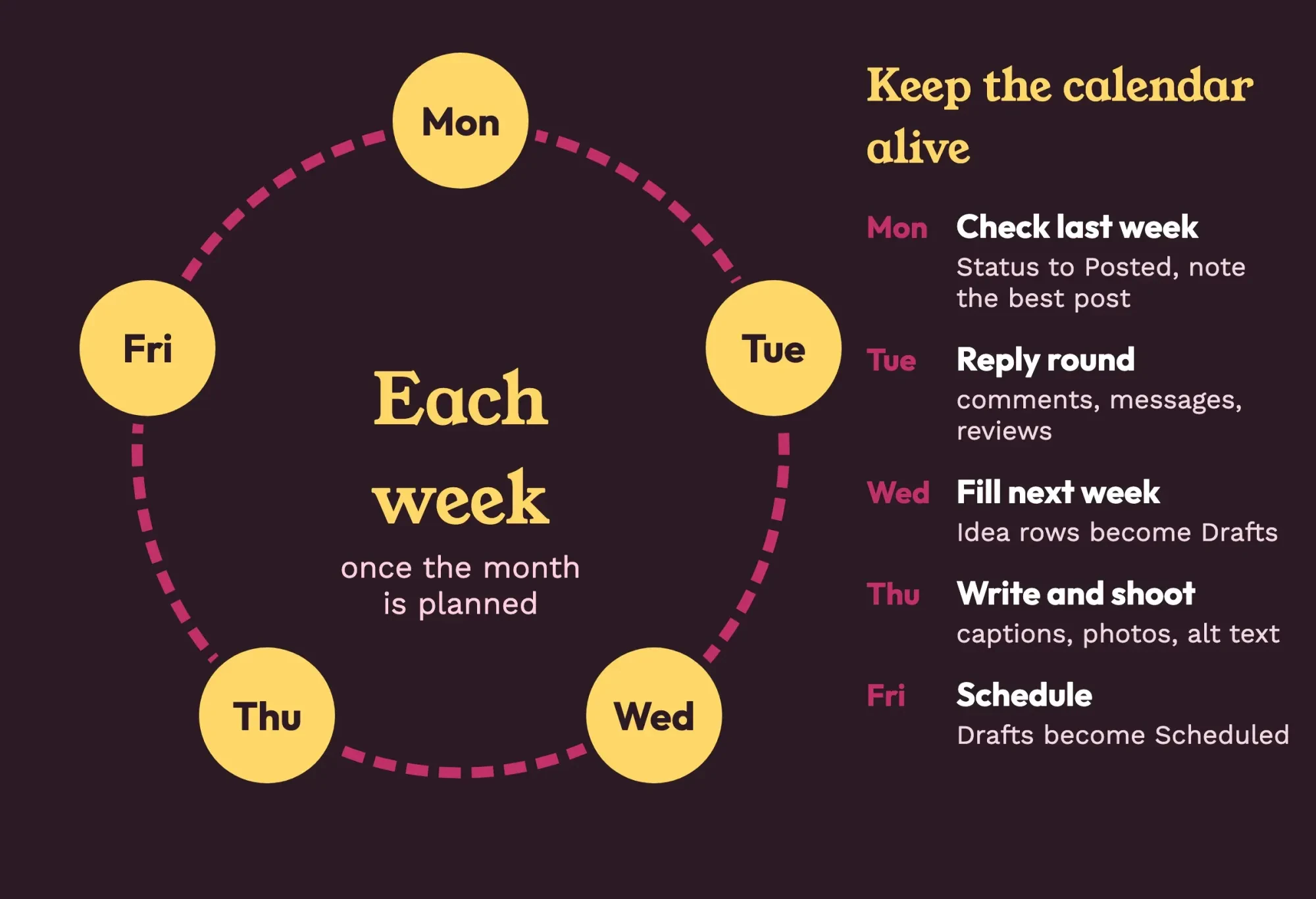 Diagram by DigitalTreed. Our suggested weekly routine for the template, October 2026.
The Status column is what makes the loop work, since each step moves rows from Idea to Draft to Scheduled to Posted. Once a month, take the Posted rows into your monthly social media report. Once a quarter, step back and check whole channels with a social media audit template, which is where you decide whether a platform keeps its rows at all.
Weeks will fall apart sometimes. When they do, don't delete the rows you missed; set them back to Idea, and they're waiting for you when next month's planning day comes around.
Our take: plan a month, but write one week at a time. Holidays and pins get locked in early, and the captions still sound like this week, not like something you wrote in a rush four weeks earlier. Prefer to hand the posting off? DigitalTreed's social media service for small businesses runs calendars like this one; it's a paid service, so weigh it like any vendor.
Frequently asked questions
Frequently asked
Does Google Sheets have a content calendar template?
Its template gallery offers "resumes, budgets, and order forms," opened from Template Gallery at the top right. Our CSV saves you adapting one of those.
How many posts a week does a small shop need to plan?
Plan what you can keep for 3 months. Buffer says 3 to 5 Instagram posts a week can more than double follower growth rate versus 1 or 2.
How do I tell two links in one post apart?
Add utm_content, which Google Analytics uses to differentiate creatives.
Can a scheduled YouTube video fail to go live?
Yes. After a Community Guidelines strike, a scheduled video won’t publish during the penalty period.
How we made this guide: We read the 14 pages in Sources on October 28, 2026, then built the template and ran our checks in a local Python script. Facts checked by the DigitalTreed team on October 28, 2026.
First published April 2020. Rewritten October 28, 2026: now a tested calendar template with a sample month.
Sources
- U.S. Office of Personnel Management: Federal holidays
- U.S. Census Bureau: Small Business Saturday: November 29, 2025
- U.S. Small Business Administration: Observances
- U.S. Small Business Administration: National Small Business Week
- Pinterest Business help: Schedule Pins
- YouTube Help: Schedule video publish time
- Google Docs Editors Help: Import data sets in Google Sheets
- Google Docs Editors Help: Create an in-cell dropdown list
- Google Docs Editors Help: Use conditional formatting rules in Google Sheets
- Google Docs Editors Help: Use templates
- Google Analytics Help: URL builders and UTM parameters
- Buffer: How often should you post on Instagram
- Pew Research Center: Social media fact sheet
- W3C Web Accessibility Initiative: Images tutorial
Comments
No comments yet. Start the conversation below.