
Quick answer
An email campaign checklist covers 20 checks in five groups: the list, the sender, the words, the build and the footer. Since 2024, Gmail and Yahoo also want every sender to keep spam complaints under 0.3%, and bulk senders to offer one-click unsubscribe. Two footer checks are federal law, so skipping them risks more than the spam folder.
This page is for send day. If you still need the plan behind the campaign (who it's for, what it should earn, how often you'll send), read our small-business guide to email marketing strategy first.
Then come back with the email written.
The trick is knowing which checks a tool can do for you and which ones need your eyes.
Key takeaways
- The checklist has 20 checks in five groups, from the list to the footer.
- Gmail wants spam rates below 0.10% and never at 0.30% or higher.
- Yahoo wants unsubscribes honored within 2 days; the law allows 10 business days.
- Every marketing email needs a valid postal address and a clear opt-out.
- A CAN-SPAM violation can cost up to $53,088 for each separate email.
Most pre-send checklists skip the rules that changed in 2024
Before we wrote our own email campaign checklist, on October 26, 2026, we read the checklists that rank for it in US results.
They agree on the basics (subject line, links, images, mobile, a test send) but go quiet on the rules that now decide whether an email arrives.
Litmus's list is from September 2022 and carries its own "2+ years old" warning. Mailtrap's, updated in February 2026, names SPF, DKIM and DMARC but gives no spam-rate number and no dates. Bird's cites Canada's anti-spam law from 2017 and nothing on authentication. Brevo's sits behind a download form, so we couldn't read it.
Meanwhile the mailbox providers rewrote the rules. Google's email sender guidelines set new requirements "Starting February 1, 2024" for anyone sending more than 5,000 messages a day to Gmail. Yahoo began enforcing matching rules the same month.
Microsoft's Outlook joined for high-volume senders on May 5, 2025.
And Google's sender guidelines FAQ says, "Starting November 2025, Gmail is ramping up its enforcement on non-compliant traffic," including "temporary and permanent rejections."
So the old pre-send list needs updating.
The 20-point email campaign checklist
That's the gap this list fills. Copy it into the doc or task you open on send day, and tick each line before you press send. Each group is explained below, with sources.
- Everyone on the list opted in to hear from you.
- You picked the right segment and applied your suppression list (past unsubscribes, bounces).
- Bad and long-dead addresses were cleaned out recently.
- Your unsubscribe process removes people within 2 days.
- The From name is one people know, at your business domain.
- SPF and DKIM are set up for the domain that sends.
- DMARC is published (p=none is fine) and the From domain aligns with SPF or DKIM.
- Replies go to an inbox a person reads.
- The subject line honestly matches what's inside.
- Preview text is written on purpose.
- A promotional email says clearly that it's an ad.
- There's one main call to action, and its prices, codes and dates are right.
- Every merge tag has a fallback.
- Every link opens the right page and carries UTM tags.
- Every image has alt text, and the email makes sense with images off.
- Text has 4.5:1 contrast and reads well on a phone and in dark mode.
- A plain-text version goes out with the HTML.
- The footer shows your valid postal address.
- There's a visible unsubscribe link and a one-click unsubscribe header.
- You sent tests to real inboxes, a second person read it, and you'll check the spam rate after.
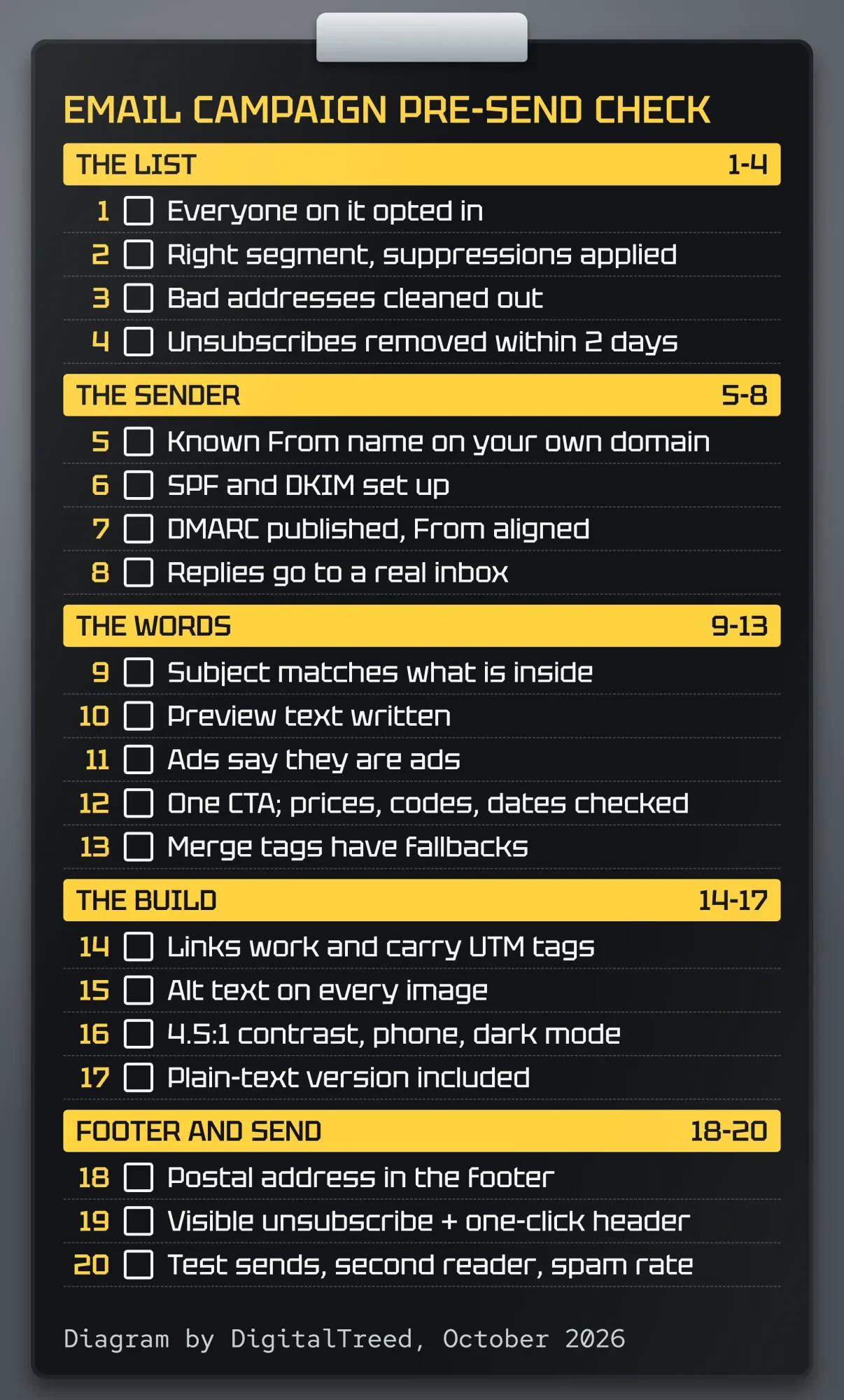 Diagram by DigitalTreed, October 2026: the 20-point checklist above.
Checks 4, 6, 7, 19 and 20 come from Gmail's and Yahoo's rules. Checks 9, 11, 18 and 19 track the federal CAN-SPAM Act.
The rest is craft.
Checks 1 to 4: send only to people who asked
The checklist starts with the list because no subject line rescues an email sent to people who never asked for it. They're the ones who hit "Report spam".
"Make sure recipients opt in to get messages from you," Google's sender guidelines say. The same page suggests you "Confirm each recipient's email address before subscribing them" and send the occasional check-in asking people whether they still want your mail.
Then pick the segment. A spring sale for local customers shouldn't go to the out-of-state people who bought one gift card in 2023.
Apply your suppression list too, so past unsubscribes and hard bounces stay out even if someone re-imports an old spreadsheet.
Clean the list if it's been a while. A verifier catches dead addresses before your campaign bounces off them. Our comparison of email verification tools by price per check shows what each one charges.
Check 4 is about speed. The law, Google and Yahoo each set a different clock for unsubscribes:
- Yahoo's sender best practices: "Honor unsubscribes within 2 days."
- Google recommends removing people "within 48 hours" and lists missing that window in its enforcement table.
- The FTC's CAN-SPAM compliance guide: 10 business days, the legal limit.
Build for the fastest one.
Most email platforms process unsubscribes right away; the risk is a list you exported to another tool.
Checks 5 to 8: prove the email really comes from you
Once the list is right, the next job is proving the email is yours, because mailbox providers now check the domain before they read a word.
Start with the From line. A known name at your business domain beats a free mailbox address.
No domain address yet? Our guide to setting up a business email address walks through it.
Then the three DNS records. SPF lists the servers allowed to send for your domain. DKIM signs each message so a receiver can tell it wasn't changed, and DMARC tells receivers what to do when a message fails those checks.
"Set up SPF or DKIM email authentication for your sending domains," Google asks of every sender. Bulk senders need both, plus DMARC, and "Your DMARC enforcement policy can be set to none," Google adds. The From domain also has to line up: "the domain in the sender's From: header must be aligned with either the SPF domain or the DKIM domain."
You can see a real DMARC record in seconds. We looked up the big three's own records with dig on October 26, 2026. Yahoo publishes "v=DMARC1; p=reject", while Gmail and Outlook both publish p=none with sp=quarantine. Yours can start at p=none too. Check your own domain's SPF and _dmarc records with our free DNS lookup tool.
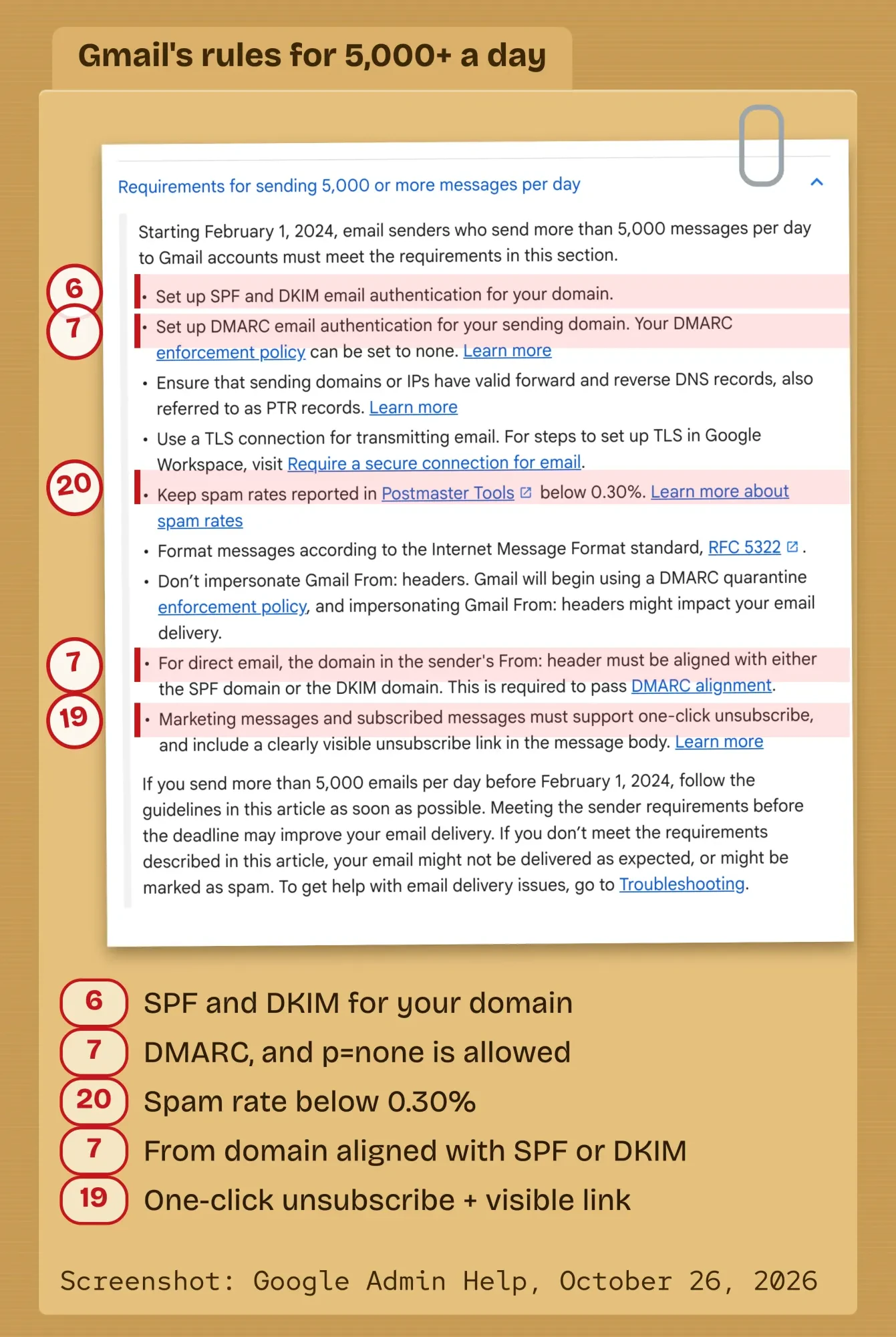 Screenshot: Google Workspace Admin Help, "Email sender guidelines", taken signed out on October 26, 2026, with the 5,000-a-day section opened. Annotations by DigitalTreed.
DKIM isn't in that lookup on its own, because its record sits under a selector name your email platform gives you. Your platform's domain settings page usually shows whether it passes.
Last, check 8: set the reply-to to an inbox a person reads. A "noreply" address tells customers you don't want to hear from them, and replies are often the most useful thing a campaign earns.
What counts as a bulk sender at Gmail, Yahoo and Outlook?
A bulk sender, for Gmail, is "any email sender that sends close to 5,000 messages or more to personal Gmail accounts within a 24-hour period," per its FAQ. Outlook uses the same 5,000-a-day line. Yahoo's sender FAQ says, "We will not specify a volume threshold."
Here's how the three compare, as each company's own page stated it on October 26, 2026:
| Rule | Gmail | Yahoo | Outlook |
|---|---|---|---|
| Who counts as bulk | About 5,000+ a day to personal Gmail | No number given | Domains sending over 5,000 a day |
| Every sender | SPF or DKIM; spam rate below 0.3% | SPF or DKIM; spam rate below 0.3% | Not stated |
| Bulk authentication | SPF, DKIM, DMARC (p=none OK), aligned | SPF, DKIM, DMARC at least p=none, aligned | SPF, DKIM, DMARC at least p=none, aligned |
| Unsubscribe | One-click plus a visible link | One-click header plus a visible link, within 2 days | Recommended, not required: a visible unsubscribe link |
| Spam rate | Below 0.30%, aim below 0.10% | Below 0.3% | Not stated |
| If you miss | Rejections since November 2025 | Spam folder or rejection from February 2024; one-click enforced from June 2024 | Rejected from May 5, 2025 |
The Outlook column comes from Microsoft's post on high-volume sender requirements, whose April 29, 2025 update says failing messages get rejected with the code "550; 5.7.515". Yahoo's FAQ dates its unsubscribe enforcement to June 2024.
These are company policies, not laws.
But they decide whether you reach the inbox, so treat them like rules.
One limit worth knowing: Google says its guidelines "don’t apply to messages sent to Google Workspace accounts," only to personal Gmail. Your customers on company addresses still have their own filters, so meet the rules anyway.
Checks 9 to 13: the words have to match the offer
Now the email itself. Checks 9 to 13 are about honesty and polish, and two of them are law.
Check 9 comes straight from the FTC: "The subject line must accurately reflect the content of the message."
A subject that promises "Your order has shipped" on a sale email isn't clever, it's a violation.
Preview text, check 10, is the line inboxes show after the subject. Leave it blank and many inboxes show whatever text comes first, which is often "View in browser". Write one sentence that adds to the subject instead of repeating it.
Check 11 is the ad label. The FTC says "you must disclose clearly and conspicuously that your message is an advertisement," and adds that the law gives "a lot of leeway in how to do this."
A plain line near the top works.
Checks 12 and 13 are where real campaigns break. Read every price, code and date against the offer. Then read them again. Click the code into a test checkout if you can. Give every merge tag a fallback so a missing first name prints "Hi there", not "Hi ," or a raw tag.
Skip the shouty caps and the stack of exclamation marks while you're there. If you want to see how other brands word their offers, our roundup of email marketing campaign examples has plenty.
Checks 14 to 17: links, images and small screens
With the words settled, click everything. Check 14 means every link opens the page it promises, on a phone too, and carries tags so your analytics can show what the email earned.
Google Analytics' URL builder help says, "When you add parameters to a URL, you should always use utm_source , utm_medium , and utm_campaign ." Its own example uses utm_medium=email. The UTM builder on our site tags them for you.
Paste them in, then click each one again.
Alt text is check 15. Some email apps hold images back until the reader allows them, and screen readers read alt text out loud. Describe what each image says; for a purely decorative divider, the W3C alt decision tree says, "Use an empty alt attribute."
Check 16 is contrast. WCAG's contrast guidance asks for text with "a contrast ratio of at least 4.5:1". Light gray footer text is the usual offender, and dark mode can flip your colors, so view it both ways.
Last in this group comes the plain-text version, check 17.
Most platforms build one for you, but read it: links and the unsubscribe line should survive.
Checks 18 and 19: the footer CAN-SPAM requires
Those last checks make the email work; checks 18 and 19 keep it legal. CAN-SPAM, the federal law the FTC enforces, has two footer rules almost every campaign touches.
Check 18: "Your message must include your valid physical postal address." Check 19: "Your message must include a clear and conspicuous explanation of how the recipient can opt out of getting marketing email from you in the future."
The opt-out has limits on what you can ask. You "can’t charge a fee," the FTC says, or require "any personally identifying information beyond an email address" before honoring it. The most you can ask is a reply email or a visit to "a single page on an Internet website," in the FTC's words. So no login wall before the unsubscribe button.
Hiring an agency doesn't move the duty. The guide's heading says, "Monitor what others are doing on your behalf."
Getting it wrong is expensive. The FTC page puts the civil penalty as high as $53,088 for each separate email that breaks the law. That's the inflation-adjusted maximum in the FTC's penalty rule since January 2025.
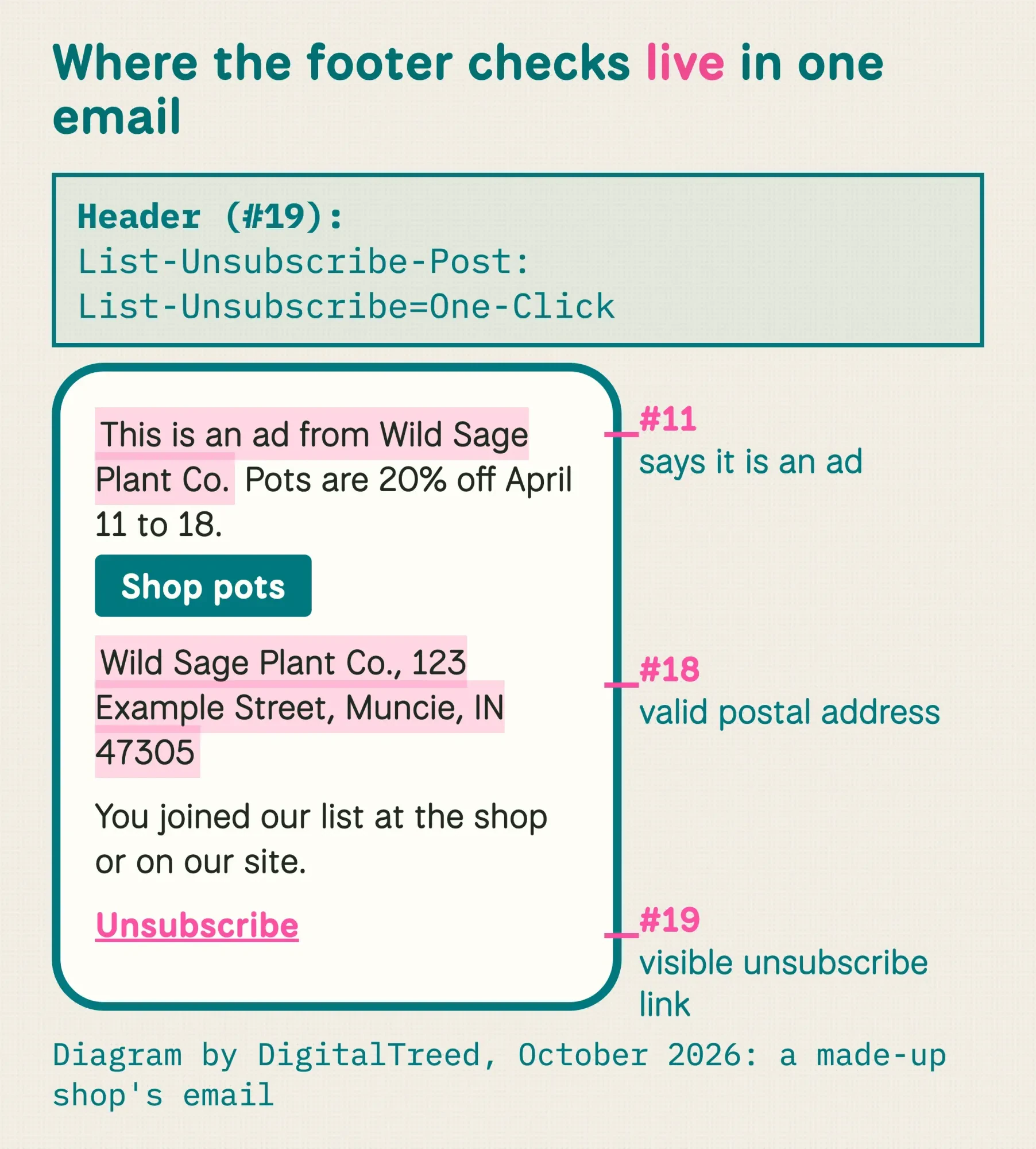 Diagram by DigitalTreed, October 2026: the footer checks on our made-up example email.
The mailbox providers add a header on top of the visible link. Marketing messages "must support one-click unsubscribe, and include a clearly visible unsubscribe link in the message body," Google says. Yahoo calls the RFC 8058 POST method "highly recommended" in its rules. In practice, your platform adds the List-Unsubscribe and List-Unsubscribe-Post headers; your job is to confirm they're there in a test send's headers.
This section explains the rules as the FTC states them; it isn't legal advice about your list or your offer. If you're unsure, a US attorney who handles marketing law can tell you how it applies to you.
Check 20: test in real inboxes, then watch the complaints
After the footer, send the test. Previews inside your email platform are a guess. Real inboxes are the answer.
Send it to at least a Gmail address, an Outlook address and an iPhone. If you test on a desktop, our guide to adding your email to Outlook gets a test inbox running fast. Then hand it to a second person who didn't write it. Ask them to click everything.
Schedule for your readers' time zone, not yours.
A 9 a.m. Eastern send lands at 6 a.m. in California.
Then watch what happens. Google's sender guidelines say, "Keep spam rates reported in Postmaster Tools below 0.10% and avoid ever reaching a spam rate of 0.30% or higher."
Postmaster Tools is free, but its data "only applies to messages sent to personal Gmail accounts." Google's spam rate help defines the rate as the share of messages "delivered to engaged recipient's Inbox and then marked as spam."
Judge the campaign on clicks, not opens. Apple's Mail Privacy Protection "prevents senders from seeing if you’ve opened the email message they sent you," so open rates from Apple Mail users don't tell you much.
We ran a script over a made-up spring sale email
So which of these 20 checks can a tool do for you? We wanted a real answer, so on October 26, 2026, we wrote a short script and ran it on a sample campaign.
Example: Wild Sage Plant Co. is a made-up plant shop in Muncie, Indiana. We wrote its repotting-week sale email twice. The draft had seven slips planted in it.
A noreply reply-to, no preview text, a merge tag with no fallback, two links without UTM tags, two images without alt text, light gray footer text and no one-click header. The fixed version corrected all seven.
The script ran 12 tests on the saved email files, and the draft passed only 5 of them while the fixed version passed all 12.
It caught every planted slip and flagged nothing that was right.
The contrast test was the clearest number. The draft's #A0A0A0 gray on white measured 2.61:1, well under WCAG's 4.5:1. The fix, #595959, measured 7.00:1.
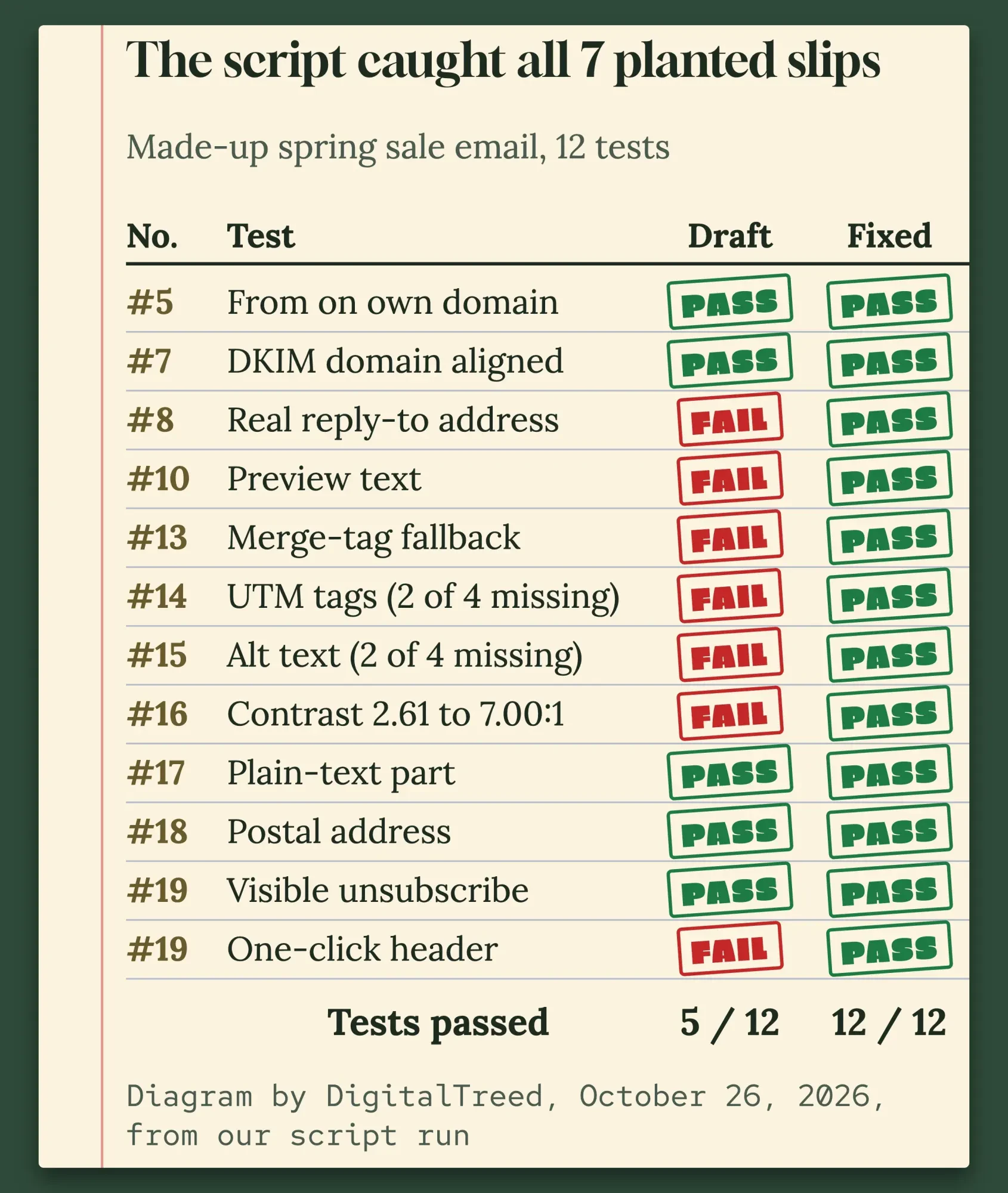 Diagram by DigitalTreed, October 26, 2026, from our own script run on two made-up emails.
Those 12 tests touched 11 of the 20 checks. The other 9 stayed out of reach: opt-in, segment, list cleaning, unsubscribe speed, SPF and DKIM records, an honest subject, the ad label, the offer details and real-inbox tests. Those need a person, a DNS lookup or your email platform.
Our take: let your platform's built-in checks and a test send catch the mechanical slips, then spend your own minutes on the nine judgment checks. Those are the ones that cause spam complaints and legal trouble.
Frequently asked
Does CAN-SPAM apply to B2B emails?
Yes. The FTC guide says, "The law makes no exception for business-to-business email." A promotion sent to company addresses needs the same honest subject line, postal address and opt-out.
Can a PO box be the postal address in my email footer?
Yes, if it's registered. The FTC accepts your current street address, "a post office box you've registered with the U.S. Postal Service," or a private mailbox registered with a commercial mail receiving agency under Postal Service rules.
Do receipts and password emails need one-click unsubscribe?
No. Yahoo's FAQ says one-click unsubscribe "is only required for promotional/marketing messages" and "does not apply to transactional messages (e.g. order confirmations, password resets)." Google's rule also names marketing and subscribed messages.
Want someone to build the template so these checks pass before you even start? We design and code email templates; see what's included in web development at DigitalTreed. We'd earn money if you hire us, so the checklist above is yours to use either way.
How we made this guide: on October 26, 2026, we read the FTC's CAN-SPAM compliance guide and Google's sender guidelines, FAQ and Postmaster Tools help. We read Yahoo's Sender Hub, Microsoft's Outlook sender post, RFC 8058, and the Google Analytics, Apple and W3C pages cited here. Then we went through the checklists that rank for this topic in US results and noted what each one left out. We looked up Gmail's, Yahoo's and Outlook's DMARC records with dig, and ran our own script on two made-up emails for the example shop. The screenshot is from a public Google help page. Each rule has its source linked where it's stated.
Nothing here went to real subscribers. Wild Sage Plant Co., its street address and both of its emails are invented. Eram N. reads this rewrite in full and approves it before it goes up on our blog.
First published July 2020. Rewritten October 26, 2026: the old post was a general list of campaign planning tips. This version is a 20-point pre-send checklist with the Gmail, Yahoo and Outlook sender rules. It adds the FTC's own words on the CAN-SPAM footer and our script test on a sample email.
Sources
- Federal Trade Commission: CAN-SPAM Act: A Compliance Guide for Business
- Google Workspace Admin Help: Email sender guidelines
- Google Workspace Admin Help: Email sender guidelines FAQ
- Google Workspace Admin Help: Postmaster Tools spam rate
- Gmail Help: Set up Postmaster Tools
- Yahoo Sender Hub: Sender best practices
- Yahoo Sender Hub: FAQs
- Microsoft Defender for Office 365 Blog: Outlook's new requirements for high-volume senders (updated April 2025)
- IETF RFC 8058: Signaling one-click functionality for list email headers
- Google Analytics Help: URL builders (campaign parameters)
- Apple Support: Use Mail Privacy Protection on iPhone
- W3C Web Accessibility Initiative: An alt decision tree
- W3C: Understanding WCAG 2.2, contrast (minimum)
- eCFR: 16 CFR 1.98, Adjustment of civil monetary penalty amounts
Comments
No comments yet. Start the conversation below.