

Three ways to build a website with AI, and which is yours
This guide is for small business owners, shopkeepers, clinics, coaches and freelancers who want a website and have heard that AI can make one in minutes. It can. What the demos skip is everything after the first draft: wrong facts, a form that sends nowhere, a database anyone can read, a page Google can't see, and a price that triples at renewal.
We build one site all the way through, for the same made-up dental clinic as in our WordPress guide: Nova Dental in Baner, Pune. So you can compare the two guides side by side. For chapter 6 we gave the same prompt to Claude, ChatGPT and Grok on 25 October 2026 and report what came back, including the one that failed.
Chapters 1 to 4 help you choose a path, plan and budget. Chapters 5 to 7 build the site on each path. Chapters 8 to 11 deal with fixing, security, SEO and the legal side, and 12 and 13 cover launch day and after. There are 13 chapters and about 80 minutes of reading. Every chapter ends with a "Done when" line so you know when to move on.
Prices are in rupees and US dollars and were checked on 25 October 2026. We show each company's price in its own currency; where we convert, we use ₹96 to US$1. We name tools only to show real prices and what they do. We don't rank them, and there are no affiliate links in this guide.
Quick answer
Path A is a hosted AI builder: you describe your business and it makes and hosts the site. Path B is vibe coding: an AI writes the code and you put it online yourself. Path C is AI help inside WordPress. Choose by what you need to own and change later, and who will fix it, not by the demo.
"Build a website with AI" means three quite different things in 2026. The ads and YouTube videos usually show one of them and call it the whole answer. Here they are side by side.
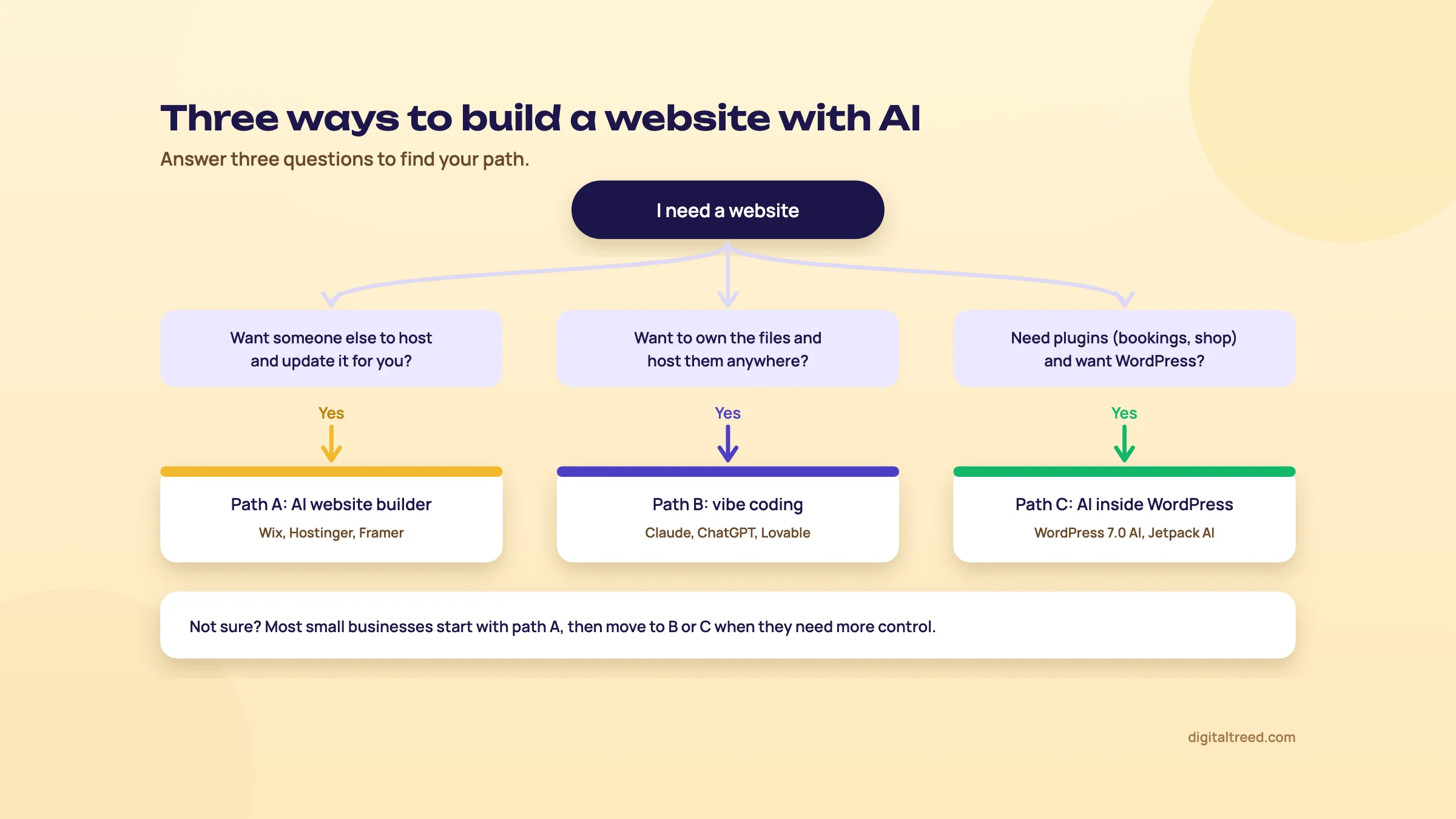 Three paths. Most small businesses start with path A.
Path A: a hosted AI website builder
You type a few lines about your business, the builder makes a full site with pages, text and pictures, and you edit it by clicking. The company also hosts it (keeps it online on its computers) and looks after updates. You pay a monthly or yearly plan.
Examples you'll come across:
- Wix: "Go from a prompt to a business-ready website", then change things by hand or with Aria, which Wix calls "your built-in AI agent".[1]
- Hostinger AI Builder: Hostinger merged its website builder and its vibe coding tool, Horizons, into one builder "with two modes - Manual for drag-and-drop editing, and Agentic for vibe coding".[2]
- Framer, Durable, 10Web and Squarespace work in a similar way. 10Web is different underneath: it builds WordPress sites.[3]
This is the path with the least to go wrong. The trade-off is that your site lives inside that company's system. Moving away later usually means rebuilding.
Path B: vibe coding
The term comes from Andrej Karpathy, an AI researcher, in a post on X on 2 February 2025:
There's a new kind of coding I call "vibe coding", where you fully give in to the vibes, embrace exponentials, and forget that the code even exists.[4]
Collins Dictionary made "vibe coding" its Word of the Year 2025 and defines it as "the use of artificial intelligence prompted by natural language to write computer code".[5] In plain words: you describe what you want, the AI writes the code (the instructions a browser reads to show a page), and you don't need to read it. It's worth knowing that Karpathy himself said it's "not too bad for throwaway weekend projects".[4] A business website isn't throwaway, which is why chapters 8 to 10 exist.
There are three kinds of vibe coding tool:
- Ordinary AI chatbots such as ChatGPT, Claude and Grok. You ask for a website in a chat and get the files. This is the path we show step by step in chapter 6, because most people already have one of these apps.
- App builders made for vibe coding, such as Lovable, Bolt.new, v0 and Replit. They write the code, show you a live preview and can host it. Google AI Studio's Build mode does the same, and using AI Studio is free of charge,[6] though Google notes that "if you use paid models, costs may apply".[7] Most of them build web apps with a database (an organised store of data, like customer records) behind them, which is more than a five-page site needs. We compare their prices in chapter 4.
- Coding agents such as Claude Code, Cursor and GitHub Copilot. They work inside a code editor on your computer. They're for people who are ready to look at code.
Path C: AI inside WordPress
WordPress is the software behind many small business sites. Since version 7.0 it has an AI Client in its core and a Connectors screen where you connect an AI provider you pay for.[8] WordPress.com, the hosted version, has its own "WordPress Agent" that builds a site from a description, on any paid plan.[9] On this path AI helps you write and design, but you still get WordPress's plugins and the freedom to move hosts. Chapter 7 covers it, and our WordPress guide covers the rest.
Which path is yours?
| Question | Path A: AI builder | Path B: vibe coding | Path C: WordPress with AI |
|---|---|---|---|
| Skill needed | None | Comfortable with files and folders; some patience | A little; WordPress has a learning curve |
| Cheapest start | Free plans with the builder's branding | Free chatbot plus free hosting; you pay for the domain | Hosting and a domain, about ₹5,000 on day one in our WordPress guide's example |
| Who hosts it | The builder | You choose a host | You choose a host, or WordPress.com |
| Bookings, shop, payments | Built-in apps on higher plans | Payment links are easy; logins and databases need care | Plugins for almost everything |
| Own the code and move it | Hard; depends on the builder | Yes, it's your files | Yes |
| Who fixes it later | The builder's support | You and the AI, or a developer | You, your host or a developer |
Our view: if you just want a good-looking five-page site live this week and don't want to think about hosting, start with path A. Are you happy handling a folder of files, and do you want to own every line? Then path B with a chatbot and plain HTML (the basic language of web pages) is cheaper than people think. If you already know you'll need plugins, bookings or a blog that grows to hundreds of posts, go to path C.
Warning
What goes wrong: picking a tool because its demo looked amazing. A month later you find out you can't take your site with you, or that publishing needs a paid plan. Decide on hosting, ownership and who fixes things first. The tool comes second.
Tip
Done when: you've answered the questions in the table for your business and picked one path to try first.
Next, chapter 2: what AI does well, and where it gets things wrong.
What AI does well, and where it gets things wrong
Quick answer
AI is good at first drafts: layouts, sections, headings, outlines and alt text. It's weak at anything it can't see, such as your prices, hours and staff, and at legal text and security. Google is fine with AI-made pages, but says it's critical to fact-check them by hand, including titles and alt text.
An AI model doesn't look up facts about your clinic. Google puts it plainly: "generative models don't retrieve facts, but predict a likely sequence of words".[10] That one sentence explains most of what goes right and wrong. A likely layout for a dental clinic site is usually a good layout. A likely price for a root canal in Pune is not your price.
What AI does well
- A first draft in minutes. Pages, sections and a menu that make sense for your kind of business.
- Layouts that work on phones. In our test (chapter 6), both working builds passed our phone-width checks with no changes.
- Structure. Headings, short sections, a clear call to action, a footer with your address.
- Small, clear jobs. "Make this paragraph shorter", "write alt text for this photo of the waiting room", "add a WhatsApp button".
- Explaining. Ask what a piece of code does and you'll usually get a plain answer.
Where it goes wrong
- Facts about your business. It doesn't know your hours, fees, qualifications or staff, so it guesses or leaves gaps.
- Facts about the world. Prices, laws and rules change. In our test, Claude's reply said a domain like novadental.in is "usually a few hundred rupees a year". At list price it's about ₹900 to ₹1,500 a year.[11] A small mistake, said with total confidence.
- Marketing filler. ChatGPT added lines we never asked for, such as "A healthier smile starts with a check-up". Harmless here. But a model that predicts likely words can just as easily predict "award-winning" or "trusted by thousands", which is why our prompt banned invented claims.
- Legal text. A privacy policy needs to match what your site really does. Both working builds marked theirs as a draft, which was the right call.
- Security. AI will write a login or a database connection that works and is still open to anyone. Chapter 9 covers this.
- Things it leaves behind. Claude left eight yellow "NOTE FOR OWNER" boxes on the pages, and ChatGPT left a caption saying to replace the illustration with a real photo. Both show to visitors until you delete them.
What developers say about AI accuracy
The people who use AI tools most are wary of them too. Stack Overflow's 2025 survey had over 49,000 responses from 177 countries.[12]
84%
use or plan to use AI tools when they code[13]
46%
actively distrust the accuracy of AI tools; 33% trust it
66%
name "AI solutions that are almost right, but not quite" as their top frustration
The 2026 survey adds a useful detail: 48% of developers trust AI "when they can easily validate the answers".[14] That's the right way to use it for a website too. Let AI do the parts you can check at a glance (does the page look right, does the button work), and check the rest yourself line by line.
What Google says about AI-made pages
Google doesn't punish a page because AI helped write it. Its 2023 statement says "Appropriate use of AI or automation is not against our guidelines".[15] The problem is volume without value: "using generative AI tools or other similar tools to generate many pages without adding value for users may violate Google's spam policy on scaled content abuse".[10]
And it asks for the check most people skip:
It is critical to manually factcheck and review all AI-generated content for accuracy and trustworthiness before publishing.[10]
The same page says this applies to the parts you don't see on screen too: the page title, the meta description (the short summary Google may show under your title in search results), structured data and image alt text (a short text description of an image for people who can't see it).[10]
Warning
What goes wrong: trusting AI more on the things that matter most. People check the colours and the logo carefully, then publish the prices, the dentist's qualifications and the privacy policy without reading them. Turn that round.
Tip
Done when: you've written a short list of the facts only you know (prices, hours, names, qualifications, address) and decided that every one of them gets checked by you before launch.
Next, chapter 3: plan and write a brief before you prompt.
Plan and write a brief before you prompt
Quick answer
Before you open any AI tool, decide the one thing the site must get people to do, list the five pages, and collect your real content in one folder. Then write a one-page brief with your business facts, prices, area and tone, plus one rule: never invent reviews, numbers or qualifications. The brief becomes your prompt.
A prompt is the instruction you type to an AI. Most bad AI websites start with a one-line prompt like "make a website for my dental clinic". The AI fills every gap with guesses. Ten minutes of planning closes those gaps before it can guess.
Step 1: one goal
Write one sentence: what should a visitor do? For Nova Dental it's "book a check-up by phone or WhatsApp". Everything on the site should point there. A coaching centre might want enquiries for a demo class; a shop might want people to visit or order on WhatsApp. If you have three goals, pick the one that brings in money and make the others smaller.
Step 2: five pages
Most small business sites need five pages: Home, Services (with prices), About, Contact, and a Privacy Policy. That's enough to launch. You can add a page for each main service or a blog later. Asking AI for 20 pages on day one gives you 20 pages to check, and the extra 15 are where filler creeps in.
Step 3: the content folder
Make one folder on your computer or phone and put in it everything the AI can't know:
- Your logo, and real photos of the place, the team and your work
- Your services with prices or starting prices
- Opening hours, address, phone, WhatsApp number and a Google Maps link
- Names and qualifications of the people customers will meet
- Real reviews, with permission to use them
Our WordPress guide explains how to collect this content in more detail, and the same folder works for any path. Collecting it usually takes longer than building the site.
Step 4: find the words your customers use
Page names and FAQs work better when they use the words people type into Google. Put your main service and town into our free Keyword Suggestions tool to see the phrases people really search around it, which may not be the words you'd use. Then use the Question Finder to collect the questions people ask, which make a good FAQ section on the Services page.
Step 5: the one-page brief
Write this once and reuse it with any tool. Here's the shape, filled in for Nova Dental:
| Heading | What to write | Nova Dental example |
|---|---|---|
| Business | Name, what you do, where | Nova Dental, a family dental clinic in Baner, Pune |
| Customers | Who and from which areas | Families and office-goers in Baner, Aundh and Balewadi |
| Goal | The one action | Book a check-up by phone or WhatsApp |
| Contact | Phone, WhatsApp, address, hours | Monday to Saturday, 10 am to 8 pm; closed Sunday |
| People | Names, qualifications, experience | Dr Asha Mehta, BDS, MDS, 15 years in practice |
| Services and prices | Each service with a price or starting price | Check-up ₹500; cleaning ₹1,200; root canal from ₹4,500 |
| Pages | The five pages | Home, Services, About, Contact, Privacy Policy |
| Tone | How you talk to customers | Warm, plain, no jargon |
| Never say | Claims you can't back up | No "best in Pune", no "painless", no reviews we didn't give |
The facts here are made up for our example, like the clinic. The full prompt we built from this brief is in chapter 6.
Note
The rule that goes in every prompt: "Use only the facts above. Do not invent reviews, ratings, awards, numbers of patients, extra staff, extra services or certifications. Where you would need something I haven't given you, leave a clearly marked note for me instead." In our test, neither working build invented a review or award with this line in place.
What not to put in a prompt
Your brief is business information you'd print on a leaflet anyway, so it's fine to share. Customer data isn't. Some free AI plans use what you type to improve their products. Google's Gemini API pricing page, for example, lists "Content used to improve our products" for its free tier, and the opposite for its paid tier.[6] So never paste patient names, phone numbers or enquiry messages into a chatbot to "make a testimonials section". The same goes for passwords and API keys (secret codes that let one service use another, such as your payment gateway).
Warning
What goes wrong: starting with a vague prompt, getting a pretty site full of guesses, and then spending hours prompting fix after fix. Planning first is quicker than fixing later, and on paid tools it's cheaper too, because every fix costs credits (chapter 4).
Tip
Done when: you have one goal sentence, a list of five pages, a content folder with real photos and prices, and a one-page brief with the "never invent" rule. The brief template is also in the checklist PDF with this guide.
Next, chapter 4: what it really costs, in rupees and dollars.
What it really costs: rupees, dollars, credits and renewals
Quick answer
You can try every path for ₹0. A sensible year 1 costs about ₹1,000 to ₹4,000 on the chatbot path, mostly the domain, or about ₹6,700 plus GST for four prepaid years on an AI builder. Watch three things: the renewal price, what the free plan can't publish, and credits that run out while you fix things.
All prices below were read on the companies' own pricing pages on 25 October 2026, from India. Many are sale prices, and many US tools add GST on top. Where a company shows only one currency, we add a rough conversion at ₹96 to US$1.
Path A: AI builders
| Builder | Free plan | Entry paid plan | Term and renewal |
|---|---|---|---|
| Wix | ₹0, with Wix branding[16] | Light ₹250 a month; Core ₹500 a month | Paid yearly upfront; taxes extra; free domain for 1 year on most yearly plans |
| Hostinger AI Builder (India) | None listed | Premium ₹139 a month[17] | 48 months upfront, ₹6,672; renews at ₹449 a month; without GST |
| Hostinger AI Builder (US) | None listed | Premium US$2.49 a month[18] | 48 months upfront, US$119.52; renews at US$10.99 a month; without VAT |
| Framer | ₹0, 500 AI credits to try, Framer domain[19] | Basic ₹361 a month | Yearly billing view; tax added at checkout |
| Durable | US$0, 300 credits, a durable.site address[20] | Launch US$25 a month, or US$22 a month billed yearly | Yearly billing saves 15% |
| 10Web | Not checked | AI Starter ₹558.2 a month[3] | 12 months upfront, ₹6,699; renewal price not shown |
| Squarespace | 14-day free trial[21] | Basic ₹810 a month, or ₹630 a month paid yearly (₹7,560 a year) | "Pay annually to save up to 36%" |
Hostinger's ₹139 needs you to pay 48 months at once, and the monthly price more than triples at renewal (₹449). Its plans come with a one-time gift of AI credits, not a monthly allowance: 250 on Premium, or 500 if you take the 48-month plan. A simple business page "usually takes 5-10 credits",[2] and when the gift runs out you buy a top-up.[22]
Path B: chatbots and vibe coding tools
| Tool | Free plan | Entry paid plan | About in rupees |
|---|---|---|---|
| ChatGPT | ₹0[23] | Go ₹399 a month ("may include ads"); Plus ₹1,999 a month | Shown in rupees; OpenAI said Go's ₹399 includes GST[24] |
| Claude | US$0; Claude Code isn't included[25] | Pro US$17 a month billed yearly (US$200 upfront), or US$20 monthly | ₹1,920 a month on monthly billing |
| Grok | Free plan used in our test | Not checked | Not checked |
| Google AI Studio | Free "in all available regions"[6] | Paid Gemini API for more use | ₹0 to start |
| Lovable | 5 build credits a day, up to 30 a month,[26] published on a lovable.app address | Pro US$25 a month, 100 credits; your own domain needs a paid plan[27] | ₹2,400 a month |
| Bolt.new | 1M tokens a month, Bolt branding[28] | Pro US$18 a month billed yearly (US$216 a year) | ₹20,736 a year |
| v0 | 7 messages a day[29] | Plus US$30 per user a month | ₹2,880 a month |
| Replit | Not shown on the pricing page | Core US$20 a month, or US$18 billed yearly[30] | ₹1,920 a month |
| GitHub Copilot | 2,000 completions a month[31] | Pro US$10 a month | ₹960 a month |
Cursor's pricing page changed a lot in 2026 and now bundles X and Grok features with its plans, from a free plan to US$8 a month and up.[32] Read it carefully on the day you sign up.
How credits and tokens work
App builders don't charge per website. They charge per request to the AI, counted in credits or tokens. A token is a small piece of text, often part of a word; the AI counts both what it reads and what it writes. Lovable gives its own examples of what a request costs in credits:[26]
Building is the cheap part. Fixing is where credits go. If a change breaks something and you ask "fix it" ten times, that's ten requests. Lovable's monthly credits expire two months after they're issued and aren't refundable.[26] v0 charges by tokens, and its stronger models cost more. v0 Pro is US$2 per million tokens read and US$10 per million written. v0 Mini is US$0.20 and US$1.20.[29] That's why one long message can cost more than you expect.
A chatbot plan works differently. ChatGPT and Claude charge a flat monthly fee with usage limits, so a few extra fixes don't cost more, but you can hit the limit and wait.
Hosting for a vibe-coded site
Path A includes hosting. On path B you put the files online yourself. To deploy means to publish your files on a host so the site is live. For a small site of plain files, several hosts have free plans:
- Netlify Free: US$0 "forever", 300 credits a month, custom domains with SSL.[33] Each production deploy (a published update) costs 15 credits, so that's about 20 updates a month if nothing else uses credits (our arithmetic).
- Cloudflare Pages: "All plans come with unlimited sites, seats, requests, and bandwidth."[34] The free plan allows 500 builds a month.[35]
- Google AI Studio: eligible accounts can publish up to 2 apps on Google Cloud's Starter Tier without setting up a billing account.[36]
- Vercel Hobby: free, but Vercel says "Our Hobby plan is for personal, non-commercial use."[37] A business site belongs on its Pro plan (US$20 a month) or another host.
Three budgets
₹0
to try: a free chatbot and a free Netlify address, or a free builder plan with its branding
About ₹1,000 to ₹4,000
year 1 on the chatbot path: your own domain, plus one month of a paid chatbot plan if you want it
₹6,672 plus GST
for four prepaid years of Hostinger AI Builder Premium; then ₹449 a month
The domain is the one cost every path shares: about ₹900 to ₹1,500 a year for a .in or .com at list price, plus GST.[11] Builders that give a "free domain for 1 year" renew it at the normal price in year 2. Business email on your domain is extra on most of these plans, so price it separately. Our WordPress guide has the full story on renewal prices.
Year 2 is where the paths split. On the chatbot path you pay for the domain and nothing else unless you buy another month of AI. On Wix the yearly plan renews automatically,[38] and any first-year discount ends: renewals are "charged at the original price of the plan".[39] On Hostinger's 48-month deal you pay nothing more for the builder until year 5, then the renewal price.
Paying US tools from India
- Mostly cards. ChatGPT takes UPI for its Go and Plus plans in India,[40] but none of the other pricing pages we read mentioned UPI. Cursor says "all major credit and debit cards",[32] and Claude lists credit card.[25] Hostinger India lists cards, local card schemes, bank transfers and e-wallets.[41] Switch on international use for your card before you try to pay a US tool.
- GST on top. v0 says its prices "exclude value-added tax (VAT), goods and services tax (GST), and other applicable taxes".[29] Claude says "Prices shown don't include applicable tax", and Hostinger India lists prices "without GST".[17] Expect GST at checkout.
- Your GSTIN. If your business is GST-registered, enter your GSTIN at checkout where the tool allows it, and ask your CA whether you can claim the tax back.
Warning
What goes wrong: judging the cost by the intro price. "₹139 a month" is ₹6,672 today and ₹449 a month later. "US$25" is about ₹2,400 plus GST, every month, and the credits may run out before the month does. Write down the total for year 1 and year 2 before you pay.
Tip
Done when: you've written down what your chosen path costs on day one, in year 1 and in year 2, with GST and the domain. You also know whether its free plan lets you publish a public site on your own domain.
Next, chapter 5: building on path A, an AI website builder.
Path A: build with an AI website builder, step by step
Quick answer
Paste your brief into the builder, let it make a first draft, then spend most of your time on the edit pass: replace every claim you can't back up, add real photos, prices and contact details, fix the menu and footer, and check it on a phone. Then connect your own domain and publish on a paid plan.
The big builders all work in a similar way, so this chapter walks through the steps that apply to any of them, with notes where they differ. Screens and button names change often, so follow your builder's own help pages for the exact clicks.
Build a five-page site on an AI builder
- Sign up on the free plan or trial. Wix says "Start for free. No credit card required."[1] Framer and Durable have free plans; Squarespace has a 14-day trial.[21] Hostinger lists no free plan but a 30-day money-back guarantee.[2]
- Give it your brief. When the builder asks what your site is about, paste the brief from chapter 3, including the "never invent" rule. If it asks questions one at a time, answer from the brief rather than accepting its suggestions.
- Pick a style. Builders usually offer a few looks. Choose the one closest to your logo colours; you can change fonts and colours later in a few clicks.
- Let it make the first draft. This takes a minute or two. Don't judge it yet.
- Do the edit pass (below). This is where the real work is.
- Check it on your phone. Use the builder's mobile preview, then open the draft link on your real phone.
- Connect your domain and publish. This usually needs a paid plan. See below.
The edit pass
Go through every page with this list. Print it if that helps. Most of it is about removing what the AI guessed.
| Check | What to look for |
|---|---|
| Claims | Delete "best", "award-winning", "trusted by thousands", "painless" and any number you didn't give it |
| Reviews | Remove any review or rating the AI wrote. Add only real ones, with permission |
| Photos | Replace stock or AI pictures of "your team" with real photos. A stock smile in a white coat is not your dentist |
| Prices | Match your price list exactly, with "from" where the price depends on the case |
| Contact details | Phone, WhatsApp, address and hours, the same on every page and in the footer |
| Buttons | Call buttons dial your number; WhatsApp buttons open a chat with your number |
| Menu | Home, Services, About, Contact. Privacy Policy goes in the footer |
| Forms | Send a test message and check that it arrives in your email |
| Page titles and descriptions | Each page has its own, in the builder's SEO settings (chapter 10) |
| Alt text | Each photo has a plain description of what's in it |
| Leftovers | No sample text, sample blog posts or placeholder pages left over |
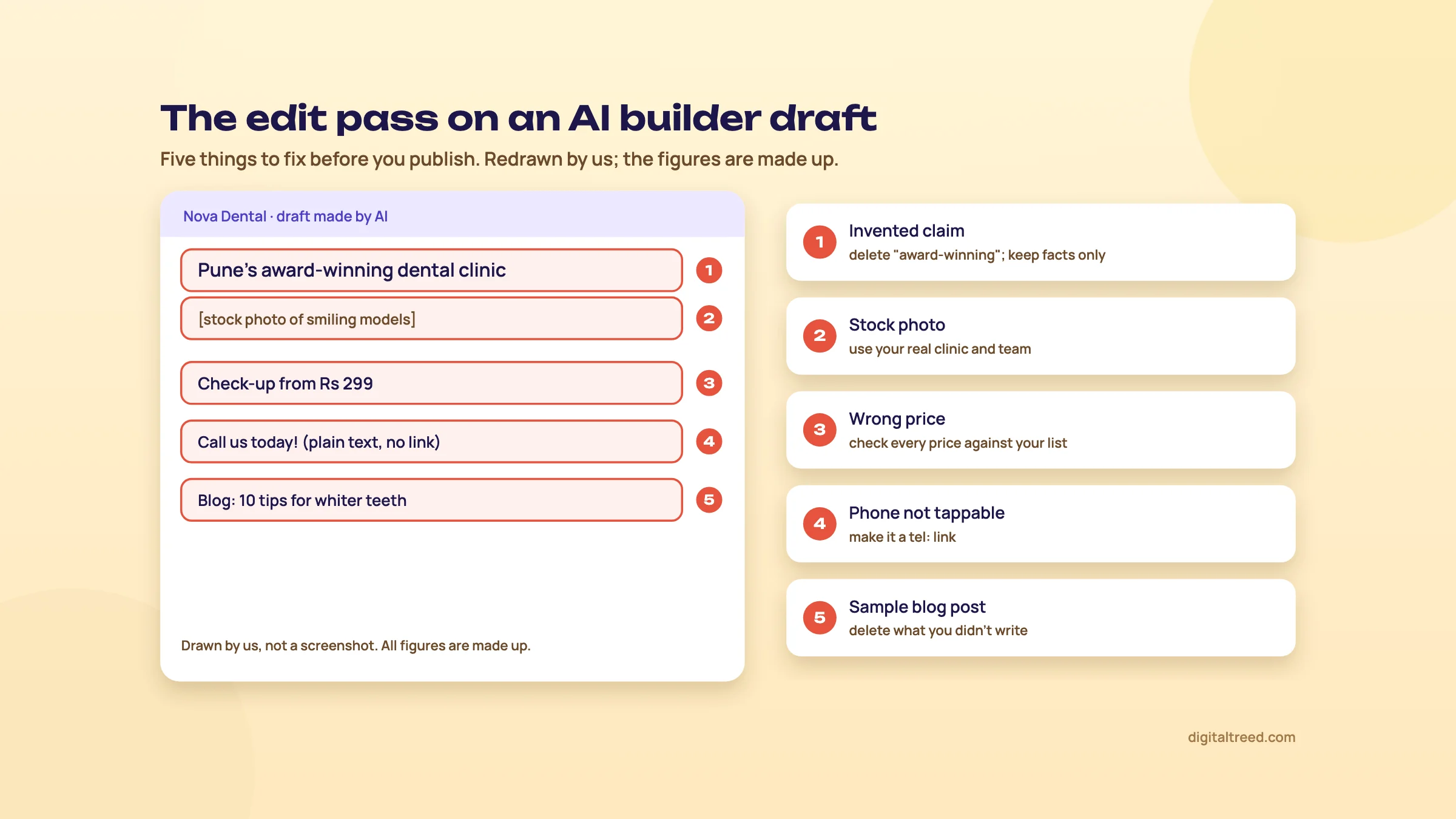 Drawn by us: five things to fix in any AI builder draft before you publish.
Editing with the builder's AI
Most builders now let you change things by asking their AI as well as by clicking. Wix calls its agent Aria.[1] Hostinger's builder has a Manual mode for drag and drop and an Agentic mode for vibe coding.[2] Use whichever is faster for the job, but know what costs credits. On Hostinger, manual text and image edits cost no credits, while AI requests do.[2] Framer says its monthly credits "power Agents, Localization, and other AI features".[19] For small text changes, clicking and typing is often quicker than asking.
What the free plan won't do
Free plans are for trying, not for running a business site. Typical limits:
- Branding. Free Wix sites show Wix branding; a paid plan removes it.[16]
- The builder's address, not yours. Framer's free plan gives a Framer domain,[19] and Durable's a durable.site address.[20] A clinic on someone else's subdomain (a name in front of the builder's own domain) looks less trustworthy on a visiting card.
- Limited AI. Framer gives 500 AI credits to try,[19] Durable 300.[20]
- Small storage and bandwidth. Framer's free plan has 1 GB of bandwidth (the amount of data visitors can download in a month).
Connect your domain and publish
You can buy the domain through the builder or from a separate registrar (the company you rent a domain from). Wix gives a free domain for 1 year on most yearly plans, as a voucher for a new domain.[16] That's handy, but the domain then renews at the normal price, and it sits in the builder's account. We prefer buying the domain in your own name at a registrar and pointing it at the builder, so you can move later without asking anyone. Our WordPress guide explains how to pick, buy and protect a domain, and that part is the same for every path.
The builder then shows you the DNS records to add (DNS is the internet's address book; the records tell browsers where your site lives). It can take a few hours before it works everywhere. When it does, publish, and open the site on your phone with mobile data, not your office Wi-Fi.
Can you take the site with you later?
Ask this before you build. Hostinger's AI Builder now lists "Code editor and export" in its plan table.[22] Wix doesn't: its help centre says Wix sites "must be hosted and operated on Wix's servers", and its templates can't be downloaded or exported.[42] For most builders, leaving means rebuilding the design somewhere else. That's acceptable for a five-page site if you keep your text and photos in your own content folder (chapter 3). It's a bigger problem for a site with hundreds of pages.
Warning
What goes wrong: publishing the AI's first draft as it is, with filler lines, a stock team photo and a sample blog post still live. The other two are not reading the renewal price, and treating "free domain for 1 year" as free. Do the edit pass and write down the year 2 price before you publish.
Tip
Done when: every row of the edit pass is ticked and a test form message has arrived. The site opens on your own domain on your phone, and you know your renewal date and price.
Next, chapter 6: path B, vibe coding a site with a chatbot.
Path B: vibe code a website with a chatbot, step by step
Quick answer
Turn your brief into one clear prompt and ask a chatbot for plain HTML and CSS files. Save them in one folder, open them on your computer, check every fact and fix one thing at a time. Connect a form service, drag the folder onto a free host such as Netlify, then add your domain. In our test, ChatGPT and Claude delivered; Grok didn't.
On 25 October 2026 we gave the same prompt to Claude, ChatGPT and Grok, each in a fresh chat, with no follow-up messages. This chapter shows that prompt, what each one gave back, what we found when we checked the files, and how to take a working build live for free. It was one attempt with each, so treat the results as one honest data point, not a ranking.
Why plain HTML
We asked for plain HTML (the language of web page content) and one CSS file (the file that sets colours, fonts and layout), with no frameworks and no build step. A framework is a ready-made toolkit developers build apps with; a build step is a program that turns their code into the final files. Neither is needed for a five-page site. Plain files are what's called a static site: the same files go to every visitor, with no database and no login. That means you can open them on your own computer, upload them to almost any host, and there's far less that can be hacked (chapter 9).
Step 1: the prompt
This is the prompt we used, built from the chapter 3 brief. Copy it and change the facts to yours.
Note
Build me a complete 5-page website for my dental clinic. Give me every file in full, ready to upload, with no placeholders like "lorem ipsum".
About the business: Name: Nova Dental. What: a family dental clinic in Baner, Pune, India. Customers: families and office-goers in Baner, Aundh and Balewadi. Goal of the site: people book a check-up by phone or WhatsApp. Phone: 020 0000 0000 (use it as a tap-to-call link). WhatsApp: +91 90000 00000 (use a wa.me link). Address: Shop 4, Example Plaza, Baner Road, Pune 411045. Hours: Monday to Saturday, 10 am to 8 pm; closed Sunday. Dentist: Dr Asha Mehta, BDS, MDS (Conservative Dentistry), 15 years in practice. Services and starting prices: check-up Rs 500; cleaning Rs 1,200; tooth-coloured filling from Rs 1,500; root canal from Rs 4,500; braces from Rs 35,000.
Pages: Home, Services, About, Contact, Privacy Policy.
Rules:
- Use only the facts above. Do not invent reviews, ratings, awards, numbers of patients, extra staff, extra services or certifications. Where you would need something I haven't given you, leave a clearly marked note for me instead.
- Plain HTML and one CSS file. No frameworks, no build step, so I can upload it to any host.
- It must work well on a phone first, then on a computer.
- Every page needs its own title and meta description, one main heading, normal links between pages (a href), and alt text on every image.
- Use simple placeholder images (or none) and tell me which real photos to add.
- The Contact page needs a short form (name, phone, message) and a map placeholder. Tell me what the form needs to actually send messages.
- The Privacy Policy should be short and plain, for a clinic in India that collects names and phone numbers through a form. Mark it as a draft to check with a lawyer.
- At the end, list the files and tell me in 5 simple steps how to put the site online for free.
Step 2: what came back
| AI and plan | Time | What we got | Problems we found |
|---|---|---|---|
| ChatGPT, Free plan, normal chat | About 1.5 minutes | A 13 KB ZIP file with 5 pages, one CSS file and a README, plus a download button for each file | One meta description at 164 characters, over the usual 160; the form sends nothing until you connect a form service (it said so); a visible caption about replacing the illustration |
| Claude, through Claude Code | About 3 minutes 50 seconds | 5 pages, one CSS file and 2 placeholder images, about 44 KB, written straight into a folder | Eight yellow "NOTE FOR OWNER" boxes that visitors can see; a wrong price in its reply: a domain is "usually a few hundred rupees a year" |
| Grok, Free plan, Fast mode | About 20 minutes | Nothing. It showed "Working", then "Grok was unable to finish replying. Please try again later or use a different model." | No website |
Neither working build invented a review, rating, award or extra staff member. Both used only the facts we gave and left notes where something was missing. ChatGPT drew a tooth illustration in code instead of using image files, so it had no images to add alt text to. Claude added structured data: a hidden summary of the clinic's name, address and hours in a format Google reads. It also added a fixed Call and WhatsApp bar at the bottom of the screen on phones.
A note on fairness. Claude's build ran through Claude Code, Anthropic's coding tool, which isn't included in Claude's free plan; Pro starts at US$17 a month billed yearly.[25] We didn't test the free claude.ai chat. ChatGPT's build came from the free plan. Grok also has a separate Build Mode for apps, which we didn't try; we used normal chat, like the other two. One failed attempt doesn't prove Grok can't do it. It does show that one very long request can fail, and that asking for one page at a time is safer.
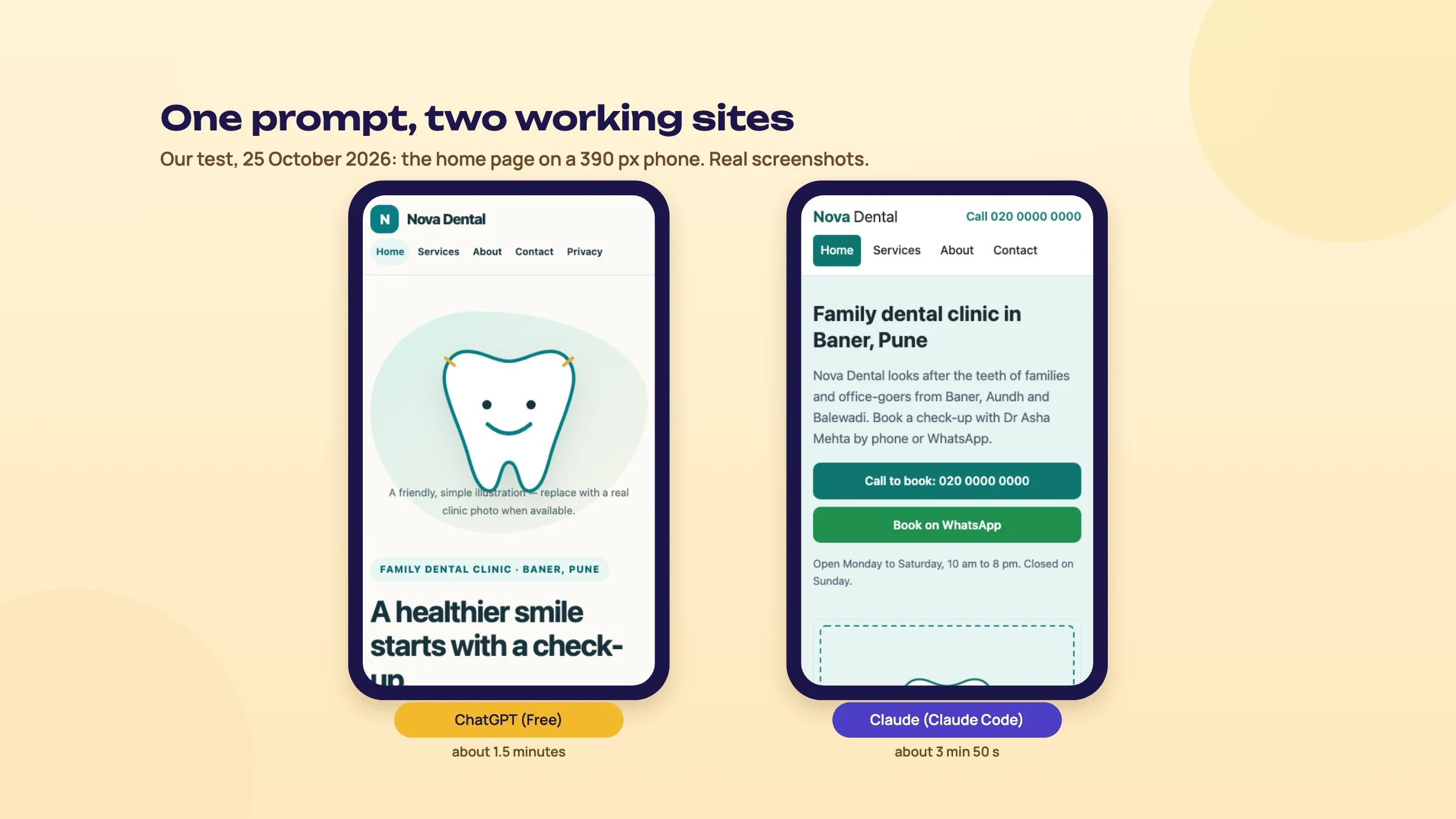 Our test, 25 October 2026: same prompt, two working sites. Real screenshots at 390 px.
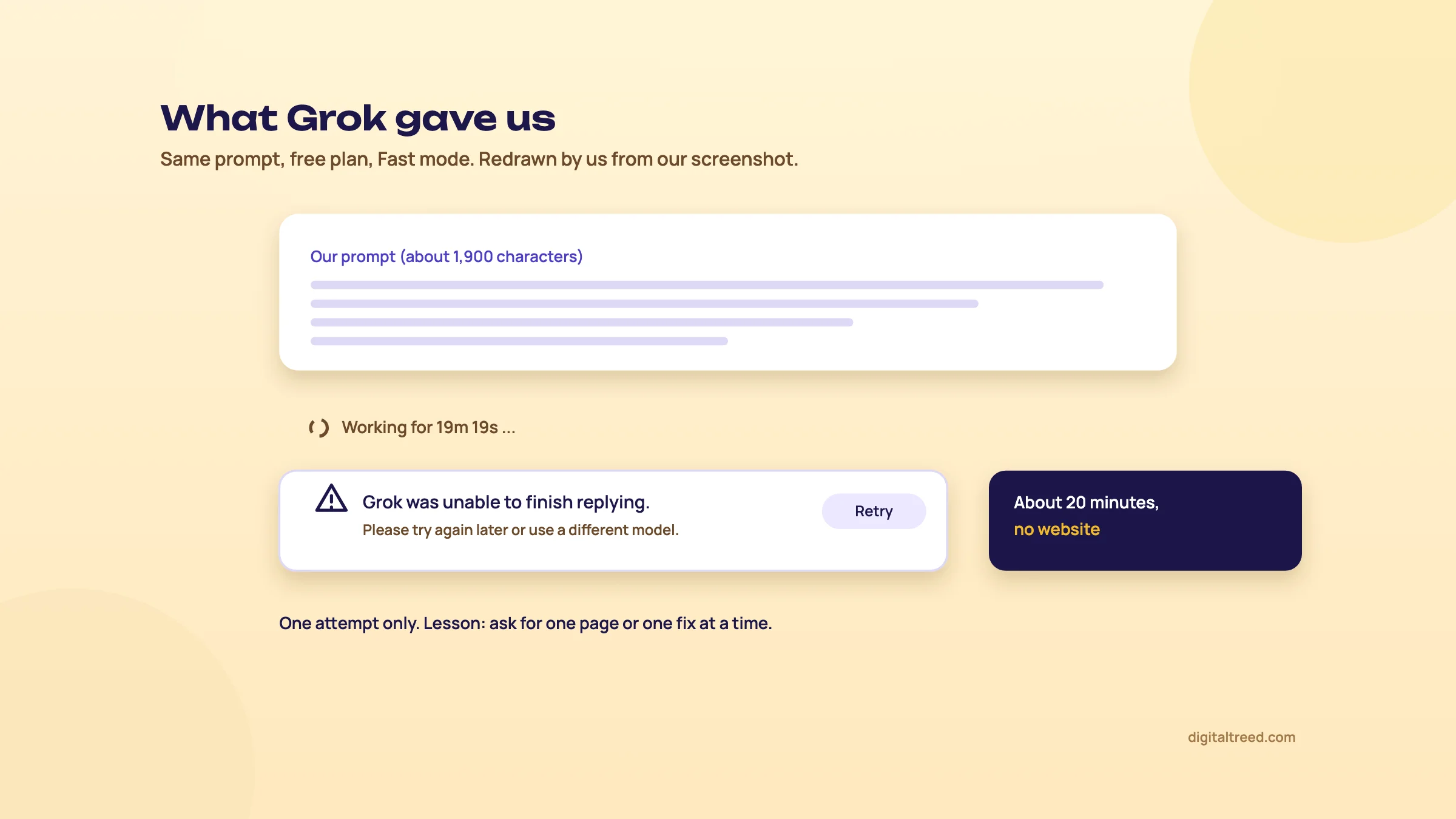 Redrawn by us from our screenshot: Grok's answer after about 20 minutes, with no website.
Step 3: save the files in one folder
Make a folder called nova-dental (or your business name) and put every file in it. If the AI gave a ZIP file, unzip it there. If it showed code in the chat, copy each file into a plain text editor and save it with the exact name it used, such as index.html or style.css. If a file sits in a sub-folder, such as images, keep that sub-folder. The pages expect to find each other in those places.
Then double-click index.html. It opens in your browser straight from your computer. Click every menu link and every button.
Step 4: check it the way we did
We checked both builds with our own scripts and a browser. You can do the same checks by eye in about half an hour:
- Phone width. Make your browser window narrow, or open the live site on your phone later. Nothing should spill off the side so that you have to scroll sideways. Both builds passed at five widths, from 360 to 1,280 pixels.
- Facts. Read every page against your brief: prices, hours, phone, address, qualifications.
- Notes left behind. Search each page for "note", "placeholder", "replace" and "draft". Delete or fill in each one.
- Links and buttons. Every menu link opens the right page. The call link dials. The WhatsApp link opens a chat with your number.
- Titles and descriptions. Each page has its own title in the browser tab. Once the site is live, our Meta Tag Analyzer shows the title and description of each page and how they look in Google.
- Advice in the reply. Check any price, law or rule the AI mentions, like Claude's "few hundred rupees" domain.
Step 5: fix one thing at a time
Go back to the same chat and ask for one change per message, and say which file. For example: "In services.html, change the cleaning price to ₹1,300. Give me the whole file again." Or: "In about.html, remove the yellow note box and add this paragraph about Dr Mehta: ..." Asking for the whole file again stops you pasting half a file in the wrong place.
Before each change, copy the whole folder and name the copy with the date, such as nova-dental-2026-10-25. If the change goes wrong, you still have the version that worked. Chapter 8 has more on this.
Step 6: make the form send messages
A plain HTML site can't send email by itself. Both AIs said so. Claude pointed its form at a stand-in Formspree address; ChatGPT left the form's address empty. You need a form service: a company that receives the form and emails it to you. Claude's reply suggested Formspree or Web3Forms, and Netlify Forms if you host on Netlify. Check each one's current free limits before you choose. The service gives you an address or a key to paste into the form. Then send yourself a test message from the live site.
ChatGPT's README had a good rule: "Do not put email passwords or secret API keys in HTML." Anything in an HTML file can be read by anyone who visits the site.
Step 7: put it online for free
Publish a folder of HTML files on Netlify
- Sign up at netlify.com with your email or Google account.
- Find the drag and drop area. Netlify's docs point to Netlify Drop, or the drag and drop section at the bottom of your team's Projects page.[43] Claude's reply called it "Add new site", then "Deploy manually", which isn't what Netlify's docs call it now.
- Drag the whole folder onto the page. In a minute or so you get a free address ending in netlify.app. On new accounts Netlify keeps new projects private until you choose to publish,[33] so open the address in a private browser window to check that anyone can see it.
- Test on your phone: every page, the call and WhatsApp buttons and a form message.
- To update, drag the changed folder onto the dropzone at the bottom of the site's Deploys page.[43] Each published update uses 15 of the 300 monthly credits on the free plan.[33]
Cloudflare Pages works much the same and its free plan has no limit on sites, requests or bandwidth.[34] Avoid Vercel's free Hobby plan for a business, because it's "for personal, non-commercial use".[37]
Step 8: add your domain
Netlify's free plan includes custom domains with SSL (the padlock and https).[33] Buy the domain in your own name, then add it in the host's domain settings and follow its DNS steps. Our WordPress guide covers choosing and buying a domain; the buying part is the same here.
Another free option: Google AI Studio's Build mode
Google AI Studio lets you "vibe code" an app in its Build mode and deploy it from the same screen.[7] Using AI Studio is free,[6] and eligible accounts can publish up to 2 apps without a billing account.[36] It makes apps, not plain HTML files, so the SEO points in chapter 10 matter more. And on the free tier, Google uses what you type to improve its products, so keep customer data out.[6]
Warning
What goes wrong: one huge prompt that times out, as in our Grok test; note boxes left on the live site; trusting the AI's advice about prices or laws, as with Claude's domain price; a contact form that sends nowhere; and no saved copy of the folder before the next change.
Tip
Done when: your folder is saved with a dated copy, every note is gone, a test form message has arrived, and the site opens on your own domain on your phone.
Next, chapter 7: path C, AI inside WordPress.
Path C: AI inside WordPress
Quick answer
On WordPress.com, the WordPress Agent builds a site from your description on any paid plan. On your own hosting, WordPress 7.0 has an AI Client and a Connectors screen, but nothing runs until you connect an AI provider you pay for. Jetpack AI and page builder add-ons add more. Choose this path when you want WordPress's plugins and ownership.
WordPress comes in two forms. WordPress.org is the free software you install on hosting you rent. WordPress.com is a service that runs WordPress for you. Our WordPress guide explains the difference and builds the whole site; this chapter covers only where AI fits in.
WordPress.com: the WordPress Agent
WordPress.com's AI site builder works like path A: "Describe your site idea - the WordPress Agent builds it and helps you run it." You need a paid plan to use it: "Sign up for any paid plan on WordPress.com to start building with the WordPress Agent."[9] Paid plans include a free domain for the first year. The difference from other builders is that what you get is WordPress underneath, so moving to your own hosting later is easier.
Your own WordPress: the AI Client and Connectors
WordPress 7.0 came out in May 2026. Its release post says: "A new AI Client in Core lets WordPress communicate with generative AI models, while connections are easily managed from a single hub in the dashboard."[8] That hub is the Connectors screen, with "3 presets" or your own connections. WordPress also has a separate AI plugin for jobs such as making and editing images and writing titles.
In practice: WordPress doesn't come with free AI. You connect an account you already pay for with an AI company, using an API key (a secret code that lets WordPress use that account). Keep that key private and set a spending limit in the AI company's dashboard if it offers one.
Jetpack AI, page builders and 10Web
| Tool | What it does | Price seen on 25 Oct 2026 |
|---|---|---|
| Jetpack AI | AI writing and image help inside the WordPress editor | Free quota of 20 requests; paid ₹290.95 a month for the first year, billed yearly, against a full price of ₹584.95; "all renewals are at full price"[44] |
| Elementor AI (Angie) | Builds full Elementor pages with AI | "a free plan with daily-renewing AI credits"; paid credit prices not shown[45] |
| 10Web | An AI builder that makes a WordPress site and hosts it | AI Starter ₹6,699 for 12 months; renewal not shown[3] |
For a five-page site we wouldn't add a page builder just for its AI. The block editor and a free block theme are enough, and our WordPress guide explains why page builders add weight and lock-in. Use AI in WordPress for the jobs it's good at: a first draft of a page from your notes, shorter sentences, headings, and alt text you then check against the photo.
When path C is the right one
- You want plugins: bookings, a shop, a membership area, a multilingual site.
- You plan to write a blog that grows to hundreds of posts.
- You want to change hosts or developers without rebuilding.
- You or someone you trust already knows WordPress.
It's the wrong one if you don't want to deal with updates and plugins at all. Then path A is simpler.
The same rules apply
AI text inside WordPress is still AI text. Google's guidance asks you to fact-check it, including titles, meta descriptions and alt text.[10] Plugins bring their own risks, so judge each one before you install it. Our WordPress guide has a two-minute way to judge any plugin.
Warning
What goes wrong: installing three AI plugins that do the same job, each wanting its own API key and subscription. Pick one way of using AI, connect one provider, and delete what you don't use.
Tip
Done when: you've decided whether WordPress.com's agent or your own WordPress suits you, connected at most one AI provider, and followed our WordPress guide for the rest of the build.
Next, chapter 8: fixing what breaks, with versions, backups and a way out of the AI loop.
Fixing what breaks: versions, backups and the AI loop
Quick answer
Save a working copy before every change, so you can always go back. Describe a bug the way you'd describe it to a person: the page, what you did, what you expected and what happened. If two or three attempts don't fix it, stop prompting and roll back to the last version that worked.
Every AI-built site breaks at some point, usually right after a change that looked small. That's normal. What matters is whether you can get back to a working version in two minutes or lose a weekend.
The AI loop
Here's how it goes. You ask for a change. Something else breaks. You paste the error and say "fix it". The fix breaks a third thing. Ten messages later, the site is worse than when you started, and on a credit-based tool you've paid for every message.
Developers know this feeling. In Stack Overflow's 2025 survey, 45% said "Debugging AI-generated code is more time-consuming".[13] On Cursor's community forum, a member titled "Community Developer" answered a non-coder whose project had gone wrong. Unplanned changes, the reply said, pile up as technical debt (messy code that makes every later change harder) that "also confuses AI".[46]
Save a version before every change
| Path | How to keep versions |
|---|---|
| A: AI builder | Find the builder's site history or duplicate-site option before your first big change, and learn how to restore from it |
| B: chatbot and HTML files | Copy the whole folder and add the date to its name before each change. Keep the last few copies |
| B: app builders | Use the tool's version history, and connect GitHub as a second copy. Lovable says Git sync works on any plan[27] |
| C: WordPress | A backup plugin that stores copies off the server; restore on staging first |
GitHub is a website that stores code and keeps every saved version of it. A project on GitHub is called a repository, or repo. You don't need to learn Git commands to use it: GitHub Desktop and most vibe coding tools can save to it for you. For a folder of five HTML files, dated copies on your computer and in Google Drive are enough.
Let one warning stand for all of them. In July 2025, news reports said Replit's AI agent deleted the production database of an app that SaaStr founder Jason Lemkin was vibe coding as a test. It did this during a code freeze, when it had been told not to change anything, and then wrongly said the data couldn't be restored.[47] A backup was in fact available and was imported. Replit then started separating development and production databases.[48] The lesson for a small site: never let an AI tool change the only copy of anything.
How to describe a bug
"It's broken, fix it" makes the AI guess. Give it what a developer would ask for:
Note
Page: contact.html. What I did: opened it on my phone (390 px wide) and tapped the WhatsApp button. What I expected: WhatsApp opens a chat with +91 90000 00000. What happened: nothing happens. Here is the button's code: [paste]. Change only this button. Give me the whole file back.
Three habits help. Ask for one fix per message. Say "change only this", so it doesn't rewrite the rest. And ask it to explain the cause in one sentence before it changes anything; if the explanation doesn't make sense, the fix probably won't either.
When to stop and roll back
Our rule: if two or three tries haven't fixed it, stop. Go back to the last saved copy that worked, and ask for the change again in a fresh chat, in smaller steps. A fresh chat helps because a long conversation full of failed fixes confuses the AI as much as it confuses you.
If rolling back and trying again in small steps still fails, the problem is probably beyond a quick prompt. That's the moment to ask a developer, not to spend another evening.
Warning
What goes wrong: asking for a big change with no saved copy, then trying to undo it by asking the AI to "put it back how it was". It can't remember exactly how it was. Only your saved copy can.
Tip
Done when: you know where your versions live, you've restored one once as a test, and you have the bug template saved in your notes.
Next, chapter 9: security for AI-built sites.
Security for AI-built sites
Quick answer
Most leaks from AI-built sites come from two holes: a secret key left in the code that visitors' browsers load, and a database with its access rules switched off. A five-page site with no login or database avoids both. If yours has either, run the 10-minute check in this chapter before launch, and take payments only through a payment gateway.
An AI will write code that works. Working and safe aren't the same thing. The AI tests whether the page shows the right data to you; it often doesn't test whether the page also shows it to a stranger.
Two words first: front-end and back-end
The front-end is everything your visitor's browser downloads: the HTML, CSS and JavaScript (the code that makes pages interactive). Anyone can read all of it, by right-clicking and choosing to view the page source. The back-end is what runs on a server out of sight, such as a database or code that sends email. A secret belongs only in the back-end.
Hole 1: secret keys in the front-end
An API key is like a password for a service. Ask a vibe coding tool to "add an AI chat to my site" or "take payments", and it may paste the key straight into front-end code. There anyone can copy it and run up bills on your account.
This happens a lot. RedHunt Labs, a security company, scanned sites built on 13 vibe coding platforms. On 23 September 2025 it reported that one in five exposed at least one sensitive secret, about 25,000 unique secrets in total.[49] It's a vendor's scan, not an independent study, but the pattern is clear.
Not every key is secret. Some services, such as Supabase (a popular database service that vibe coding tools often connect to), give you a public key that's meant to sit in the front-end. That key is only safe if the database rules in hole 2 are on.
Hole 2: a database with no access rules
Supabase controls who can read each table of data with Row Level Security, or RLS: rules that say which rows each visitor may see or change. Its documentation is blunt: "A table in an exposed schema without RLS is readable and writable by any role with a grant on it. Enable RLS on every table in an exposed schema."[50]
The best-known case is Lovable. A CVE is a public ID number for a security flaw, and CVE-2025-48757 describes "an insufficient database Row-Level Security policy in Lovable through 2025-04-15" that let outsiders read or write database tables of generated sites. MITRE, which assigned the ID, rates it 9.3 out of 10, Critical; NVD hasn't scored it. Lovable disputes it, saying each customer is responsible for protecting their own app's data.[51] The researcher, Matt Palmer, found 303 weak endpoints (addresses where an app sends or receives data) across 170 of the 1,645 projects he scanned, about 10.3%.[52]
170 of 1,645
Lovable projects in one researcher's scan had weak database rules[52]
1 in 5
vibe-coded sites in a vendor scan exposed at least one secret[49]
24 hours
for Wix to fix a login bypass in Base44 that Wiz reported[53]
Platforms have their own bugs too. Wiz, a cloud security firm, found that Base44, an AI app builder owned by Wix, let outsiders register on private apps using only a public app ID. Wix fixed it within 24 hours, and Wiz reported "No evidence of malicious exploitation" after Wix checked its own records.[53] In early 2026 Wiz also found Moltbook, a vibe-coded social network, with a database key in its public code and no RLS, exposing 1.5 million API tokens and 35,000 email addresses.[54] In April 2026, The Next Web reported a separate Lovable flaw that let anyone with a free account reach another user's profile, public projects, source code and database credentials. It stayed open for 48 days.[55]
The point isn't that one tool is bad. It's that "the platform handles security" isn't a plan. You're responsible for your site's data, and under India's DPDP Rules, once they fully apply, a business must tell affected people "without delay" when a breach happens (chapter 11).[56]
Why we showed plain HTML in chapter 6
A static site with no login, no database and no keys has neither hole. The contact form goes through a form service, which handles the data on its own servers. That's the main reason we'd build a clinic's five-page site this way rather than as an app with a database. Add logins or a database only when you truly need them, and then get the code checked.
Forms, logins and payments
- Forms: ask only for name, phone and message. A dental clinic shouldn't collect health details through a website form. Lovable's FAQ says its standard terms don't allow health data, payment card data or government IDs in apps built on it.[27] Turn on your form service's spam filter.
- Logins: if your site doesn't need visitors to log in, don't add it. If it does, have a developer check it.
- Payments: use your payment gateway's own payment link, button or hosted checkout. Never let your site handle or store card numbers. Your gateway's secret key never goes in front-end code.
- Your accounts: turn on two-step login for the AI tool, your host, GitHub, your domain registrar and your email. Use a different strong password for each.
The 10-minute security check
Check an AI-built site before launch
- Search the page source. Open each page in a private browser window, view the page source, and search (Ctrl+F) for "key", "secret", "token" and "password". Ask a developer about anything that looks like a long random code.
- Check the database rules. If your site uses Supabase or another database, confirm in its dashboard that RLS is on for every table.
- Test as a stranger. Log out, open a private window and try to reach pages or data meant only for logged-in users.
- Check https. Run the SSL Checker on your domain: a valid certificate that isn't about to expire.
- Check the security headers. Run the HTTP Header Checker. Missing headers aren't an emergency on a static site, but ask your host or the AI to add the basic ones.
- Send a test form. It arrives, and nothing you typed shows up on the public site.
- Check who has access. Remove old logins on the host, GitHub and the AI tool, and make sure two-step login is on.
If you want to go deeper, OWASP (a non-profit that publishes web security guidance) lists the ten most serious risks for web apps in its Top 10:2025. Number one is Broken Access Control, which is what a missing RLS rule is.[57] If your site has an AI chatbot, OWASP's separate list for AI apps starts with prompt injection: visitors typing instructions that trick the bot.[58]
Warning
What goes wrong: asking the AI "is my site secure?" and believing the "yes". It checks the code it can see against what it thinks you asked for. Run the checks yourself, and for anything with logins, payments or stored customer data, pay for a review by a person.
Tip
Done when: the page source has no secrets and every database table has RLS on (or there's no database). https and headers check out, payments go through the gateway, and every account has two-step login.
Next, chapter 10: SEO, speed and accessibility.
SEO, speed and accessibility for AI-built sites
Quick answer
Google doesn't penalise a page for being made with AI; it penalises many pages with no value. Fact-check every page, give each one its own title and description, use real links, and make sure Google can read the content without running JavaScript. Then check speed, phone layout, alt text and contrast with free tools before you launch.
An AI-built site can rank like any other. What holds it back is usually one of three things: generic text, a technical setup that hides the content from Google, or basics nobody checked. SEO (search engine optimisation) just means making pages that Google can find, read and trust.
What Google says about AI content
Google's 2023 statement is still the starting point: "Appropriate use of AI or automation is not against our guidelines. This means that it is not used to generate content primarily to manipulate search rankings, which is against our spam policies."[15] Its spam policy targets "many pages" made "for the primary purpose of manipulating search rankings and not helping users", and that rule applies "no matter how it's created".[59]
So the edit pass from chapter 5 is also your SEO work. Real prices, real photos, the dentist's real qualifications and answers to real questions are what make a page helpful. Fifty AI pages called "Best dentist in [area]" that say the same thing are what Google calls scaled content abuse.
Can Google read your pages?
Google handles pages built with JavaScript "in three main phases: Crawling, Rendering, Indexing".[60] Crawling is fetching the page. Rendering is running its JavaScript to build what a visitor sees. Indexing is adding it to Google's list of pages it can show.
Plain HTML files, like our chapter 6 builds, have all their text in the file, so there's nothing to render. Many app builders instead make single-page apps: one HTML page that's almost empty until JavaScript fills it in. Google can usually render those, but it still says: "server-side or pre-rendering is still a great idea because it makes your website faster for users and crawlers, and not all bots can run JavaScript."[60] Server-side rendering means the server sends finished HTML, so the text is there from the start. Lovable, for example, says apps created before 13 May 2026 render in the browser (it gives search engines pre-rendered copies), while newer apps render on the server.[27]
Two more rules from Google matter for apps:
- Real links. Google can only follow links that are "<a> HTML elements with an href attribute".[60] A button that changes the page by JavaScript isn't a link to Google. That's why our prompt asked for "normal links between pages (a href)".
- Real addresses for each page. For single-page apps, Google says to use the History API and "don't use fragments to load different page content". A fragment is the part of an address after a # sign. In plain words: each page needs its own proper address, like novadental.in/services, not novadental.in/#services.
To see what Google gets, run the page through our Rendered HTML Checker. It shows the raw HTML next to the version after JavaScript runs. If your prices and headings appear only in the second, ask your tool for server-side rendering or pre-rendering.
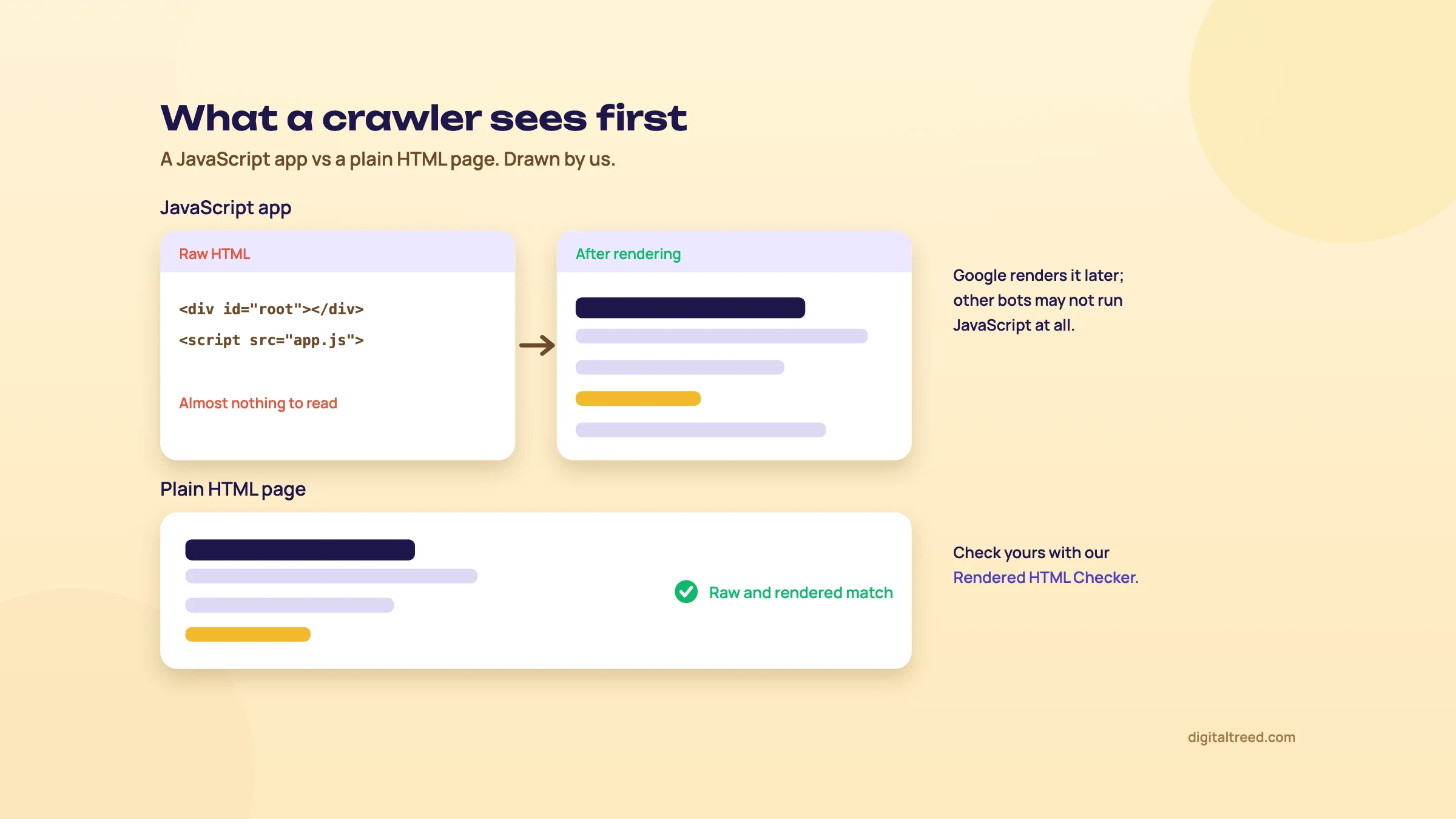 Drawn by us: plain HTML gives crawlers the content straight away.
The on-page basics
| Item | What to check | Our tool |
|---|---|---|
| Title | Each page has its own, with the service and town, short enough not to be cut off in search results | Meta Tag Analyzer |
| Meta description | Each page has its own; ChatGPT's privacy page went over the usual 160 characters, at 164 | Meta Tag Analyzer |
| Headings | One main heading (H1) per page that says what the page is about | Website Audit |
| Alt text | Every meaningful image has a plain description | Image Alt Text Checker |
| Sitemap | An XML sitemap (a list of your pages for search engines) at your domain, with every page on it | XML Sitemap Validator |
| robots.txt | The file that tells search engine bots where they may go doesn't block your pages | Robots.txt Tester |
| One address | The site opens on one domain only, not also on the builder's or host's free address | Meta Tag Analyzer (canonical tag) |
Neither of our test builds had a sitemap, and Claude's said to add a canonical tag (a line telling Google which address is the main one) once the domain exists. Ask the AI for both after you know your domain. Then add the site to Google Search Console, Google's free tool that shows whether your pages are indexed and what people searched to find you. Our WordPress guide shows the Search Console steps at launch.
Speed
Phones on mobile data are where slow sites lose people. The usual causes on AI-built sites are large photos and heavy app code. Compress photos before you upload them, keep to a few web fonts, and test the live site with our Website Speed Test, which scores server response, page weight, requests and caching. Google measures real-world speed with its Core Web Vitals; our WordPress guide's speed section explains them in plain words.
Accessibility
Accessibility means people with poor eyesight, or who use a screen reader or only a keyboard, can use your site. The standard is WCAG (Web Content Accessibility Guidelines); the current version is WCAG 2.2, first a W3C Recommendation in October 2023[61] and updated in December 2024.[62] It has three levels, A, AA and AAA; this chapter uses AA, the middle one.
Few sites get it right. WebAIM tests the home pages of the top million websites each year. In its 2026 report:[63]
In all, 95.9% of home pages had detectable WCAG 2 failures, up from 94.8% in 2025, and .in home pages averaged 58.3 errors each.[63] AI tools copy the patterns they've seen, so expect the same mistakes in what they make.
Check these four on every page:
- Contrast. Text needs a contrast ratio of at least 4.5:1 against its background, or 3:1 for large text.[62] Pale grey on white usually fails.
- Alt text on every meaningful image.
- Form labels. Each form field has a visible label, not just grey hint text inside the box.
- Tap targets. WCAG 2.2 asks for targets of at least 24 by 24 CSS pixels, with some exceptions.[62] Small icons crammed together in a footer often fail.
Our free Website Audit includes accessibility checks along with SEO, speed and security, across up to 25 pages.
Warning
What goes wrong: launching on the builder's free address and your own domain at the same time, so Google sees two copies of every page. Pick one address, point the other at it, and add only that one to Search Console.
Tip
Done when: every page has its own title, description and H1, and Google can see your text without JavaScript. The sitemap is in Search Console, the Website Audit shows no alt text or form label errors, and your pale text passes a contrast check.
Next, chapter 11: ownership, legal pages and payments.
Ownership, legal pages and payments
Quick answer
The big AI companies' terms give you whatever rights they have in what their AI makes, but the law may not treat AI output as yours alone. So keep the domain, the code and your content in your own accounts. Publish a privacy notice that fits India's DPDP Act, add terms and a refund page if you take payments, and take UPI through a gateway.
This chapter is general information, not legal advice. Laws differ by country and change often. For anything beyond a simple enquiry form, ask a lawyer.
Who owns what the AI made
The tools' own terms mostly hand their rights to you:
| Tool | What its terms say |
|---|---|
| Claude (Anthropic) | "we assign to you all of our right, title, and interest - if any - in Outputs"[64] |
| ChatGPT (OpenAI) | You "own the Output", and also: "output may not be unique and other users may receive similar" output[65] |
| Lovable | "you own your Customer Data, including the applications, websites, or other projects you build", subject to third-party rights[66] |
| Cursor | Assigns to you "all of our right, title, and interest if any" in its suggestions[67] |
| Google Gemini API | "Google won't claim ownership over that content", but it "may generate the same or similar content for others"[68] |
Notice the words "if any". A company can't give you rights the law doesn't create. The US Copyright Office looked at this on 29 January 2025. It said AI output can be protected by copyright "only where a human author has determined sufficient expressive elements", and "not the mere provision of prompts". It also said that using AI to help, or including AI material in a larger human work, "does not bar copyrightability".[69]
India has no clear rule yet on who owns AI output. In December 2025 the DPIIT published Part 1 of a working paper on generative AI and copyright.[70] It's about training AI on other people's work; the committee left who owns AI output for a Part 2.[71]
What this means for a small business: your own words, photos, prices and edits are yours. The more of the site you write and shape yourself, the stronger your position. And don't worry that a competitor might get a similar layout; their content will be different, and that's what matters.
Keep it in your own accounts
Ownership in practice is about access, not law. Make sure these are in your name, with your email:
- The domain, at a registrar, in your name. This matters most.
- The code: the folder of files (path B), an export if your builder offers one (path A), or a GitHub repository in your account.
- Your content: text, photos and price list in your content folder (chapter 3), outside any tool.
- Hosting and form service accounts, with two-step login on.
If someone builds the site for you, ask them to create these in your name from day one and give them their own login.
Privacy: India's DPDP Act
India's Digital Personal Data Protection Act, 2023 (DPDP) applies to any site that collects personal data, such as names and phone numbers in a contact form. Its Rules were notified in November 2025, with "an eighteen-month period for phased compliance".[56] If there's a breach, the business must inform "all affected individuals without delay", and penalties go up to ₹250 crore for failing to keep reasonable security safeguards.[56]
A small site can do the basics now: collect only what it needs, say why at the form, publish a privacy notice, and name a contact for data requests. Our WordPress guide explains these four steps and what to write. Both our test builds produced a draft privacy policy, and Claude's named the DPDP Act, 2023. Use the AI draft as a start, fill in your real form service, host and contact, and have a lawyer check it.
Terms and refund pages
If you take any payment on the site, even an advance for an appointment, add Terms and a Refund and cancellation policy and link both in the footer. Indian payment gateways check your site for these pages before they activate your account; our WordPress guide lists which pages they ask for. Write them for your real process. An AI draft of a refund policy will be generic until you tell it how you actually handle refunds.
Taking UPI payments
Your site doesn't need to handle the payment itself, and on path B it shouldn't. On every path the simplest safe way is the same:
- Open an account with an Indian payment gateway, such as Razorpay, and complete its checks.
- Create a payment link, payment button or QR code in the gateway's dashboard.
- Put that link or button on your site. The customer pays on the gateway's page by UPI or card.
Path A builders and WordPress (path C) also have payment apps or plugins if you need a cart. On a vibe-coded app, a payment integration needs a secret key on the back-end (chapter 9), so get it checked. Our WordPress guide covers UPI and card payments in more detail.
Warning
What goes wrong: letting a builder or a freelancer register the domain in their own account. When you want to move, or they stop answering, your address isn't yours. Check the registrant name on your domain today.
Tip
Done when: the domain, code, content and accounts are in your name, and the privacy notice is published and checked. If you take payments, terms and refund pages are up and payments go through a gateway link or button.
Next, chapter 12: the launch checklist.
The launch checklist
Quick answer
Before you share the link, go through about 25 checks: every fact and price confirmed by you, no AI notes or filler left, the form tested, no secrets in the code, https on, one address, titles and alt text done, legal pages published, and the domain and accounts in your name. It takes an hour or two.
Launch day is when small mistakes get seen by real customers. Go through this list once, in order, on your phone and your computer. It's also in the downloadable checklist with this guide. If you're on WordPress, use the WordPress launch checklist as well, for the WordPress-only items such as plugins and backups.
| Area | Check | Tool or chapter |
|---|---|---|
| Facts | Prices match your price list exactly | Chapter 2 |
| Facts | Phone, WhatsApp, address and hours are correct on every page and in the footer | Chapter 5 |
| Facts | Names, qualifications and years in practice are right and agreed by the people named | Chapter 2 |
| Content | No invented reviews, ratings, awards, "best" or "award-winning" lines | Chapter 5 |
| Content | No AI notes, placeholder captions, sample text or sample blog posts left | Chapter 6 |
| Content | Real photos, compressed, each with alt text | Image Alt Text Checker |
| Buttons | Call buttons dial and WhatsApp buttons open a chat, tested on a phone | Chapter 6 |
| Forms | A test message from your phone arrived in your inbox | Chapter 6 |
| Forms | A consent line and privacy link sit under every form; it asks only for what you need | Chapter 11 |
| Security | No keys, secrets or passwords in the page source | Chapter 9 |
| Security | RLS on for every database table, or no database at all | Chapter 9 |
| Security | https works, with a valid certificate | SSL Checker |
| Security | Basic security headers checked | HTTP Header Checker |
| Security | Two-step login on for the AI tool, host, registrar, GitHub and email | Chapter 9 |
| Payments | Payments go through a gateway link, button or checkout; no card data on your site | Chapter 11 |
| SEO | Every page has its own title, description and one H1 | Meta Tag Analyzer |
| SEO | Your text shows in the raw HTML and doesn't need JavaScript to appear | Rendered HTML Checker |
| SEO | Links between pages are real a href links | Chapter 10 |
| SEO | The site opens on one address only; the free builder or host address points to it | Chapter 10 |
| SEO | Sitemap works and robots.txt doesn't block your pages | XML Sitemap Validator |
| Speed | The home page loads quickly on mobile data | Website Speed Test |
| Phone | No sideways scrolling; text readable; buttons easy to tap | Mobile-Friendly Test |
| Accessibility | Form labels and alt text pass; pale text passes a contrast check | Website Audit and chapter 10 |
| Legal | Privacy notice published and checked; terms and refund pages if you take payments | Chapter 11 |
| Ownership | Domain, code, content and accounts in your name; a dated copy of the site saved | Chapters 8 and 11 |
| Cost | Renewal dates and prices in your calendar, for the domain, plan and any AI tool | Chapter 4 |
| Site added to Google Search Console and the sitemap submitted | Chapter 10 |
Run our free Website Audit last. It checks up to 25 pages for SEO, speed, security and accessibility in one go, and ranks what to fix first. It's a good way to catch anything the list above missed.
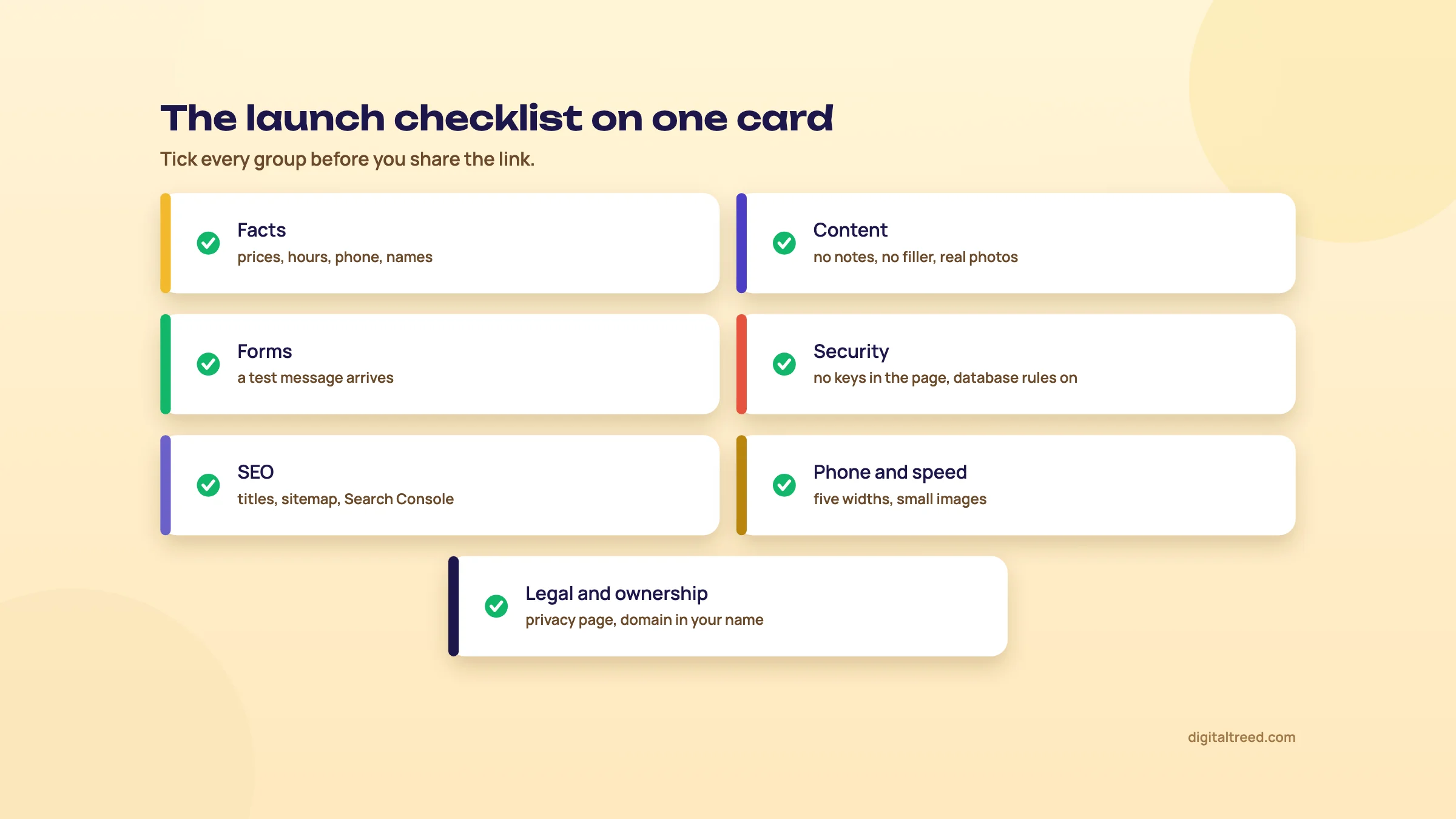 Seven groups to tick before you share the link.
Warning
What goes wrong: checking everything on the computer you built it on, where it looks perfect. Customers will open it on a phone, often on mobile data, through a link in WhatsApp or Google. Do the final pass exactly that way.
Tip
Done when: every row is ticked, the Website Audit shows nothing serious, and you've sent the link to two friends to try on their phones.
Next, chapter 13: after launch, and when to hire help.
After launch, and when to hire help
Quick answer
In the first 30 days, get the site into Google, link it from your Google Business Profile and watch what people do. After that, spend about an hour a month: save a copy, test the form, check Search Console, update prices and re-read any AI text. Hire help for payments with stored data, logins, bookings or health and legal claims.
A website isn't finished at launch. Prices change, staff change, tools change their plans, and AI copy that looked fine in October reads oddly by March. The good news is that a five-page site needs very little time if you keep a routine.
The first 30 days
- Week 1: add the site to Google Search Console and submit the sitemap. Add the website link to your Google Business Profile, so people who find you on Google Maps can reach it.
- Week 1: put the link on your WhatsApp Business profile, visiting cards and social media pages.
- Week 2: in Search Console, check that your pages are being indexed. If one isn't after two weeks, inspect it there.
- Week 3: ask five customers to open the site on their phones and tell you one thing that confused them. Fix those.
- Week 4: look at what people searched to find you, and whether your Services page answers those questions. Add a short FAQ if it doesn't.
The monthly routine
| When | Task | Time |
|---|---|---|
| Monthly | Save a dated copy of the site, or check the builder's version history | 5 min |
| Monthly | Send a test message through the form from your phone | 5 min |
| Monthly | Open every page on your phone: anything wrong, out of date or broken? | 10 min |
| Monthly | Search Console: pages indexed, clicks, any errors | 15 min |
| Monthly | Update prices, hours, photos and staff if anything changed | 10 min |
| Monthly | Check AI credits and the bill on any paid AI tool; cancel what you don't use | 5 min |
| Every 3 months | Re-read all AI-written text and fix anything that's no longer true | 20 min |
| Every 3 months | Run the Website Audit and the 10-minute security check (chapter 9) | 20 min |
| Yearly | Check domain, plan and hosting renewal dates and prices | 15 min |
One habit we'd add: when you change something on the site, write one line in a notes file with the date and what changed. When something breaks three months later, that note saves an hour.
When AI is enough
Think of a five-page site for a clinic, shop, coaching centre or freelancer, with a contact form and a payment link. For that, AI plus your own careful checking is often enough. That's what this guide is for. The things that make a site work, such as your real prices, photos, reviews and a clear offer, come from you, not from the tool.
When to hire help
Pay a developer or an agency when the site has to do something where a mistake costs money, data or trust:
- Payments with stored customer data, such as saved cards, subscriptions or invoices.
- Logins and accounts, for patients, students or members.
- Bookings tied to staff calendars or to your clinic or shop software.
- Medical, legal or financial claims on the site, where wrong words create real risk.
- A busy local market, where ranking above ten other dentists in your area needs proper SEO work, not just a site.
- A loop you can't get out of: you've rolled back, tried again in small steps, and it still breaks (chapter 8).
If you do hire someone, keep the domain, code and accounts in your own name (chapter 11) and give them their own login. Our web development service builds and looks after websites for small businesses, and our quote estimator shows prices up front, in rupees or dollars.
Warning
What goes wrong: launching and never opening the site again. A year later the prices are old, a doctor has left, the form stopped working in month three, and the AI tool's subscription is still charging the card. Put the monthly routine in your calendar today.
Tip
Done when: the site is in Search Console and on your Google Business Profile, the monthly routine is in your calendar, and you've decided which jobs you'll pay someone for.
Words used in this guide
- AI agent
- An AI that doesn't just answer but takes actions, such as editing pages or running code, inside a tool.
- Alt text
- A short text description of an image, read aloud by screen readers and used by Google.
- API key
- A secret code that lets one service use another, such as your site using an AI or payment account. Treat it like a password.
- Back-end
- The part of a website that runs on a server, out of sight: databases, code that sends email or takes payments.
- Canonical tag
- A line in a page's code that tells Google which address is the main one when the same page can open at more than one.
- Credits
- The units many AI tools use to charge for each request. Fixes cost credits too.
- CSS
- The file that sets a site's colours, fonts and layout.
- CVE
- A public ID number for a known security flaw, such as CVE-2025-48757.
- Database
- An organised store of data, such as customer records or bookings, that a website reads and writes.
- Deploy
- To publish your files on a host so the site is live.
- DNS
- The internet's address book. Its records connect your domain to your host.
- Domain
- Your website's address, like novadental.in. You rent it a year or a few years at a time.
- Form service
- A company that receives what visitors type into your site's form and emails it to you.
- Front-end
- Everything a visitor's browser downloads: HTML, CSS and JavaScript. Anyone can read it.
- GitHub and repository
- GitHub is a website that stores code and every saved version of it. One project there is a repository, or repo.
- Hosting
- A computer that's always online, where your site's files live.
- HTML
- The language web pages are written in: headings, paragraphs, links, images.
- JavaScript
- The code that makes pages interactive. Some sites need it to show any content at all.
- JavaScript rendering
- Running a page's JavaScript to build what visitors see. Google can do it, but not all bots can.
- Meta description
- A short summary of a page that Google may show under the title in search results.
- OWASP
- A non-profit that publishes web security guidance, including the Top 10 list of risks.
- Prompt
- The instruction you type to an AI.
- Rendered HTML
- The page after its JavaScript has run, as opposed to the raw file the server sends.
- Row Level Security (RLS)
- Database rules that say which rows each visitor may see or change. Without them, a public key can open the whole table.
- Search Console
- Google's free tool that shows whether your pages are in Google and what people searched to find you.
- Server-side rendering
- The server sends a finished page with the text already in it, so no JavaScript is needed to read it.
- Single-page app
- A site that loads one page and swaps content in with JavaScript. Common with app builders.
- SSL and https
- What gives your site the padlock, so data sent through it is private.
- Static site
- A site made of plain files that are the same for every visitor, with no database or login.
- Structured data
- A hidden summary of facts on a page, such as name, address and hours, in a format Google reads.
- Subdomain
- A name in front of a domain, like yourname.netlify.app. Free plans often give you one instead of your own domain.
- Supabase
- A database service many vibe coding tools connect apps to.
- Tokens
- Small pieces of text, often parts of words, that AI tools count to measure and charge for use.
- Vibe coding
- Describing what you want in plain language and letting AI write the code, without reading it yourself.
- WCAG
- The Web Content Accessibility Guidelines, the standard for making sites usable by people with disabilities. The current version is 2.2.
- XML sitemap
- A list of your site's pages for search engines.
That's the whole build. To bring people to the site, start with our free SEO for beginners guide, and if you're a clinic, shop or coaching centre, its local SEO chapter.
Test yourself
Ten questions on the whole guide. Pick an answer, check it, and see your score at the end.
You got 0 of 10 right.
Frequently asked questions
Frequently asked
AI se website kaise banaye: how do I make a website with AI for free?
Write a short brief with your business facts, ask a free chatbot such as ChatGPT for a five-page site in plain HTML and CSS, save the files in one folder and check every fact. Then drag the folder onto a free host such as Netlify. You can try it for ₹0; your own domain costs about ₹900 to ₹1,500 a year. Chapter 6 shows each step.
Can AI build my whole website?
It can build a working first draft in minutes: in our test, ChatGPT made five pages in about 1.5 minutes. It can't know your prices, hours or staff, and it gets security and legal text wrong, so you still check every fact, test the form and handle the domain and launch yourself.
Which AI website builder is best for a small business in India?
There isn't one best tool. Pick the path first: a hosted builder if you want the least to look after, a chatbot and plain HTML if you want to own the files cheaply, or WordPress with AI if you need plugins. Then compare the year 1 and renewal price in rupees, with GST, and whether the free plan can publish on your own domain.
Lovable, Bolt or v0: which should I use?
All three build web apps from prompts and charge in US dollars: on 25 October 2026, Lovable Pro was US$25 a month, Bolt Pro US$18 a month billed yearly and v0 Plus US$30 per user a month, plus GST. For a five-page business site you may not need any of them; a chatbot and plain HTML do the job for less.
Will Google rank a website made with AI?
Yes, if it's helpful. Google says appropriate use of AI isn't against its guidelines; what it treats as spam is many pages made to manipulate rankings without value. Fact-check every page, give each its own title and description, use real links, and make sure your text shows without JavaScript.
Is vibe coding safe?
For a static five-page site with no login or database, the risks are small. Apps with a database are different: the common holes are secret keys left in the front-end code and database tables without Row Level Security. Run the 10-minute check in chapter 9, and get anything with logins or payments reviewed by a person.
Do I own the code the AI writes?
The terms of Anthropic, OpenAI, Lovable and Cursor give you whatever rights they have in the output, and Google won't claim ownership. But the law may not protect purely AI-made work: in the US, prompts alone don't make you the author. In practice, keep the domain, code and content in your own accounts. This is general information, not legal advice.
Can I take UPI payments on an AI-built site?
Yes. The simplest safe way on any path is a payment link, button or QR code from an Indian payment gateway such as Razorpay. The customer pays on the gateway's page, so your site never handles the payment. Add terms and refund pages first, because gateways check for them.
Can AI make my site in Hindi?
Yes, you can ask in Hindi or ask for Hindi pages, and some tools, such as Lovable, also offer their own screens in Hindi. We haven't tested how natural the Hindi is, so have a native speaker read every page, check the Devanagari text shows properly on a phone, and ask the AI to mark the page language as Hindi. We'd keep page addresses in English.
Should I use AI or WordPress?
You can use both. AI builders and chatbots are quicker for a small site you won't change much. WordPress is better when you need plugins, bookings, a shop or a growing blog, and it now has AI help built in. Our WordPress guide builds the same clinic site, so you can compare the two.
Sources
References
- AI website builder, Wix, accessed 25 Oct 2026
- Hostinger AI Builder, Hostinger, accessed 25 Oct 2026
- 10Web pricing, 10Web, accessed 25 Oct 2026
- Post on vibe coding, Andrej Karpathy on X, 2 Feb 2025, accessed 16 Oct 2026
- Collins Word of the Year 2025: AI meets authenticity as society shifts, Collins Dictionary blog, 6 Nov 2025, accessed 16 Oct 2026
- Gemini Developer API pricing, Google AI for Developers, updated 22 Oct 2026, accessed 16 Oct 2026
- Build apps in Google AI Studio (Build mode), Google AI for Developers, updated 20 Oct 2026, accessed 16 Oct 2026
- WordPress 7.0 release post, WordPress.org News, 20 May 2026, accessed 16 Oct 2026
- AI website builder, WordPress.com, accessed 25 Oct 2026
- Google Search's guidance on using generative AI content on your website, Google Search Central, updated 1 Oct 2026, accessed 16 Oct 2026
- Domain name search and pricing (India), Hostinger, accessed 25 Oct 2026
- 2025 Stack Overflow Developer Survey, Stack Overflow, 2025, accessed 16 Oct 2026
- 2025 Developer Survey: AI, Stack Overflow, 2025, accessed 16 Oct 2026
- 2026 Developer Survey: AI, Stack Overflow, 2026, accessed 16 Oct 2026
- Google Search's guidance about AI-generated content, Google Search Central Blog, 8 Feb 2023, accessed 16 Oct 2026
- Wix plans, Wix, accessed 25 Oct 2026
- AI website builder (India), Hostinger, accessed 25 Oct 2026
- AI website builder, Hostinger, accessed 25 Oct 2026
- Framer pricing, Framer, accessed 25 Oct 2026
- Durable pricing, Durable, accessed 25 Oct 2026
- Squarespace pricing, Squarespace, accessed 25 Oct 2026
- Hostinger AI Builder (India), Hostinger, accessed 25 Oct 2026
- ChatGPT pricing, OpenAI, accessed 25 Oct 2026
- ChatGPT release notes: Introducing ChatGPT Go (18 Aug 2025), OpenAI Help Center, accessed 25 Oct 2026
- Claude pricing, Anthropic, accessed 25 Oct 2026
- Lovable pricing, Lovable, accessed 25 Oct 2026
- Lovable FAQ, Lovable, accessed 25 Oct 2026
- Bolt pricing, Bolt.new, accessed 25 Oct 2026
- v0 pricing, Vercel, accessed 25 Oct 2026
- Replit pricing, Replit, accessed 25 Oct 2026
- GitHub Copilot plans, GitHub, accessed 25 Oct 2026
- Cursor pricing, Cursor, accessed 25 Oct 2026
- Netlify pricing, Netlify, accessed 25 Oct 2026
- Cloudflare Pages, Cloudflare, accessed 25 Oct 2026
- Pages limits, Cloudflare Docs, updated 5 Sep 2026, accessed 16 Oct 2026
- Deploy apps from Google AI Studio, Google AI for Developers, updated 28 Sep 2026, accessed 16 Oct 2026
- Vercel pricing, Vercel, accessed 25 Oct 2026
- Renewing Your Premium or Studio Plan, Wix Help Center, accessed 25 Oct 2026
- Using Wix Promotions for Premium Plan Renewals, Wix Help Center, accessed 25 Oct 2026
- Multi-currency billing, OpenAI Help Center, accessed 25 Oct 2026
- Payment methods (India), Hostinger, accessed 25 Oct 2026
- About Templates, Wix Help Center, accessed 25 Oct 2026
- Create deploys, Netlify Docs, accessed 25 Oct 2026
- Jetpack AI, Jetpack (Automattic), accessed 25 Oct 2026
- Elementor AI page builder (Angie), Elementor, accessed 25 Oct 2026
- No Coder goes crazy, Cursor Community Forum, accessed 25 Oct 2026
- Replit AI agent snafu: shot across the bow for vibe coding, TechTarget, Beth Pariseau, 22 Jul 2025, accessed 16 Oct 2026
- Vibe coding service Replit deletes production database, heise online, 25 Jul 2025, accessed 16 Oct 2026
- Echoes of AI exposure: thousands of secrets leaking through vibe coded sites, RedHunt Labs, 23 Sep 2025, accessed 16 Oct 2026
- Row Level Security, Supabase Docs, accessed 25 Oct 2026
- CVE-2025-48757, NIST National Vulnerability Database, published 30 May 2025, accessed 16 Oct 2026
- Statement on CVE-2025-48757, Matt Palmer, May 2025, accessed 16 Oct 2026
- Critical vulnerability in Base44, Wiz Research, 29 Jul 2025, accessed 16 Oct 2026
- Exposed Moltbook database reveals millions of API keys, Wiz Research, 2 Feb 2026, accessed 16 Oct 2026
- Lovable vibe coding security crisis exposed, The Next Web, 21 Apr 2026, accessed 16 Oct 2026
- Digital Personal Data Protection Rules, 2025: explainer, Press Information Bureau, Government of India, 17 Nov 2025, accessed 16 Oct 2026
- OWASP Top 10:2025, OWASP Foundation, 2025, accessed 16 Oct 2026
- OWASP Top 10 for LLM Applications 2025, OWASP Gen AI Security Project, 2025, accessed 16 Oct 2026
- Spam policies for Google web search, Google Search Central, updated 28 Aug 2026, accessed 16 Oct 2026
- Understand JavaScript SEO basics, Google Search Central, updated 4 Mar 2026, accessed 16 Oct 2026
- What's new in WCAG 2.2, W3C Web Accessibility Initiative, accessed 25 Oct 2026
- Web Content Accessibility Guidelines (WCAG) 2.2, W3C, 12 Dec 2024, accessed 16 Oct 2026
- The WebAIM Million (2026), WebAIM, 2026, accessed 16 Oct 2026
- Consumer Terms of Service, Anthropic, effective 8 Oct 2025, accessed 16 Oct 2026
- Terms of Use (rest of world), OpenAI, effective 1 Jan 2026, accessed 16 Oct 2026
- Terms of Service, Lovable, updated 28 Aug 2026, accessed 16 Oct 2026
- Terms of Service, Anysphere (Cursor), updated 3 Sep 2026, accessed 16 Oct 2026
- Gemini API Additional Terms of Service, Google, updated 28 Apr 2026, accessed 16 Oct 2026
- Copyright Office Releases Part 2 of Artificial Intelligence Report, US Copyright Office, 29 Jan 2025, accessed 16 Oct 2026
- DPIIT working paper on generative AI and copyright, Part 1, Press Information Bureau, Government of India, 9 Dec 2025, accessed 16 Oct 2026
- Working Paper on Generative AI and Copyright, Part 1, DPIIT, Government of India, Dec 2025, accessed 16 Oct 2026
Get the free checklist
Every step of this guide on one page, to print or tick off. We email you the PDF link.