

What SEO is, and how it differs from paid ads

0:000:57
Starts with · 0:00Why nobody finds your shop
SEO for Beginners: The Free Guide, No Code (2026)
This guide is for the owner of a shop, a clinic or a coaching centre, for a student who wants to learn SEO, and for marketers who have run ads but never touched a search console. You don't need to know any code. You need a website you can edit and a few evenings.
Most of what a beginner needs fits into eleven short chapters. Read them in order the first time. After that, use the chapter list to jump back to the part you need.
I'm Aijaz Alam, and I wrote this guide. For a while my job was teaching SEO, from the first definition to the last technical check, at a training institute. Many of my students were already doing work for clients, and they started seeing results within two or three weeks of putting these methods to use. That's the bar I've set for this guide: things you can do this week, not theory.
Outside the classroom I've done SEO for an online women's wear store, a global sports platform and networking community, and, right now, a perfume brand. You'll meet all of them in the chapters ahead, because each one taught me something a beginner should know.
Quick answer
SEO is everything you do so your pages appear in Google's free results, and now in AI answers, when people search for what you sell or know. Paid ads stop the day you stop paying. SEO is slower to start, usually months, but the visits keep coming without a fee for every click.
SEO in one sentence
SEO stands for search engine optimization. It means making your pages the best answer a search engine can find for a search, and making sure the search engine can actually read them.
Take a sweet shop in Kanpur. Someone standing in Swaroop Nagar types "kaju katli near me" into Google. Google shows a map with three shops, a few websites and maybe an AI summary. The shops on that map didn't pay for the spot. They got there because Google could find their details, trusted them, and judged them close and relevant. That is SEO at work.
Do things to your website because it makes sense for your users and makes sense for your business.[6]
Free results and ads on the same page
A Google results page mixes two kinds of listings. Ads are marked "Sponsored" and the advertiser pays for every click. Everything else is organic: Google picks it on its own, and nobody can buy a better position. Google says so plainly: "Google doesn't accept payment to rank pages higher, and ranking is done programmatically."[1]
5 trillion+
Google searches a year, Google's own figure from 2025[3]
96.63%
of search engine traffic in India came from Google in September 2026[2]
42.75%
of website visits came from organic search in early 2026; AI assistants sent 0.32%[4]
Five trillion a year works out to about 14 billion searches a day, by simple division. You'll see "8.5 billion a day" quoted all over the web. It's an old estimate, not a Google number, so don't repeat it.
SEO or paid ads?
Ads (people also call this SEM or PPC) buy you a place on the page today. SEO earns you a place that lasts. Most businesses end up using both, but they behave very differently:
| SEO (organic) | Paid search ads | |
|---|---|---|
| You pay for | Your time, or someone's time, and content | Every click |
| First results | Usually months | The same day |
| When you stop paying | Rankings fade slowly, often over months | Traffic stops at once |
| Trust | Earned, not bought; some people skip anything marked "Sponsored" | Marked "Sponsored" |
| Best for | Steady leads over years, answering questions | A launch, a sale, testing which words sell |
Our view: if you have a budget for only one, and you need calls this month, run ads. If you can wait three to six months, put the money into SEO, because each page you fix keeps working after the invoice is paid.
The four parts of SEO
- On-page: the words, titles, headings and links on your pages. Chapter 7 starts it, Guide 2 goes deeper.
- Technical: whether search engines can crawl, read and store your pages. Chapter 8 covers the setup, Guide 3 the rest.
- Off-page: links and mentions of you on other websites. Covered in Guide 2.
- Local: showing up on the map for searches near you. Chapter 9, then Guide 2.
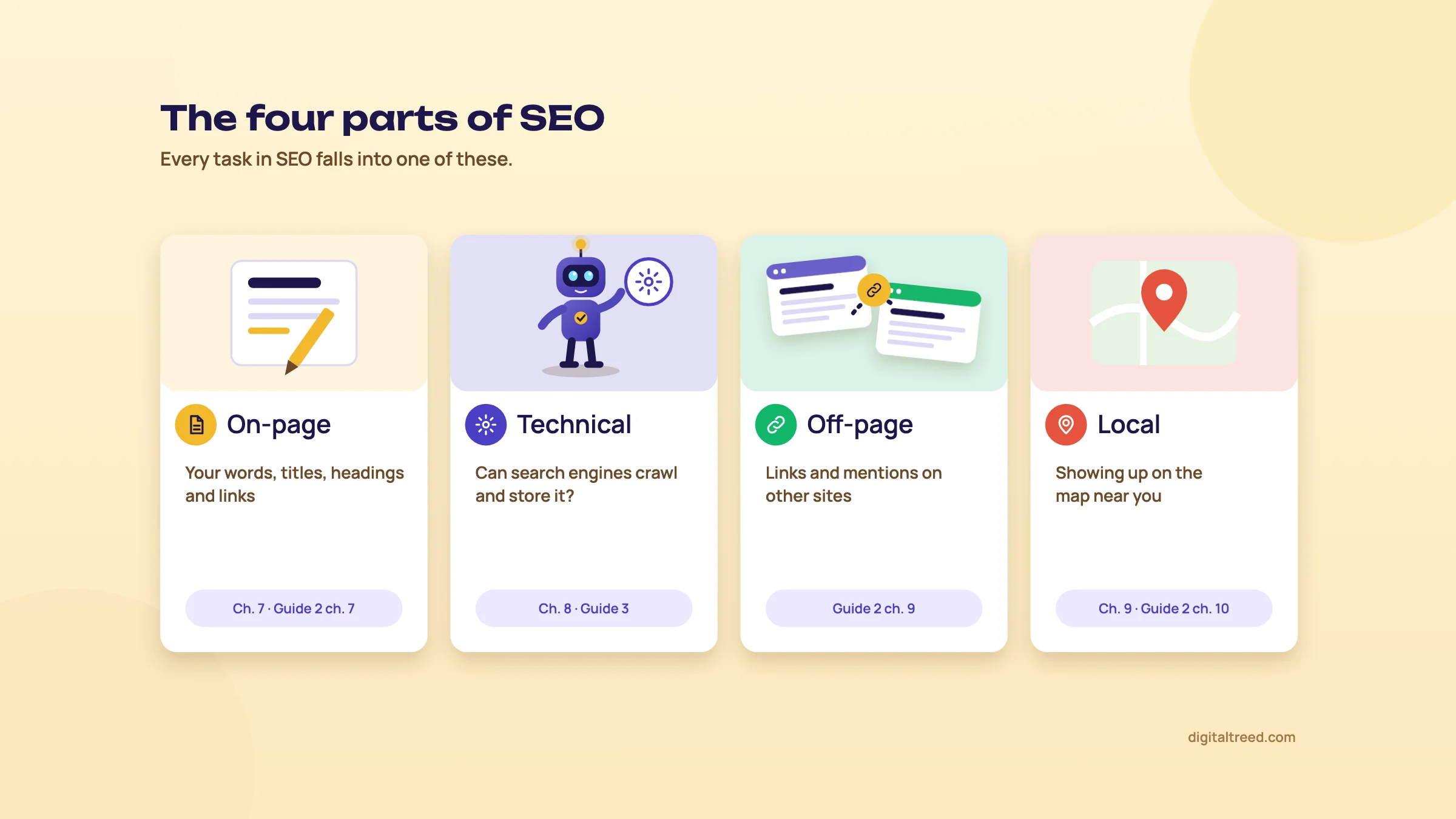 The four parts of SEO, and where this series covers each.
Does SEO still matter now that AI answers questions?
Yes. AI answers are growing fast, and they do take clicks away from some searches. But in early 2026 organic search still sent 42.75% of all visits to the 101,574 sites SE Ranking studied, while AI assistants sent 0.32%.[4] And the AI answers inside Google are built from the same pages Google has in its index,[8] so the work is the same. Chapter 5 explains how AI answer engines pick their sources.
How long does SEO take?
Longer than anyone selling SEO likes to admit. Ahrefs tracked a million new pages for a year: only 1.74% reached Google's top ten in that time. And 72.9% of the pages already in the top ten were more than three years old.[5] A small local business with little competition can move in weeks. A new site in a crowded field can take a year.
Here's one from our own work. On a client's site we fixed the on-page basics, sorted out technical problems and added new content. Between mid-June and the end of August 2025, its daily impressions in Google went from under 600 to about 5,000, and it earned 2,760 clicks from 180,000 impressions over that period.
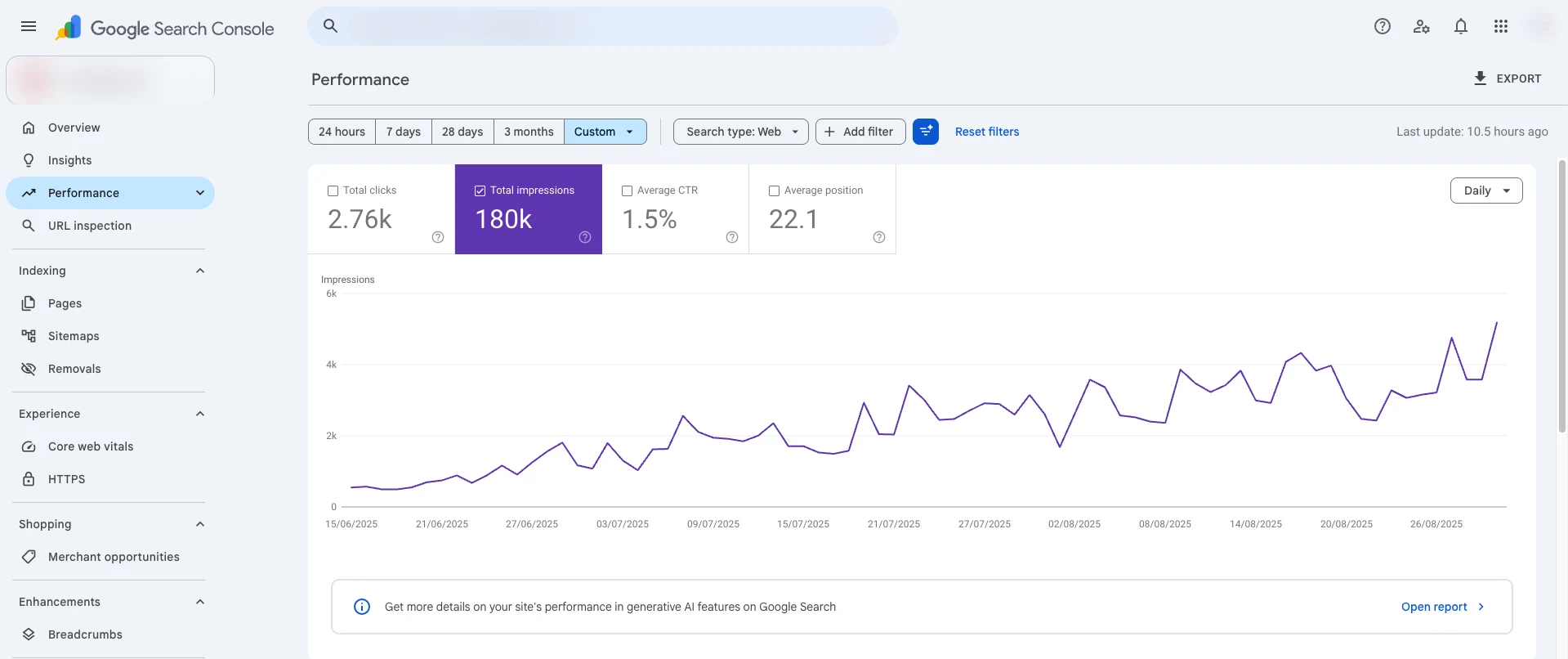 A client site in Search Console, June to August 2025. Name and logo hidden, shared with the client's permission.
Warning
Be careful with anyone who promises "page one in 30 days". Nobody controls Google's results, and the quick tricks that do work for a few weeks are the ones Google penalises later (chapter 3 shows how often that has happened).
Do it yourself or hire someone?
Pros
- Doing it yourself costs time, not money, and you learn how your customers search
- Fine for a small local site: a good Business Profile, ten well-written pages, Search Console set up
- This guide and the free tools on our site cover the basics
Cons
- Slow if you're also running the business
- Easy to miss technical problems you can't see
- Competitive fields (real estate, coaching, health) usually need someone full time
A sensible middle path: do the basics in this guide yourself, then get an expert to audit the site once a year. If you'd like a price for that, our quote page gives you one in a couple of minutes.
How Google finds, stores and shows your pages
Quick answer
Google works in three steps. Googlebot crawls the web, following links and sitemaps to download pages. Google then indexes them: it reads each page and stores it in a huge database. When someone searches, it serves the most relevant, useful pages from that index. AI Overviews and AI Mode draw on the same index.
Think of a library. A collector goes out and brings back every book he can find. A cataloguer reads each one and files it. When a reader walks in with a question, the librarian picks the few books that answer it best. Google's three steps are those three jobs, done billions of times a day.[1]
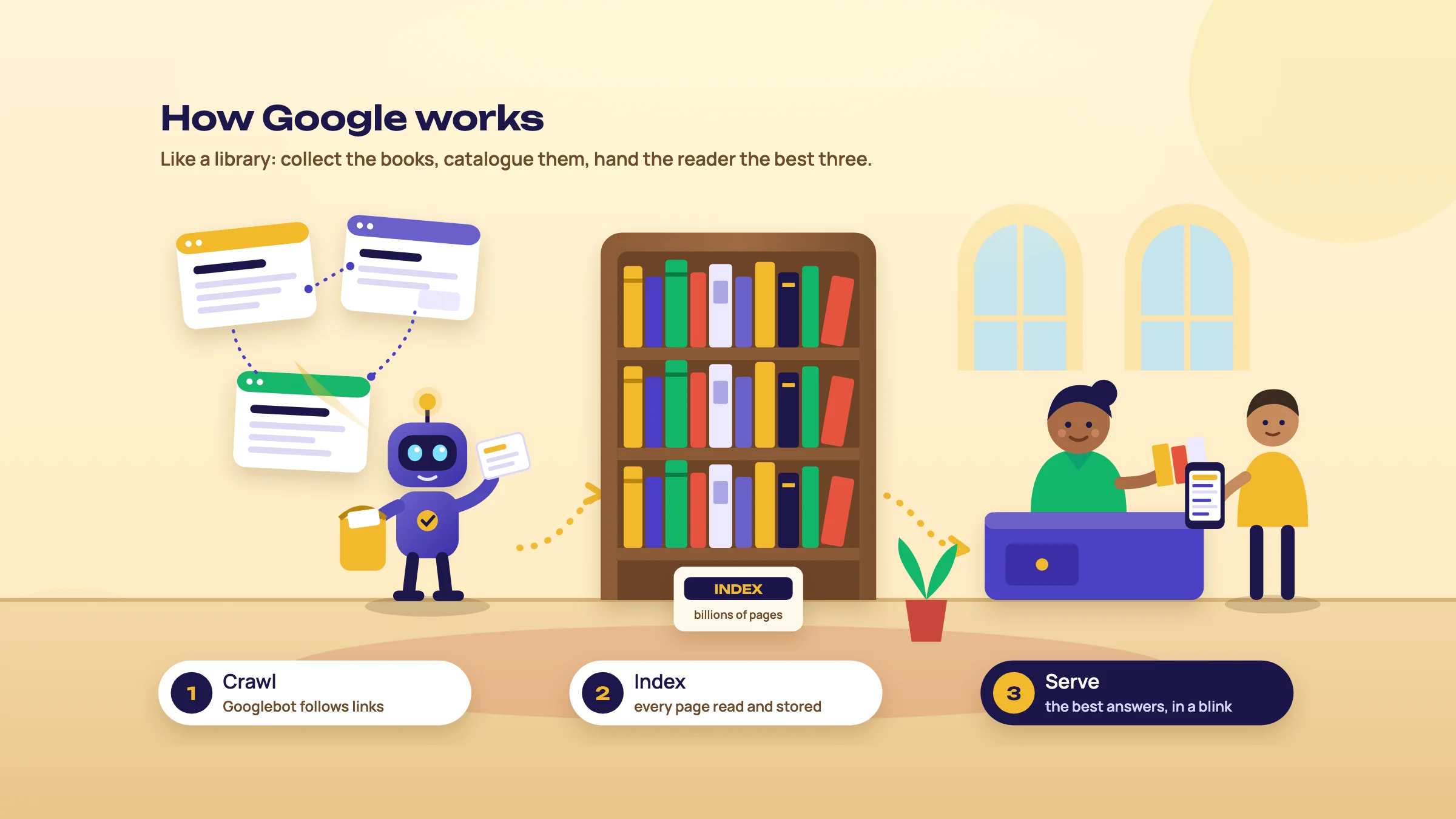 Crawl, index, serve: Google works like a library.
Crawling: how Googlebot finds your pages
Google's crawler is called Googlebot. It finds new pages in two main ways: by following links from pages it already knows, and by reading the sitemaps that site owners give it. Then it downloads the page, its text, images and video.[1]
Two details matter even at the start. First, Googlebot reads only the first 2MB of a page's HTML; anything after that isn't fetched or indexed.[7] Normal pages are far smaller, so this only bites on very bloated pages. Second, Google runs a page's JavaScript in a recent version of Chrome to see what the visitor sees.[1] If your content only appears after a lot of scripts run, Guide 3 explains how to check it.
Tip
A page nobody links to is hard for Googlebot to find. Link every important page from your menu or from another page, and list it in your sitemap (chapter 8 shows how).
Indexing: Google's list of pages
Google has a list of every page it knows about. That list is called the index. If your page isn't on it, nobody can find it in search.
While indexing, Google reads the page's words, its title, its image alt text and more. It also groups pages that are the same or almost the same, and picks one of them to show. That chosen page is called the canonical.[1] Being crawled doesn't mean being indexed, and being indexed doesn't guarantee being shown.
Note
Is a page of yours in the index? Search Console's URL Inspection tells you for certain. Chapter 8 sets it up. For a rough look at someone else's site, type site:example.com into Google.
Ranking and serving: who shows up first
When someone searches, Google looks through the index for the pages that best match the words and what the person seems to want, then orders them. Where the person is, what language they use and what device they're on all change the result.[1] That's why a search for "dentist" in Kanpur and in Lucknow returns different clinics, and why your results may not match your friend's.
You'll read that Google uses "200 ranking factors". It's an old line, not a list Google publishes, and chasing a checklist of 200 things wastes time. Chapter 10 deals with that myth.
In 2024 a large set of Google's internal documents leaked. Mike King of iPullRank and Rand Fishkin of SparkToro went through them and found that Google stores signals about clicks and has a site-level score called siteAuthority, but nothing showing how much any of it counts.[13] Google confirmed the documents were real but warned they were out of context, outdated or incomplete.[65] For a beginner the lesson is short: real people's behaviour on your pages counts, so build pages people are glad they clicked.
The results page today
A results page is no longer ten blue links. For a search like "dentist in Delhi" you may see ads at the top, a map with three clinics, an AI summary, a "People also ask" box, videos, and then the regular results.
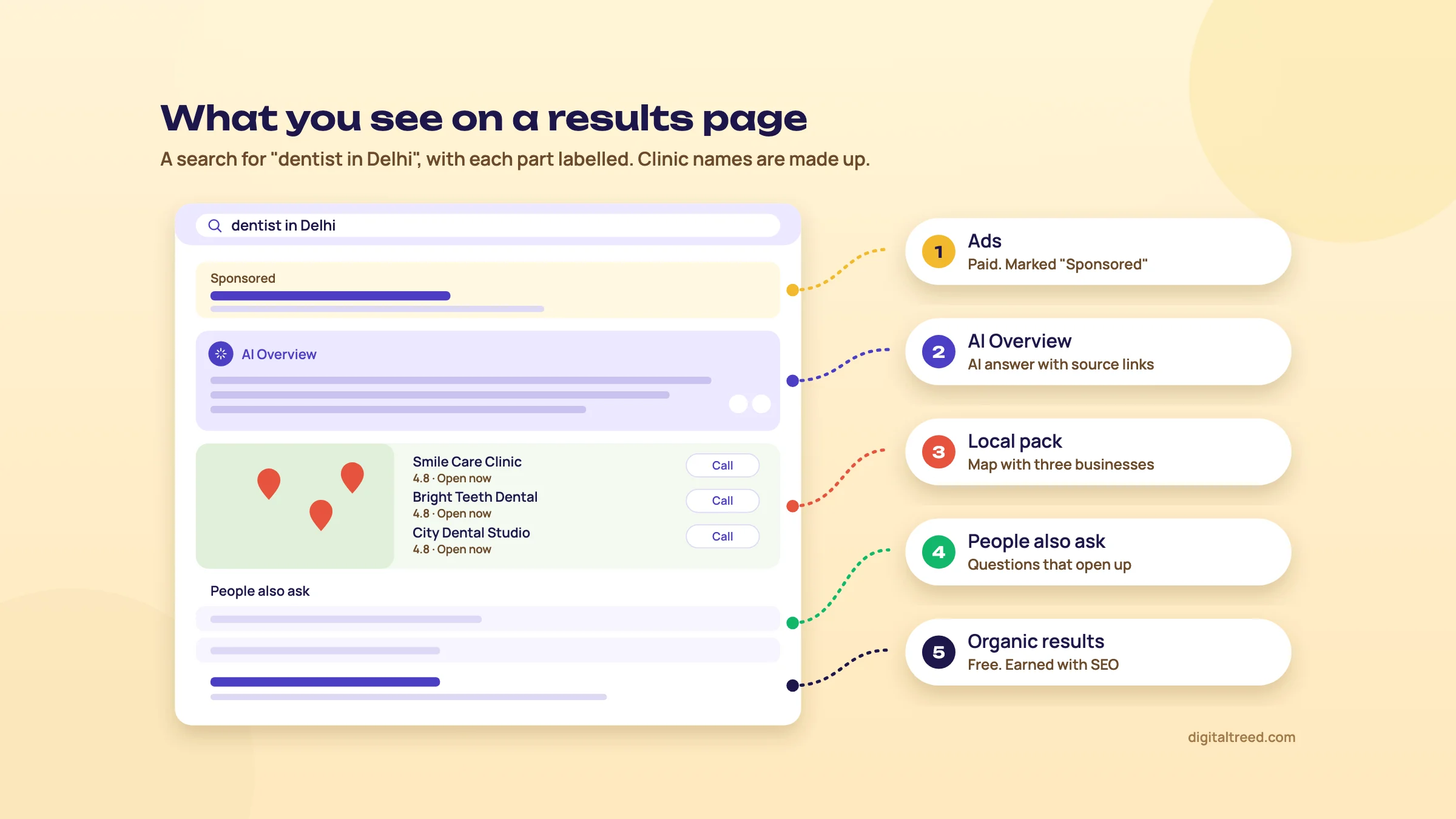 The parts of a results page. Clinic names are made up.
Clicks fall off fast as you go down the page, and even faster when an AI answer sits on top. First Page Sage measured 41 million clicks between March and August 2026:
Note
Click-rate studies disagree a lot, because they measure different sites, countries and years. Learn the shape, not one number: the top three results get most clicks, and an AI answer takes a big share of them.
AI Overviews and AI Mode, in plain words
An AI Overview is the short AI-written answer Google shows above the results for some searches. AI Mode is a separate tab where you can ask follow-up questions, like a chat. AI Overviews reached all US users in May 2024.[66] AI Mode came to India in June 2025, in English, as an opt-in Search Labs experiment; India was the first country after the US.[14] Hindi followed in September 2025[67] and seven more Indian languages in October 2025.[68]
Both use what Google calls "query fan-out": one question is split into several smaller searches, and the answer is built from the pages those searches find.[8] Ask "best coaching for NEET in Kanpur" and Google may also look up fees, results, reviews and batch timings on its own.
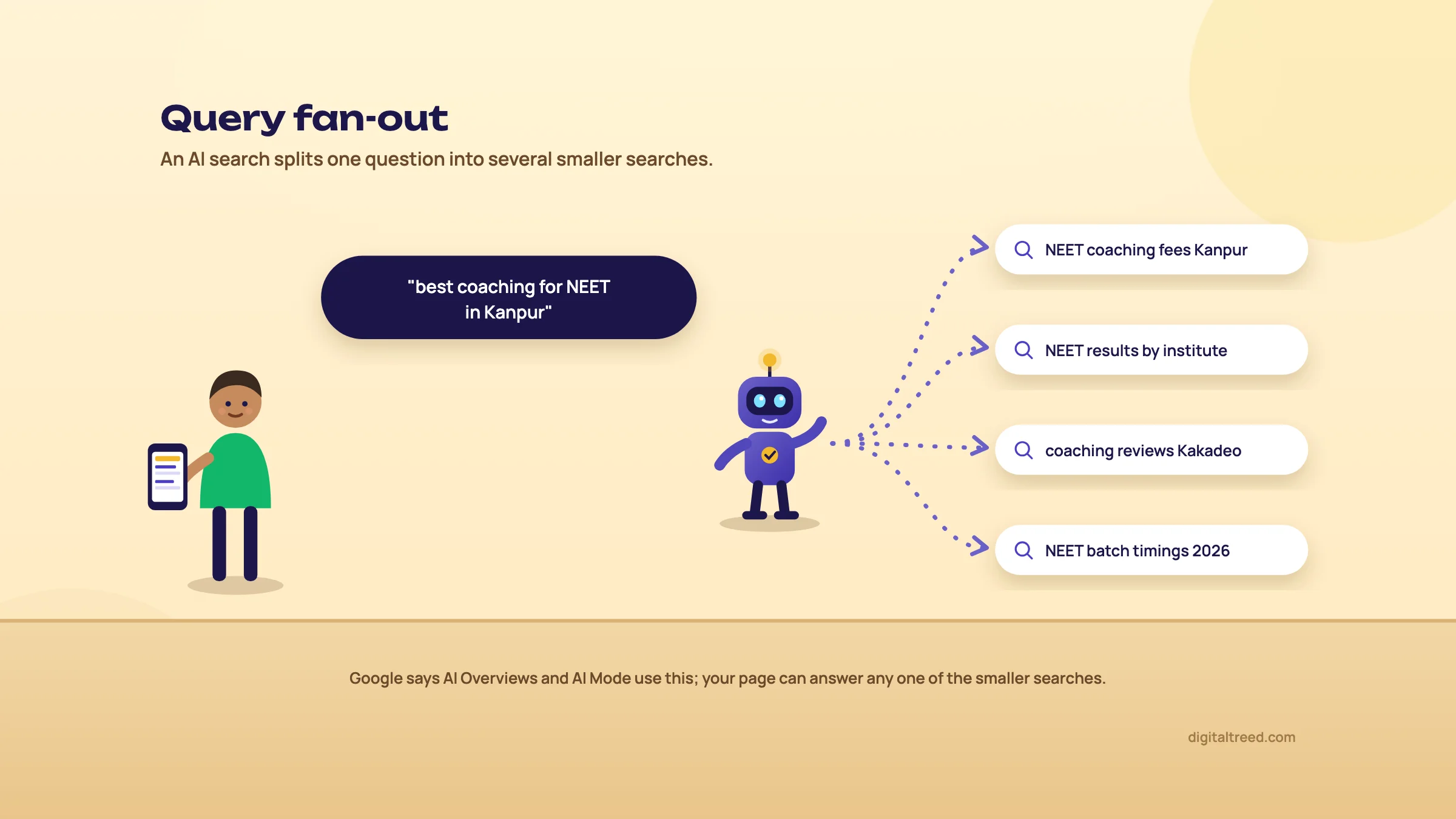 Query fan-out: one question becomes several searches.
The good news: Google says "there are no additional requirements to appear in AI Overviews or AI Mode". Your page has to be indexed and allowed to show a snippet, nothing more.[8] So everything in this guide helps with AI answers too.
Zero-click searches
Many searches now end without a click to any website: the answer is on the results page, in a map, an AI summary or a quick fact. SparkToro found that 68.01% of US Google searches ended without a click in January to April 2026, up from 60.45% in 2024 on the same Similarweb data.[12] Its earlier 2024 study, using a different provider (Datos), had put it at 58.5%.[11]
Pew Research watched how 900 US adults really searched in March 2025. When an AI summary appeared, they clicked a regular result in 8% of visits; without one, in 15%. They clicked a link inside the summary only 1% of the time.[10]
What this means for you: being in the results is no longer enough on its own. Your page has to be the one the AI answer quotes, or the one worth clicking past the summary for. Guide 5 is all about the first; the rest of this guide helps with both.
A short history of SEO, 1990 to 2026
Quick answer
SEO started around 1997, when people learned to stuff keywords into meta tags. Google's PageRank (1998) made links the main signal, so people started selling links. From 2011, Panda and Penguin punished thin content and bought links. Mobile, machine learning and helpful content came next, and since 2024 AI answers have changed what ranking means.
You don't need history to rank a page. But it explains why some advice you'll hear is twenty years out of date, and why every shortcut eventually stops working.
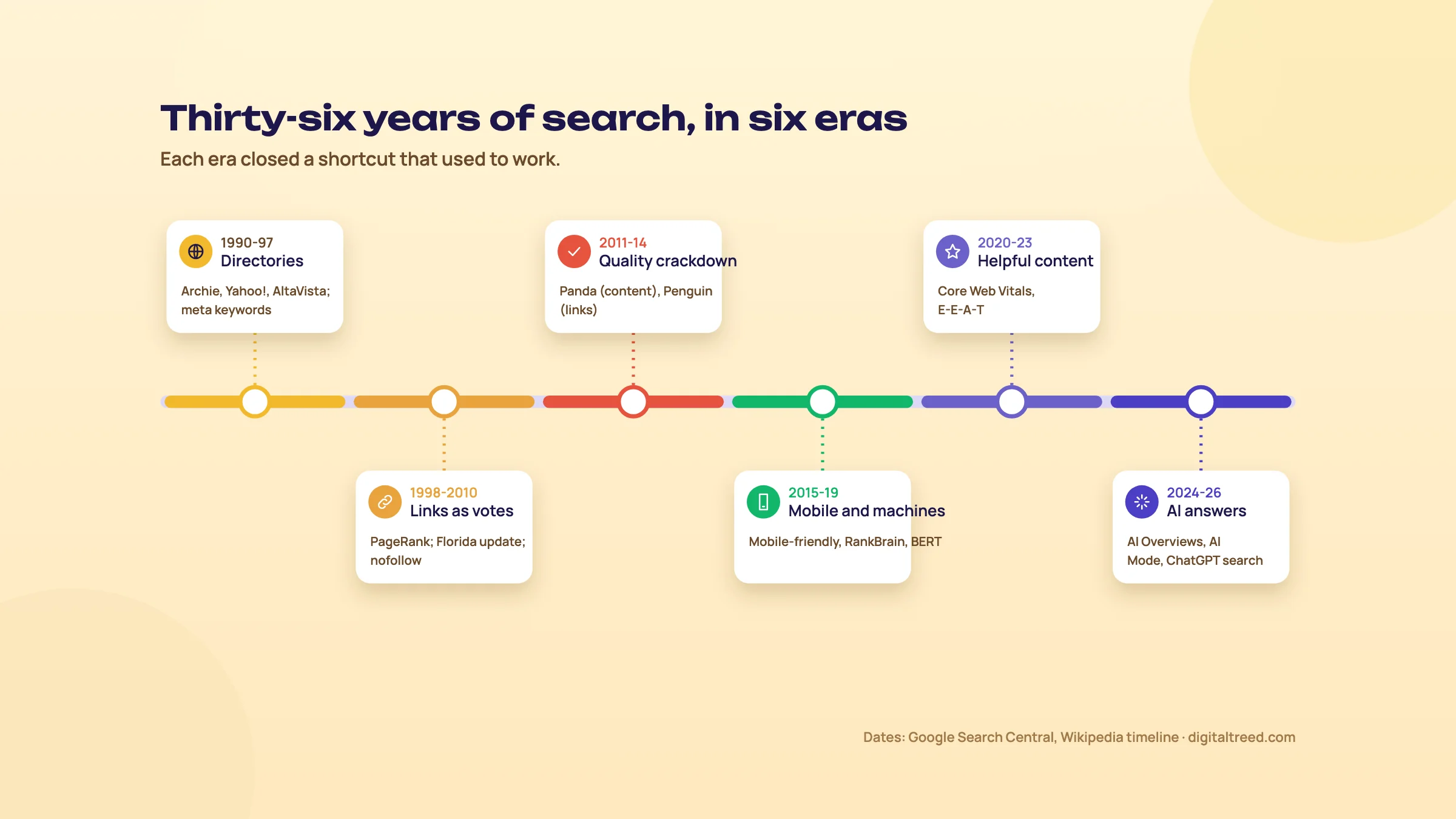 Six eras of search, 1990 to 2026.
1990 to 1997: directories and the first crawlers
The first search engine is usually said to be Archie, released in September 1990 at McGill University in Montreal; it listed file names, not web pages.[69] Yahoo! started as a hand-made directory in 1994, and AltaVista crawled the web from 1995. Engines trusted whatever a site said about itself in its meta keywords tag, so people stuffed it.
The phrase "search engine optimization" shows up around 1997. Who used it first is disputed: Danny Sullivan traced early uses to 1997[21] and credited Bruce Clay as one of the first to popularise it.[70]
1998 to 2010: links as votes
In 1998 Sergey Brin and Larry Page published the paper behind Google. Its big idea, PageRank, scored a page by the number and strength of links pointing to it.[22] Links became the currency of search, and a trade in them followed: link farms, paid links, endless directories. Google answered with the Florida update in 2003 and the "nofollow" link attribute in 2005, an early pushback against link spam.[20]
2011 to 2014: the quality crackdown
In February 2011 Google launched Panda against thin and copied content, and said it noticeably affected 11.8% of searches in the US.[16] Penguin followed in April 2012, aimed at manipulative links.[20] Whole businesses built on cheap articles and bought links lost most of their traffic in a day.
One of them was Indian. Harsh Agrawal's blog ShoutMeLoud was hit hard by Panda in 2012, badly enough that he thought about another career. He spent about eight months learning SEO properly, and the traffic came back.[18]
I needed to align better with Google's expectations.[18]
2015 to 2019: mobile and machine learning
In April 2015 Google started favouring mobile-friendly pages in mobile results; the press called it "Mobilegeddon". A month later, on 20 May 2015, Webmaster Tools was renamed Google Search Console, the free tool you'll set up in chapter 8.[19] RankBrain, Google's first big use of machine learning in ranking, was revealed later that year. In 2019 BERT helped Google understand about one in ten English searches in the US, especially longer, conversational ones.[15]
2020 to 2023: helpful content and experience
Google started measuring page speed and stability with Core Web Vitals. In August 2022 it launched a "helpful content" system to demote pages written mainly for search engines.[20] That December it added an extra E, for Experience, to its quality idea, E-E-A-T.[71] Guide 2 explains what E-E-A-T means in practice.
2024 to 2026: AI answers
The March 2024 core update folded the helpful content system into Google's main ranking. Google later said searchers would "now see 45% less low-quality, unoriginal content".[17] In May 2024 AI Overviews reached everyone in the US;[66] ChatGPT search launched that October; AI Mode followed in 2025 and reached India that June.[14] In 2026 Search Console began reporting AI Overview and AI Mode impressions,[72] and Google stopped showing FAQ rich results on 7 May 2026.[23]
| Year | What happened | What it meant for site owners |
|---|---|---|
| 1990 | Archie, the first search engine | Search existed before the web did |
| 1997 | "Search engine optimization" appears | Meta keyword stuffing works, for now |
| 1998 | PageRank paper | Links become the main signal |
| 2003 | Florida update | Keyword-stuffed affiliate sites drop |
| 2005 | rel="nofollow" | Links in comments stop counting |
| 2011 | Panda | Thin and copied content is demoted |
| 2012 | Penguin | Bought and manipulative links are punished |
| 2015 | Mobile-friendly update; Search Console named | Mobile pages matter |
| 2019 | BERT | Google reads longer questions better |
| 2022 | Helpful content system; E-E-A-T | Pages written for search engines lose |
| 2024 | March core update; AI Overviews | AI answers sit above the results |
| 2025 | AI Mode, India from June | Searches become conversations |
| 2026 | AI reports in Search Console; FAQ rich results end | Being cited counts, not just being clicked |
Every era closed a shortcut. Keyword stuffing, link buying, thin pages and mass-produced articles all worked until an update caught them. The things that lasted were pages people found useful and sites other people chose to mention.
Search engines compared: Google, Bing and the rest
Quick answer
Google gets about 97% of search engine traffic in India and about 90% worldwide (StatCounter, September 2026). Bing is second, and its index also feeds Yahoo, most of DuckDuckGo and Microsoft Copilot. Yandex leads in Russia, Baidu in China, and Naver competes with Google in South Korea. For an Indian business: Google first, Bing second.
Who has how much of search
Warning
These numbers count visits that search engines send to websites running StatCounter's tracker. They aren't counts of searches, and they undercount China, where few sites use the tracker. Use them to see who matters, not as exact figures.
Owned by Alphabet. In India it is search, for most people. Its free tool for site owners is Google Search Console, and its AI Overviews and AI Mode sit inside the normal results. Everything in this guide is aimed at Google first.
Bing, and why it matters more than its 2%
Microsoft's Bing has a small share in India, but its index does a lot of quiet work. Yahoo shows Bing's results. DuckDuckGo gets most of its links from Bing.[25] And Microsoft Copilot builds its answers from Bing. So one setup in Bing Webmaster Tools reaches all of them. It takes about ten minutes, because you can import your site from Google Search Console (chapter 8).
Bing, Yandex, Naver and Seznam also support IndexNow, a simple way to tell them the moment a page changes, instead of waiting to be crawled.[26] Google doesn't use it.
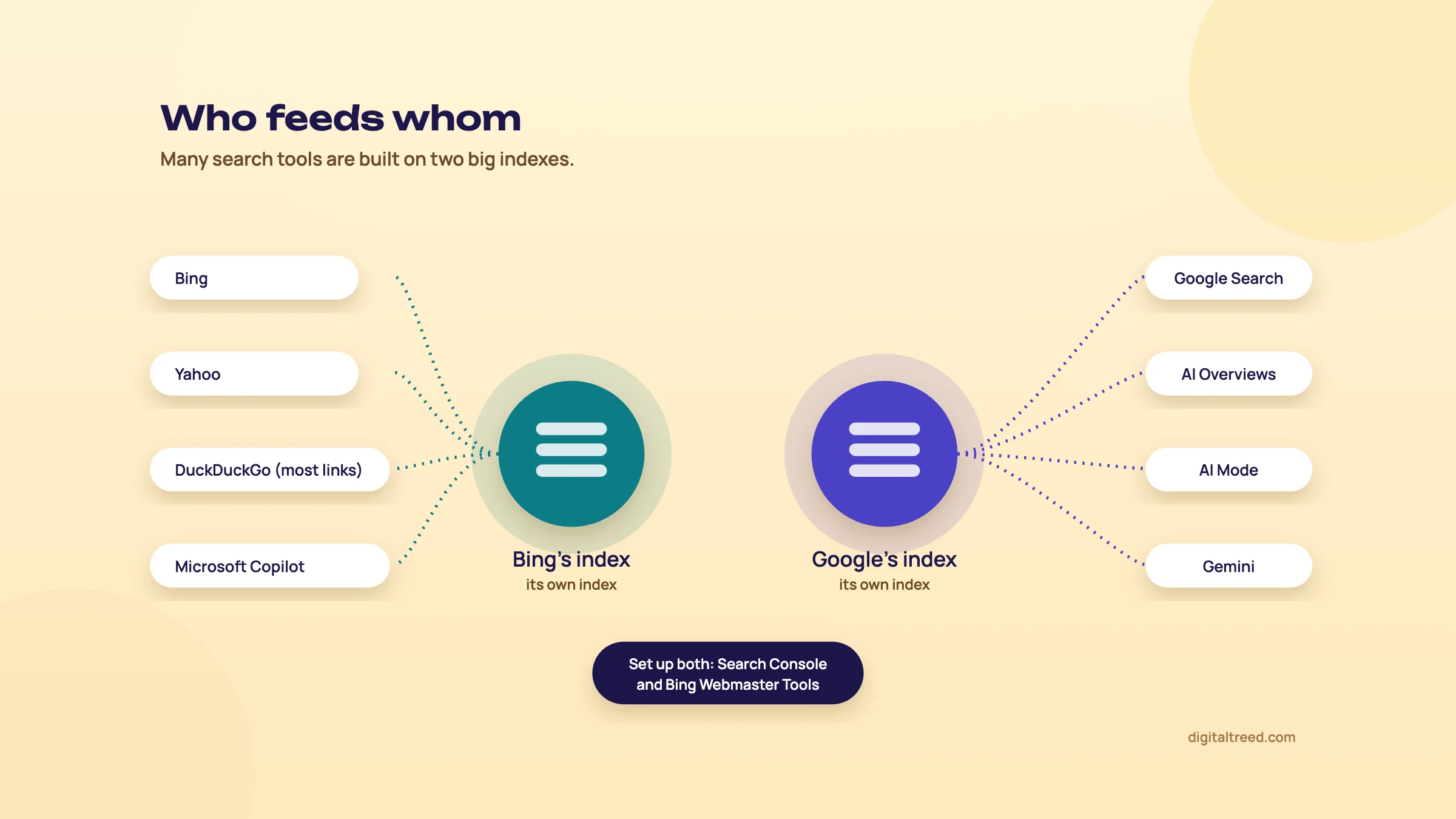 Two big indexes feed most search tools.
Yandex, Baidu, Naver and the others
You only need these if you sell into their countries. Yandex has 70.33% of search in Russia, Baidu 46.65% in China, and Naver 43.06% in South Korea, close behind Google there.[24] Each has its own webmaster tool. Hosting a site in mainland China also requires an ICP licence.[73]
| Engine | Owner | Where it leads | Its own index? | Tool for site owners |
|---|---|---|---|---|
| Alphabet | Almost everywhere, including India | Yes | Search Console | |
| Bing | Microsoft | Second in most countries; strong on Windows desktops | Yes | Bing Webmaster Tools |
| Yahoo | Apollo funds | Japan (separate company, Google results) | No, uses Bing | Bing Webmaster Tools |
| DuckDuckGo | DuckDuckGo | Privacy-minded users | Partly; most links from Bing | Bing Webmaster Tools |
| Yandex | Yandex (Russia) | Russia and nearby countries | Yes | Yandex Webmaster |
| Baidu | Baidu | Mainland China | Yes | Baidu Ziyuan |
| Naver | Naver | South Korea | Yes | Naver Search Advisor |
Search inside platforms: YouTube, Amazon and app stores
People also search inside apps. About 56% of US online shoppers start a product search on Amazon, according to a 2024 Jungle Scout survey of 1,000 shoppers.[27] We found no Indian figure, but if you sell on Amazon.in or Flipkart, their search boxes matter as much as Google's.
Note
You'll often read that YouTube is "the second largest search engine". That comes from comScore counts from 2008 of searches typed into YouTube's own search box, not a current measurement. Today YouTube is better described as one of the most visited websites.[28] Video still matters for SEO, because videos show up in Google's results and AI answers too.
The engines don't always agree
Glenn Gabe, an SEO consultant who studies Google updates, wrote about a site on a "your money or your life" topic, full of low-quality AI-written content, that Google ignored completely. Bing removed the whole site from its index in July 2026, yet ChatGPT kept citing it, in more than 464,000 answers by early August.[29] Search engines don't always agree, and AI tools can lag behind them.
What this means for you
For a business in India: set up Google Search Console and Bing Webmaster Tools, and you've covered almost everyone who searches. Add the others only when you sell into those countries. Guide 3 covers selling abroad.
AI answer engines: ChatGPT, Perplexity, Gemini and Copilot
Quick answer
AI answer engines such as ChatGPT search, Perplexity, Gemini and Microsoft Copilot write an answer and cite a few web pages. Most of them lean on a search index: Gemini on Google, Copilot on Bing. So the basics in this guide still apply. They send far fewer visits than Google: about 0.3% of website traffic in early 2026.
How an AI answer is put together
You ask a question. The AI turns it into several searches, reads the best passages from the pages it finds, writes an answer, and links some of those pages as sources. Google calls the splitting step "query fan-out".[8] If your page isn't in the index the AI searches, it can't be one of those sources.
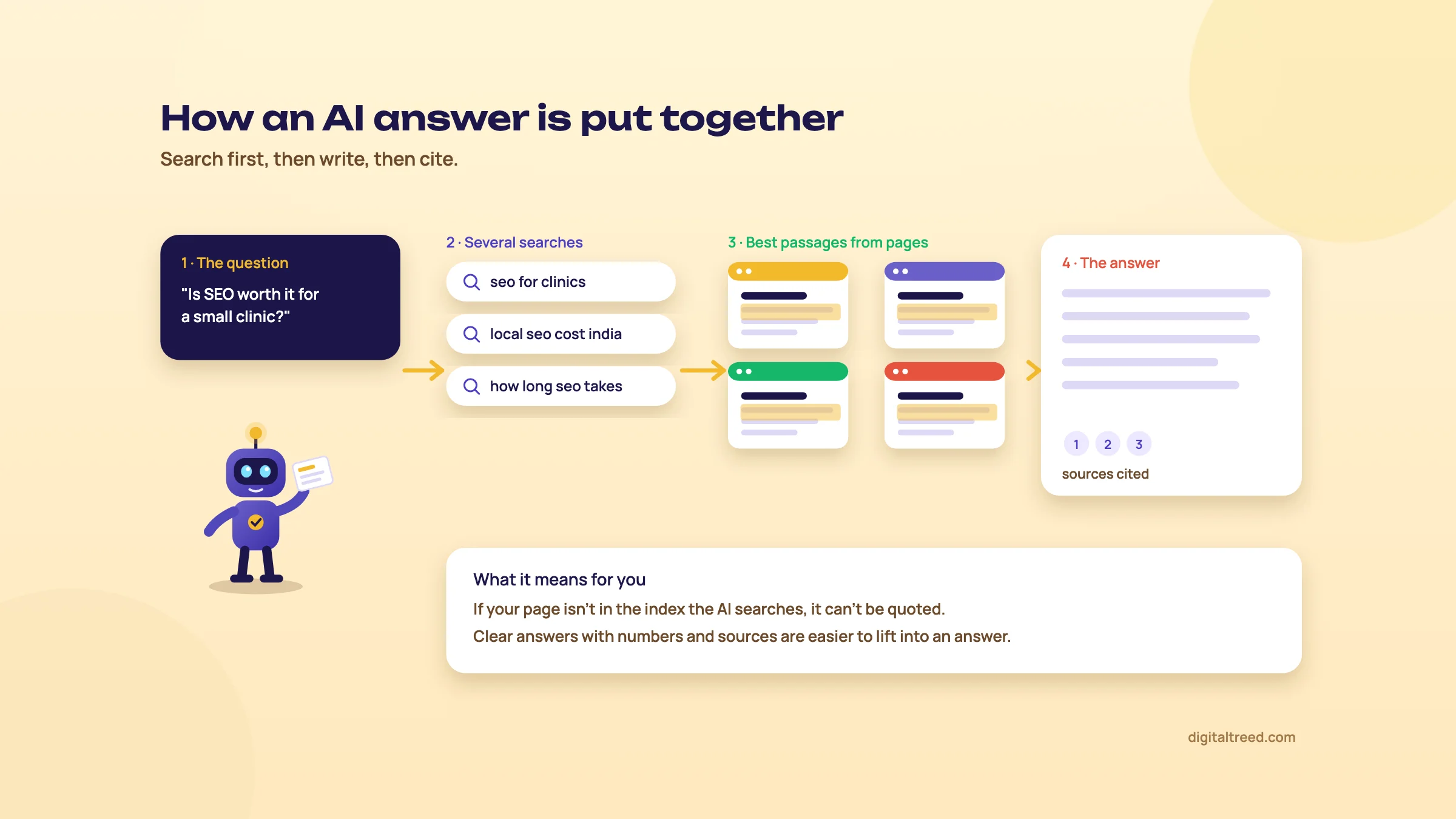 How an AI answer is put together.
The five you'll hear about
| Engine | Made by | Where its answers come from | Bot to allow |
|---|---|---|---|
| Google AI Overviews and AI Mode | Google's index | Googlebot | |
| Gemini | Google Search | Googlebot | |
| ChatGPT search | OpenAI | Search partners and its own crawling | OAI-SearchBot |
| Perplexity | Perplexity AI | Its own index plus live fetches | PerplexityBot |
| Microsoft Copilot | Microsoft | Bing's index | Bingbot |
Training bots and search bots
AI companies send two kinds of crawlers. Training bots collect pages to teach their models. Search bots fetch pages so the AI can cite them in answers.[30] Blocking a training bot doesn't take you out of AI answers; blocking a search bot does.[31]
- Training: GPTBot (OpenAI), ClaudeBot (Anthropic)[74], Google-Extended (Google's control for Gemini training), CCBot (Common Crawl)
- Search and answers: OAI-SearchBot (ChatGPT search), PerplexityBot, Claude-SearchBot, Googlebot, Bingbot
So if you don't want your text used for training but do want to be cited, your robots.txt file can say exactly that:
User-agent: GPTBot
Disallow: /

User-agent: Google-Extended
Disallow: /

User-agent: OAI-SearchBot
Allow: /

User-agent: PerplexityBot
Allow: /
Whether to block training bots is a business choice, not an SEO rule. We let them in on our own site, because we'd rather AI tools know what we do. Chapter 8 explains robots.txt properly.
GEO, AEO and SEO: one job, not three
You'll hear new names: GEO (generative engine optimization) and AEO (answer engine optimization). Google's own answer, in its May 2026 guide: "optimizing for generative AI search is optimizing for the search experience, and thus still SEO."[32] Google also says you don't need an llms.txt file or any special markup for its AI features.[32]
AEO/GEO is not an overhaul or abandonment of SEO.[33]
Lily Ray also tracked eleven sections of websites that lost Google traffic in early 2026. All eleven lost AI citations too, by 22.5% on average.[37] Her conclusion is worth remembering: the fastest way to lose visibility in AI search might be to lose it in Google first.
What helps, in plain terms
Do not
- Pay anyone who "guarantees" a ChatGPT ranking
- Stuff keywords into pages for AI tools
- Hide text that only bots can see
Do
- Get indexed in Google and Bing, and let the search bots in
- Answer questions clearly, with numbers and sources
- Get your business mentioned on other trusted sites
There is some research behind this. In a lab test, researchers from Princeton and IIT Delhi found that adding quotations, statistics and cited sources made a page between 28% and 43% more visible in AI answers, while keyword stuffing made it 8.7% less visible.[34] A later study found these rewriting tricks matter much less when many sites compete, and that ranking well in normal search matters more.[35] So write well for people and the AI benefits too. Guide 5 covers this in depth.
How much traffic to expect
The AI tools are huge: ChatGPT reported 900 million weekly users in February 2026.[36] But they send few visits. Across the sites SE Ranking measured, AI assistants sent 0.32% of all visits in early 2026, and ChatGPT sent three quarters of those.[4]
Both things are true at once. AI answers change how people search, and Google still sends most of the visits. Do the basics well and you're ready for both.
Note
From our work: a sports platform. A global sports platform and networking community had the technical side in good shape: fast pages, clean setup. But its posts linked to no outside sources at all, so nothing in them showed where its facts came from, and its link building relied on spammy shortcuts. We changed course. Posts started citing real sports statistics, with their sources. That gave other sites a reason to notice: collaboration requests began coming in, which brought links from inside their articles and mentions of the brand by name. Traffic rose 60%. The lesson: give people something worth citing, and links and mentions follow. That is also what AI answers look for.
Keyword basics: find the words your customers use
Quick answer
A keyword is the word or phrase someone types, or says, into a search box. Good keywords match what your customers actually type, not what you call your product. Start with Google's autocomplete, "People also ask", Google Trends and Search Console, all free, and sort each phrase by what the person wants: to learn, compare, buy or go somewhere.

0:003:04
Starts with · 0:00The list you'll build
How to Find Keywords for SEO Free: 20 Keywords in 45 Minutes (2026)
All 12 chapters
- 0:00The list you'll build
- 0:10What a keyword is
- 0:23Step 1: what and where
- 0:36Step 2: Google autocomplete
- 0:46Why a private window + People also ask
- 0:59Step 3: Google Trends
- 1:17Trends shows zero?
- 1:28Step 4: Keyword Planner without paying
- 1:57Step 5: Search Console
- 2:10Step 6: build your list
- 2:33Don't trust AI search numbers
- 2:46You're done when
What a keyword is
Keyword research is finding the words people type into Google before they find a business like yours. A cake shop in Lucknow might guess "best cakes". People actually search "birthday cake near me" and "eggless cake Lucknow". Write for the words they use, not the words you'd use.
Short, broad phrases like "cakes" are called head terms. Lots of people search them, but they want all sorts of things, and big brands own the results. Longer phrases like "eggless chocolate cake delivery Gomti Nagar" are called long-tail. Fewer people search each one, but the ones who do know exactly what they want. A small business wins most of its customers on long-tail phrases.
You can produce the greatest article in the world about something that no one is searching for in Google.[40]
Search intent: what the person wants
Every search has a purpose behind it. Google tries to match it, so your page has to match it too. There are four common types. Here they are for a dental clinic in Delhi:
| Intent | The person wants to | Example search | Page that fits |
|---|---|---|---|
| Informational | Learn something | teeth whitening side effects | An article or guide |
| Commercial | Compare before choosing | best dentist in Lajpat Nagar | A service page with reviews, prices, photos |
| Transactional | Do something now | book dentist appointment Delhi | A booking or contact page |
| Navigational | Reach a known place | the clinic's own name + Lajpat Nagar | Your home page and Business Profile |
The easiest way to check intent: search the phrase yourself and look at what Google already shows. If the top results are all articles, a sales page will struggle to rank there, and the other way round.
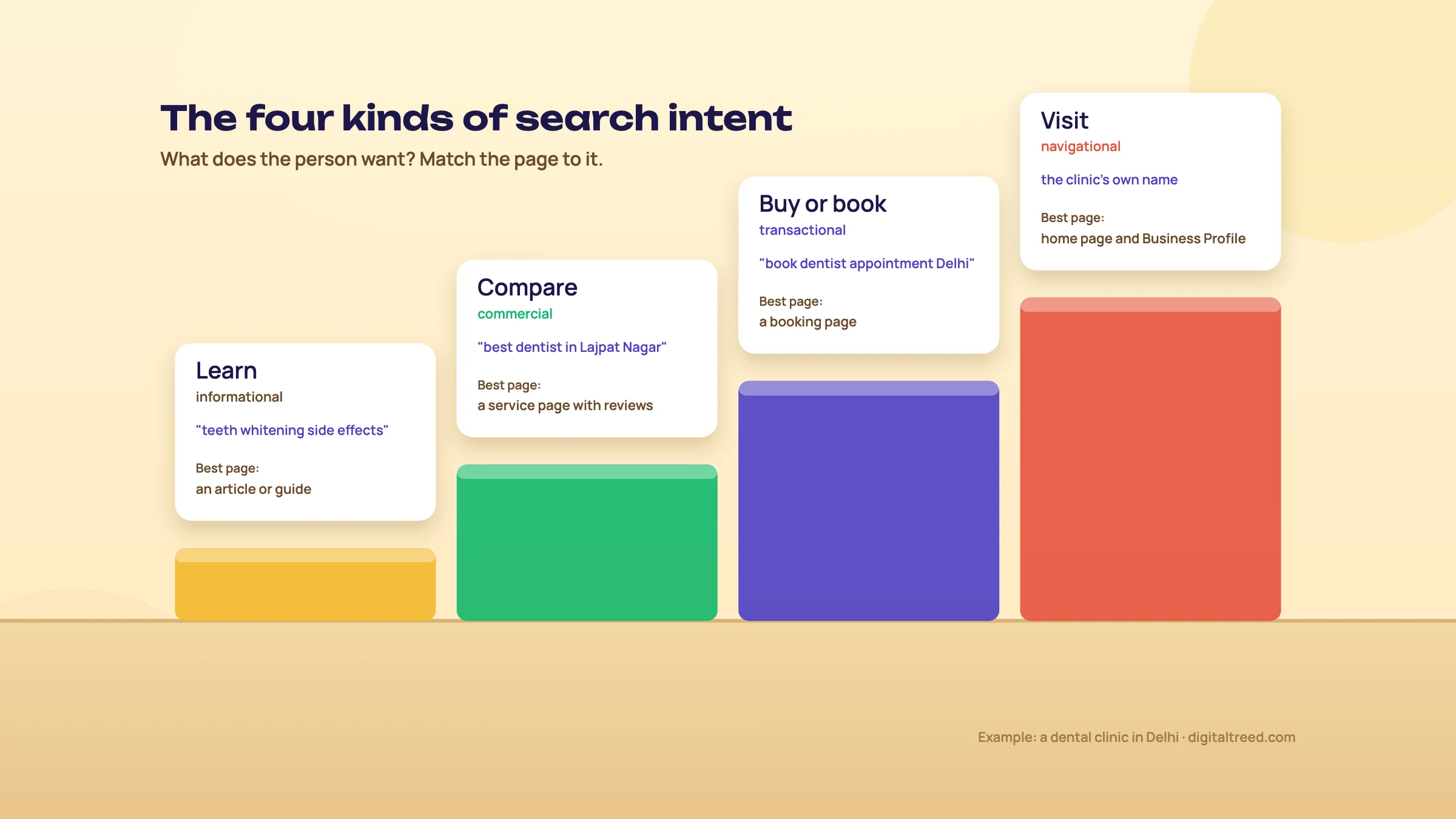 The four kinds of search intent.
How people in India search
People in India type the same idea in several ways: in English, in Hindi script, and in Hindi written with English letters. Each version is a separate search with its own results, so check all three for your main services. Voice search is common too; a Google report in 2019 put the year-on-year growth in voice searches in India at 270%.[42] That's an old number from a small starting point, but the habit has only grown.
There's no separate trick for voice. Spoken questions are answered from the same index as typed ones, so clear answers and a good local listing cover them. Google's AI Mode now works in Hindi and seven more Indian languages.[68]
Writing pages in Hindi can pay off. Techmagnate, an Indian agency, says Hindi pages it built for Bajaj Finserv raised traffic from Hindi searches by 270%.[41] That's the agency's own account, but it shows the opportunity. Guide 2 has a full chapter on how India searches.
Find your first keywords for free
Find your first 20 keywords for free
- List what you sell and where Write down every service or product, and the areas you serve (for example "eggless cakes", "birthday cakes", "Gomti Nagar", "Indira Nagar").
- Ask Google Open an incognito window on google.co.in. Type each service and note the suggestions that drop down, then the questions in "People also ask". Our free Keyword Suggestion Tool does this for you: it asks Google for your seed with every letter, question word and modifier and lists the hundreds of phrases that come back.
- Check the season Put your main phrases into Google Trends to see when interest peaks: sweets before Diwali, banquet halls in wedding season, coaching before exams.
- Get rough volumes Google Keyword Planner shows how often phrases are searched. It's free but needs a Google Ads account with billing details, and accounts that spend little or nothing often see ranges like "1K to 10K" instead of exact numbers.
- Look at what already works Once your site has data, Search Console's Performance report lists the searches you already appear for. These are often the quickest wins.
- Build your list Put 10 to 20 phrases in a sheet with four columns: the phrase, the intent, the page it belongs to, and notes.
Tip
Google Trends shows interest on a scale of 0 to 100, relative to all searches in the place and time you choose, with 100 as the highest point on your chart. It's not a count of searches, so use it to compare and to spot seasons, not to size a market.[39]
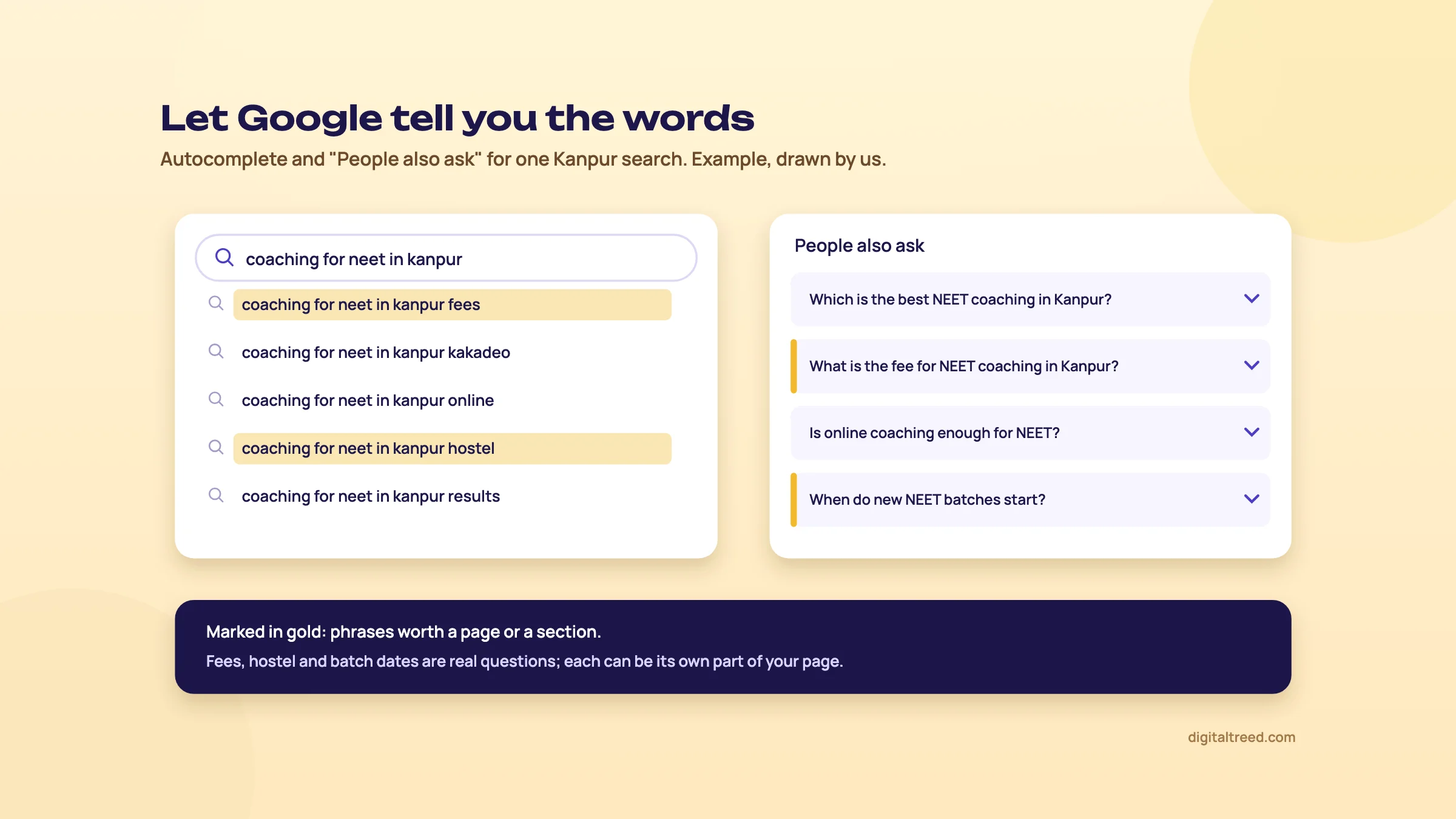 Autocomplete and People also ask: example drawn by us.
Free and paid keyword tools
| Tool | Free? | Use it for |
|---|---|---|
| Google autocomplete and "People also ask" | Yes | The words and questions people actually use (our free Keyword Suggestion Tool collects the autocomplete phrases for you) |
| Google Trends | Yes | Seasons, and comparing two phrasings |
| Google Keyword Planner | Yes, with an Ads account | Rough monthly volumes[38] |
| Google Search Console | Yes | Searches you already show up for |
| AnswerThePublic | 3 searches a day with a free account | Questions around a topic |
| Semrush, Ahrefs, Ubersuggest, KWFinder | Paid (limited free tiers) | Volumes and difficulty for hundreds of phrases; not needed to start |
Warning
ChatGPT and other AI chatbots are good for brainstorming ideas, but they make up search volumes. Never take a number from a chatbot; check it in Keyword Planner or Search Console.
One page, one main topic
Give each phrase group one page. If two of your pages chase the same search, they compete with each other and both do worse. SEOs call this keyword cannibalisation; Guide 2 shows how to find and fix it.
And don't repeat a phrase again and again to "help" a page. Our Word Counter shows how often a phrase appears, so you can spot overuse. There is no ideal keyword density; write it the way you'd say it.
Note
From our work: a women's wear store. A women's wear manufacturer selling through its own online store was aiming every page at short, broad keywords, the same few words the biggest fashion sites fight over. A new store can't win that fight. So we gave each product page its own long-tail search, written the way a shopper describes that exact piece. Within a month the results had started to show. The lesson: when you're small, don't compete for the words everyone wants. Compete for the words that describe exactly what you sell.
On-page basics: title, description, headings, URL, images and links
Quick answer
On-page SEO is what you control on the page itself. Give each page one clear topic, a unique title with the main phrase near the start, a description that earns the click, a clear main heading and subheadings, a short readable URL, alt text on images, and links to and from your related pages.

0:003:57
Starts with · 0:00Before and after
On-Page SEO for Beginners: Fix One Page in 15 Minutes (Free Tool, 2026)
We'll use one page all the way through: the "Kaju katli" page of a sweet shop in Kanpur. Here's how it starts, and where it ends up.
| Before | After | |
|---|---|---|
| Title | Home | Products | Item 14 | Kaju Katli in Kanpur, Made Fresh Daily | Sharma Sweets |
| Description | (empty) | Pure kaju katli made every morning with no added colour. Order 250 g to 5 kg boxes, delivery across Kanpur, or pick up in Swaroop Nagar. |
| Main heading (H1) | Welcome! | Kaju Katli, Made Fresh Every Morning |
| URL | /product.php?id=14 | /sweets/kaju-katli |
| Image alt text | IMG_2041.jpg | Kaju katli pieces with silver leaf in a gift box |
The shop name is made up. Now each piece, one at a time.
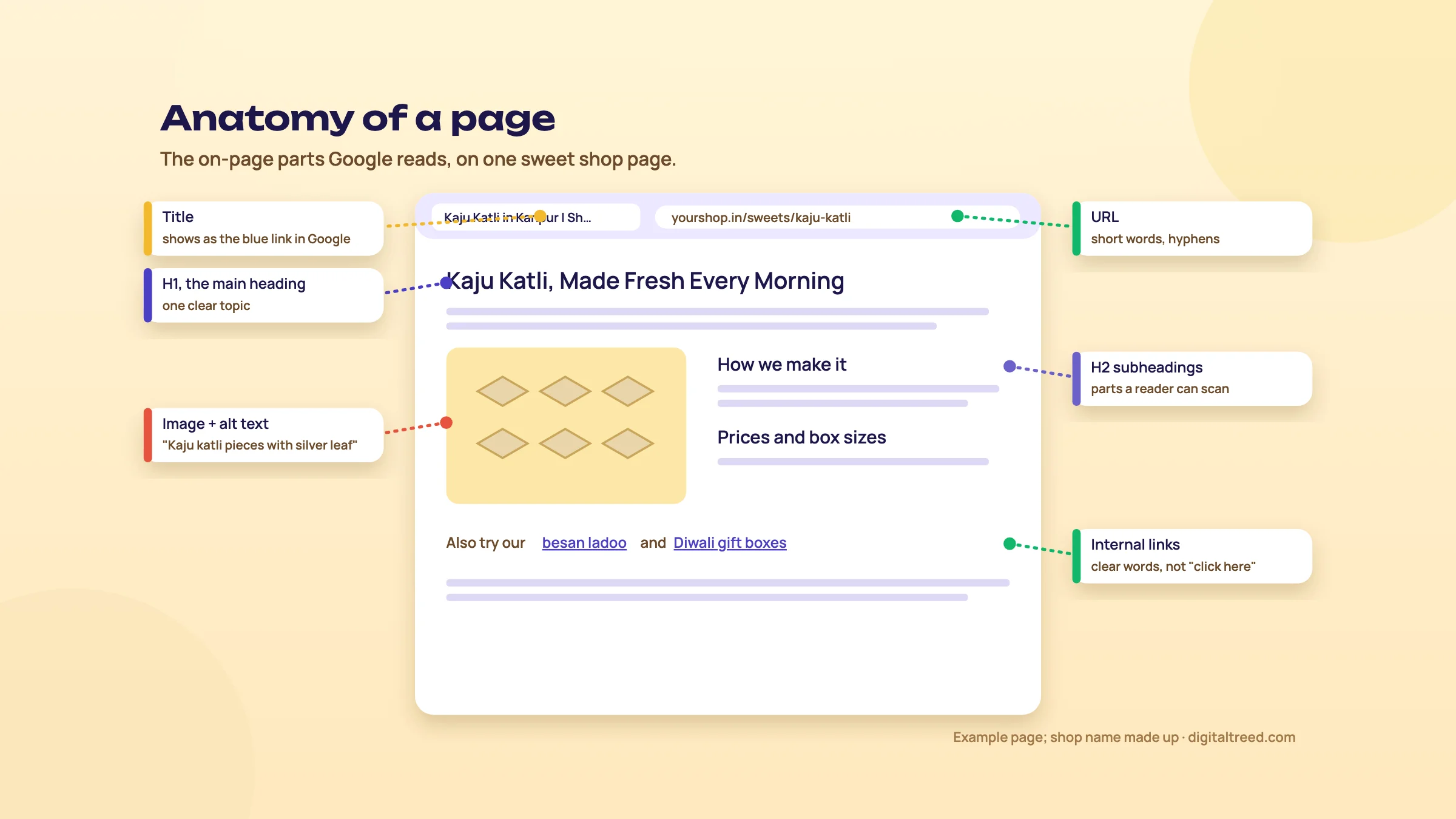 The on-page parts Google reads. Shop name made up.
The title
The title is the clickable blue line in Google's results and the text on the browser tab. It's one of the clearest hints you give Google about what the page is for. Put the main phrase near the start, make it different on every page, and keep it short enough not to be cut off. Google sets no limit, but long titles are cut to fit the screen; around 55 to 60 characters is a safe habit.[75]
Placing your target keywords first is still the move.[13]
Google doesn't always show your title. It sometimes rewrites it from your headings or other text on the page,[43] especially when the title is vague or stuffed.[75] A clear, honest title is rewritten less often.
One small study is worth knowing. Cyrus Shepard looked at 50 sites after recent Google updates; sites that lost traffic tended to have titles full of adjectives and numbers ("10 Best Amazing Sweets 2026!").[48] It's a correlation from a small sample, not a rule, but plain titles are the safer habit.
The meta description
The description is the grey text under the title. Google doesn't use it to rank the page,[76] but it often shows it, and it's your chance to win the click. Say what's on the page, who it's for and why it's worth opening. Google may write its own from the page text if yours doesn't fit the search.[43]
Do not
- Repeat the same title or description on every page
- Stuff in every keyword you can think of
- Promise what the page doesn't deliver
Do
- Main phrase early in the title, brand at the end
- Say who it's for and one real detail (price, area, time)
- Write the description like a line from a shop sign
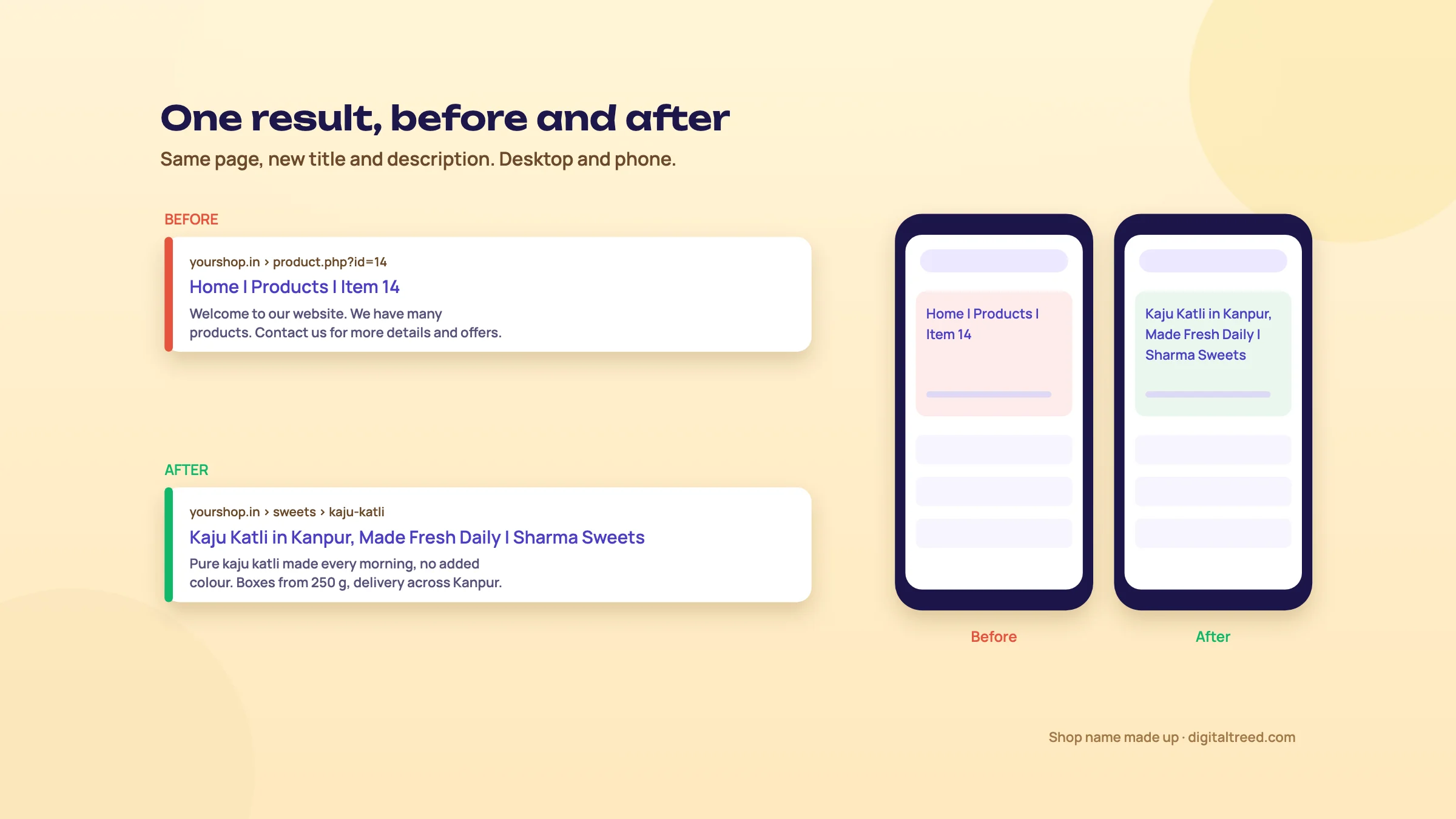 Before and after: new title and description.
Headings
Headings are the outline of your page. The main heading (H1) says what the page is about; subheadings (H2, H3) break it into parts a reader can scan. Google's own advice is relaxed about the details: "it doesn't matter if you're using them out of order."[43] One clear main heading per page is a good habit, not a law.
The URL
Use short, readable words in the address, separated by hyphens: /sweets/kaju-katli, not /product.php?id=14. Our free URL Slug Generator writes the slug from your title, drops the filler words and checks the address is free. Google's Starter Guide recommends descriptive URLs and grouping similar pages in folders.[43] But don't rename the addresses of pages that already rank. If you must, redirect the old address to the new one, or you'll lose what the old page had earned (Guide 3 explains redirects).
Images and alt text
Alt text is a short description of an image for people who can't see it, and for Google. Describe what's actually in the picture, as you would to someone on the phone: "Kaju katli pieces with silver leaf in a gift box", not "sweets sweets best sweets Kanpur". When an image is a link, its alt text works as the link's words.[44] Give image files sensible names too, and keep them small, because heavy images slow the page (Guide 2 covers image size).
Links between your pages
Internal links help visitors move around and help Google find and understand your pages. Google reliably follows normal links written as <a href="...">.[44] Use words that say where the link goes ("our eggless cake range"), not "click here". And make sure every page you want found has at least one link pointing to it from another page.
Write for people, not for a word count
Google asks site owners whether they're "writing to a particular word count because you've heard or read that Google has a preferred word count?" and answers: "(No, we don't.)"[45] Write until the question is answered, then stop. Repeating keywords to game a page is a named spam practice, keyword stuffing.[46]
Structured data, in one paragraph
Structured data is a bit of code that tells Google facts about a page in a fixed format: this is a local business, these are its hours, this is a product and its price. It can make your result show extra details. Google stopped showing FAQ-style results in May 2026, so don't add FAQ markup expecting them.[23] Our Schema Markup Validator checks whether yours is correct; Guide 2 explains which types are worth adding.
Fix one page in 15 minutes
Fix one page in 15 minutes
- Check it Run the page's address through our Meta Tag Analyzer to see its title, description and other tags.
- Rewrite the title and description Main phrase first in the title; one real detail and a reason to click in the description.
- Check the headings One clear main heading that matches the title's topic, then subheadings for each part.
- Fix the images Add alt text to every image that shows something meaningful.
- Add two links Link to this page from two related pages, with words that describe it.
Tip
On WordPress, Yoast SEO (10 million+ active installations),[47] Rank Math (4 million+)[77] and All in One SEO (2 million+)[78] all give you boxes for the title and description. Use whichever one your site already has; switching plugins on a live site is more trouble than it's worth.
Your first site setup: Search Console, Bing, sitemap, robots.txt, HTTPS and mobile
Quick answer
Before you chase rankings, make sure Google can reach your site. Verify it in Google Search Console and Bing Webmaster Tools (both free), submit an XML sitemap, check robots.txt isn't blocking pages, serve every page over HTTPS, and make sure the mobile version shows the same content. Most sites can do it in an afternoon.

0:003:28
Starts with · 0:00What you'll get
How to Set Up Google Search Console and Bing Webmaster Tools (2026, Step by Step)
All 12 chapters
- 0:00What you'll get
- 0:11What you need
- 0:24What Search Console is
- 0:38Add a Domain property
- 1:03No DNS access? URL prefix + HTML tag
- 1:18Verify with a TXT record
- 1:37Click Verify (it can take 2-3 days)
- 1:48Submit your sitemap
- 2:17Three reports to open first
- 2:33Add your site to Bing
- 2:58You're done when
- 3:10Next step
What Google needs from every page
Google lists only three technical requirements for a page to be eligible for search: Googlebot isn't blocked from it, "the page works, meaning that Google receives an HTTP 200 (success) status code", and "the page has indexable content".[49] Everything in this chapter is about getting those three right, and being able to check them.
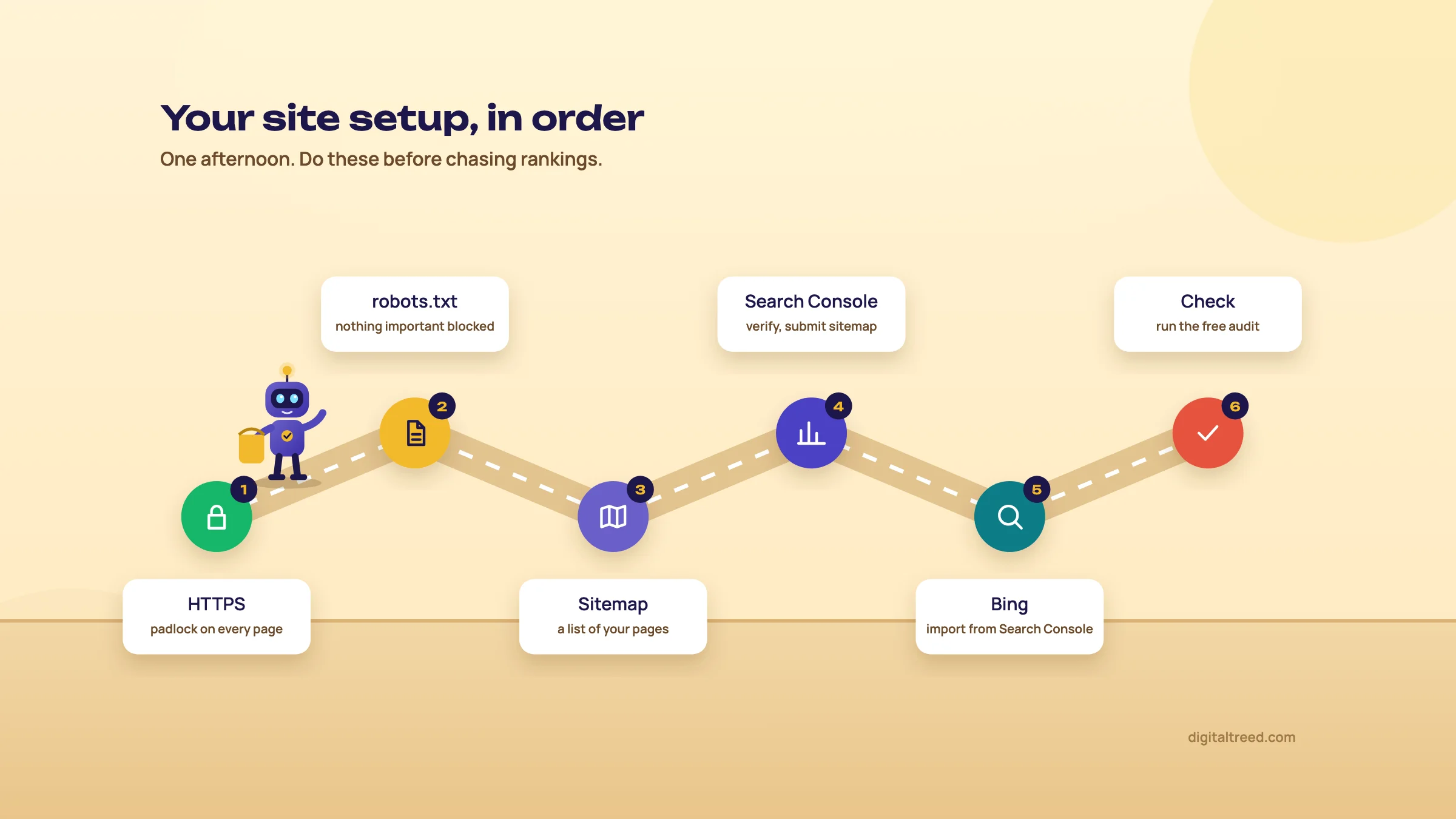 Your site setup, in order.
Set up Google Search Console
Search Console is Google's free dashboard for your site. It shows which searches bring people to you, which pages are indexed and which aren't, and any problems Google found. It keeps 16 months of data.[58] If you do only one thing from this chapter, do this.
Set up Google Search Console
- Open Search Console Go to search.google.com/search-console and sign in with the Google account the business will keep using.
- Choose "Domain" Pick the Domain property, not URL prefix. Type your domain without https or www (for example yourshop.in).
- Copy the TXT record Search Console shows a line of text starting with google-site-verification.
- Add it to your domain In your domain registrar's DNS settings (GoDaddy, Hostinger, BigRock and so on), add a TXT record with that text.
- Verify Back in Search Console, click Verify. DNS changes can take from a few minutes to two or three days.[79]
- Submit your sitemap Open Sitemaps, enter your sitemap address (often /sitemap.xml or /sitemap_index.xml) and submit.
- Look around Open Performance (searches and clicks), Pages (what's indexed and why not) and URL Inspection (check one page).
Tip
A Domain property covers every version of your site at once: with and without www, http and https, and any subdomain. Glenn Gabe described a client whose whole site vanished from Google because a forgotten DNS entry let a spammer take over the www version, while the version they watched in Search Console looked normal. The Domain property showed the problem, but nobody was checking it. They cleaned it up and were back in about two days, but only after they spotted it.[56]
Clicks from AI Overviews and AI Mode are counted inside Search Console's normal "Web" results, and since June 2026 a separate Search Generative AI report shows how often your pages appeared in AI Overviews and AI Mode (impressions only, no clicks; available to all sites since 31 August 2026).[72]
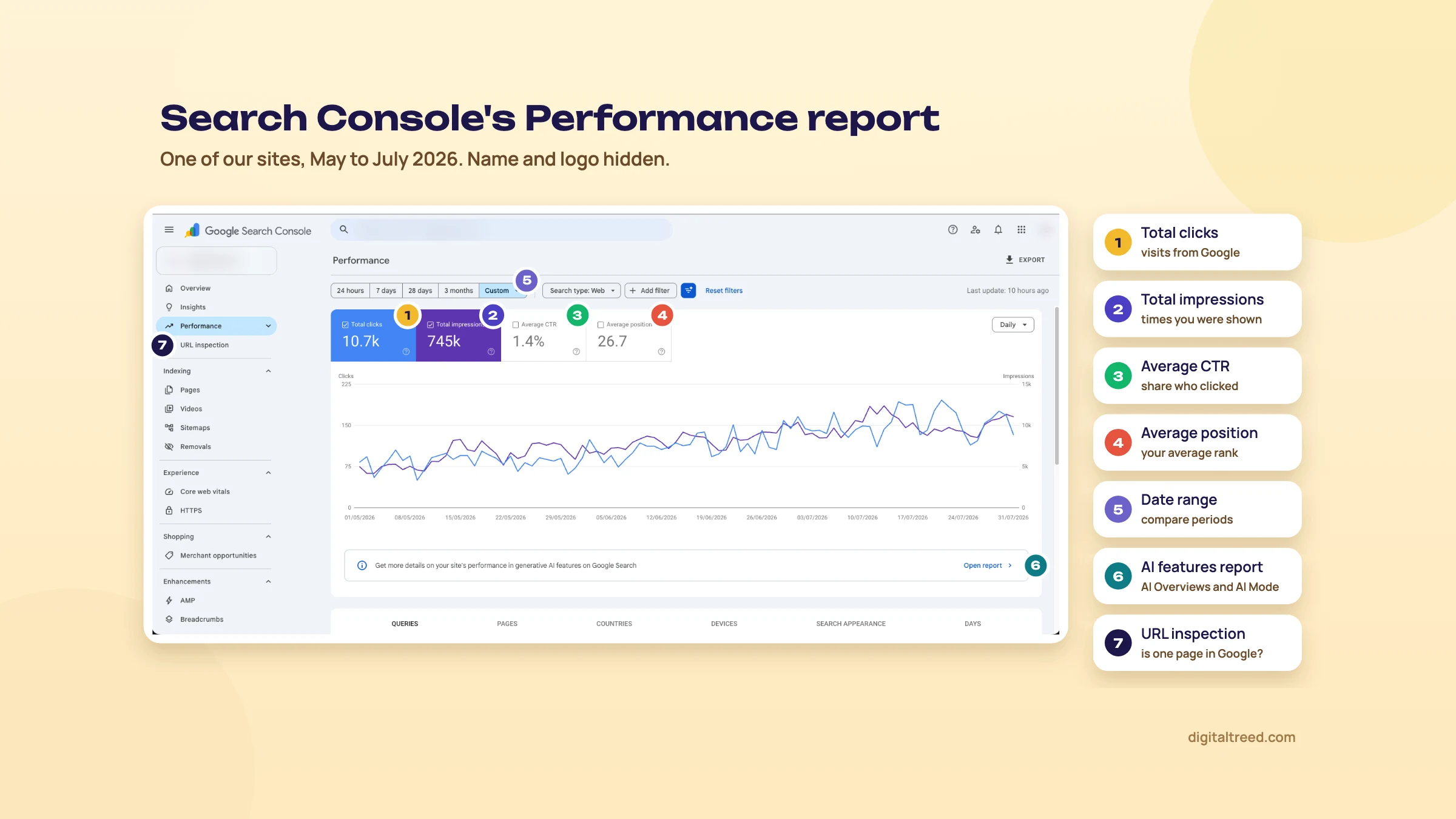 The Performance report on one of our sites, May to July 2026. Name and logo hidden.
That's a real report from one of our sites. Over those three months it earned 10,700 clicks from 745,000 impressions, and daily clicks roughly doubled, from about 70 to about 150. The average position, 26.7, looks low, but it's an average of every search the site appears for, including many on page three or later. Watch the trend, not that single number.
Add your site to Bing Webmaster Tools
This one is quick, because Bing can copy your site from Search Console. And it reaches more than Bing: Yahoo, most of DuckDuckGo and Microsoft Copilot all use Bing's index (chapter 4).
Add your site to Bing Webmaster Tools
- Sign in Go to bing.com/webmasters and sign in with a Microsoft or Google account.
- Import from Search Console Choose to import your sites from Google Search Console and allow access.[55]
- Pick your site Tick the site; Bing brings across the verification and sitemaps.
- Check the sitemap Open Sitemaps and make sure yours is listed and was read. If it was not, paste its address into our free XML Sitemap Validator to see why.
Bing also supports IndexNow, a way to tell it the moment a page is added or changed. Bing, Yandex, Naver, Seznam and Yep use it; Google doesn't.[26] Many website platforms and SEO plugins can switch it on for you.[80]
Your XML sitemap
A sitemap is a file that lists the pages you want search engines to know about. WordPress (with Yoast or Rank Math), Shopify and Wix make one for you; look for /sitemap.xml or /sitemap_index.xml on your site. A few rules from Google: one file can hold up to 50,000 addresses or 50MB, the "last modified" date is used only if it's accurate, and the priority and change-frequency fields are ignored.[51] Submitting a sitemap is a hint, not a guarantee that every page gets indexed.
robots.txt: what it does and what it doesn't
robots.txt is a small text file at yoursite.com/robots.txt that tells crawlers which parts of the site to stay out of. It's for managing crawling, and Google is clear that "it is not a mechanism for keeping a web page out of Google".[50] To keep a page out of search, use a noindex tag or a password instead.
Warning
Two common mistakes after a redesign: a robots.txt left with Disallow: / from the test site, which blocks everything, and a noindex tag left on pages from the staging copy. Check both the day a new site goes live.
A safe, simple robots.txt for most small sites is short: let every crawler in, keep private areas out, and point to the sitemap. For example:
User-agent: *
Disallow: /account

Sitemap: https://yourshop.in/sitemap.xml
Our free Robots.txt Generator writes this file for your platform, with the AI-crawler choice built in and your sitemap line filled. If you want to treat AI crawlers differently, chapter 5 shows how.
HTTPS
HTTPS is the padlock in the address bar. It means the connection is encrypted, browsers warn visitors when it's missing, and Google has used it as a "very lightweight" ranking signal since 2014.[53] Most hosts give you a free SSL certificate. After switching it on, make sure the http address redirects to https, so there's only one version of each page.
Mobile
Google looks at the mobile version of your site, not the desktop one. Its rule is simple: the mobile version should have the same content, titles and structured data as the desktop version.[52] In India that's where your visitors are anyway: StatCounter put 77.3% of Indian web traffic on phones in September 2026.[57]
Speed, briefly
Google measures how fast and stable pages feel to real visitors with three Core Web Vitals. "Good" means:
| Measure | What it checks | Good |
|---|---|---|
| LCP (Largest Contentful Paint) | How fast the main content appears | 2.5 seconds or less |
| INP (Interaction to Next Paint) | How fast the page reacts to a tap or click | 200 milliseconds or less |
| CLS (Cumulative Layout Shift) | How much the layout jumps while loading | 0.1 or less |
What counts is real visitors' data, not a perfect score in a testing tool.[54] A slow site is worth fixing, but for a beginner it comes after the setup above. Guide 3 covers speed properly.
Check your setup in five minutes
- Free Website Audit: one overall check of the basics
- HTTP Status Checker: your pages return 200, and http redirects to https
- Robots.txt Tester: nothing important is blocked
- Noindex Tag Checker: no leftover noindex on pages you want found
- Canonical Tag Checker: each page points to one preferred address
- SSL Checker: the certificate is valid and not about to expire
Note
From our work: a perfume brand. When we started with a perfume brand, its WordPress site was so slow that Google was struggling to crawl and index it. No amount of content would fix that, so speed came first. Working with their developer, we moved the site to a lighter theme, added a caching plugin and optimised the images. With the site fast again, we wrote blog posts on the topics their competitors were ranking for, and synced their products to Google Merchant Center so they could show up in Google's shopping results. Results started in five to six weeks, and orders began arriving from organic search. The lesson: if Google can't read your site easily, fix that before anything else.
Have a shop, clinic or coaching centre? Start with local SEO
Quick answer
Local SEO helps a business with an address or a service area show up in Google Maps and in "near me" results. The first step is a free, verified Google Business Profile with the right category, hours, photos and phone number, then a steady flow of genuine reviews. Guide 2 covers local SEO step by step.
Search "physiotherapist near me" in Kanpur and the first thing you see is usually a map with three clinics on it. That box is called the local pack, and for a local business it's often worth more than the first normal result, because the phone number and directions are right there.
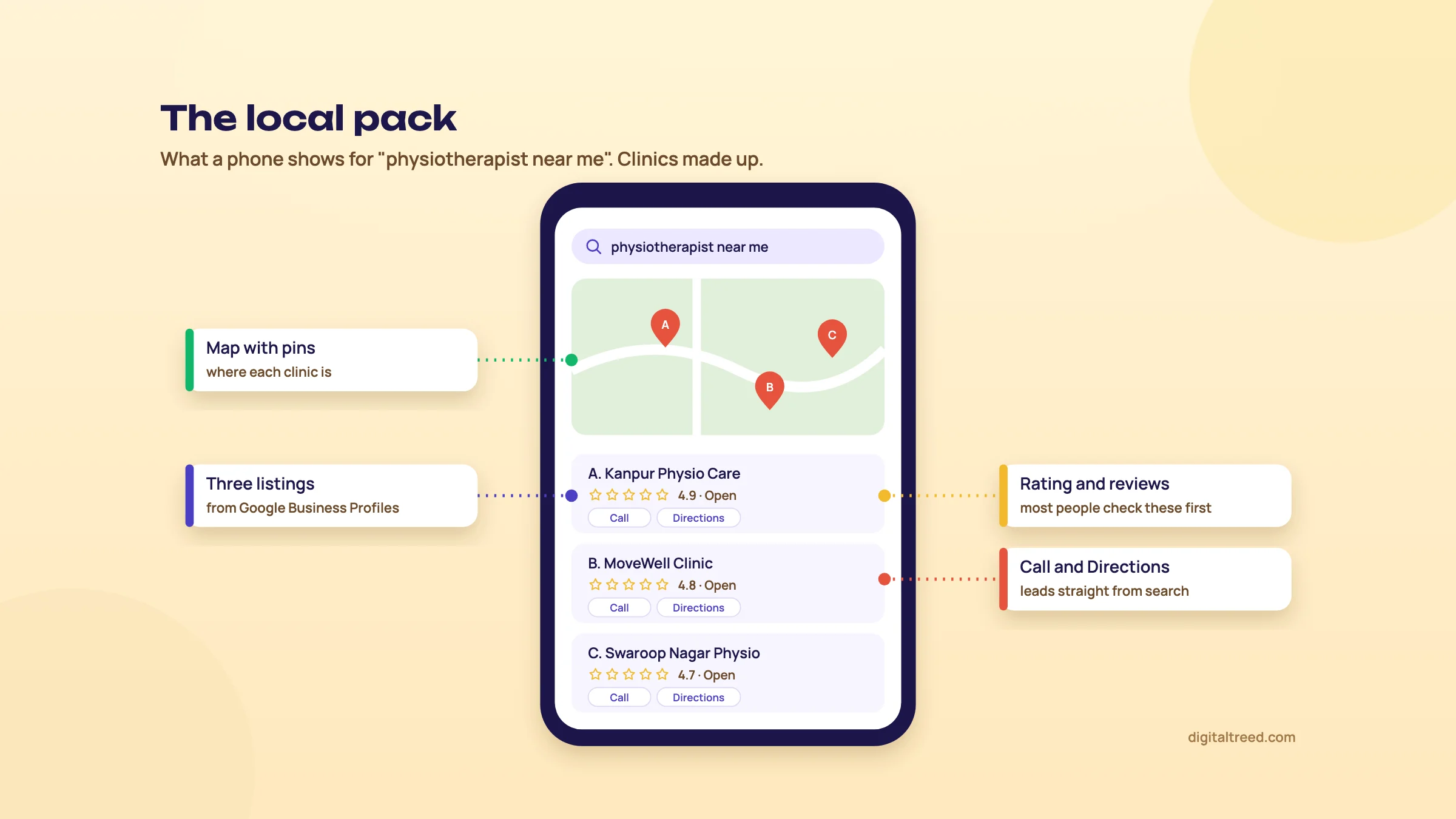 The local pack. Clinics are made up.
Your Google Business Profile
The listings in that box come from Google Business Profiles. Creating one is free. Google verifies that you're real, usually by phone, text or postcard, sometimes by email or a short video; Google picks which methods you get.[81] Your business must also meet customers in person, either at your address or by visiting them.[59] Choose the category that matches what you do, fill in your hours, add real photos of your place and keep the phone number current.
Reviews
Reviews decide a lot of local choices. In BrightLocal's 2026 survey of 1,002 US adults, 97% read online reviews for local businesses, 71% use Google to read them, and 68% want at least a four-star rating.[60] These are US numbers; we found no comparable survey for India, though the habit is easy to see here too.
97%
of US consumers read reviews for local businesses (2026 survey)[60]
68%
of US consumers want a rating of at least four stars[60]
45%
of US consumers use ChatGPT or other AI tools for local business recommendations[60]
Ask happy customers for a review in person, the day they're happiest. Never buy reviews or offer something in return for good ones; Google removes them and can restrict your profile.[82]
The Indian extras
In India people also look up businesses on Justdial, IndiaMART and Sulekha. A listing there, with the same name, address and phone number as your Google profile, helps people and search engines trust that your details are right. Keep those three details identical everywhere; SEOs call this NAP (name, address, phone). Guide 2 goes through each site.
Tip
Ready for more? Guide 2's local SEO chapter covers categories, photos, posts, reviews, citations and how to measure calls and direction requests.
SEO myths beginners still hear
Quick answer
Most SEO myths are old advice that stopped being true, or numbers nobody can trace. Google says it ignores the keywords meta tag, has no preferred word count, doesn't treat duplicate content as spam and takes no money to rank pages. You also don't need special files or markup to appear in its AI answers.
You'll hear these from clients, from agencies trying to sell you something, and from old blog posts that still rank. Each one below has what people say, what's actually true, and where that comes from.
| What people say | What's true |
|---|---|
| "Add a keywords meta tag." | "Google Search doesn't use the keywords meta tag."[43] |
| "Write 2,000 words or you won't rank." | Google: no preferred word count, "(No, we don't.)"[45] In Cyrus Shepard's 50-site study, word count didn't separate the winners from the losers.[48] |
| "Duplicate content gets you penalised." | It's not a spam violation and won't cause a manual action. Google just picks one version to show.[43] |
| "Put your keyword in the domain name." | Keywords in a domain "alone have hardly any effect beyond appearing in breadcrumbs".[43] |
| "Headings must be in perfect order." | "It doesn't matter if you're using them out of order."[43] Clear structure still helps readers. |
| "E-E-A-T is a ranking factor." | Not a single factor you can switch on, but Google's systems look for signs of experience, expertise and trust, and trust matters most.[45] |
| "Running Google Ads helps your free rankings." | "Google doesn't accept payment to rank pages higher."[1] |
| "Submit a sitemap and you're indexed." | A sitemap is a hint, not a guarantee.[51] |
| "Block a page in robots.txt to hide it." | robots.txt "is not a mechanism for keeping a web page out of Google". Use noindex.[50] |
| "Google bans AI-written content." | "Appropriate use of AI or automation is not against our guidelines."[61] But mass-producing low-value pages is spam, and Google's guidance, updated in October 2026, says it is critical to fact-check AI-generated content by hand before publishing, including titles, descriptions and alt text.[62] |
| "You need llms.txt to show up in ChatGPT or AI Overviews." | Google doesn't use it.[32] In an Ahrefs study of server logs from 137,000 sites, 97% of llms.txt files got no requests at all in May 2026.[63] |
Numbers that get repeated without a source
Some "facts" spread because they sound right and are easy to copy. When you see one, look for the study, its date and how many people or sites it measured. If you can't find all three, don't repeat it.
| The claim | The problem | Use instead |
|---|---|---|
| Google uses 200 ranking factors | An old line from the late 2000s; Google now describes many systems, not a count | Google's guide to its ranking systems |
| 8.5 billion searches a day | An estimate with no Google source | "More than 5 trillion a year" (Google, 2025)[3] |
| 50% of searches will be voice by 2020 | Usually credited to comScore, but no comScore report containing it can be found | Nothing current; voice has no separate SEO anyway |
| 75% of people never scroll past page one | No study anyone can trace | Click-rate data with its date (chapter 2) |
| Position one gets 32% to 40% of clicks | Measured before AI answers; current studies find far less when an AI answer shows | First Page Sage 2026 (chapter 2)[9] |
AI Search Is Still Search.[64]
"SEO is dead"
People have been saying it for years, and they're saying it again because of AI answers. The numbers don't agree yet: in early 2026 organic search still brought 42.75% of all visits to the sites SE Ranking measured, against 0.32% from AI assistants.[4] What's true is that SEO keeps changing shape. Guide 4 looks at where it's going.
42.75%
of website visits from organic search, early 2026[4]
0.32%
from AI assistants in the same study[4]
One honest grey area: Google said for years that it has no "domain authority" score. The 2024 leak showed a feature called siteAuthority, with no sign of how much it counts.[13] So the fair answer is "it's complicated": Google does look at a site as a whole, but no third-party score (Moz DA, Ahrefs DR) is that number.
SEO glossary, and what to learn next
Quick answer
This glossary explains the SEO words used in this guide in one plain sentence each. Once you're comfortable with them, move to Guide 2 for keyword research, content and links in depth, then Guide 3 for technical SEO and Guide 5 for AI search. Set up Search Console first if you haven't; everything else builds on its data.
Glossary
- SEO
- Search engine optimization: making your pages easy for search engines to find, understand and trust.
- SERP
- Search engine results page: everything Google shows after a search.
- Organic result
- A free listing that Google chooses on its own; nobody can pay for it.
- Paid result
- An ad marked "Sponsored"; the advertiser pays for each click.
- Keyword
- The word or phrase someone types or says into a search box.
- Long-tail keyword
- A longer, more specific search, like "eggless cake delivery Gomti Nagar", that fewer people make but that converts well.
- Search intent
- What the searcher wants: to learn, compare, buy or reach a known place.
- Crawling
- Search engines visiting and downloading pages by following links and sitemaps.
- Googlebot
- Google's crawler, the program that fetches pages.
- Rendering
- Running a page's code (like JavaScript) to see it the way a visitor does.
- Index
- Google's stored list of pages; a page must be in it to appear in search.
- Ranking
- The order in which Google shows pages for a search.
- Canonical
- The one version Google picks to show when several pages are the same or nearly the same.
- Noindex
- A tag that tells search engines not to show a page in results.
- robots.txt
- A file that tells crawlers which parts of a site not to crawl; it doesn't hide pages from results.
- XML sitemap
- A file listing the pages you want search engines to know about.
- HTTP status code
- The server's reply to a request: 200 means fine, 301 means moved for good, 404 means not found.
- HTTPS
- An encrypted connection, shown as a padlock; it needs an SSL certificate.
- Mobile-first indexing
- Google looking at the mobile version of your site to index and rank it.
- Core Web Vitals
- Google's three measures of how fast and stable a page feels: LCP, INP and CLS.
- Title tag
- The page title in the code; Google often shows it as the clickable line in results.
- Meta description
- A short summary of the page that Google may show under the title.
- Snippet
- The text Google shows for a result, from your description or the page itself.
- Heading
- A title inside the page (H1, H2, H3) that structures the content.
- Alt text
- A written description of an image for people who can't see it and for search engines.
- Anchor text
- The clickable words of a link.
- Internal link
- A link from one page of your site to another.
- Backlink
- A link to your site from another website.
- nofollow, sponsored, ugc
- Labels on a link that tell Google it's unendorsed, paid or user-generated.
- Structured data
- Code that states facts about a page (business, product, article) in a format Google reads; also called schema.
- Rich result
- A search result with extra details, like stars, prices or images, made possible by structured data.
- Local pack
- The map with three businesses that Google shows for local searches.
- Google Business Profile
- Your free business listing on Google Maps and Search.
- NAP
- Name, address and phone number, which should be identical everywhere you're listed.
- E-E-A-T
- Experience, expertise, authoritativeness and trust: the qualities Google's systems look for, trust above all.
- YMYL
- "Your money or your life": topics like health and finance, where Google sets a higher bar for trust.
- Core update
- A broad change to Google's ranking that it announces a few times a year.
- Spam policy
- Google's rules on practices that can get a page or site demoted or removed.
- AI Overview
- An AI-written summary Google shows above the results for some searches.
- AI Mode
- Google's chat-style search, where you can ask follow-up questions.
- Query fan-out
- An AI splitting one question into several searches to build its answer.
- GEO
- Generative engine optimization: helping your pages get cited in AI answers; mostly good SEO.
- Zero-click search
- A search that ends without a click to any website.
What to learn next
This is guide 1 of 5 in our learning path. Take them in this order:
- Guide 2, Intermediate SEO: keyword research, content, on-page, links, local SEO and measuring results.
- Guide 3, Advanced SEO: technical SEO, migrations and working at scale.
- Guide 4, SEO as a career: jobs, income, freelancing and the future.
- Guide 5, GEO: how to get cited by AI answers.
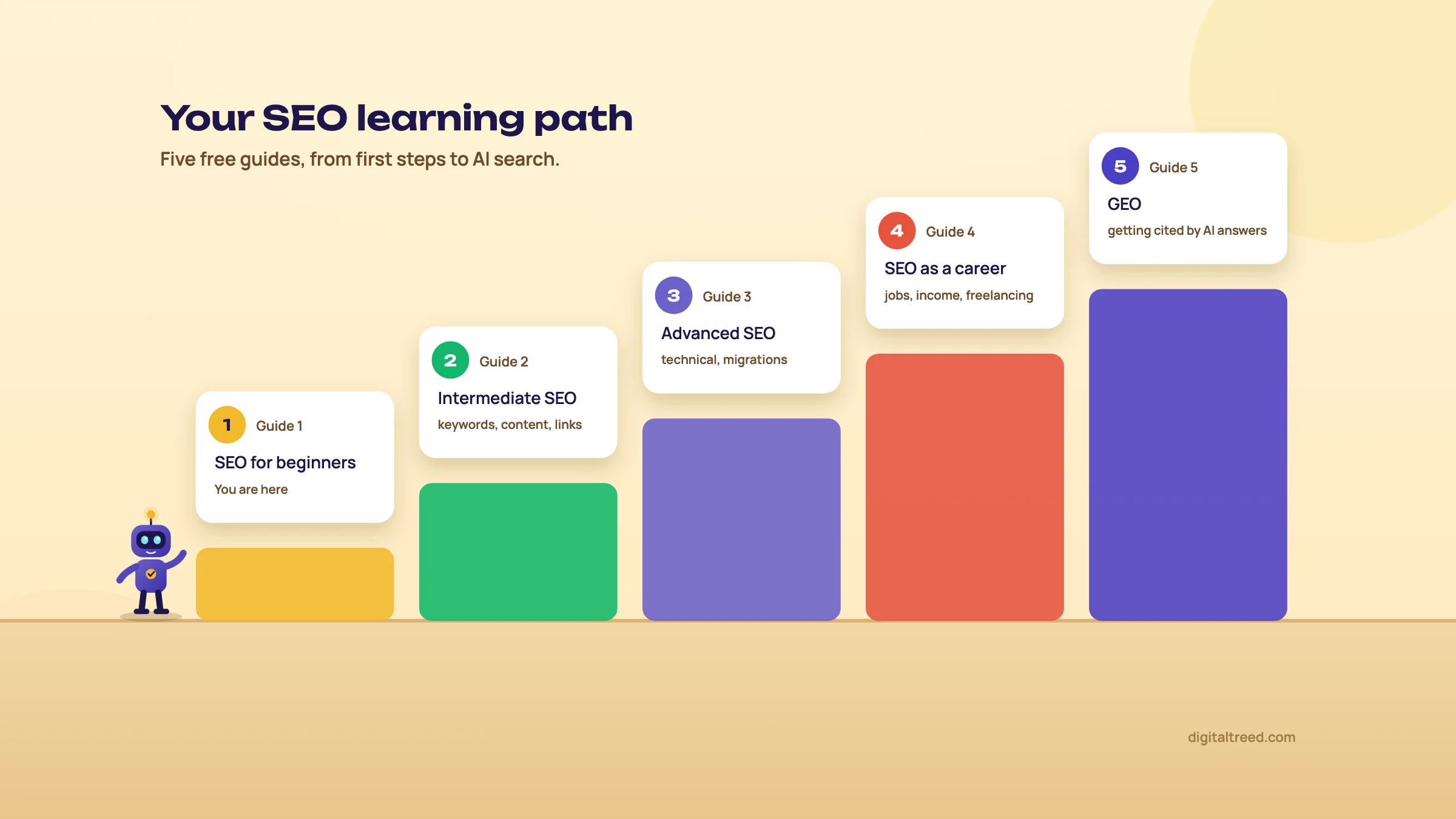 Your SEO learning path.
Free places to keep learning
| Course | From | Length | Cost |
|---|---|---|---|
| SEO Starter Guide | An afternoon | Free | |
| SEO learning paths (video playlists) | Google Search Central | Beginner and technical playlists | Free |
| SEO Course for Beginners | Ahrefs Academy | 14 lessons, about 2 hours | Free |
| SEO courses | Semrush Academy | About 1 hour each | Free, with certificates |
| AEO Fundamentals | HubSpot Academy | 7 lessons, about 2 hours 20 minutes | Free, with certificate |
| LearningSEO.io | Aleyda Solis | A full roadmap of free resources | Free |
Certificates are nice for structure, but nobody hires an SEO for a certificate. What gets you clients or a job is one site you've grown, with the numbers to show for it. Start with your own.
The whole guide in 11 slides
Your first 30 days
- Week 1: set up HTTPS, Search Console, Bing Webmaster Tools and your sitemap (chapter 8).
- Week 2: build your list of 10 to 20 keywords with intent (chapter 6).
- Week 3: fix five important pages with the 15-minute method (chapter 7).
- Week 4: claim your Business Profile if you serve a local area (chapter 9), then read your Search Console reports.
Our free tools, and when you'll use them
| Tool | Use it when |
|---|---|
| Free Website Audit | You want one overall check of a site |
| Meta Tag Analyzer | You're fixing a page's title and description |
| Robots.txt Tester | A page isn't being crawled |
| Noindex Tag Checker | A page isn't showing up at all |
| Canonical Tag Checker | Two versions of a page exist |
| HTTP Status Checker | You want to know if a page works or redirects |
| SSL Checker | You're checking the padlock and its expiry |
| Website Speed Test | Pages feel slow |
| Schema Markup Validator | You've added structured data |
| AI Crawler Checker | You want to know which AI bots can read your site |
| Word Counter & Keyword Density Checker | You suspect a page repeats a phrase too often |
| Hyperlink Generator | You need a clean link to paste into a page |
Note
From my teaching. When I taught SEO, the part my students found hardest was technical SEO. Most local businesses run on WordPress with shared hosting, and that mix throws up a long list of small technical problems, with a slow site at the top almost every time. So if chapter 8 felt hard, you're in good company. Take it one check at a time, and use the free tools; they'll show you where to look.
If you'd rather have someone do this for you, see our SEO service or get a quote.
Test yourself
Ten questions on the whole guide. Pick an answer, check it, and see your score at the end.
You got 0 of 10 right.
Frequently asked questions
Frequently asked
What is SEO in simple words?
SEO is the work of getting your pages into the free search results, and now AI answers, when people search for what you offer. A Kanpur sweet shop showing up for "kaju katli near me" without paying for it is SEO at work.
What is the full form of SEO?
Search engine optimization: improving (optimizing) your website so search engines can find, understand and show it.
Can I do SEO myself?
Yes, the basics in this guide need no code: Search Console, a keyword list, good titles and a Business Profile. Hire help when you lack the time, the field is very competitive, or there are technical problems you can't diagnose.
How long does SEO take to work?
Usually months, not weeks. Ahrefs found that only 1.74% of new pages reached Google's top ten within a year, and most top-ten pages were more than three years old. A small local business with little competition can see results sooner.
Is SEO free?
The search results are free; you never pay Google per click. Your time, content and any paid tools cost money. Google Search Console and Bing Webmaster Tools are free.
What is the difference between SEO and SEM?
SEO earns free (organic) results over time. SEM usually means paid search ads, which bring visits the same day and stop when you stop paying.
Does SEO still work now that ChatGPT and AI Overviews exist?
Yes. AI answers are built from search indexes, and Google says optimizing for its AI search is still SEO. In early 2026 organic search still sent 42.75% of website visits, against 0.32% from AI assistants.
How do I get my website on Google?
Verify it in Google Search Console, submit your sitemap, make sure robots.txt and noindex tags aren't blocking pages, and link every important page from another page. Chapter 8 walks through it.
What are the types of SEO?
On-page (your content and tags), technical (crawling, indexing, speed), off-page (links and mentions elsewhere) and local (maps and nearby searches).
What are the best free SEO tools for beginners?
Google Search Console, Bing Webmaster Tools, Google Trends, Google Keyword Planner and PageSpeed Insights, plus our free tools such as the Website Audit and Meta Tag Analyzer.
Do I need a website for local SEO?
A Google Business Profile can show up on the map without a website, but a good site with your services, area and contact details makes the profile stronger and gives people somewhere to check you out.
Is SEO dead?
No. Clicks per search are falling as AI answers grow, so being cited and being a known brand matter more, but in early 2026 organic search still brought 42.75% of all website visits in SE Ranking's study, against 0.32% from AI assistants.
Sources
References
- How Google Search works, Google Search Central, updated 18 Dec 2025, accessed 16 Oct 2026
- Search engine market share in India, StatCounter Global Stats, September 2026, accessed 16 Oct 2026
- AI, personalization and the future of shopping, Google, 3 Mar 2025, accessed 16 Oct 2026
- AI traffic research study, SE Ranking, 18 Jun 2026, accessed 16 Oct 2026
- How long does it take to rank in Google? (And how old are top-ranking pages?), Ahrefs, 15 May 2025, accessed 16 Oct 2026
- Cracking Google: an interview with Barry Schwartz, Duda, 6 Jun 2024, accessed 16 Oct 2026
- Googlebot crawling and file size limits, Google Search Central blog, Gary Illyes, 31 Mar 2026, accessed 16 Oct 2026
- AI features and your website, Google Search Central, updated 10 Dec 2025, accessed 16 Oct 2026
- Google click-through rates by ranking position, First Page Sage, 22 Sep 2026, accessed 16 Oct 2026
- Google users are less likely to click on links when an AI summary appears, Pew Research Center, 22 Jul 2025, accessed 16 Oct 2026
- 2024 zero-click search study, SparkToro and Datos, 1 Jul 2024, accessed 16 Oct 2026
- Zero-click searches reach 68% (2026 study), Search Engine Land on the SparkToro and Similarweb study, 9 Jun 2026, accessed 16 Oct 2026
- Google search algorithm leak, iPullRank, Mike King, 27 May 2024, accessed 16 Oct 2026
- Google AI Mode now available in India, Search Engine Land, June 2025, accessed 16 Oct 2026
- Understanding searches better than ever before (BERT), Google, 25 Oct 2019, accessed 16 Oct 2026
- Finding more high-quality sites in search (Panda), Google Official Blog, 24 Feb 2011 (archived), accessed 16 Oct 2026
- New ways we're tackling spammy, low-quality content on Search, Google, 5 Mar 2024, updated 26 Apr 2024, accessed 16 Oct 2026
- ShoutMeLoud case study, Kinsta, accessed 16 Oct 2026
- Announcing Google Search Console, Google Search Central blog, 20 May 2015, accessed 16 Oct 2026
- Timeline of Google Search, Wikipedia, accessed 16 Oct 2026
- SEO, 1997, Web Design Museum, accessed 16 Oct 2026
- The anatomy of a large-scale hypertextual web search engine, Sergey Brin and Lawrence Page, Stanford, 1998, accessed 16 Oct 2026
- Latest Google Search documentation updates, Google Search Central, accessed 16 Oct 2026
- Search engine market share worldwide, StatCounter Global Stats, September 2026, accessed 16 Oct 2026
- Where DuckDuckGo's results come from, DuckDuckGo Help, accessed 16 Oct 2026
- IndexNow, IndexNow.org, accessed 16 Oct 2026
- Amazon rules product discovery, for now (Jungle Scout 2024 survey), Practical Ecommerce, accessed 16 Oct 2026
- How YouTube dominates search and how you can optimize your videos to take advantage, Econsultancy, Malte Landwehr, 15 Oct 2019, accessed 16 Oct 2026
- Surging in ChatGPT, dead in Google, GSQi, Glenn Gabe, 22 Jun 2026, updated 3 Aug 2026, accessed 16 Oct 2026
- Overview of OpenAI crawlers, OpenAI, accessed 16 Oct 2026
- Perplexity crawlers, Perplexity, accessed 16 Oct 2026
- Optimizing for AI search experiences, Google Search Central, 15 May 2026, updated 10 Jul 2026, accessed 16 Oct 2026
- A reflection on SEO and AI search, Lily Ray, 19 Jan 2026, accessed 16 Oct 2026
- GEO: Generative Engine Optimization, Aggarwal and others, Princeton University and IIT Delhi, KDD 2024, accessed 16 Oct 2026
- C-SEO Bench: does conversational SEO work?, Puerto and others, NeurIPS 2025 Datasets & Benchmarks, accessed 16 Oct 2026
- ChatGPT reaches 900M weekly active users, TechCrunch, 27 Feb 2026, accessed 16 Oct 2026
- Are citations in AI search affected by Google updates?, Lily Ray, 17 Feb 2026, accessed 16 Oct 2026
- Use Keyword Planner, Google Ads Help, accessed 16 Oct 2026
- How Trends data is adjusted, Google Trends Help, accessed 16 Oct 2026
- The SaaS Podcast, episode 205: Tim Soulo, SaaS Club, accessed 16 Oct 2026
- Vernacular SEO case study (Bajaj Finserv), Techmagnate, accessed 16 Oct 2026
- Most of India prefers using Hindi for search, says Google, Inc42, 2019, accessed 16 Oct 2026
- SEO Starter Guide, Google Search Central, accessed 16 Oct 2026
- Make your links crawlable, Google Search Central, updated 10 Dec 2025, accessed 16 Oct 2026
- Creating helpful, reliable, people-first content, Google Search Central, accessed 16 Oct 2026
- Spam policies for Google web search, Google Search Central, accessed 16 Oct 2026
- Yoast SEO, WordPress.org plugin directory, active installations checked 16 Oct 2026, accessed 16 Oct 2026
- Google updates punish good SEO, Zyppy, Cyrus Shepard, 18 Jun 2024, updated 1 Sep 2026, accessed 16 Oct 2026
- Google Search technical requirements, Google Search Central, accessed 16 Oct 2026
- Introduction to robots.txt, Google Search Central, updated 10 Dec 2025, accessed 16 Oct 2026
- Build and submit a sitemap, Google Search Central, accessed 16 Oct 2026
- Mobile-first indexing best practices, Google Search Central, updated 10 Dec 2025, accessed 16 Oct 2026
- HTTPS as a ranking signal, Google Search Central blog, 7 Aug 2014, accessed 16 Oct 2026
- Web Vitals, web.dev (Google), accessed 16 Oct 2026
- Import sites from Search Console to Bing Webmaster Tools, Bing Webmaster Blog, 2019, updated June 2025, accessed 16 Oct 2026
- Deindexed and delayed: a manual action case study, GSQi, Glenn Gabe, 14 Apr 2026, accessed 16 Oct 2026
- Desktop, mobile and tablet market share in India, StatCounter Global Stats, September 2026, accessed 16 Oct 2026
- Introducing the new Search Console, Google Search Central blog, 8 Jan 2018, accessed 16 Oct 2026
- Google Business Profile support and FAQ, Google, accessed 16 Oct 2026
- Local Consumer Review Survey 2026, BrightLocal, 11 Feb 2026, accessed 16 Oct 2026
- Google Search's guidance about AI-generated content, Google Search Central blog, 8 Feb 2023, accessed 16 Oct 2026
- Google Search's guidance on using generative AI content, Google Search Central, updated 1 Oct 2026, accessed 16 Oct 2026
- We analyzed 137K sites: 97% of llms.txt files never get read, Ahrefs, Jun 2026, accessed 16 Oct 2026
- GEO, AEO, LLMO: what's with all this AI stuff?, Patrick Stox, Ahrefs Evolve 2025, accessed 16 Oct 2026
- Google confirms the leaked Search documents are real, The Verge, 29 May 2024, accessed 16 Oct 2026
- Generative AI in Search: let Google do the searching for you, Google, 14 May 2024, accessed 16 Oct 2026
- AI Mode expands to more languages, Google, 8 Sep 2025, accessed 16 Oct 2026
- Supercharging Search for India: new languages in AI Mode and Search Live debuts, Google India blog, 8 Oct 2025, accessed 16 Oct 2026
- Archie (search engine), Wikipedia, accessed 16 Oct 2026
- Search engine optimization (history), Wikipedia, accessed 16 Oct 2026
- E-A-T gets an extra E for Experience, Google Search Central blog, 15 Dec 2022, accessed 16 Oct 2026
- Introducing Search Generative AI performance reports in Search Console, Google Search Central blog, 3 Jun 2026 (all sites from 31 Aug 2026), accessed 16 Oct 2026
- ICP license, Wikipedia, accessed 16 Oct 2026
- Does Anthropic crawl data from the web, and how can site owners block the crawler?, Anthropic Help Center, accessed 16 Oct 2026
- Influencing your title links in search results, Google Search Central, accessed 16 Oct 2026
- Google does not use the keywords meta tag in web ranking, Google Search Central blog, 21 Sep 2009, accessed 16 Oct 2026
- Rank Math SEO, WordPress.org plugin directory, active installations checked 16 Oct 2026, accessed 16 Oct 2026
- All in One SEO, WordPress.org plugin directory, active installations checked 16 Oct 2026, accessed 16 Oct 2026
- Verify your site ownership, Search Console Help, accessed 16 Oct 2026
- How to add IndexNow to your website, Bing Webmaster Tools, accessed 16 Oct 2026
- Verify your business on Google, Google Business Profile Help, accessed 16 Oct 2026
- Prohibited and restricted content (fake engagement, incentivised reviews), Maps User Generated Content Policy Help, accessed 16 Oct 2026
Get the free checklist
Every step of this guide on one page, to print or tick off. We email you the PDF link.