
Quick answer
Coin Master free spins come from two official places: the game and the three social accounts on Moon Active's store listings, as of October 2026. Moon Active's terms say free rewards may expire if not collected within 7 days. Check a link's address before you tap, and never type your login into a spin page.
If you searched Haktuts after your spins ran out, you likely found link pages that never said who posted them. Coin Master is a free-to-download village game from Moon Active, where each spin of a wheel can bring coins or a raid.
We cover free spins in the game, daily spin links on the official pages, how to tell an official link from a fake one and what Haktuts searches lead to. Then come our test, what buying spins costs and a teen's phone.
Key takeaways
- Moon Active's store listings name the official Facebook, Instagram and X accounts.
- Free rewards may expire if you don't collect them within 7 days.
- Our checker flagged 8 of 12 made-up spin links by address alone.
- Moon Active's terms make you answer for every use of your login.
- The US App Store rates Coin Master 18+, while Google Play rates it Teen.
Free spins inside the game: daily rewards, events and friends
The steadiest free spins come from the game itself, though Moon Active's pages don't promise a spin count. The first source is the daily reward calendar, which the App Store release notes announce as "our new reward calendar feature - collect your daily rewards!" Moon Active's terms and conditions, last revised in July 2026, say items can be won, earned or bought. They're blunt about paying: "You are not obligated, at any time, to purchase any Virtual Items." Both store pages say "Coin Master is free on all devices with in-app purchases". They add that it "also allows you to purchase virtual items with real money inside the game."
Events are the second source, and they change with the calendar. The US App Store listing showed a live event on October 30, 2026: "Spooky Spins, Viking grins!" The Google Play listing had a Halloween offer marked "Ends on 11/15". That card reads "Spin by moonlight and let the Halloween season begin!", and once the date passes, it's gone. Friends are the third. Moon Active's release notes on both store pages say "Invite your friends to play Coin Master & get your FREE REWARDS!" Refill rates and friend-gift limits sit in the help center at support.coinmastergame.com, which answered 403 to our checker, so they're not in this guide.
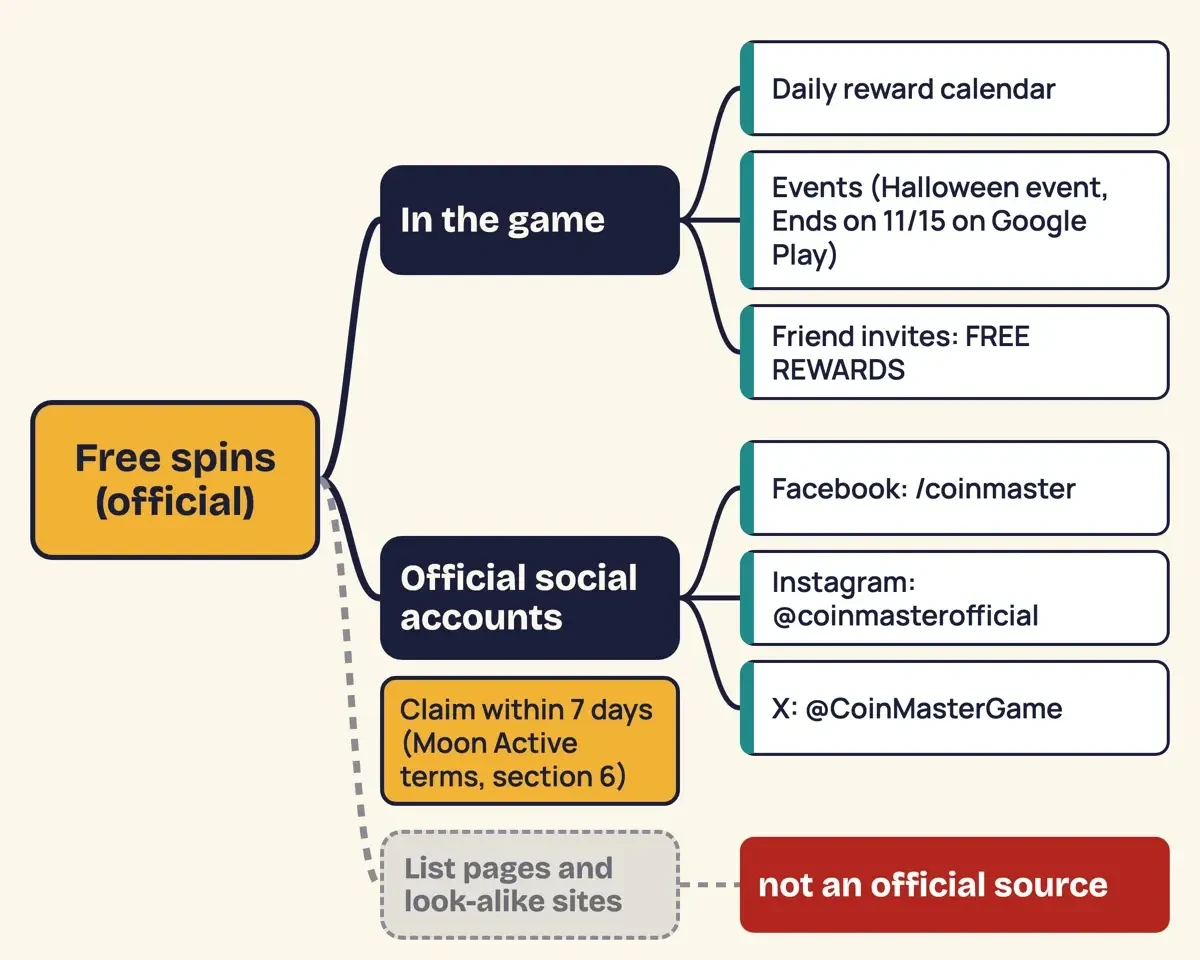 Diagram by DigitalTreed, built from Moon Active terms and both US store listings, read October 30, 2026.
Daily spin links: the official pages that post them
Beyond the game, daily spin links are reward links shared through Coin Master's social accounts, and the store listings name those accounts. Google Play says "Follow Coin Master on Facebook and Instagram for exclusive offers and bonuses!" It names the Coin Master Facebook page and @coinmasterofficial on Instagram. The App Store release notes add X, recommending "joining our community on Facebook, X, and Instagram". That account is @CoinMasterGame on X. That's the whole list. A copycat page can borrow the Coin Master name and art, but it isn't on that list. We'd skip any link it shares, however official it looks.
Signed out, we couldn't read the posts. The Instagram name read "Coin Master | Daily spins & fun" that day.
Moon Active's contests and sweepstakes fall under section 24 of the terms, which says "NO PURCHASE IS NECESSARY IN ORDER TO PARTICIPATE IN ANY PROMOTION". One entry per person is the default.
Timing matters as well. Section 6 of the terms says items awarded without a purchase "may expire if not collected within 7 days." The same section says rewards "are generally collected automatically once awarded", and that Moon Active will tell you if a reward needs any extra step. A link copied into a list last week may be dead already. We didn't read individual posts, so we can't tell you how many links go up on a typical day or which address each one opens. Open the official post itself and tap the link from there, on the phone where you play.
How can you tell an official spin link from a fake one?
Most of the answer sits in the address bar, before you tap anything. Here's what to look at. Our checker ran a made-up link for every row but the first, though it caught the zero-for-o host only because that host isn't on the allow list:
| Check | Official link | Warning sign |
| Where you found it | A post on one of the three accounts the store listings name | A list page, a comment or a forwarded message |
| Scheme | https | Plain http |
| Host | facebook.com, instagram.com, x.com, apps.apple.com, play.google.com | Coin Master or spin words inside some other domain |
| Account or page | /coinmaster, /coinmasterofficial, /CoinMasterGame | A similar name with extra words added |
| Letters | Plain Latin letters | A zero for an o, or a host starting xn-- (another alphabet) |
| What it asks for | Nothing beyond the game opening | A password field, a login box or an .apk download |
One caveat from our test: a real reward link inside an official post may open a different Moon Active address than the profile does. We couldn't read posts while signed out. So check where you found a link first and its host second. A bare short link stays unknown.
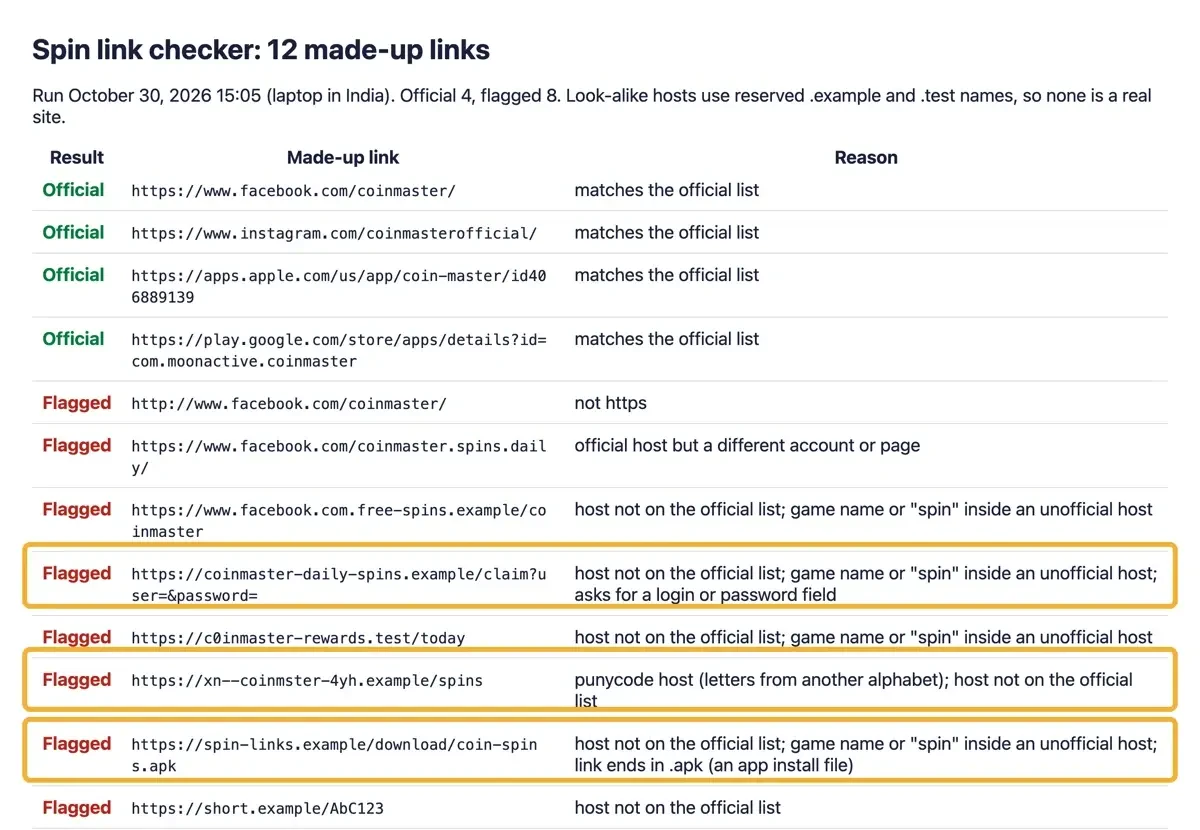 Screenshot: our link checker results for 12 made-up links, served from 127.0.0.1 on October 30, 2026. No look-alike address in it is a real site.
What Haktuts searches lead to, and the pattern to avoid
Haktuts is a name people search when hunting spin links. We couldn't confirm who runs it. We didn't open it or link it, and none of the Moon Active pages we saved mention it by name.
Moon Active's terms cover what these pages ask for, starting with logins. Section 3 says "You must safeguard and not disclose your Login Information". It also makes you answer for every use of the account, "including purchases, whether or not authorized by you." You can sign in with Facebook, which the terms call a third-party tool. A page asking for that password puts your Facebook account at risk, plus anything else that login opens, and our tips for spotting phishing pages cover the wider pattern. If you think someone's got your login, the terms say you "must immediately notify us" at [email protected]. Our Facebook hack warning signs show whether it's still yours.
App installs come second. The terms bar any "Attempt to use the Service on or through any service that is not authorized by Moon Active. Any such use is at your own risk". Section 14 then lets Moon Active suspend or delete an account it suspects of breaking the terms. A spin page that makes you install its own app first fits that rule, unless Moon Active approved the app, and you can't check that from the page. On Android, Google Play Protect "checks your device for potentially harmful apps from other sources." Our guide to verifying an Android APK covers the checks after that.
Pages trading game items fare no better: section 11 bars "selling or transferring Virtual Items to other Users or third parties." Our look at Free Fire diamond generator pages shows how such pages take over accounts in another game.
What we tested
On October 30, 2026, a short Python checker on a laptop in India tested 12 made-up links. Its allow list held only addresses Moon Active's listings name. Look-alikes used reserved .example or .test endings, so none is real. Four passed. Eight were flagged: plain http, a wrong account, a hidden facebook.com prefix, a password field, a zero for an o, punycode, an .apk and a bare short link. Of 9 official addresses we requested, 7 answered 200.
What buying spins costs in the US
Once free spins run short, the official way to buy is the in-app store. Moon Active's terms say items "may only be purchased or acquired from us through our Web Store or through the applicable Platform". After a successful payment, the terms say "you will be able to see the Virtual Items within your Account", which is where a spin pack should appear. We didn't find a Web Store address anywhere on Moon Active's pages, so for a US account we'd buy through the App Store or Google Play instead. The US App Store listing showed these 10 in-app purchases to a signed-out visitor, each billed by Apple:
| In-app purchase (as listed) | Price (USD, October 30, 2026) |
| XSmall Pet Food pack | $0.99 |
| Small Spins pack | $1.99 |
| Sofi Pack_1.99 | $1.99 |
| Sofi Pack_2.99 | $2.99 |
| Sofi Pack_3.99 | $3.99 |
| Sofi Pack_4.99 | $4.99 |
| Sofi Pack_7.99 | $7.99 |
| Sofi Pack_9.99 | $9.99 |
| Sofi Pack_14.99 | $14.99 |
| Sofi Pack_19.99 | $19.99 |
Only one row names spins: the Small Spins pack at $1.99 on the App Store listing, as of October 30, 2026. None shows a pack size. Google Play showed no price list at all to a signed-out visitor, so the App Store rows above are the only US prices we could confirm that day.
Refunds go through the store, under Apple's rules or Google Play's refund policies. The terms say platform purchases "are final and are not refundable" unless Moon Active decides otherwise. They add: "Requests for refunds should be made to the Platform through which they were purchased." Moon Active's Web Store refund policy opens its cancellation section with "Purchases are final," though it doesn't stop there: it allows exceptions such as refunds "required by law." Read the amount on Apple's or Google's payment sheet before you confirm, since that's the charge you approve and our list came from a signed-out page. For why games sell named packs instead of plain spin counts, see our piece on how virtual economies work.
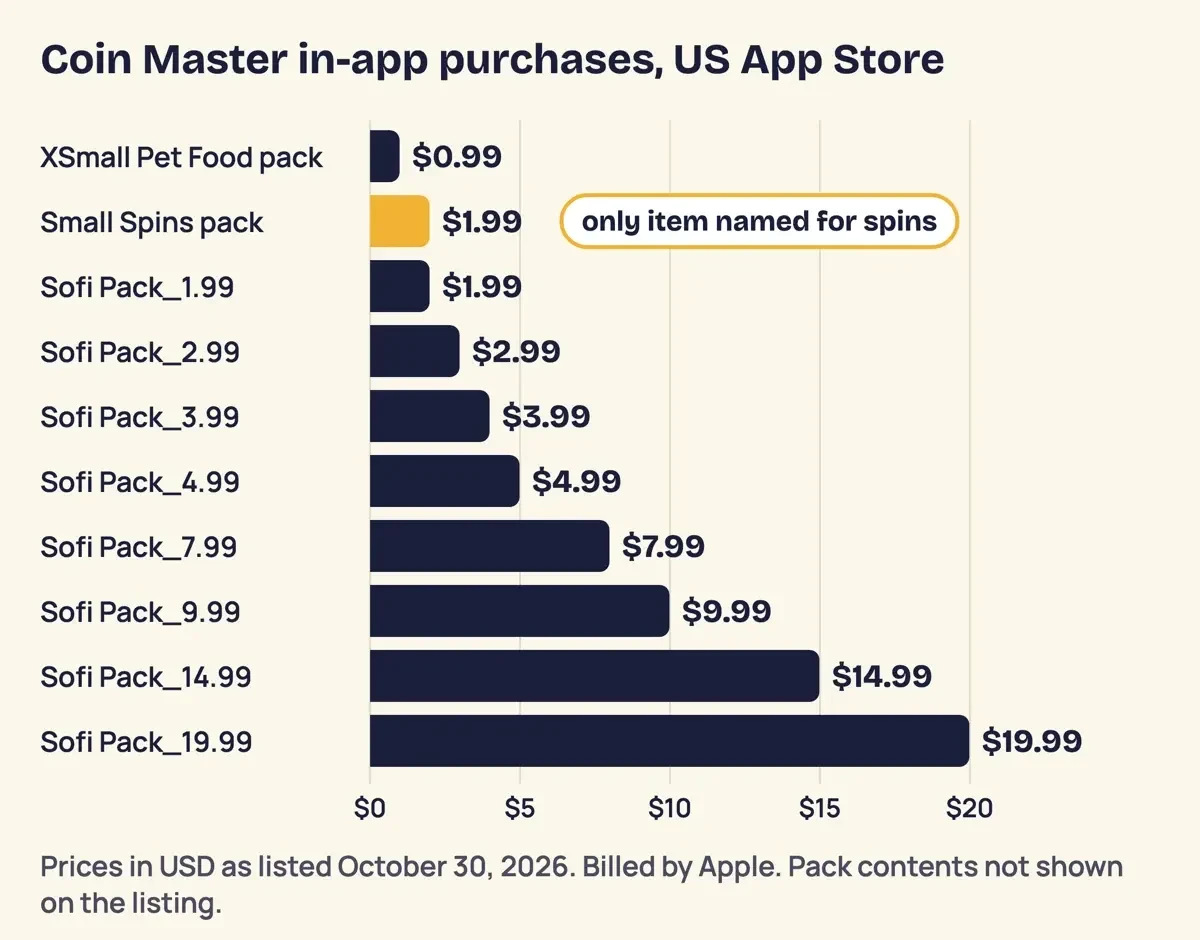 Diagram by DigitalTreed, from the in-app purchase list on the US App Store listing, signed out, October 30, 2026.
Coin Master on a teen's phone: ratings and purchase controls
Beyond price, parents get two answers. The US App Store rates Coin Master 18+, with "Simulated Gambling" marked frequent and "Loot Boxes" listed. Google Play rates it Teen and flags "In-Game Purchases (Includes Random Items)".
The terms set their own floor. For a minor, the "PARENT OR LEGAL GUARDIAN MUST READ AND CONSENT TO THESE TERMS". Promotions are open only to people who are "the greater of eighteen (18) years of age and the age of legal majority" where they live. Both listings also say "You can disable in-app purchases in your device's settings." On iPhone, Apple says Ask to Buy is "turned on by default and can't be turned off if the child is under 18" in some regions. For a teen who plays, we'd set these four controls:
- On iPhone, start with the rating. Apple's parental controls page lets you limit apps to "a specific age rating," and the App Store rates Coin Master 18+.
- If the game stays, turn on Ask to Buy in Family Sharing, so each pack request reaches your phone as a notification before anything is charged.
- On Android, keep Google Play purchase verification on "Always", the default, which Google says covers purchases "including within apps."
- Put a long, unique password on the Facebook account the game signs in with; our password generator builds one.
Gave a spin page your Facebook password? Change it on Facebook first, then email [email protected]. Our steps for a phone after a phishing click cover the device itself.
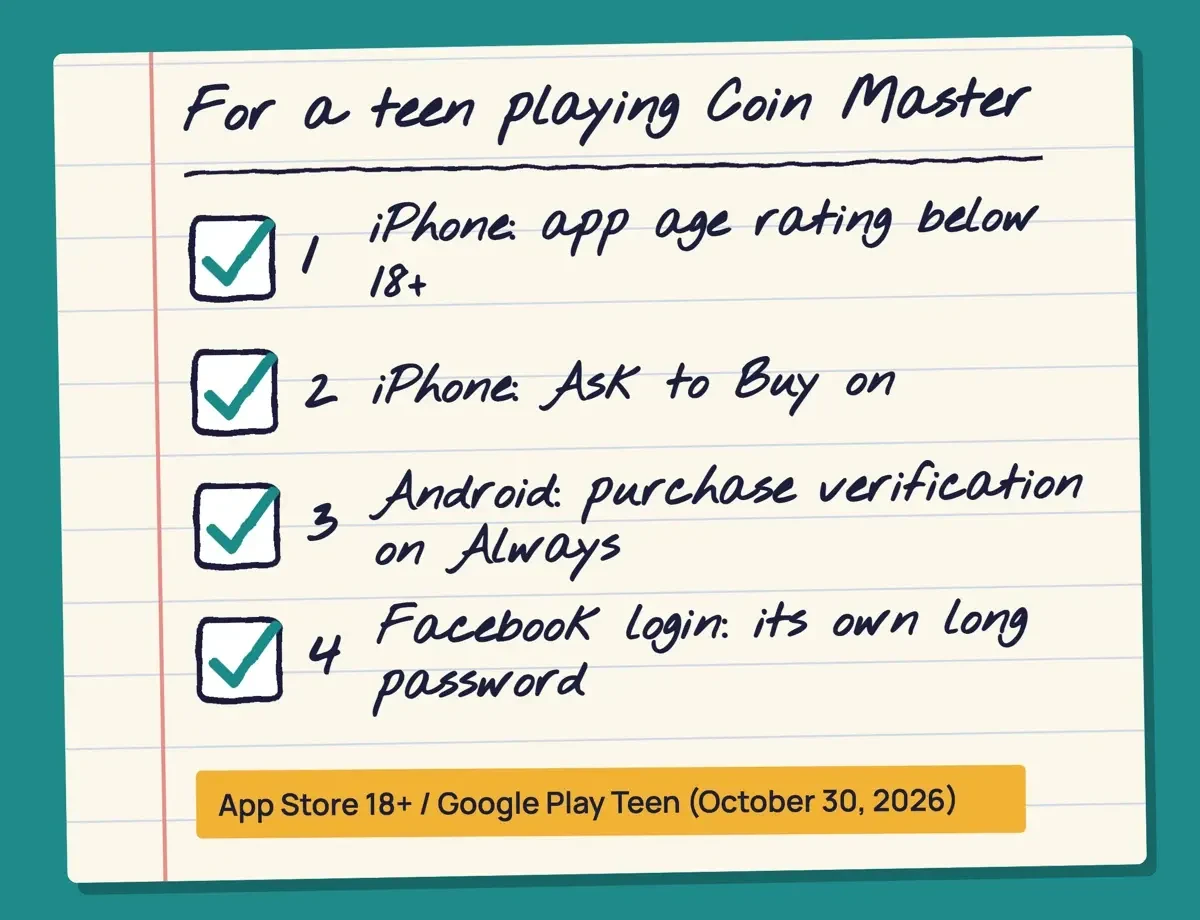 Drawn by us, from Moon Active terms and Apple and Google help pages, October 30, 2026. Not a real phone screen.
Coin Master free spins questions
Frequently asked
Can I get a refund for Coin Master spins?
Ask the store that charged you. Apple says to "Wait 24 to 48 hours" for an update once you've filed.
Will I lose my spins if I change phones?
Yes, if the game was never connected to an account: Moon Active will "not be able to restore any Virtual Items" then.
Does Moon Active close accounts that sit idle?
Moon Active may close an account that's been "inactive for at least 365 consecutive days," with no compensation for the items in it.
Can I sell my Coin Master account?
No. The terms bar you from trying to "sell, trade, gift, bequeath or otherwise transfer your Account" without permission.
How we made this guide: Quotes come from copies, saved October 30, 2026, of Moon Active's policies, US store listings and Apple and Google help pages. A script matched each one. The help center and FTC pages didn't load for us. Facts checked by the DigitalTreed team on October 30, 2026.
First published December 2023 as a profile of Haktuts as a free spins source. Rewritten October 30, 2026: the site isn't described or recommended anymore. The post now covers Moon Active's own spin sources, a link check and account settings.
Sources
- Moon Active: Terms and Conditions (last revised July 2026)
- Moon Active: Web Store Cancellation and Refund Policy
- Moon Active: company site
- App Store (US): Coin Master listing
- Google Play (US): Coin Master listing
- Coin Master on Facebook
- Coin Master on Instagram (@coinmasterofficial)
- Coin Master on X (@CoinMasterGame)
- Apple Support: Approve what your child can purchase and download with Ask to Buy
- Apple Support: Use parental controls on your child's Apple device
- Apple Support: Request a refund for apps or content that you bought from Apple
- Google Play Help: Purchase verification for Google Play
- Google Play Help: Learn about Google Play refund policies
- Google Play Help: Use Google Play Protect to help keep your apps safe
Comments
No comments yet. Start the conversation below.