
Quick answer
HDIntranet isn't a product you can buy. As of November 7, 2026, hdintranet.com only opens a Microsoft sign-in page, and our checks found no vendor or product page under the name. If an employer gave you that address, use the exact link from HR or IT. Choosing an intranet instead? Check sign-in security against NIST and accessibility against Section 508 first.
HDIntranet appeared in our 2023 post as an intranet product with a pricing section, but none of that post's 9 claims had a source when we rechecked them. An intranet is a private network an organization uses for internal work, closed to outsiders, per the NIST glossary entry for intranet.
On November 7, 2026, the www address sent our plain request straight to a Microsoft sign-in page, with no product page, price list or contact form in between. So we'd treat the name as one organization's private login. If you're picking an intranet for your own team, we'd judge it on sign-in security and accessibility. The rules we use come from NIST, CISA, the FTC, the Access Board, the EEOC and W3C.
Key takeaways
- Use only the intranet link your HR or IT team sent you.
- hdintranet.com forwards visitors to a Microsoft sign-in page, not a product site.
- We found no HDIntranet vendor, price list or public product page.
- NIST now sets a 15-character minimum for passwords used alone.
- Section 508 holds agency intranet pages to WCAG 2.0 Level A and AA.
What we found when we checked HDIntranet
On November 7, 2026, hdintranet.com resolved in DNS. But the bare domain gave no secure HTTPS answer, only a TLS error when our script asked for the page. Its plain HTTP version pointed to a Microsoft application proxy host instead.
The www address returned a redirect to login.microsoftonline.com, Microsoft's sign-in page, for a single organization's account. We stopped there. Signing in to someone else's system isn't ours to do.
Microsoft's application proxy overview explains that pattern. It says the service "provides secure remote access to on-premises web applications for remote users" after single sign-on to Microsoft Entra ID. So an organization runs an internal website and puts Microsoft's sign-in in front of it.
The Verisign registry record for hdintranet.com shows the name was registered on February 11, 2014 and runs to February 11, 2027, with GoDaddy Corporate Domains, LLC as registrar. It doesn't name the registrant, so the record alone can't tell you who runs the site behind the sign-in. Each of hdintranet.net, .org, .io and .us returned NXDOMAIN, the no-such-name answer explained in our NXDOMAIN error guide, so those names don't exist.
| Where we looked | How | Result (November 7, 2026) |
|---|---|---|
| hdintranet.com (www) | Plain request, no sign-in | Redirect to Microsoft sign-in for one organization |
| hdintranet.com (bare, HTTPS) | Plain request | No secure answer (TLS error) |
| hdintranet.net, .org, .io, .us | DNS lookup | NXDOMAIN: the names do not exist |
| Registry record (RDAP) | Public lookup | Registered February 11, 2014; owner not shown |
| Wayback Machine | Archive captures | 2013 parked page; 2016 sign-in screen |
| GitHub and npm | Name search | 0 results each |
| USPTO trademark search | Not run | Not checked |
The Wayback Machine's April 7, 2013 capture is a parked page saying the domain may be for sale, and its October 8, 2016 capture shows only a sign-in screen.
Code searches came back empty. GitHub's repository search and the npm package registry each returned 0 results for the name. We didn't run a USPTO trademark search. A filing we haven't seen could still exist.
Pages using the name do exist elsewhere. When we planned this rewrite on November 6, 2026, the ones we saw were login help pages on unrelated sites, each pointing readers to a different company's employee portal. We don't link them, because a page that sends strangers to someone else's sign-in screen is the exact setup phishing advice warns about.
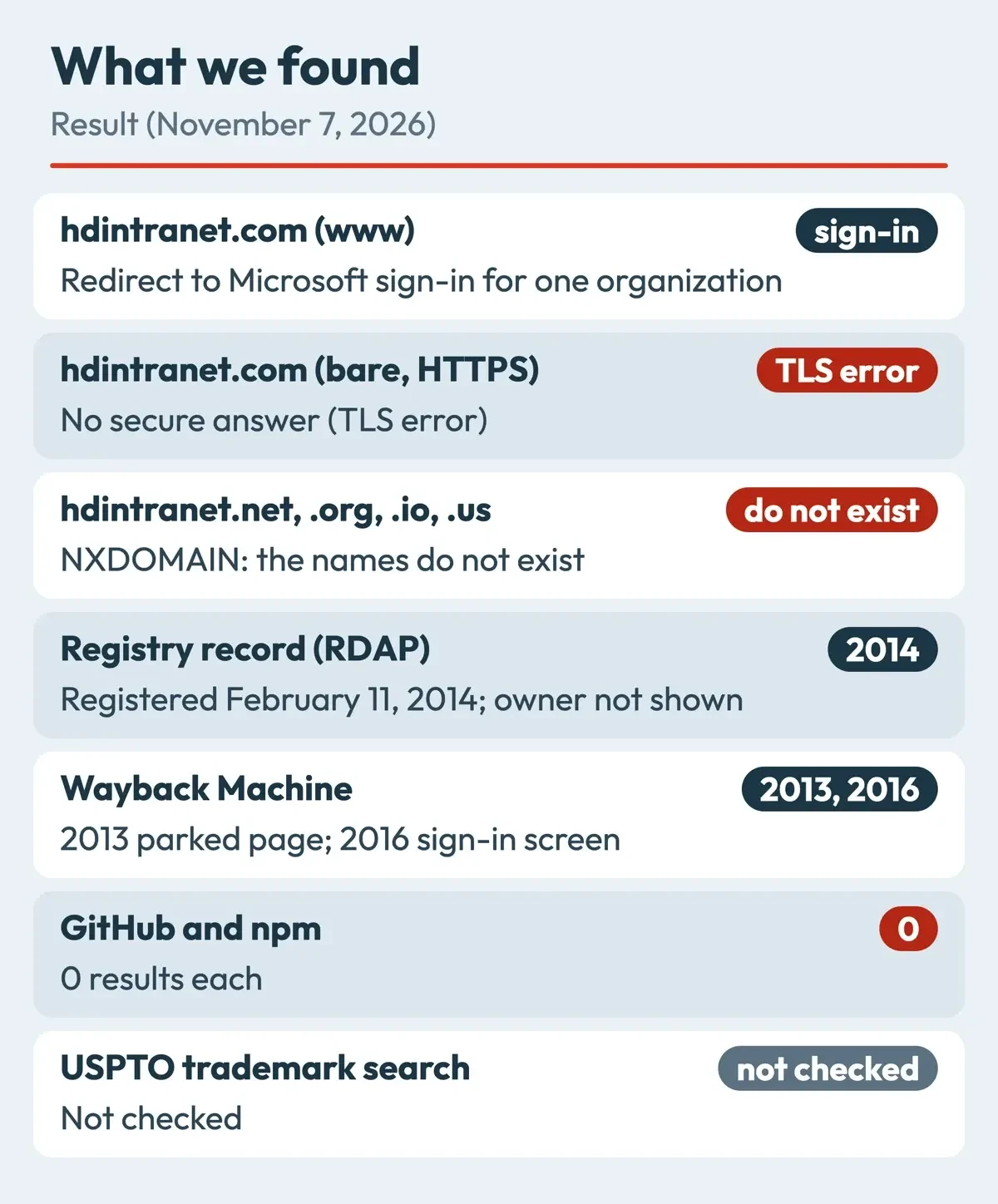 Diagram by DigitalTreed, from our DNS, web and registry checks on November 7, 2026.
What we tested
We ran three small scripts on November 7, 2026, all plain requests that named us in the user agent. The first did the DNS, web and registry checks in the table.
The second matched 9 claims from our old post, such as team spaces and a pricing section, against every public page we'd saved about the name. None of the 9 had a source. The third checked 10 made-up links against a made-up address, https://intranet.example.com/, and stopped 8 of them.
Where should you sign in if your job uses HDIntranet?
Because the address is a private gateway, use the link your employer gave you. Check your onboarding email, your HR portal or a bookmark from your IT help desk. If it's lost, ask IT to resend it. Don't search for the name plus "login" and click the first result, since that's where we saw the look-alike help pages.
The FTC's phishing guide warns that a scam can look like it's "from a company you know or trust." It says to contact the company "using a phone number or website you know is real."
CISA's Secure Our World phishing tips list "Untrusted shortened URLs" and "Incorrect email addresses or links" among the common signs. NIST's small business phishing page adds: "Verify the request by using known contact information."
Our made-up link test built those signs into 10 addresses. The 2 links that passed used the exact host IT handed out, once for the home page and once for an HR benefits page. The 8 that failed used http instead of https, put the real name in front of another host, or put rn in place of m (exarnple for example). Two pointed to a different host. Others hid a Cyrillic letter in punycode, used a bit.ly short link, or put the real name before an @ sign, which hides the real host after it. CISA's social engineering guide tells you to "Pay attention to the Uniform Resource Locator (URL) of a website" for this reason.
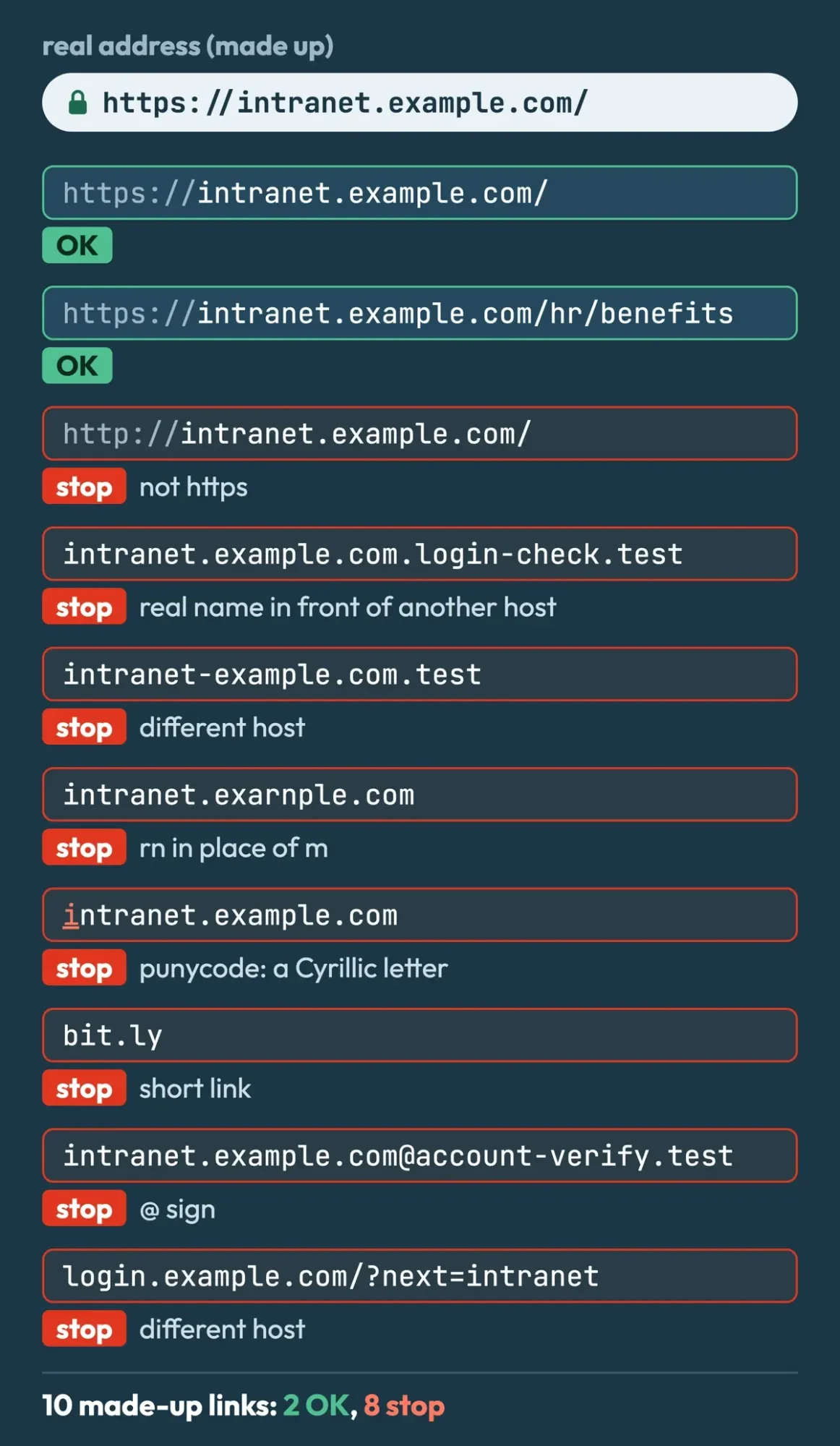 Drawn by us from our link check of 10 made-up links, November 7, 2026.
Typed a password into a page you now doubt? Tell your IT team today. Then change the password from a device you trust. Our guide on what to do if you clicked a phishing link covers the steps on PC, Mac and phone. NIST's phishing page adds that businesses can report phishing crimes to the FBI's Internet Crime Complaint Center.
What a company intranet should do
Once staff can sign in safely, we'd plan an example 40-person office's intranet around four jobs. They're company news and policies in one place, shared documents with version history, a staff directory, and weekly forms such as time-off requests and IT tickets. In any trial, test those four first.
Big employers run intranets as long projects. In Nielsen Norman Group's 2023 Intranet Design Annual, the 10 winning intranets had core teams averaging 21 people, from 4 to 60. Their redesigns took 6 to 45 months, 25 on average, and NN/g says the median build time fell from 35 months in 2004-2013 to 18 months in 2014-2023. The winners ranged from 1,100 to 343,234 employees, so a small business with one office manager running the intranet part-time should read those numbers as a ceiling.
If your HR software already has an employee portal, check whether it covers news and documents before you buy a second system.
Our guide to implementing HR software and guide to choosing an employee engagement platform cover that side. Ask each vendor where documents are stored, who can see them, and how you'd get everything out if you switched later.
Security checks before you buy an intranet
NIST's Cybersecurity Framework 2.0 release, dated February 26, 2024, organizes security around six functions: Identify, Protect, Detect, Respond, Recover and the newly added Govern. The NIST Cybersecurity Framework page hosts quick start guides for common goals. For an intranet buyer, Protect and Govern become plain questions: who can sign in, how, and who decides.
Password rules have changed, so check the admin settings. NIST's SP 800-63B digital identity guideline says passwords used as the only factor must be "a minimum of 15 characters in length." Passwords used only alongside multifactor sign-in can be shorter but must still be at least 8 characters. The same guideline says systems "SHALL NOT impose other composition rules" such as forced symbol mixes. It also says they should allow at least 64 characters and must check new passwords against a blocklist of common or breached ones. Ask each vendor whether its admin settings can match all of that, because a tool that forces 90-day resets or symbol mixes works against the current NIST rules.
CISA's multifactor authentication page for small businesses says "Strong passwords help, but they are no longer enough."
CISA adds that "Businesses should aim to use a phishing-resistant MFA method." If the intranet signs people in through a company identity system, like the Microsoft setup in front of hdintranet.com, those rules can live there. Microsoft says apps behind its proxy "can use Microsoft Entra Conditional Access and multifactor authentication."
The FTC's Start with Security guide draws on "more than 80 law enforcement actions" and tells businesses to "Restrict access to sensitive data." Its next lesson is "Require secure passwords and authentication," which lines up with the NIST rules above. It says admin access "should be limited to the employees tasked with that job." On an intranet, for example, payroll and medical leave folders open to HR only, and admin rights go to two or three named people with a reason to hold them. Our cybersecurity tips for small businesses go beyond the intranet.
Accessibility rules: Section 508, the ADA and WCAG
Congress amended the Rehabilitation Act in 1998 to cover federal agency technology. Section508.gov's laws and policies page says the law "applies to all federal agencies when they develop, procure, maintain, or use electronic and information technology." The Access Board's ICT accessibility standards list "Intranet content designed as a Web page" at E205.3, and E205.4 sets the bar at WCAG 2.0 Level A and Level AA.
Vendors that sell to agencies document this in an Accessibility Conformance Report, or ACR, often built on a VPAT template. The Section508.gov ACR page calls it "a document that explains how information and communication technology (ICT) products" meet the Revised 508 Standards. Ask every intranet vendor for its latest ACR, even as a private buyer. It shows which criteria the product misses before your staff find out. If a vendor has no ACR at all, note that on the scoring sheet below, since nobody has written down which criteria the product meets.
Private employers work under a different law. ADA.gov's introduction to the ADA says Title I covers "employers that have 15 or more employees." The EEOC's reasonable accommodation guidance adds: "Employers must ensure that employees with disabilities have access to information that is provided to other similarly-situated employees without disabilities."
We're summarizing, not giving legal advice, so ask an employment attorney what applies to your company.
The sign-in page itself gets its own check in WCAG 2.2. Success criterion 3.3.8, Accessible Authentication (Minimum), is a Level AA rule in the W3C WCAG 2.2 Recommendation. That version is dated December 12, 2024. It says a cognitive function test, such as "remembering a password or solving a puzzle," can't be required at a sign-in step unless there's another method or a helper. Two narrower exceptions cover recognizing objects and personal content you've given the site.
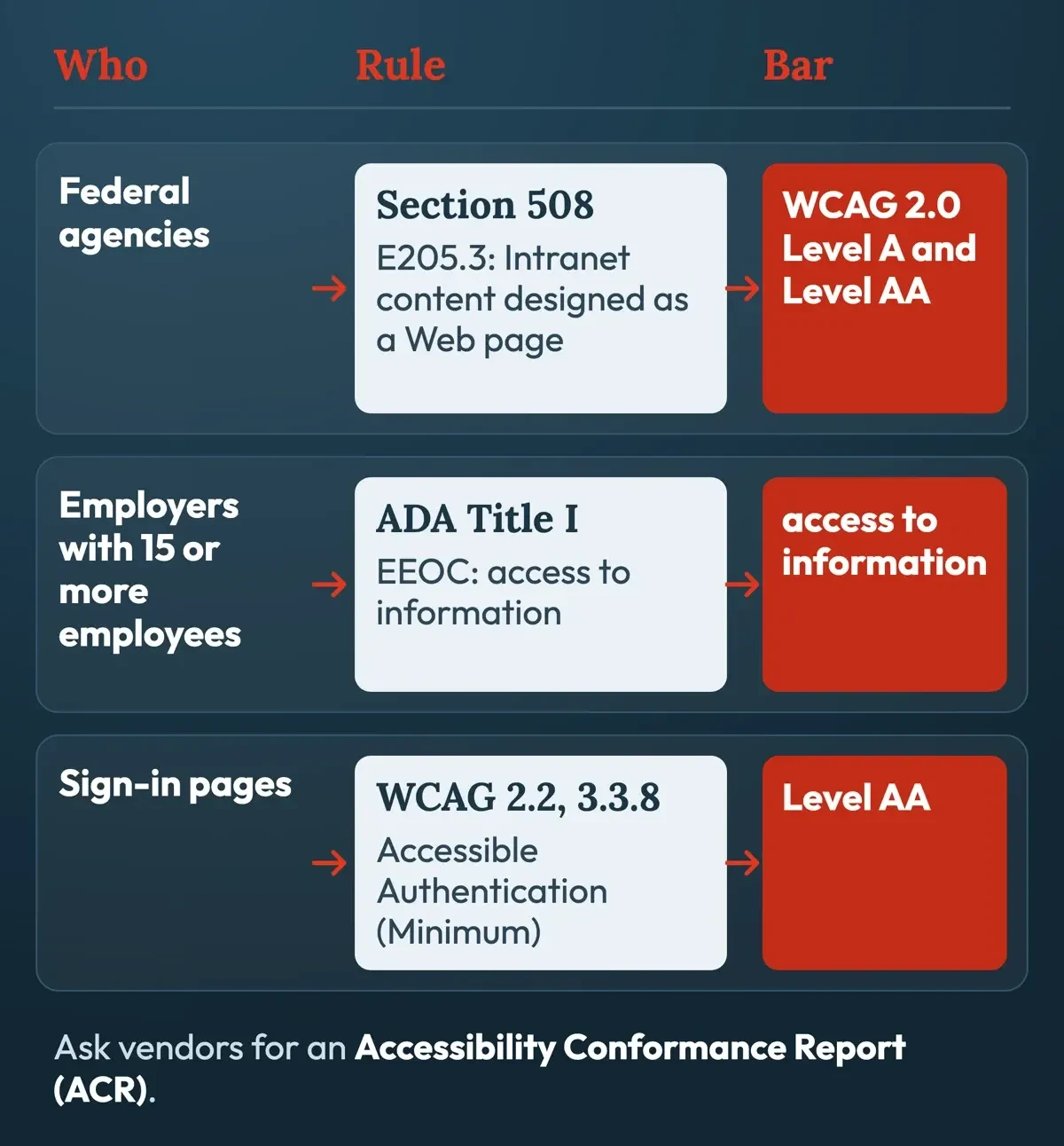 Diagram by DigitalTreed, from Access Board, Section508.gov, ADA.gov, EEOC and W3C pages read November 7, 2026.
An example scoring sheet for intranet options
Those security and accessibility rules become the lines of the example sheet below. The weights are ours, and Option A and Option B are made up. Score each line 0 (missing), 1 (partly) or 2 (fully), then use weighted score = sum of (weight x score / 2), which tops out at 100.
| Criterion | Weight | Option A (made up) | Option B (made up) |
|---|---|---|---|
| Single sign-on and phishing-resistant MFA | 25 | 2 | 1 |
| Password rules match NIST SP 800-63B | 15 | 2 | 1 |
| Role-based access, few admins | 15 | 1 | 2 |
| Recent ACR showing WCAG 2.x Level AA | 20 | 1 | 2 |
| Search, documents and staff directory | 15 | 2 | 2 |
| Full data export if you switch | 10 | 0 | 2 |
| Weighted score (example) | 100 | 72.5 | 80 |
In this example, Option A wins on sign-in. But it scores 0 on data export, so its 72.5 trails Option B's 80. Drop the export weight to 0 and Option A comes out ahead, 72.5 to 70. Set the weights from your own priorities before you read any vendor's answers.
We'd also add one gate beyond the math: a 0 on sign-in security or on the ACR line knocks an option out.
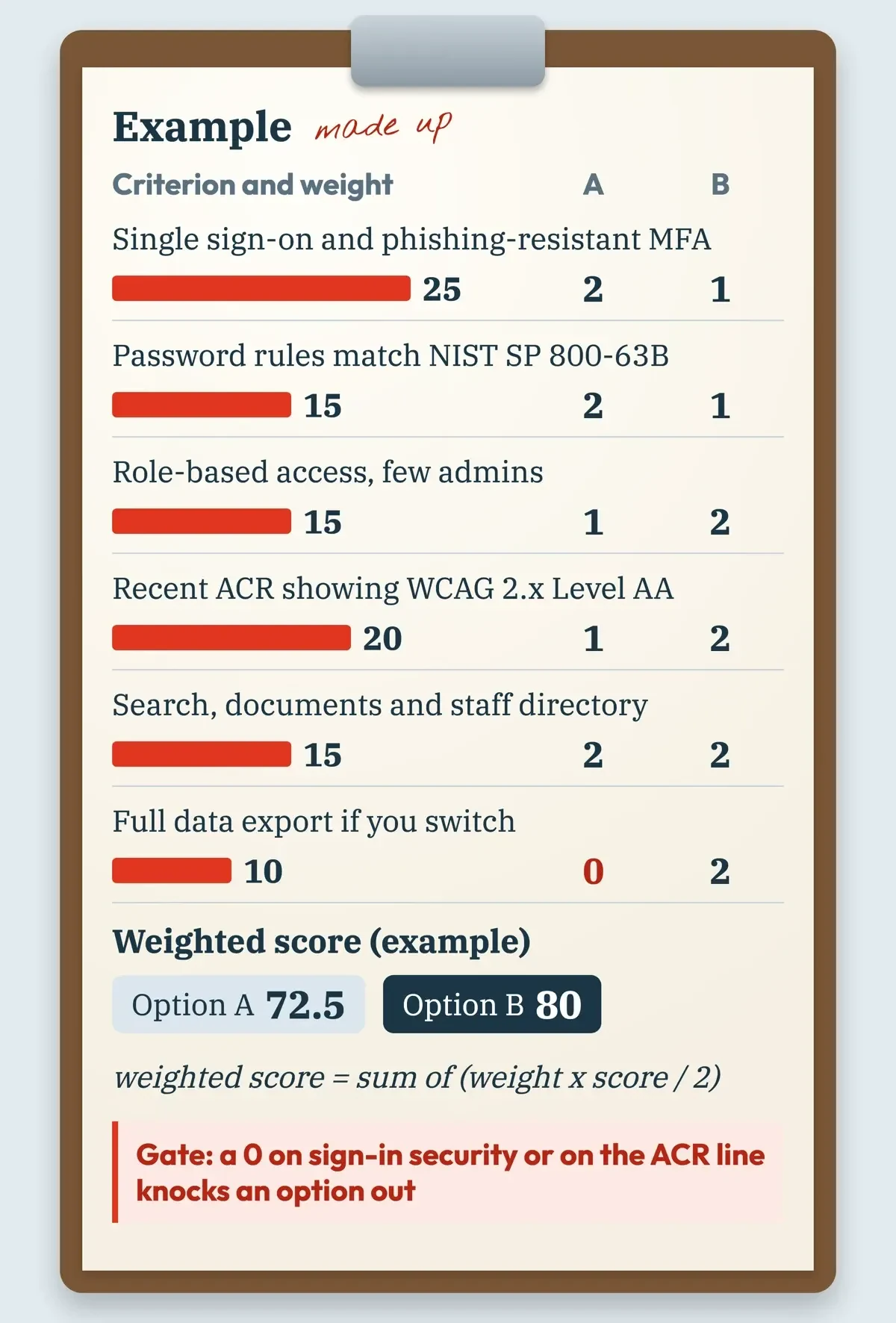 Drawn by us: an example scoring sheet with made-up options and our own weights.
We'd send each vendor these six questions in writing before any demo, since written answers can be compared line by line against the sheet.
- Do you support single sign-on with our identity provider and phishing-resistant MFA?
- Can password rules require 15 or more characters without forced character mixes?
- Do you check new passwords against a list of common or breached passwords?
- How many admin roles exist, and can HR folders be limited to HR staff?
- Can you send your latest Accessibility Conformance Report?
- How do we export all documents and user data if we leave?
Keep each vendor's replies next to the sheet so the scores can be checked later. For habits that keep staff off fake login pages, see our phishing prevention tips and our lookalike website check.
Frequently asked
Is hdintranet.net the same site as hdintranet.com?
No. On November 7, 2026, hdintranet.net returned NXDOMAIN, so it doesn't exist in DNS. You can look up any domain's registration record on ICANN Lookup.
Where do I report a fake intranet login page?
Tell your IT team first. Per the FTC, forward phishing emails to [email protected], forward texts to SPAM (7726) and report at ReportFraud.ftc.gov.
Should intranet passwords expire every 90 days?
Not under NIST SP 800-63B, which says systems "SHALL NOT require subscribers to change passwords periodically." A change is still required when a password shows signs of compromise.
Does Section 508 apply to private companies?
It covers federal agencies. ADA.gov's web guidance covers "state and local governments and businesses open to the public" and notes rules for state and local governments published April 24, 2024.
How we made this guide: Plain DNS, web and registry checks, a script matching the old post's claims, and official pages saved as text. Facts checked by the DigitalTreed team on November 7, 2026.
First published November 15, 2023 as a product guide to HDIntranet. Rewritten November 7, 2026 as an honest finding plus a vendor-neutral intranet guide.
Sources
- NIST CSRC Glossary: intranet
- Microsoft Learn: What is Microsoft Entra application proxy?
- Verisign RDAP: hdintranet.com registration record
- ICANN Lookup
- FTC: How To Recognize and Avoid Phishing Scams
- CISA: Recognize and Report Phishing
- CISA: Avoiding Social Engineering and Phishing Attacks
- NIST Small Business Cybersecurity Corner: Phishing
- FBI: Internet Crime Complaint Center (IC3)
- FTC: ReportFraud.ftc.gov
- Nielsen Norman Group: 10 Best Intranets of 2023
- NIST: NIST Releases Version 2.0 of Landmark Cybersecurity Framework
- NIST: Cybersecurity Framework
- NIST SP 800-63B: Authentication and Authenticator Management
- CISA: Require Multifactor Authentication (small and medium businesses)
- FTC: Start with Security, A Guide for Business
- Section508.gov: IT Accessibility Laws and Policies
- U.S. Access Board: ICT Accessibility 508 Standards and 255 Guidelines
- Section508.gov: Accessibility Conformance Report (ACR)
- ADA.gov: Introduction to the Americans with Disabilities Act
- EEOC: Enforcement Guidance on Reasonable Accommodation and Undue Hardship under the ADA
- ADA.gov: Guidance on Web Accessibility and the ADA
- W3C: Web Content Accessibility Guidelines (WCAG) 2.2


Comments
No comments yet. Start the conversation below.