
Quick answer
DNS_PROBE_FINISHED_NXDOMAIN means Chrome asked DNS for the site's address and was told the name does not exist. Usually it's a typo, a stale cached answer, or a VPN or filter on your side. If the name fails for everyone, the domain has expired, points to the wrong nameservers, or is missing a DNS record.
DNS_PROBE_FINISHED_NXDOMAIN is Chrome's code for a failed name lookup. Cloudflare's troubleshooting page puts it plainly: the DNS lookup finished, and the answer was that the domain does not exist.
We caused the error on purpose on October 22, 2026, with Chrome 155 and a name that can never exist. Then we asked Google Public DNS the same question and timed how long a "does not exist" answer stays cached. Chrome showed "This site can't be reached" with the DNS_PROBE_FINISHED_NXDOMAIN code. Nothing on our computer was changed.
Key takeaways
- NXDOMAIN means "no such domain." The site may be fine. Your device just can't find its address.
- Check the spelling first. Chrome itself now says "Check if there is a typo."
- Paste a Google Public DNS link in your browser to see if the name fails for everyone or only for you.
- A "does not exist" answer can stay cached. In our test the limit was 15 minutes to 24 hours.
- Google's DNS addresses are 8.8.8.8 and 8.8.4.4. Our old version of this post got that wrong.
What does DNS_PROBE_FINISHED_NXDOMAIN mean?
DNS_PROBE_FINISHED_NXDOMAIN means Chrome asked DNS for a site's IP address and was told the name does not exist. The website itself may still be running. But without an address, your browser has nowhere to connect, so it shows this error page.
Every website name has to be turned into a number, an IP address, before your browser can connect. DNS is the system that does that lookup, a bit like a phone book for the internet.
NXDOMAIN is the answer "this name is not in the book." The DNS standard, RFC 1035, calls it response code 3. A later standard, RFC 8020, says it means the queried name "does not exist in the DNS."
To see the real page, we opened shop.example.invalid. The RFC 6761 rules for reserved names say ".invalid" names should always get an NXDOMAIN answer, so it's a safe test.
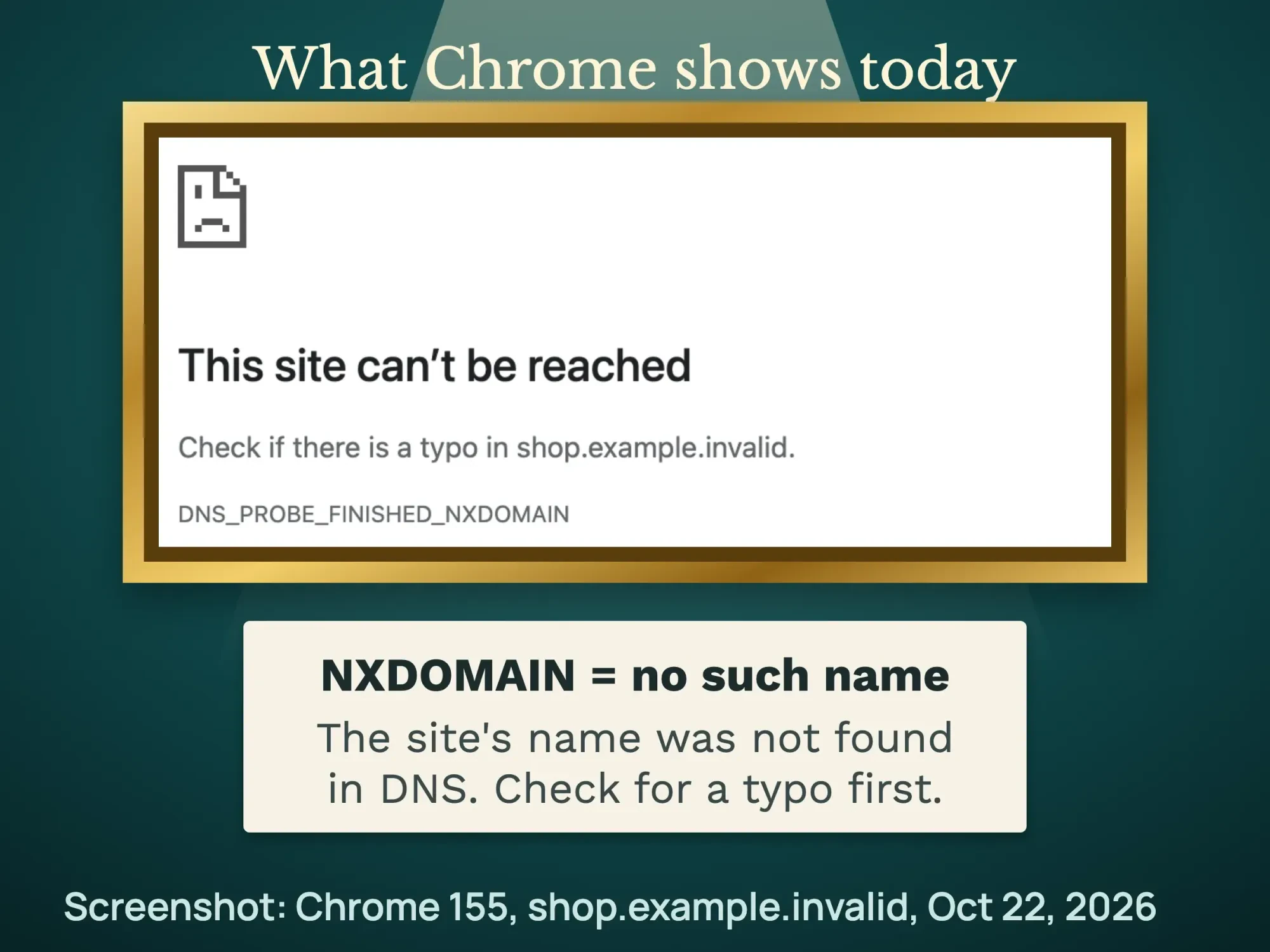 Screenshot: Chrome 155 opening shop.example.invalid, October 22, 2026.
"Server IP address could not be found" and other Chrome DNS errors
Older versions of Chrome were widely reported to say "Server IP address could not be found" instead. In our test, Chrome's console also logged ERR_NAME_NOT_RESOLVED for the same page. Treat all three as the same family of problem.
Chrome runs a quick DNS check, called a probe, when a lookup fails. Chromium's source code lists the results, and each one points to a different fix.
| Code on the page | What Chrome found | Where to look |
|---|---|---|
| DNS_PROBE_FINISHED_NXDOMAIN | The DNS servers work, so the name must not exist | The spelling, your caches, or the domain itself |
| DNS_PROBE_FINISHED_NO_INTERNET | There is no internet connection | Your Wi-Fi, cable or router |
| DNS_PROBE_FINISHED_BAD_CONFIG | The DNS settings are wrong, or the DNS servers are down | Your DNS settings or your provider |
| DNS_PROBE_FINISHED_BAD_SECURE_CONFIG | The secure DNS settings are wrong, or those servers are down | Chrome's secure DNS setting |
DNS has its own codes, too. RFC 1035, linked above, calls code 2 "Server failure," often written SERVFAIL. That means the DNS server had a problem, not that the name is missing.
This site can't be reached: is it your device or the website?
It's the website if Google Public DNS also says the name doesn't exist, and your device if public DNS finds it. A typo, a stale cache or a VPN points to your side. An expired domain or a missing record points to the site.
Run this 30-second check before you change anything. It tells you which half of this guide to read.
- Read the address again, letter by letter. Google's Chrome Help lists checking the URL as the first fix. Watch the ending, too: ".con" instead of ".com" fails every time.
- Try 2 other sites. If every site fails, your internet connection or DNS settings are the problem. If only this site fails, keep going.
- Open the site on your phone with Wi-Fi turned off. If it works on mobile data, the problem is your Wi-Fi network or computer.
- Ask Google Public DNS directly. Paste the link below in any browser and swap example.com for the site's name.
https://dns.google/resolve?name=example.com&type=AThat link uses Google's DNS-over-HTTPS JSON API. "Status": 0 with an "Answer" means the name exists, so the problem is on your side. "Status": 3 means the name does not exist for anyone, so it's the website's problem.
Prefer a command? Microsoft's nslookup page shows how to ask a chosen DNS server about a name. This asks Google Public DNS directly, on Windows or a Mac.
nslookup example.com 8.8.8.8A missing name gets "Nonexistent domain" on Windows, per Microsoft. On a Mac, our test on October 23, 2026, said "server can't find shop.example.invalid: NXDOMAIN."
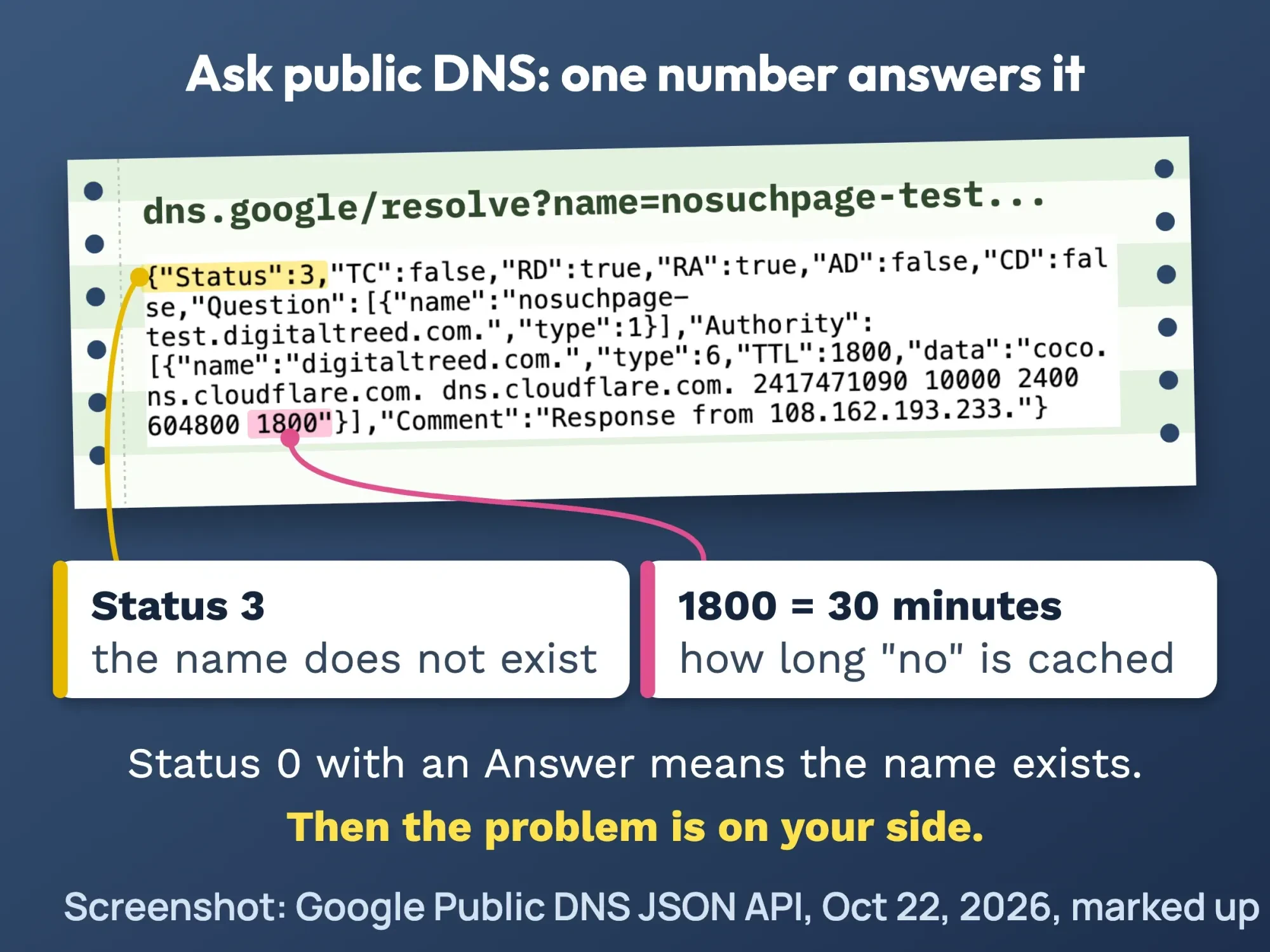 Screenshot: Google Public DNS JSON answer for a missing subdomain, October 22, 2026, marked up by DigitalTreed.
You can also run the site through our free HTTP status checker. It fetches the page from our server, not your network. When it can't resolve the name either, the site is down for everyone, not just you.
How to fix DNS_PROBE_FINISHED_NXDOMAIN on your computer or phone
When public DNS says the name exists (Status 0), the fault is on your side. Work down this list in order. Stop as soon as the site loads.
- Turn off VPN, filters and private relays. Pause your VPN, ad blocker, parental filter or antivirus web shield one at a time, then reload. Turn each one back on after the test. Each of these can change which DNS server answers you.
- Clear Chrome's own DNS cache. Type chrome://net-internals/#dns in the address bar and click "Clear host cache." We confirmed this page exists in Chrome 155.
- Flush your computer's DNS cache. On Windows, open Terminal as administrator and run ipconfig /flushdns. On a Mac, the simple option is a restart.
- Restart your router and device. Unplug the router for 30 seconds, plug it back in, then restart the computer or phone.
- Try a public DNS server. Write down your current DNS settings first. Then switch to Google Public DNS or Cloudflare, using the addresses in the table below.
- Check the hosts file. A line in your hosts file can send a name to a wrong or blocked address. Back the file up before you edit it, or ask an IT person.
- Call your internet provider. If nothing works and the name exists in public DNS, your provider's DNS may be failing. Tell them the exact site name and the time.
Two notes on step 1. Apple says iCloud Private Relay encrypts your DNS requests and sends them through 2 relays, so it's worth pausing as a test. And Cloudflare's family DNS blocks some sites on purpose, so a blocked site may fail to load.
Chrome has its own DNS switch, too. Chrome Help says secure DNS is on in automatic mode by default. If it has trouble, it falls back to a normal lookup.
If you picked a custom provider, Chrome won't fall back, and errors may say the server's IP address couldn't be found. Check it in Settings > Privacy and security > Security, under "Use secure DNS."
On step 3, Microsoft's ipconfig page says /flushdns can "discard negative cache entries." That's exactly the "does not exist" answer you want gone. We didn't find an Apple page that gives a flush command, so we don't print one here.
ipconfig /flushdnsMany guides also tell you to renew your IP address. The same Microsoft page says /release gives up your current address and /renew asks for a new one. It adds that /renew works only when the adapter gets its address automatically.
ipconfig /release
ipconfig /renew
Why does clearing the cache help?
Clearing the cache helps because your device and DNS servers keep a "does not exist" answer for a set time. That copy can outlive the fix. Flushing deletes your device's copy, so the next lookup asks the DNS server again instead of reusing the old answer.
DNS servers remember bad news as well as good news. RFC 2308, the negative caching standard, says the "does not exist" answer carries its own timer, taken from the domain's SOA record.
Our test: how long a "does not exist" answer stays cached
We read those timers in public DNS on October 22, 2026. A missing subdomain on a Cloudflare-hosted domain was cached for up to 1,800 seconds, or 30 minutes. An unregistered .com name got 900 seconds, or 15 minutes. A typo in the ending, like .con, got up to 86,400 seconds: a full 24 hours. We used Google's JSON API, and Cloudflare's resolver gave the same 1,800 seconds for the missing subdomain.
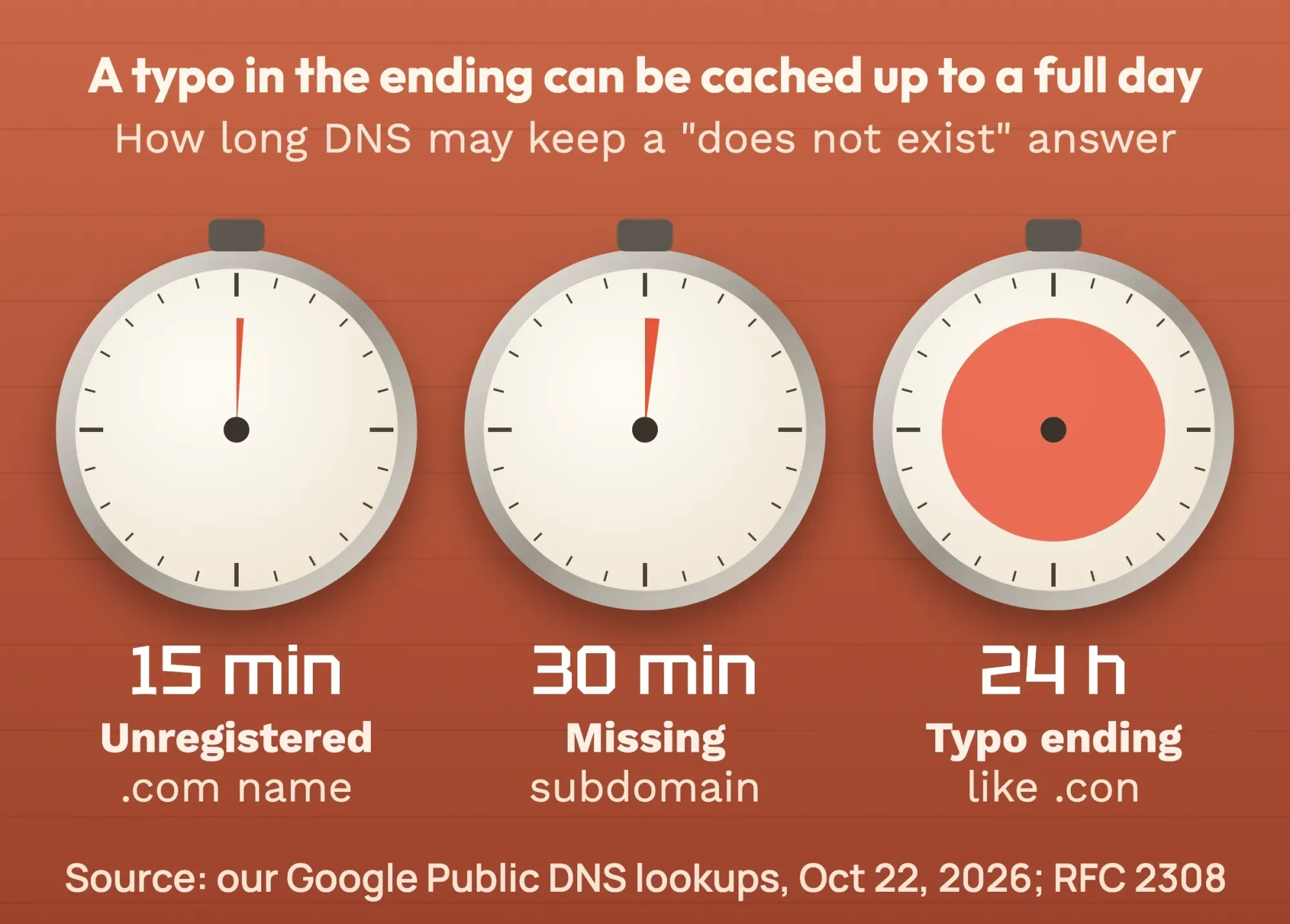 A typo in the ending can be cached up to a full day. Source: our Google Public DNS lookups, October 22, 2026; timer rule from RFC 2308.
So if you mistyped a name once, it may keep failing for a while even after you fix the spelling. Flushing clears your device's copy. Your router or provider may keep its copy until the timer runs out.
Which DNS addresses are correct?
Google Public DNS uses 8.8.8.8 and 8.8.4.4. Cloudflare uses 1.1.1.1 and 1.0.0.1. The IPv6 addresses are in the table below.
Use only the addresses each company publishes on its own page. Our old version of this post listed 8.8.8.4, which is not Google's, and mixed in Cloudflare's IPv6 addresses under Google.
| Provider | IPv4 | IPv6 |
|---|---|---|
| Google Public DNS | 8.8.8.8 and 8.8.4.4 | 2001:4860:4860::8888 and 2001:4860:4860::8844 |
| Cloudflare 1.1.1.1 | 1.1.1.1 and 1.0.0.1 | 2606:4700:4700::1111 and 2606:4700:4700::1001 |
The table matches Google's Public DNS setup page and Cloudflare's address list, both checked October 22, 2026. Before you switch, write down your current settings, as Google advises, so you can switch back.
- Mac: Apple menu > System Settings > Network, pick your network, click Details, then DNS, per Apple's DNS settings guide.
- Windows: the Preferred DNS and Alternate DNS boxes sit in Network & internet settings. Microsoft's network settings guide recommends automatic settings for most people.
- Android: Settings > Network & internet > Private DNS, per Google's Android help. Google recommends keeping Private DNS on, so switch it off only as a short test.
- Work laptop: leave DNS alone and ask your IT team. Company devices often need their own DNS.
How to fix it on an iPhone or Android phone
Chrome on a phone can show the same error. Start with the 30-second check above, then try these steps in order.
- Switch networks. Apple's Safari help says to try cellular data, or another Wi-Fi network. It also says some websites may block content while a VPN is on.
- Restart the phone. Android's connection help lists a restart first, then switching between Wi-Fi and mobile data.
- On Android, turn airplane mode on, wait 10 seconds, then turn it off, as the same Android page suggests.
- On an iPhone, clear Safari's data: Settings > Apps > Safari > Clear History and Website Data, per Apple.
- Check Private DNS on Android, as shown in the list above.
Why does your own website show DNS_PROBE_FINISHED_NXDOMAIN?
Your own site shows this error when the domain has expired, its nameservers point to the wrong company, or the name has no DNS record. If Google Public DNS returns Status 3 for your domain, every visitor sees it. Google's crawler docs say DNS errors are "most commonly caused by misconfiguration."
- Check the expiry date in your registrar account. Renew at once if it has lapsed.
- Check that your nameservers point to the company that hosts your DNS, such as your web host or Cloudflare.
- Check that a record exists for both yourdomain.com and www.yourdomain.com, plus any subdomain you use.
- If you just moved hosts or added a record, wait a few minutes and test again.
Not sure when the domain expires? ICANN's free Lookup tool shows a domain's current registration data, straight from the registry or registrar. Look for the expiration date. The domain chapter of our step-by-step WordPress website guide covers picking, buying and protecting a domain.
Cloudflare tells owners to check the apex domain and active subdomains such as www. A missing www record is a common slip. Our WordPress website set-up guide walks through connecting a new domain.
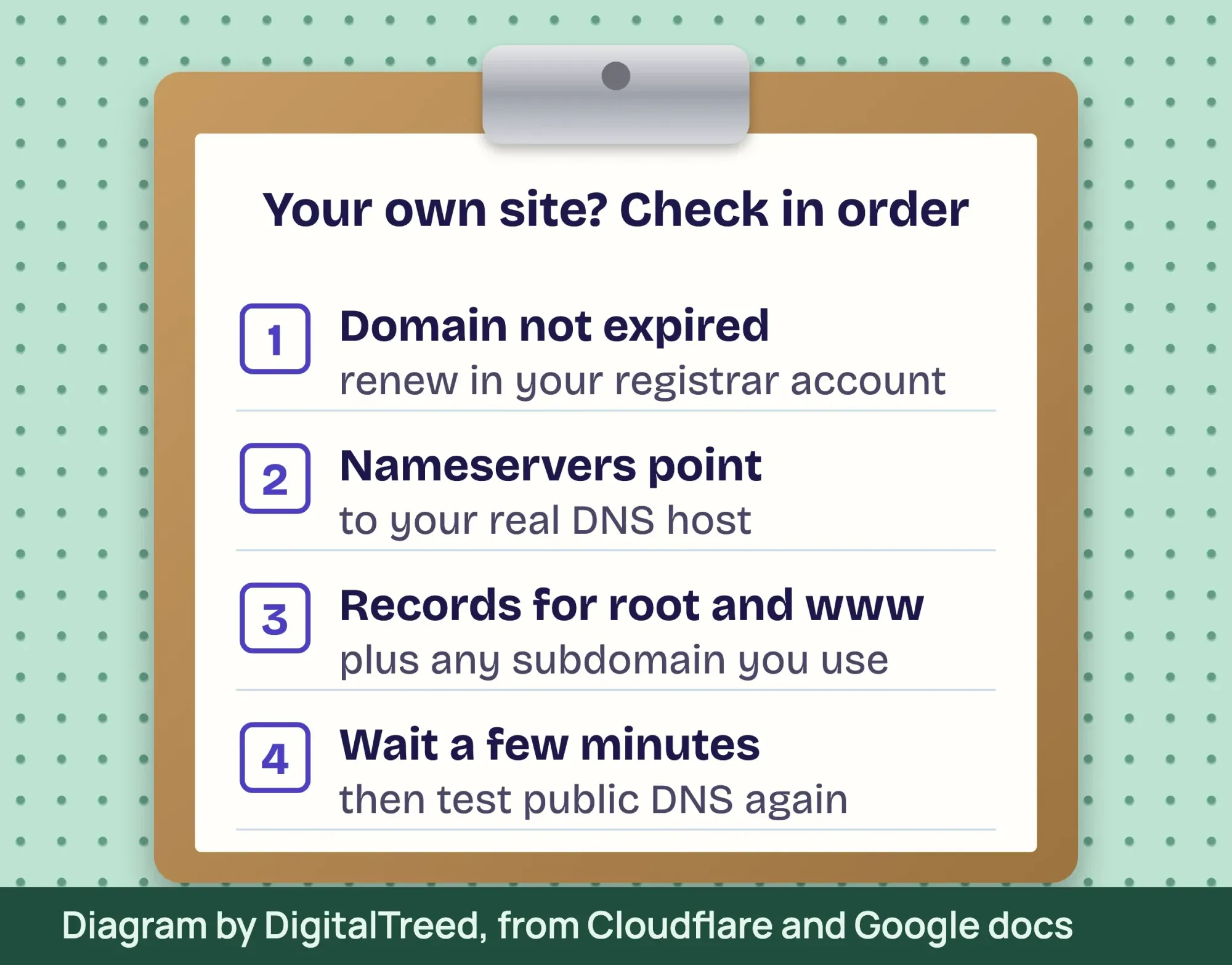 Diagram by DigitalTreed, based on Cloudflare and Google documentation, October 2026.
An expired domain may not show this error at all. ICANN's Expired Registration Recovery Policy makes registrars send reminders about 1 month and 1 week before expiry. For at least the last 8 days a lapsed name can be renewed, the registrar must interrupt its normal DNS. Often it shows an "expired" page instead. So you may see a parking page, not this error.
For .com and other generic endings, the same policy gives a 30-day Redemption Grace Period after deletion. ICANN's expired domain page says to contact your registrar "immediately." Renewing on time is cheap. Porkbun lists .com renewal at $11.08 a year as of October 2026, per its domain pricing page. Redemption fees vary by registrar.
Did the error start after you changed nameservers?
Often, yes. Moving DNS to a new company is a common trigger. If the new company is missing a record, that name stops existing once the new nameservers take over. Cloudflare's setup guide gives 3 warnings.
- Its automatic scan is "not guaranteed to find all existing DNS records," so review the root, www, subdomain and email records yourself.
- Copy the new nameserver names exactly, or your DNS will not resolve correctly.
- If DNSSEC is on, turn it off at your registrar first. Changing nameservers while it is active can make the domain unreachable.
Cloudflare also says to wait up to 24 hours while your registrar updates the nameservers. Our advice: keep the old DNS host running until then.
Our take: a crashed server does not cause NXDOMAIN. If DNS still answers, visitors get a connection error instead. So when you see this code, look at the domain and DNS records first, not the server.
DNS records are easy to get wrong. Email uses DNS too: an MX record tells the internet where your mail goes, as our business email setup guide shows with a real lookup. Our web development team can check your domain, nameservers and records and get the site back. (DigitalTreed sells this service.)
After the fix: how long until everyone sees the site?
Most visitors see the fix within minutes. Cloudflare says you may wait "a few minutes" after a change. Google's crawler guide says that changes made in the last 72 hours may still be spreading. Anyone who hit the error earlier may wait out the cached "does not exist" answer.
Visitors who use Google Public DNS can get the fix sooner. Google's Flush Cache tool refreshes its cache for most domain names. You don't need to own the domain, but you must solve a reCAPTCHA.
Changed your registrar or DNS host? Google's Public DNS FAQ says to flush the main domain first, then subdomains like www.
A new subdomain also needs a valid HTTPS certificate. Run it through our free SSL checker once the name resolves.
Per its crawler guide, Google treats DNS errors "similarly to 5xx server errors" and slows crawling. Watch the crawl stats in our Google Search Console guide. Our advanced SEO guide covers what long outages can do to rankings.
Example: a bakery's new ordering page
Example: a made-up bakery in Columbus, Ohio, launches online ordering at order.examplebakery.com. Its domain uses Cloudflare DNS. The owner opens the new address before adding the DNS record and gets DNS_PROBE_FINISHED_NXDOMAIN.
She adds the CNAME record, but her laptop still shows the error. Her laptop and her provider's DNS cached the "does not exist" answer, which lasted up to 30 minutes on a Cloudflare zone in our test. Running ipconfig /flushdns clears the laptop's copy; otherwise she waits it out. Customers who never tried the address see the page right away.
The name works, but the site still fails?
If Google Public DNS returns Status 0 but the page still fails, DNS isn't the problem anymore. The name resolves, so the fault sits with the server, WordPress or a redirect rule. Match your message to a guide below.
- "502 Bad Gateway": read our 502 bad gateway fix.
- "ERR_TOO_MANY_REDIRECTS": read our too many redirects fix.
- "HTTP ERROR 500" or "critical error": read our HTTP 500 error guide.
- "Error establishing a database connection": read our database connection fix.
- "403 Forbidden": read our 403 forbidden fix.
Mistakes to avoid
- Typing 8.8.8.4 as a DNS server. Google's second address is 8.8.4.4.
- Changing DNS settings without writing down the old ones.
- Resetting Chrome before checking the spelling and another network. Chrome's own help puts the URL check first.
- Adding a DNS record for yourdomain.com and forgetting www.
- Letting renewal emails go to an old address. Keep your registrar contact email current.
- Editing the hosts file without a backup copy.
- Hearing about an outage from customers first. Our uptime monitoring guide shows how to get an alert when your site goes down.
Frequently asked
Is DNS_PROBE_FINISHED_NXDOMAIN a virus?
Usually not. A typo, a cached answer or a VPN is far more common. Malware can change DNS settings, so run a scan if every site fails and the fixes above don't help.
Why does the site work on my phone but not my laptop?
Each device keeps its own DNS cache and may use a different network. Flush the laptop's cache, or test it on the same network as the phone.
How long until the error goes away by itself?
Up to the domain's negative cache time. In our lookups the limit ranged from 15 minutes to 24 hours. Flushing your caches skips the wait on your device.
Will flushing DNS always fix it?
No. Flushing only clears old answers saved on your device. If Google Public DNS also returns Status 3, the fix is at the domain or its DNS host.
Does this error hurt my SEO?
A short outage is unlikely to matter. Google treats DNS errors like server errors and crawls less while they last, so fix a long one fast.
Is it the same as "Server IP address could not be found"?
Yes, in practice. It is widely reported as Chrome's older wording for a failed name lookup. The fixes are the same.
Your next step
Paste the Google Public DNS link from the 30-second check, with the site's name in it. Status 0 means fix your device. Status 3 means fix the domain.
If it's your own domain and you want it handled, our web development team can check it, and you get a fixed quote first.
How we made this guide: we opened a reserved test name in Chrome 155 on October 22, 2026. The same day, we looked up real and missing names in Google Public DNS. We changed no settings on our own computer. The fix steps come from Microsoft, Apple, Google, Cloudflare and ICANN pages, linked inline. We checked every DNS address against its provider's page that day. Updated October 23, 2026: added phone steps, a table of related Chrome codes and an nslookup check we ran that day. We also added Chrome's secure DNS setting, IP renewal, nameserver-change checks and Google's DNS flush tool. Updated October 25, 2026: added short answers and a cache-test heading.
First published July 2020. Rewritten October 2026: new text, a 30-second "is it me?" test and measured cache times. It also has correct DNS addresses, current device steps and checks for site owners.
Sources
- Cloudflare Docs: DNS_PROBE_FINISHED_NXDOMAIN
- RFC 1035: Domain names, implementation and specification
- RFC 8020: NXDOMAIN, There Really Is Nothing Underneath
- RFC 2308: Negative Caching of DNS Queries
- RFC 6761: Special-Use Domain Names
- Google Chrome Help: Fix connection and loading errors
- Google Public DNS: Get started
- Google Public DNS: JSON API for DNS over HTTPS
- Cloudflare: 1.1.1.1 IP addresses
- Microsoft Learn: ipconfig
- Microsoft Support: Essential network settings and tasks in Windows
- Apple Support: Change DNS settings on Mac
- Apple Support: About iCloud Private Relay
- Android Help: Manage advanced network settings
- Google Search Central: Debug network and DNS errors
- ICANN: Expired Registration Recovery Policy
- ICANN: About renewing an expired domain
- Porkbun: Domain pricing (vendor)
- Chromium source: DNS probe results (net_error_info.h)
- Microsoft Learn: nslookup
- Google Chrome Help: Manage Chrome safety and security
- Apple Support: If Safari isn't loading websites on iPhone
- Android Help: Fix internet connection problems
- Cloudflare Docs: Change your nameservers (Full setup)
- ICANN Lookup
- Google Public DNS: Flush Cache
- Google Public DNS: FAQ

Comments
No comments yet. Start the conversation below.