

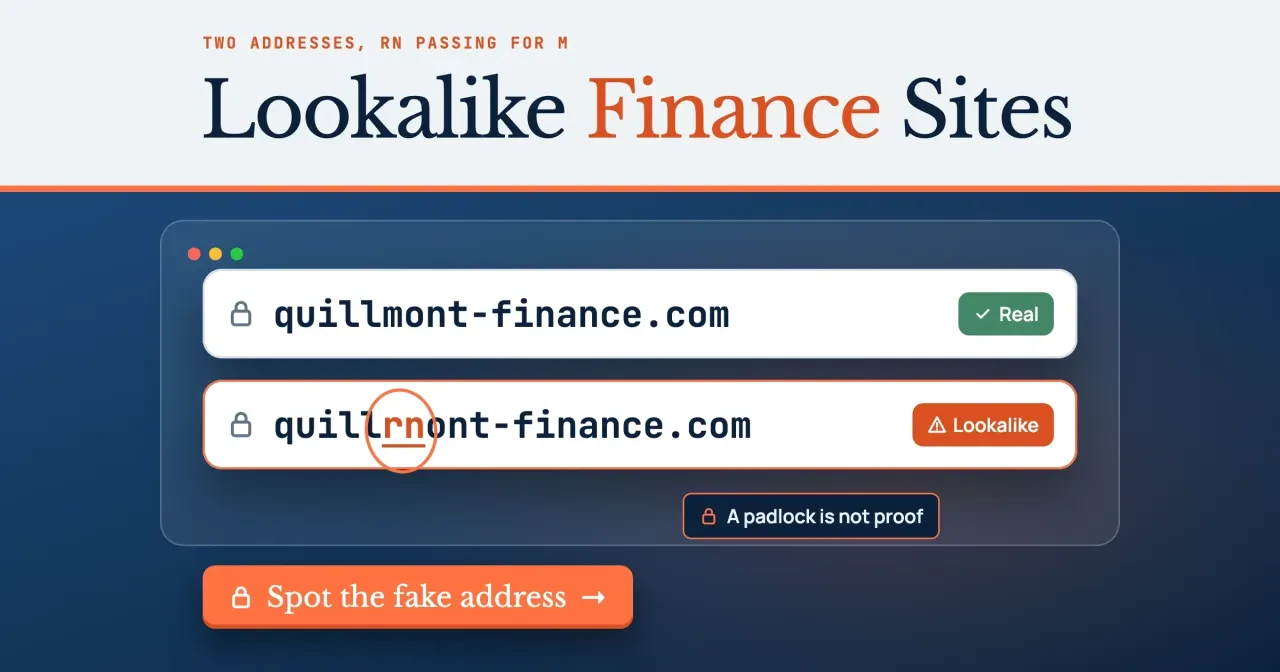
Quick answer
To spot a lookalike finance website, check the address, then its registry record. Records read October 29, 2026, show gomyfinance.com registered on April 25, 2024, and gomyfinance.org on October 12, 2024. If a site says it's a bank, the regulator settles it: FDIC BankFind lists each insured bank's official website. Start by reading the address from the right.
Two sites share the GoMyFinance name, one ending in .com and one in .org. Maybe a page asked for your card number, and now you're not sure which site you meant to visit. A lookalike finance website is a site whose address or look is close enough to a known finance name that you could mistake one for the other. This guide explains the rules; it is not financial or legal advice. If money already left your account, call your bank or card issuer, then report it to the FTC or your state attorney general.
The order below follows the address bar. You read the address from the right, then see the 96 copies our script made of one made-up name and the ten links it sorted. After that come the padlock, a domain record pulled in ICANN Lookup, and the two GoMyFinance records as they stood on October 29, 2026. The last three parts cover who pays the site, the company's regulator and what to do if you already typed data into a copy. Neither registry record says which GoMyFinance site is genuine, so the regulator's listing does that job here.
Key takeaways
- On October 29, 2026, our script built 96 lookalikes of one made-up name.
- Records show gomyfinance.com registered April 25, 2024, and gomyfinance.org October 12, 2024.
- Since April 1, 2024, 16 CFR 461 bars falsely posing as a business.
- An FBI alert from June 2019 says phishing sites use HTTPS too.
- FDIC BankFind lists each insured bank's official website, as of October 2026.
Read the address from the right
Skip the logo and the reviews and look at the address bar. It's the one part a copycat can't fully fake. The name and ending just before the first slash tell you whose site you're on. Everything to the left of that is a subdomain, and whoever owns the domain can type any words there, including a bank's name or the brand you searched for. Here's a made-up link that uses the trick: quillmont-finance.com.account-check.example/login. It opens with the real-looking name, but the registered part is account-check.example, so you'd be on that site, not on Quillmont Finance (made up for this guide). We can use .example safely because it's one of the names RFC 2606 reserves for documentation.
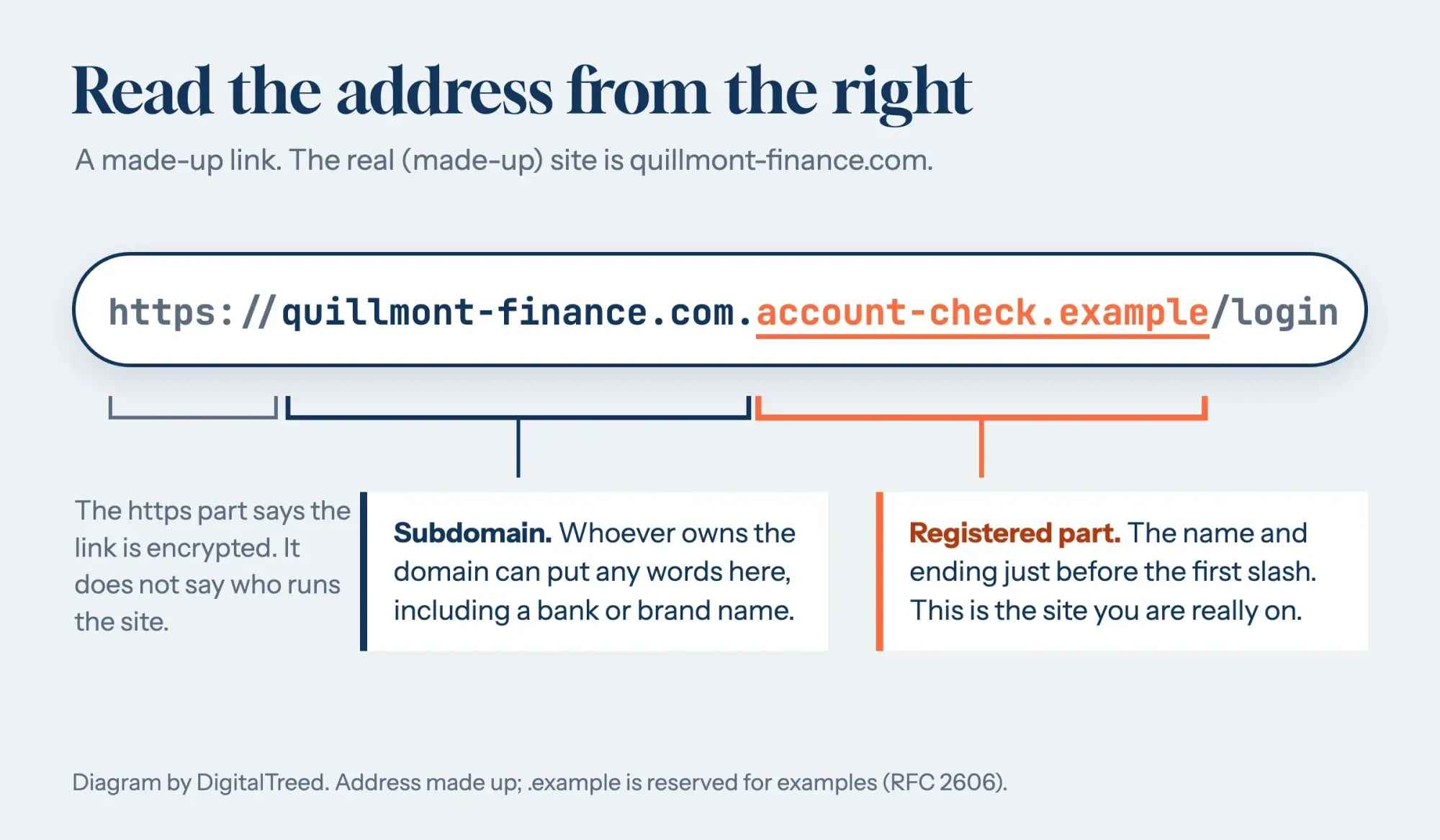 Diagram by DigitalTreed. The address is made up; .example is reserved for examples by RFC 2606.
A link in an ad or a text message often passes through a tracking domain or a link shortener before the page opens. Paste it into our redirect checker, then apply the right-to-left rule to the final address only.
How lookalike addresses are built
Copies rarely touch the logo; they change one spot in the address. CISA, the federal cybersecurity agency, describes this in its guide to phishing attacks. A malicious site may look identical, "but the URL may use a variation in spelling or a different domain (e.g., .com vs. .net)." Its phishing tip sheet shows a link like "amaz a n.com" with one letter changed.
Some swaps are hard to see even when you're hunting for them. The letters r and n side by side pass for an m, so quillrnont-finance.com gets by at a glance. Other alphabets make it worse. The Unicode Consortium's report on confusable characters uses "paypal" next to a copy with a Cyrillic а. Chrome's notes on international domain names say browsers show some such names in punycode, which "looks like xn--...". Chrome's rules flag any part of a name that mixes Latin, Cyrillic or Greek letters, which "cannot be mixed with each other," and show that part in punycode.
How many copies can one name have? We wrote a few lines of Python to find out, gave them quillmont-finance.com, and with 11 simple techniques the script built 96 different lookalikes. Here's every technique, its count and one example:
| Technique | Lookalikes built | Example |
|---|---|---|
| Next key on the keyboard | 27 | qiillmont-finance.com |
| Letter left out | 15 | qillmont-finance.com |
| Letter doubled | 15 | qquillmont-finance.com |
| Two letters swapped | 13 | qiullmont-finance.com |
| Same-looking letter from another alphabet | 8 | quillmont-financе.com |
| Extra word added | 8 | app-quillmont-finance.com |
| Different ending (TLD swap) | 4 | quillmont-finance.co |
| Look-alike letters (1 for l) | 2 | qui1lmont-finance.com |
| Hyphen removed or added | 2 | quillmont-fin-ance.com |
| Look-alike letters (rn for m) | 1 | quillrnont-finance.com |
| Look-alike letters (0 for o) | 1 | quillm0nt-finance.com |
| Total | 96 |
Plain typos won: the four keyboard-slip techniques made 70 of the 96. So the check that catches most of them is slow and dull: read the registered part letter by letter against an address you saved yourself, before you type anything.
Next, the same script checked 10 made-up addresses of the kind you'd meet in an ad or an email, with no network calls:
| # | Address in the link | Matches the real domain? | What it is |
|---|---|---|---|
| 1 | quillmont-finance.com/login | Yes | Real domain |
| 2 | app.quillmont-finance.com/ | Yes | Real domain, subdomain |
| 3 | quillrnont-finance.com/login | No | Look-alike letters |
| 4 | quillmont-finance.org/ | No | Same name, different ending |
| 5 | quilmont-finance.com/ | No | Typo (1-2 characters off) |
| 6 | quillmont-finance.com.account-check.example/login | No | Real name used as a subdomain of another domain |
| 7 | quillmont-finance-secure.com/ | No | Real name plus an extra word |
| 8 | quillmоnt-finance.com/ | No | Mixed alphabets (a browser may show it as xn--) |
| 9 | quillmontfinance.com/ | No | Hyphen dropped or added |
| 10 | rates-quillmont.example/ | No | Different domain |
Row 6 worries us most, because the real name leads the address while the site belongs to whoever owns account-check.example. Row 8 looks just like row 1's domain on screen, and the only thing that gives it away is the xn-- form a browser may show instead. Row 4 is the GoMyFinance case in miniature: same name, other ending. The checker can say the two domains differ, but it can't say which one is genuine.
Copying a business name to fool people has a legal side as well. The FTC's impersonation rule, 16 CFR 461.3, makes it unfair or deceptive to "materially and falsely pose as, directly or by implication, a business or officer thereof." The FTC's April 1, 2024 announcement says the rule took effect that day and lets the agency seek "money back to injured consumers and civil penalties against rule violators." A similar address alone proves nothing, though, because the rule turns on false posing, and only the FTC or a court decides that.
What we tested
We ran test/lookalike.py with Python 3 on October 29, 2026, offline, and served its results page on 127.0.0.1. These are the summary lines from the saved run log:
Part 1: 96 lookalikes of quillmont-finance.com from 11 techniques
Part 2: matches the real domain: 2 of 10. Not the real domain: 8 of 10.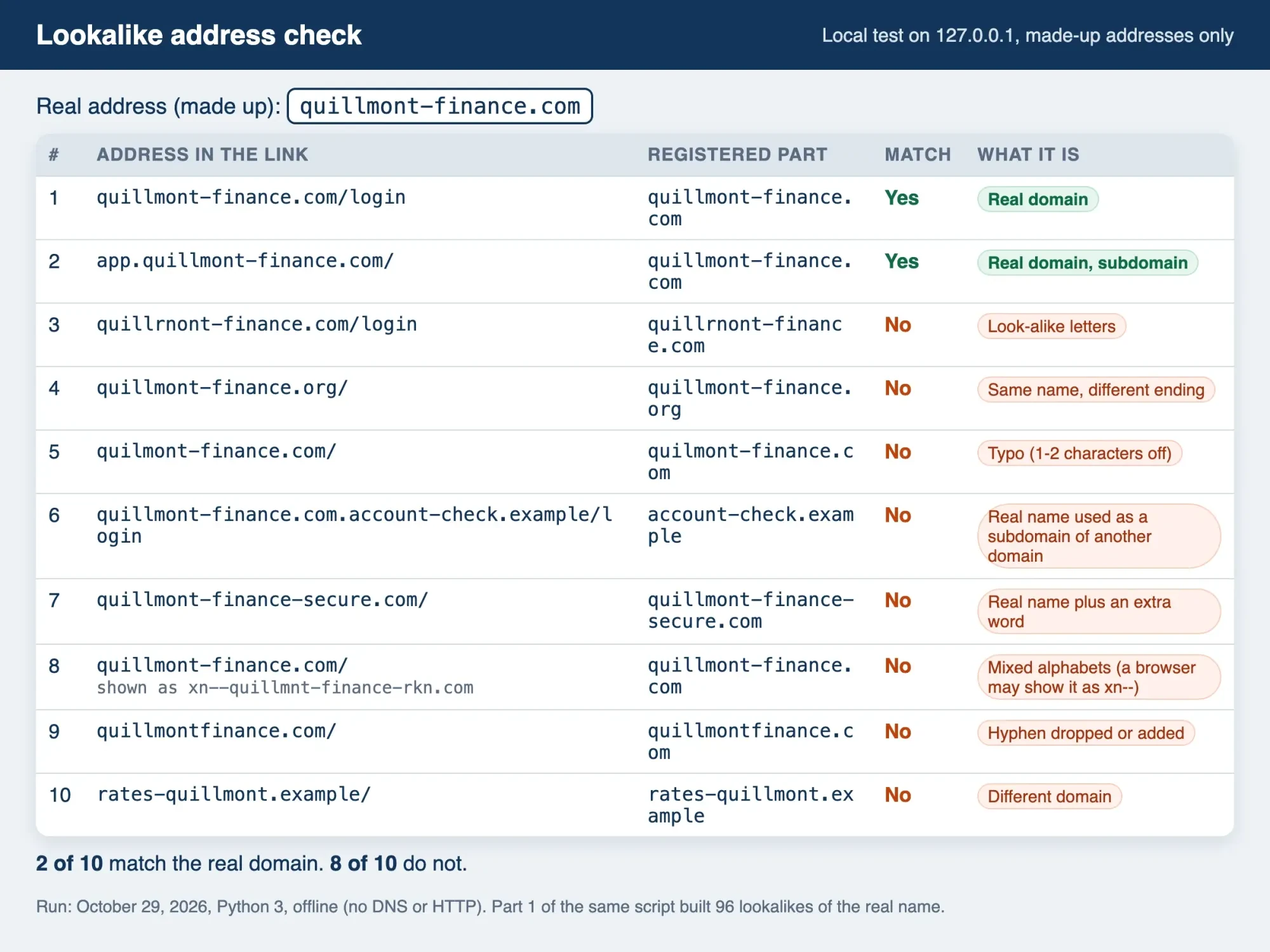 Screenshot: our lookalike checker on 127.0.0.1, made-up addresses only, October 29, 2026.
Does the padlock mean a site is real?
No. The padlock only means your connection is encrypted; CISA's page calls it "a sign your information will be encrypted." It says nothing about who's on the other end.
The FBI said the same in a June 2019 Internet Crime Complaint Center alert: "cyber criminals are banking on the public's trust of 'https' and the lock icon." Scammers, it added, are "more frequently incorporating website certificates" into phishing sites. Any of our lookalikes with a normal ending could get a padlock too, the moment someone registered it and switched on HTTPS. Our SSL checker shows who issued a site's certificate and when it expires. The name on that certificate, though, is just the domain you're already looking at, so it can't settle which site is real.
Look up the domain record with ICANN Lookup
The address tells you which domain you're on, and the domain record tells you how old it is and which company it was registered through. ICANN, the nonprofit that coordinates domain names, says on its RDAP page that this protocol "was created as the replacement for the WHOIS protocol." You can run a query in ICANN Lookup, and ICANN's guide for RDAP users says that client "is free to use." Each ending has one registry, and the IANA root zone database lists VeriSign Global Registry Services for .com and Public Interest Registry for .org. We didn't want to test on anyone's real site, so we read the record for example.com, a reserved name, and reprinted the reply:
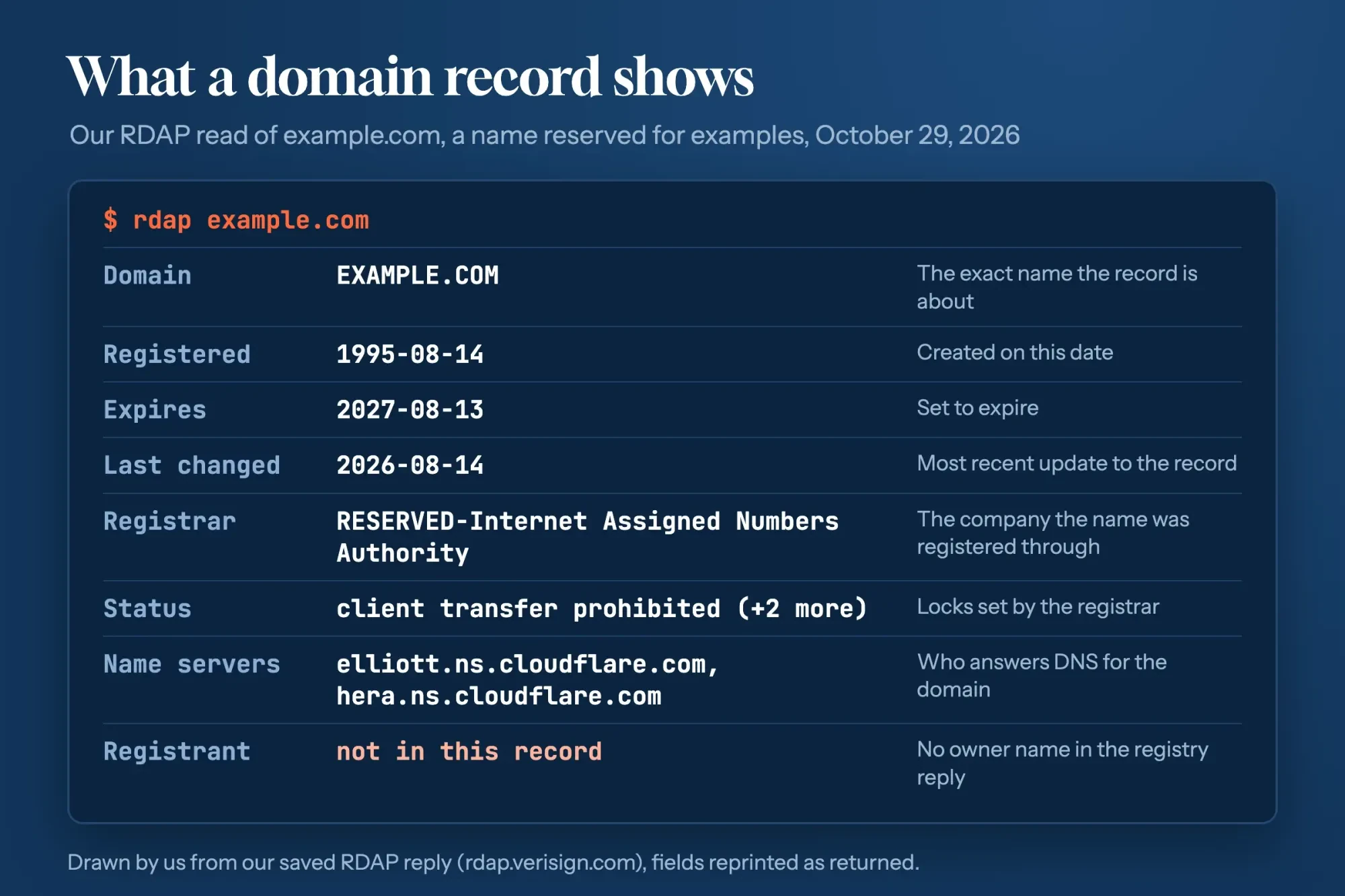 Drawn by us from our saved RDAP reply for example.com (rdap.verisign.com), October 29, 2026.
Start with the registration date, which shows how long the domain has existed, and the registrar, the company it was bought through. Status lines such as "client transfer prohibited" are locks the registrar set. Then notice the gap. The example.com reply had no registrant, so no owner name at all, and the two GoMyFinance records in the next section came back the same way. That reply also said the registry last refreshed its own data at 17:38 UTC that day, so the record was current when we read it. For live technical records, such as which servers answer for a domain, our DNS lookup tool pulls them in a few seconds.
GoMyFinance .com and .org: the records on October 29, 2026
We ran the GoMyFinance pair through the same checks on the evening of October 29, 2026: the registry record first, then the home page. Each line below is what that source returned, and we give no verdict on either site.
The .com came first. Its record shows gomyfinance.com was registered on April 25, 2024, through NameCheap, Inc., and its record lists an expiration date of April 25, 2027. Its home page loaded under the title "GoMyFinance.com: Personal Finance, Investing & Money Tips," with an About block that says "Founded in 2024." Its disclaimer page says "GoMyFinance is not a registered investment advisor, broker dealer, or financial institution." It adds that the site is "not affiliated with or endorsed by regulatory organizations" such as the SEC or FINRA. Neither that page, the home page nor the About Us page mentioned gomyfinance.org.
The .org was harder. Its record shows gomyfinance.org was registered on October 12, 2024, also through NameCheap, Inc., with Cloudflare name servers. We couldn't read its pages, because its home page returned a Cloudflare 522 error twice that evening, meaning the server behind it didn't answer. Neither record named an owner, and a shared registrar says nothing about whether the same people run both sites.
One correction belongs here. Our earlier post called .org the correct GoMyFinance site and described an app we couldn't confirm on either domain's pages, so that's gone.
Who pays the site? Affiliate and paid links
A copycat isn't the only reason a finance page may not be what it seems. Lots of honest sites earn money when you open an account or click a card offer through their link. That's allowed, as long as they tell you. Under 16 CFR 255.5, when a connection to the seller "is not reasonably expected by the audience, such connection must be disclosed clearly and conspicuously." The same section lists "monetary payment" among those connections.
The FTC's answers to common endorsement questions apply this to affiliate links. A site that earns a commission should "disclose your relationship to the retailer clearly and conspicuously on your site." The FTC's sample line is short: "I get commissions for purchases made through links in this post." Look for wording like that near the links and near the start of the page. If a page pushes one product hard and you can't find a disclosure anywhere on it, give its praise less weight than you would a neutral review. Our post on how affiliate links and their labels work shows where careful sites put them.
Check the company with its regulator
A clean address and a clear disclosure still don't show whether a company may legally hold your money. Start at the regulator's list. Banks are the easy case. The FDIC's deposit insurance FAQ says BankFind covers "all FDIC-insured institutions, including branch locations, the bank's official website" and the bank's current status. The FDIC's deposit insurance overview points to the same search. Other firms sit on other lists. A lender should appear in a state license search, and our online payday lender check shows how to run one. Stock pickers and advisers can be looked up in the SEC and FINRA databases from our stock tip website check. Either way, the site to trust is the one the record points to.
Then get there the slow way. The FTC's phishing guide says to contact a company "using a phone number or website you know is real." Type that address yourself and bookmark it.
If you typed data into a copy
Already typed something into a site you now doubt? The FTC's page on what to do if you were scammed sorts the steps by what you gave away. Speed matters:
- A credit card number or payment: "Report it to the credit card issuer immediately," using the number on the back of your card, and ask for a refund.
- Bank details or a debit card: report it to your bank or credit union right away and ask them to reverse the payment.
- A username and password: if you can still log in, set a new, strong password, change it wherever you reused it, and turn on two-factor authentication.
- Your Social Security number: if it was used, go to IdentityTheft.gov for a report and a recovery plan.
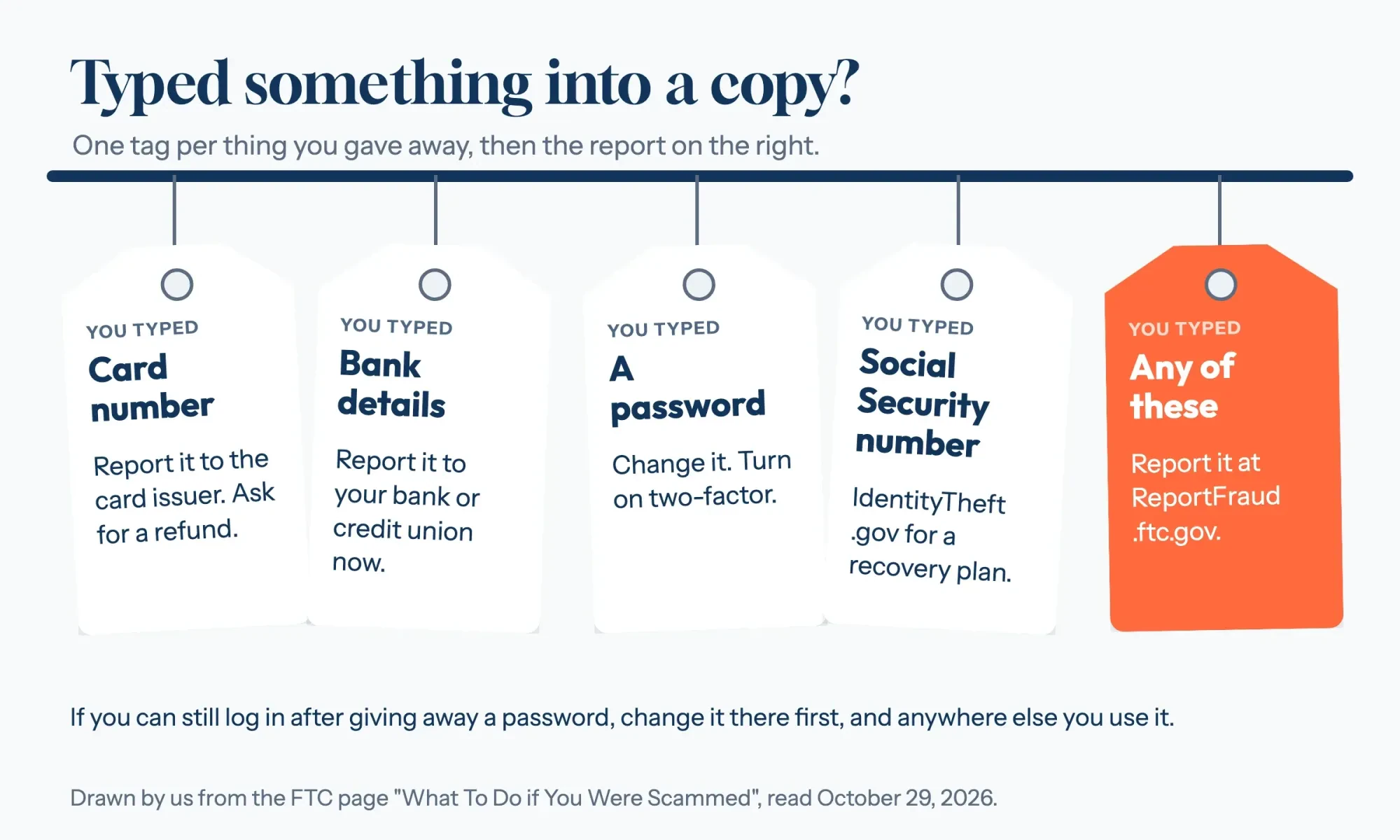 Drawn by us from the FTC page on what to do if you were scammed, read October 29, 2026.
Then report the site at ReportFraud.ftc.gov, even if you lost nothing. The site describes itself as a way to "Protect your community by reporting fraud, scams, and bad business practices." A strange charge that turns up later? Our walkthrough on disputing an unknown card charge covers it. If you clicked a link and worry about your phone or laptop, read our phishing link walkthrough. For your Social Security number, our guide to checking your own SSN records covers free credit reports and freezes.
Our checker could match a link against a saved address, but it couldn't say which GoMyFinance site is genuine, and neither could the registry records. So the address you save should come from a regulator's listing or your card statement, not from an ad or a search result.
Firms that find copies of their own name can hire our website development service for the domain and site side. It's paid; this is the guide's one ad.
Lookalike finance site questions
Frequently asked
Can I still use WHOIS to look up a domain?
Partly. ICANN's RDAP page says registries and registrars must still run RDAP. Since January 28, 2025, they "are no longer required to provide WHOIS services (except for .com, .name, and .post)."
Where do I send a phishing email that copies a finance site?
The FTC's phishing guide says to forward phishing emails to [email protected]. Then report it at ReportFraud.ftc.gov.
How much do people lose to business impersonators?
The FTC's April 1, 2024 release says reported losses to these scams "topped $1.1 billion for the year, more than three times what consumers reported in 2020."
How we made this guide: We pulled registry records for both GoMyFinance domains and example.com, read three .com pages, tried .org twice and tested only made-up addresses. Facts checked by the DigitalTreed team on October 29, 2026.
First published March 2025 as a feature on GoMyFinance's savings tips. The October 29, 2026 rewrite drops the savings tips and the unconfirmed .org claim, and covers reading an address, the 96-copy test and both GoMyFinance registry records.
Sources
- CISA: Avoiding Social Engineering and Phishing Attacks
- CISA: Recognize and Report Phishing
- FBI IC3: Cyber Actors Exploit Secure Websites in Phishing Campaigns (June 10, 2019)
- ICANN: Registration Data Access Protocol (RDAP)
- ICANN: Information for RDAP Users
- ICANN Lookup
- IANA: Delegation record for .com
- IANA: Delegation record for .org
- RFC 2606: Reserved Top Level DNS Names
- Chromium: IDN in Google Chrome
- Unicode Technical Standard #39: Unicode Security Mechanisms
- eCFR: 16 CFR Part 461, Impersonation of Government and Businesses
- FTC: Impersonation Rule Goes into Effect Today (April 1, 2024)
- eCFR: 16 CFR Part 255, Guides Concerning Endorsements and Testimonials
- FTC: Endorsement Guides, What People Are Asking
- FDIC: Deposit Insurance FAQs
- FDIC: Understanding Deposit Insurance
- FTC: How To Recognize and Avoid Phishing Scams
- FTC: What To Do if You Were Scammed
- IdentityTheft.gov
- ReportFraud.ftc.gov
- GoMyFinance.com: Disclaimer page (read October 29, 2026)
- GoMyFinance.com: About Us (read October 29, 2026)


Comments
No comments yet. Start the conversation below.