
Quick answer
Save a 10 Minute Mail style inbox for one-off codes or downloads, because it's built to vanish and later reset emails can't reach it. For anything you'd keep, use a forwarding alias: as of October 2026, Firefox Relay gives 5 masks free, and Hide My Email comes with iCloud+ at $0.99 a month. The table near the end matches sign-ups to addresses.
You want the coupon or the trial code, but not a year of promo email with it. That's usually when people search for 10 Minute Mail. A disposable email address is an inbox you use for one sign-up and then abandon.
We cover when a 10 minute mail address is enough and how a throwaway inbox lets you down. Then come forwarding aliases, Apple Hide My Email, Firefox Relay, the plus address, what we tested and which address to give which sign-up.
Key takeaways
- One line of code strips a plus tag and exposes your real address.
- A throwaway inbox can't receive a password reset after it expires.
- Firefox Relay gives 5 forwarding masks free as of October 2026.
- Hide My Email comes with iCloud+, from $0.99 a month as of October 2026.
- Mozilla says to give banks, doctors and lawyers your real address.
When a 10 minute mail address is enough
A throwaway inbox does one job well: it catches a single email you need right now. If a site wants an address before it shows a white paper or a coupon, and you'll never sign in again, an inbox that vanishes costs you nothing. We didn't open 10 Minute Mail or any site like it while writing this, so we don't rate any of them, and what follows covers throwaway inboxes as a type.
For newsletters from real US businesses, you may not need one at all. Under 15 U.S.C. 7704, it's unlawful for a sender to keep mailing you "more than 10 business days after the receipt of such request" to opt out. So a US company's unsubscribe link should end its marketing mail within two business weeks. A throwaway address earns its place with senders you don't trust to honor that rule, such as a site you found through an ad and have never bought from. If you send marketing email yourself, our email campaign checklist covers the unsubscribe side.
Three ways a throwaway inbox lets you down
That changes once a one-off sign-up turns into an account you want to keep, like a supplier portal or a store holding your card. Three things go wrong.
First, there's no way back in. Google's recovery options help says a recovery email is there "to help you get into your account if you forget your password." Microsoft's password reset page says it "will send a verification code to the email or phone number you selected."
Both assume the inbox still exists. In our test, a reset sent on day 30 to the expired throwaway inbox came back undeliverable.
Second, the inbox may not be yours alone. A throwaway inbox that opens without a password can be read by anyone who knows or guesses the address. That's how we built the one in our local test, and a stranger's plain request got the welcome email back with HTTP 200 and no login. At 10 minutes 1 second, the same request got a 404. A reset link sitting in an inbox like that works for whoever clicks it first.
Third, many forms refuse the address before any of that happens. Mozilla's Relay FAQ says some sites "have stopped accepting all addresses except those from Gmail, Hotmail, or Yahoo accounts."
Senders have tools for this. The Twilio SendGrid validation API returns a flag named is_suspected_disposable_address. Its description reads "Whether the domain appears to be from a disposable email address service." Our strict mock form, which checked a blocklist of just one made-up domain, refused the throwaway address with a 422 error before creating any account. Services like the ones in our email verification tools comparison run checks like that for stores, so a bigger list catches far more than ours did.
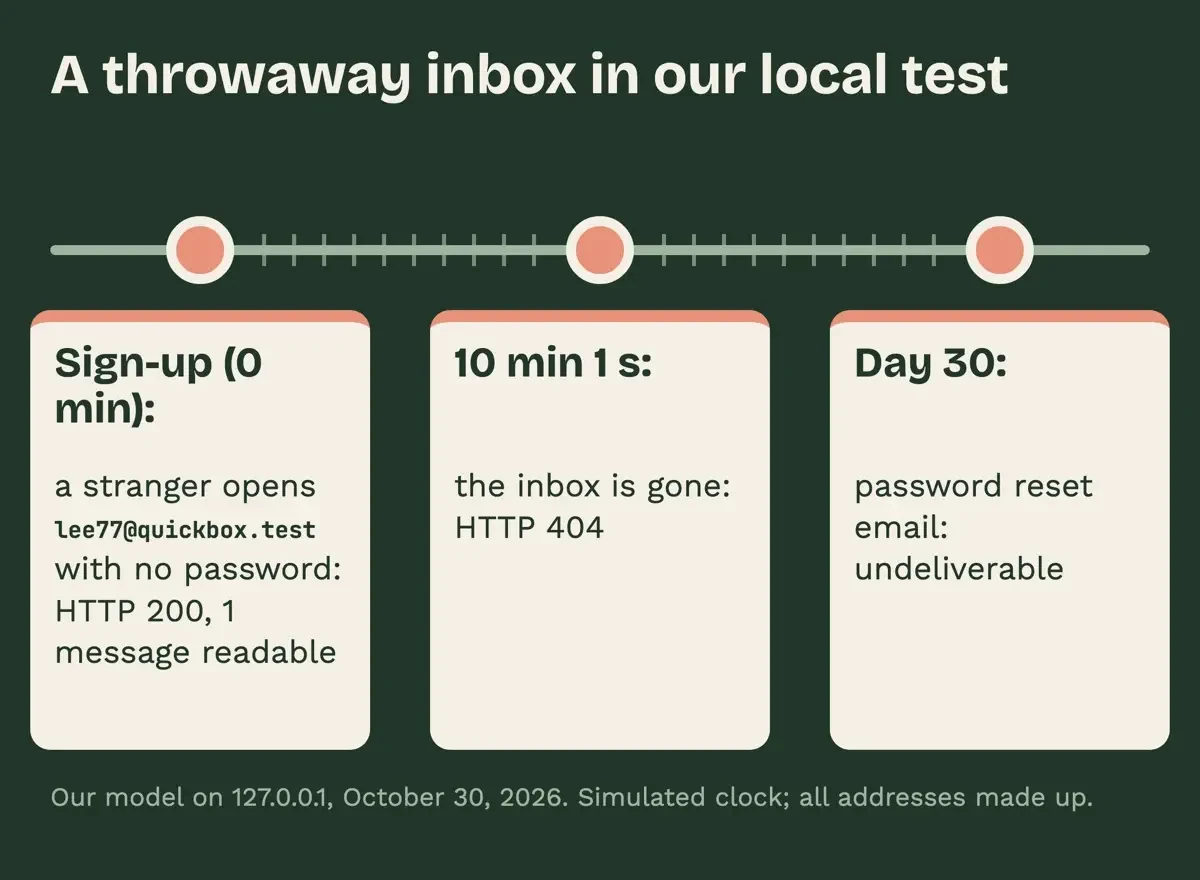 Diagram by DigitalTreed, from our local alias test on 127.0.0.1, October 30, 2026.
Forwarding aliases keep one inbox and many addresses
Those first two problems are what a forwarding alias fixes. Mozilla's FAQ says Relay masks "forward messages to your true email address." Apple's Sign in with Apple page says Hide My Email addresses "automatically forward to your personal email inbox." A reset email sent on day 30 or day 300 still reaches you, and the site you signed up with never sees the real address behind the alias.
The bigger gain is the off switch. Give each site its own alias, and when one starts drawing spam, you can turn that one alias off without touching any of the others or your real inbox. You'll also know which sign-up leaked or sold your address, because only that site had it. In our test, spam sent to a switched-off alias wasn't forwarded. Aliases don't fix blocked domains, though. Mozilla's FAQ says some sites may not accept an address on a subdomain like @subdomain.mozmail.com, so keep your real address ready for those forms. Phone numbers raise similar trade-offs, and our notes on temporary phone numbers for SMS codes cover that side.
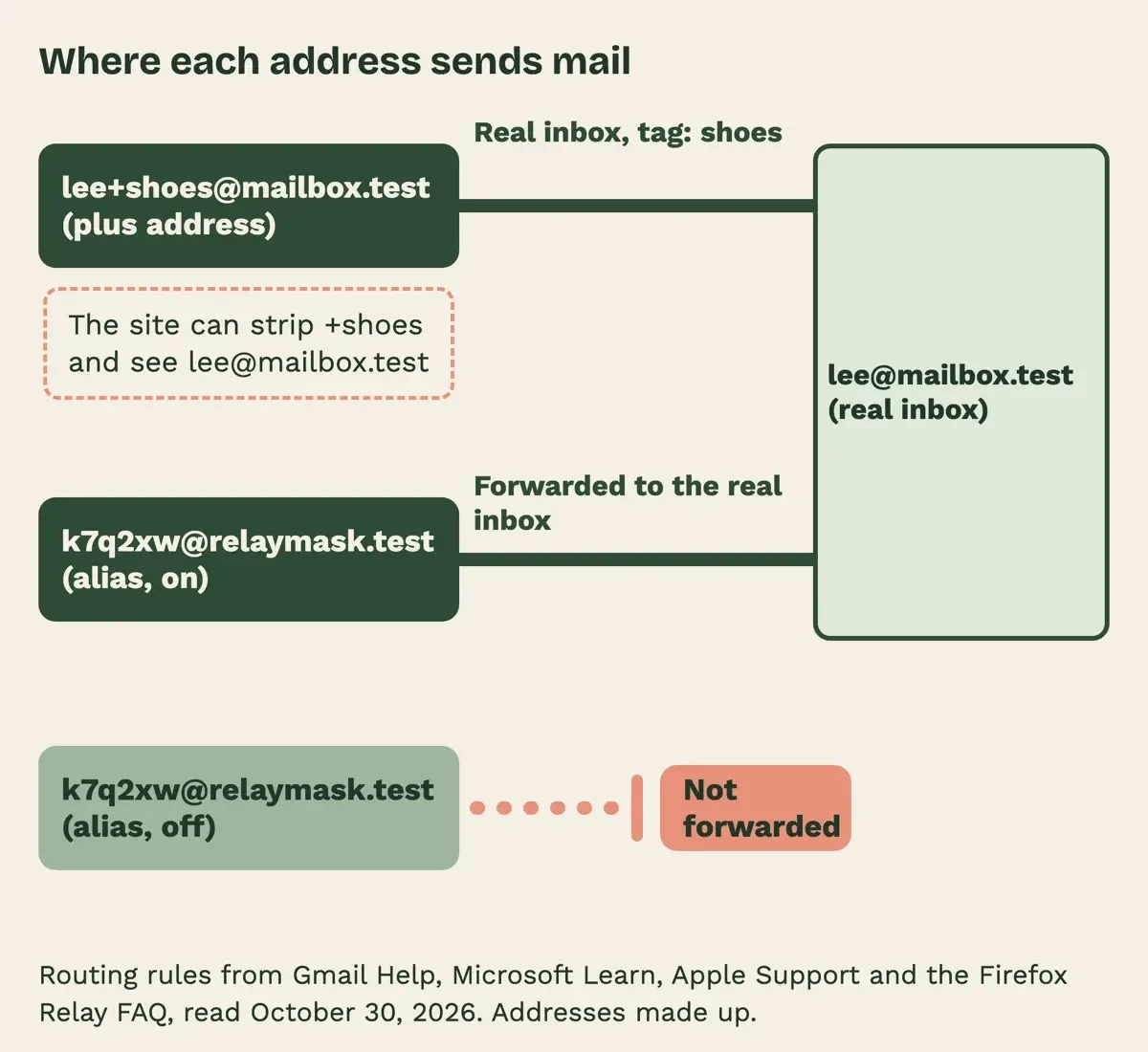 Diagram by DigitalTreed, from Apple, Mozilla, Google and Microsoft help pages and our local test, October 30, 2026.
Apple Hide My Email, part of iCloud+
Once you're on iCloud+, you already have Apple's alias service. Apple's Hide My Email page says it's "a service that's included with an iCloud+ subscription." The cheapest US plan, iCloud+ with 50 GB, costs $0.99 a month, billed monthly, as of October 2026. That's the figure on Apple's iCloud+ plans and pricing page and on its iCloud page, and Apple adds that residents of some US states pay tax on top. You make addresses in Safari when a site asks for an email, from the From field in Mail, or in iCloud settings. Apple's iCloud user guide says it's also "available on iCloud.com from any supported web browser."
Where an address ends depends on how you sign up. Sign in with Apple creates one "ending in @privaterelay.appleid.com," and other sites get one ending in @icloud.com.
To cut off a sender, deactivate that address. Apple says "it stops forwarding emails to you." You can reactivate it later, and you can't delete it until it's deactivated. Apple also says messages are deleted from its relay servers after delivery, "usually within seconds."
The limit is the account itself. You'll need an Apple Account with an iCloud+ plan, so a household that runs on Windows and Android with no Apple devices may find Relay simpler. Relay isn't tied to Firefox. Its FAQ says you can make masks in other browsers or on a phone by logging in to the Relay dashboard.
Firefox Relay: 5 free masks, with limits
Unlike Hide My Email, Mozilla's Relay has a free tier. As of October 2026, Mozilla's Relay page says "Everyone gets 5 email masks for free." The Relay Premium page offers unlimited masks, billed monthly, and lists the US among the countries where Mozilla sells the paid plan. Our checker runs from India and saw a "Join the waitlist" button there with no price, so we've left the Premium price out rather than guess.
Mozilla is frank about where masks don't belong. Its FAQ says, "We don't recommend using masks when you need your identity verified or for very important emails." It names your bank, your doctor and your lawyer as places for your true address. Mail over 10 MB isn't forwarded.
With only five free masks, we'd spend them on the sign-ups most likely to spam you, like loyalty programs and contest entries.
Is a Gmail or Outlook plus address private?
Before paying for either, check the plus address you probably have already. Gmail's alias help shows that mail to [email protected] and similar addresses "will all go to [email protected]." Filters can sort on the tag. Microsoft documents the feature for Outlook in Microsoft 365 work and school mailboxes. There, it's "enabled by default in Exchange Online," per Microsoft Learn. We found no Microsoft page covering personal Outlook.com accounts, so send yourself a test message at a plus address before you rely on one there for sign-ups.
Privacy is the weak spot. Microsoft calls plus addresses "extensions of their actual email address." The email standard RFC 5233 describes the + as the boundary between the "user" part and the "detail" tag. Anyone holding the address, including whoever buys a leaked store list, can delete the tag and mail your real inbox directly. In our test, one line of code turned [email protected] back into [email protected]. So use a plus address for sorting your inbox and tracing leaks, and pick a real alias whenever hiding the address from the site itself matters to you. Microsoft adds that you "cannot send emails from plus addresses," so replies go out from the real one.
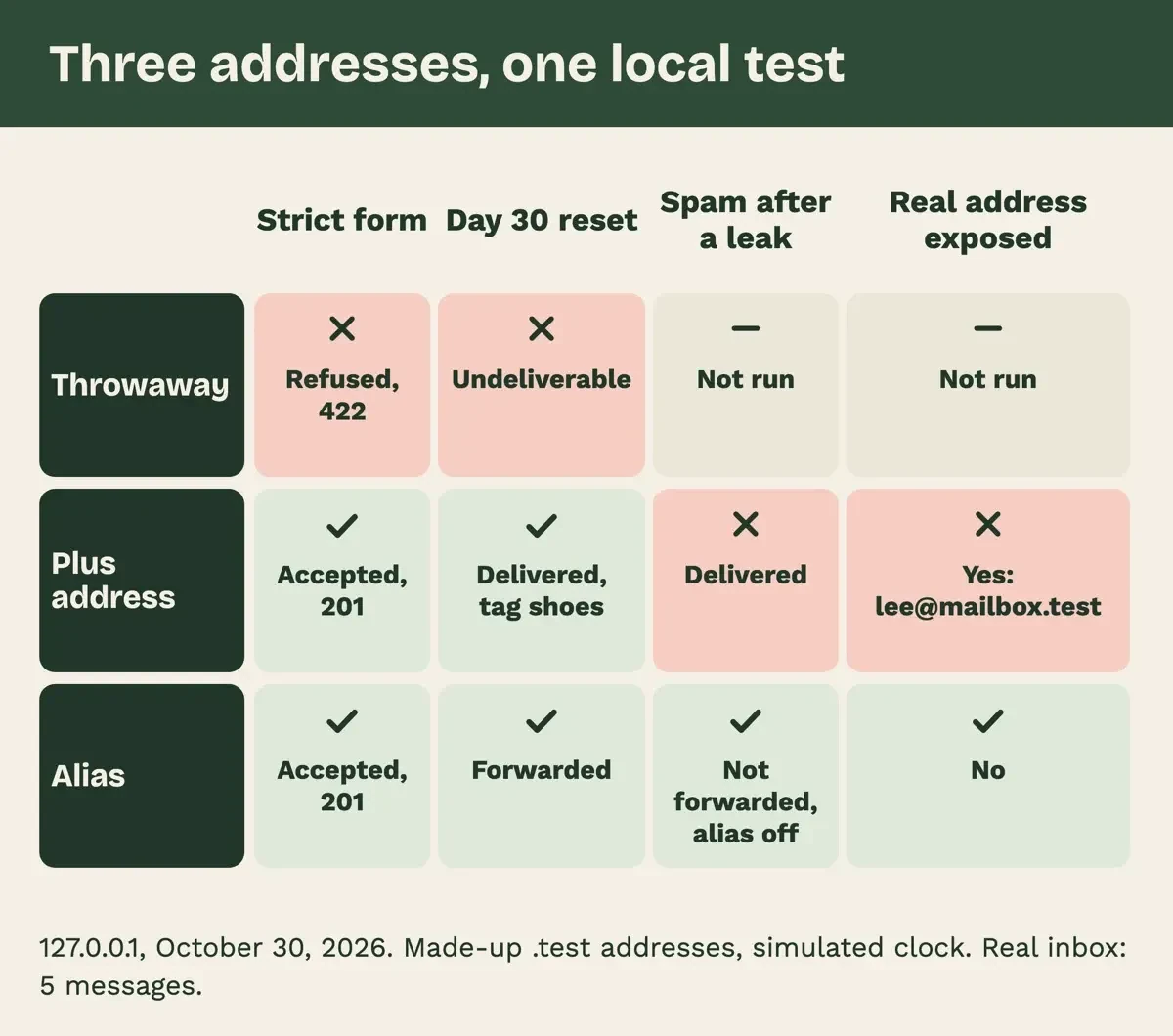 Diagram by DigitalTreed, from test/run-log.txt of our local alias test, October 30, 2026.
What we tested
Then we tested all three on October 30, 2026, with a mock store form and mail router on 127.0.0.1. Our throwaway inbox was made up. It had no password and expired after 10 minutes.
| Made-up address | Strict form | Day 30 reset | Spam after a leak |
| Throwaway | Refused, 422 | Undeliverable | Not run |
| Plus address | Accepted, 201 | Delivered, tag "shoes" | Delivered |
| Alias | Accepted, 201 | Forwarded | Not forwarded, alias off |
The real inbox ended with 5 messages, including one spam message sent to the plus address.
Which address to give which sign-up
Put side by side, the five choices split on four questions, and the first is whether you'd ever need that account back. Each cell comes from the vendor pages above or from our test, and prices are US prices as of October 2026.
| Address | Reset email reaches you later | Hides your real address | How to stop one sender | Cost, as of October 2026 |
| Throwaway inbox (10 Minute Mail type) | No, once it expires | Yes | Abandon the inbox | Not checked; we opened no such site |
| Gmail or Exchange Online plus address | Yes | No, the tag strips off | Filter by tag | Part of the mail account |
| Firefox Relay mask | Yes, under 10 MB | Yes | Turn off or block the mask | Free for 5 masks; Premium price not shown to us |
| Apple Hide My Email | Yes | Yes | Deactivate the address | iCloud+ from $0.99 a month, billed monthly |
| Your real address | Yes | No | Unsubscribe; US senders get 10 business days to stop | Already yours |
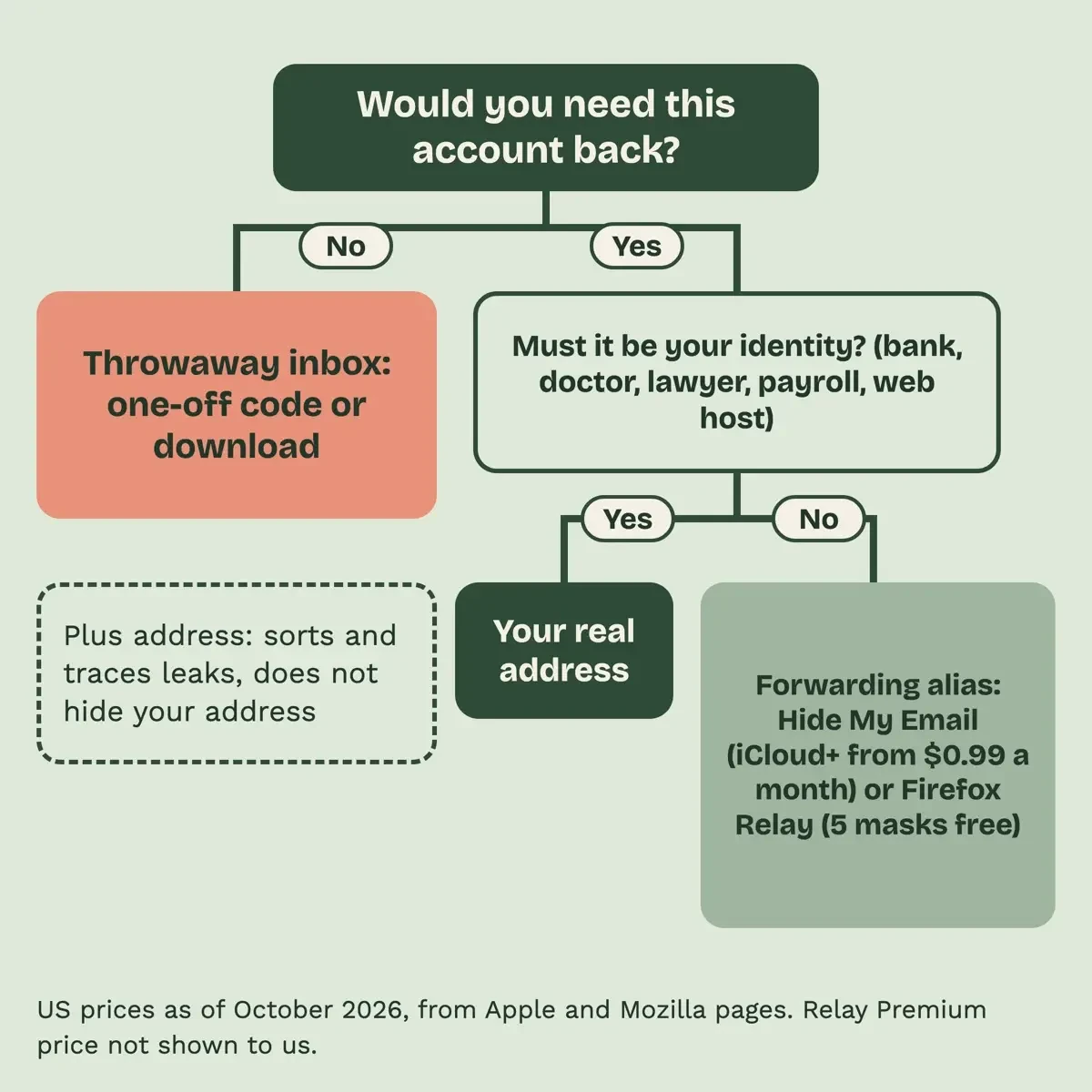 Drawn by us from the five-row address table above, October 30, 2026.
Read the table from the question that matters most: would you need this account back? If not, a throwaway inbox is fine. If yes, give it an alias, and keep your real address for your bank, doctor and lawyer, as Mozilla advises, and for payroll and your website host. A work address belongs on a business email address at your company domain, kept apart from personal sign-ups.
Our take: set up one alias service this week, then retire throwaway inboxes for anything that asks for a password. An alias hides the address but not a weak login, so a store account with a reused password is still exposed. Our free password generator gives each site its own. Fake reset emails can reach an alias too, and our tips to avoid phishing and simple steps to better online security help you spot them.
Is your own store's sign-up form filling with throwaway addresses? The DigitalTreed web development team can add address checks to it. We charge for that work, which is worth knowing before you take the suggestion.
Disposable email questions
Frequently asked
Can I reply from a Hide My Email or Relay address?
Apple says you "can read and respond directly" to that mail; Mozilla limits Relay replies to Premium users, "within 3 months."
Do dots in a Gmail address work like an alias?
No. Google says "you own all dotted versions of your address," so they hide nothing.
What happens to my masks if Mozilla shuts Relay down?
Mozilla says it "will give you advance notice" to change those accounts.
Is Hide My Email free with a free iCloud account?
No. Apple lists it among iCloud+ features "available only to subscribers."
How we made this guide: Every page we quote was saved without signing in, and a script found each quoted phrase in those saved copies. No throwaway inbox site was opened. Facts checked by the DigitalTreed team on October 30, 2026.
First published July 2020 as a description of 10 Minute Mail. Rewritten October 30, 2026: no throwaway site is described or linked; the post covers when one fits and the alias options, with dated US prices.
Sources
- Apple Support: How to use Hide My Email with iCloud+ on your iPhone or iPad
- Apple Support: How to use Hide My Email with Sign in with Apple
- Apple iCloud User Guide: What you can do with iCloud and Hide My Email
- Apple Support: iCloud+ plans and pricing
- Apple: iCloud
- Mozilla: Firefox Relay
- Mozilla: Firefox Relay Premium
- Mozilla: Firefox Relay frequently asked questions
- Gmail Help: Send emails from a different address or alias (Use Gmail aliases)
- Gmail Help: Dots don't matter in Gmail addresses
- Google Account Help: Set up recovery options
- Microsoft Learn: Plus addressing in Exchange Online
- Microsoft Support: Reset a forgotten Microsoft account password
- IETF RFC 5233: Sieve Email Filtering, Subaddress Extension
- Twilio SendGrid Docs: Validate an email (API reference)
- 15 U.S.C. 7704: Other protections for users of commercial electronic mail (govinfo.gov, 2023 edition)
Comments
No comments yet. Start the conversation below.