
Quick answer
Email verification tools check whether each address on your list can receive mail before you send. The 8 we priced cost $0.0076 to $0.0195 per check at their smallest paid packs (as of October 2026), and free tiers run from 10 to 250 checks. They cut bounces. They won't fix spam complaints, which Gmail and Yahoo enforce.
So the real question isn't "which tool is best." It's which one fits the size of your list and how often you'll clean it.
We read every price on the vendor's own pricing page that Friday, October 23, 2026, did the per-check math ourselves, and ran a small test of our own with no account and no real person's address. None of the links in this guide are affiliate links.
Key takeaways
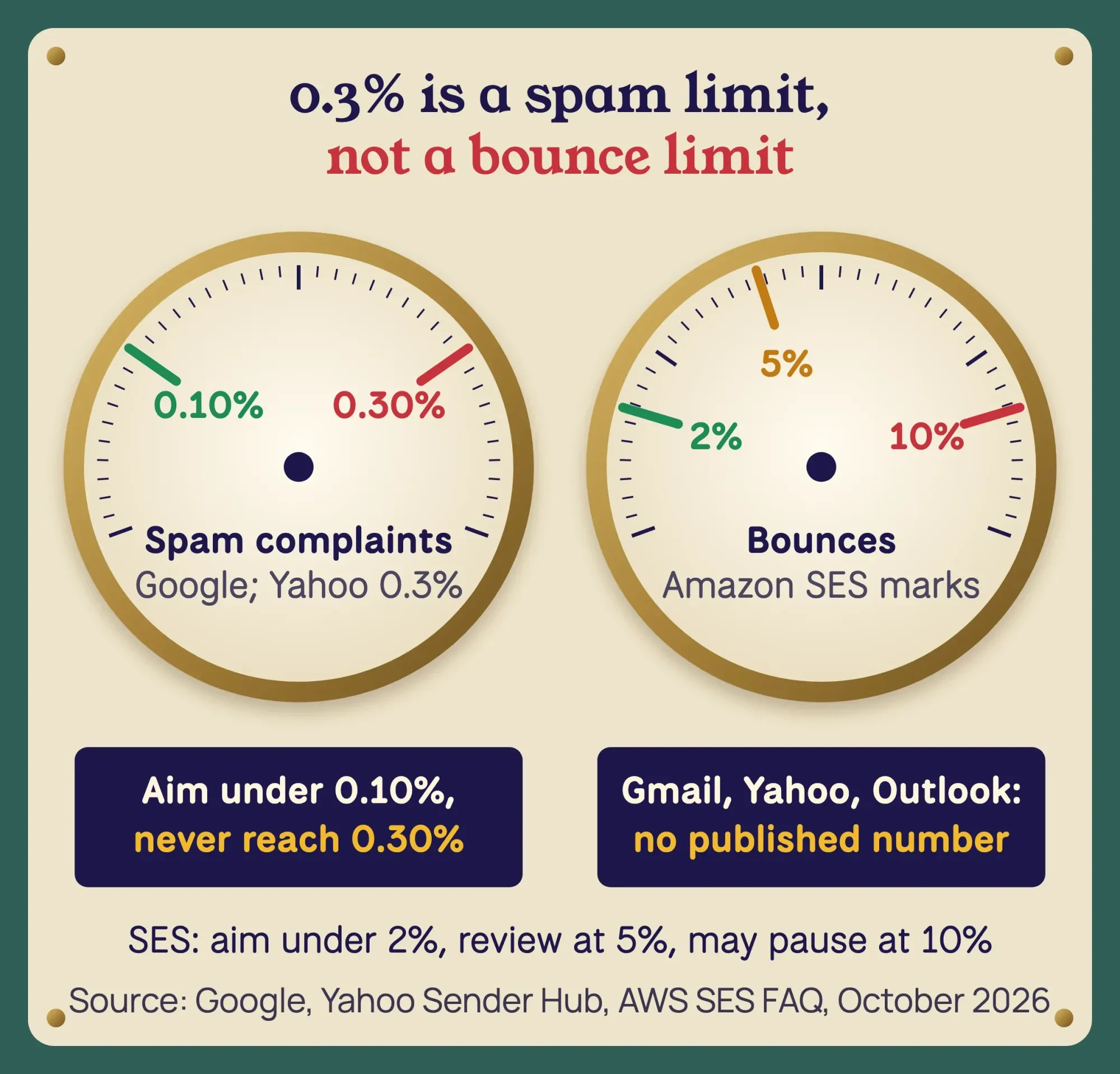
- Gmail and Yahoo limit spam complaints to under 0.3%, not bounces.
- Amazon SES advises keeping your bounce rate below 2%.
- A catch-all server accepts every address, so no tool can prove the mailbox exists.
- NeverBounce pay-as-you-go credits expire 12 months after purchase.
- CAN-SPAM says opt-outs must be honored within 10 business days.
How we tested, and the check we couldn't run
We started with addresses that can't belong to anyone. RFC 2606 reserves example.com, example.org and example.net for documentation, and it sets aside .invalid for names "that are sure to be invalid." So our test list was [email protected], [email protected], [email protected], [email protected] and one typo, [email protected].
That night, at about 11:30 p.m. India time, we ran dig +short MX (dig 9.10.6 on a Mac) on each domain. All 3 example domains answered "0 .", which is a null MX. RFC 7505 says a null MX "will cause all mail delivery attempts to a domain to fail immediately" because the domain doesn't accept email. The .invalid test domain came back NXDOMAIN, the same "this name doesn't exist" answer behind the DNS_PROBE_FINISHED_NXDOMAIN browser error.
The typo domain was the interesting one. gmial.com has no MX record, but it does have an A record pointing to a server. Cloudflare's 1.1.1.1 resolver returned SERVFAIL, and Google's 8.8.8.8 returned an empty answer. Under RFC 5321, a domain with no MX can still take mail at its plain address record, so "no MX" doesn't prove a typo domain is dead.
A one-line Python syntax check caught the double dot in [email protected]. It passed the other 4, which is the point: good syntax says nothing about whether a mailbox exists.
Then we tried a free, no-sign-up web checker. Mailmeteor's Email Checker says it's "completely free for manual use" with no sign-up and no credit card, so we typed in [email protected]. It gave no verdict. The browser console showed its Cloudflare Turnstile bot check had failed with error 600010 in our automated browser.
We stopped there and didn't try to get around it, so we have no checker verdicts to report.
Even that failure told us something.
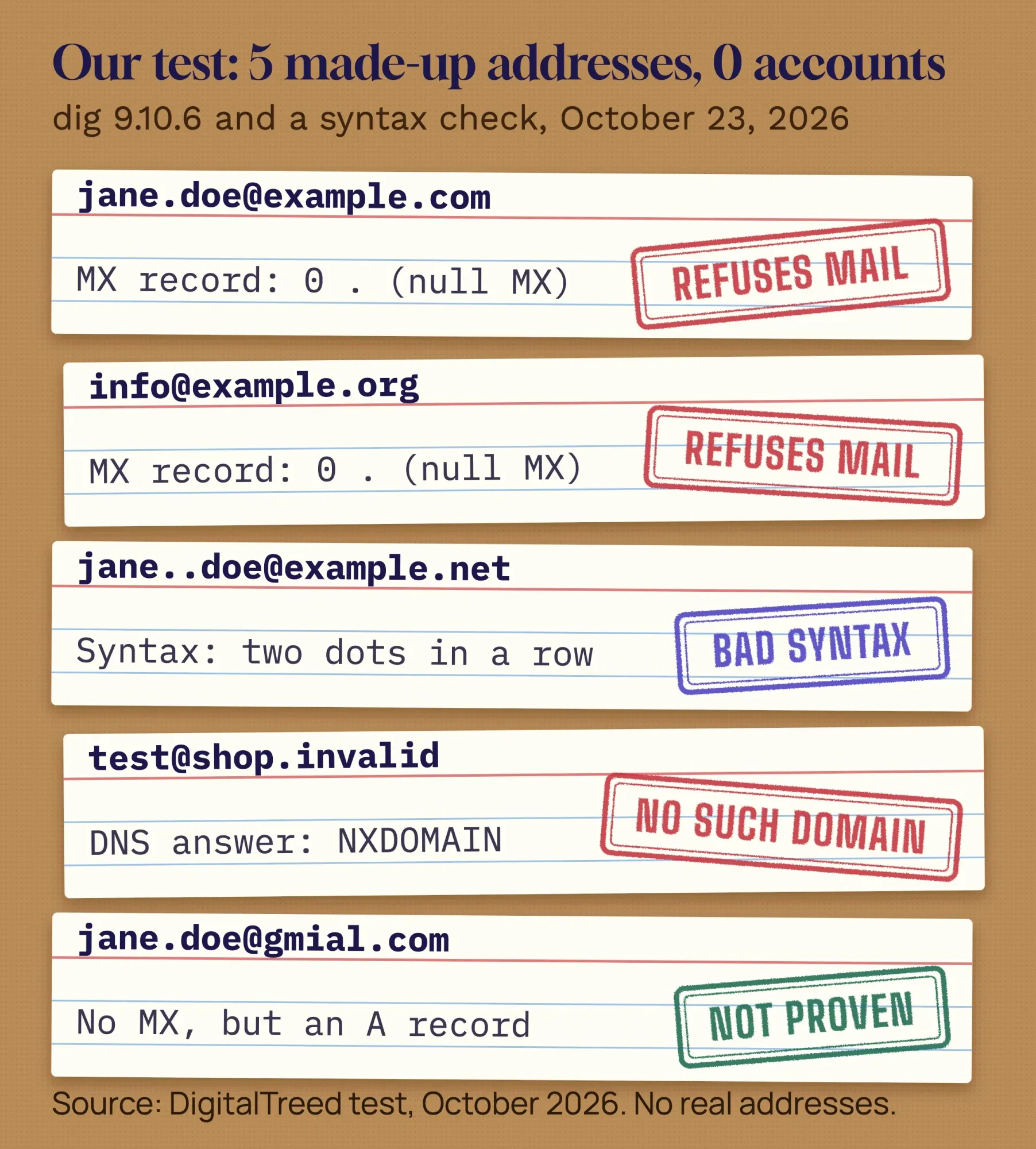 Source: DigitalTreed test with dig 9.10.6 and a Python syntax check, October 2026. Reserved and made-up addresses only.
Mailmeteor's FAQ says it applies "a fair-use policy to prevent automated scraping," and a script driving a browser is what that check is there to stop. We didn't retry by hand, so we can't say how the checker scores these addresses. We also couldn't test any paid tool's accuracy, because that needs accounts and real lists. So the tool sections below report prices, credit rules and who each one suits, not accuracy scores.
Eight verifiers side by side, priced per check
Those limits shaped the table. Prices are the vendors' own, in US dollars, read that same Friday. "Per check" is our math: the smallest paid option divided by the checks it buys.
| Tool | Best for | Free tier | Smallest paid option and price per check (as of October 2026) | Billing basis |
|---|---|---|---|---|
| Emailable | Biggest free sample | 250 credits for new accounts | $38 for 5,000 = $0.0076 | Pay as you go; never expire |
| NeverBounce | Lists kept in a CRM | Free test credits (amount not stated) | $8 for 1,000 = $0.008 | Pay as you go; expire after 12 months |
| Bouncer | One-off cleans | 100 credits | $8 for 1,000 = $0.008 | Pay as you go; never expire |
| Clearout | May move to a plan later | 100 credits | $40 for 5,000 = $0.008 (or $23 a month for 3,000) | One-time or plan; roll over |
| Kickbox | Unknowns refunded | 100 credits | $5 for 500 = $0.01 | One-time packs |
| MailerCheck | Inbox placement tests too | 10 credits | $10 for 1,000 = $0.01 | Never expire |
| Hunter | Sales outreach | 50 credits a month (100 checks) | $49 a month for 4,000 checks = $0.01225 | Monthly; credits reset |
| ZeroBounce | Extras in one account | 100 a month with a business domain | $39 for 2,000 = $0.0195 | One-time credits or $99 a month |
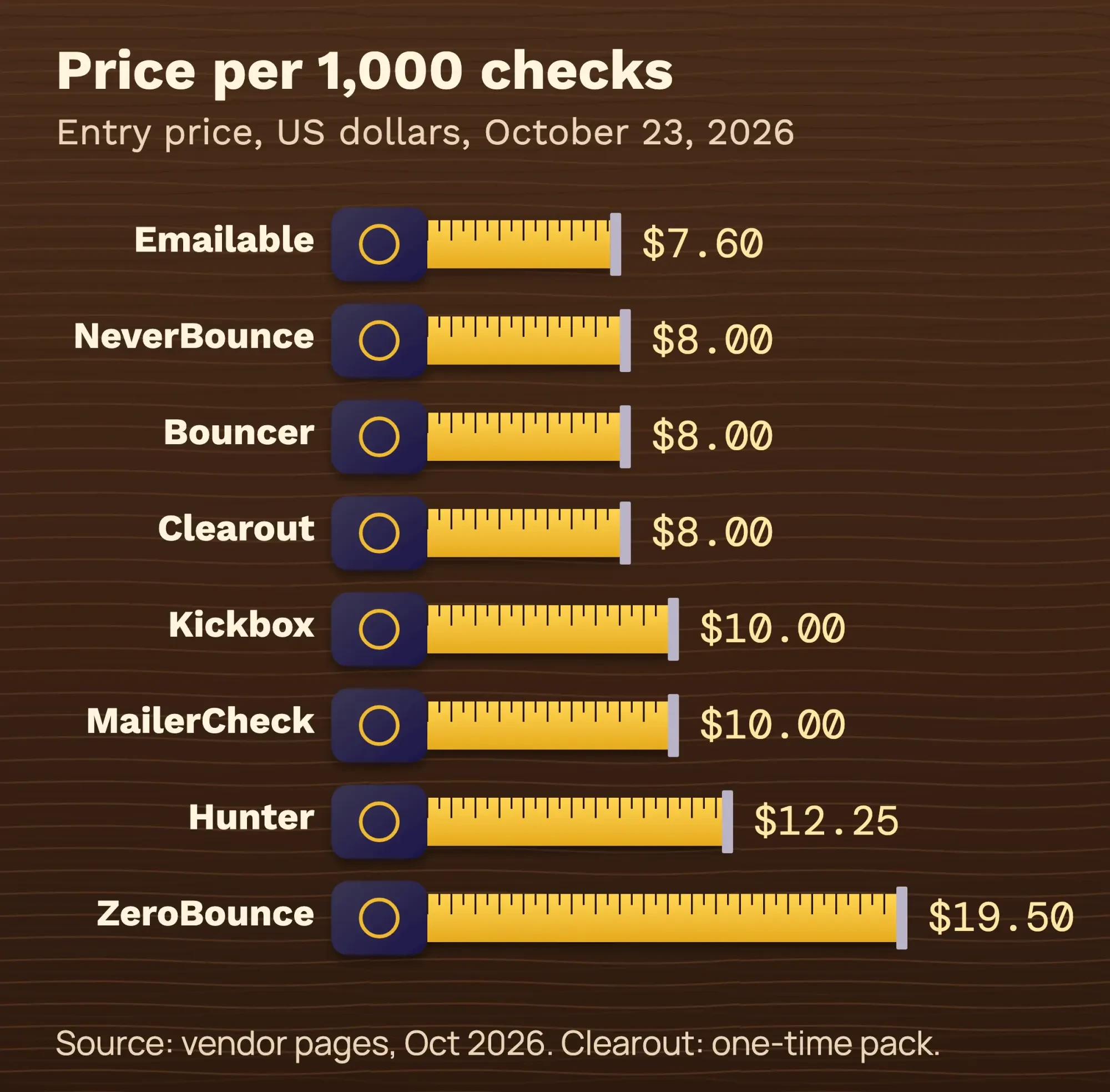 Source: each vendor's pricing page, read October 23, 2026. Our arithmetic. Prices change; promos left out.
Two vendors ran time-limited promos that day: Kickbox showed 30% off credits through 12/1, and Bouncer showed 30% more credits until October 31. We left both out of the math.
Credit rules differ more than prices do.
We also left out 4 tools you'll see on other lists: Verifalia, DeBounce, MillionVerifier and EmailListVerify. We couldn't confirm a small-pack price in US dollars on their own pricing pages that day, and we'd rather show 8 checked prices than 12 guessed ones.
Emailable has the biggest free sample
Emailable starts every new account with 250 credits, the largest free tier in our table. That's enough to check a real slice of your list. Start with your oldest addresses. Its pricing page lists 5,000 credits for $38 pay as you go, or "$0.0076 Cost Per Credit" (as of October 2026), and says credits never expire.
It also refunds duplicates and unknown results, so you don't pay for answers it couldn't give.
Best for: owners who want to try first and buy once.
The catch: the smallest purchase is 5,000 credits.
If your list is 1,200 addresses, you'll pay for 3,800 checks you won't use this year. They don't expire, though, so they'll cover next year's clean.
NeverBounce fits lists that live in a CRM
That never-expire rule is where NeverBounce differs. Its pay-as-you-go credits cost $8 for 1,000, or $0.008 each as of October 2026, but they "expire 12 months after purchase."
So buy only what you'll use this year.
NeverBounce's other plan is the reason to pick it. Its Growth plan costs $49 a month as of October 2026 (the page says "Up to 10,000") and syncs with your CRM, so new addresses get checked without a manual upload.
Best for: a business whose contacts sit in a CRM and keep changing.
The catch: credits that expire, and a free tier with no stated number. The page promises "free test credits" and no credit card for your first list, but doesn't say how many.
Bouncer is the low-commitment pick for one clean
If you clean once a year, credits that last matter more than a monthly plan. Bouncer sells 1,000 checks for $8 and says "Email verification credits never expire" (as of October 2026). New accounts get 100 free credits to start.
The price drops a lot with volume: Bouncer quotes $2 per 1,000 when you buy 1 million credits and $400 for 100,000 (as of October 2026), though few small businesses will ever need that many.
Best for: one clean before a big send, with leftovers kept for later.
The catch: the minimum purchase is 1,000 credits, and the banner offers change.
On test day it advertised 30% more credits until October 31, so the deal you see may differ from ours.
Kickbox refunds the answers it can't give
Some addresses come back "unknown" because the receiving server won't say. Kickbox refunds the credit when that happens, and it gives 100 free checks to start. Packs start at $5 for 500, and $10 buys 1,000 or $70 buys 10,000, which is $0.01 or $0.007 a check as of October 2026.
Best for: lists heavy on company domains, where you expect a lot of unknowns.
The catch: at 1,000 checks it's one of the pricier small packs here.
The 30% sale on the page runs through 12/1, so don't budget on it.
Clearout keeps your credits if you move to a plan
Kickbox sells packs; Clearout lets you buy once or subscribe. Its page says "unused credits roll over and never expire" and lists a start of $40 for 5,000 credits, or $0.008 a check as of October 2026, plus 100 free credits on a new account.
Best for: a team that cleans now and may want monthly checks later without losing what it bought.
The catch: like Emailable, the smallest one-time pack is 5,000, so small lists pay for spare credits. The Starter plan, $23 a month for 3,000 credits as of October 2026, is the smaller way in.
ZeroBounce costs the most per check here
ZeroBounce sits at the top of our price range. Its pay-as-you-go pricing "starts at $39 USD for validating 2,000 email addresses," which works out to $0.0195 a check as of October 2026.
Unknown results are free, at least.
The free tier comes with a condition: 100 free monthly validations "when you sign up with a business/premium domain." A free webmail sign-up won't qualify. If you don't have one yet, here's how to set up an email account on your own domain.
What the extra money buys is the rest of the account: scoring, an email finder and other deliverability tools in one place. Subscriptions start at $99 a month with a 10,000-credit minimum (as of October 2026).
Best for: marketers who want verification plus extras under one login.
The catch: price, and credit rules that depend on your plan. Credits never expire only "while you have an active ZeroBounce One subscription."
Hunter is a sales tool that also verifies
Hunter isn't built around list cleaning, and its pricing shows it. On its pricing page, one check costs "0.5 credit," and the free plan gives 50 credits a month, so 100 checks. Starter is $49 a month billed monthly for 2,000 credits, or 4,000 checks (as of October 2026).
Those credits are shared with Email Finder and Domain Search, and they "reset monthly and don't roll over."
Failed checks come back as Unknown and cost nothing.
Best for: salespeople who find a contact and check it in the same place.
The catch: a monthly plan for a yearly job. If you only clean a newsletter list, a pack makes more sense.
MailerCheck adds inbox placement tests to list cleaning
The smallest free tier in our table belongs to MailerCheck: "all new accounts get 10 free credits." Paid credits cost $10 for 1,000, or $0.01 each as of October 2026, with a 1,000-credit minimum, and they never expire.
Beyond list cleaning, it sells inbox placement tests, which show whether a test message lands in the inbox or in spam. Those cost extra credits: 200 per test on its pricing page. It also connects to email platforms including MailerLite, Mailchimp and ActiveCampaign.
Best for: senders who want to clean a list and test where their mail lands, in one account.
The catch: 10 free checks won't tell you much about your list, and placement tests eat credits fast.
What a verifier checks before it says valid
All 8 tools run roughly the same checks in the same order.
The differences are in how they score the gray areas.
- Syntax: is the address written correctly? Our double-dot test failed here.
- Domain: does the name exist in DNS? shop.invalid failed here.
- Mail server: does the domain publish an MX record, or a null MX that refuses all mail?
- Mailbox: the tool starts an SMTP conversation and asks the server whether the mailbox exists, without sending a message.
- Flags: disposable, role address (info@, sales@), free webmail, catch-all, or a known spam trap.
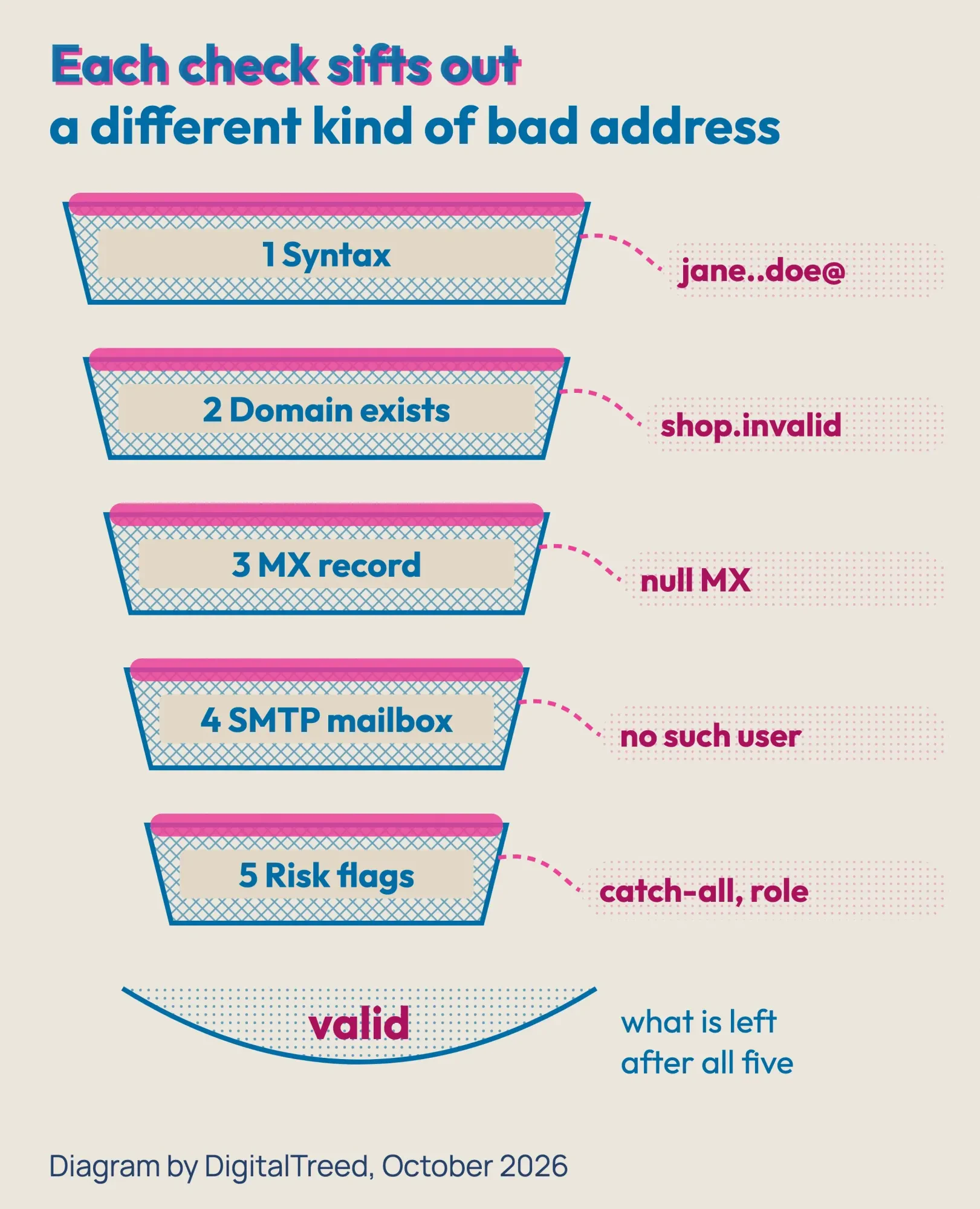 Diagram by DigitalTreed. Check order based on RFC 5321, RFC 7505 and the vendors' own descriptions.
Results land in a few buckets: valid, invalid, catch-all (or accept-all), unknown and risky. Disposable addresses are the throwaway inboxes people use to skip a signup; we explain those in our guide to temporary email addresses.
Catch-all is the one that confuses people.
A catch-all server says yes to every address at the SMTP step, so no tool can prove a single mailbox is real. Don't delete those addresses out of hand; many belong to real customers at small companies. Send to them in smaller batches and watch what bounces.
Gmail and Yahoo limit spam complaints, not bounces
That watching matters, but one number on vendor pages is wrong. Mailmeteor's checker page, for one, says a bounce rate above 0.3% can hurt your reputation under the 2024 Gmail and Yahoo bulk-sender guidelines.
They say no such thing.
Google's email sender guidelines say: "Keep spam rates reported in Postmaster Tools below 0.3%." Yahoo's Sender Hub says the same thing: "Keep your spam rate below 0.3%".
Spam rate is people pressing "report spam." Bounces are a different number: a hard bounce means the address doesn't exist, and a soft bounce is a temporary problem, like a full inbox. Google's spam-rate advice goes further: "Keep spam rates reported in Postmaster Tools below 0.10% and avoid ever reaching a spam rate of 0.30% or higher."
None of the 3 big inbox providers publishes a bounce-rate limit. Google tells you to "Automatically unsubscribe recipients who have multiple bounced messages." Yahoo says "Remove invalid recipients from your list promptly." Microsoft's Outlook requirements post says to remove inactive or invalid addresses regularly, "monthly or quarterly."
Yahoo's best practices also say to "Monitor hard and soft bounces as well as inactive recipients." Take a hard bounce off the list right away. A soft bounce can clear up, so drop that address only if it keeps bouncing.
 Source: Google Email sender guidelines, Yahoo Sender Hub and AWS SES enforcement FAQ, October 2026.
The clearest bounce numbers we found come from one sending service, not an inbox. Amazon SES advises staying "below 2%," puts accounts under review at 5% and says it might pause sending at 10%. If you send through one of the bulk email providers instead, it may use different numbers, so check its own help pages.
There are a few more rules worth knowing. Google treats anyone who sends "close to 5,000 messages or more to personal Gmail accounts within a 24-hour period" as a bulk sender, permanently. Yahoo asks bulk senders to "Honor unsubscribes within 2 days", and its FAQ says it won't specify a volume threshold.
For US law, the FTC's CAN-SPAM guide says the act "covers all commercial messages," that opt-outs must be honored "within 10 business days," and that each violating email can cost "up to $53,088" as of October 2026. It also lists "harvesting email addresses or generating them through a dictionary attack" among the acts that can bring criminal penalties. Guessing addresses and running them through a verifier to build a list comes close to that, so don't.
This is a plain summary for planning, not legal advice; a lawyer can tell you how CAN-SPAM applies to your own mailings. For SPF, DKIM, DMARC, one-click unsubscribe and the rest of the sender rules, read our email marketing strategy guide. To see whether your domain already publishes those records, run it through our website audit tool, which checks email records along with SEO and speed.
Is a free email verifier enough?
For a single address, usually yes. For a list, no.
Free single-address checkers such as Mailmeteor's are built for one person typing one address, and they guard against scripts. Free tiers on accounts run from 10 credits at MailerCheck to 250 at Emailable, and Hunter's 50 monthly credits cover 100 checks (all as of October 2026). Past that, the lowest price per check we found is Emailable's $38 for 5,000.
You can also check a domain yourself for free. Run dig or nslookup for its MX record: no record, or a "0 ." null MX, means mail to that domain won't arrive. It can't tell you whether jane.doe exists, and only an SMTP check can try that.
Frequently asked
How many soft bounces before you should remove an address?
There's no single rule, but email platforms set their own limits. Mailchimp turns an address into a hard bounce after 7 soft bounces with no subscriber activity, or up to 15 for active contacts, as of October 2026. That's on its soft vs. hard bounces help page.
What does a 550 error in a bounce message mean?
It usually means the mailbox doesn't exist. The SMTP standard says a server returns a 550 reply when the recipient is known not to be deliverable, often with text like "no such user" (RFC 5321). Treat it as a hard bounce and remove the address.
How do I check my spam rate with Gmail?
Use Google Postmaster Tools, which shows spam rate, reputation and delivery errors for your sending domain. You add the domain you use for SPF or DKIM, then verify it with a DNS record. Its data covers only mail sent to personal Gmail accounts, per Google's Postmaster Tools setup page.
How to choose a verifier and clean your list
So match the tool to the job. A list you clean once a year wants credits that never expire (Emailable, Bouncer, Clearout, MailerCheck), while a CRM that keeps changing wants an automatic re-check like NeverBounce's Growth plan. Prospecting? Hunter.
Our take: for most small businesses with a few thousand addresses, a never-expire pack beats any subscription. Pick by your list size and the smallest pack, not by an accuracy claim you can't check.
Example: a climbing gym in Burlington, Vermont, has 3,000 old member addresses and wants to send a reopening email. At October 23, 2026 list prices, Bouncer or NeverBounce would cost about $24 ($8 per 1,000). Kickbox would be $30 in three 1,000 packs, and MailerCheck $30 too. Emailable would be $38 for its smallest 5,000 pack, leaving 2,000 credits for later. Hunter Starter would be $49 for one month, which covers up to 4,000 checks if every credit goes to verification (Hunter pricing).
Here's the order we'd clean it in:
- Export the list as a CSV and remove duplicates. Duplicates that differ only in case or spaces count too; our guide to comparing strings in Python shows the two-line fix.
- Upload it to the verifier and wait for the report.
- Delete invalid addresses. Keep valid ones.
- Set catch-all and unknown aside for a small, careful send.
- Remove role and disposable addresses unless they asked to hear from you.
- Import the clean list, send, and check bounces and spam reports after the first campaign.
After that, verify new signups as they come in and confirm them by email. Google says to "Confirm each recipient's email address before subscribing them," and Yahoo recommends double opt-in; our guide to building an email list legally shows how to set it up. If you're emailing new blog posts, our plan for promoting a business blog by email and social covers the send itself, and these campaign tips help with the next one.
Want us to clean the list and fix the sending setup for you? Ask us for a quote with your list size. (We sell this work, so weigh our advice with that in mind.)
How we made this guide: our team rechecked every price, free tier and quote against the vendor's or provider's own page, dated October 23, 2026. The test is ours: dig 9.10.6 and a one-line Python syntax check on reserved and made-up addresses, run from India that night, plus one try of a free web checker that stopped at its bot check. We used no accounts. You'll find the link for every price and quote in the sentence that uses it.
First published July 2020. Rewritten October 23, 2026: dated prices per check for 8 tools, our own DNS test and the spam-rate correction. We also added the inbox and CAN-SPAM rules in short and cut the old tester notes.
Sources
- Google: Email sender guidelines
- Google: Email sender guidelines FAQ
- Yahoo Sender Hub: Sender best practices
- Yahoo Sender Hub: FAQs
- Microsoft Tech Community: Outlook's new requirements for high-volume senders
- FTC: CAN-SPAM Act, a compliance guide for business
- Amazon SES: Enforcement FAQs
- RFC 2606: Reserved Top Level DNS Names
- RFC 7505: A "Null MX" No Service Resource Record
- RFC 5321: Simple Mail Transfer Protocol, section 5.1
- Cloudflare: Turnstile client-side error codes
- Emailable pricing (vendor)
- NeverBounce pricing (vendor)
- Bouncer pricing (vendor)
- Clearout pricing (vendor)
- Kickbox pricing (vendor)
- MailerCheck pricing (vendor)
- Hunter pricing (vendor)
- ZeroBounce pricing (vendor)
- Mailmeteor Email Checker (vendor)
Comments
No comments yet. Start the conversation below.