
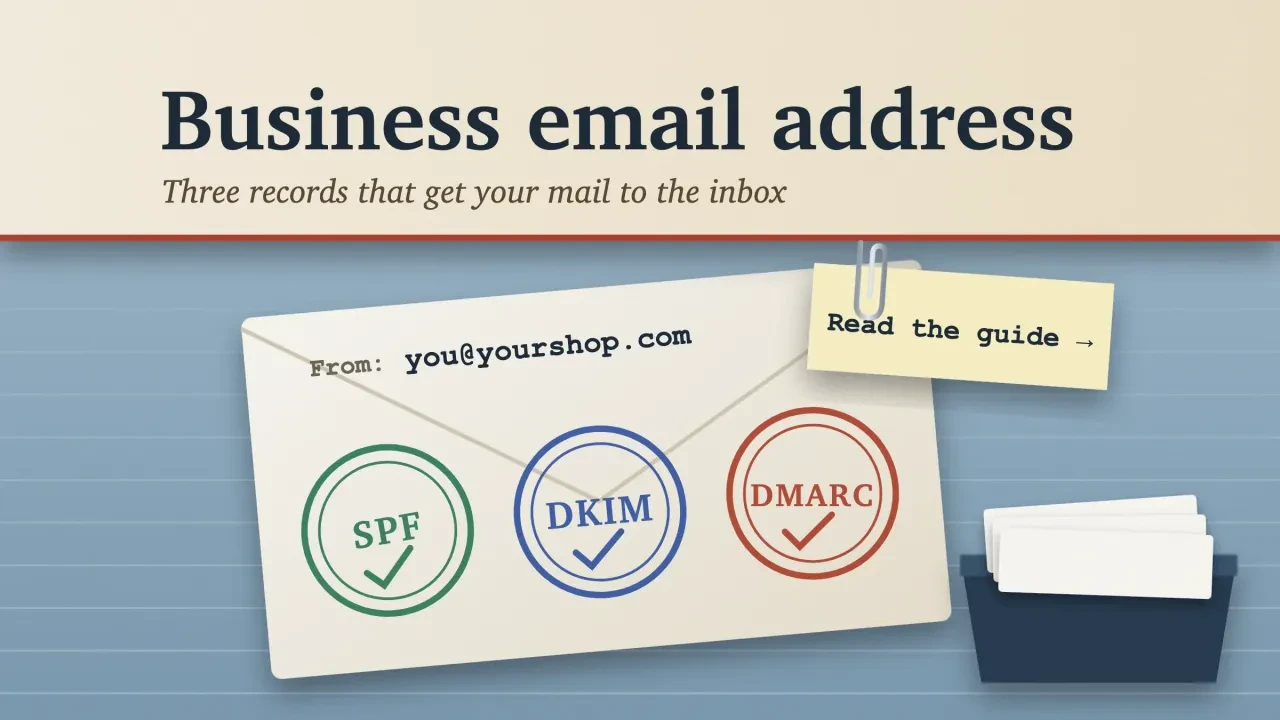
Quick answer
To create a business email, you need a domain you own and a mailbox host. Google Workspace and Microsoft 365 both charge $7 per user per month on a yearly plan, as of October 2026. The signup is the easy part. The four DNS records behind it decide whether your mail reaches inboxes or spam.
This page used to walk you through free Gmail, Yahoo and Outlook.com sign-ups.
That isn't what a business needs, so we've replaced all of it.
What's here now: real prices with their billing terms, the setup order, the record values Google and Microsoft publish, and a lookup we ran on our own domain.
A business address is a mailbox on a domain you own
A business email address has two parts. The part before the @ is a name you pick, like jane or info. The part after it is your domain, which you rent each year from a registrar. Our guide to making a WordPress website covers buying one.
The mailbox itself lives with a host such as Google or Microsoft.
One small DNS record, the MX record, tells the rest of the internet which host takes your mail. Swap hosts later and the address stays the same, because the domain is yours.
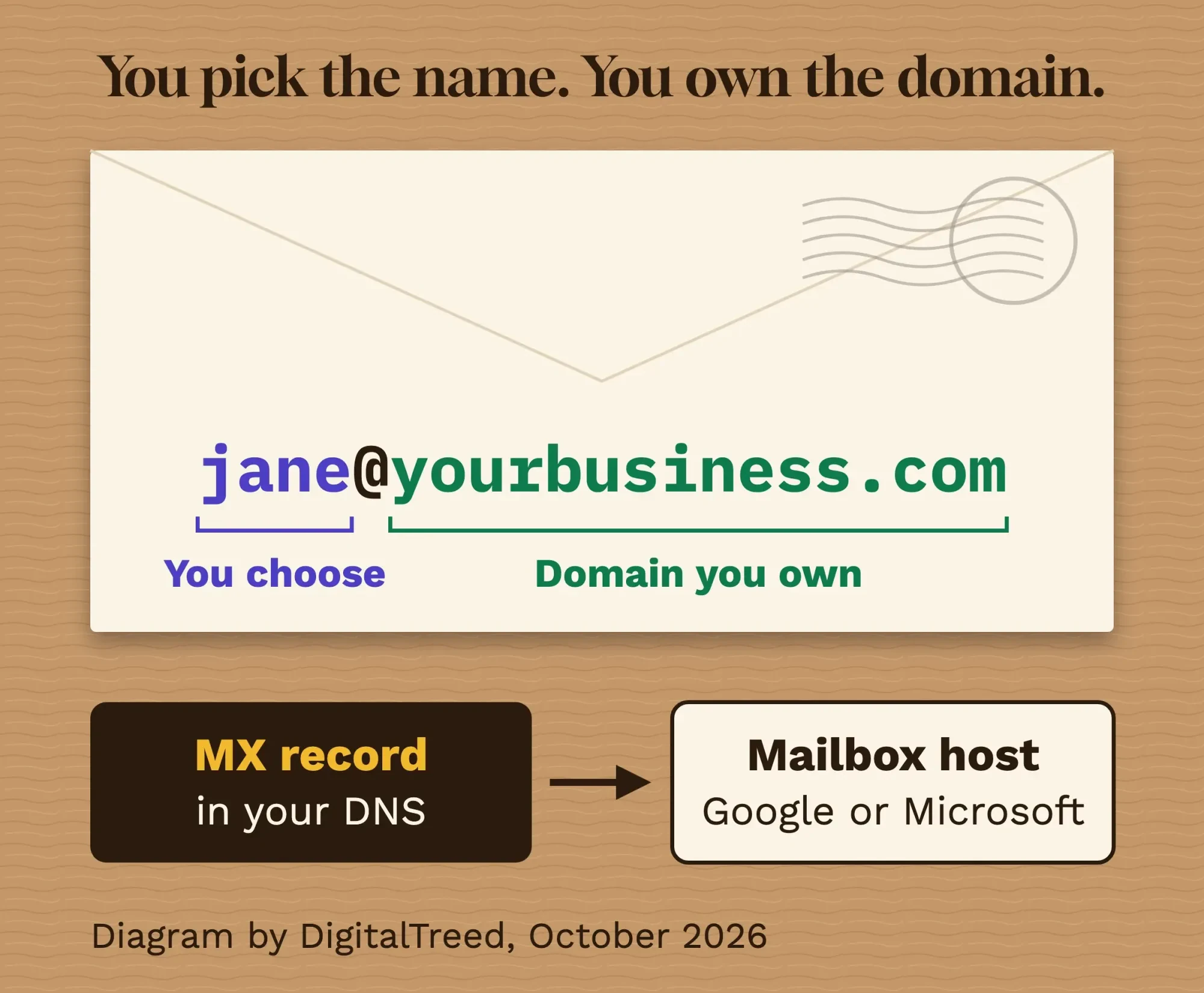 Diagram by DigitalTreed, based on Google Workspace and Microsoft 365 setup docs, October 2026.
So why not keep a free @gmail.com address?
Partly it's trust.
Anyone can open a free account with your business name in it, and that's one trick behind business email compromise. The FBI’s IC3 2025 report counts 24,768 complaints of it in 2025, with reported losses of about $3.05 billion.
The other reason is control. On a business account, you own every mailbox, so when someone leaves you suspend their account and keep the mail.
With a personal Gmail, the account belongs to them.
Buy the domain first. Register it in the business's name, with auto-renew on, because a domain that lapses takes your email with it. Still choosing one? Here's what to check before you lock in a domain name.
Can you do this for free? Only partly.
Zoho's Forever Free plan hosts mail for one domain and up to 5 users with 5 GB each, in select data centers. It leaves out IMAP and POP, so you're mostly tied to Zoho's own apps.
Free forwarding is the other route, and Cloudflare's pricing page lists inbound Email Routing as unlimited on its Workers Free plan. That only passes mail on to an inbox you already have. It isn't a mailbox, and replying from your domain needs a separate sending setup.
Pick a provider: $7 a user is the going rate
That free route suits a side project. For a business with staff, the choice is mostly between the two big suites, and both start at the same yearly price.
| Plan (per user per month, USD) | Yearly plan | Month to month | Mail storage | Catch |
|---|---|---|---|---|
| Google Workspace Business Starter | $7 | $8.40 (Flexible Plan) | 30 GB pooled per user | Yearly plan can't be cut mid-term |
| Microsoft 365 Business Basic | $7.00 | $8.40 | 100 GB mailbox | Yearly plan auto-renews |
| Microsoft Exchange Online (Plan 1) | $4.00 | Not listed | 50 GB mailbox | Email only, no Office apps |
| Zoho Mail Lite | $1 (5 GB) or $1.25 (10 GB) | No monthly plan | 5 GB or 10 GB | Billed yearly only |
| Zoho Forever Free | $0 | $0 | 5 GB | Up to 5 users, no IMAP or POP |
Prices are as of October 2026, before tax, from Google Workspace pricing, Google's Flexible Plan rates, Microsoft's Business Basic page, the Exchange Online plans and Zoho Mail pricing. We left out first-month promotions.
Paying month to month costs 20% more at both Google and Microsoft, as of October 2026: $8.40 instead of $7.
The yearly plan has a catch, though.
Google's billing comparison says on the annual plan "You can reduce licenses only when renewing" your contract. Cancel early and you're "charged for the remaining balance" with no refund, while the Flexible Plan can be cancelled "at any time without penalty" instead.
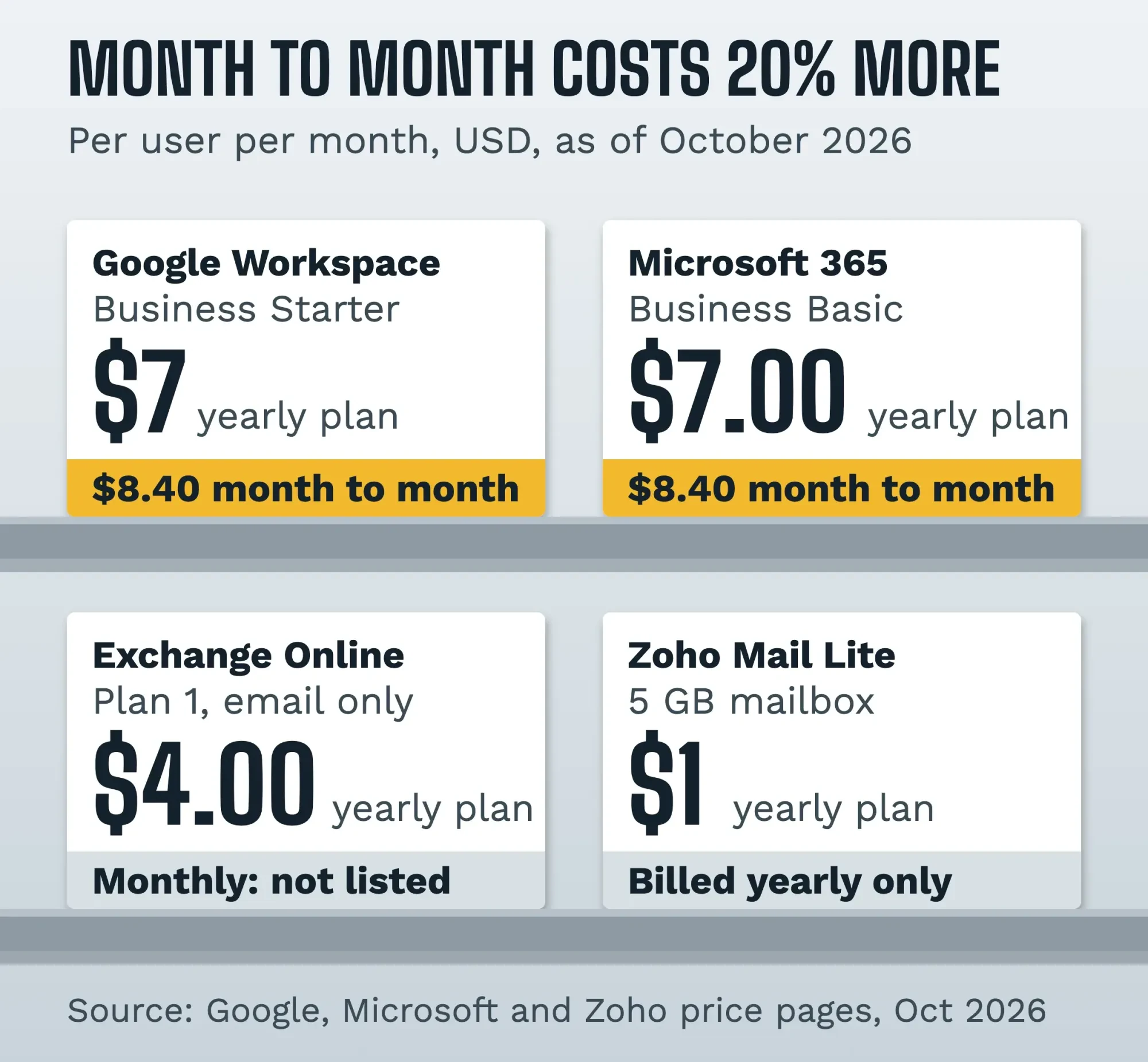 Source: Google Workspace, Microsoft and Zoho pricing pages, October 2026. Per user per month, USD, before tax.
Our take: pick the suite your team already knows.
If you live in Word and Excel, Microsoft 365 Business Basic is the natural fit. If everyone already uses Google Docs, take Workspace. The DNS work is about the same for both.
Need mail and nothing else? Exchange Online Plan 1 is the cheaper Microsoft option.
Example: Stonebridge Tile is a made-up 3-person tile installer in Fort Collins, Colorado. The owner and two installers go on Workspace Business Starter, paid yearly at the October 2026 price: 3 x $7 = $21 a month, or $252 a year, plus the domain. On the Flexible Plan, it'd be 3 x $8.40 = $25.20 a month, or $302.40 a year. They add info@ and billing@ as free aliases on the owner's account instead of paying for two more users.
Set it up in this order
Once you've picked a host, most of the setup is copying values from its admin screen into your domain's DNS settings. New to DNS? Our article on the DNS_PROBE_FINISHED_NXDOMAIN error explains how a domain name finds its server.
The order matters more than you'd expect:
- Start the trial and verify you own the domain with the TXT record your host gives you.
- Create every user's mailbox before you touch the MX record.
- Replace your old MX records with the new host's value, then wait.
- Add one SPF record listing every service that sends mail as you.
- Turn on DKIM in the admin console, publish the key it gives you, then start authentication.
- Wait 48 hours, then add a DMARC record set to p=none.
- Turn on MFA for every mailbox.
- Send test messages and check the results.
- Add aliases and signatures, then move old mail across.
Step 2 is the one that bites.
Microsoft's DNS setup guide says to "add users before updating an MX record," because once MX changes, "all new email for anyone who uses your domain" goes to the new host. Your old messages don't move by themselves either; they stay with the previous host unless you migrate them.
The four DNS records, in the providers' own words
Steps 3 to 6 name four records: MX, SPF, DKIM and DMARC.
MX says where your mail goes. Google's MX setup page gives one value for every Workspace domain, smtp.google.com with priority 1, and warns that new MX records can take up to 72 hours to be recognized.
Type: MX Host: @ Value: smtp.google.com Priority: 1Microsoft's MX value is different for each customer. Copy it from your admin center, not from a blog post.
SPF lists the servers allowed to send as you. Google's SPF page gives the line below for Workspace, and Microsoft's SPF guide uses include:spf.protection.outlook.com instead.
v=spf1 include:_spf.google.com ~allOne rule here doesn't bend.
Microsoft says "only one SPF record is allowed per domain or subdomain" in its guide. If a newsletter tool or invoicing app also sends as you, add its include to that same line.
DKIM signs each message so receivers can tell it wasn't changed. You generate the key in the Google Admin console; Google's DKIM page says to pick 2048 bits if your DNS provider supports it and uses the selector "google", so the record lives at google._domainkey.
Microsoft uses two CNAME records instead.
DMARC ties the other two together. dmarc.org says it builds on DKIM and SPF, with the goal to "Reduce successful phishing delivery" for your domain.
Google's DMARC page says to wait 48 hours after SPF and DKIM, then start with the policy at none:
Type: TXT Host: _dmarc Value: v=DMARC1; p=none; rua=mailto:[email protected]Once the reports look clean for at least a week, Google's DMARC rollout guide says to move to p=quarantine for a small share of mail and raise it over time. p=reject can come later.
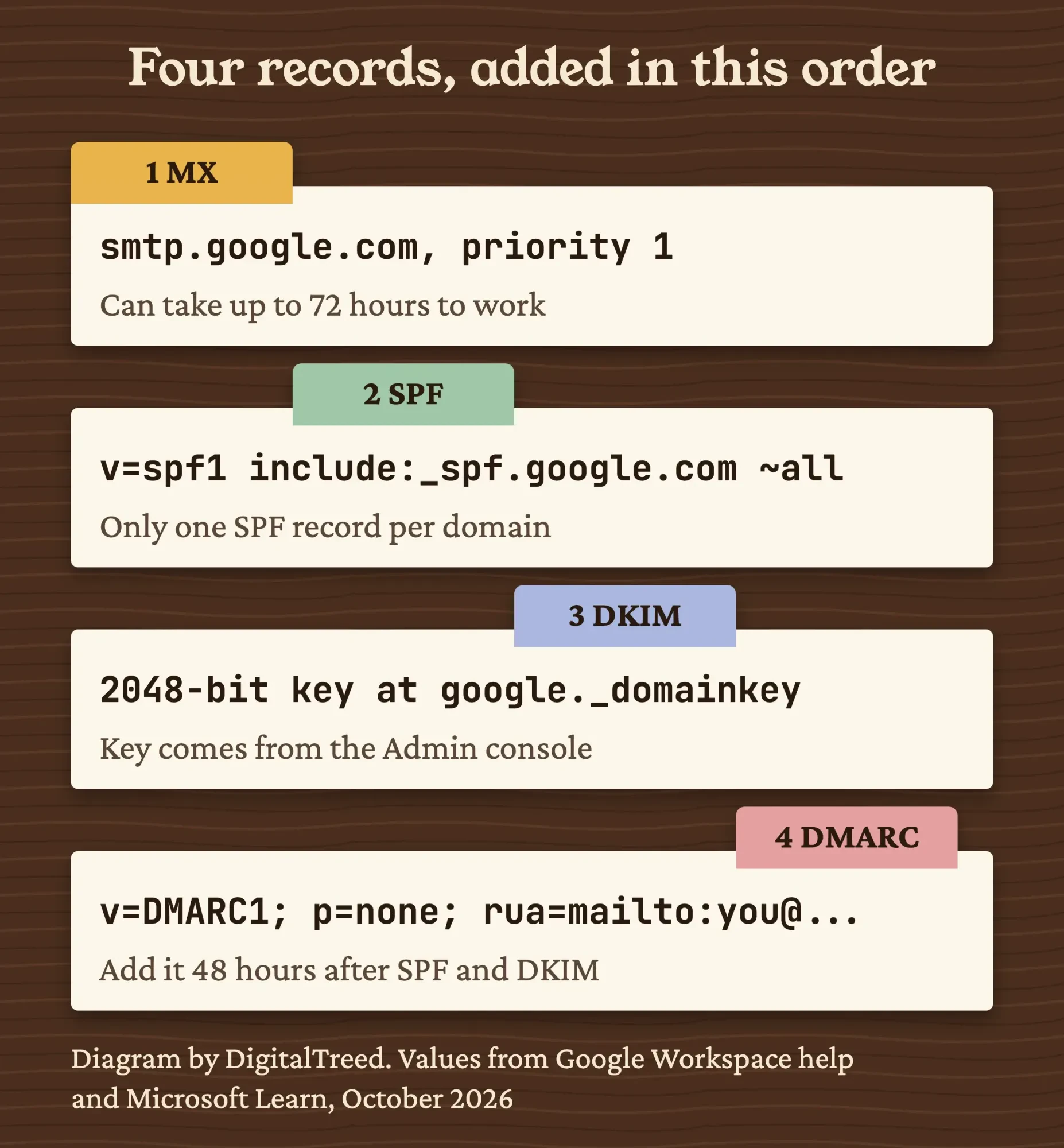 Diagram by DigitalTreed. Values from Google Workspace help pages; the one-SPF-record rule is from Microsoft Learn. October 2026.
These records matter even more for marketing email.
Gmail’s sender rules ask every sender for SPF or DKIM, and bulk senders, meaning close to 5,000 messages a day to personal Gmail accounts, for all three. Yahoo asks every sender to keep the spam rate below 0.3%. Outlook wants SPF, DKIM and DMARC from domains sending over 5,000 emails a day, and rejects failures with error 550 5.7.515.
Our email marketing strategy guide covers the sending side. Before your first newsletter, run the list through an email verification tool so stale addresses don't bounce.
We build and look after small-business websites, so we have an interest here: if DNS is more than you want to handle, our developers can set the records up with you.
Name addresses so they outlast the people
With the records in place, settle on names before you hand out a single address.
For people, first@ works for a small team. first.last@ scales better once two people share a first name.
Pick one pattern and keep it.
Role addresses are where businesses waste money.
info@, sales@ and billing@ don't each need a paid user. Google lets you add "up to 30 email aliases for each user at no extra cost" in Workspace. In Microsoft 365, a shared mailbox can hold up to 50 GB without its own license.
Either way, the address survives when the person answering it leaves.
Keep postmaster@ working too. RFC 5321, the standard for sending mail, says mail servers must support it, and RFC 2142 names abuse@ as well. An alias pointing to the owner is enough.
Then give everyone the same signature: name, role, phone and website, in the colors and logo from your branding strategy. Our free email signature generator builds one you can paste into Gmail or Outlook.
Turn on MFA before you hand out the address
Those addresses are only as safe as the passwords behind them.
Not all MFA is equal. CISA's fact sheet on phishing-resistant MFA says "any form of MFA is better than no MFA" but calls phishing-resistant MFA "the gold standard" for protecting accounts. Its table puts FIDO and WebAuthn security keys at the top and text-message codes at the bottom, since a SIM swap can steal them.
Use an authenticator app or a security key. Keep SMS as a fallback.
Plan for people leaving.
Suspend the account, keep the mail, and turn the old address into an alias on someone else's mailbox so customers aren't bounced.
Last, watch the domain itself, since mail stops the day it expires. The uptime monitoring guide covers alerts that catch a site going dark.
How do you know it worked?
Everything above lives in DNS, and DNS is public. You can check it from any browser.
That's what we did with our own domain. Our lookup ran October 23, 2026, with dig and with Google Admin Toolbox Dig, which needs no account. Our mail runs on GoDaddy, not Google or Microsoft. The lookup showed two MX hosts, smtp.secureserver.net at preference 0 and mailstore1.secureserver.net at 10, so mail tries the first one first. It also found a single SPF record, v=spf1 include:secureserver.net -all, and a DMARC record already at p=reject.
DKIM was the one record we couldn't confirm from outside.
A DKIM key sits under a selector name, like google._domainkey, and you can't look it up without knowing that name. Your host's admin screen shows it, and so does the s= value in the DKIM-Signature header of a message you've sent.
We also looked up example.com, a domain reserved for examples. Its MX record is a single dot at preference 0, the "null MX" that RFC 7505 uses to say a domain "does not accept email" at all. With v=spf1 -all and DMARC at p=reject on top, it tells receivers that nothing sent in its name is real.
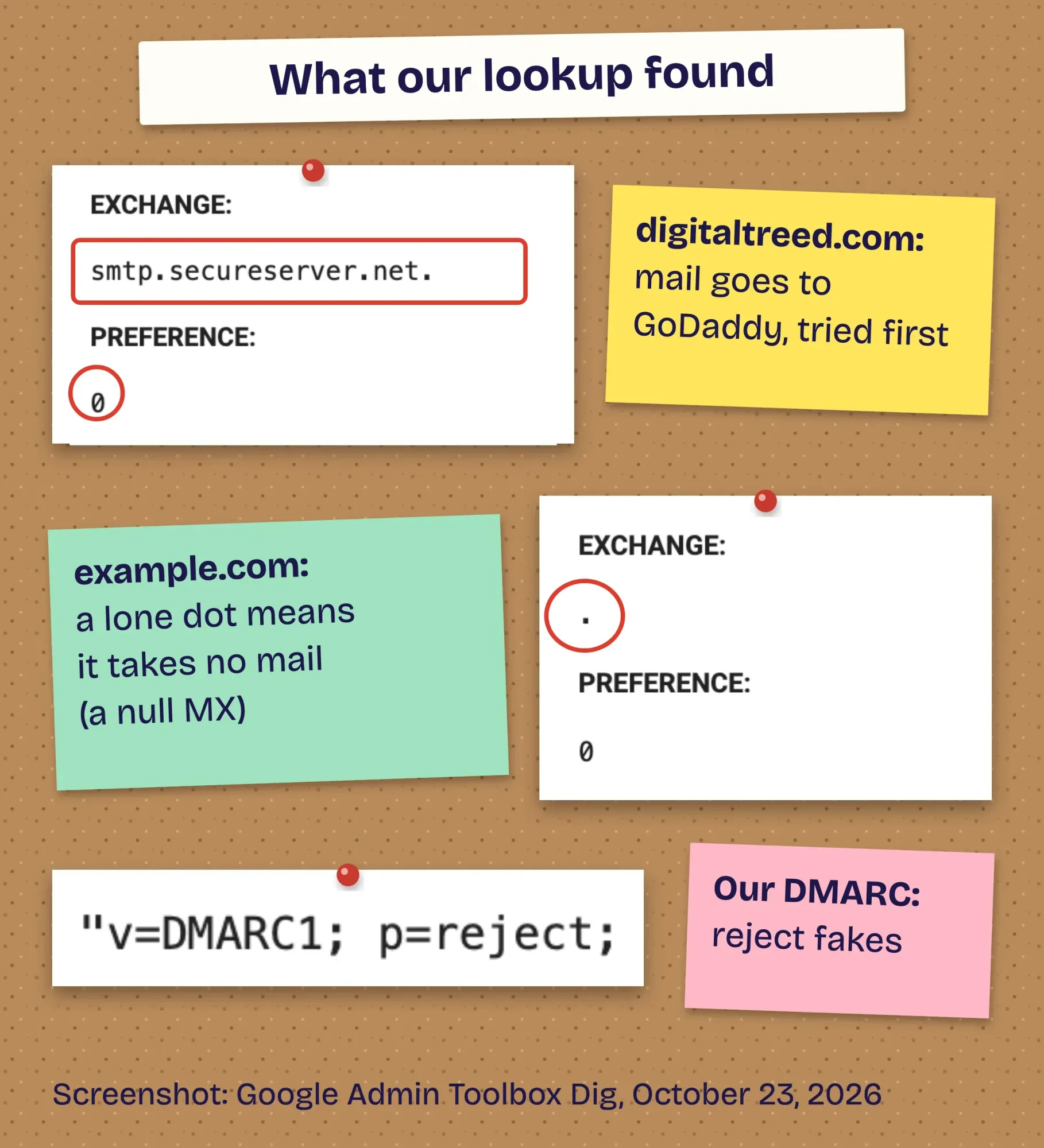 Screenshot: Google Admin Toolbox Dig lookups for digitaltreed.com and example.com, October 23, 2026, annotated by DigitalTreed.
Records can look right and still fail, so send a real message.
Mail your new address to a personal Gmail account, open it, and pick Show original from the More menu next to Reply, as Google’s header guide shows. The full header opens in a new window. Find the Authentication-Results line: Google's DKIM page says the result should read something like DKIM=pass.
If a check there fails, go back to that record.
Look first for a second SPF record, a typo in the DKIM key, or an MX change that hasn't spread yet.
Then add the address to your phone with the Gmail or Outlook app.
Want a hand with the domain, the records or moving old mail? Ask us for a quote and we'll tell you what's involved.
How we made this guide: Our DNS lookups of digitaltreed.com and example.com date from October 23, 2026, and the screenshots in this post come from them. The DigitalTreed team then read each price on the vendor's own US page on October 24, 2026, and worked the Stonebridge Tile sums by hand. Record values and wait times are quoted from Google, Microsoft and dmarc.org, with each source linked at the line it supports.
First published July 2020. Rewritten October 24, 2026: the old sign-up steps for free Gmail, Yahoo, AOL and Outlook 2007 accounts are gone. New: business email on your own domain, dated prices with billing terms, the four DNS records, MFA and our own DNS lookup.
Sources
- Google Workspace: Pricing (US)
- Google Workspace Admin Help: Flexible Plan
- Google Workspace Admin Help: Compare the Flexible and Annual plans
- Microsoft: Microsoft 365 Business Basic
- Microsoft: Compare Exchange Online plans
- Zoho Mail: Pricing
- Cloudflare: Email service pricing
- Google Workspace Admin Help: Set up MX records
- Google Workspace Admin Help: Set up SPF
- Google Workspace Admin Help: Set up DKIM
- Google Workspace Admin Help: Set up DMARC
- Microsoft Learn: Add DNS records to connect your domain
- Microsoft Learn: Set up SPF to identify valid email sources
- dmarc.org: Overview
- Google Workspace Admin Help: Email sender guidelines
- Yahoo Sender Hub: Best practices
- Microsoft Tech Community: Outlook requirements for high-volume senders
- CISA: Implementing phishing-resistant MFA (fact sheet, October 2022)
- FBI IC3: 2025 Internet Crime Report
- IETF RFC 5321: Simple Mail Transfer Protocol
- IETF RFC 2142: Mailbox names for common services
- IETF RFC 7505: A "Null MX" no service resource record
- Google Workspace Admin Help: Add an alternate email address (alias)
- Microsoft Learn: About shared mailboxes
- Google Admin Toolbox: Dig
- Gmail Help: Trace an email with its full header


Comments
No comments yet. Start the conversation below.