
Quick answer
If you forgot your Screen Time passcode, open Settings, then Screen Time, Passcode & Management and Change Screen Time Passcode. Apple's iPhone and iPad page lists 4 steps for that, dated October 27, 2026. On a child's device in Family Sharing, the parent resets it from their own device in 6 steps, and step 5 asks for the old code.
You searched "forgot Screen Time passcode" because four digits you set months ago are gone. Maybe they lock your own iPhone, maybe your kid's iPad. A Screen Time passcode is a separate four-digit code that locks your Screen Time settings, not the code that opens the phone. This page once promised a bypass; it now quotes Apple's reset.
We cover what the passcode locks, then the reset on your own iPhone or iPad, on your child's device and on a Mac with its login password. Next come the Apple Account password, which route fits you, what we tested, any safe bypass, and life after the reset. Our view: Apple's reset works if you have the Apple Account that set the code.
Key takeaways
- Your own iPhone resets in 4 steps with Face ID or the device passcode.
- A child's passcode is reset from the parent's own device, not the child's.
- On a Mac, your login password or Touch ID can replace the old code.
- Apple says account recovery can take several days or more.
- Apple lists no bypass, and calls jailbreaking a security risk.
What the Screen Time passcode locks
Before any reset, check that you've forgotten the right code. Apple's Screen Time passcode article says "A Screen Time passcode isn't the same as the passcode you use" to get into your device. Apple's Kids and Families guide says a child's code is "separate from the device passcode your child uses" too. If the phone itself won't open, you need a different Apple article. The code is four digits. Both the iPhone User Guide and the Mac User Guide say "Enter a four-digit passcode, then enter the passcode again to verify it." Its job is narrow, because Apple says you need it "to change the settings, limits, or restrictions" for your device or a child's device.
Reset it on your own iPhone or iPad
This route covers a passcode you set yourself, and Apple's steps apply "to iOS 27 and iPadOS 27 and later," as its pages read in October 2026. The iPad User Guide uses the same menu names as the iPhone guide. Here are Apple's 4 steps:
- Open the Settings app, then tap Screen Time.
- Tap Passcode & Management.
- Tap Change Screen Time Passcode, then tap it again. Authenticate with Face ID or your device passcode; if asked, enter the Apple Account email and password that set up the Screen Time passcode.
- Enter a new Screen Time passcode, then enter it again to confirm.
Step 3 is where most resets stall, because the Apple Account it asks for may not be the one you're signed in with on this phone. Apple warns it "might be a different Apple Account than the one that you're signed in to on your device." In a family, it "might be a family member's Apple Account or your child's Apple Account." The rule behind this is strict: Apple says "you must use the same account you entered when you first set up the Screen Time Passcode Recovery." Try each account your household uses before you decide the reset is broken.
Once you're back in, add recovery if it was skipped, since Apple's article says "It's recommended that you don't skip adding a Screen Time Passcode Recovery." The iPhone guide gives the reason: "you can use your Apple Account to reset your Screen Time passcode if you ever forget it." Own a Mac or a second iPad too? With Share Across Devices on, Apple says "your Screen Time passcode automatically updates on those devices if you reset it," so one reset covers every device that shares the setting.
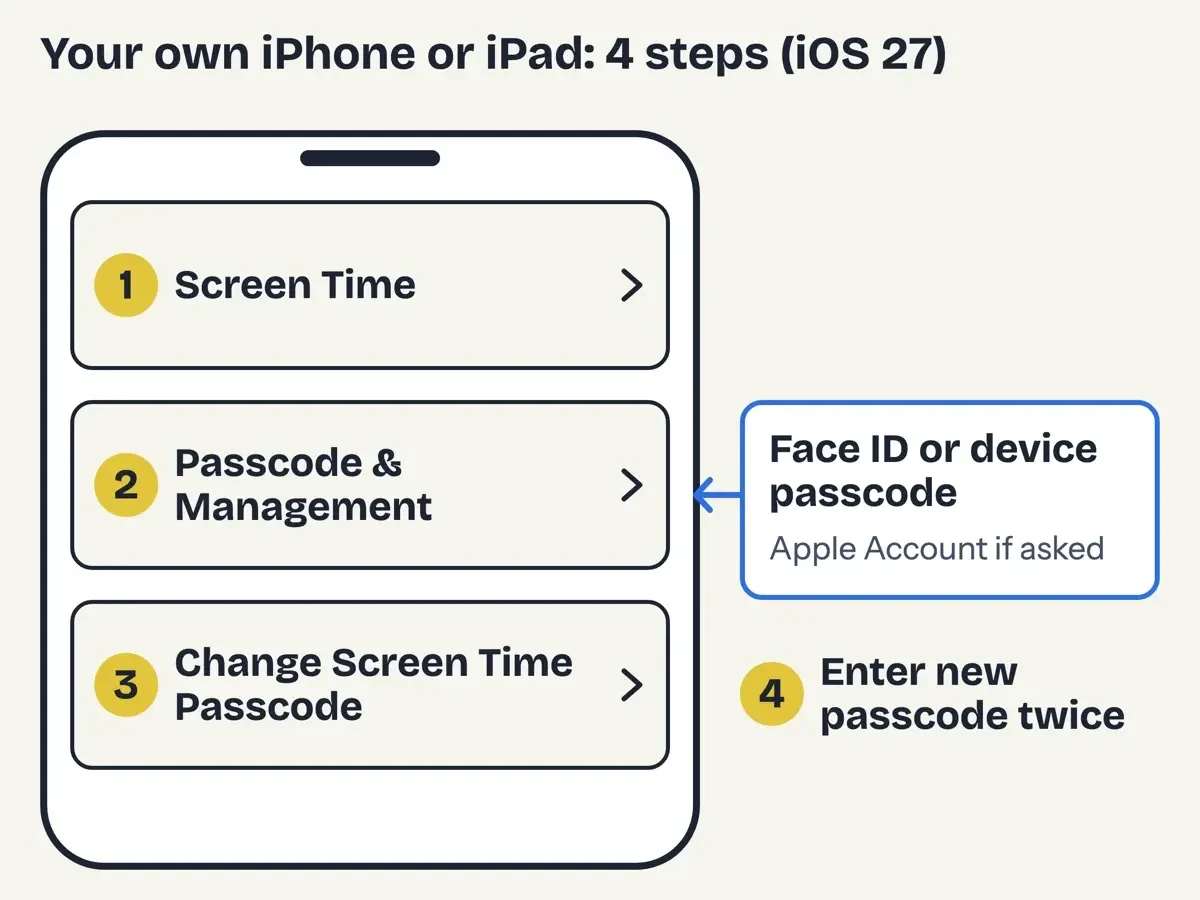 Drawn by us from Apple's iOS 27 steps (support article 102677, October 27, 2026). Not a real iPhone screen.
Your child's device: the parent's phone does the reset
A child's passcode follows a different rule. Apple says "the Family Sharing organizer or a parent/guardian needs to reset the Screen Time passcode on their own device, not the child's device." The Screen Time for children article repeats it: the parent "must set the child's Screen Time passcode on their own device."
From your own phone, Apple's route has 6 steps. Open Settings, tap Family, then tap your child's name. Next tap Passcode & Management, then Change Screen Time Passcode twice. On a Mac, Apple says to "Go to System Settings, click Family, then click your child's name." Our script found one catch in Apple's list: step 5 of the child steps reads "Enter your old Screen Time passcode." The guide's change steps also ask for "the current passcode." Apple's only fallback is the same-account check from the section above, so start there.
If your child learned the code instead, Apple's Kids and Families guide says "you can change it at any time," and you'll know the old code step 5 wants.
No child's name under Family? Then the family group is the gap. Apple asks that "you're both signed in to your devices with your own Apple Account and that your child's account is part of the Family Sharing group."
The group itself has limits. The Family Sharing setup article says "you and up to five family members" can share, and the iPhone guide to Family Sharing gives the same five. It adds that "Where legally required, an Apple Account created for a child under 18 needs to be part of a Family Sharing group." Any adult in the group can be set as a parent/guardian to manage parental controls. Apple also notes that "you can only switch to a different Family Sharing group once per year." For the wider picture, our guide to protecting children from online threats covers what a passcode can't.
On a Mac, your login password stands in
The Mac is the easiest case, because Apple's Mac guide lets your login password or Touch ID stand in for the old code. The path is System Settings, then Screen Time in the sidebar. Then "Scroll down, click Passcode & Management, then click Change Passcode." The next step accepts "the current four-digit passcode (or verify your identity with your password or Touch ID)." If you can sign in to your Mac, you can set a new code without the old one. Apple's Mac guide adds that the latest Screen Time features need "iOS 27, iPadOS 27, macOS 27, watchOS 27, or visionOS 27 or later on all your Apple devices."
The same Mac page points elsewhere for a full reset. It says "If you need to reset the passcode, see the Apple Support article If you forgot the Screen Time passcode for an iPhone or iPad." That means the 4-step route above. The Mac Screen Time setup page notes that Share across devices covers "other devices signed in to the same Apple Account," so an iPhone reset reaches the Mac too.
Removing it follows the same pattern: turn off Lock Screen Time Settings, then give the code, your Mac password or Touch ID.
When the Apple Account password is the real problem
Sometimes the Apple Account password is what's lost. Apple's forgotten password article says "The easiest way to reset your password is with a trusted device and your trusted phone number." A trusted device is an Apple device "on which you've already signed in to your Apple Account using two-factor authentication." If you hold one, change the password there first, then come back to the Screen Time reset with the new password ready. Our free password generator can make the new password. If it's the email you can't recall, Apple says to "try different email addresses or phone numbers" you've used with Apple, since any of them will work to sign in.
No trusted device? Then Apple asks for recovery factors, such as your trusted phone number, your Apple Account email, a card on file, a recovery key, or "A code from your recovery contact." Apple's Apple Account security page suggests picking "one or more people you trust as Account Recovery Contacts" ahead of time. Apple's own hard case is someone who traded in an old iPhone and got a new number, a switch that can also strand old messages. Our iMessage transfer steps for a new iPhone cover that part.
If none of that works, request account recovery at iforgot.apple.com in Safari, on a device with iOS 17 or later or macOS 27 or later. On a borrowed device, the Support app has a "Help Someone Else" option. Apple's account recovery page says the confirmation "email arrives within 72 hours after you start account recovery." The wait itself "might take several days or longer." Apple adds that "Apple Support can't shorten the wait period." In its words, "The waiting period is fixed." Leave signed-in devices alone in the meantime, because Apple warns that "Using an Apple device signed in to your account will cancel your account recovery request."
Didn't start a recovery yourself? Apple's recovery page says "someone may be trying to access your account" and points you to the cancellation link in the confirmation email.
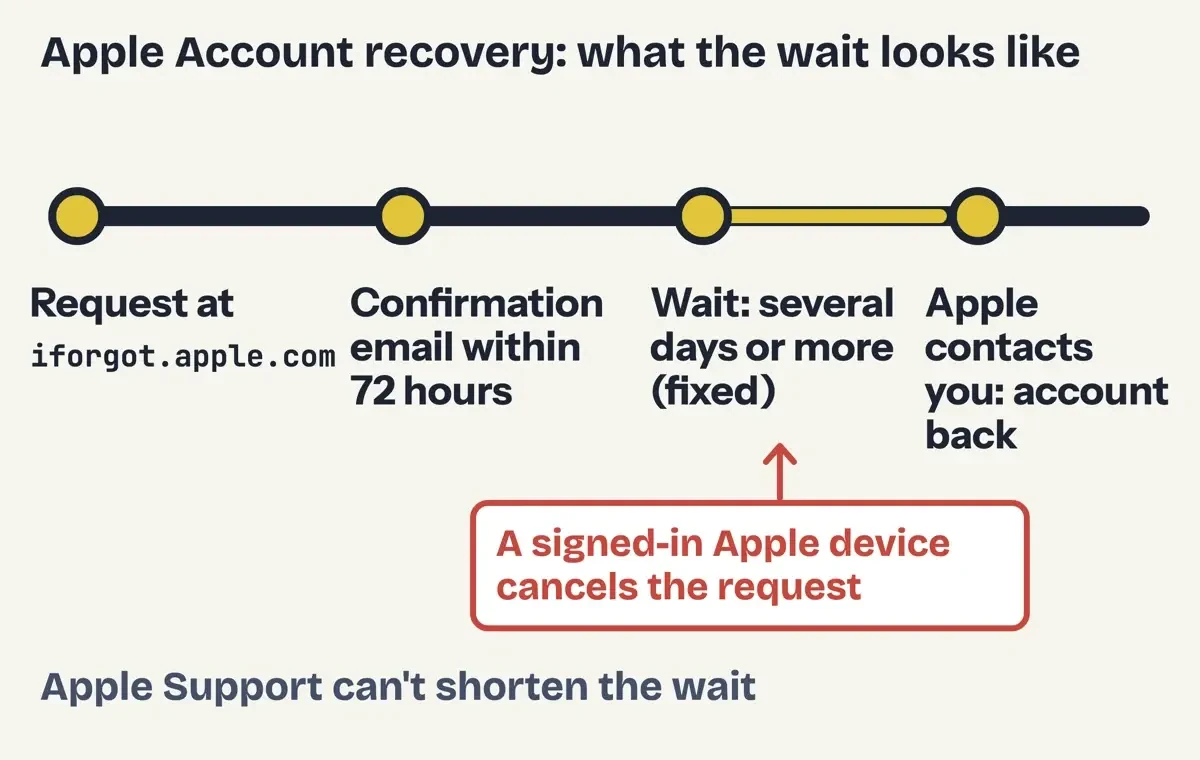 Diagram by DigitalTreed: the Apple Account recovery wait, from Apple Support articles 102656 and 118574 (both dated October 5, 2026).
Which route fits you
Our script crossed 3 kinds of device with 3 Apple Account states for a 9-row route table, and these three rows come up most:
| Whose device | Apple Account state | First move | Where the reset happens |
| Your iPhone or iPad | Password known | Go straight to the reset | Settings > Screen Time > Passcode & Management |
| Your child's device | Password forgotten, trusted device on hand | Reset the parent's Apple Account password first | Parent's device: Settings > Family > child's name (step 5 asks for the old code) |
| Your Mac | No trusted device or recovery factors | Recovery is needed only for the iPhone route | System Settings > Screen Time, with your Mac password or Touch ID |
The six rows left out repeat these moves, and every child row still ends at Apple's step 5.
What we tested
On October 30, 2026, a script saved 20 Apple, CISA and FTC pages as text, matched every quote here and counted Apple's steps. The FTC page sent our plain request a 404, so this post leaves its wording out.
python3 -I check.py
quotes 76/76 across 38 claims
own-device reset steps on Apple article: 4
child reset steps on Apple article: 6
"Passcode & Management" on 5/6 pages
routes: 9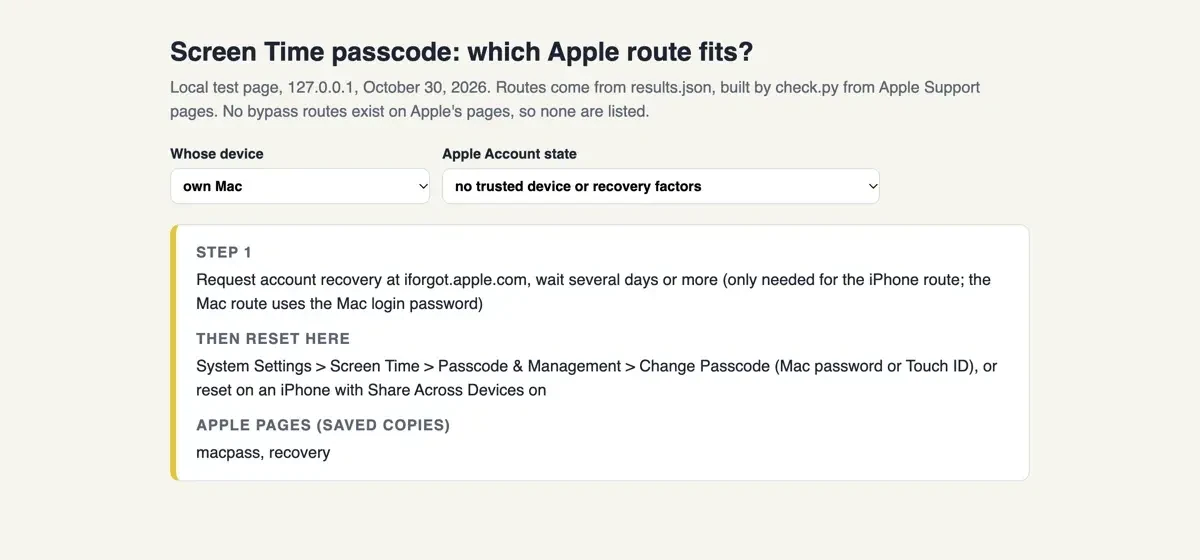 Screenshot: the route finder from our test, served on 127.0.0.1 on October 30, 2026 and set to own Mac. Not an Apple screen.
Is there a safe way to bypass Screen Time?
No route on Apple's pages skips the passcode, and the 20 pages we saved list none. Apple's iPhone page on unauthorized modification covers software that changes iOS, which Apple calls jailbreaking. It says these changes "bypass security features and can cause numerous issues such as security vulnerabilities." Apple also "may deny service for an iPhone that has any unauthorized software installed." Its iPad version says the same for iPad. Apple lists no bypass tool. We could not confirm who runs most bypass sites.
Removing the tool later may not undo the harm. Apple's iPhone page says "Some unauthorized modifications may cause damage to iOS that is not repairable."
The download is a second risk. Apple's scam guidance says to "install software from the App Store or get it directly from the developer's website." It also flags "apps that ask to install configuration profiles that can then control your device." CISA's malicious code tip warns that "It is not uncommon that free software contains a Trojan horse." Our list of common malware entry points shows how such installs reach a home network.
A tool that asks for your Apple Account is a third risk. Apple says "never share your Apple Account password or verification codes with anyone." It also says "Apple will never ask you to disable any security feature on your device or on your account." Typed a password into a bypass page already? Apple's advice for that case is to "change your Apple Account password immediately and ensure that two-factor authentication is enabled." Then follow our steps after clicking a phishing link. Our tips for avoiding phishing cover fake Apple sign-in pages.
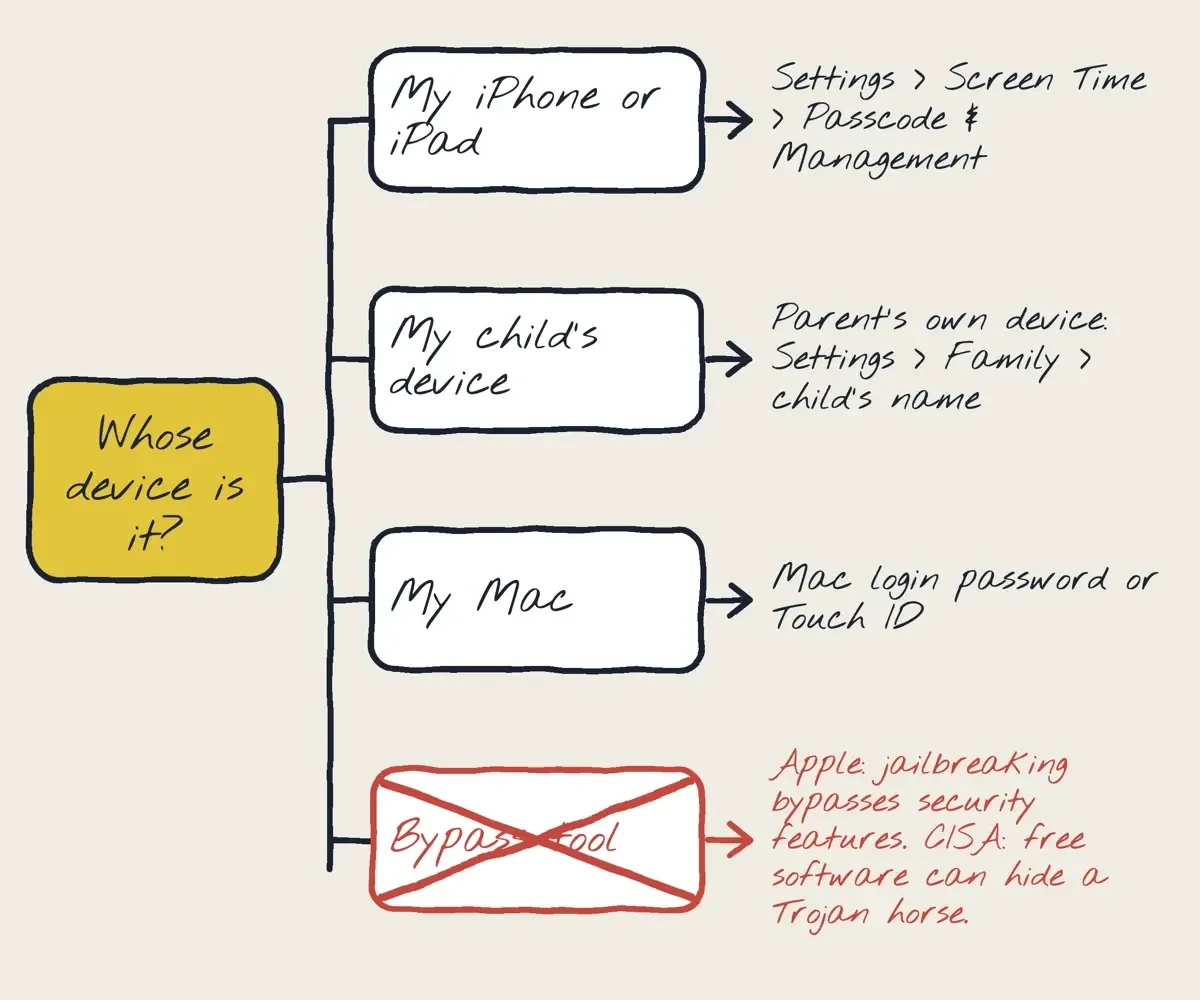 Diagram by DigitalTreed: Apple reset routes by device, with the bypass branch Apple warns against, from Apple and CISA pages read October 30, 2026.
After the reset: keep the new code findable
A new code only helps if you can find it next year, so Apple's Mac guide suggests a safe place "such as in a locked note."
For a child's code, Apple's guide says to avoid "birthdays, phone numbers, or common patterns like 1234." Turn on Screen Time Passcode Recovery with an account you'll keep.
Parents get one extra check. Under Passcode & Management, Apple shows a "Last used" line, and "The date and time of the last passcode entry appears here." What we'd do: reset from the parent's phone, save the code in a locked note, and glance at Last used each week. If the same devices run a home business, our business cybersecurity tips reach past Screen Time to the work accounts.
Screen Time passcode FAQ
Frequently asked
Is the Screen Time passcode the same as my iPhone passcode?
No, but the iOS 27 reset accepts Face ID or the device passcode at step 3.
Can I set up Screen Time Passcode Recovery on an iPad?
Yes. The iPad User Guide says "After setting a passcode for yourself, you can also set up Screen Time Passcode Recovery."
Can Apple Support speed up account recovery?
No. Apple says "Contacting Apple Support can't help shorten the wait."
Can I start account recovery from a friend's iPhone?
Yes, in the Support app under Help Someone Else. Apple says "The information that you enter won't be stored on the borrowed device."
How we made this guide: Every reset step comes from Apple's help pages, and the risk section from Apple and CISA. We changed no Screen Time setting, signed in to nothing and opened no bypass site. Facts checked by the DigitalTreed team on October 30, 2026.
This post ran from November 2023 under a title that promised a bypass, and our October 30, 2026 rewrite drops that promise. It gives Apple's iOS 27 and macOS 27 reset routes for your own device, a child's device and a Mac, plus Apple Account recovery.
Sources
- Apple Support: Change your Screen Time passcode on an iPhone or iPad
- iPhone User Guide: Create, change, or remove a Screen Time passcode
- iPad User Guide: Create, change, or remove a Screen Time passcode
- Mac User Guide: Set, change, or remove a Screen Time passcode on Mac
- Mac User Guide: Set up Screen Time for yourself on Mac
- Apple Devices for Kids and Families: Set, change, and manage a Screen Time passcode on your child's device
- Apple Support: Use Screen Time to manage your child's iPhone or iPad
- Apple Support: How to set up Family Sharing
- iPhone User Guide: Set up Family Sharing
- Apple Support: If you forgot your password and can't sign in to your Apple Account
- Apple Support: What to expect during account recovery
- iPhone User Guide: Keep your Apple Account secure
- Apple Support: Recognize and avoid social engineering schemes
- iPhone User Guide: Unauthorized modification of iOS
- iPad User Guide: Unauthorized modification of iPadOS
- CISA: Protecting Against Malicious Code


Comments
No comments yet. Start the conversation below.