
Quick answer
The free antivirus most Windows users need is already on the PC: Microsoft Defender Antivirus, which scored 17.5 of 18 points in AV-TEST's July-August 2026 Windows test. Avast Free Antivirus and AVG AntiVirus Free scored 18 of 18 there, while Avast's own FAQ keeps shields such as Webcam Shield for its paid app. First, check that Defender's real-time protection is on.
Maybe a paid trial just ended and a pop-up says you're unprotected. Free antivirus for Windows is a security program that scans files and blocks malware without a subscription fee, and Windows 11 already ships with one.
First: what Windows already gives you for free, how AV-TEST and AV-Comparatives test antivirus, and which free apps the labs test. Then what free versions leave out, Kaspersky and the US ban, fake pop-ups and download ads, and what we'd run.
Key takeaways
- Windows 11 includes Microsoft Defender Antivirus at no extra cost.
- Only Defender, Avast and AVG appear free in both labs.
- Defender scored 17.5 of 18 in AV-TEST; Avast and AVG scored 18.
- A third-party antivirus switches Defender off automatically.
- Kaspersky lost the right to send US updates on September 29, 2024.
What Windows already gives you for free
So before you download anything, look at what's already installed. Microsoft's Windows security page says Windows 11 comes with Defender built in, and "You don't have to pay extra for this antivirus protection." It lives inside the Windows Security app, which the Windows Security support page says includes "Microsoft Defender Antivirus, Windows Firewall, and Smart App Control." Defender runs all the time, too. Microsoft calls it "real-time, always-on antivirus protection," and if you pause it, real-time protection "will soon turn on automatically again." Checking it takes under a minute, and you never leave the Windows Security app:
- Open the Start menu, type Windows Security, then open the app.
- Select Virus & threat protection.
- Under Virus & threat protection settings, select Manage settings.
- Confirm the Real-time protection switch is On. If another antivirus is listed instead, that program is in charge.
If step 4 shows another program's name, that's by design. The Virus and Threat Protection help page says "If you install a compatible non-Microsoft antivirus program Microsoft Defender antivirus will automatically turn itself off." While you're on that screen, glance at the updates section, which Microsoft says is "dedicated to ensuring that your device is protected with the latest security intelligence updates."
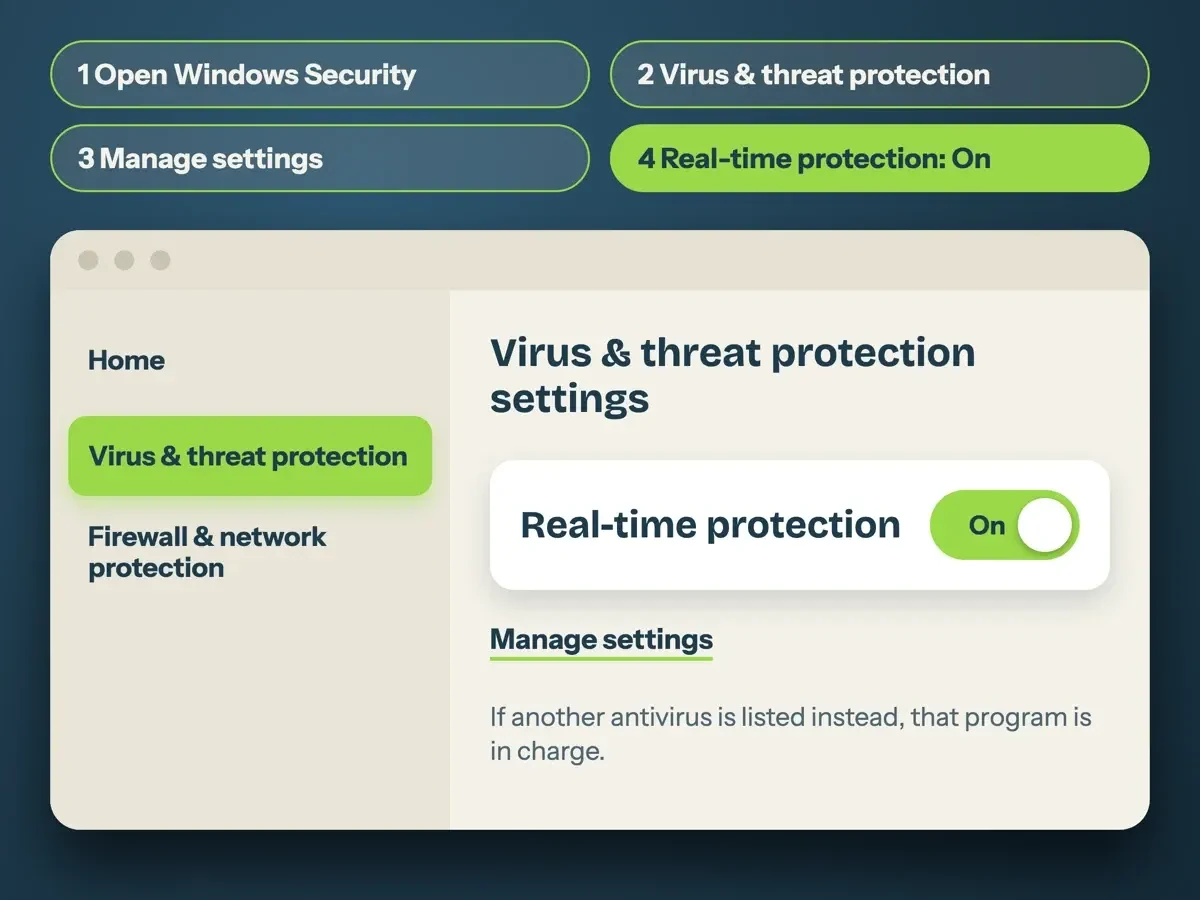 Drawn by us from the Microsoft Support steps for the Windows Security app, October 2026. Not a real Windows screen.
Windows 10 is the exception. Microsoft's Windows 10 notice says "Windows 10 has reached the end of support on October 14, 2025," and no antivirus can patch Windows itself.
How AV-TEST and AV-Comparatives test antivirus
Once Defender is on, the real question is how it compares. We lean on two independent labs that publish their methods and raw numbers for free. AV-TEST is based in Magdeburg, Germany, and AV-Comparatives runs its real-world test with the University of Innsbruck in Austria. AV-TEST's Windows home-user test for July and August 2026 says "we continuously evaluated 15 home user security products using their default settings." Each product gets up to 6 points for protection, 6 for performance and 6 for usability, so 18 is the ceiling.
Each product's result page shows the protection score resting on 297 fresh web and email attacks plus a reference set of 12,543 recent malware samples. At 17.5 points or more, the lab hands out its TOP PRODUCT award, so a half-point slip doesn't cost a product that badge.
AV-Comparatives splits the work into two tests, and its Real-World Protection Test for February to May 2026 ran 400 live web attacks on a fully patched Windows 11 machine. Each attack is first run "on a clean machine without antivirus software" to check it's a suitable test case. The report prints its formula: protection rate equals blocked percentage plus half of any user-dependent cases. The Malware Protection Test for September 2026 used 10,000 malicious files arriving another way, through "network drives, USB" or files already on the disk. Both count false alarms, meaning clean sites or programs a product wrongly blocks. Too many of those drops a product to a lower award, even when it stopped almost every threat.
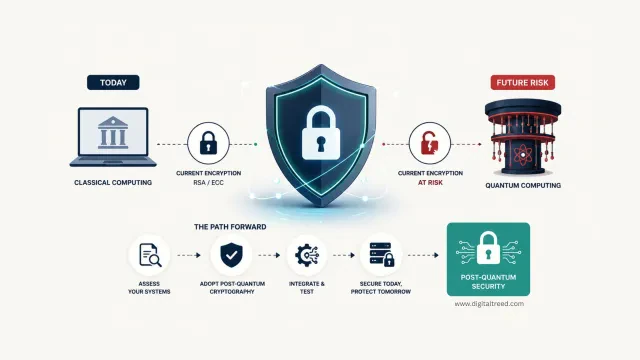
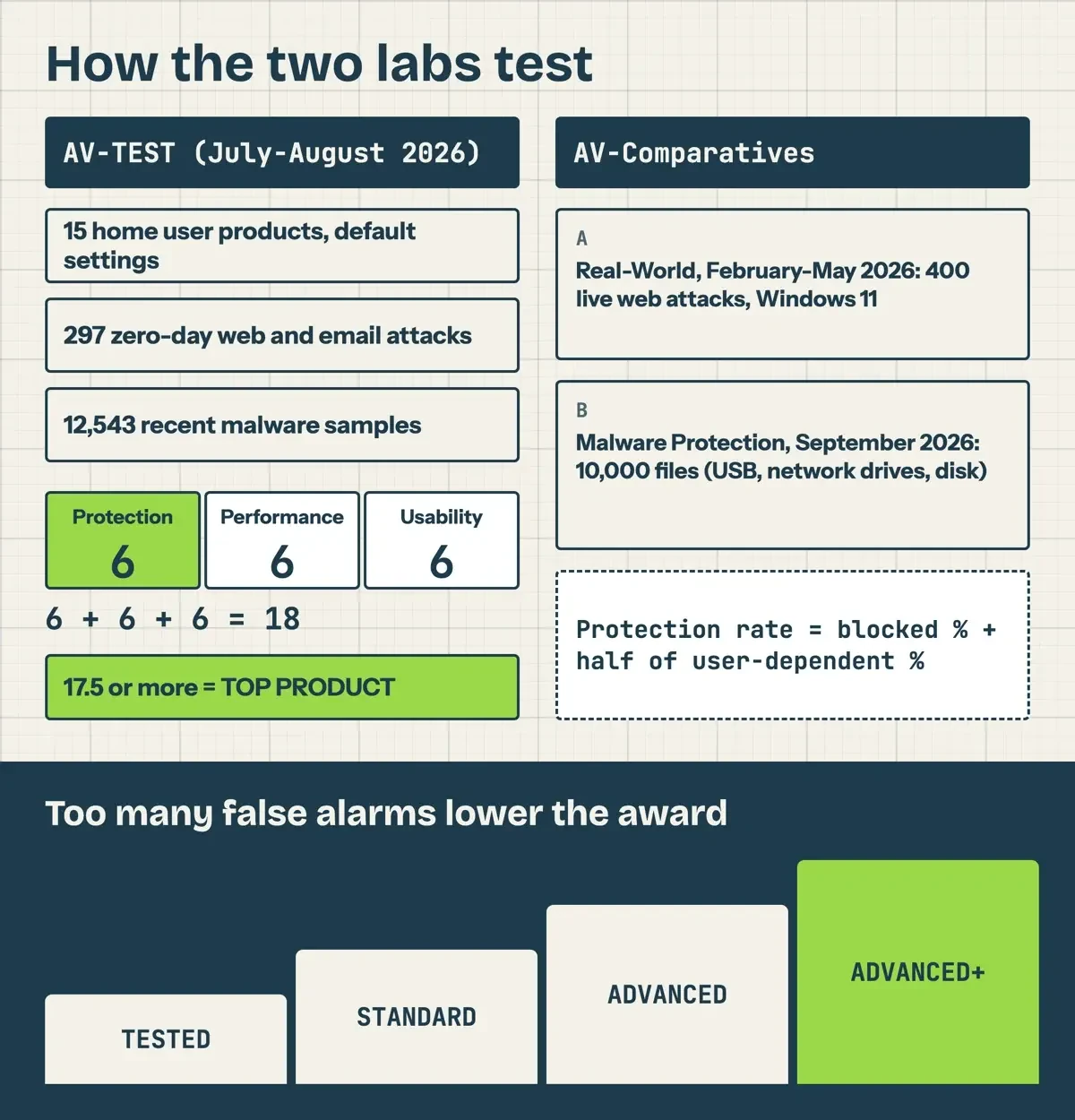 Diagram by DigitalTreed, from the AV-TEST and AV-Comparatives method notes read October 31, 2026.
Even the lab warns against one chart: "we do not recommend purchasing a product purely on the basis of one individual test or even one type of test."
Which free antivirus apps did the labs test?
Most lab entries turn out to be paid suites, and AV-Comparatives even notes that "some vendors asked us to include their (free) antivirus security product instead." AV-TEST's latest round tested Bitdefender, Avira, Malwarebytes and Norton as paid products. Only three free Windows products show up in both labs: Microsoft Defender Antivirus, a free Avast app and AVG AntiVirus Free. Below is every figure for those three, copied from the lab pages and recomputed by our script. Avast's entry differs by lab: AV-TEST tested Avast Free Antivirus, and AV-Comparatives tested the free tier of the newer Avast One app. AV-TEST also has a page for each product: the Defender result page, the Avast result page and the AVG result page.
| Lab and test | What is measured | Microsoft Defender | Avast free | AVG Free |
| AV-TEST, Windows 11, July-August 2026 | Points out of 18 (protection + performance + usability) | 6 + 5.5 + 6 = 17.5 | 6 + 6 + 6 = 18 | 6 + 6 + 6 = 18 |
| AV-Comparatives Real-World, February-May 2026 | Of 400 web attacks: blocked / compromised | 396 / 4 | 397 / 3 | 397 / 3 |
| Same test | False alarms, then award | 0, ADVANCED+ | 5, ADVANCED+ | 5, ADVANCED+ |
| AV-Comparatives Malware Protection, September 2026 | Of 10,000 samples: blocked / compromised | 9,989 / 11 | 9,996 / 4 | 9,996 / 4 |
| Same test | False alarms, then award | 28, STANDARD | 15, ADVANCED | 15, ADVANCED |
Read rows 2 and 4 together and no app wins every line. In the real-world test, Defender let one more attack through than Avast and AVG (4 against 3 of 400), yet it had zero false alarms against their 5. In the September malware test, Defender's 28 false alarms put it in AV-Comparatives' "very many" band, and the lab's award grid drops that to STANDARD. Avast and AVG, at 15, landed one level higher.
The September malware report adds one more split that matters on a laptop. Scanning files with no internet connection, Defender detected 82.2% of the samples, against 95.4% for Avast and AVG. Online, those figures rose to 95.5% and 98.3%. That's a 13.3-point jump for Defender (95.5 minus 82.2) against 2.9 points for Avast and AVG (98.3 minus 95.4), so Defender leans harder on the cloud. The lab explains that reputation services and cloud signatures "are only reachable if there is an active Internet connection." If you often work offline, on planes or job sites, that gap is worth knowing. Protection rates, which also count files stopped when they run, were closer: 99.89% for Defender and 99.96% for the other two.
One detail explains why Avast and AVG score as twins. The February-May report says "AVG and Norton use the Avast engine," so treat them as one engine in two wrappers.
What we tested
On October 31, 2026, our script found all 63 quotes in 33 saved pages and redid the lab math. Avast's 397 of 400 works out to 99.25% (397 / 400), which the lab rounds to 99.3%. Every lab figure matched. We also sent one HEAD request to each of 16 official domains: 13 answered 200, and avast.com, avg.com and avira.com returned 403.
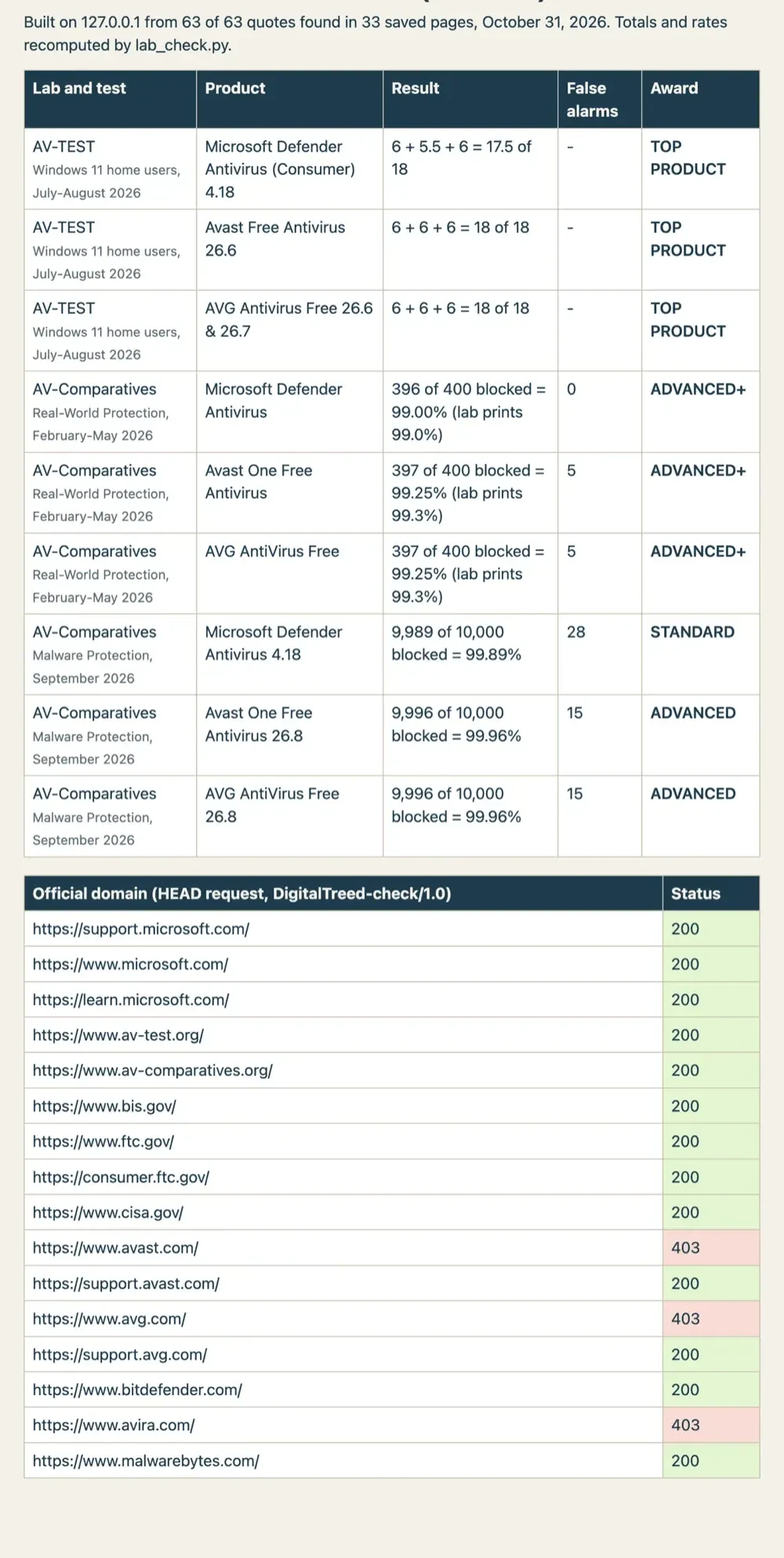 Screenshot: our lab table on 127.0.0.1, October 31, 2026.
What the free versions leave out
Each free tier holds something back, and Avast's own Free Antivirus FAQ spells out what. The free app activates itself, but "after 12 months, the app may prompt you to renew the activation." Sandbox, Webcam Shield, Browser Shield and Sensitive Data Shield are each listed as "available in Avast Premium Security," and Real Site "is a premium feature." SecureLine VPN and Cleanup Premium cost extra even there: they "appear in the Avast Premium Security app but require separate, paid subscriptions." Codes, renewals and paid tiers are in our Avast activation code and license guide.
Data use is the bigger question for Avast, and here a regulator has spoken. On June 27, 2024, the FTC finalized an order banning Avast "from selling, disclosing, or licensing any web browsing data for advertising purposes." In its complaint, the FTC alleged Avast collected browsing information "through the company's browser extensions and antivirus software, stored it indefinitely," and sold it without consumer consent. That's the antivirus itself, not some side app, which is why the case matters for a free download. Avast also had to pay $16.5 million, and the FTC's Avast refund page says "Avast collected and sold users' information to third parties without users' consent."
Bitdefender's free antivirus page is upfront about its limits: "Basic protection, Windows only," with "No anti-tracking measures" and "No full-system analysis." It does keep "Basic ransomware protection." You install it "by creating a Bitdefender Central Account," and neither lab tested this free edition. Malwarebytes draws the line more sharply. Its download page says "Malwarebytes Free is a cleanup tool for cyberattacks that have already damaged a device," while Premium Security "works in real time" to stop threats. So the free app isn't a Defender replacement. It's a second scanner you run when something already feels wrong.
AVG's install guide for AVG AntiVirus Free says "Uninstall any previous antivirus software from your PC" if setup fails. The avast.com, avg.com and avira.com product pages answered our checker with a 403 bot-block (they open in a browser), so we don't quote their feature charts.
Kaspersky and the US ban
Then there's Kaspersky, whose Premium suite scored a full 18 (6 + 6 + 6) in AV-TEST's August 2026 round.
US users can't count on it, though. On June 20, 2024, the Commerce Department's Bureau of Industry and Security issued a Final Determination on Kaspersky. It said Kaspersky "will generally no longer be able to" sell its software in the US "or provide updates to software already in use." BIS's Kaspersky information page gives the dates: new US agreements stopped at 12:00 AM EDT on July 20, 2024. From September 29, 2024, Kaspersky was barred from "Providing any anti-virus signature updates and codebase updates." That's your date. The Federal Register text of the determination carries the same September 29 date.
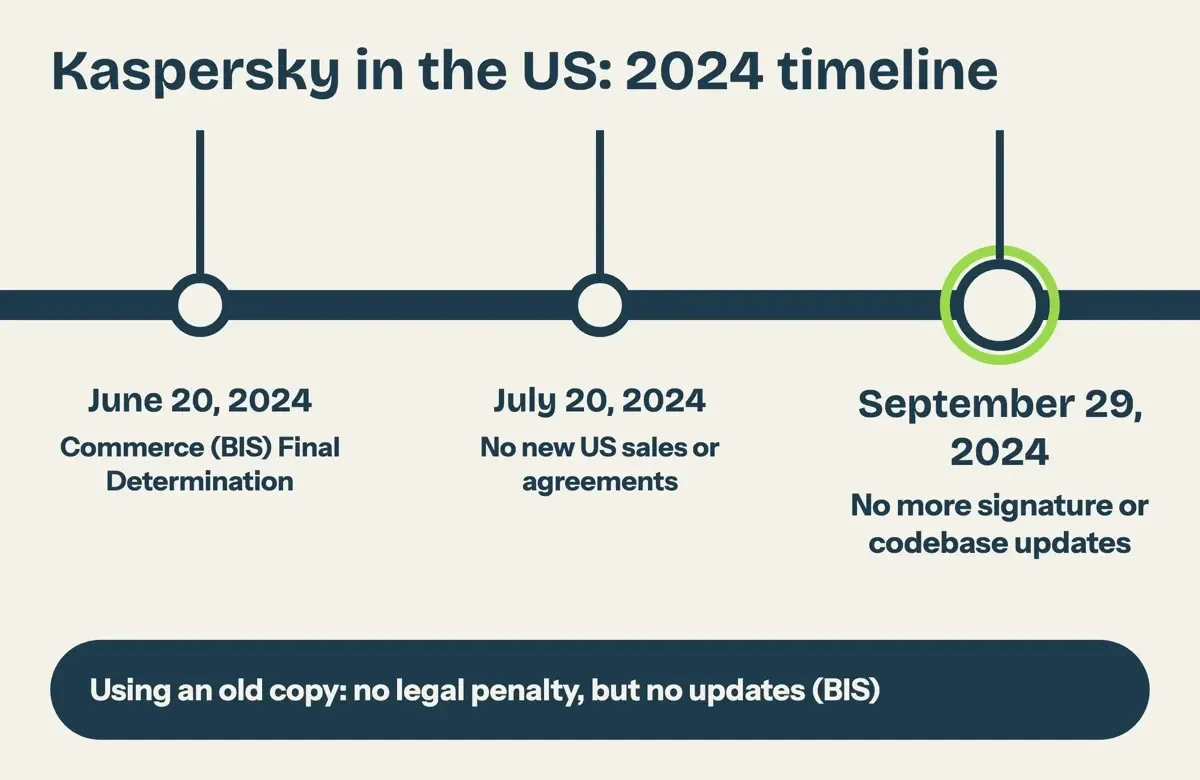 Diagram by DigitalTreed, from the BIS press release and BIS Kaspersky page read October 31, 2026.
Keeping an old copy carries no penalty. BIS's press release says people who keep it "will not face legal penalties under the Final Determination." Still, anyone who does "assumes all the cybersecurity and associated risks of doing so." An antivirus that stopped getting signature updates in 2024 has no signatures for malware written since, so we'd uninstall it and let Defender take over.
Fake antivirus pop-ups and download ads
With Defender on, the next risk is a fake antivirus offer: an ad or pop-up that pushes a download or a phone call. The FTC's malware guide has two rules that fit. "Don't click on ads to download software." And "Never call a phone number that appears in a pop-up window." Type the vendor's address yourself.
Tech support scams lean on the same fear. The FTC's tech support scam page says "Real security pop-up warnings and messages will never ask you to call a phone number," and asks you to report scammers at ReportFraud.ftc.gov. Our tips to avoid phishing cover the email side, and what to do after clicking a phishing link covers the cleanup. Free downloads are the third door. The FTC's malware guide also warns "Don't use unfamiliar websites to download free stuff like music, movies, shows, or games." Our MP4Juice safety guide sticks to legal sources, and the Instagram scams guide lists the social app tricks.
What we'd run on a Windows PC
On Windows 11, we'd keep Microsoft Defender Antivirus, with real-time protection on and Windows Update set to automatic. It costs nothing, scored 17.5 of 18 at AV-TEST and had zero real-world false alarms at AV-Comparatives.
Prefer Avast or AVG Free for the 18-point score? Fine. Defender switches itself off, and the free Avast app lacks the shields its FAQ keeps for Premium Security. We wouldn't run two real-time antivirus apps side by side.
Whichever you pick, keep it patched. CISA's software update guidance says "It's important to install ALL updates, especially for our web browsers and antivirus software." For an office, our list of common malware entry points in business networks goes past antivirus, and simple steps to increase your online security covers passwords and two-step sign-in.
Free antivirus questions
Frequently asked
Can I run Microsoft Defender alongside another antivirus?
No. Microsoft's compatibility article shows Defender in "Disabled mode (happens automatically)" when another antivirus is primary.
Does a Windows 10 PC still get security updates?
Only through Extended Security Updates, which Microsoft's ESU page says run "through October 12, 2027." As of October 2026, you enroll at no added cost by syncing your PC settings, with 1,000 Rewards points, or for $30 USD plus tax.
How do I scan for malware that hides while Windows runs?
Pick Microsoft Defender Antivirus (offline scan) in Scan options; Microsoft's scan help says it runs "after a restart, without loading Windows."
Did Avast users get money back from the FTC case?
Claimants did. The FTC's Avast refund page says December 2025 payments topped $13.5 million, and a second round sent 91,093 more.
How we made this guide: Our checker read 33 Microsoft, lab, vendor and US government pages with plain requests. Then a script compared all 63 quotes and recomputed every lab total. Nothing was installed, downloaded or signed into. Facts checked by the DigitalTreed team on October 31, 2026.
First published July 2020 as seven picks with no lab data. Rewritten October 31, 2026.
Sources
- Microsoft: Windows Security, Defender Antivirus, SmartScreen and more
- Microsoft Support: Stay protected with the Windows Security app
- Microsoft Support: Virus and Threat Protection in the Windows Security app
- Microsoft Learn: Microsoft Defender Antivirus compatibility with other security products
- Microsoft Support: Windows 10 support has ended on October 14, 2025
- Microsoft: Windows 10 Extended Security Updates
- AV-TEST: Windows 11 home user test, August 2026
- AV-Comparatives: Real-World Protection Test February-May 2026
- AV-Comparatives: Malware Protection Test September 2026
- AV-Comparatives: Consumer Malware Protection Test September 2026 announcement
- Avast Support: Avast Premium Security and Avast Free Antivirus for Windows FAQs
- AVG Support: Installing AVG AntiVirus Free
- Bitdefender: Antivirus Free
- Malwarebytes: Free downloads
- FTC: Order banning Avast from selling web browsing data for advertising (June 27, 2024)
- FTC: Avast settlement refunds
- BIS: Commerce Department prohibits Russian Kaspersky software for US customers (June 20, 2024)
- BIS: Kaspersky Final Determination information page
- Federal Register (govinfo): Final Determination, Case No. ICTS-2021-002, Kaspersky Lab, Inc.
- FTC: Malware, how to protect against, detect and remove it
- FTC: How to spot, avoid and report tech support scams
- CISA: Update software
Comments
No comments yet. Start the conversation below.