
Quick answer
You get an Avast activation code by paying for a plan. On October 30, 2026, Avast's US store charged $49.08 for the first year of Premium Security, then $77.99 a year at renewal. Avast Free Antivirus needs no code and costs $0. If you bought on avast.com, you'll find your code in the order email and your Avast Account.
Maybe Avast just asked for an activation code, or your trial ran out and a search for a free Premier key led here. An Avast activation code is a string of letters and numbers, split by hyphens, that links a paid subscription to your devices. Avast's own help treats it as the same thing as a license key.
This guide starts with whether an activation code is the same as a license key and where your code is. Then it covers how to enter the code or sign in, Free Antivirus, Premium Security and Ultimate side by side, and the renewal price. It ends with moving a license, what happens when it expires, and why shared or cracked keys backfire.
Key takeaways
- Premium Security renews at $77.99 a year after a $49.08 first year.
- Online orders put the code in the order email and Avast Account.
- Google Play and App Store purchases activate without any code.
- Avast's license terms bar sharing a code with anyone but Avast.
- You can cancel an auto-renewal within 30 days for a full refund.
Is an activation code the same as a license key?
Yes. For Avast, the two names point to one thing. Avast's help page on locating your activation code calls it an activation code "(sometimes called a subscription code or license key)." The Avast End User License Agreement, Version 1.16 revised January 23, 2026, lumps them together as an "authorization code, license number" or "other activation code or number supplied by Vendor."
The code isn't the license itself, though. The license is your right to use the software "for the agreed period" you paid for. The code is just how the app proves that period belongs to you.
Avast's activation steps for Premium Security add that "An Avast Account was created using the email address that you provided during the subscription purchase." So the license is tied to your account, and a lost code can be read again from there.
Searching for an Avast Premier license key? That product's name has changed. Avast's Windows FAQ says "Avast Premier continues as Avast Premium Security with no changes to the available tools and features."
The Premium Security page adds that setup finds Premier version 7.x or later and upgrades it in place. A Premier key today means a Premium Security subscription.
Where your code is, by where you bought it
That account is one of the first places to look, because most people who see the activation box already own a code. Where else it hides depends on where the money went. Avast's locate-your-code article lists each route, and here they are in one table:
| Where you bought | Where the code is | What Avast says |
| avast.com | Order confirmation email, under Your activation code | Sent from [email protected], or sometimes [email protected] |
| avast.com | Your Avast Account, next to Activation code | The account login is the email used at checkout |
| A store or reseller | Printed card in the Avast box or case | Staples and Amazon are the examples Avast gives |
| Google Play | No code | The purchase activates through Google Play |
| Apple App Store | No code | The purchase activates through the App Store |
| A device already running Premium | Inside the app | Usually visible on the subscription screen |
Start with your inbox. Search for [email protected], since that's the sender Avast names for online orders.
No email? Sign in to your Avast Account instead. Avast's FAQ says "You can always find your current activation codes in your Avast Account." An "Avast" email from any other sender deserves a slower look, and our tips for spotting phishing emails cover the checks.
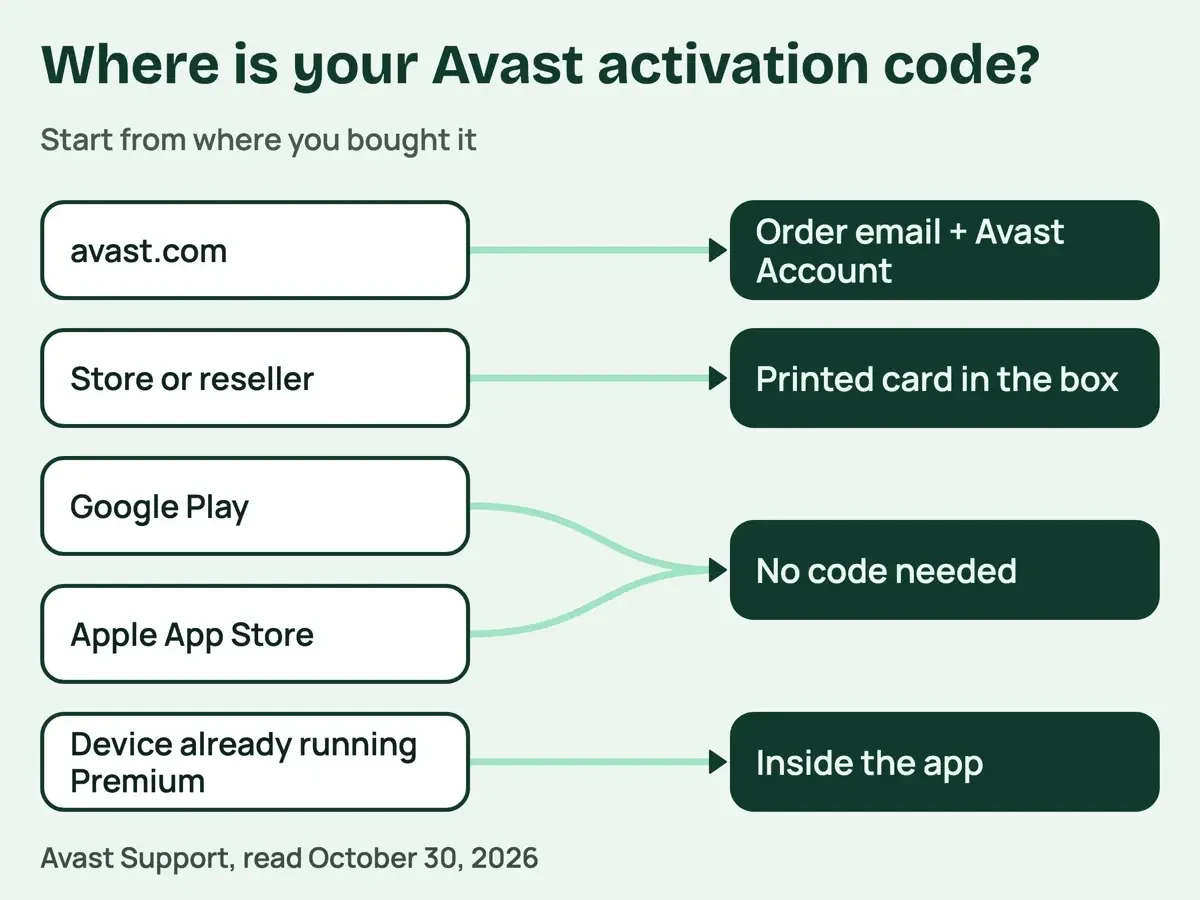 Diagram by DigitalTreed, from the Avast Support article on locating your activation code, read October 30, 2026.
Enter the code, or sign in instead
Once you've found the code, typing it in takes a minute. On a Windows PC, Avast's activation article gives these steps for Premium Security:
- Open Avast Premium Security, then go to Menu > Enter activation code.
- Type or paste the code, hyphens included, then click Next twice.
- If the code covers more than one product, pick the apps and click Activate & install.
- Go to Menu > My subscriptions to see what's now active.
A Mac's path is slightly different. Open Avast Security, go to Menu > My subscriptions, select Activate paid features, paste the code and click Activate.
Skipping the code entirely works too. Under Menu > Sign in, you can enter the email of the Avast Account that holds the subscription. From there, type your password or ask for a one-time passcode by email.
When activation fails, Avast's fixes run in a set order. First, its FAQ asks you to recheck the hyphens. Then comes a timing note: "subscription synchronization may take up to 24 hours after purchase," so a brand-new order can look missing for a while. If you're signing in, the troubleshooting article says to open your Avast Account and click the Subscriptions tile. A plan that isn't listed there "is not linked to your Avast Account," and there's a separate set of steps to link it. If a full day passes and nothing's changed, the same article has a blunter fix. It says to "Completely uninstall and then reinstall your product," and then to try the other method, code or account.
Free Antivirus, Premium Security and Ultimate side by side
Before typing any code, it's worth asking whether you need one. Avast Free Antivirus doesn't ask for a code at all. The FAQ says it "automatically activates after installation" and may ask you to renew that activation after 12 months. The free download page confirms you can keep using it as long as you want, and you'd download it again on each new Windows PC.
Premium Security adds paid tools on top. Avast's FAQ says it "includes all of the free features" plus extras, such as scanning mailboxes for suspicious emails and controlling which IP addresses can remotely reach your Windows PC. Ultimate bundles Premium Security with Premium VPN, Cleanup Premium and AntiTrack, per the Ultimate page, while plain Premium Security needs a separate paid subscription for the VPN and for Cleanup. Here's what the Avast US store charged, as of October 30, 2026:
| Plan | Devices | First year | Renews at | Two years in total |
| Free Antivirus | One install per device | $0 | $0 | $0 |
| Premium Security | 1 PC or Mac + 1 mobile | $49.08 | $77.99 a year | $49.08 + $77.99 = $127.07 |
| Premium Security | 10 devices | $69.48 | $99.99 a year | $69.48 + $99.99 = $169.47 |
| Ultimate | 1 PC or Mac + 1 mobile | $49.08 | $109.99 a year | $49.08 + $109.99 = $159.07 |
| Ultimate | 10 devices | $69.48 | $139.99 a year | $69.48 + $139.99 = $209.47 |
The same figures also appear on Avast's Premium Security and Ultimate pages, so they aren't a one-page promo. There's a trial too: the store says "Try it for 30 days" on a PC and 60 days on a Mac. The Ultimate page says "you need to provide a payment method at sign-up," and Avast will "bill you at the end of the trial, unless you cancel it first." If free protection is all you're after, our roundup of free antivirus software for Windows compares other free options.
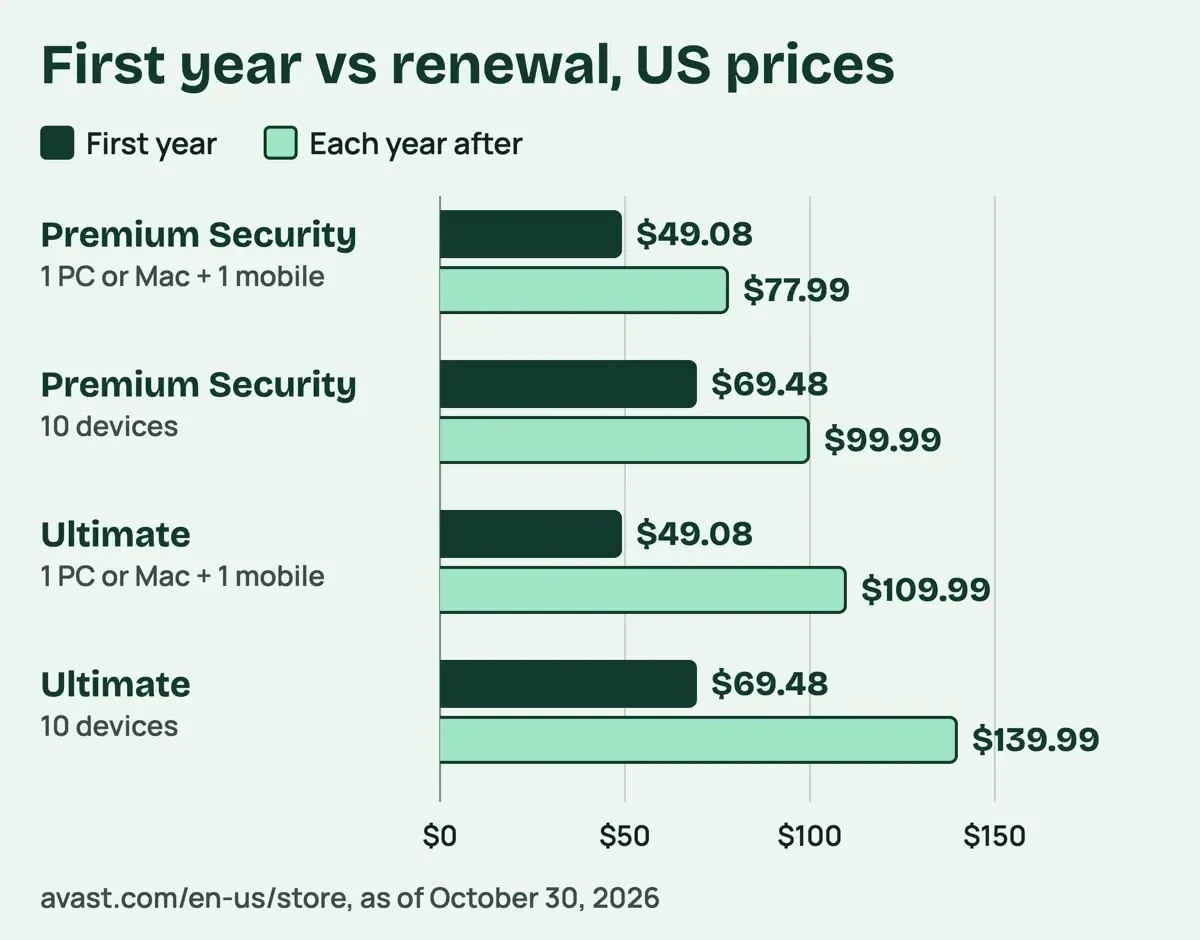 Diagram by DigitalTreed, from the Avast US store, prices as of October 30, 2026.
The renewal price is the number to plan around
Those first-year prices are introductory. The store labels each discount "Savings compared to renewal price," as of October 2026. So the 37% off Premium Security is measured against $77.99: 1 - $49.08 / $77.99 = 37%.
That renewal doesn't wait for you to act. Section 2A.1 of the Avast license agreement says "Your subscription will automatically renew" and warns that "the renewal price may be different to the price you paid." In dollars, using the store's prices as of October 2026, the jump at the first renewal is $77.99 - $49.08 = $28.91 for the entry Premium Security plan. The gap's wider on Ultimate. On its entry plan, it's $109.99 - $49.08 = $60.91. The 10-device Premium plan works out to $99.99 / 10 = $10.00 per device a year at renewal, if you fill every slot. That per-device math favors the 10-device plan for a family or a small office with several machines.
You also get two ways out. The store and the Premium Security page both show a "30-day money-back guarantee." Section 2A.6 of the EULA covers renewals: "you may cancel that renewal no later than 30 days following such renewal date." If payment was taken, "you will receive a full refund of the Renewal Payment." The store's notes route both refunds through "Avast Customer Support." Section 2A.5 lets you switch off auto-renewal, and the plan then ends with its current period. Section 2A.4 adds that each auto-renewal sends "a confirmation email," which gives you a real message to compare against any lookalike. Our local license reader below lays those dates out for an example purchase, with each refund window marked.
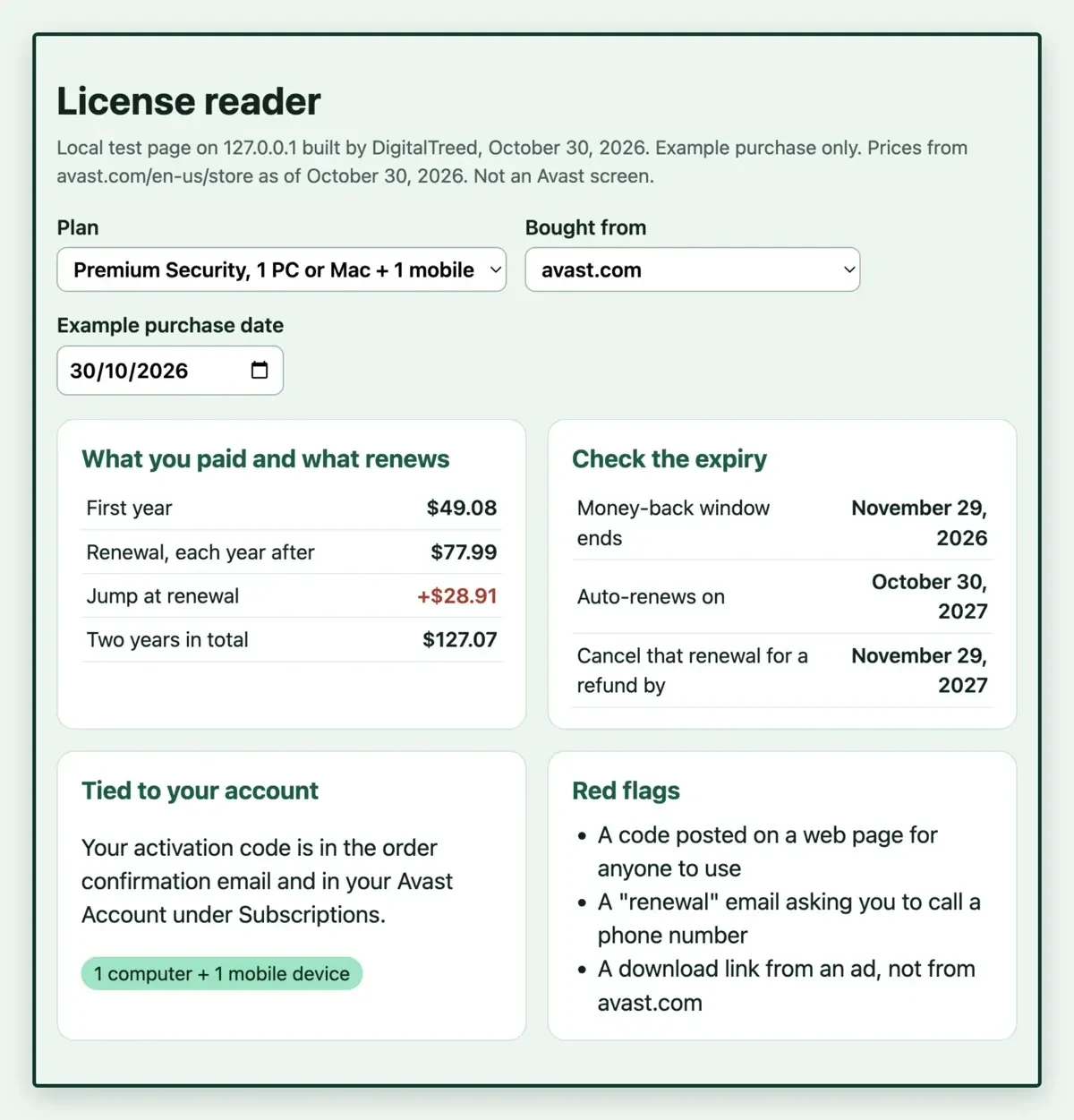 Screenshot: license-reader.html served from 127.0.0.1 on October 30, 2026, entry Premium Security plan, made-up purchase date. Not an Avast screen.
What we tested
On October 30, 2026, a script matched every quote here against saved text of the Avast, CISA and US Code pages in our sources. The FTC lines came from a separate reader tool, since ftc.gov won't serve our checker the page. Then it redid the price math.
python3 check.py
quotes found 90/90 across 45 claims
example timeline: bought 2026-10-30, 30-day money-back to 2026-11-29, renews 2027-10-30, cancel renewal for refund until 2027-11-29
ALL CHECKS PASS
All 90 quotes matched. Our discount math also matched the store's labels for all four plans. In the example, November 29, 2026 and November 29, 2027 are the two dates worth a reminder.
Moving a license, and what happens when it expires
Once a plan is paid for, a new laptop doesn't mean a new purchase. Avast's transfer article says the Multi-Device plan works "on up to 10 devices simultaneously" and says you can transfer it "freely between devices and platforms." The single-PC plan is stricter. You can move it to another Windows PC, "but you cannot use your Avast Premium Security subscription on more than one PC simultaneously." The move takes three steps: uninstall on the old device, install on the new one, then activate with the same code or account. Avast adds that you can install Free Antivirus "to remain protected on the original device."
Expiry is where the account matters again. The activation article says "The expiration date of your subscription appears in your Avast Account." The troubleshooting article spells out the Expired status: "You need to purchase a new subscription before you can activate and use the product." For annual plans, the EULA adds that "you will be notified in advance of the renewal," and that notice states the next price. Check the date in your account anyway, a few weeks before that email lands, so the renewal charge never arrives as a surprise on your card statement. Our Photoshop CS6 vs CC license guide shows Adobe's own switch from a one-time purchase to a subscription.
Why shared or cracked keys backfire
That account link is also why a code copied from a public web page is a bad bet. Earlier, this article listed codes that people said still worked, and we've removed every one.
The reasons sit in Avast's own terms. Section 5.1.2 of the EULA says you may not "disclose any Activation Code to any party other than Vendor or Vendor's designated representatives." Section 5.1.1 bars using a code on more devices than the plan allows, and that's exactly what a code posted on a public page invites.
Breaking those rules costs the very protection you wanted. Section 8.1 says the agreement "will immediately terminate upon your breach," which brings "forfeiture of any rights you may have to receive Updates." The same clause also cancels any refund for the unused part of the subscription, so mixing a paid plan with a shared code puts both at risk. CISA's antivirus guidance explains why updates matter: "Because it relies on signatures, anti-virus software can only detect malware that has known characteristics." The same page adds: "It is important to keep these signatures up-to-date."
The pages that hand out keys carry their own risk. CISA's malicious code tip says "It is not uncommon that free software contains a Trojan horse." The FTC's malware page tells you "Don't use unfamiliar websites to download free stuff like music, movies, shows, or games." The same page warns that "Scammers place bogus ads for software," and says to reach the real site by typing its address. Its shortest rule is "Don't click on ads to download software." Typing the address also keeps you off lookalike domains, like the pair compared in our lookalike website check. Our MP4Juice safety guide covers the same ad and malware risk on converter sites.
US law draws its own line. Under section 1201 of the Copyright Act, "No person shall circumvent a technological measure that effectively controls access to a work protected under this title." The same section on govinfo.gov defines what circumventing covers. Avast's EULA separately bars attempts to "defeat or circumvent" its "controls on the use of copies." Whether a given tool crosses the legal line is a question for a lawyer, and this guide isn't legal advice.
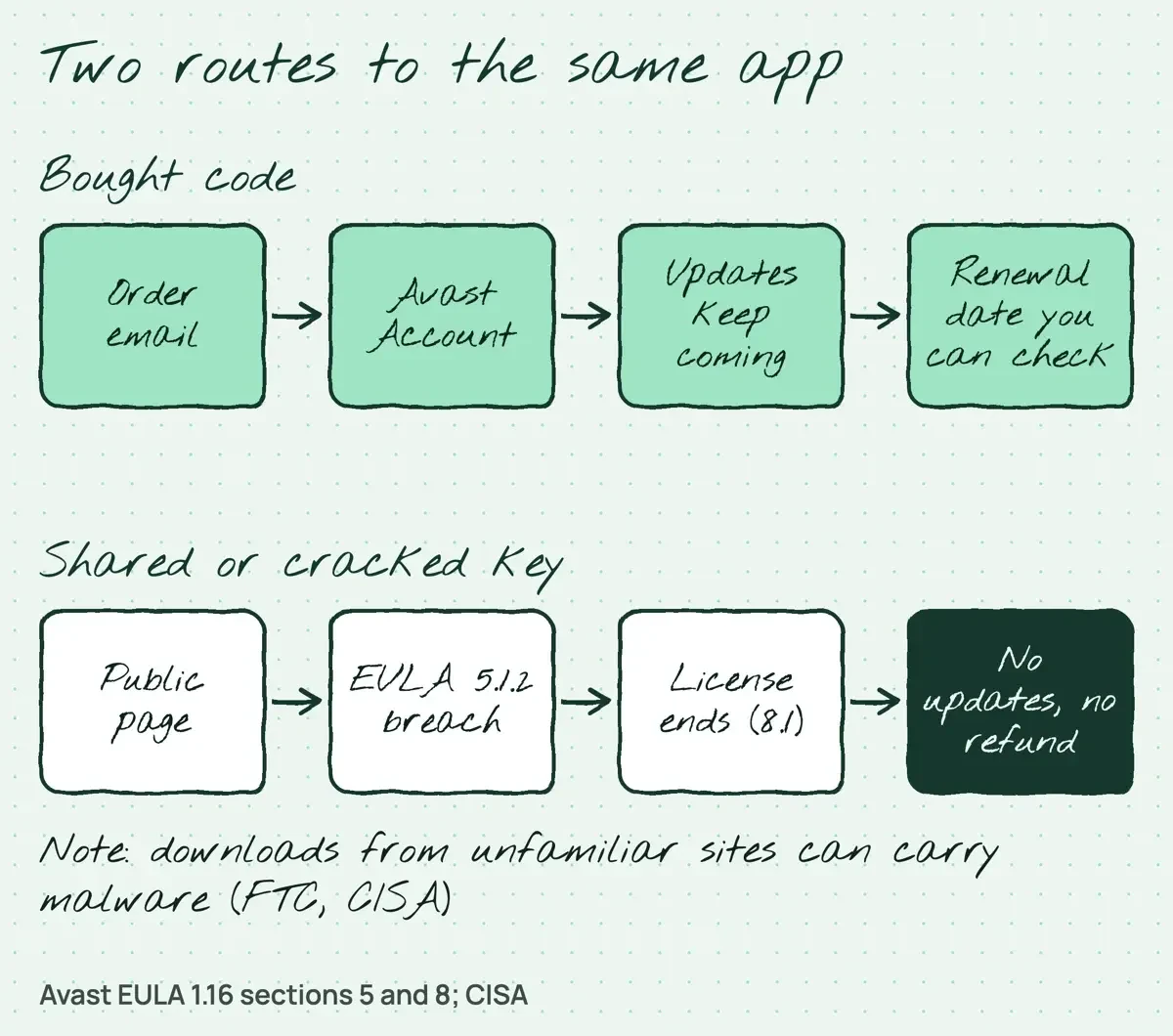 Drawn by us, from Avast EULA sections 5 and 8 and CISA guidance, October 30, 2026.
Scammers copy the renewal itself, too. The FTC's tech support scams page says "scammers send notices about automatic renewals for tech support subscriptions." Its advice is short: "Do not use the number included in the message." Avast's store page says "Avast only bills your stored payment method and has no other way of billing you for your ongoing Avast service." Check the real renewal date in your Avast Account, reached by typing the address yourself, instead of calling, clicking or replying to anything in that message. Already clicked a link in one of those emails? Our steps after clicking a phishing link cover a PC, Mac or phone.
Our take: buy the plan that fits your device count, find the code in your order email or Avast Account, and set a reminder for the renewal date. For a business, our tips to protect your business online and the list of common malware entry points show where antivirus fits.
Avast license questions
Frequently asked
Can I still buy Avast Internet Security or Pro Antivirus?
No. Avast's Windows FAQ says both "are no longer available for purchase via the Avast website."
Why does my activation code fail on a Mac?
It may be a Windows code. Avast's Mac FAQ asks you to "confirm that the code is for Avast Premium Security for Mac" before trying again.
Does Avast work on a Windows laptop with an ARM chip?
Yes, on Windows 11. The same Windows FAQ notes that Rescue Disk and Do Not Disturb Mode won't work on those devices.
What if I forgot my Avast Account password?
Reset it. Avast's locate-your-code article says your login is the email you gave at checkout, and "If you do not know the password for your Avast Account, you can reset it."
How we made this guide: Each price came from Avast's US pages on the day we wrote it. A script tied each license rule to Avast's EULA or Support text. We didn't install Avast software, open an account or visit a key site. Facts checked by the DigitalTreed team on October 30, 2026.
First published April 2025 with shared codes and a third-party download step. Rewritten October 30, 2026: both are gone. In their place are where to find your own code, how to activate and move it, checked US prices with renewal math, and the license terms behind the change.
Sources
- Avast Support: How to activate Avast Premium Security
- Avast Support: How to locate your Avast activation code
- Avast Support: Avast Premium Security and Avast Antivirus for Windows FAQs
- Avast Support: Avast Premium Security and Avast Security for Mac FAQs
- Avast Support: How to troubleshoot activation issues in Avast products
- Avast Support: How to transfer an Avast subscription to another device
- Avast End User License Agreement, Version 1.16 (revised January 23, 2026)
- Avast Store (USA)
- Avast Premium Security (USA)
- Avast Ultimate (USA)
- Avast Free Antivirus download page (USA)
- CISA: Understanding Anti-Virus Software
- CISA: Protecting Against Malicious Code
- FTC: Malware: How To Protect Against, Detect, and Remove It
- FTC: How To Spot, Avoid, and Report Tech Support Scams
- U.S. Copyright Office: Title 17, Chapter 12 (section 1201)
- govinfo.gov: 17 U.S.C. 1201


Comments
No comments yet. Start the conversation below.