
Quick answer
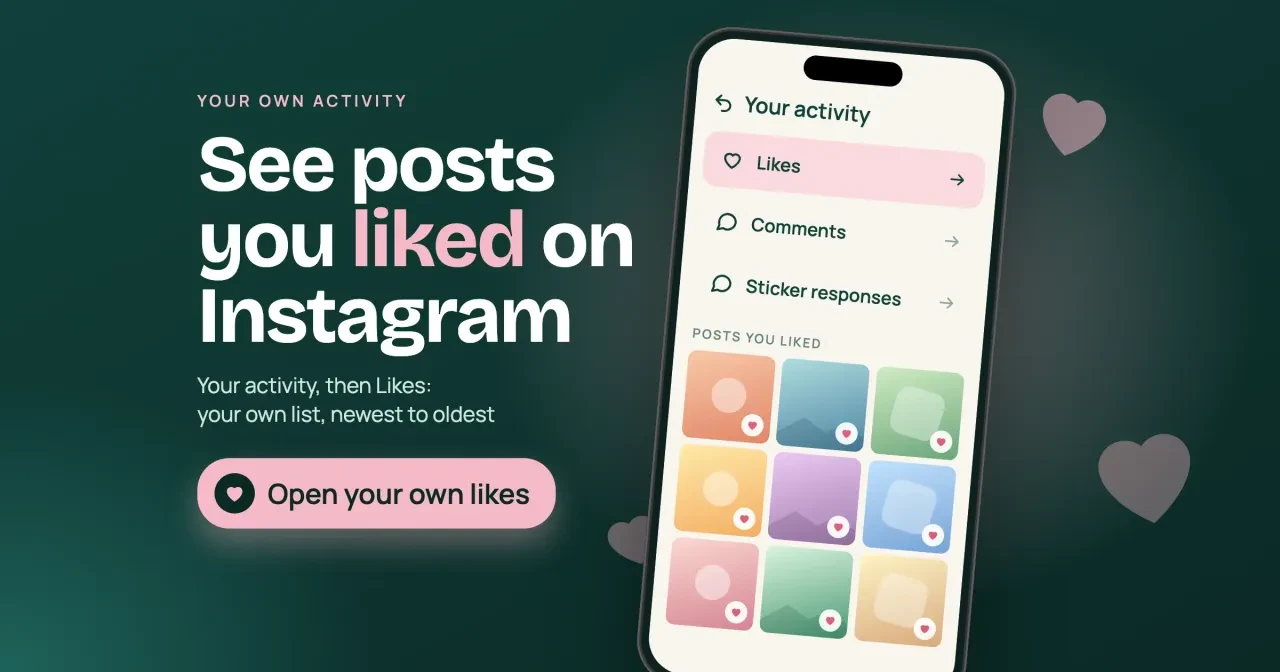
Instagram shows your 300 most recent likes under Your activity, then Likes, as of October 29, 2026. Posts their owners deleted drop off that list, and no screen in the app lists everything another account has liked. After checking it, set who sees your likes under Likes you've made.
Maybe you run a shop's Instagram from your own phone and want to see liked posts on Instagram in one place. Your likes bookmark posts, and customers can sometimes see them. Your activity is a section of your own profile menu that lists the posts you liked and the comments you wrote. We'd open it before touching any privacy setting.
This guide starts with where Instagram keeps the posts you liked and how to unlike old posts in bulk. Then it covers who can see that you liked a post, why hiding like counts is a separate setting, and why there's no list of someone else's likes. It ends with the risk likes viewer apps pose to your account, and a short privacy check.
Key takeaways
- Your activity shows your 300 most recent likes and unlikes them in bulk.
- Likes you've made can hide your likes from everyone except the poster.
- Hiding like counts changes the totals, not who sees your name.
- Meta's API reference had 0 fields naming who liked a post, of 68 checked.
- Likes viewer apps that ask for your password can take over accounts.
Where Instagram keeps the posts you liked
Your likes live in one place, and Instagram's help page on posts you have liked gives the path, which on an iPhone reads like this as of October 29, 2026:
- Tap your profile picture in the bottom right.
- Tap Menu in the top right.
- Under How you use Instagram, tap Your activity.
- Under Interactions, tap Likes, then tap any post to open it.
The list stops at your 300 most recent likes. Say you liked a supplier's post two years ago and have liked plenty since. It may simply have aged out. At an example rate of 10 likes a day, 300 likes covers only 30 days (300 ÷ 10 = 30). A heavy scroller's list reaches back about a month, while a light user's can span years. On a computer, the path starts from Menu in the bottom left, and every tap after that is the same as on the phone.
Instagram's page on removing likes from multiple posts adds the catch behind most "missing" likes: if the owner deleted a post you liked, you won't see it in the list.
The same Interactions screen holds the comments you wrote, and Instagram's page on deleting your comments uses that exact path, with the same Select button for clearing several at once. So Your activity is the one stop for tidying what you've left on other people's posts. The list keeps its own newest to oldest sort, and you can filter it by date just like likes.
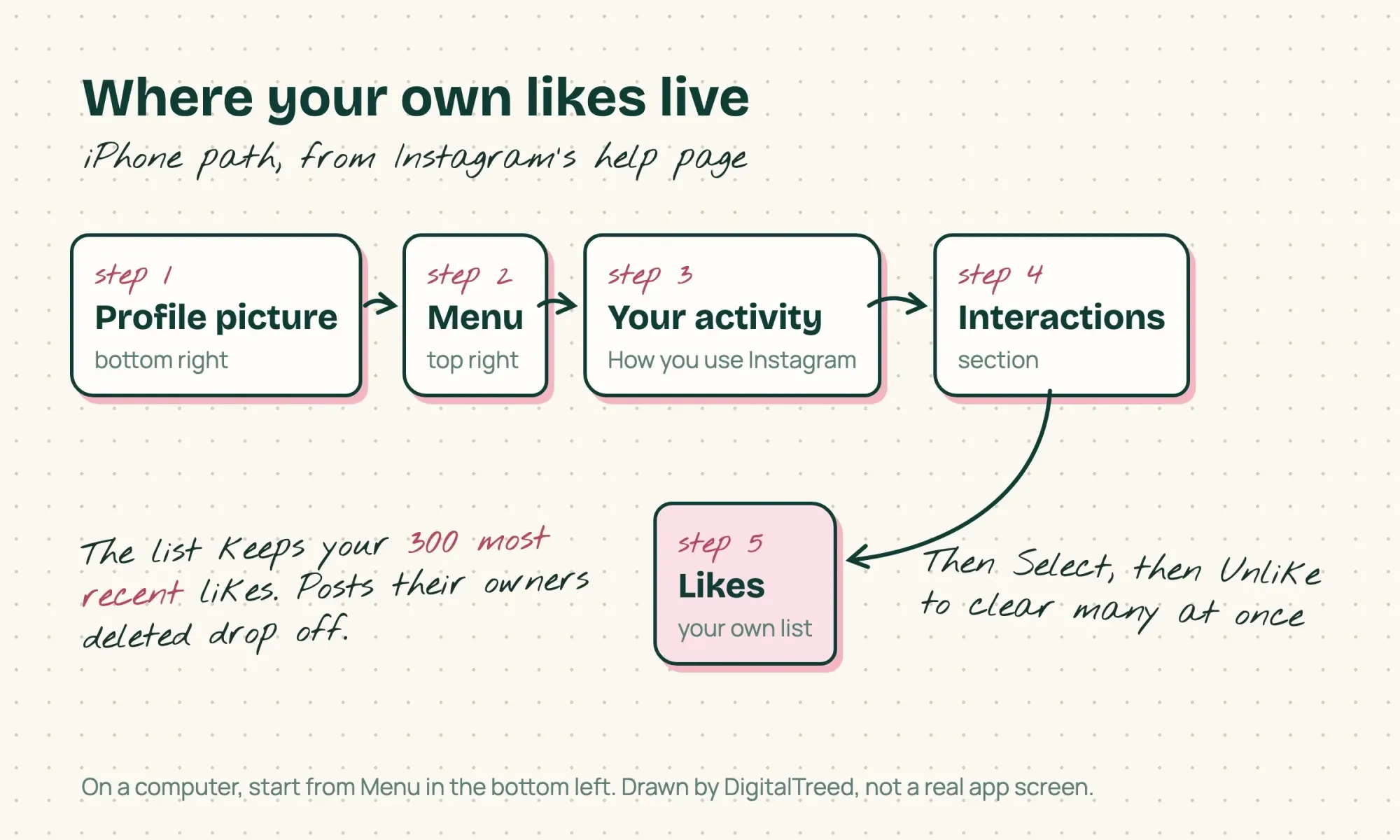 Drawn by us. Steps from Instagram's Help Center, read October 29, 2026; not a real app screen.
Unlike old posts in bulk from the same list
Now clear it in batches. Tap Select in the top right and pick each post you want to drop. Then tap Unlike at the bottom and confirm. Instagram's steps start with updating the app to its latest version, so do that first if the Select button doesn't show up where the help page says it should.
The filters save time. A sort button labeled newest to oldest changes the order. All dates narrows the list to a date range, and All authors shows one account's posts only. Say you want to drop every like on a former partner brand's posts. Filter by that account first. Example: if that brand's posts make up 25 of your 300 listed likes, the filter puts those 25 posts on one screen. You still tap Select on each post, then Unlike once, instead of scrolling through all 300.
Unliking takes your like off the post and out of your list, but it can't undo what someone saw while it showed.
A quick pass every few months keeps each batch small enough to review post by post. The list only holds your newest 300, so a like that has aged out of it can't be found and removed there later.
Who can see that you liked a post?
That leads to the question most people really have. By default, it's anyone who can see the post. Instagram's page on who sees your likes says your followers may see your username under a post you liked, written out as your username and 12 others, whatever the count. If your own account is private, only approved followers see your posts, but that covers what you post, not the likes you leave on public accounts. You can narrow that now. Instagram's page on managing who sees your likes describes a setting called Likes you've made, under Menu on your profile. It covers your likes on other people's posts and reels, with four choices:
| Setting | Who can see what you like | Who still sees it |
| Allow everyone to see likes | Everyone | The poster, and you |
| Allow people you follow to see likes | People you follow | The poster, and you |
| Allow close friends to see likes | Your close friends | The poster, and you |
| Don't allow anyone to see likes | No one | The poster, and you |
The last column is the part people miss, because whatever you pick, Instagram says the account that posted can see that you liked it.
So a like on a competitor's post always reaches that competitor, even with Don't allow anyone to see likes switched on. If you'd rather they not know, skip the heart, or unlike it from Your activity later.
Two other places can show your likes to people you know. Meta's August 6, 2025 announcement said the Friends tab in Reels shows content your friends have liked, created, reposted or commented on. The same post said controls were rolling out that let you hide your own likes and comments on reels, so your likes may show there until you switch that off. Separately, Instagram's shared activity page covers accounts where one or both of you follow the other. Either of you can see the likes you've left on each other's photos and reels.
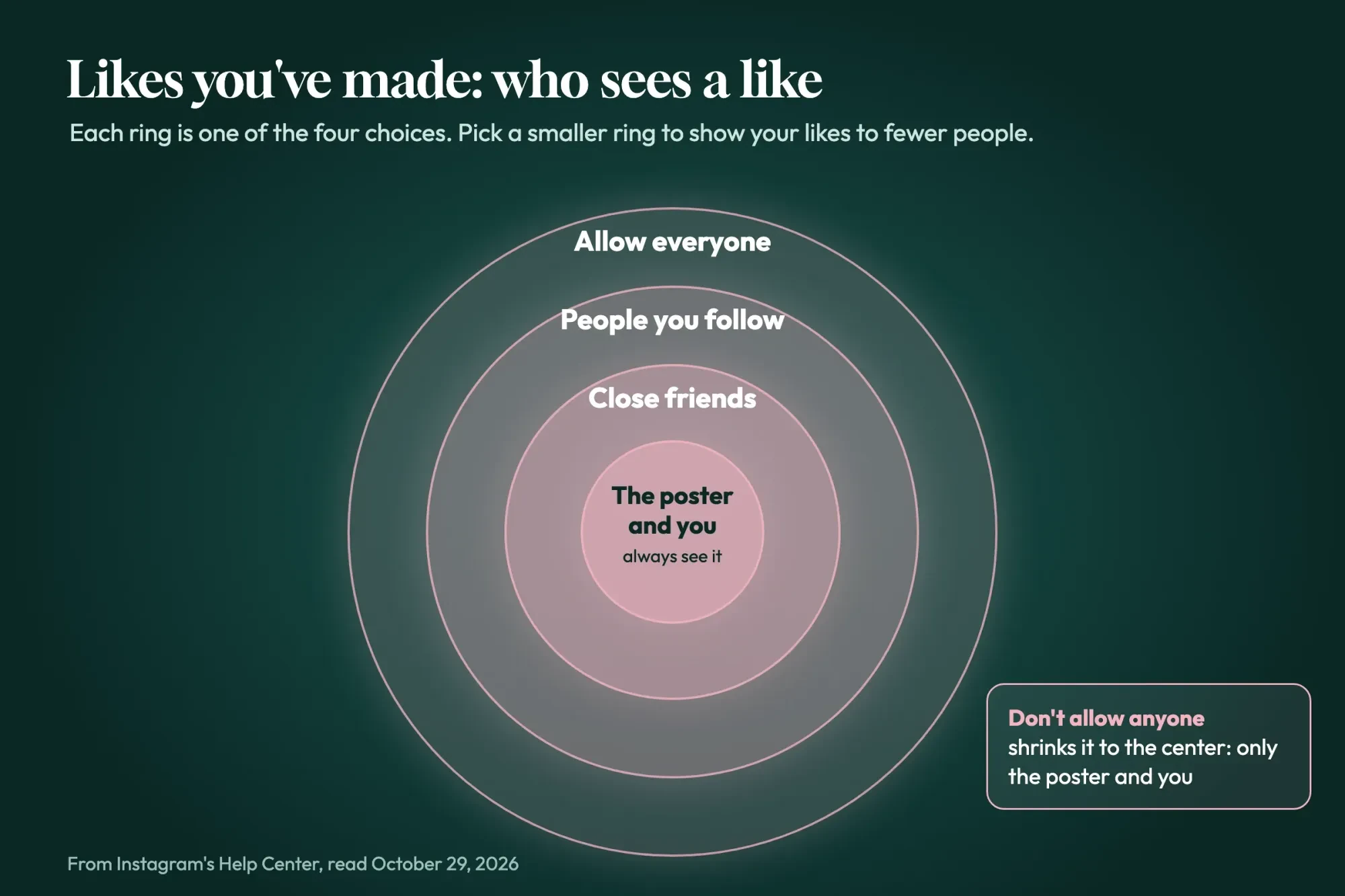 Diagram by DigitalTreed. Settings from Instagram's Help Center, read October 29, 2026.
Hiding like counts is a separate setting
Hiding who sees your likes is one switch, and hiding the numbers is another. Neither one deletes anything. Instagram's page on hiding like counts covers two counts. Under What you see, Like and share counts hides totals on other people's posts, on your screen only. It doesn't change what anyone sees about you, and it doesn't stop the account you liked from seeing your name on its list of likes.
The second count sits on your own posts. Before you share, tap More options and switch on Hide like counts on this post. You can change it later for posts already in your feed, and you'll still see your own totals. On a slow launch post, that takes a little pressure off. It doesn't hide the names of the people who liked it, though, so anyone who opens the likes list can still scroll through who tapped the heart.
The switch reaches past the app, too: Meta's IG Media API reference says its like_count field is left out of some responses when the owner has hidden like counts.
Why there's no list of someone else's likes
A list of your own likes exists, so it's natural to expect one for other people. There used to be something close. Instagram's old Following tab showed what the accounts you followed were liking. TechCrunch reported on October 7, 2019 that Instagram was removing it, with the rollout expected to finish that week. None of the 13 Help Center pages we read on October 29, 2026 mentions a Following tab.
What's left is partial: the Friends tab and shared activity covered above. Both depend on settings and follows, and neither is a full history of what an account liked. So the steps here stay on your own account and your own likes. We also checked whether any official doorway gives out more. Meta publishes its IG User API reference for apps that work with Instagram accounts. If Meta gave apps a list of who liked a post, we'd expect a field there to name it. The IG Media page also says the API returns data only for professional accounts, not personal ones.
What we tested
On October 29, 2026, we saved both pages without logging in and ran a script over their tables. Of 68 fields and edges, only like_count and total_like_count mention likes, and both are totals that name no one who liked a post.
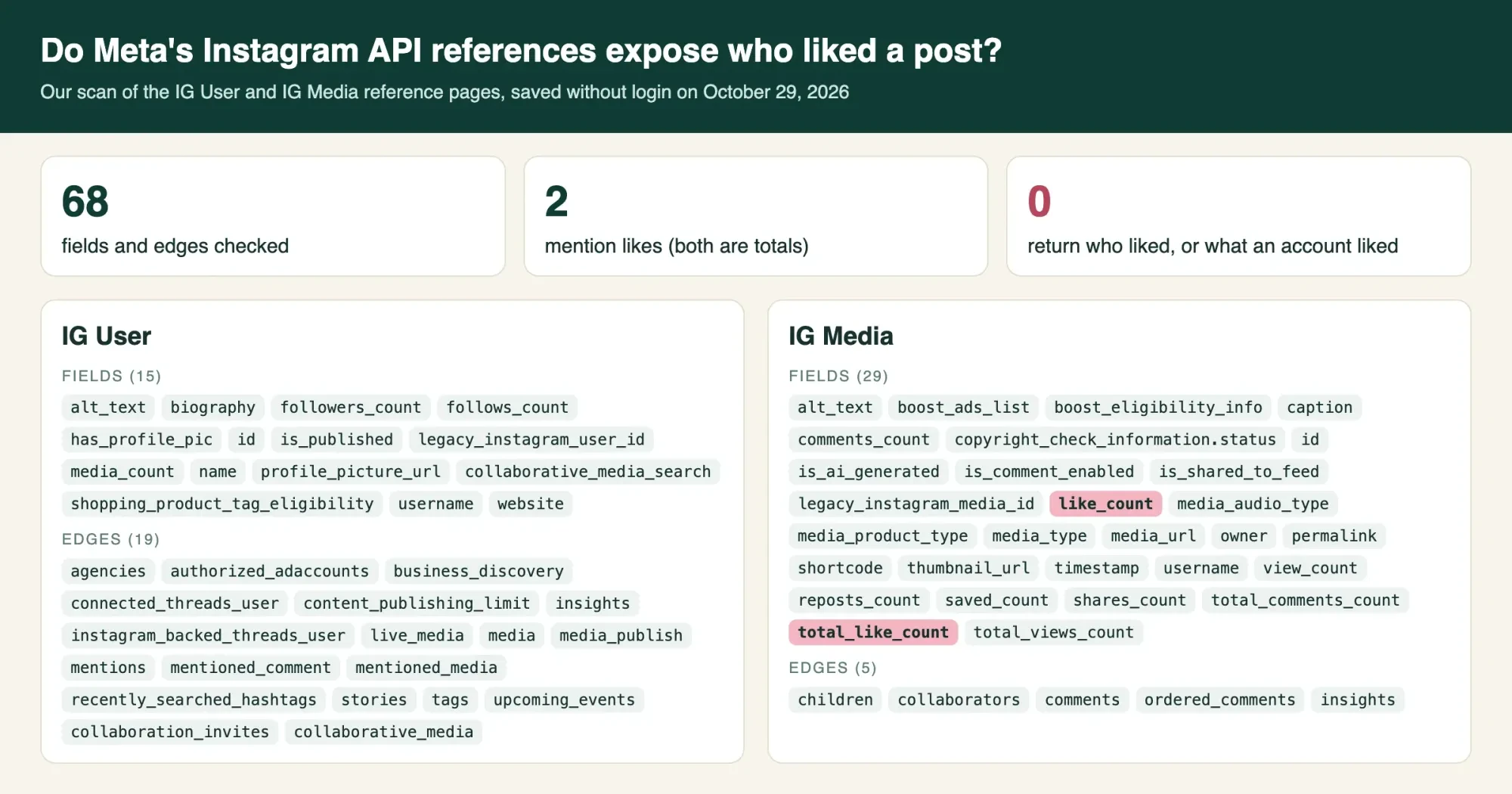 Screenshot: our scan page on 127.0.0.1, October 29, 2026.
Likes viewer apps put your own account at risk
So be wary when a site promises to show you anyone's likes, since that is exactly the list our scan found no official field for.
With no official source, an app promising someone's full likes list has to get its data another way, and often that way is your own login. Instagram's page on third-party apps says apps given your login details "can gain complete access to your account", whether you typed a password or connected through an access token. It adds that they can read your messages. The page also warns that Instagram may remove the likes those apps generated, and limit or disable the account. Instagram's data scraping page lists giving your password to a third-party app as one reason an account gets flagged. For a shop, that puts the business account and its customer messages in someone else's hands.
Scams on social media aren't small, either. The FTC reported on October 6, 2023 that one in four people who reported losing money to fraud since 2021 said it started on social media. Reported losses there hit $2.7 billion from January 2021 through June 2023.
We cover the wider tricks in our post on Instagram scams, and the same password bait shows up in Snapchat scams that target creators.
Typed your password into one of these sites already? Change it in the Instagram app now. Then remove that app from your connected apps.
The FTC's phishing guide also recommends multi-factor authentication, since it makes logging in harder for scammers who have your password. Our guide to clicking a phishing link covers the next steps on a phone or computer.
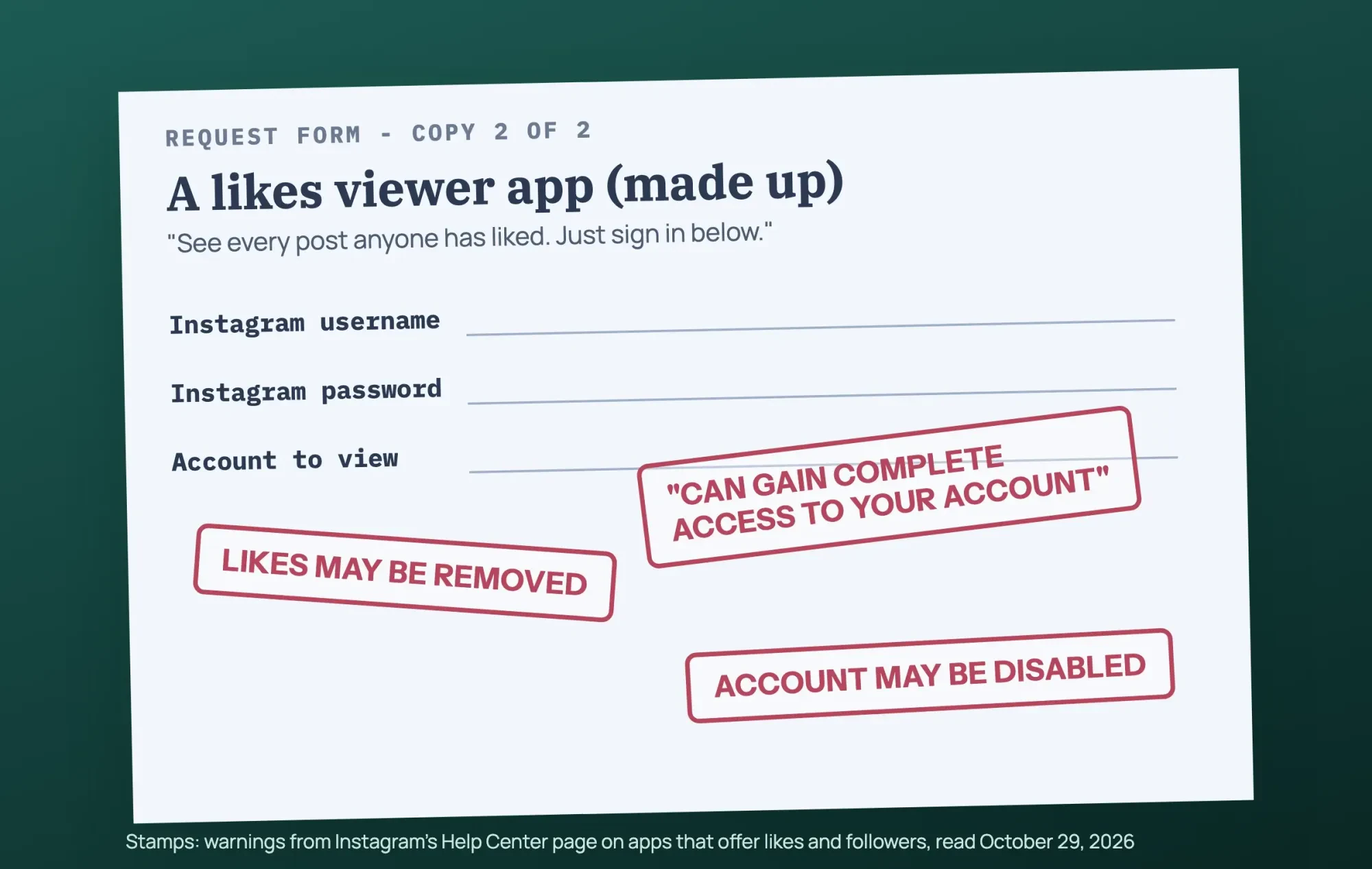 Drawn by us. Warnings from Instagram's Help Center, read October 29, 2026; the app is not real.
A short privacy check for your likes
Put together, these settings fit in one sitting. We'd run them in this order, because the first step shows what's already public:
- Open Your activity, then Likes, and filter by date to scan the last year.
- Unlike anything you wouldn't want a customer or the poster to notice.
- Set Likes you've made to the narrowest group you're happy with.
- Check that no outside app still has access to your account.
- Turn on two-factor authentication if it is off.
Two more switches sit in Settings, and each takes one toggle. Instagram's private account page says only approved followers see a private account's posts. Business profiles can't go private, though, and teens under 16 need a parent's or guardian's permission to switch an account to public. And per the Activity Status page, turning that status off also hides when others are active from you. Want a record of older activity? Instagram's export page lets you pick types of information and a date range. The email link can take up to 30 days. That page doesn't list likes by name, so we can't promise older likes are in it.
Our take: change Likes you've made today, since it decides who besides the poster sees your hearts, and repeat the bulk unlike every quarter. The account itself needs a wider look, and our social media audit template covers it. For passwords and logins, read our notes on managing several social accounts securely and simple steps to tighten your online security. Then get back to posting, with Instagram Story ideas you can measure if you need a start.
Questions about your Instagram likes
Frequently asked
Will my followers see my name under posts I like?
They may. Instagram's likes visibility page says that after 4 likes, a photo shows the count and some usernames the viewer follows.
Can people see my likes if my account is private?
On public posts, yes. Instagram's private account page says accounts for people under 18 start private.
Does hiding like counts hide my name on posts I liked?
No. Instagram's like counts page also covers hiding counts on posts already shared.
What if I gave a likes app my password?
Change it first. Instagram's phishing help page lists [email protected] for reporting strange emails.
How we made this guide: This rewrite rests on 13 Instagram Help Center pages, two Meta API references, a Meta post, TechCrunch and two FTC pages. We used no Instagram account. Facts checked by the DigitalTreed team on October 29, 2026.
First published June 2025 as a guide to seeing what photos someone else likes. Rewritten October 29, 2026: now about your own likes, who sees them and how to limit that.
Sources
- Instagram Help Center: See recent photos and videos you've liked
- Instagram Help Center: Remove your likes from multiple posts
- Instagram Help Center: Delete comments you've made
- Instagram Help Center: Who can see when you've liked a photo
- Instagram Help Center: Manage who can see your likes on content
- Instagram Help Center: How to see shared activity
- Instagram Help Center: Hide or unhide like counts
- Instagram Help Center: Make your account private
- Instagram Help Center: Turn your Activity Status on or off
- Instagram Help Center: Review and export a copy of your information
- Instagram Help Center: Why you should not use apps that offer likes and followers
- Instagram Help Center: Restricted for data scraping
- Instagram Help Center: Protect yourself from phishing
- Meta Newsroom: New Instagram features to help you connect (August 6, 2025)
- TechCrunch: Instagram is killing its creepy stalking feature, the Following tab (October 7, 2019)
- Meta for Developers: IG Media reference
- Meta for Developers: IG User reference
- FTC Data Spotlight: Social media: a golden goose for scammers (October 6, 2023)
- FTC Consumer Advice: How to recognize and avoid phishing scams

Comments
No comments yet. Start the conversation below.