
Quick answer
To secure a Snapchat business account, turn on 5 settings as of October 29, 2026: two-factor login, a recovery code, Session Management, a passkey and a verified email and phone. Any message asking for your login code, password or a fee is a red flag, since Snap staff never contact you through Snap or Chat. Then report it in the app and at ReportFraud.ftc.gov.
Say you walk dogs, cut hair or post as a creator, and your Public Profile on Snapchat is where new customers find you. Snapchat account security is the set of settings and habits that stop someone else from signing in as you, or talking you into handing over the keys. Most attacks on small accounts don't break any code. They arrive as a friendly note: a warning from "support," a paid collab, or a friend asking for a code. We'd set up the five settings below before you answer any of them.
This guide starts with why scammers want a business account. Then it covers fake Snap support, brand deals that ask for a login, a fee or a check, and login code requests. After that come five settings that lock the account down and the signs of a takeover. It ends with five checks we ran on example messages and how to report it to Snap and the FTC.
Key takeaways
- Snap says its employees never contact you through Snap or Chat.
- Never share a Snapchat login code, even with a friend who asks.
- An authenticator app beats SMS codes, per FTC guidance on SIM swaps.
- Snap gives no help with lost recovery codes, so store yours now.
- Our five checks flagged 5 of 6 example scam messages and missed one.
Why scammers want a business Snapchat account
So why aim at a business at all? People already trust it. Snap's Public Profiles page for business calls the profile "your brand's permanent home on Snapchat." Each profile can have its own contributors, managers and admins, so one stolen login can reach every customer who follows you and message people who've bought from you before.
Social media is also where a big share of reported fraud starts. The FTC's data spotlight (October 6, 2023) puts losses to scams that started on social media since 2021 at $2.7 billion, "far higher than any other method of contact." For the first six months of 2023, the same spotlight says half of people who lost money to an online romance scam said it began on Facebook, Instagram or Snapchat. Across every channel, the FTC's 2024 fraud data release counted more than $12.5 billion in reported losses in 2024, from 2.6 million consumers. Impostor scams, the family fake support messages belong to, came second at $2.95 billion.
Snap knows accounts get traded. Its rules on deceptive practices (updated September 2026) ban "the hacking or sale of social media accounts, including Snapchat accounts." They also ban copying Snapchat or Snap Inc. branding to fool users. Running ads too? Snap's ad data is covered in our Snapchat ads targeting guide. This guide stays on the login, and all three hooks below want either that login or your money.
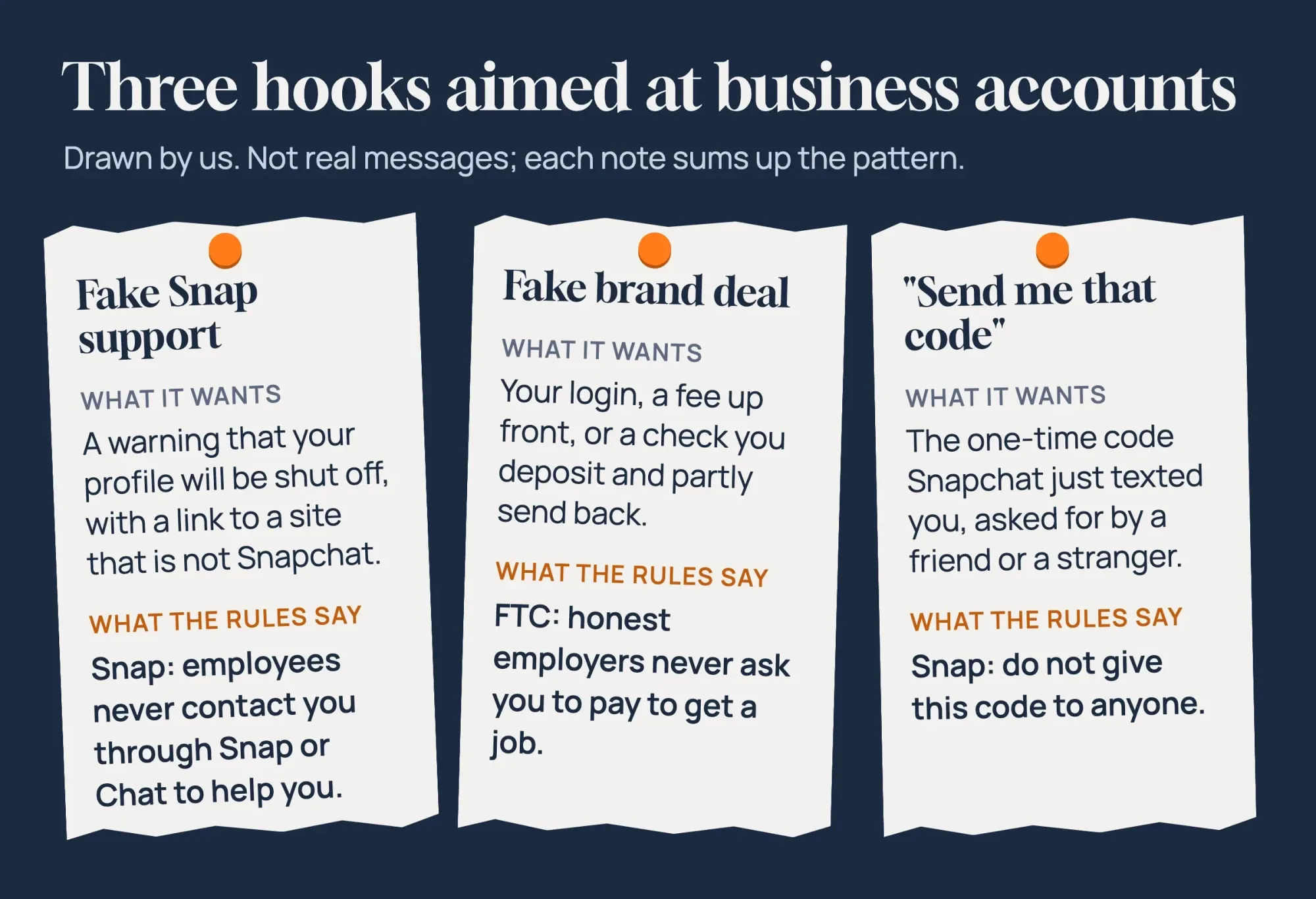 Drawn by us. Patterns summed up from Snap and FTC pages read October 29, 2026; not real messages.
Fake Snap support messages
That first hook pretends to be Snap itself. The message says your profile broke a rule, or will be shut off soon, and asks you to "confirm" you own it somewhere. Snap's reporting help page answers this one plainly: "Snapchat employees will never contact you via Snap or Chat to assist you." The same page asks you to report any account that does. For the made-up Fernmoor Dog Walkers, that means a chat signed "Snapchat Support Team" gets reported, not answered, using the in-app steps near the end of this guide.
Snap's privacy through security page adds two rules worth keeping by the phone. Don't answer unsolicited messages that claim to come from Snap or its Support team, and use Snapchat only in the app or on its official domains. A site whose name only looks like Snapchat fails that test, however polished it looks. The page also says Snap would never ask for your password, codes or pins. Worried the warning is real? Open Settings in the app, or type help.snapchat.com yourself. The FTC's phishing guide gives the same advice for any company: reach it through a phone number or website you know is real, not the one in the message.
So in our test, the fake support note raised R2 from its "Support Team" signature alone, and its look-alike link and 24-hour deadline added R3 and R5.
Already clicked a link like this? Our guide on what to do after clicking a phishing link walks through the next steps by device.
Brand deals that ask for a login, a fee or a check
Then there's the bait aimed at creators: a paid partnership that sounds like a break. A real sponsor wants your audience and your content. It has no reason to ask for your Snapchat password.
A fake one asks for something before any work starts, usually a login on its own site, an "onboarding" fee, or a check you deposit and partly send on.
The FTC covers the fee and the check in two consumer guides, and a sponsored post is paid work like any other gig. Its job scams guide says honest employers "will never ask you to pay to get a job." Its fake check guide (June 2025) describes a check "usually for more than they owe you," followed by a request to send some of it back. The rule is short: "Don't rely on money from a check unless you know and trust the person you're dealing with."
A real offer survives a slow reply. Look up the brand's website yourself, write to an address listed there, and ask who'll sign the contract. If the deal vanishes once you won't log in or pay, you have your answer. A real deal also has to be labeled on Snapchat. Snap's deceptive practices rules ban "unauthorized or undisclosed paid or sponsored content," so a sponsor asking you to hide the deal is a warning sign too. Our look at influencer marketing for small businesses shows how real partnerships are usually set up and paid.
Is someone asking for your login code?
That leaves the quietest hook. A friend, or someone using a friend's account, says Snapchat sent a code to your phone by mistake. Could you read it back? Don't.
Snap's sign-in alert page explains what that code means. An unexpected login code may mean someone already has your password, and that Snap stopped them by asking for extra proof before it let them into your account. Its instruction is short: "Do not give this code to anyone."
The page adds that Snapchat will never email or text you to ask for your password or two-factor codes, or to click a login link. Snap's security tips say never to share one-time passcodes or login links with anyone. They also warn against adding a phone number or email address you don't control.
If the request came from a friend's account, that account may already be hacked. The FTC's hacked account guide lists friends getting messages "you didn't send" as one sign. Call the friend instead of replying. Instagram owners see a cousin of this trick. Apps that promise to show someone else's likes ask for your login first, as our piece on seeing the posts you liked on Instagram explains.
Lock down the account in five settings
Those three hooks mostly fail against an account that's set up well, because a stolen password or a phished login can't open it without the second factor.
Snap's help pages put every setting in one place: the gear icon in your Profile, then My Account. Here are the five:
| Setting | Where Snap puts it | What it stops |
| Two-factor authentication | Settings > My Account > Two-Factor Authentication | A stolen or guessed password working alone |
| Recovery code | Two-Factor Authentication > Recovery Code > Generate Code | Losing access when the phone or app is gone |
| Session Management | Settings > My Account > Session Management | An unknown device staying signed in |
| Passkey | Settings > My Account > Passkey > Add Passkey | Passwords typed into fake pages |
| Email and mobile number | Settings > My Account | Being locked out with no way to reset |
Start with two-factor. Snap's SMS set-up page and its authenticator app set-up page share the same steps and end with a choice of SMS or Authentication App. Pick the app. Snap itself recommends an authenticator app or a passkey on top of your recovery details. The FTC's two-factor guide explains why, since hackers can take over a phone number through a SIM swap. In its words, "it's safer to use an authenticator app or security key." One catch: Snap warns that a factory reset, deleting the authenticator app, or losing both the phone and the recovery code can lock you out.
That's why the recovery code comes second. Snap's recovery code page says to keep it in an encrypted wallet such as a password manager, or print it and store it securely. Don't email it to yourself, since that inbox could be hacked too. Snap adds, "We do not offer support for lost Recovery Codes." Next, open Session Management. Snap's session page says it lists every device and browser signed in, so log out any you don't know. A session may not end right away, Snap notes.
Passkeys come after that. Snap's passkey page says a passkey uses your phone's own lock, such as Face ID or a passcode. The feature is rolling out gradually, so you may not see it yet.
Last, check the email and mobile number on the account. A business should use an address it owns, not a personal inbox. No domain address yet? Our walkthrough for creating a business email account covers the setup.
Passwords still matter here, because two-factor only adds a step after the password. Snap's tips ask for at least 8 characters, and its password safety page says a Snapchat representative will never ask for yours. Our password generator makes a long random one in your browser. If a team runs the profile, give each person their own role instead of passing one password around. The FTC's small business cybersecurity page says to require multi-factor authentication for all employees and contractors who access your network and devices.
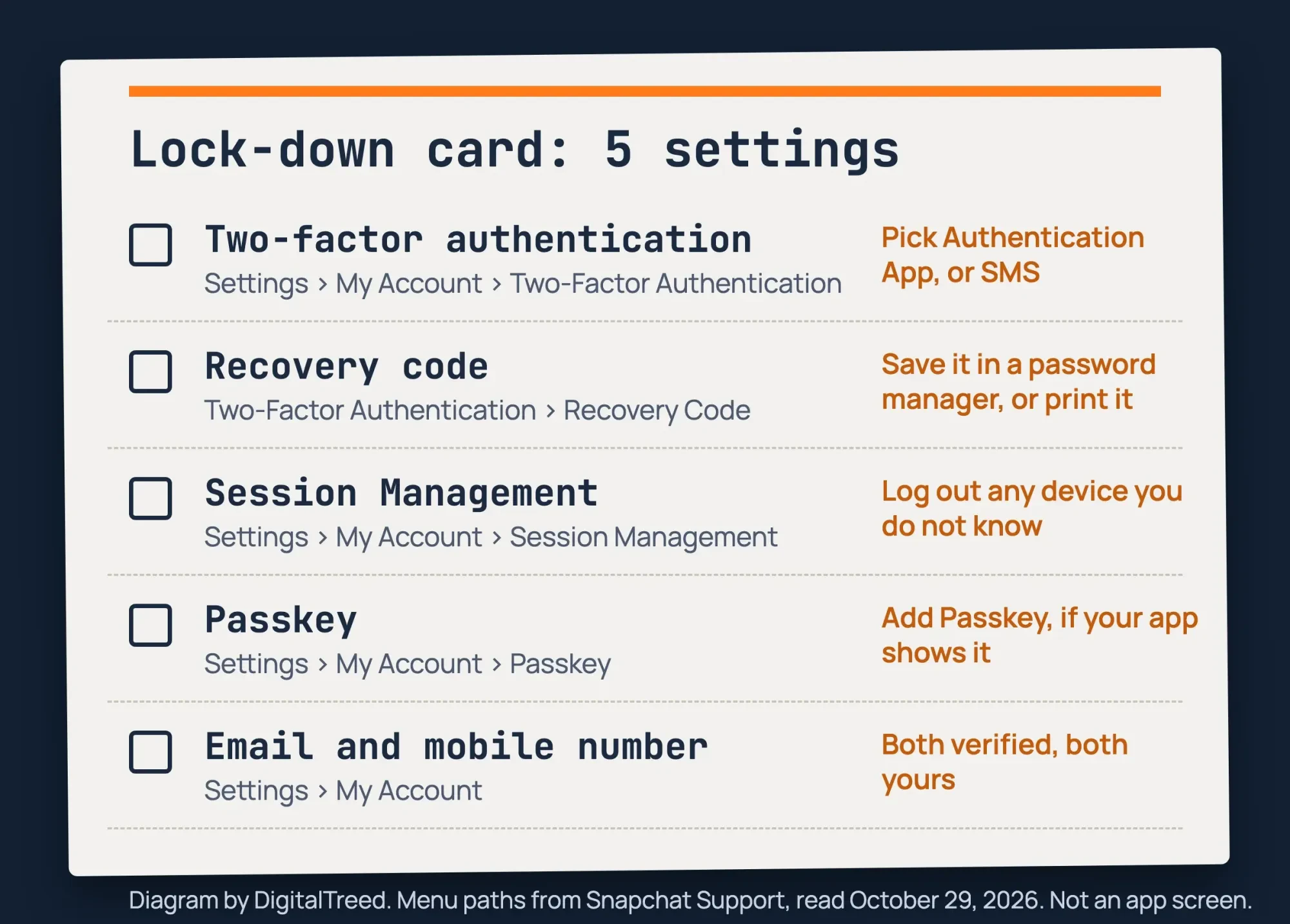 Diagram by DigitalTreed. Menu paths from Snapchat Support pages, read October 29, 2026; not an app screen.
Signs your account was taken over
Even with those settings on, you'll want to know what a takeover looks like. Snap's compromised account page lists the signs, and these matter most for a business:
- A login alert from a place, IP address or device you don't recognize
- Your email, mobile number or display name changed without you
- Two-factor turned on by someone else
- Stories, Spotlight posts or chats you never sent
- Customers asking about messages that came from your account
Snap's page also lists contact from outside Snapchat that mentions account details only you would know, which points to someone already inside. Seen any of these? Change your password first, at accounts.snapchat.com or with the forgot-password link. Then check that the email and mobile number are yours. If you're still stuck, Snap points you to its Support Bot or Contact Us form. The FTC's hacked account guide adds the customer side: tell your contacts about the hack and ask them to ignore pleas for help or money. On a Public Profile, a short Story once you're back in reaches the people most likely to be targeted next.
Five checks to run before you answer a message
Those rules boil down to a few questions you can ask of any message in seconds. We turned them into five plain checks, each tied to a Snap or FTC page:
- R1: Does it ask for a code, a password or a login?
- R2: Does it say it comes from Snap staff or a support team?
- R3: Does a link point anywhere other than snapchat.com or snap.com?
- R4: Does it ask for money first, a gift card or a check to pass on?
- R5: Does it set a deadline or threaten the account?
One yes doesn't prove a scam, but it's a reason to stop and check through a channel you trust.
On our 10 example messages, the checks flagged 5 of the 6 scam-like ones and none of the 4 ordinary ones. The fake support note raised R2, R3 and R5. The brand deal that asked for a login raised R1, R3 and R5. The code request raised only R1, and both money messages raised only R4. The miss was a "you won our giveaway" note asking for a phone number. None of the five checks covers a prize, so it slipped through.
| Message group | Messages | Flagged | Not flagged |
| Scam-like (fake support, brand deals, login code, giveaway) | 6 | 5 | 1 (the giveaway) |
| Ordinary (customer questions, a booking, a help link, a sample offer) | 4 | 0 | 4 |
We wrote the checks knowing what the messages said. That means this isn't an accuracy score for real inboxes. It shows what a short checklist catches, and that a message with no code, link or payment can still be bait. The help link to help.snapchat.com passed R3, as it should.
What we tested
Those 10 messages went to a made-up business, Fernmoor Dog Walkers, and we wrote every one. Six followed the scam patterns in this guide, and four were ordinary customer notes. Links used reserved .example test domains. Our script, redflags.py, ran the five checks on one Mac and saved the results as a page on 127.0.0.1, shown below.
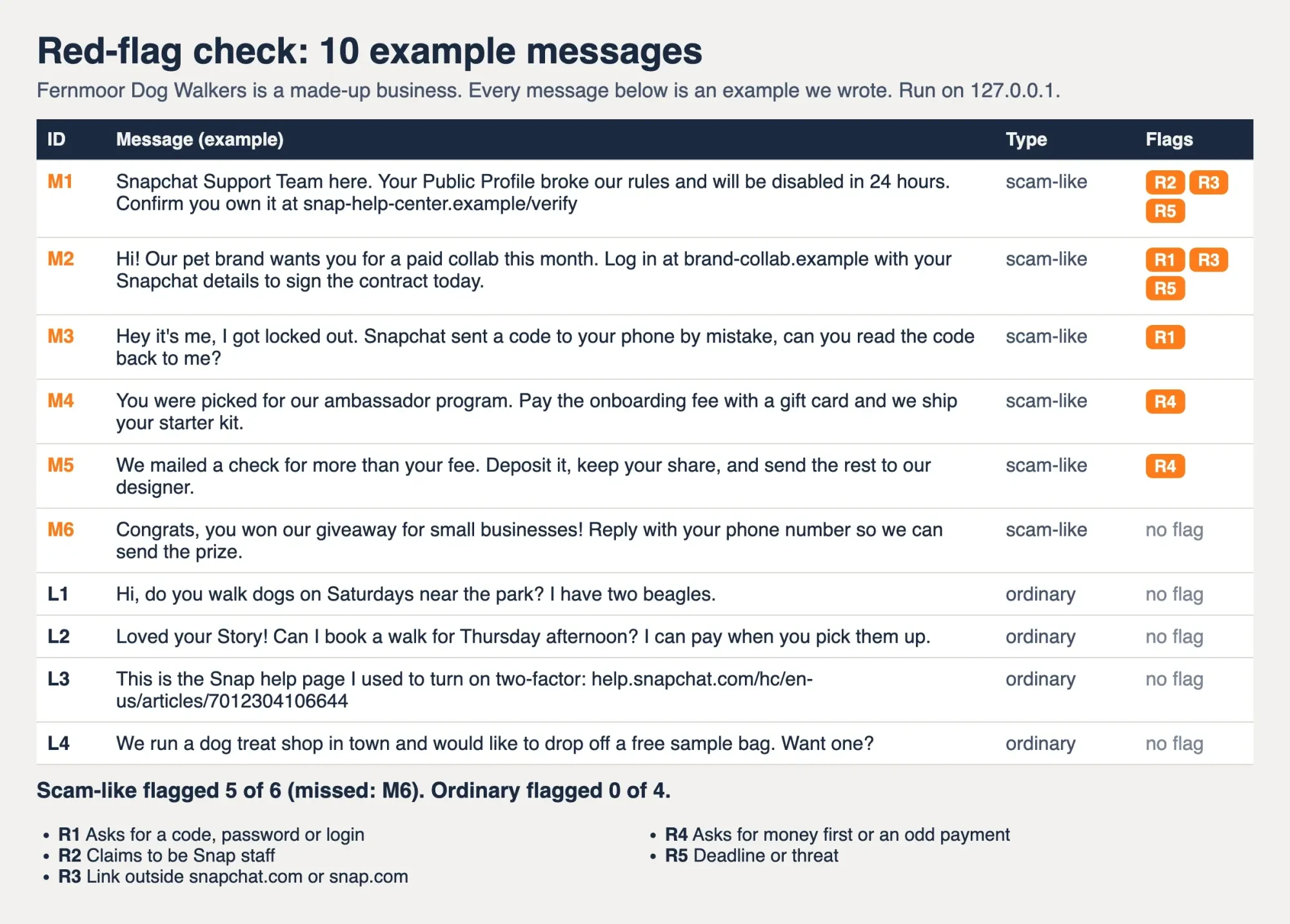 Screenshot: redflags.py results for 10 example messages, served locally on October 29, 2026. Fernmoor Dog Walkers is made up; all messages are examples.
Report it to Snap, then to the FTC
Once the account is safe, report the message in two places. Snap can remove the account that contacted you, and the FTC collects the pattern. For a Public Profile, Snap's reporting page says to open the profile and tap the menu at the top. Then tap Report, choose a reason and submit. For a person, press and hold their name in Chat, tap Manage Friendship, then Report. Snap says it doesn't share who reported with the person reported, and the closest reasons on its list are "False information or deceptive practices" and "Spam."
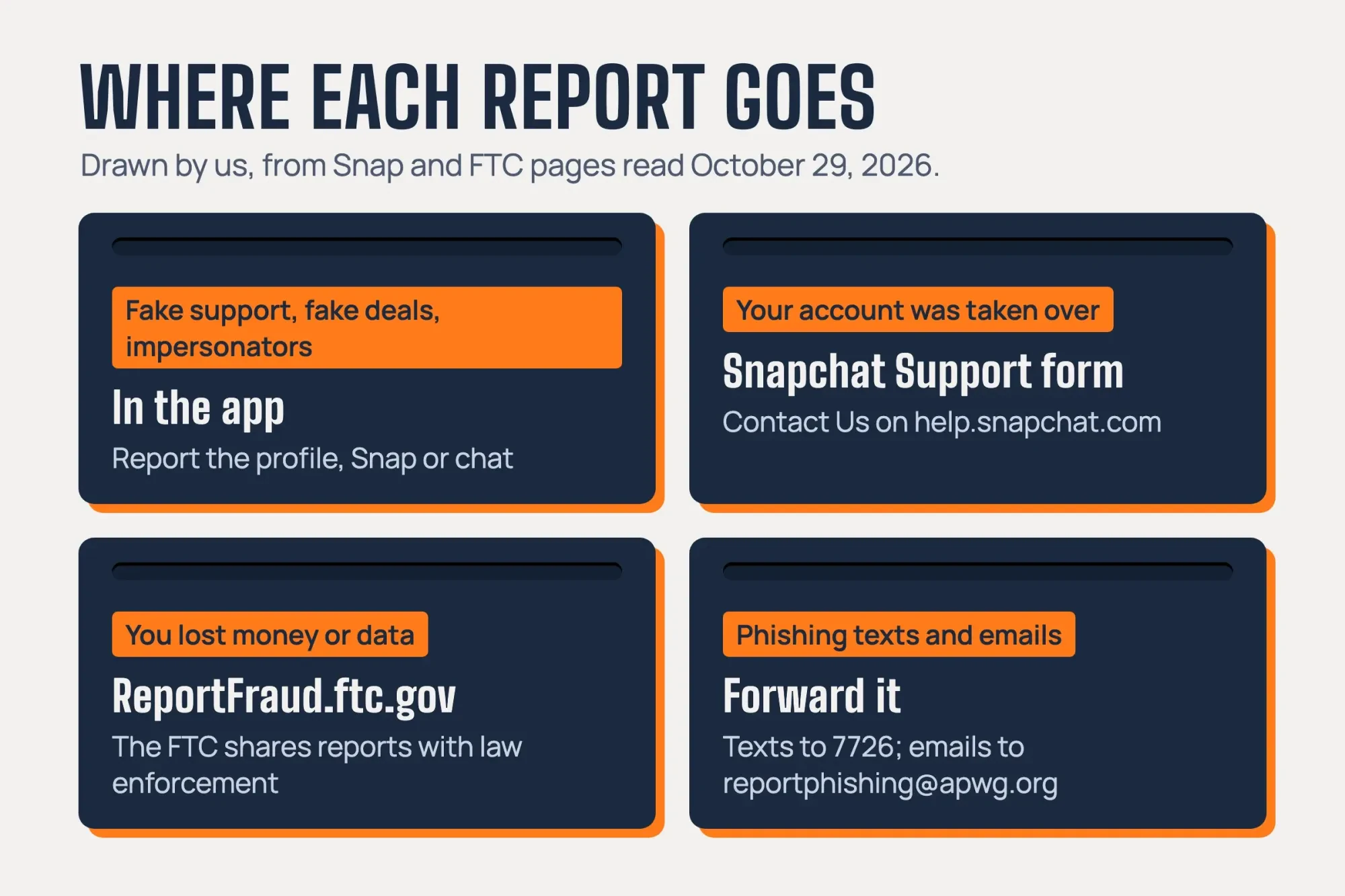 Drawn by us, from Snapchat Support and FTC pages read October 29, 2026.
Lost money or shared personal data? File a report at ReportFraud.ftc.gov too. The FTC's Consumer Sentinel page says those reports sit in a database "available to any federal, state or local law enforcement agency."
For phishing outside the app, the FTC phishing guide says to forward texts to 7726. Emails go to [email protected].
Our take: turn on two-factor with an authenticator app and save the recovery code today, before any message arrives. Every hook in this guide gets easier to ignore once your password can't work alone. Then add a security pass to your next social media audit so new staff and new devices get checked.
Full disclosure: DigitalTreed is paid to run social media marketing for small businesses, but nothing here needs us.
Questions about Snapchat scams and account security
Frequently asked
What happens if I log in with my Snapchat recovery code?
Snap's recovery code page says logging in with it will automatically turn off two-factor authentication. Turn it back on right away.
Will the person I report know it was me?
No. Snap's reporting page says the reported account may be told content was removed, but not who reported it.
What should I do if a friend says my Snapchat sent them odd messages?
The FTC's hacked account guide says to run up-to-date security software and sign out of all devices.
Can I log out of Snapchat on the web from another device?
Yes. Snap's session page says to go to accounts.snapchat.com, choose Session Management and click Log Out beside the device or browser.
How we made this guide: Facts here come from 13 Snap pages and 9 FTC pages, with a link beside each claim. ReportFraud.ftc.gov is linked only as the place to report. Our red-flag check ran on example messages on a local Mac, with no Snapchat login and no contact with anyone. Facts checked by the DigitalTreed team on October 29, 2026.
First published November 2023 as a general overview of Snapchat scams aimed at personal users. Rewritten October 29, 2026: now about creator and small business accounts, with Snap's security settings, reporting steps and a local message check.
Sources
- Snapchat Support: What steps can I take to help protect my security and safety on Snapchat?
- Snapchat Support: Set up Two-Factor Authentication with SMS
- Snapchat Support: Set up Two-Factor Authentication with an authentication app
- Snapchat Support: How do I use a Recovery Code for Snapchat?
- Snapchat Support: My account is compromised
- Snapchat Support: Manage the devices signed in to your account
- Snapchat Support: I got a sign-in alert I didn't request
- Snapchat Support: How do I report abuse, illegal content, or other violations?
- Snapchat Support: How do I use Passkeys on Snapchat?
- Snapchat Support: How do I keep my password safe?
- Snap Values: Privacy through security
- Snap Values: Harmful false or deceptive practices
- Snapchat for Business: Public Profiles
- FTC: Social media, a golden goose for scammers
- FTC: New FTC data show a big jump in reported losses to fraud
- FTC: How to recognize and avoid phishing scams
- FTC: How to recover your hacked email or social media account
- FTC: Use two-factor authentication to protect your accounts
- FTC: Job scams
- FTC: How to spot, avoid, and report fake check scams
- FTC: Cybersecurity for small business
- FTC: ReportFraud.ftc.gov
- FTC: Consumer Sentinel Network


Comments
No comments yet. Start the conversation below.