
Quick answer
A social media audit is a review of your accounts, results, posts and competitors over one period, usually the last quarter. It ends with one verdict per channel: keep, fix or pause. Audit every quarter, because Instagram's in-app insights only reach back 90 days, and save each platform's numbers the same day.
Most owners start a social media audit for the same reason. You've posted for months, a few posts did well, and you still can't tell which channel sends customers.
This guide gives you a free template and a way to fill it in one sitting.
It covers four parts: profiles, results, posts and competitors. If you only want to tidy bios, photos and links, that's a different job, and our social media optimization guide walks through that profile cleanup. Here the profiles get a quick check, and most of your time goes to what the numbers say.
Key takeaways
- Each audit ends with keep, fix or pause for every channel.
- Export every platform's numbers on one day so the periods line up.
- Judge channels by website visits and leads in GA4, not likes.
- Rank posts by interactions per 1,000 views, not raw likes.
- Finish with three actions, each with an owner and a date.
An audit ends in keep, fix or pause for each channel
What is it, exactly? A social media audit is a look back at one fixed period, with one question for each platform: was it worth the hours? It isn't a strategy, and it's not a monthly report. The strategy is the plan you write after the audit shows what's working.
That's why we end every audit with a verdict. Keep means the channel brings visits or leads. It earns the same effort. Fix means people engage but results are thin. One specific thing has to change. Pause means you stop for a quarter and spend those hours somewhere that pays.
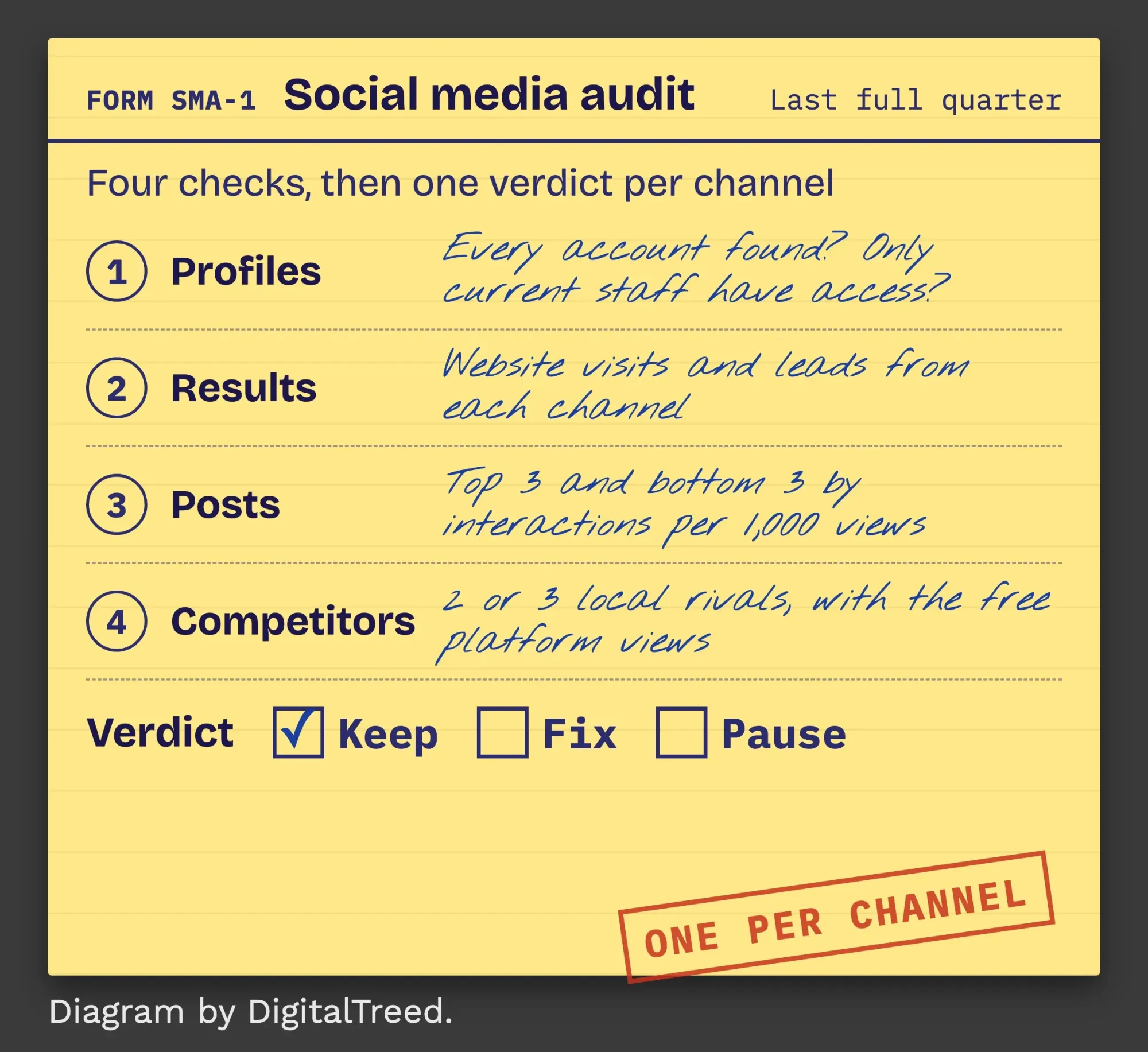 Diagram by DigitalTreed.
Nobody needs a 40-tab spreadsheet to get there.
Start with the goal. Decide what social should bring you this year, such as bookings, calls or store visits. Three numbers per channel usually settle it: website visits, leads, and how people react to your posts. Where your customers spend time is the starting point, not the verdict. In the Pew survey published October 19, 2026, 84% of US adults said they use YouTube, 70% Facebook and 51% Instagram. Even so, a channel most people use can still send you nobody.
Free analytics expire, so audit every quarter
That verdict needs data, and free data doesn't stay around for long.
Each platform keeps a different amount of history in its built-in analytics, and when we lined up their help pages on October 26, 2026, no two windows matched. Instagram's help center lets you pick a timeframe "within the past 90 days". Meta Business Suite's Overview tab "focuses on the past 28 days" for a Facebook Page or Instagram profile. LinkedIn's content analytics show highlights "for up to 365 days", while YouTube's Advanced mode page warns that "Downloaded reports are limited to 500 rows."
| Platform | Where the numbers live | How far back (free) | How to save them |
|---|---|---|---|
| Facebook Page | Meta Business Suite > Insights | Overview focuses on the past 28 days (no longer limit stated) | Export dropdown |
| Instagram app > Insights | Within the past 90 days | Export dropdown (Meta Business Suite) | |
| LinkedIn Page | Page admin view > Analytics | Highlights for up to 365 days | Export button, XLS file |
| YouTube | YouTube Studio > Analytics | Date range you pick in Advanced mode | Export current view, 500 rows max |
| TikTok | TikTok analytics | Not confirmed (help pages did not load for us) | Not confirmed |
The shortest window sets the pace. Right now, that's Instagram's.
If Instagram matters to you, audit at least once a quarter and export everything on one day, so the periods line up. We tried to confirm TikTok's limits as well. Its support site sent back an error page, and a headless browser showed a blank one, so we haven't listed numbers we couldn't read. Check the date picker in your own TikTok analytics. We'd rather say we don't know than guess.
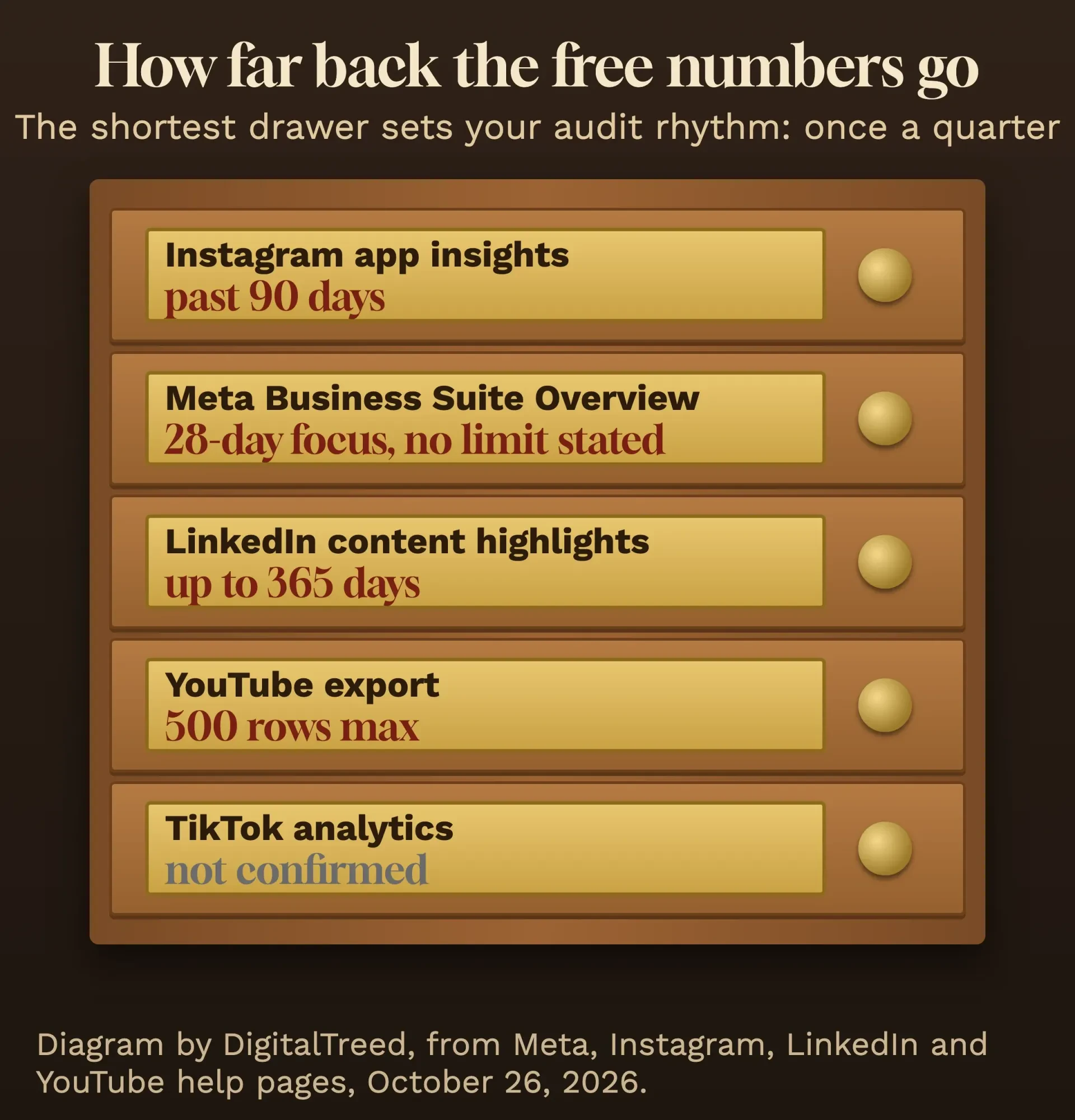 Diagram by DigitalTreed, from Meta, Instagram, LinkedIn and YouTube help pages read October 26, 2026.
Part 1: profiles get a quick pass, not a makeover
Once the dates are set, start with the accounts themselves. List every profile your business has opened, including old ones nobody posts on and any copycat using your name. A dead page with your logo still turns up when people search for you. A customer who finds a page that hasn't posted since 2021 may wonder whether you're still open at all.
Next, check who can get in, the step most owners skip.
On YouTube, channel permissions let "Multiple people" manage a channel at "five different levels" without your Google Account. Google calls that "safer than sharing your password". Meta also ties insights to people who have "permissions" on the Page. Read that list too. If a former employee or an old agency still has access, remove it the day you find it.
Last, open each bio link on your phone. Does it land on a working page? The social preview checker on our site shows the title and image your pages send when someone shares them. Bigger fixes, like rewriting bios, belong to the full profile cleanup.
Part 2: results are visits and leads, not likes
Those profiles only matter if they lead somewhere. The results part asks a blunt question: how many website visits and leads did each channel bring this quarter? You'll find the answer in Google Analytics, not in the social apps.
In Google Analytics 4 (GA4), visits from unpaid social links land in a channel called Organic Social. Google's default channel group page counts a visit there when the source is on its list of social sites. It also counts it when the medium is "social", "social-network", "social-media", "sm", "social network" or "social media". YouTube and TikTok clicks usually go to Organic Video instead. Check both rows.
Here's the catch.
A link tagged with a made-up source and a medium like "story" fits neither rule, so those visits won't show as social at all. We'd tag every bio link and post link with the medium "social" and a plain source name. Google's URL builder help page says those tags then appear in "the Traffic acquisition report", and the UTM link builder on our site writes the tagged link for you.
Leads take one more step: a key event, such as a form, a call click or a booking, set up in GA4. The GA4 setup chapters in our guide cover it. Without that, you'll know which channel sends visitors but not which one sends customers.
Part 3: rank posts by rate, and read the bottom of the list
Now look inside the channels that pay off. The posts part finds what to make more of, and it works best with a rate. A post shown to 4,000 people will nearly always collect more likes than one shown to 900, even if it was the weaker post.
We use interactions per 1,000 views.
Instagram defines interactions as "likes, comments, saves and shares". Meta Business Suite reports Views and Content interactions, with a Content tab that's "A table showing results of individual pieces of content". LinkedIn hands you a ready-made version, because its engagement rate is "the ratio of interactions per impressions".
Sort by that rate and read both ends. The top three show which format to repeat. The bottom three are often more useful, since they're the posts you can stop making, and in the example below, a stock-photo "book now" promo sits there.
Two smaller checks belong here. Instagram only shows audience age and location once you "reach over 100 accounts" in the period, so very small accounts may see blanks. If a post did well at an odd hour, don't move your whole schedule yet. Our Facebook posting-time study roundup shows how to test timing first.
On YouTube, the Reach tab shows "How your audience found your content", and Advanced mode compares videos side by side. If viewers leave early, this audience retention walkthrough explains the drop-off graph. And if your Facebook posts keep landing at the bottom, try a few new formats from these Facebook post ideas.
How can you check your competitors for free?
Those post numbers mean more next to a rival's. Before you pay for a competitor tool, use what the platforms include for free, and pick two or three local businesses your customers would also consider.
Skip the national brands, because you aren't competing with them for the same customers down the street and their numbers won't tell you anything you can act on this quarter.
LinkedIn has the clearest built-in view. Its competitor analytics compare your Page's followers and organic posts with other Pages. A free Company Page gets data for 1 competitor and a Premium Company Page for up to 9, and both show rivals' top posts from "the past 30 days".
Meta Business Suite has a Benchmarking tab, which Meta says compares you "against other businesses in the same category" with a similar organic 28-day reach. Its best practices page adds that you can "create a list of Businesses to watch" to follow specific rivals.
One more free view is easy to miss.
It's the Meta Ad Library. Meta says it holds "all active ads" shown across its apps, and "Anyone can view and search" it. Type a rival's Page name and you'll see the ads they're running right now.
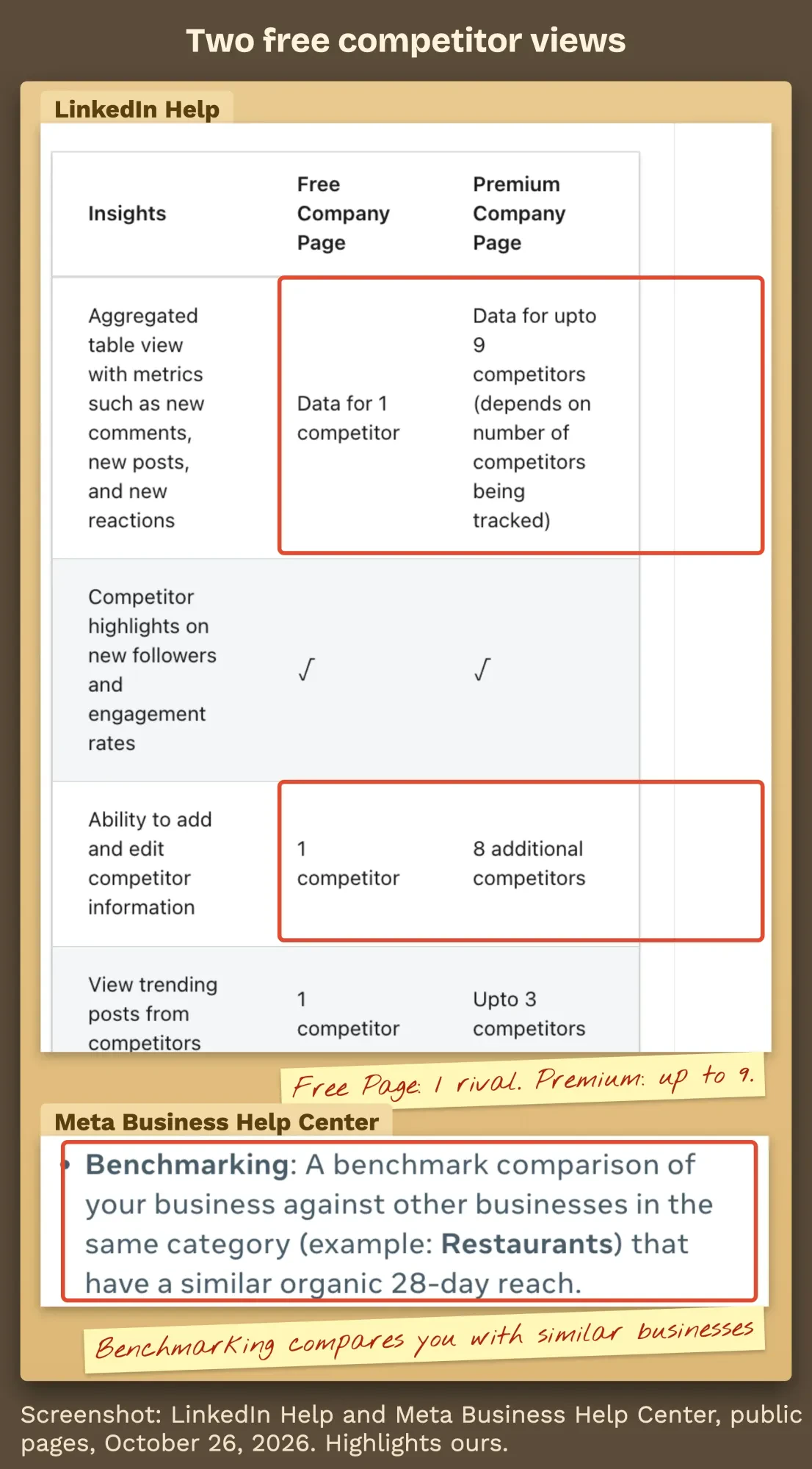 Screenshot: LinkedIn Help and Meta Business Help Center, public pages captured October 26, 2026, with our highlights.
The free social media audit template
Those four parts fit on one sheet. Copy the template below into a file called audit.csv and open it in Google Sheets or Excel.
part,check,where to find it,facebook,instagram,linkedin,youtube,tiktok,notes
profiles,Account listed and you can sign in as an admin,each platform's settings,,,,,,
profiles,Only current staff have access (roles not shared passwords),page or channel permissions,,,,,,
profiles,Old duplicate or impostor accounts found,search the platform for your business name,,,,,,
profiles,Bio link works and carries UTM tags,open it on your phone,,,,,,
results,Website sessions from this channel,GA4 Traffic acquisition (Organic Social or Organic Video),,,,,,
results,Leads from this channel (calls / forms / bookings),GA4 key events by session source,,,,,,
results,Link clicks,Meta Insights Results tab / LinkedIn Content analytics,,,,,,
results,Followers at start and end of the quarter,each platform's analytics,,,,,,
posts,Posts published this quarter,content table or export,,,,,,
posts,Interactions per 1000 views (all posts),content table or export,,,,,,
posts,Top 3 posts and their rate,content table sorted by rate,,,,,,
posts,Bottom 3 posts and their rate,content table sorted by rate,,,,,,
posts,Format that wins (photo / video / text / carousel),compare the top and bottom posts,,,,,,
competitors,Rival 1 and Rival 2 posts per week,their public profiles,,,,,,
competitors,Rival ads running now,Meta Ad Library,,,,,,
competitors,Benchmark vs similar businesses,Meta Business Suite Insights > Benchmarking,,,,,,
competitors,Follower and post comparison,LinkedIn Page Analytics > Competitors,,,,,,
decision,Keep / fix / pause,your call from the rows above,,,,,,
decision,Action 1 (owner and due date),,,,,,,
decision,Action 2 (owner and due date),,,,,,,
decision,Action 3 (owner and due date),,,,,,,
Each row is one check, and each platform gets a column, so you fill it across rather than down. Delete the columns for platforms you don't use. Blank cells are fine. If you saved last quarter's numbers, put them in a second copy and compare the two side by side.
The decision rows at the bottom matter most. Fill them in last.
If a channel brings visits or leads, mark it keep. If people react but nobody clicks through, mark it fix and write down what you'll change. If it brings neither after a full quarter of steady posting, pause it. Every action gets a name and a date, or it won't happen.
Example: one quarter at a made-up dog daycare in Yakima
Here's that template filled in for a business we invented for this guide: Orchard Bark Dog Daycare in Yakima, Washington, from July to September 2026. The inputs are made up, but we've calculated every rate below ourselves, so you can check the math. It's a small business on purpose.
Example: on Facebook, Orchard Bark posted 36 times and got 1,150 interactions on 41,200 views, or 27.9 per 1,000. Instagram looked better on paper, with 2,640 interactions on 58,900 views from 48 posts. That's 44.8 per 1,000. YouTube Shorts sat in between at 31.6 per 1,000 from 12 videos.
The results flipped it. GA4 showed 190 sessions from Facebook, 120 from Instagram and 6 from YouTube, and of 12 booking requests from social, Facebook brought 9, Instagram 3 and YouTube none.
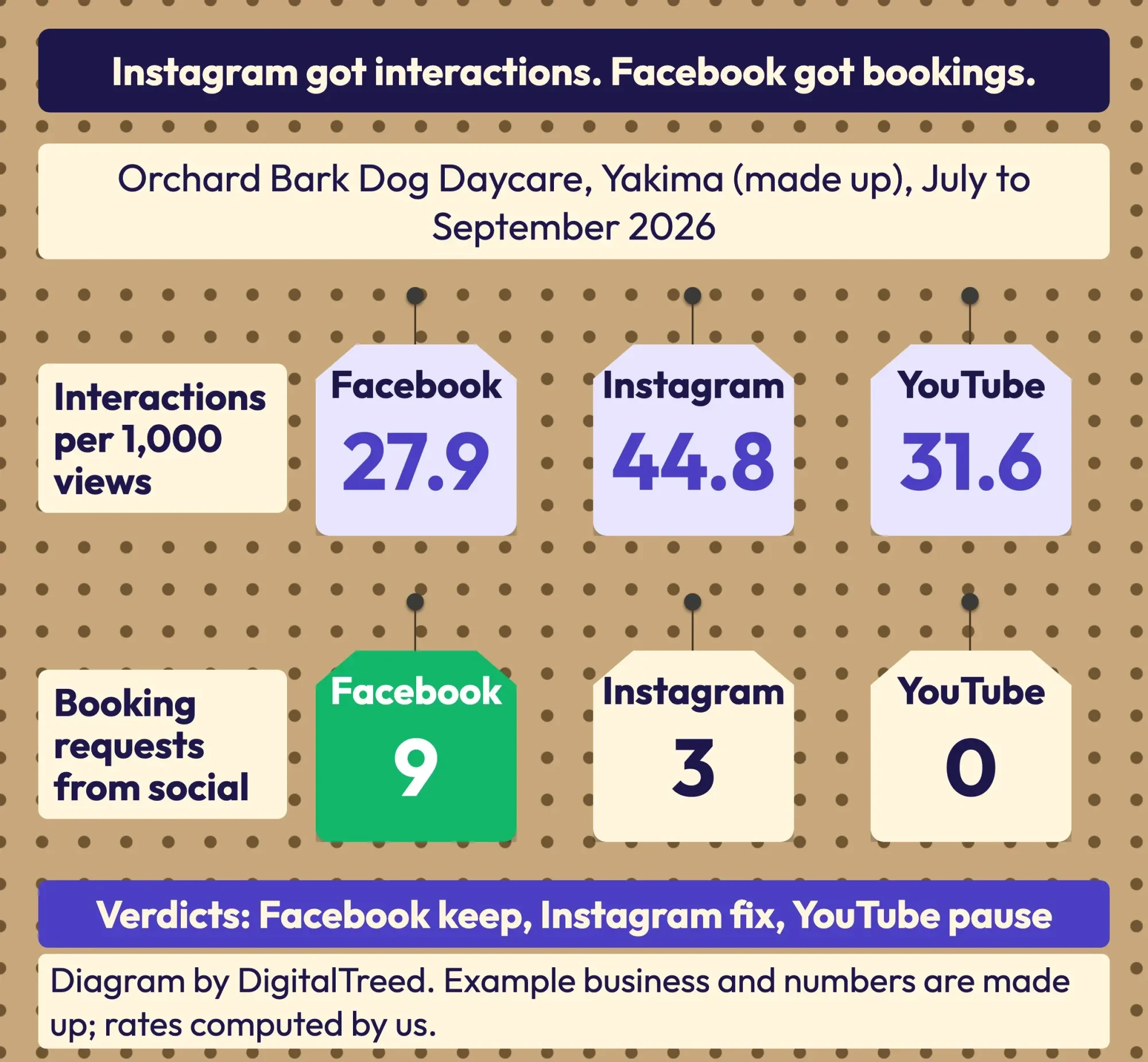 Diagram by DigitalTreed. Example business and its numbers are made up; rates computed by us.
Our take: Facebook is a keep, even with the lowest interaction rate, because it books dogs.
Instagram is a fix.
People like the posts there. The job is a tagged booking link in the bio and in Stories. YouTube gets paused for one quarter. Twelve videos brought zero bookings.
The posts part backed that up. Orchard Bark's best Facebook post, a first-day photo album, earned 73.1 interactions per 1,000 views, while its stock-photo "book now" promo earned 4.3. One of two made-up rivals posted 5 times a week and ran 3 Meta ads, against Orchard Bark's 2.8 Facebook posts a week and no ads. Posting more wasn't the first fix. The booking link was.
Turn the audit into three dated actions
So what happens after the verdicts? An audit that ends in a spreadsheet changes nothing. Pick the three actions that would move your keep and fix channels most, give each an owner and a date, and stop there.
Three done beats ten planned, and you'll feel the difference by the next audit.
Then build the plan around those actions. This step-by-step social media strategy covers goals, content pillars and a calendar you'll keep. If you're new to the wider picture, digital marketing 101 shows where social fits next to search and email.
Put the next audit in your calendar now. Set it about 90 days out, before Instagram's window closes on this quarter. Want someone else to run it? The social media marketing team at DigitalTreed runs a quarterly audit with this same template. A fair warning: we earn money from that service, so weigh our tips knowing that. The template stays free either way.
Questions owners ask about audits
Frequently asked
How much does a social media audit cost?
It can cost nothing if you use the platforms' own analytics and the template above. The first paid upgrade most owners meet is LinkedIn: a free Company Page compares you with 1 competitor, and a Premium Company Page with up to 9, per LinkedIn Help.
Can I check a competitor's ads without an account?
Yes. Meta says anyone can view and search the Ad Library. Downloading searches is different: you must be logged in to Facebook and agree to its terms.
Can I export LinkedIn data for the template?
Yes. Page admins can export content, visitor, follower and competitor analytics as an XLS file from Analytics in the Page admin view, per LinkedIn Help.
How we made this guide: the DigitalTreed team read every Meta, Instagram, LinkedIn, YouTube and Google Analytics page quoted here on October 26, 2026. Each one is linked where we use it. We captured the LinkedIn and Meta screenshots from public pages without signing in, and we left TikTok's limits out because its help pages wouldn't open. The dog daycare is invented, and we did its arithmetic ourselves. Eram N. checks and signs off on this guide before we publish it.
First published August 2020 as a social media optimization tutorial. Rewritten October 26, 2026: now a social media audit guide with a free template, data limits by platform, free competitor views and a made-up example business.
Sources
- Meta Business Help Center: About Insights in Meta Business Suite on desktop
- Meta Business Help Center: Best practices for analyzing Insights data in Meta Business Suite
- Instagram Help Center: About Instagram insights
- Meta Business Help Center: About Meta Ad Library
- LinkedIn Help: Competitor analytics for your LinkedIn Page
- LinkedIn Help: Export your LinkedIn Page analytics report
- LinkedIn Help: Content analytics for your LinkedIn Page
- YouTube Help: Get started with YouTube Analytics
- YouTube Help: Learn how to use Advanced mode for analytics reports
- YouTube Help: Add or remove access to your YouTube channel with channel permissions
- Google Analytics Help: Default channel group
- Google Analytics Help: URL builders, collect campaign data with custom URLs
- Pew Research Center: Americans' Use of Social Media in 2026

Comments
No comments yet. Start the conversation below.