

Quick answer
The best Instagram Story ideas for business give each Story one job: get a reply, build trust, sell, or bring people in. Pair each idea with the right sticker, such as a poll, countdown or link. Then tag every link so you can see which Stories brought visits, and save the winners to Highlights.
A Story disappears from your profile and Feed after 24 hours, unless you add it to a Highlight, as the Instagram Help Center explains. That short life makes Stories cheap to test. It also makes them easy to forget once they are gone.
This guide gives US small businesses 20 Story ideas in 4 groups, with the sticker to use for each. Then it covers the parts most idea lists skip: tracked links, insights, and the Federal Trade Commission (FTC) rules for giveaways and creators. If you don't have a plan for social media yet, start with our social media marketing strategy guide.
Key takeaways
- Give each Story one goal and one sticker. A poll gets replies. A Link sticker gets clicks.
- Most accounts can add a Link sticker to an organic Story, but Instagram says not every sticker is available to everyone.
- Tag every Story link with utm_source=instagram and utm_medium=social, in lowercase, so Google Analytics 4 (GA4) files the visit under Organic Social.
- Story insights stay for up to 2 years, even though the Story is gone after 24 hours.
- Giveaways need official rules, and paid creators must show a clear disclosure on the Story itself.
- Buying fake views or followers for your business breaks an FTC rule that took effect October 21, 2024.
What is an Instagram Story? Key facts for businesses
An Instagram Story is a full-screen photo or video that disappears after 24 hours unless you save it to a Highlight. Stickers turn a Story into a poll, a link or a reminder.
Key facts, as of October 23, 2026:
- A Story lasts 24 hours on your profile and in Feed, per the Instagram Help Center.
- Story insights stay for up to 2 years after you post, per the Story insights help page.
- Account insights cover the last 7, 14, 30 or 90 days, per the account insights page.
- Audience details show once you reach over 100 accounts, per Instagram's insights overview.
- Meta's Stories specs page lists 9:16 among its aspect ratios, along with 4:5 to 1.91:1, and its Stories ads guide recommends 1080 x 1920 pixels.
- The FTC rule against buying fake views took effect October 21, 2024, per the Federal Register notice.
What makes a good Instagram Story for a small business?
A good Instagram Story for a small business asks the viewer to do one thing. That could be a poll tap, a reminder, a link visit or a trip to your shop today. Pick one goal and one sticker for each Story. When a Story tries to do all four, viewers do none of them.
Most of that "one thing" comes from a sticker. The Instagram sticker guide lists polls, quizzes, questions, countdowns, links, locations, captions and more. It also warns that "not all stickers are available to everyone," so check your own menu first.
Keep the look steady too. The same fonts, colors and opening frame make your Stories easy to spot. Our branding strategy for small business guide shows how to pick them.
Instagram Story ideas that get replies
These 5 ideas start a conversation. Replies and sticker taps also tell you what customers care about, which feeds the rest of your plan.
1. This-or-that poll
Ask viewers to pick between two products, flavors or colors. The Instagram sticker guide says you can swipe up on your own Story to see "how each person voted."
2. Myth quiz
Run a multiple-choice quiz on a common wrong idea in your trade. A plumber might ask how often a water heater needs flushing.
3. "Ask us anything" box
Use the Questions sticker for one hour, then answer the best questions in the next Stories.
4. Emoji slider on something new
Ask "How much do you want this?" with an emoji slider. It takes one swipe, so more people answer.
5. Add yours prompt
The Add yours sticker lets you "write a prompt for others to share their own stories." Try "Show us your setup."
Answer replies within a day. A poll that no one follows up on teaches people not to vote next time. Poll and question replies are good proof of an engaged audience in your media kit.
Instagram Story ideas that build trust
People buy from businesses they feel they know. These 5 ideas show the people and proof behind the logo.
6. A review, with permission
Share a customer review as an image and thank the customer by name only if they agree.
7. Before and after
This works well for cleaners, salons, landscapers and repair trades. Show the same angle twice.
8. Behind the scenes, with captions
Post a 15-second clip of the work. The Captions sticker "automatically transcribes your video's audio," so viewers with sound off can follow.
9. Meet the team
Show one person, one fun fact and one thing they do for customers.
10. How it's made
Post 3 or 4 frames that go from raw material to finished product.
Customers also make trust Stories for you. When someone mentions your account in their Story, it shows up in your messages, or as a message request if you don't follow them. That's per Instagram's help page on Story mentions. You can add it to your own Story, unless they turned off reshares for people they mention.
Ask before you reshare a customer's face. Milestones work as trust Stories too, such as your first year or your 1,000th order.
To get more reviews to share, send happy customers a direct review link. Make one with our free Google review link generator. Our guide to automating customer reviews covers the FTC and Google rules on asking.
Instagram Story ideas that sell
These 5 ideas move people toward a purchase. Our rule of thumb: no more than about 1 in 4 Stories should sell, so your Stories don't feel like an ad break.
11. New product with a Link sticker
Show a clear photo, the price and a Link sticker to the product page.
12. Stories-only code
Share a discount code that appears only in Stories, so you know where the sale came from.
13. Restock countdown
The Countdown sticker lets viewers turn on a reminder, and they get a notification when it ends.
14. Product sticker
If you sell through an Instagram shop, the Product sticker tags items from it.
15. FAQ answer
Answer one common question per Story, such as price, shipping or hours. Then save them to a FAQ Highlight.
Clean product photos stand out in Stories. Our free background remover cuts a product out of a busy photo, so you can place it on your brand color.
Point Story viewers to your newest post or reel, too. Tap Share below it, then Add to story, per Instagram's help page on sharing posts. You can share another account's post only if it is public and allows resharing. Instagram adds that this feature "isn't available to everyone."
Instagram Story ideas for local businesses
For a shop, salon or restaurant, the goal is a visit. These 5 ideas bring people through the door. Stories reach people who already follow you. To reach people searching nearby, see what local SEO is and how to start.
16. Location sticker with today's hours
Viewers can tap the sticker to open your location's page, per the sticker guide.
17. Event countdown
Count down to a tasting, a class or a sale day, with a reminder.
18. Today's special
One photo every morning at the same time. Regulars learn to look for it.
19. Neighbor shout-out
Tag a nearby business you work with, using the Mention sticker. They may share it to their own Story.
20. In-store QR code
Put a small sign at the counter that opens your Instagram profile.
Make that counter sign with our free QR code generator. Point it at your profile, then test it with 2 phones before printing.
Instagram Story ideas for small businesses: the cheat sheet
Here are all 20 ideas on one page, with the sticker each one uses and what it gets you. Print it, or copy it into your content plan. You are welcome to share the table with a link back to this page.
| # | Story idea | Sticker to use | What it gets you |
|---|---|---|---|
| 1 | This-or-that poll | Poll | Replies |
| 2 | Myth quiz | Quiz | Replies |
| 3 | "Ask us anything" box | Questions | Replies |
| 4 | Emoji slider on something new | Emoji slider | Replies |
| 5 | Add yours prompt | Add yours | Replies and reshares |
| 6 | A review, with permission | None needed | Trust |
| 7 | Before and after | None needed | Trust |
| 8 | Behind the scenes | Captions | Trust |
| 9 | Meet the team | None needed | Trust |
| 10 | How it's made | None needed | Trust |
| 11 | New product | Link | Clicks and sales |
| 12 | Stories-only code | None needed | Sales you can trace |
| 13 | Restock countdown | Countdown | Reminders and sales |
| 14 | Shop item | Product | Sales |
| 15 | FAQ answer | None needed (save to a Highlight) | Fewer repeat questions |
| 16 | Location with today's hours | Location | Visits |
| 17 | Event countdown | Countdown | Visits |
| 18 | Today's special | None needed | Visits |
| 19 | Neighbor shout-out | Mention | Reach |
| 20 | In-store QR code | None needed (a printed QR sign) | Followers |
How do you add a link to an Instagram Story and track it?
To add a link to an Instagram Story, open Stickers, tap Link, enter the URL and tap See Preview, as the sticker guide explains. After that, anyone who can see your Story can tap it to visit the link. The link sticker help page says link stickers work only in organic Stories, not in Story ads.
The problem is tracking. Without tags, a visit from a Story looks like any other Instagram visit in Google Analytics 4. Google says to always use utm_source, utm_medium and utm_campaign, and to use lowercase, because "Meta and meta" count as 2 values.
Add a tracked link to an Instagram Story
- Build the tagged link Open our free UTM builder, pick the Instagram bio preset, which sets source instagram and medium social, and enter your page. Set the campaign, such as pie-drop, and the content, such as story-fri.
- Check the channel The builder shows which GA4 channel the visit will land in. For source instagram and medium social, it should say Organic Social.
- Add the Link sticker In Instagram, create the Story, open Stickers, tap Link, paste the tagged URL and tap See Preview.
- Say what the link does Write a short line next to the sticker, such as "Pre-order Saturday pies," so viewers know why to tap.
- Compare after 24 hours Check link taps in the Story insights, then find the campaign in GA4 under Traffic acquisition. Our take: they won't match exactly, because a tap on a page that never loads is not a GA4 session.
We tested this on our own free UTM builder on October 22, 2026. We used a made-up bakery page, campaign pie-drop and content story-fri. The tool built the link and said GA4 files it under Organic Social.
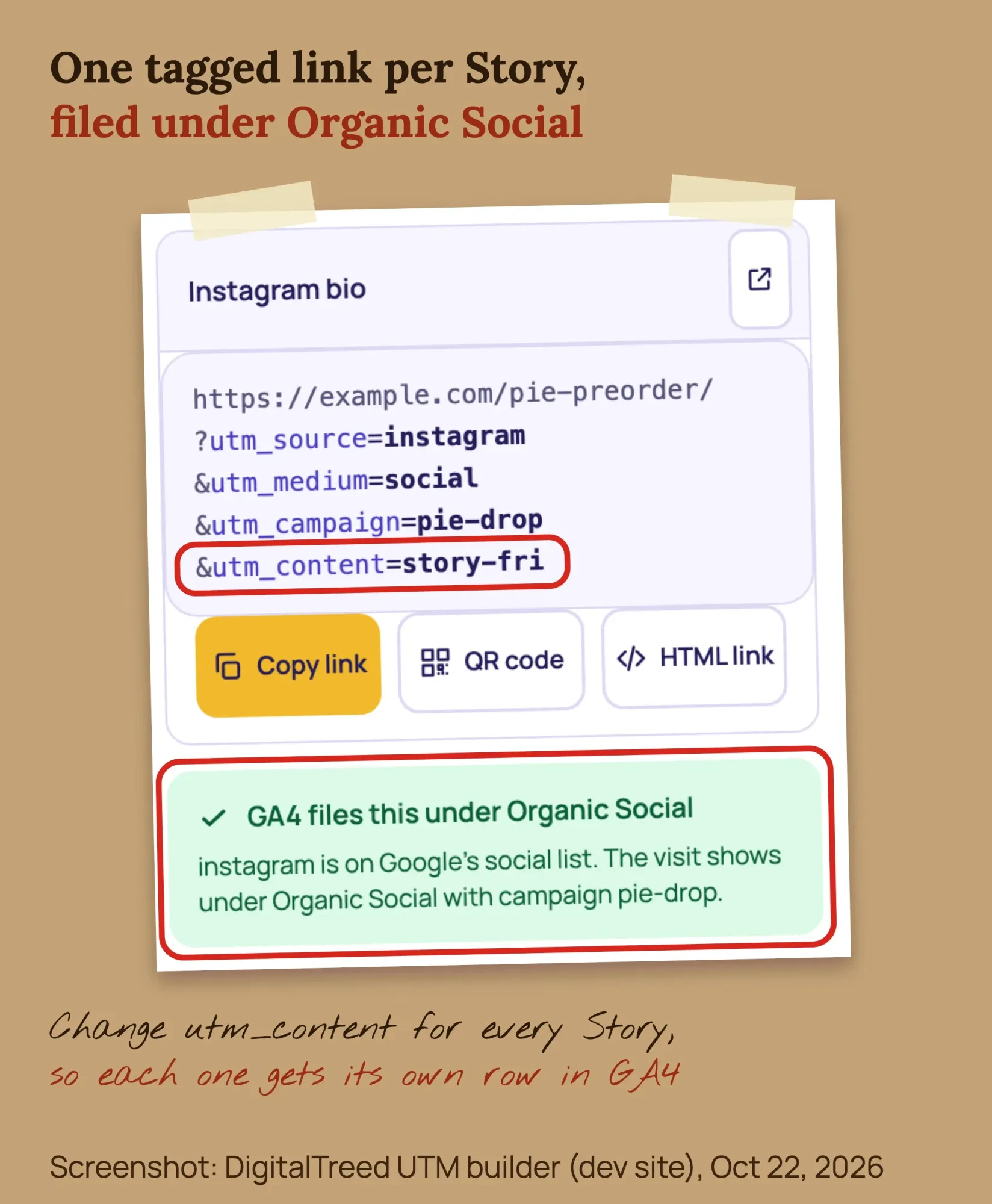 Screenshot: DigitalTreed UTM builder (dev site) with a made-up bakery link, October 22, 2026.
That matches the Google channel rules, which file a visit as Organic Social when the medium is "social" or the source is a social site. Change utm_content for every Story, so each one gets its own row.
Tag the link in your bio the same way. Our Linktree for business guide shows how to track bio clicks in GA4.
Which Stories should you keep as Highlights?
Keep the Stories that answer the same questions every week: who you are, reviews, prices, FAQs and how to book. Highlights keep Stories on your profile after they expire, so we suggest these 5 for most small businesses. The Highlights help page says you pick the Stories, name the Highlight and choose a cover. Highlights work best on a profile that's already set up; here's our social media optimization checklist.
- Start here, with who you are, where you are and what you sell
- Reviews, your best ones, shared with permission
- Menu or prices, updated whenever prices change
- FAQ, for shipping, returns, parking and booking
- How to book or order, with a Link sticker
Take care with customer faces. Per its Story visibility page, Instagram uses public Stories, archive included, "to improve AI at Meta." That applies unless you delete them from your archive or make your account private. Get a customer's okay before you post their face.
How do you read Instagram Story insights?
Instagram Story insights show how many accounts saw each Story and what they did, from sticker taps to website clicks. You need a public account to see insights, says the Story insights help page. Insights stay for up to 2 years after you post, though the Story itself is gone after 24 hours. The main numbers are these:
- Views: how many times your Story was played or shown.
- Viewers: unique accounts that saw it at least once.
- Interactions: replies, shares, sticker taps and link taps.
- Accounts engaged: unique accounts that did one of those things.
- Profile activity: profile visits, follows and website clicks from the Story.
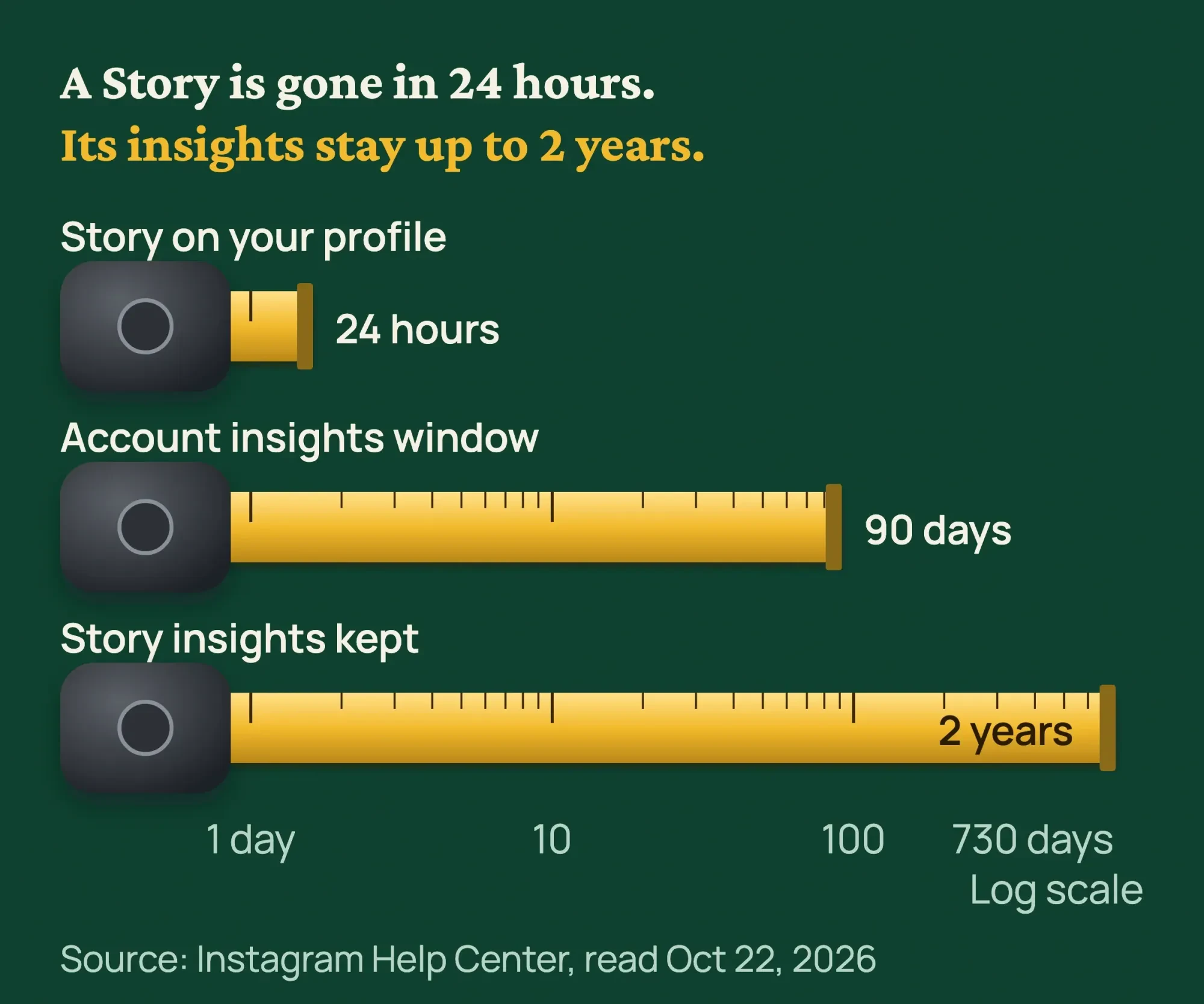 Source: Instagram Help Center, read October 22, 2026.
The account overview is shorter. You can view the last 7, 14, 30 or 90 days, per the account insights page. Audience details need reach over 100 accounts, and Instagram calls these numbers "estimated," on its insights overview. So we suggest a weekly screenshot of your best and worst Story.
Posting time matters too. Our comparison of the best time to post on Facebook shows why your own numbers beat any study.
What are the rules for giveaways and paid creators?
An Instagram giveaway needs written official rules and a release of Instagram, and states like Florida ban a purchase requirement. Paid creators must also disclose the deal on the Story itself. The Instagram Promotion Guidelines say you are "responsible for the lawful operation" of a contest, including the official rules.
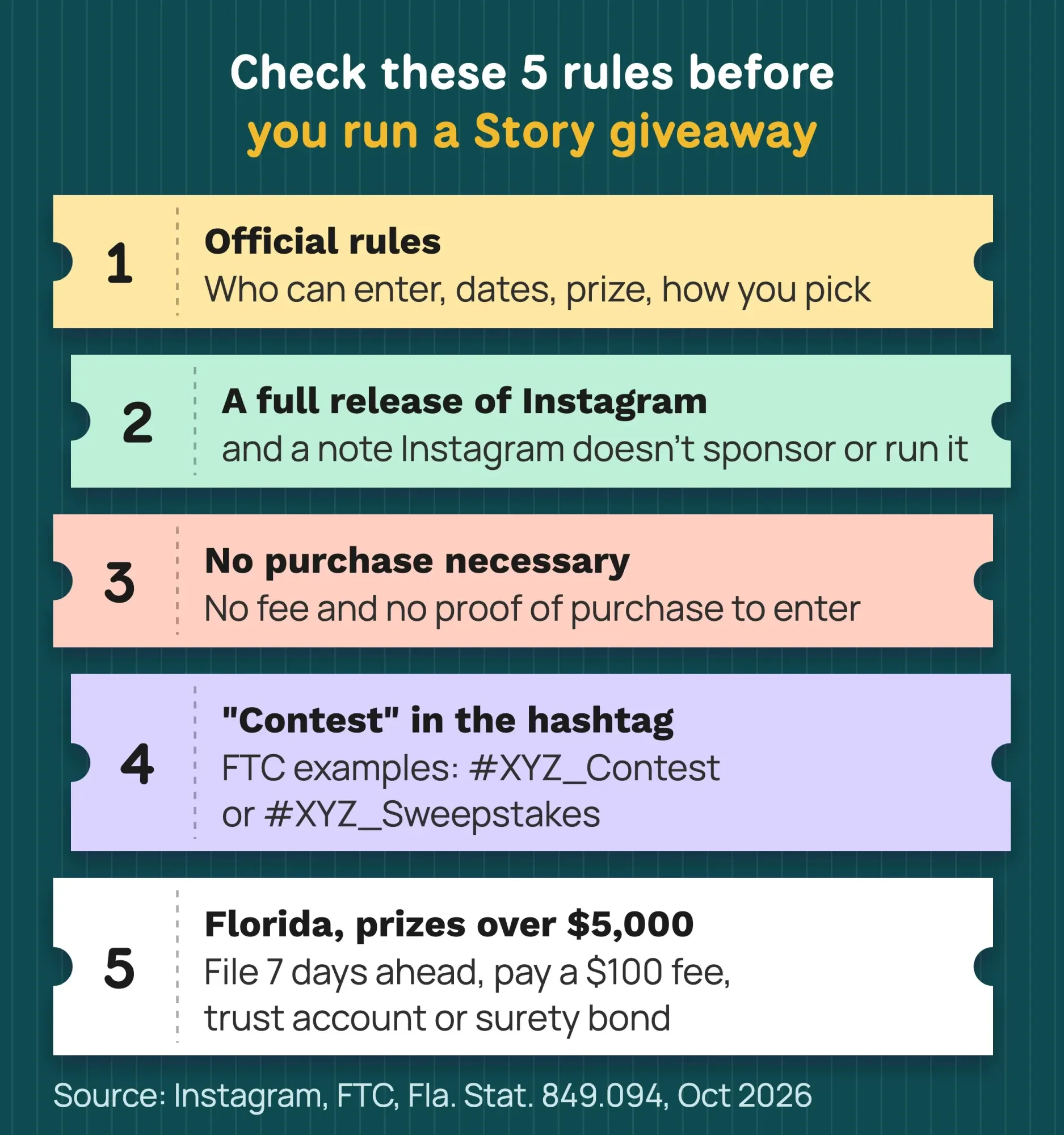 Source: Instagram Promotion Guidelines, FTC and Fla. Stat. 849.094, read October 22, 2026.
Use this checklist for a giveaway run on Stories:
- Write official rules: who can enter, dates, the prize and its value, and how you pick the winner. Link them with a sticker.
- Never require a purchase to enter.
- Include a complete release of Instagram and a line that Instagram does not sponsor or run the promotion.
- Don't offer money for likes or follows. The Community Guidelines ban it.
- If entrants post about you, ask for a tag like #JuniperBakery_Contest. The FTC endorsement FAQ says "contest" or "sweepstakes" in the hashtag should be enough.
State law adds more. In Florida, for example, Fla. Stat. 849.094 makes an entry fee or proof of purchase unlawful. If the announced prizes total more than $5,000, the operator must file the rules 7 days ahead and pay a $100 fee. A trust account, or a surety bond for the same amount, is also required, as of October 22, 2026. Other states have their own rules.
Running the same giveaway on Facebook? Our Facebook giveaway rules guide covers Meta's rules for Pages.
Creators, employees and anyone you pay or give free products to must disclose that link. The FTC guide for influencers says to "superimpose the disclosure over the picture" in Stories, long enough to read. It also says not to assume a platform's disclosure tool is good enough.
Instagram, for its part, requires its Paid partnership label on branded content. So use both. Add the label, plus on-screen words such as "Ad" or "Thanks to [your shop] for the free product" on the Story. The FTC's guidance sits in the Endorsement Guides, 16 CFR Part 255. Our influencer marketing guide covers how to find creators.
This is general information, not legal advice; check with an attorney for your situation. For prizes of real value or entrants in many states, talk to a US attorney.
Don't want to run giveaways and creator deals alone? Our social media marketing team can plan and post them with the rules in place. (DigitalTreed sells this service.)
Can you buy Instagram Story views?
No. Buying fake views or followers for your business breaks the FTC rule on fake social media indicators, 16 CFR 465.8. It bans buying fake indicators you knew, or should have known, were fake when they "materially misrepresent" your influence "for a commercial purpose."
Views, followers, likes and shares all count as indicators under the definitions in the rule. The rule took effect October 21, 2024, per the Federal Register notice. The FTC announcement says it lets the agency seek civil penalties against knowing violators.
Instagram bans it too. Its Community Guidelines say not to "artificially" collect likes, followers or shares. This is general information, not legal advice; check with an attorney for your situation.
Example: a bakery's week of Stories
Example: Juniper Street Bakery is a made-up 6-person bakery in Columbus, Ohio. It wants more pre-orders for its Saturday pie drop. Here is its plan for one week in October.
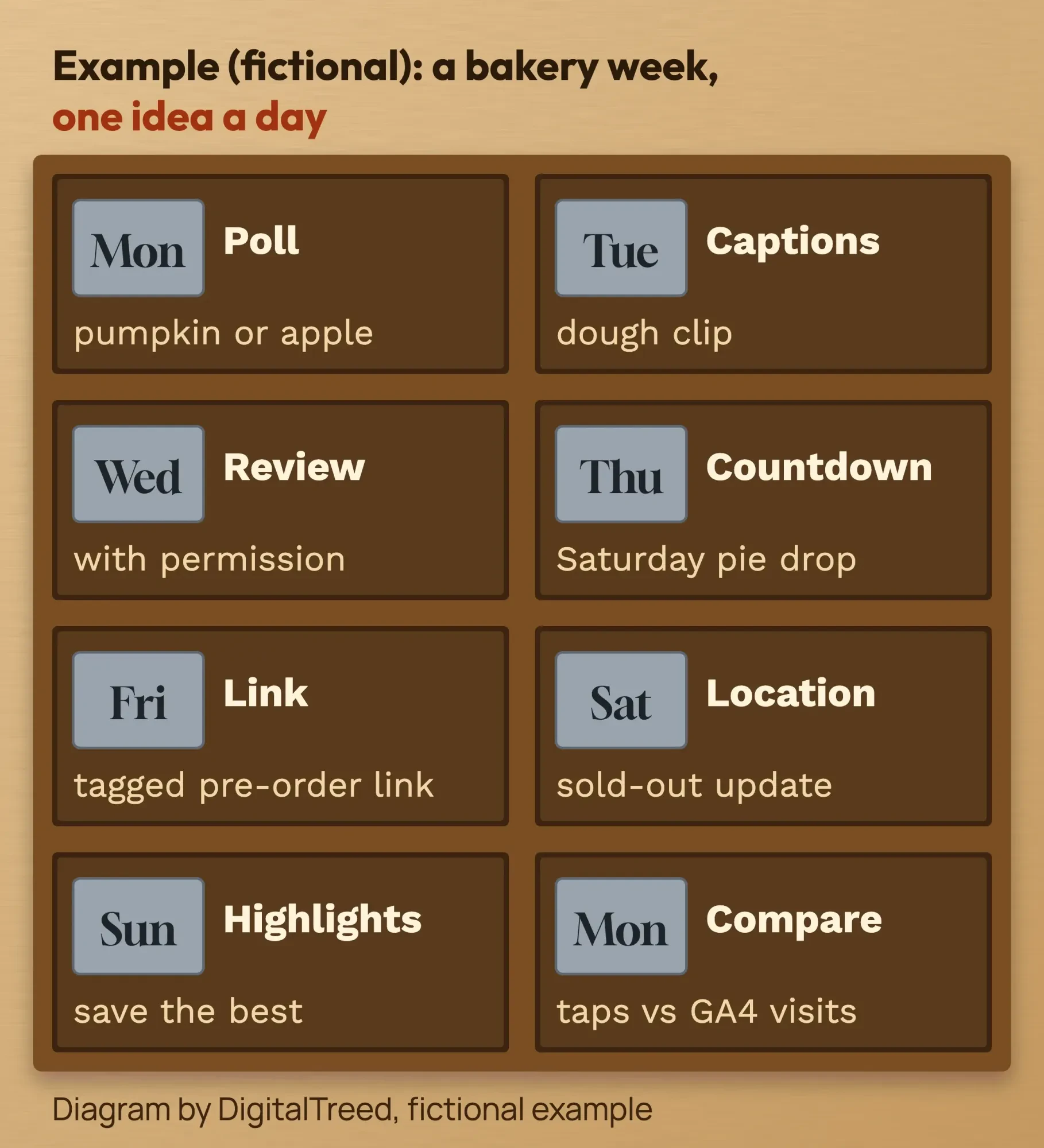 Diagram by DigitalTreed, fictional example.
Monday is a pumpkin-or-apple poll. Tuesday is a captioned clip of the dough. Wednesday is a customer review. Thursday starts a countdown to Saturday. Friday adds the tagged pre-order link with content story-fri.
Saturday uses the Location sticker and an update when the pies sell out. Sunday saves the week's best frames to Highlights. On Monday, the owner compares link taps with GA4 sessions for campaign pie-drop.
Frequently asked
Can any business add a link to a Story?
Most can, using the Link sticker. Instagram notes that some stickers may be missing in Europe and Japan, and that not every sticker is available to everyone.
How long do Instagram Stories last?
24 hours on your profile and in Feed. Add a Story to a Highlight to keep it on your profile longer. Stories are also saved to your Stories Archive.
Can you schedule Instagram Stories?
Yes. In Meta Business Suite on desktop, click Create story, add your photos or videos and pick Schedule. The Meta Business Suite help page says you can add up to 10 of them and a link. You need full control of the Instagram account or Content permission for it.
How often should a business post Stories?
Instagram does not publish a number. Start with one Story a day for 4 weeks, then keep the days and ideas that got the most taps.
Do I need #ad when a creator posts about us?
Yes, if you paid them or gave them something of value. Use the Paid partnership label and on-screen words such as "Ad" that viewers can read in time.
How do I remove a Story I posted by mistake?
Open the Story, tap the menu and delete it. Our guide shows how to delete a photo or video from an Instagram Story.
Your next step
Pick 4 ideas from this page, one from each group, and post them this week. Tag every link in the UTM builder before you post, and check the results next Monday.
If you want help planning and running Stories every week, see what our social media marketing service includes.
How we made this guide: it's built from the Instagram Help Center, FTC guidance and the rule text on eCFR and the Federal Register. We also used the Florida Statutes and Google Analytics Help. We built and checked a tagged Story link with our own UTM builder on October 22, 2026. We didn't use or log in to any Instagram account. Every source is linked where we use it, and we checked every number against it on October 22, 2026. Updated October 23, 2026: added key facts, a 20-idea cheat sheet, customer reshares, sharing posts to Stories and a FAQ on scheduling. We also made the first lines under each question a direct answer.
First published November 17, 2022. Rewritten October 22, 2026: 20 ideas with the sticker for each, plus tracked links, Story insights and Highlights. It also covers FTC and giveaway rules and warns against bought views.
Sources
- Instagram Help Center: Stories
- Instagram Help Center: How long Instagram stories remain visible
- Instagram Help Center: Add a story to your Story Highlights
- Instagram Help Center: Using stickers on Instagram
- Instagram Help Center: About Call-to-action Link Sticker on Instagram Stories
- Instagram Help Center: View insights on your Instagram Stories
- Instagram Help Center: About Instagram insights
- Instagram Help Center: View account and content insights
- Instagram Help Center: Get started with branded content
- Instagram Help Center: About branded content
- Instagram Help Center: Promotion Guidelines
- Instagram Help Center: Community Guidelines
- FTC: Disclosures 101 for Social Media Influencers
- FTC: Endorsement Guides, What People Are Asking
- eCFR: 16 CFR Part 255, Guides Concerning the Use of Endorsements and Testimonials
- eCFR: 16 CFR Part 465, Use of Consumer Reviews and Testimonials
- Federal Register: Trade Regulation Rule on the Use of Consumer Reviews and Testimonials, 89 FR 68034, August 22, 2024
- FTC press release, August 14, 2024: final rule banning fake reviews and testimonials
- The Florida Statutes: section 849.094, game promotions
- Google Analytics Help: URL builders, collect campaign data with custom URLs
- Google Analytics Help: Default channel group
- Instagram Help Center: What happens when someone mentions you in their Instagram story
- Instagram Help Center: Share someone's post from feed to your Instagram story
- Meta Business Help Center: Technical specifications for Facebook and Instagram Stories
- Meta Business Help Center: Design requirements for Instagram Stories ads
- Meta Business Help Center: Create and manage stories in Meta Business Suite on desktop
Comments
No comments yet. Start the conversation below.