

Quick answer
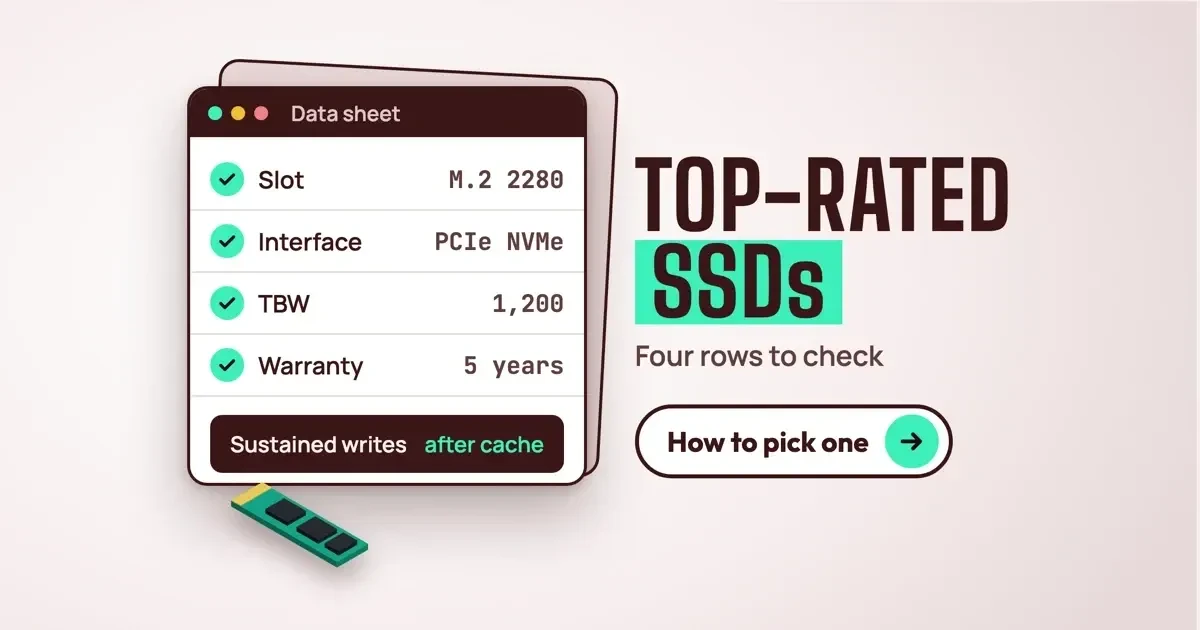
Top-rated solid state drives (SSDs) pass four checks on the maker's data sheet, as of November 2026: slot, interface, TBW with warranty years, and write speed after the cache fills. Samsung's 990 PRO 2TB lists 1,200 TBW and 5 years; the 870 QVO 2TB lists 720 TBW and 3 years. Start with your slot.
Lists of top-rated solid state drives (SSDs) sort drives by stars and benchmark scores. An SSD is a storage drive built from NAND flash chips, with no moving parts. Whether one fits your PC is a question they don't answer. The maker's data sheet does: slot size, interface, rated writes and warranty years.
Warranty years matter more than the biggest speed number. At a made-up 50 GB written a day, the 870 QVO 2TB would need 39.5 years to use up its rated writes, but its warranty ends after 3.
Key takeaways
- At a made-up 50 GB a day, warranty years end before TBW.
- An M.2 slot can carry SATA or PCIe, so check the bus.
- Samsung's 870 QVO 2TB drops to 160 MB/s writes after its cache fills.
- The 990 PRO and 870 QVO both allow 0.33 drive writes per day.
- Keep the receipt; the FTC says it proves your purchase date.
What does top-rated mean for an SSD?
Here, top-rated means a drive passes four checks you can repeat at home with the maker's PDF data sheet open.
Samsung's US store page showed the 990 PRO 2TB at 4.9 stars from 1,309 reviews on November 5, 2026. That tells you buyers were happy, not that it'll fit your laptop. Three of our four checks are rows on both Samsung sheets we read. The fourth sits in a footnote, and only the 870 QVO's footnote gives a number.
- Slot: the form factor row (2.5-inch, or M.2 with a size like 2280) matches your PC's bay or slot.
- Interface: the interface row (SATA 6 Gb/s, or PCIe with NVMe) is one your PC supports.
- Endurance: the TBW row, read with the warranty period, since coverage ends at whichever comes first.
- Sustained writes: the footnote on speed after the fast cache fills, since the headline row is an "up to" figure.
Run them in that order. A 2.5-inch drive won't fit an M.2-only slot, so its speed and TBW rows don't matter for that PC.
We read two Samsung sheets end to end to show the method. The 990 PRO data sheet covers an M.2 NVMe drive, and the 870 QVO data sheet a 2.5-inch SATA one. Both are public PDFs with every row filled in. They're examples, not picks. We didn't buy or install either drive. We tried Kingston and SanDisk spec pages too, but on November 5, 2026 one blocked our checker and the other loaded its specs only with JavaScript.
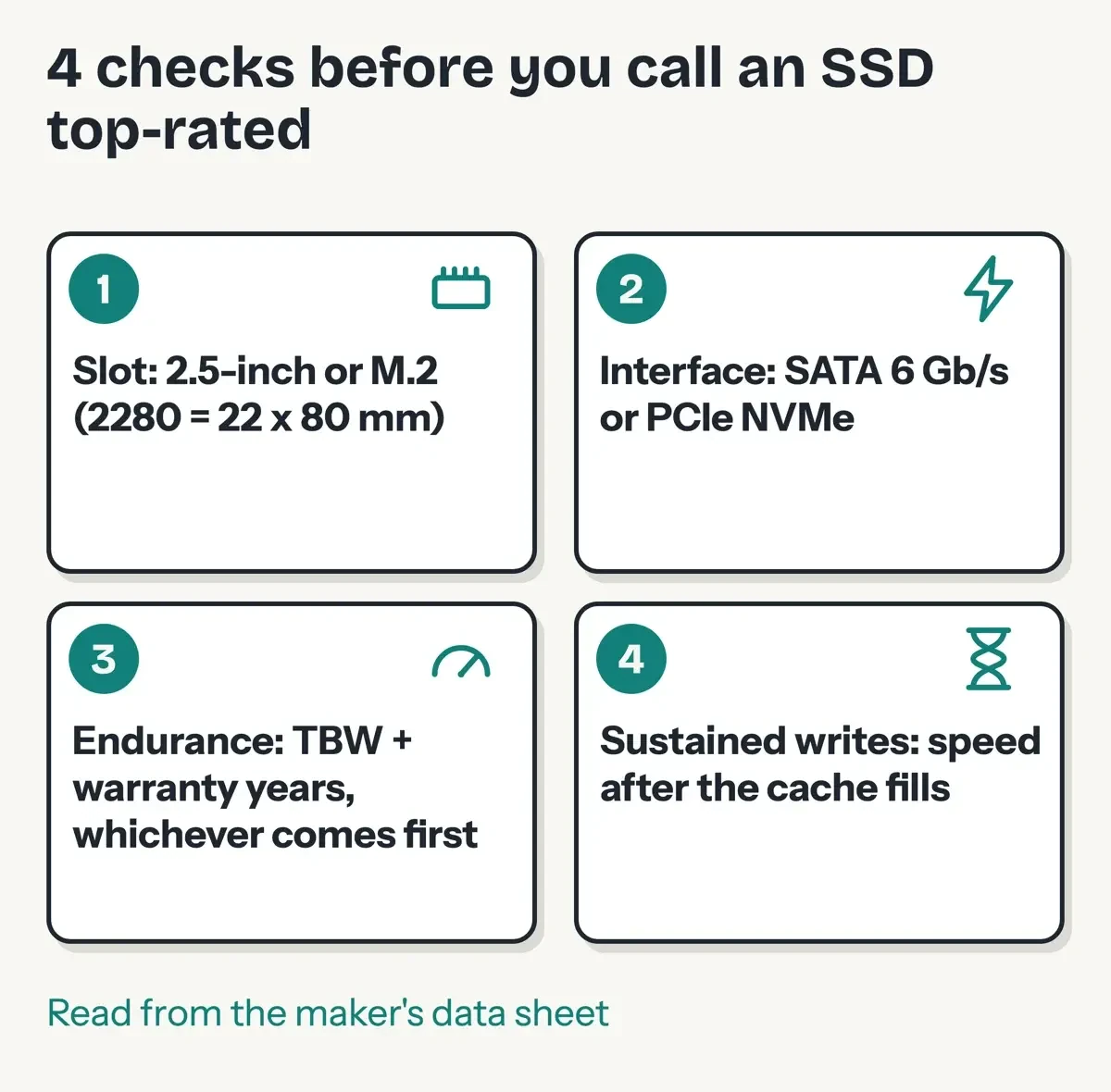 Diagram by DigitalTreed: our four data-sheet checks, from the Samsung 990 PRO and 870 QVO sheets, November 5, 2026.
Check your slot before you buy
A 2.5-inch drive has the shape of a laptop hard disk. The 870 QVO sheet gives its size as 100 x 69.85 x 6.8 mm. Its interface row reads "SATA 6 Gbps Interface, compatible with SATA 3 Gbps & 1.5 Gbps interfaces". An M.2 drive is a bare stick that screws onto the motherboard. The 990 PRO sheet lists "Form Factor M.2 (2280)" at no more than 80.0 x 22 mm, which is where the 22 and the 80 come from. The 870 QVO sheet also lists 4TB and 8TB sizes in that same 2.5-inch shell.
M.2 names a shape, though, not a speed. The SATA-IO group's M.2 card page says the connector "supports applications such as Wi-Fi, WWAN, USB, PCIe & SATA". So an M.2 slot in an older laptop may only talk SATA. Your PC's manual names the slot type, and on Windows you can also ask the drive that's already in there. Open PowerShell (our computer shortcuts guide for Windows and Mac lists quick ways in) and run this:
Get-PhysicalDisk | Select-Object FriendlyName, MediaType, BusTypeMicrosoft's Get-PhysicalDisk reference says the cmdlet lists every physical disk the storage providers can see. Its values come from the MSFT_PhysicalDisk class. There, MediaType 4 means SSD and 3 means HDD, while BusType 11 is Serial ATA and 17 is NVMe.
If your current drive shows NVMe, it's in a slot that speaks PCIe, and an NVMe replacement of the same M.2 length is the safe match.
Macs work differently. Our test machine is a Mac mini (2024), listed as Mac16,10 on Apple's model identifier page, and its System Information shows the internal Apple SSD as "Detachable Drive: No". Apple's Mac mini (2024) tech specs list the M4 model's storage as "256GB SSD Configurable to: 512GB, 1TB, or 2TB", so we treat size as a choice made at purchase. The same System Information panel reports TRIM support and a S.M.A.R.T. status, and ours read Yes and Verified. We're treating our 256GB as fixed. If a Mac like that fills up, our comparison of 4 cloud storage options for small business covers paying for space off the machine.
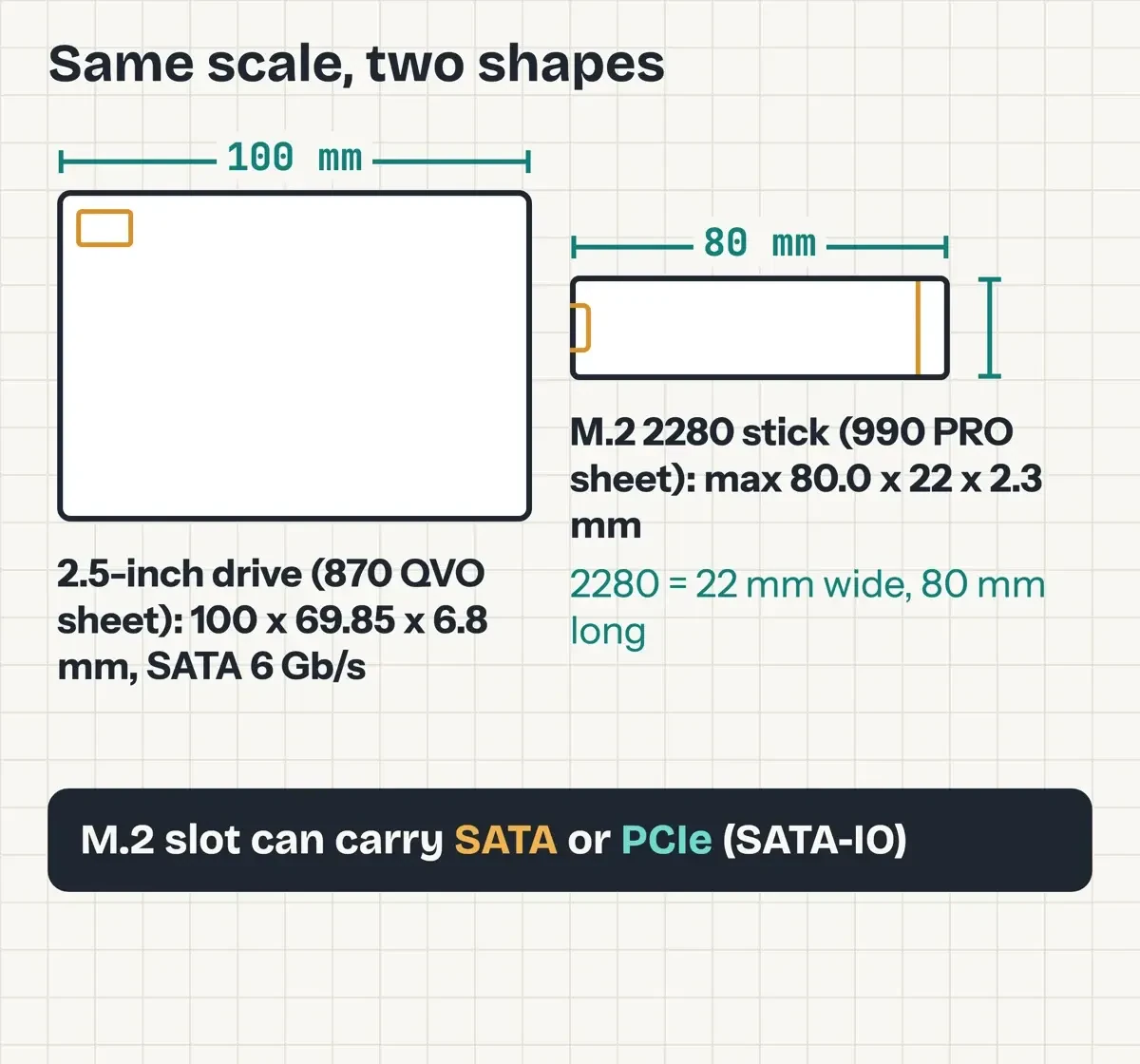 Drawn by us to scale from the Samsung 870 QVO and 990 PRO dimension rows and the SATA-IO M.2 card page, November 5, 2026.
NVMe vs SATA: what the speed rows mean
The interface row sets the speed ceiling. NVM Express, the group behind the standard, describes the NVMe specification as "The register interface and command set for PCI Express technology attached storage". In plain words, NVMe drives talk over PCIe lanes. SATA drives use the older SATA link, and the SATA-IO naming guidelines say Revision 3.0 doubled its top rate "from three to six gigabits per second (6Gb/s)".
The 990 PRO sheet lists sequential reads up to 7,450 MB/s and writes up to 6,900 MB/s on PCIe Gen 4.0 x4. Samsung's store page repeats "7,450MB/s Read | 6,900MB/s Write" in its product title. The 2TB model lists the same 7,450 MB/s read as the 1TB, so capacity doesn't change this row. The 870 QVO lists 560 MB/s reads and 530 MB/s writes, and since 7,450 / 560 = 13.3, the NVMe drive reads about 13 times faster on paper.
That ratio rests on footnotes. Samsung measured the 990 PRO with IOmeter on an AMD Ryzen 7 5800X system. Its footnote says "990 PRO is backward compatible with PCIe 3.0", which means it works in an older slot, not that it'll hit 7,450 MB/s there. The 870 QVO's footnote is blunter: "Performances after Intelligent Turbowrite are 80 MB/s (1TB), 160 MB/s (2/4/8TB)." That's what you'd see copying a big video folder once the fast cache is full. It's a long way below the 530 MB/s in the sheet's headline row. Even the 990 PRO's write rows were "measured with Intelligent TurboWrite technology being activated".
Hosting plans often list NVMe storage too. Our checklist of 13 features to look for in a web host and reseller vs VPS hosting comparison cover how much it matters for a site. For big crawls, our Screaming Frog guide on memory and storage settings covers it.
Random reads and queue depth
Those headline rows are long, straight transfers. Both sheets also list random 4KB speeds in IOPS (input/output operations per second) at two queue depths, meaning how many requests wait at once. At queue depth 32, the 990 PRO 1TB lists 1,200K random reads against the 870 QVO's 98,000. That's a gap of about 12 times (1,200,000 / 98,000 = 12.2). At queue depth 1, it's 22K against 11,000, or 2 times.
On the sheet, the NVMe lead falls from about 12 times to 2 when requests come singly. Neither matches the 13x headline.
Power and heat rows for laptops
The 990 PRO 1TB lists an average of 5.4 W while reading and 5.0 W while writing. The 870 QVO 1TB lists 2.1 W and 2.2 W. That's about 2.6 times the power on reads (5.4 / 2.1), which ends up as heat and battery drain in a thin case. Both sheets give an operating range of 0°C to 70°C (32°F to 158°F), and the 990 PRO adds "Proper airflow recommended".
The 990 PRO sheet lists a maximum height of 2.3 mm. Check your laptop's manual for a limit.
TBW, warranty years and the daily write math
TBW (terabytes written) is the total data the maker rates a drive to absorb, and the warranty is tied to it. The 990 PRO sheet spells out the deal: "Warranty provides coverage for the stated time period or the TBW, whichever comes first." The 990 PRO gets five years. The 870 QVO gets three. Both Samsung sheets say their endurance figures follow JEDEC's JESD218 test standard.
To compare sizes, turn TBW into a daily budget. Our formula is GB per day = TBW x 1,000 / (warranty years x 365). Drive writes per day (DWPD) = TBW / (capacity in TB x warranty years x 365). For the 990 PRO 2TB, that's 1,200 x 1,000 / (5 x 365) = 658 GB a day for five years. The last column uses a made-up 50 GB written every day: TBW x 1,000 / 50 / 365.
| Drive (from its data sheet) | Interface | TBW | Warranty | Daily budget | Years to reach TBW at 50 GB/day (example) |
|---|---|---|---|---|---|
| Samsung 990 PRO 1TB | M.2 2280, PCIe 4.0 x4 NVMe | 600 TB | 5 years | 329 GB | 32.9 years |
| Samsung 990 PRO 2TB | M.2 2280, PCIe 4.0 x4 NVMe | 1,200 TB | 5 years | 658 GB | 65.8 years |
| Samsung 870 QVO 1TB | 2.5-inch, SATA 6 Gb/s | 360 TB | 3 years | 329 GB | 19.7 years |
| Samsung 870 QVO 2TB | 2.5-inch, SATA 6 Gb/s | 720 TB | 3 years | 658 GB | 39.5 years |
Both land on 0.33 DWPD, rounded. The 870 QVO has less TBW per terabyte (360 against 600), but its shorter 3-year warranty evens out the daily budget. Its 4TB and 8TB sizes list 1,440 and 2,880 TBW, still 0.33 DWPD. In the table's last column, the shortest run is the 870 QVO 1TB at 19.7 years against 3 years of cover. When two drives pass the slot and interface checks, we'd take the longer warranty with a TBW of a few hundred per terabyte. Speed comes last. If you edit video or crawl big sites all day, your daily total may be far above our example, and TBW per terabyte moves to the front.
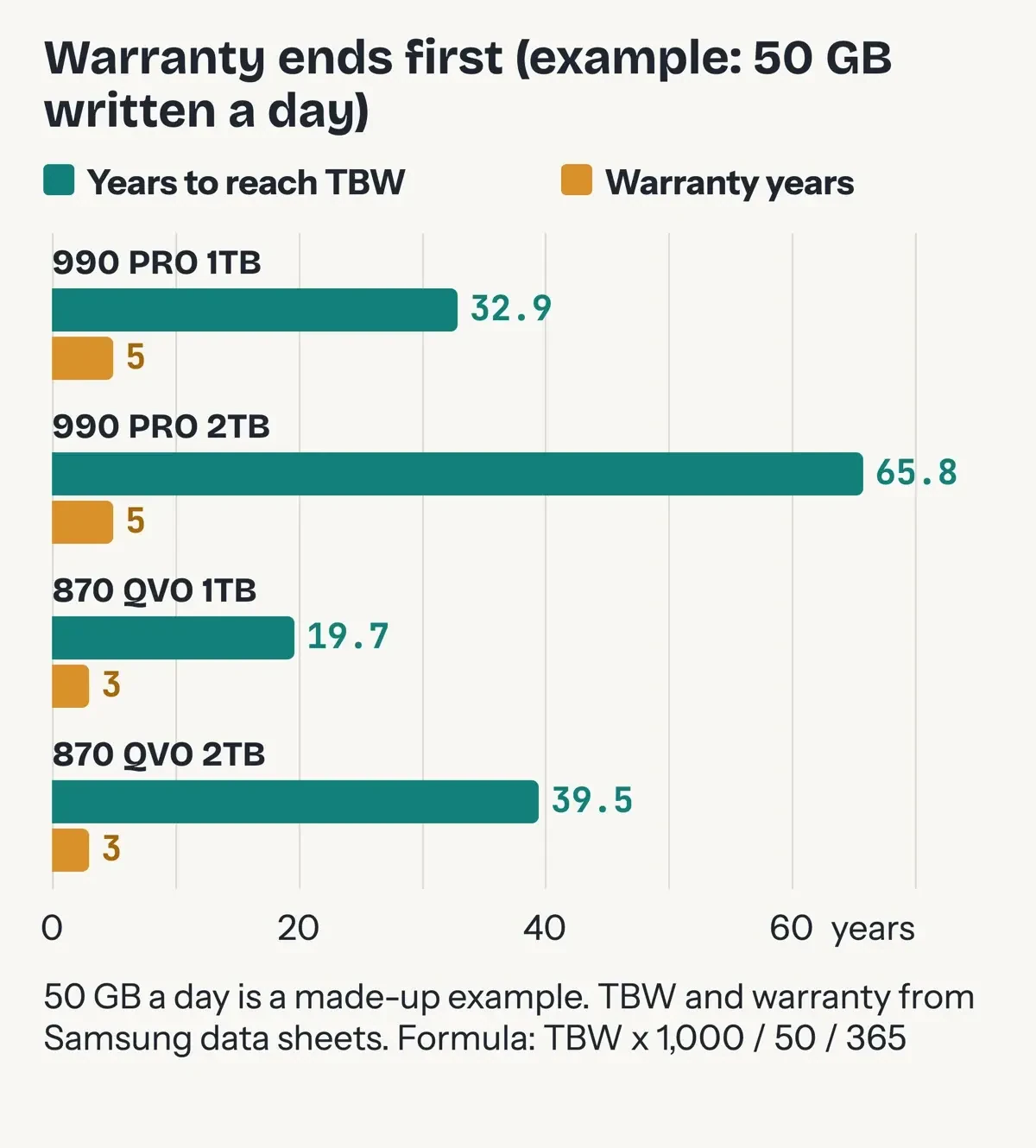 Diagram by DigitalTreed from our endurance script and the two Samsung data sheets; 50 GB a day is a made-up example, November 5, 2026.
Why a 2TB drive shows less space
Capacity rows use decimal units. The 990 PRO sheet defines "1GB = 1,000,000,000 bytes by IDEMA" and says part of the capacity "may be used for system file and maintenance use". On our 256GB Mac mini, System Information lists the drive at 251 GB, and diskutil shows 245.1 GB for the main macOS container. Your new 2TB drive won't show a round 2,000 GB either.
What we tested
On November 5, 2026, we timed the 256GB internal SSD in our Mac mini (2024), Mac16,10. A script wrote a 1 GiB random file with the macOS file cache off, read it back, three times over.
Writes ran 760.1, 1,564.6 and 770.1 MB/s; reads 2,246.2, 2,844.3 and 2,555.9 MB/s. The median read is 4.6 times the 870 QVO's 560 MB/s. The second write run was about twice as fast as the other two (1,564.6 against 760.1 and 770.1), so treat any single benchmark as one sample.
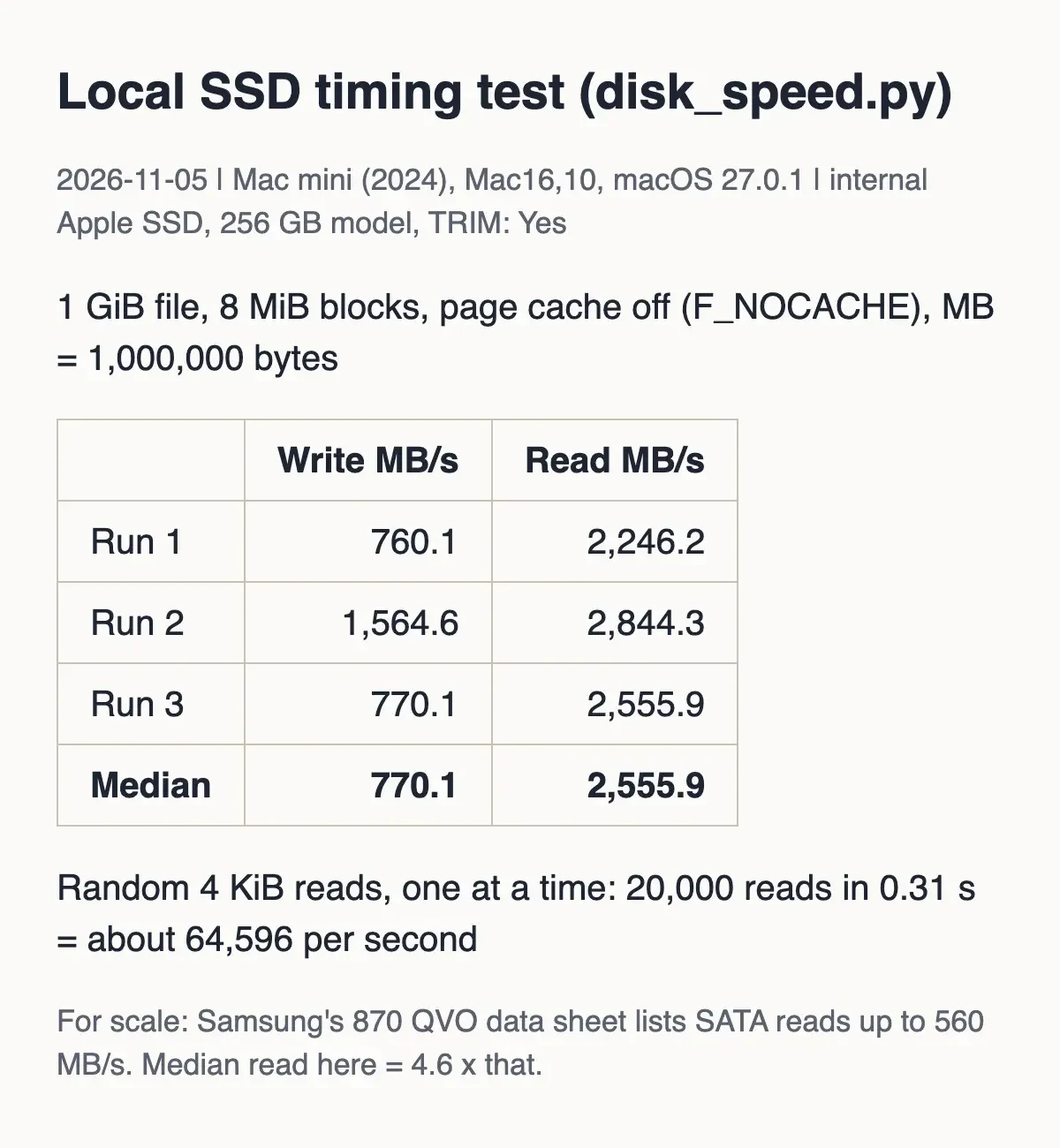 Screenshot: our disk_speed.py results page on 127.0.0.1, November 5, 2026.
After the swap: TRIM, health checks and warranty rights
Before any swap, copy everything off the old drive; our guide to cloud backup for small businesses explains why an off-site copy matters. If you plan to clone the old drive onto the new one, a separate backup first means a failed clone costs you time, not files. Then check TRIM, the command that tells an SSD which blocks aren't in use. Both Samsung sheets list "TRIM (Required OS support)", and Microsoft's fsutil behavior reference says NTFS has trim on "by default unless an administrator disables it". In an admin Command Prompt, run this and look for a 0:
fsutil behavior query DisableDeleteNotifyMicrosoft's page says the flag "Disables ( 1 ) or enables ( 0 ) delete notifications", so 0 means TRIM is on.
For health, Apple's Disk Utility First Aid guide says that if it warns the disk is about to fail, you should "back up your data and replace the disk". On Windows, there's a HealthStatus field in the same Get-PhysicalDisk cmdlet.
If your PC's still under warranty, US law is on your side. The FTC's consumer guide to warranties puts it this way: "a manufacturer can't require you to use specific parts or services to keep the warranty coverage". The exceptions are free parts or an FTC waiver. The agency's businessperson's guide to federal warranty law ties that rule to Section 102(c) of the Magnuson-Moss Warranty Act. The same consumer guide says to keep the receipt, since it "proves the date you bought the product".
For the SSD itself, both Samsung sheets point to a detailed warranty statement at samsung.com/samsungssd for the exact terms.
For the old drive, NIST's SP 800-88 Rev. 2, Guidelines for Media Sanitization came out in September 2025 and replaced the 2014 version as a US government reference for wiping storage. Its abstract says sanitization makes access to the old data "infeasible for a given level of effort." The EPA's electronics donation and recycling page gives the household version plainly: "Delete all personal information from your electronics."
Frequently asked
Can a PCIe 4.0 NVMe SSD go in a PCIe 3.0 slot?
The 990 PRO can. Its data sheet footnote says "990 PRO is backward compatible with PCIe 3.0."
Will an M.2 SSD work in a PlayStation 5?
Samsung's 990 PRO data sheet lists PlayStation 5 under usage, in the M.2 2280 size. For other models, check the console maker's rules.
What do TLC and 4-bit MLC mean on a data sheet?
Bits stored per flash cell. The 990 PRO sheet says TLC; the 870 QVO sheet says "Samsung 4bit MLC V-NAND" and has less TBW per terabyte.
How we made this guide: We saved the two Samsung data sheets and 14 other pages on November 5, 2026, and matched quotes to them. Facts checked by the DigitalTreed team on November 5, 2026.
First published April 2023, listing ten mostly data-center drives with no sources. Rewritten November 5, 2026 from maker data sheets, Microsoft and Apple help pages, and federal warranty guidance.
Sources
- Samsung: SSD 990 PRO Data Sheet, Revision 1.0 (PDF)
- Samsung: SSD 870 QVO Data Sheet, Revision 1.1 (PDF)
- Samsung US: 2TB PCIe 4.0 NVMe M.2 SSD 990 PRO store page
- NVM Express: About
- SATA-IO: SATA naming guidelines
- SATA-IO: SATA M.2 card
- Microsoft Learn: Get-PhysicalDisk
- Microsoft Learn: MSFT_PhysicalDisk class
- Microsoft Learn: fsutil behavior
- Apple Support: Repair a storage device in Disk Utility on Mac
- Apple Support: Identify your Mac mini model
- Apple Support: Mac mini (2024) Tech Specs
- FTC Consumer Advice: Warranties
- FTC: Businessperson's Guide to Federal Warranty Law
- NIST SP 800-88 Rev. 2: Guidelines for Media Sanitization
- US EPA: Electronics Donation and Recycling


Comments
No comments yet. Start the conversation below.