
Quick answer
Among Google, Microsoft and Dropbox business plans, storage for a small team starts at $7 per user a month on an annual plan, as of October 28, 2026. The catch is space: Google Workspace Business Starter pools 30 GB per user, while Microsoft 365 Business Basic gives each user 1 TB. Check the per-TB table first, then add a separate backup.
If client files at your office still go out as email attachments, you're likely pricing cloud storage for small business use. Cloud storage for business is a paid service that keeps your team's files on a provider's servers and syncs them to each computer. It's the software layer from our cloud computing architecture explainer, rented by the seat. We'd start with the storage inside the email suite you already pay for.
This guide starts with the four services side by side and what each plan costs per user and per TB. Then sharing controls, whether cloud storage counts as a backup, upload limits for big files, and how to pick.
Key takeaways
- Workspace Starter costs $2,800 per TB a year for an example five-person team.
- Business Basic gives each user 1 TB for $7.00 a month, paid yearly.
- A synced delete reaches every copy, so keep a separate dated backup.
- Dropbox Standard restores deleted files for 180 days; Drive's trash empties after 30.
- Box caps a single upload at 5 GB on its Business plan.
Four services, one job: shared files for a small team
So what are you choosing between? Two of the four come bundled with business email and office apps, and two sell storage first. Google Drive is part of Google Workspace, and OneDrive is part of Microsoft 365. The seat that pays for your inbox pays for your files too. Dropbox and Box sell storage and sharing on their own, so if you also need business email, you'd be paying a second bill to someone else. Here's how the plans a five-person office would look at line up, from each vendor's US page as of October 28, 2026:
| Plan | Per user a month (annual) | Storage | Deleted files kept | Largest single file |
| Google Workspace Business Starter | $7 | 30 GB pooled per user | 30 days in Trash | 5 TB |
| Google Workspace Business Standard | $14 | 2 TB pooled per user | 30 days in Trash | 5 TB |
| Microsoft 365 Business Basic | $7.00 | 1 TB per user | 93 days (work accounts) | 250 GB |
| Dropbox Standard | $15, billed yearly | Starts at 3 TB for the team | 180 days | 2 TB |
| Box Business | No US price read | Not read on a US page | Not read | 5 GB |
Two rows need a second look. Workspace storage is pooled across the company, so one heavy user can draw on the rest, while Microsoft's terabyte belongs to each person and can't be lent to a colleague. Box's pricing page sent our browser to a UK page in rupees, so we've left its price blank rather than guess a US number from a foreign price list.
Microsoft counts mail apart: its plans page shows 100 GB primary and 50 GB archive mailbox storage per user on Business Basic, beside the 1 TB.
Those seats also cover video meetings, which our video call apps comparison prices, and a mailbox, which our business email address walkthrough sets up. Books and stock counts belong in accounting software or a cloud ERP.
What each plan costs per user and per TB
Those per-user prices hide the number that matters once your files get big: what you pay for each terabyte. Google's Workspace pricing page lists Business Starter at $7, Standard at $14 and Plus at $22 per user a month. Those are 1-year commitment prices as of October 28, 2026. Microsoft's business plans page lists Business Basic at $7.00 and Business Standard with Copilot at $23.50, paid yearly. On Dropbox's business pricing page, Standard costs $15 and Advanced $24 per user per month with yearly billing. Advanced needs 3 people or more and starts at 15 TB for the team.
Our cost script did the math for an example team of five. Yearly cost is the monthly price x 12 x 5. Team storage is storage per user x 5, or Dropbox's "starts at" team figure: 3 TB on Standard and 15 TB on Advanced. That makes Dropbox's per-TB cost the most it would be. Cost per TB is yearly cost divided by team storage, with 1 TB counted as 1,000 GB:
| Plan | Per user a month | Team, per year | Team storage | Cost per TB, per year |
| Google Workspace Business Starter | $7.00 | $7.00 x 12 x 5 = $420.00 | 0.03 TB x 5 = 0.15 TB | $420.00 / 0.15 TB = $2,800.00 |
| Google Workspace Business Standard | $14.00 | $14.00 x 12 x 5 = $840.00 | 2 TB x 5 = 10 TB | $840.00 / 10 TB = $84.00 |
| Google Workspace Business Plus | $22.00 | $22.00 x 12 x 5 = $1,320.00 | 5 TB x 5 = 25 TB | $1,320.00 / 25 TB = $52.80 |
| Microsoft 365 Business Basic | $7.00 | $7.00 x 12 x 5 = $420.00 | 1 TB x 5 = 5 TB | $420.00 / 5 TB = $84.00 |
| Microsoft 365 Business Standard with Copilot | $23.50 | $23.50 x 12 x 5 = $1,410.00 | 1 TB x 5 = 5 TB | $1,410.00 / 5 TB = $282.00 |
| Dropbox Standard | $15.00 | $15.00 x 12 x 5 = $900.00 | starts at 3 TB for the team | $900.00 / 3 TB = $300.00 |
| Dropbox Advanced | $24.00 | $24.00 x 12 x 5 = $1,440.00 | starts at 15 TB for the team | $1,440.00 / 15 TB = $96.00 |
None of the pricing pages we read prints a per-TB figure, and dividing splits the two $7 plans. As of October 2026, Business Starter's 150 GB pool works out to $2,800 per TB a year. Business Basic's 5 TB comes to $84. The same $420 buys about 33 times the space. Dropbox Standard's $300 uses its 3 TB starting figure, and Dropbox says team storage "starts at" that number. A bigger team may pay less per TB there.
Our surveying example isn't a documents-only office. At an example 6 GB per drone survey file, five files fill one person's 30 GB Starter share. Say the example firm keeps 4 TB of old drone surveys and CAD drawings that everyone needs to reach from the field. Business Starter's 150 GB pool can't hold even a tenth of it, while Business Standard's 10 TB pool takes the whole archive and still leaves 6 TB for new work. Because Google's pool is shared across the organization, the archive doesn't have to squeeze into one person's 2 TB.
Microsoft's terabyte is tied to each person. A 4 TB archive won't fit in anyone's OneDrive. Dropbox Standard's 3 TB starting figure falls 1 TB short too, unless your team's allowance comes out higher than that floor. So for this firm the cheapest plan here that fits is Workspace Business Standard, at $840 a year as of October 2026. Business Plus costs $480 more.
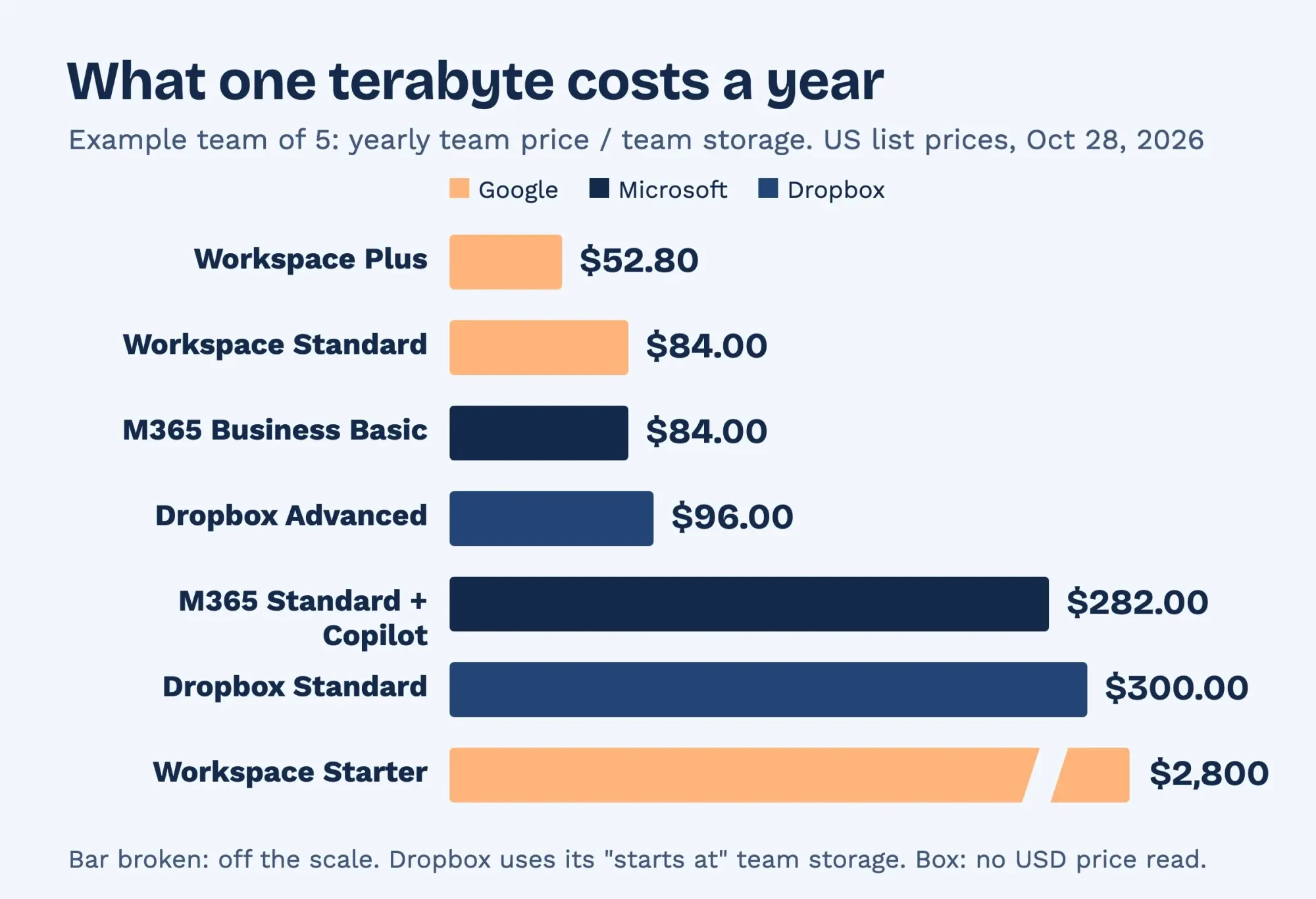 Diagram by DigitalTreed. Example team of 5; US annual list prices from Google, Microsoft and Dropbox, read October 28, 2026.
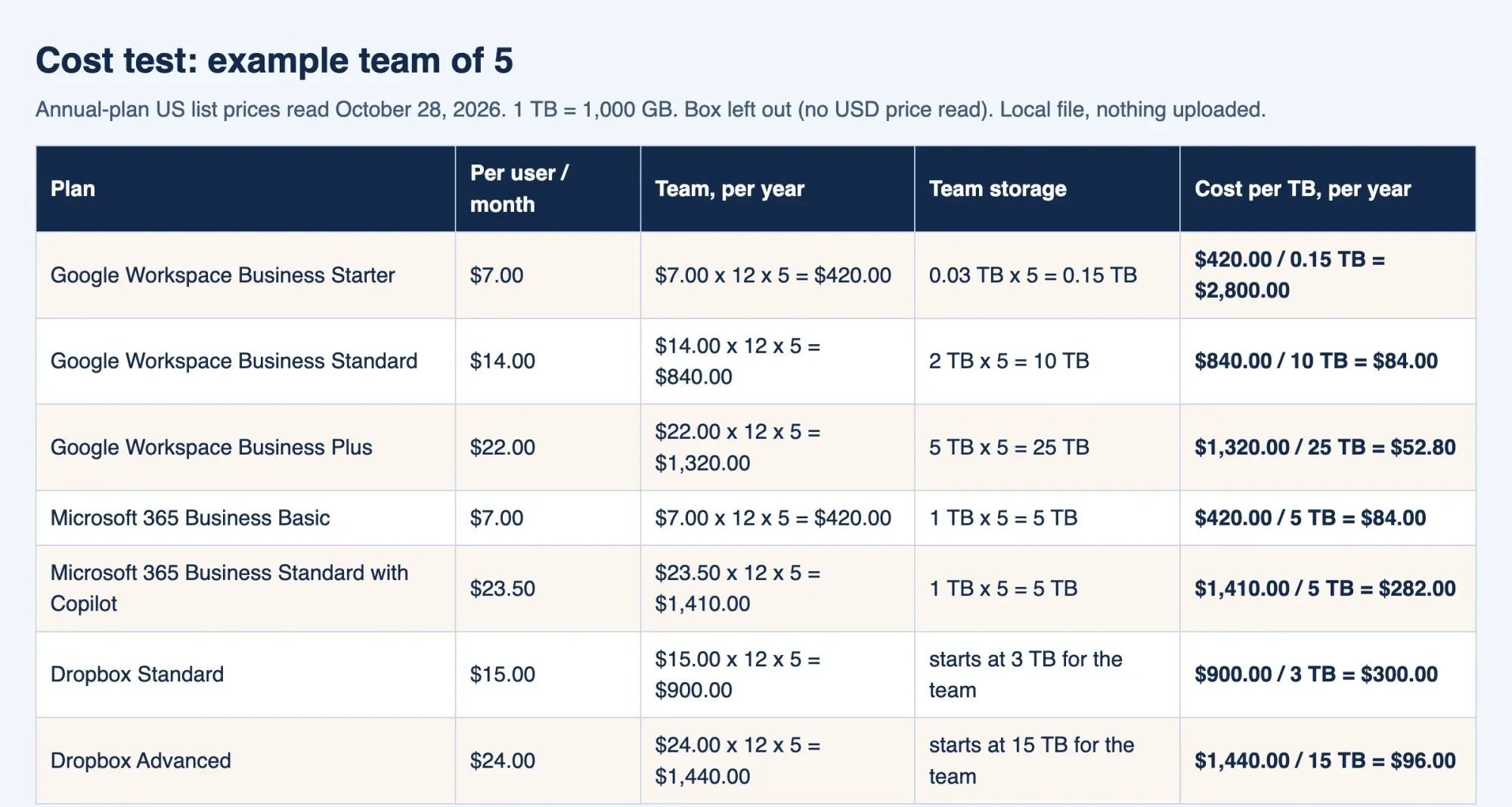 Screenshot: cost.html from our storage cost script, served on 127.0.0.1 on October 28, 2026. Example team of 5.
Sharing controls decide who can open a client file
Once files live in the cloud, the risk moves from a lost laptop to a link that lands in the wrong inbox. All four services share with named people or by link. The extras differ by plan.
Google Drive's sharing help page gives three roles: Viewer, Commenter and Editor. A link is either Restricted or open to anyone with the link. On work accounts you can make a person's access expire on a date within one year, though for folders it only works on Viewer access. That expiry is set per person, not on an "anyone with the link" link. There's also a setting that stops people from downloading, copying or printing. On a work account, your administrator may restrict external link sharing, so check that before you promise a client a link.
Dropbox draws the line by plan. Link passwords and expiry dates skip the one-person Plus plan, and its link settings page lists Standard, Advanced and other paid plans instead. After the expiry date, the link is disabled. Box's shared links guide offers links for people in your company or anyone with the link. You can add a password, an expiry date or a download block, and passwords need a paid account and at least eight characters. Microsoft's OneDrive business page lists password-protected or expiring links for its business plans.
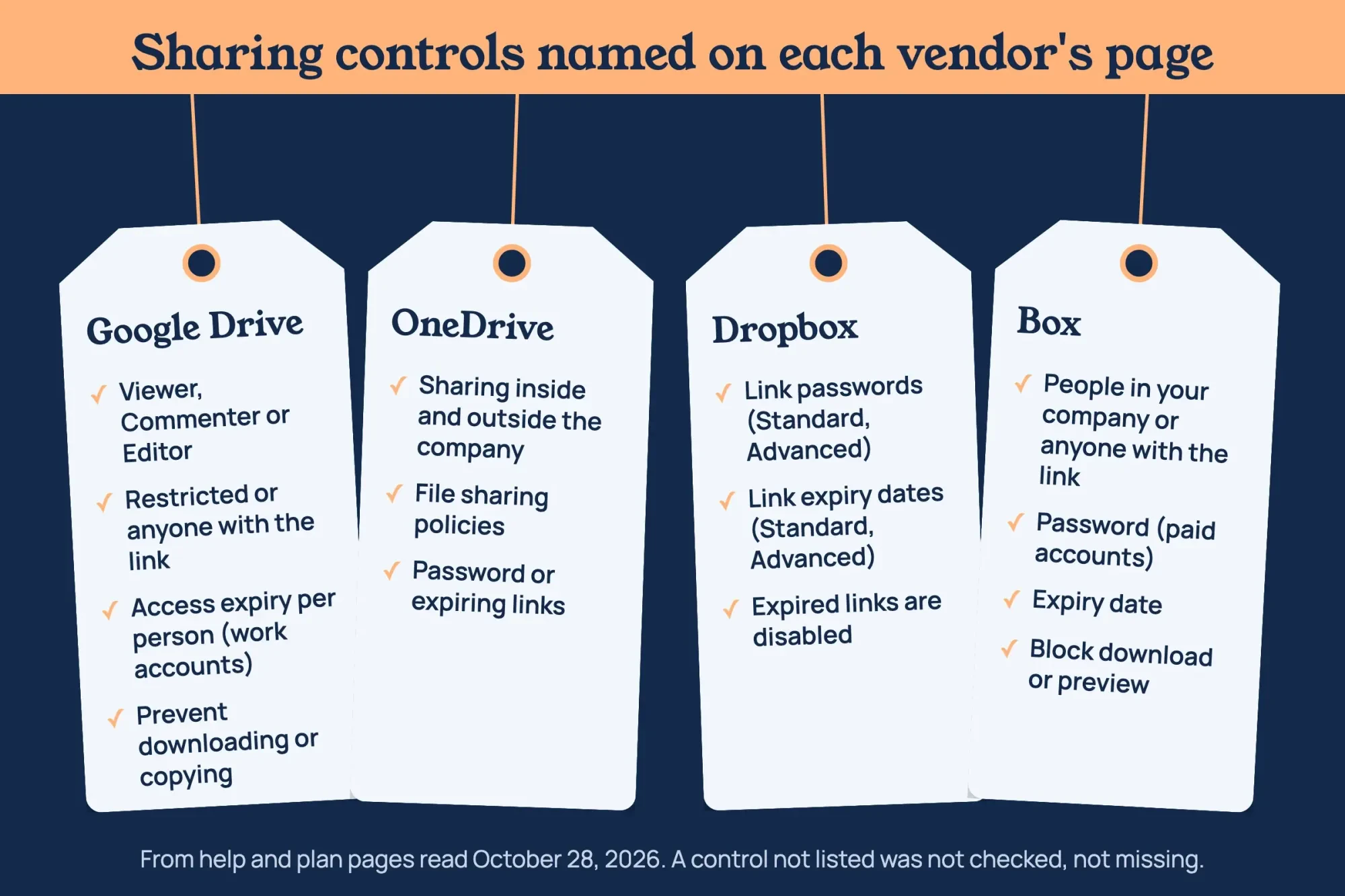 Diagram by DigitalTreed. Controls named on each vendor help or plan page, read October 28, 2026; a control not listed was not checked.
Before the first client folder goes out, make these four settings the default:
- New links open as Restricted in Drive, or People in your company in Box.
- Clients get Viewer access unless they truly need to edit.
- Any share of a contract, invoice or ID document gets an expiry date (per person in Drive, on the link in Dropbox, Box and OneDrive).
- A person who leaves loses access the same day.
Give that last rule a named owner, because a former employee's account keeps its shared folders until an admin removes or suspends it. Our CRM setup guide covers the same access-by-role habit for customer records, and shared folders need it just as much.
Is cloud storage the same as a backup?
No. A synced folder copies your mistakes as faithfully as your work. Google's help page on deleting files says "any files you put in the trash are put in the trash everywhere" when Drive folders are mirrored or streamed to a computer.
Microsoft's restore page lists files that get "deleted, overwritten, corrupted, or infected by malware" as cases you might undo.
What saves you is the restore window. It isn't the same anywhere. Drive deletes trashed files forever after 30 days. Its version history page says an older version can go after 30 days or once 100 newer versions exist. OneDrive work accounts get 93 days to restore deleted files. An admin can change that. Microsoft's version history page adds that "File version history is retained for 30 days." Dropbox's version history overview gives Standard 180 days and Advanced 365. Dropbox's plans page lists 30 days to restore deleted files on the one-person Plus plan, so a solo plan gives you about the same month Drive does.
Those windows still sit inside one account, though. Stolen logins can empty a trash too. CISA's #StopRansomware Guide says to "Maintain offline, encrypted backups of critical data," since many ransomware variants hunt for reachable backups. For a five-person office, that's a second copy outside the storage account, kept somewhere a stolen Google, Microsoft or Dropbox password can't reach. An external drive swapped weekly works, and so does a cloud-to-cloud backup on its own login. The same CISA guide names both routes, offline copies and cloud-to-cloud backups, in a single line. It also says to test backups regularly, so restore one folder from that copy every quarter.
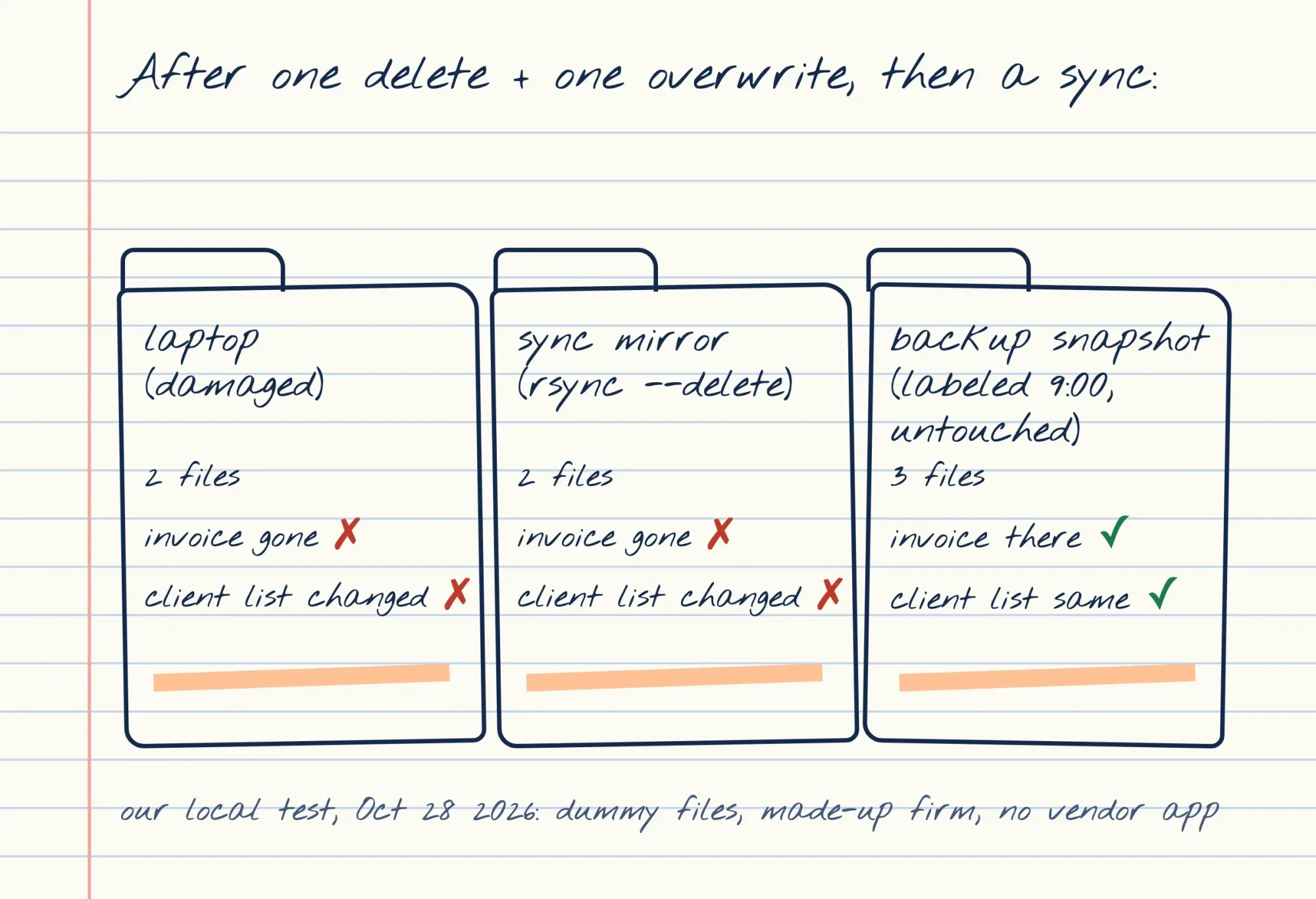 Drawn by us. Results from our local rsync test on dummy files, October 28, 2026; no vendor app was used.
What we tested
On October 28, 2026, we also ran a sync-and-backup model on one Mac, with no vendor app or account. It made three dummy files for the made-up Wexley Land Surveying, mirrored them with rsync --delete and saved a dated snapshot. Then it deleted the invoice, scrambled the client list and synced again. Each folder got three checks: file count, the invoice, and the client list's SHA-256 hash. All nine results:
| Folder | Files | invoice-1047.pdf | clients.csv hash matches |
| Laptop after the accident | 2 | Missing | No |
| Sync mirror after the next sync | 2 | Missing | No |
| Backup snapshot labeled 9:00 | 3 | Present | Yes |
The mirror matched the damaged laptop. Only the snapshot kept both files. This is rsync, not any vendor's app, and those add a trash and version history on top.
Big files hit upload limits before storage limits
Beyond backups, surveyors, video makers and architects hit a different wall. It's the biggest single file a service accepts. Google Drive's file types page takes files up to 5 TB. OneDrive's limits page caps a single upload at 250 GB and points anything over a few GB to the sync app rather than the website upload. Dropbox's file size page allows 2 TB, but browser uploads over 375 GB may time out. Box is stricter. It sets the cap by plan in its file size guide: 5 GB on Business, 15 GB on Business Plus and 50 GB on Enterprise. Its Box Sync app stops at 15 GB per file, whatever plan you buy.
An example 6 GB drone survey file fits every service here except Box Business.
Before you move a whole archive, try your largest file during a trial, so a file over the cap fails before you have moved anything else. Laptop disk space counts too. Google's Drive for desktop help says streaming "uses almost no computer space," while mirroring keeps a full copy on every machine.
Pick by your email suite and your biggest file
So we'd decide on two things. One is the suite you already pay for, and the other is the size of the largest files your team has to move around. Choose Microsoft 365 Business Basic if your team lives in Outlook, Word and Excel on the web and needs room. As of October 2026, $7.00 a user buys 1 TB each. Choose Google Workspace Business Standard if you run on Gmail and Docs, since $14 a user buys a 2 TB pool. Keep Business Starter for documents only. Photos and video outgrow 30 GB fast. Moving off another service? Google lists its Workspace Migrate tool for data migration on Business Standard.
Choose Dropbox Standard if you'd like storage kept apart from email, with 180-day version history and the option of a password on any link that leaves the office. Box is worth pricing when outside sharing is the main job, but ask its sales team for a US figure first, since we couldn't read one from here. Storage is only one line in a small business tech stack, so check what you already pay for before adding a seat.
Our take: start from the suite you already pay for, check its per-TB cost against your biggest folder, and set up the separate backup that same week.
Rather hand off the move, the sharing defaults and a test restore? That kind of setup is part of our web development work for paying clients. It's a paid service, so request a quote and set it beside a local IT shop's.
Cloud storage questions from small offices
Frequently asked
How many users can a small business plan have?
Up to 300. Microsoft's plans page lists 1 to 300 employees, and Google caps Business Starter, Standard and Plus at 300 users.
Can I use Dropbox Plus for my business?
It's sold for one person. Dropbox's plans page lists Plus at $9.99 per month billed yearly for 2 TB, as of October 28, 2026.
Does Microsoft 365 Business Basic include desktop Office apps?
No. Microsoft's OneDrive business plans page lists web and mobile versions of Word, Excel, PowerPoint and Outlook for Basic. Business Standard with Copilot adds the desktop versions.
Is there a free trial of Google Workspace?
Yes. Google's pricing page offers to "Try Google Workspace for 14 days."
How we made this guide: We read each vendor's US pricing and help pages on October 28, 2026, Microsoft's in a normal browser window. Two local scripts made the cost table and sync results. Box's pricing page redirected us to a UK page in rupees, so Box has no price here. Facts checked by the DigitalTreed team on October 28, 2026.
First published August 2020 as an explainer on storage as a service. Rewritten October 28, 2026: now a comparison of four business storage services on price, sharing, backup and file limits.
Sources
- Google Workspace: Compare pricing plans (US)
- Microsoft: Microsoft 365 business plans and pricing
- Microsoft: Compare OneDrive business plans
- Dropbox: Business pricing
- Dropbox: Plans
- Google Drive Help: Share and manage access to files and folders
- Google Drive Help: Delete files in Google Drive
- Google Drive Help: Check activity and file versions
- Google Drive Help: Files you can store in Google Drive
- Google Drive Help: Use Google Drive for desktop
- Microsoft Support: Restore files deleted from your OneDrive
- Microsoft Support: Restore a previous version of a file stored in OneDrive
- Microsoft Support: Restrictions and limitations in OneDrive and SharePoint
- Dropbox Help: Version history overview
- Dropbox Help: How to set shared link permissions
- Dropbox Help: What is the Dropbox file size limit?
- Box Support: Creating Shared Links
- Box Support: Understand the maximum file size you can upload to Box
- CISA: #StopRansomware Guide


Comments
No comments yet. Start the conversation below.