
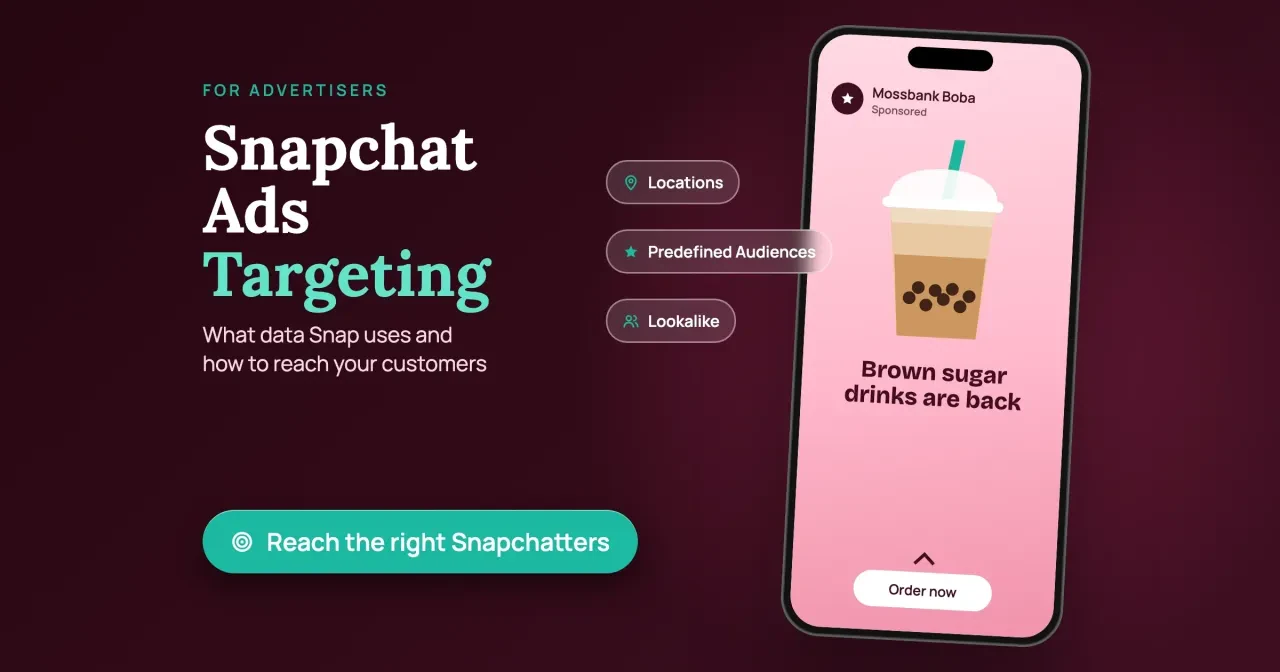
Quick answer
Snapchat ads targeting reaches people through the age and country they gave Snap, interests Snap infers, and data your Snap Pixel or customer list sends, as of October 28, 2026. Your product category changes who you may reach: US alcohol ads must target 21+, and dating ads 18+. Start with location and age, then add one audience.
Say you run one shop near a campus, and most of your customers are under 25. Snapchat ads targeting is the set of choices in Snap's ad setup that decides who sees your ad. It runs on data Snap collects, guesses and gets from advertisers.
We cover the four kinds of data behind an audience, the targeting menu and which audience a small shop should start with. Then come the Snap Pixel, age gates and sensitive data, what US Snapchatters can switch off, and why $5 a day is the floor.
Key takeaways
- In our 6 example plans, 5 of 8 fails were policy checks.
- US alcohol ads on Snapchat must target people 21 and older.
- Snap lets you target by postal code, not only city or state.
- Snap recommends $20 to $50 a day over its $5 minimum.
- Snapchatters can opt out of ads built on advertiser customer lists.
Snap builds your audience from four kinds of data
Before you pick anything in the ad setup, it helps to know what Snap matches your choices against, because some of its inputs count for far more than others. Snap's ads transparency page sorts its inputs into four groups and marks each one "Higher weight" or "Lower weight" for its ad system. The first group is what a person types in at sign-up. Age, taken from the birthday, carries higher weight. So do country and language. Snap also tries to infer age from activity, which it says helps ads reach the right audience.
The second group is what Snap guesses from how someone uses the app: an age estimate, a gender cohort and interests. Some of those interest guesses are what Snap calls Lifestyle Categories, and Snapchatters can review, change or clear them in the app at any time. Snap's own example tags a fan of racing Stories as an "Automotive Enthusiast." Friends' ad clicks count too, at lower weight. If your friends clicked an ad for shoes, Snap says it may show you that ad first, and it can use similar signals from Snapchatters over 18 in your household.
The third group is what advertisers send. That's Snap Pixel and Conversions API data plus uploaded customer lists, which Snap says it typically matches on "a hashed version of your phone number or email." Both carry higher weight. Snap's own example is a comic book publisher sharing its fan list so those fans see an ad for the next release. The fourth group, device details and location from the IP address or GPS, carries lower weight. Snap's example: an iPhone user may see an ad for an app that's only on iOS. Snap's Privacy Policy, effective September 21, 2026, says it uses interests and preferences "to personalize, target, and measure ads."
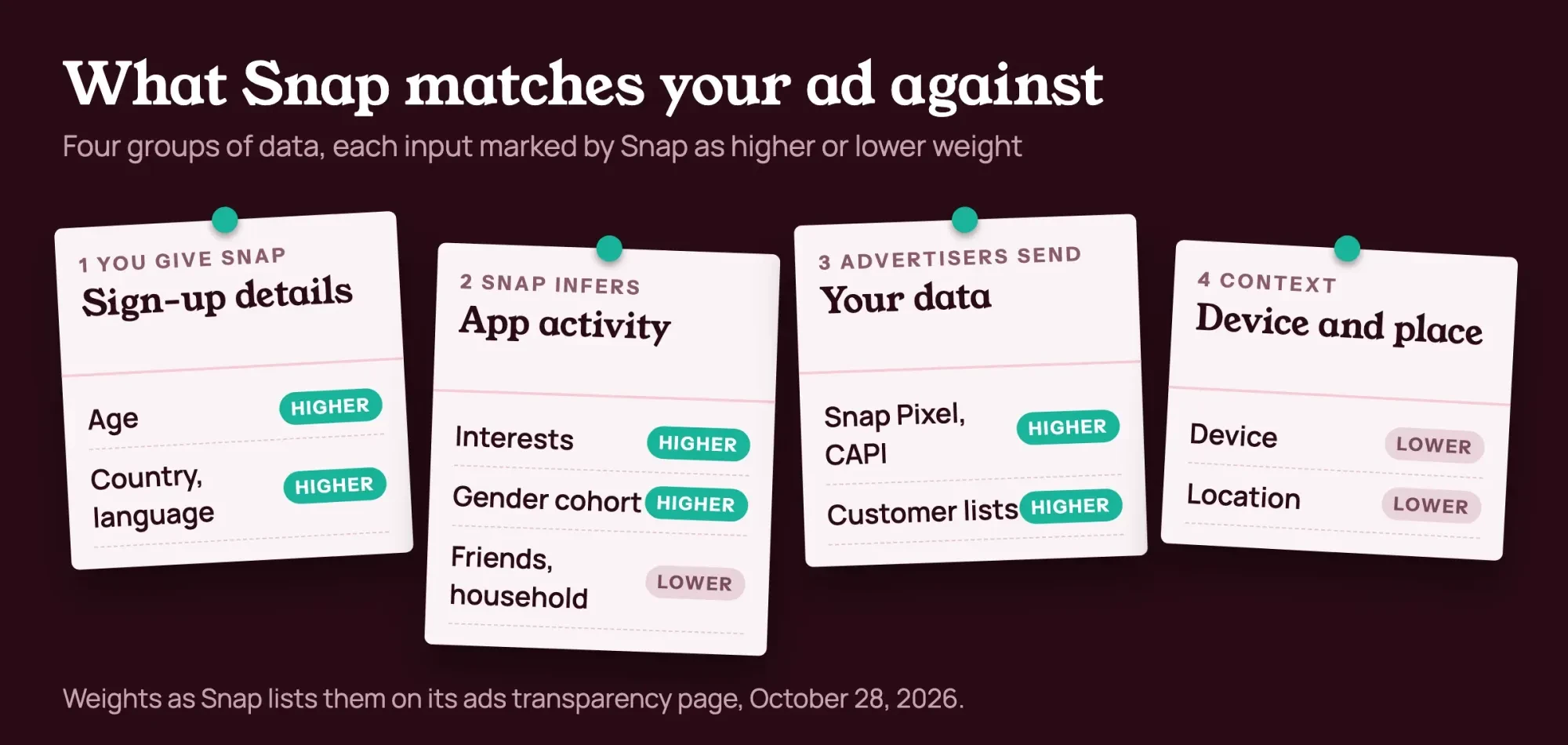 Diagram by DigitalTreed, drawn from Snap's ads transparency page as read October 28, 2026.
Of those inputs, location is the one a walk-in shop leans on hardest, though Snap weights it lower. Only you know which postal codes your customers actually walk in from.
The targeting menu, from postal codes to Lookalikes
Snap's audience targeting page splits targeting into a base layer and a set of Custom Audiences. The base layer has three parts. Locations run down to "Cities, states, countries, and postal codes." Postal codes, the smallest unit listed, matter a lot for a single shop. Demographics cover "Age range, gender, education, income, and marital and parental status." Predefined Audiences group people by "What your customers like to do, where they like to go, and where they shop."
Custom Audiences add your own data on top. Snap lists six types, split by whether they're better at finding new customers or reaching current ones:
| Audience type | Built from | Snap says it suits |
| Ad Engagement | People who swiped up, watched a full video ad or opened a Story ad of yours | New customers |
| Profile Engagement | People who engaged with your Public Profile or subscribed | New customers |
| Lookalike | A customer list, Snap Pixel data or a third-party audience | New customers |
| Customer List | Your uploaded customer list, matched to Snapchatters | Current customers |
| Website Events | Snap Pixel actions on your site, like add to cart | Current customers |
| Mobile App Events | Actions in your app, like an install or first open | Current customers |
Snap's audience page FAQ names three Lookalike sizes, from High similarity (closest) through Balance to Wide reach (broadest). Each needs a source audience. Snap's targeting overview says one will "find more people similar to your best customers".
Snap's FAQ on that page spells out what counts as engagement, and the list is long. Ad Engagement covers people who swiped up on an image or video ad, watched a full video ad or opened a Story ad. It also counts anyone who shared or saved a lens or filter, or was served a paid impression. Profile Engagement covers people who viewed your profile or a Story, played a profile lens, viewed a Spotlight, or subscribed or unsubscribed in a set period. The same FAQ says all six Custom Audience types can reach new and current customers, even if each suits one purpose better.
Snap's pricing FAQ says a Public Profile is free, and anyone who views it, watches its Stories or plays its lens can later join your Profile Engagement audience.
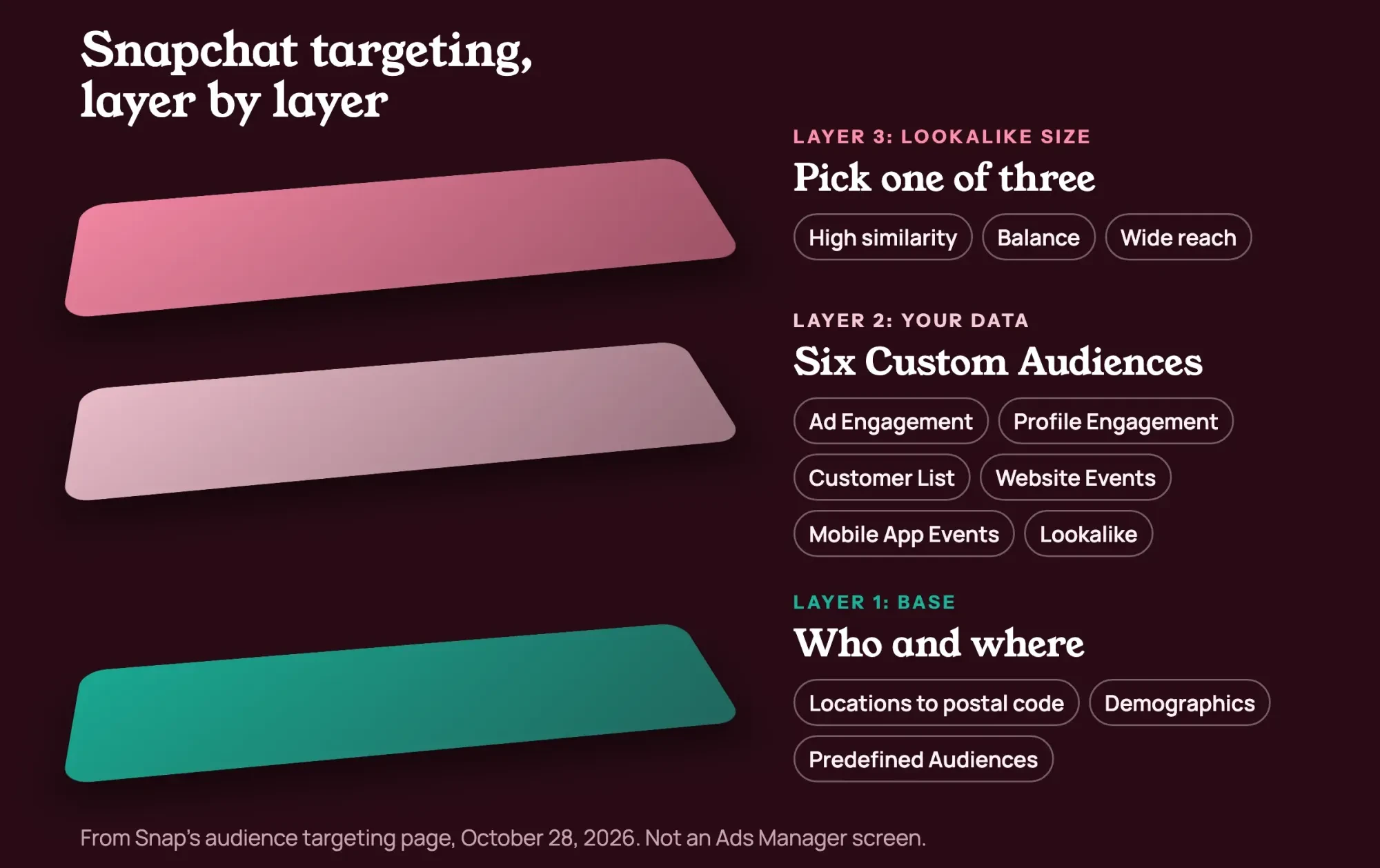 Diagram by DigitalTreed of the options on Snap's audience targeting page, October 28, 2026. Not an Ads Manager screen.
Radius settings, minimum audience sizes and the full Predefined Audience list aren't on those public pages. Snap's help articles didn't load for us, so we've left them out.
Which audience should a small shop start with?
Start with the base layer, and add a Custom Audience only once you have data to build one. Take Mossbank Boba, a made-up boba shop in Gainesville, Florida, whose regulars are mostly students. Its first audience is the postal codes around the shop and campus, ages 13 to 34, and one Predefined Audience close to eating out, if the setup offers one. Each of those choices maps to a higher-weight input. We'd only widen the age range once sales show older customers walking in, since every year added spreads the same budget thinner. Snap's audience page gives a similar case, a cleaning service that "uses broad local targeting" to reach likely lead-form fillers.
Later, the shop collects loyalty-club emails from people who agree to share them. Snap files Customer List audiences under reaching current customers, so this step is about repeat visits more than new faces. A Customer List audience built from those emails can tell regulars about a new drink, and a Lookalike set to Balance can then find students who resemble them. We'd skip Wide reach here. A store people walk to gains little from a loose match spread across a whole state. Snap's own suggestions for a Customer List fit a shop well: reach customers who haven't bought in a while, or tell them about new products they might like.
First, ask ten regulars at the counter whether they open Snapchat daily. Weighing channels is a social channel strategy question, and if your crowd leans to X, see marketing on X for small businesses.
Tag the ad's link before it runs with a free UTM link builder, so Snapchat visits show up as their own source in your analytics reports. Untagged visits are harder to separate later.
Our take: for a shop people walk to, we'd launch with postal codes and an honest age range. We'd hold any Predefined Audience back until two weeks of results are in, because every layer narrows the audience Snap's system learns from.
Install the Snap Pixel before you need Website Events
Website Events audiences and pixel-based Lookalikes need site data that's already been collected, so the pixel goes in early. The Snap Pixel page calls it "a piece of JavaScript code" for your website. Snap says the pixel is free. You can add it three ways: Snap's Shopify app ("in just 2 clicks"), Google Tag Manager, or Snap's Pixel Setup Tool. That last route has you paste the code into your site's header section. Snap says it takes 5 minutes. Snap calls Tag Manager the best choice if you're already using it, so the setup tool is mainly for sites with neither.
The pixel tracks actions such as page views, add to cart, purchases and sign-ups, and those events are what Website Events audiences and pixel Lookalikes are built from. Snap also offers a Conversions API, a server-to-server link that can catch events a browser pixel misses. Snap recommends running both. To test the setup, it points to its Pixel Helper and Pixel Test Event tools. Once real visitors have come through, Snap rates how well your events match Snapchat accounts with an Event Quality Score. It says a higher score can mean more conversions at a lower cost. There's nothing to grade on install day, so check the score after your first campaign has sent some traffic.
You also set limits of your own. Snap's pixel page says you can't use the pixel to send health-related or other sensitive data, and that following the law is your responsibility. The FTC's Office of Technology went further in a pixel tracking post dated March 16, 2023. It warned that pixels can pass along personal data, even form entries, and that improper sharing can break the FTC Act or health privacy rules. So keep the pixel off pages like a health intake form, a pharmacy refill page or anything else that reveals a condition. For building visitor lists on Google and Meta too, our retargeting ads guide goes further.
Age gates and sensitive data: who each category may reach
Data limits aren't the whole story. Every ad goes through Snap's review, and the policy says Snap can still reject or remove an ad later, including in response to user feedback. Its Advertising Policies also decide who each category may reach. Ads must follow the law in each area where they run, so a plan aimed at two states answers to both. Section 2.1 warns that some products "may not be targeted on the basis of gender, age, or location," and it sets the floor too. Snap will reject ads "addressed to, or intended to appeal to, children under 13," because "Snapchat is a 13+ app."
Each category then adds its own minimum. Here are the US age rules as of October 28, 2026:
- Alcohol: at least 18+ or the local drinking age, listed as "United States: 21+."
- Dating services: 18+, or the legal age of majority where you target.
- Anything that references weight loss: 18+. Weight-loss supplements aren't allowed.
- Health and wellness supplements: 18+ in the United States, after Snap pre-approves the advertiser.
- Gambling: Snap pre-approval first, and no targeting below the legal gambling age.
Snap enforces the alcohol line on the user side as well: its ads privacy page says US users under 21 won't see alcohol ads, whatever their ad topic settings. Its teens page says the same restrictions keep gambling ads from anyone under the legal age where they live.
Section 2.3 covers data. Ads "may not collect sensitive information or special category data." That list includes health information, crime, and "financial status, racial or ethnic origin, religious beliefs or preferences." It also names sexual preferences, political opinions and union membership. That covers lead forms, too. Your privacy policy must be "readily accessible" wherever you collect personal details.
Copy has a rule of its own. Ads "must not state or imply knowledge of personal data, sensitive information, online activity, or the precise whereabouts of a user." A headline hinting you watched someone shop breaks it.
What US Snapchatters can switch off
Even a plan inside the rules won't reach everyone, because Snap gives users six ad controls. Its ads transparency page lists opt-outs for Activity-Based Ads, built on data from advertisers' sites and apps, and for Audience-Based Ads, built on advertisers' customer lists. A third opt-out covers third-party ad networks. iOS 14.5 users can refuse tracking. People can also hide sensitive ad topics like alcohol or gambling, and edit their Lifestyle Categories. Snap notes that age gating still overrides those choices, so a US user under 21 won't see alcohol ads whatever categories they keep. The Audience-Based Ads opt-out matters most to a small advertiser, because anyone who flips it drops out of every customer list you upload.
Snap's U.S. State Privacy Notice, effective July 15, 2026, says Snap doesn't sell or share data "as defined by these state laws" at all. It sends US residents who want to opt out of targeted ads to the activity-based ads setting, and it mentions Global Privacy Control signals. Since Snap says it doesn't sell data, it doesn't process or keep metrics on opt-out-of-sale requests either. California's CCPA page from the attorney general confirms people there can opt out of sale or sharing "including via a user-enabled global privacy control." Californians can also ask Snap to limit how it uses sensitive personal information. Snap's notice counts precise geolocation as sensitive and says it may use it for more relevant ads.
For you, lists shrink. A Customer List never matches one to one, since some customers aren't on Snapchat and anyone who's opted out of Audience-Based Ads drops off it. So expect a list audience well below your list's size, and lean on location, age and interest targeting for most of the reach in a first campaign. We'd keep a location-and-age ad set running beside any list-based one, so a shrinking list never takes your whole reach down with it. Our piece on privacy and data collection in marketing covers why that trade-off exists.
$5 a day is the floor, not the plan
With the audience set, the budget decides whether Snap's system gets enough impressions and results to learn anything useful about the people in it. Snap's pricing page, read October 28, 2026, says you can spend as little as $5 a day, but Snap recommends "at least $20-50 per day" instead. The reason is the Exploration Phase, which Snap describes as its system learning who in your audience is most likely to act. The faster an ad gets through it, the page says, the sooner Snap can optimize it. The pricing FAQ puts it at "4 days or more, depending on your campaign objective." Snap's audience page goes further and suggests at least 15 days.
Here's the math as of October 2026, using daily budget x 15 days. The budgets are examples, not quotes:
| Example daily budget | Days | Formula | Example total |
| $5 (Snap minimum) | 15 | $5 x 15 | $75 |
| $20 (low end of Snap's range) | 15 | $20 x 15 | $300 |
| $50 (high end of Snap's range) | 15 | $50 x 15 | $750 |
So a first test that follows Snap's advice costs $300 to $750 over 15 days in this example, before you pay for any creative. The $5 floor is per day. Snap's pricing page says you'll see reach and results estimates for your budget during setup, and you can set daily and lifetime caps. Snap lets you stop ads anytime. That means you can pause a test whose first week brings no site clicks, though stopping early cuts the exploration phase short. To compare this kind of auction buying with search ads, see our PPC marketing guide.
How much each view costs isn't fixed, because Snap sells placements in an auction. Its pricing page lists no set price per view. The pricing page says the auction picks which ads to show and then "determines how much to charge the winning ad." Snap's advice there is to match your objective and goal-based bid type to the result you want. Experimenting with suggested bids sits under its advanced tips, so we'd leave that for a second campaign. For Mossbank Boba, $5 a day for 7 days costs $35, while $25 a day for 15 days costs $375. Only the second gives the exploration phase the time and money Snap asks for.
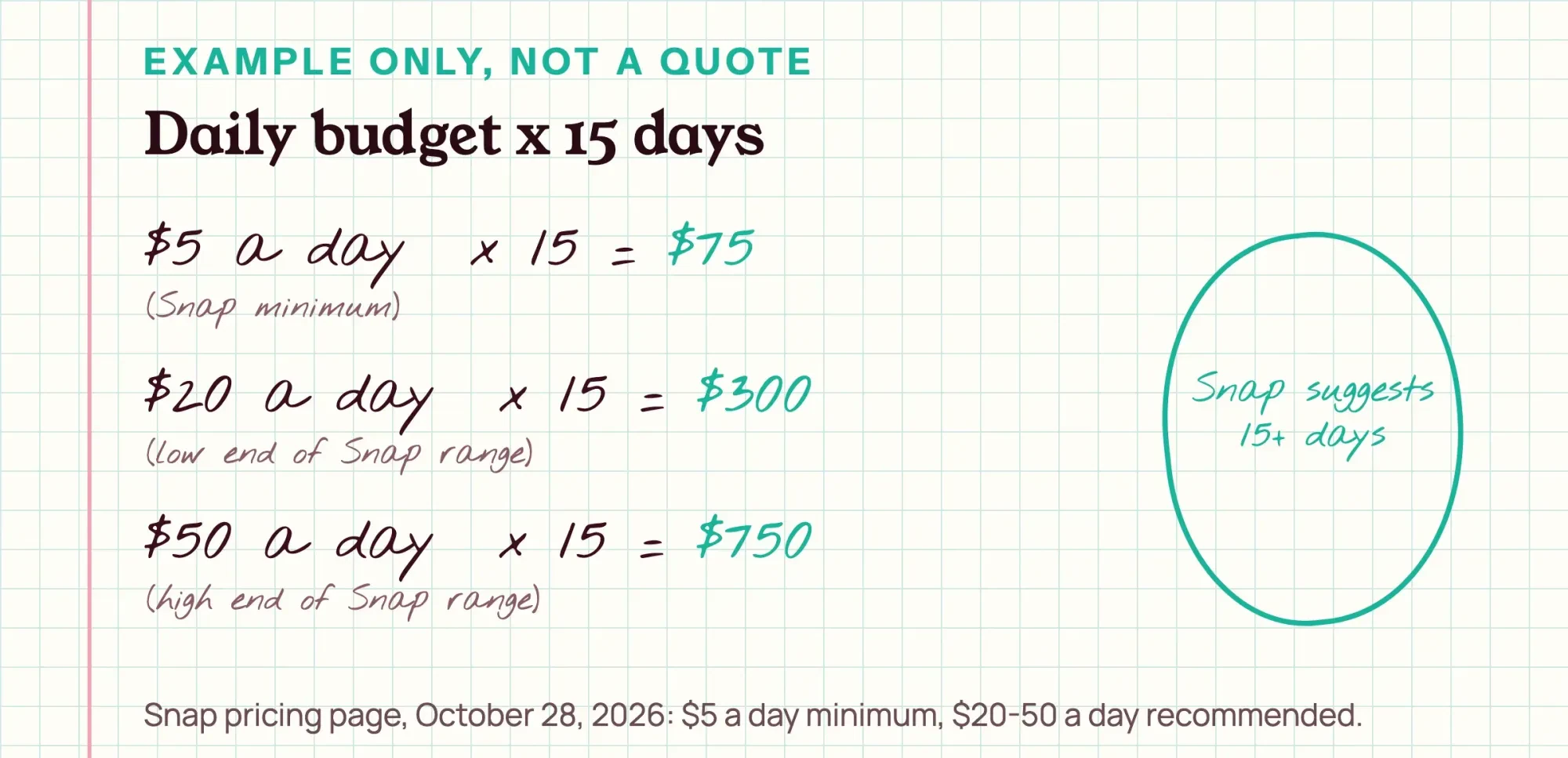 Drawn by us. Example inputs only, from Snap's pricing page as of October 28, 2026.
What we tested
Our Python script, plan_check.py, ran offline on October 28, 2026 on six example plans, with no Snapchat account. Five if-checks cover the $5 minimum, the $20-50 range, 15 days, age 13+ and the US category age. The others test form fields against our 12-word sensitive list, headlines against 6 phrases like "we saw", and pre-approval.
| Example plan | Checks passed | What failed |
| A: Mossbank Boba, $5/day, 7 days | 6 of 8 | $20-50 range, 15 days |
| B: Mossbank Boba, $25/day, 15 days | 8 of 8 | None |
| C: brewery, 18+ | 7 of 8 | Age (US: 21+) |
| D: dating app, 18+ | 8 of 8 | None |
| E: weight loss, 16+ | 6 of 8 | Age, form fields |
| F: supplements, 10 days | 5 of 8 | 15 days, headline, pre-approval flag |
Overall, 40 of 48 checks passed. No plan failed the $5 floor or the 13+ check. Two plans passed all eight. Of the 8 fails, 5 came from policy checks, one of them a pre-approval flag rather than a ban, and 3 from budget or run length. Plan E's flagged fields were "current weight" and "health conditions", and plan F's headline was "We saw you looking at protein powder." Our word lists are crude, so a pass doesn't mean Snap would approve a plan.
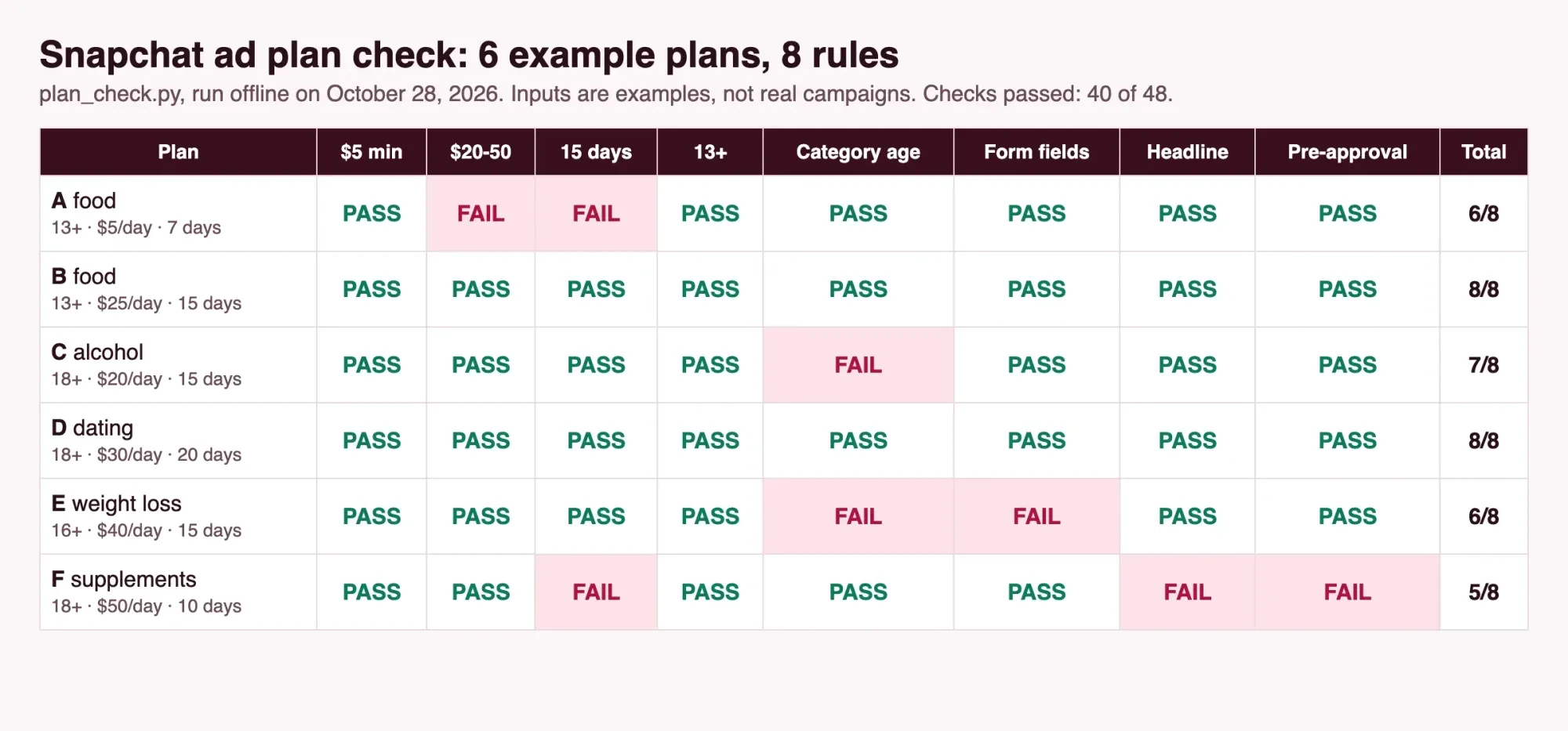 Screenshot: plan_check.py output shown as a local web page at 127.0.0.1 on October 28, 2026. Example inputs only.
Questions about Snapchat ads targeting
Frequently asked
Is the Snap Pixel free?
Yes, and the Conversions API is free to install, though Snap's pixel FAQ says some partner options may cost money.
Does Snapchat sell user data to advertisers?
Snap says it doesn't. Its state privacy notice says that when personal data is disclosed to show ads, it goes only to service providers acting for Snap.
Can Snapchat ads target teenagers?
Yes, from 13. Snap's policies add that an adults-only credit card offer must be age targeted 18+.
How do I turn off personalized ads on Snapchat?
Turn off Activity-Based Ads and Audience-Based Ads in the app's ad settings. In the EU, UK, Norway and Switzerland, Snap's ads page adds a switch that leaves only contextual ads.
How we made this guide: Every quote here was matched against saved copies of Snap's business, policy and privacy pages, plus a California attorney general page and an FTC post. All were opened on October 28, 2026. No Snapchat ad account was opened or used. Facts checked by the DigitalTreed team on October 28, 2026.
First published November 2023 as a user's look at what Snapchat collects. Rewritten October 28, 2026 for advertisers, with targeting options, age rules, opt-outs, budget math and a local test.
A word on our stake: DigitalTreed runs paid social campaigns for clients, and that's paid work, though everything above is doable on your own. Running TikTok too? Our list of common TikTok ads mistakes carries over well. Prefer to hand it off? The DigitalTreed social media service page explains how we build and watch campaigns.
Sources
- Snapchat for Business: Snapchat Ads Targeting Options
- Snapchat for Business: How to Reach the Right People on Snapchat
- Snapchat for Business: Snapchat Ads Pricing
- Snapchat for Business: Snap Pixel
- Snap Advertising Policies
- Snap: Snapchat Ads Transparency
- Snap: Privacy Policy (effective September 21, 2026)
- Snap: U.S. State Privacy Notice (effective July 15, 2026)
- Snap: Teens on Snapchat
- State of California Department of Justice: California Consumer Privacy Act (CCPA)
- FTC Office of Technology: Lurking Beneath the Surface: Hidden Impacts of Pixel Tracking (March 16, 2023)

Comments
No comments yet. Start the conversation below.