
Quick answer
A social media marketing strategy is a one-page plan. It names your goal, your customer and one to three platforms. It also sets what you'll post and how often, who answers messages, your ad budget and the numbers you check monthly. For most small businesses, three good posts a week on one or two platforms is a solid start.
Key takeaways
- Start from a business goal, like 10 booked jobs a month, not from a follower count.
- Pick platforms from real data. In Pew's 2026 survey, 79% of US adults aged 18 to 29 use Instagram, while 78% of those aged 30 to 49 use Facebook.
- Three to five posts a week is enough for most small accounts. Buffer's data on 2.1 million Instagram posts shows smaller gains past that.
- Answer comments and messages within a day. In Sprout Social's survey, 73% of consumers said they'd buy from a competitor if a brand doesn't respond.
- US rules apply to social posts. Label paid or gifted posts, never buy followers (up to $53,088 per violation), and skip share-to-enter giveaways on Facebook.
Picture three businesses. A coffee shop in Portland wants more weekday regulars. A roofer in Dallas wants inspection requests. A two-partner accounting firm in Chicago wants discovery calls.
All three post on social media. Only the ones with a plan can tell you what it brought in. A good social media strategy for small business fits on one page. We built this one from Pew Research Center's 2026 survey, platform help pages and Federal Trade Commission (FTC) rules, all linked at the end.
What is a social media marketing strategy?
A social media marketing strategy is a short written plan for how your business uses social media to reach a business goal. It answers seven questions:
- Why are we on social media? One or two goals you can count.
- Who are we trying to reach?
- Which one to three platforms will we use?
- What will we post, and how often?
- Who replies to comments and messages, and how fast?
- How much will we spend on ads, if anything?
- Which numbers do we check each month?
Three terms get mixed up. The strategy is the why and the what. The plan adds who does each task and the budget. If an agency will run it, our guide to what a digital marketing agency costs lists US price ranges and the accounts to keep. The content calendar is the week-by-week list of posts. You need all three, but the strategy comes first.
A one-page document is enough. If it runs to 20 pages, nobody will open it in month two.
Social media marketing key facts for 2026
All checked on October 23, 2026:
- YouTube (84%) and Facebook (70%) are the most used platforms among US adults in 2026, per Pew Research Center's survey of 5,511 adults.
- Posting 3 to 5 times a week gave about 12% more reach per post than 1 to 2 times, in Buffer's analysis of 2.1 million posts on Instagram (vendor data).
- The overview in Insights in Meta Business Suite covers the past 28 days. Its Messaging tab shows your response rate and response time.
- Meta said 9 million small businesses on its apps use at least one of its AI ad creative tools. That's from its second-quarter 2026 remarks (July 29, 2026).
- An Instagram carousel can hold up to 20 photos and videos, per Instagram Help.
Which social media platforms do US adults use most in 2026?
In 2026, YouTube and Facebook reach the most US adults, while Instagram and TikTok lean young. Choose platforms from data. The best free source is Pew Research Center's fact sheet, published October 19, 2026. Pew surveyed 5,511 US adults between January 30 and June 18, 2026.
YouTube (84% of adults) and Facebook (70%) are still the most used platforms in the US. Age changes the picture fast. Instagram reaches 79% of adults under 30 but only 21% of those 65 and older.
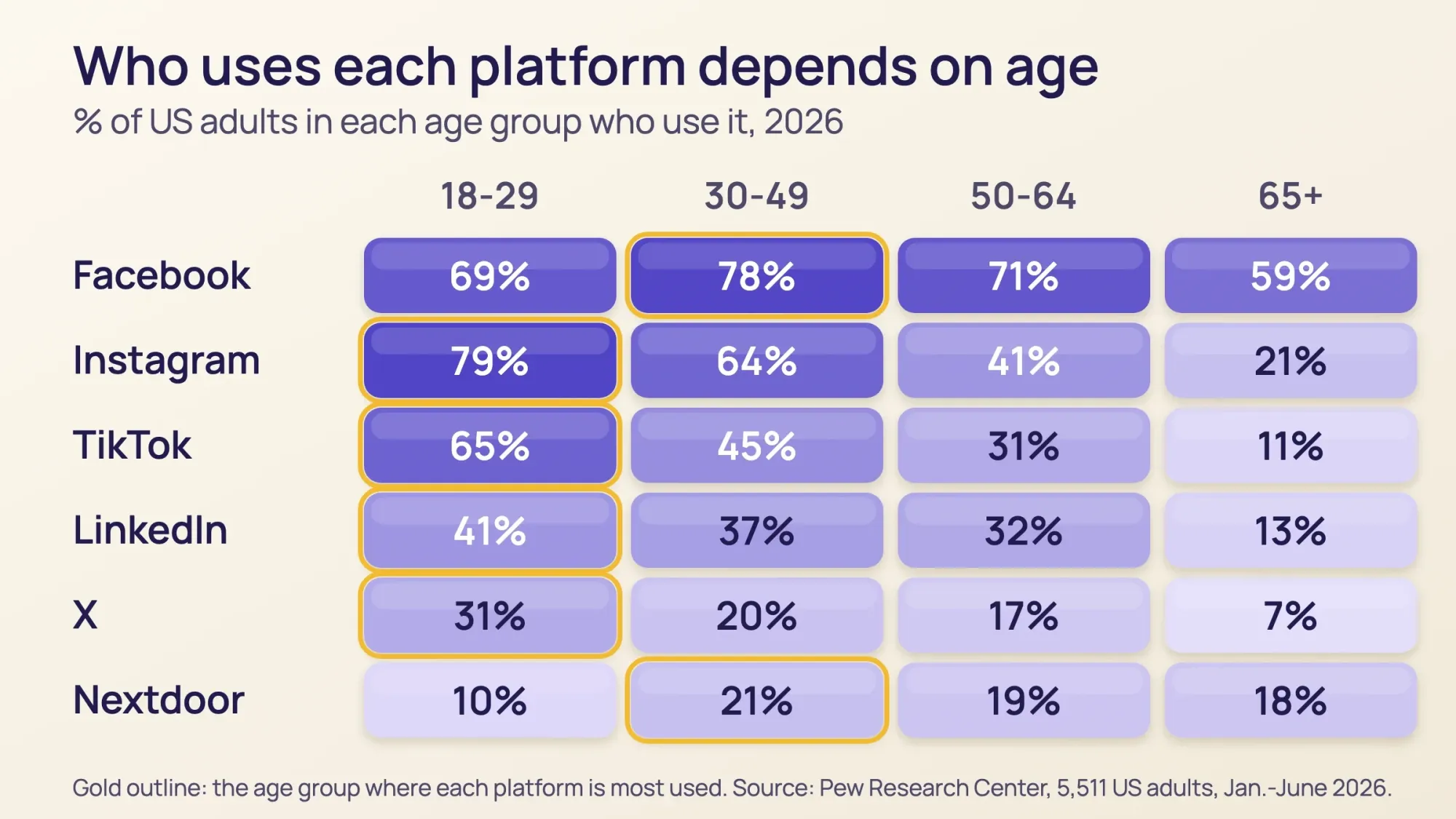 Source: Pew Research Center, Americans' Use of Social Media fact sheet (survey of 5,511 US adults, Jan. 30 to June 18, 2026, published October 19, 2026).
Pew also breaks use down by income, education and where people live. For a business, four findings matter:
- Facebook peaks with adults aged 30 to 49, at 78%. It also reaches 76% of rural adults.
- Instagram skews young, yet it still reaches 64% of people aged 30 to 49.
- LinkedIn follows income and education. 51% of college graduates and 45% of adults earning $100,000 or more use it.
- Nextdoor is small (18% of adults) but suburban. It reaches 23% of suburban adults and 23% of those earning $100,000 or more.
Pew is a national survey. Your own customers may differ, so check your platform insights once you're posting.
How to create a social media strategy for a small business (10 steps)
Work through these in order. Steps 1 to 5 fit into one afternoon. Steps 6 to 10 become your weekly and monthly routine.
- Pick one or two business goals.
- Describe your customer in one paragraph.
- Choose one to three platforms.
- Set up business profiles.
- Pick three or four content pillars.
- Build a content calendar you can keep.
- Post original content with licensed music.
- Reply to comments and messages within a day.
- Boost only what already works.
- Measure monthly and change one thing at a time.
1. Pick one or two business goals
Count something that pays the bills: calls, bookings, foot traffic or sales. Followers can climb while sales stay flat. Write each goal so you could check it with a yes or no in 90 days.
| Business | Weak goal | Strong goal |
|---|---|---|
| Coffee shop, Portland, OR | Grow our Instagram | 20 more weekday-morning customers a month by January 31, counted with a "SOCIAL" punch card |
| Roofer, Dallas, TX | Get more engagement | 10 inspection requests a month from social by March 31, tracked by a web form |
| Accounting firm, Chicago, IL | Build our brand on LinkedIn | 5 discovery calls a month from LinkedIn within 90 days, counted by asking "How did you hear about us?" on every intake call |
This is the SMART framework: specific, measurable, achievable, relevant and time-bound. Each strong goal above has a number, a deadline and a way to count it.
2. Describe your customer in one paragraph
Write who buys from you in plain words. Include their age range, where they live or what industry they're in, what worries them and when they buy.
Here's the roofer's: "Homeowners aged 35 to 65 in Dallas suburbs. They call after a hailstorm or when they're selling. They worry about insurance claims and getting ripped off." Every post should help that person.
3. Choose the best social media platforms for your business
Don't try to be everywhere at once. Start with one or two platforms you can keep up, and add another only after 60 days. This table matches business types to the Pew 2026 data above. The picks are our recommendations.
| Business type | Start with | Add later | Why |
|---|---|---|---|
| Cafe, restaurant, salon, boutique | Instagram and Facebook | TikTok | Instagram reaches 79% of 18-29s and 64% of 30-49s; Facebook reaches 77% of women |
| Home services: roofer, plumber, HVAC, landscaper | Facebook Page and Nextdoor | YouTube for before-and-after videos | Facebook reaches 78% of 30-49s; Nextdoor reaches 23% of suburban adults |
| Professional B2B: accountant, lawyer, consultant | The owner's LinkedIn profile plus a Company Page | Facebook or Instagram for local trust | LinkedIn reaches 51% of college graduates |
| Online store or products | Instagram and TikTok | TikTok reaches 65% of 18-29s; Pinterest has 106 million monthly users in the US and Canada | |
| Anyone who can teach | YouTube | Shorts and Reels cut from the same videos | YouTube reaches 84% of US adults |
| Threads, Bluesky, X | Optional | Test only if your customers are there | Threads 8% and Bluesky 4% of US adults in 2025; X 18% in 2026 |
Selling to other businesses as well as shoppers? Our B2B vs B2C marketing guide shows how to split offers, pages and emails.
YouTube is a big topic of its own. Our YouTube marketing guide covers Shorts, channel setup and video ads. For titles, chapters and captions on each upload, use our YouTube SEO checklist.
Before you commit, look at three local competitors on each platform you're considering. Note how often they post, which posts get comments and how fast they reply. If nobody nearby is active on an app, that's either an opening or a sign your customers aren't there.
4. Set up business profiles everywhere you'll post
Use a Facebook Page, an Instagram professional account, a TikTok Business account, a LinkedIn Company Page or a Nextdoor business page. All of them are free. They give you insights, contact buttons and ads.
Use the same business name, logo, hours, phone number and website link on every profile. It's the same consistency rule that helps your local SEO. Check how your link previews look when shared with our social preview checker.
Already have accounts? List every one, including pages nobody has touched in years. Update the ones you'll keep, and close the rest so customers never find old hours. While you're there, search your business name on each app for copycat accounts and report them.
Fill in every part of your profile a customer can act on. Our guide to social media optimization has a 12-point checklist for each profile. On a Facebook Page, click Options, then Add action button, and pick the button that fits your goal, as Facebook's help page shows. Our Facebook call to action guide compares the buttons.
On Instagram, put your booking or shop link in your bio. Our Linktree for business guide compares link-in-bio tools and shows how to track bio clicks.
People also search inside these apps. Instagram lets people search by keyword to find content and creators. So put your city and main service in your profile name, bio and captions. YouTube says its search weighs how well your title, tags, description and video content match the search.
5. Pick three or four content pillars
Content pillars are the few themes you post about again and again. They stop the "what do I post today?" panic. A simple starting set is these four:
- How-to and tips: what you know that customers don't.
- Behind the scenes: your people, your process, your shop.
- Proof: reviews, before-and-after photos and customer stories, shared with permission.
- Offers and events: new products, seasonal deals, open days.
Our rule of thumb is about four helpful posts for every one that sells. No study backs that exact ratio. If every post says "buy now", people stop looking.
Decide how you sound, too. Write the way you'd talk to a regular at the counter, and sound the same on every app. Our branding strategy guide shows how to write down your brand voice.
Then match each pillar to a format. On Instagram, the main formats work like this:
| Format | What it is | Good for (our suggestion) |
|---|---|---|
| Reel | A short vertical video | How-to tips and before-and-after clips |
| Carousel | Up to 20 photos and videos in one post, per Instagram's help page on carousels | Step-by-step tips and customer stories |
| Story | A photo or video that disappears after 24 hours unless you save it as a highlight, per Instagram's Stories help | Daily specials, polls and behind the scenes |
| Single photo or text post | One image or update; the usual post on Facebook, LinkedIn and Nextdoor | Offers, events and news |
Plan to reuse each idea. One how-to can become a Reel, a carousel and a Facebook post in the same week. For daily Stories, pick from our 20 Instagram Story ideas for business, each with the sticker to use.
6. Build a social media content calendar you can keep
A social media content calendar is a simple grid of what goes out each day, and where. Make it small enough to survive a busy month. Here's a sample week for one owner, about three hours of work in total:
| Day | Other | Pillar | ||
|---|---|---|---|---|
| Mon | Reel, 30 to 60 seconds | Same Reel | - | How-to |
| Tue | - | Reply round: comments, messages, reviews | Nextdoor or LinkedIn post | Community |
| Wed | Carousel | Photo with a short story | - | Proof |
| Thu | Stories, 2 or 3 frames | - | - | Behind the scenes |
| Fri | Reel or trial reel | Event or offer post | - | Offer |
| Every day, 10 minutes | Check comments and DMs | Same | Same | - |
Batch the work. On Monday morning, film three or four clips, write the captions and schedule the week. Meta Business Suite schedules Facebook and Instagram posts for free.
7. Post original content, with licensed music
Both Meta apps now favor original content. Instagram says that when it finds identical posts, "we will only recommend the original one." Facebook says accounts that keep reposting others' content get "reduced distribution on everything they share."
Three practical rules follow:
- Film your own clips. Your phone is enough.
- Don't post TikTok videos with the TikTok watermark to Reels. Instagram makes "watermarked" reels less visible.
- Use business-safe music. Instagram's music library is "intended for personal, non-commercial use." Use Meta's Sound Collection or TikTok's Commercial Music Library, which is free for businesses.
Add captions to every video and alt text to images. Captions help anyone watching with the sound off. Alt text helps people who use screen readers. On Instagram, tap Accessibility before you share and write it there. On YouTube, viewers see your thumbnail before they click. Our guide to YouTube thumbnail size and design gives today's specs and a free checklist.
8. Reply to comments and messages within a day
Replying is the cheapest step in this plan. Sprout Social surveyed 4,044 consumers in the US, UK, Canada and Australia for its 2025 Index. Of those, 73% said they'd buy from a competitor if a brand doesn't respond, and about three-quarters expect a reply within 24 hours.
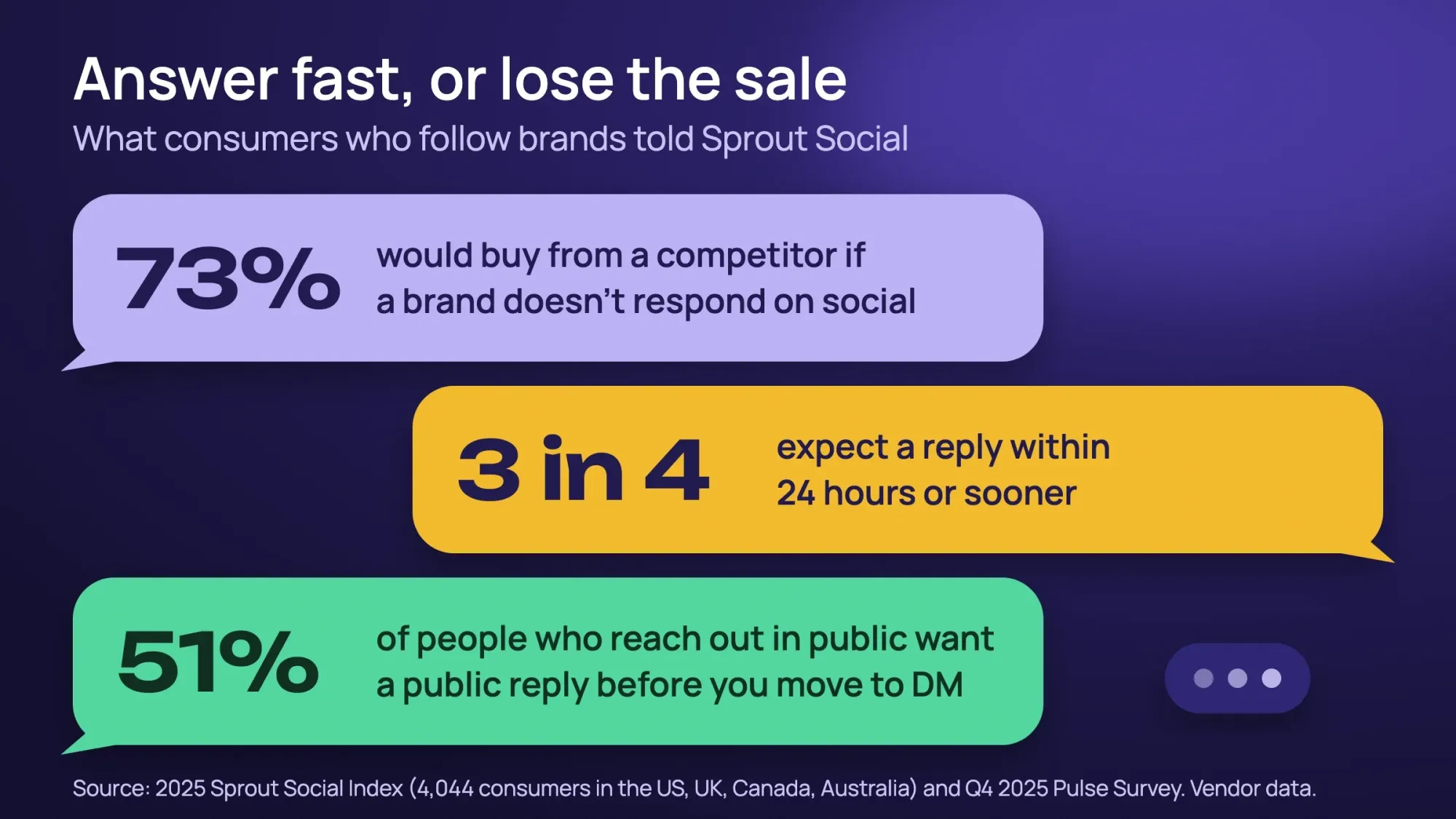 Source: The 2025 Sprout Social Index (4,044 consumers in the US, UK, Canada and Australia, September 2024) and Sprout's Q4 2025 Pulse Survey. Vendor surveys of people who follow brands.
When someone complains in public, thank them and apologize briefly in the comments. In Sprout's Q4 2025 Pulse Survey, 51% of people who reach out publicly expected a public reply before a private message. Then move to a direct message with a name and a fix. Never argue in public.
Save your common answers, such as hours, prices and booking link, as saved replies. AI tools can draft answers, but a person should check them before they go out.
9. Boost only what already works
Organic posts tell you what people like, for free. After two to four weeks, put a small budget behind your best post. Know the minimums before you start:
| Platform | Official minimum (USD) | Good to know |
|---|---|---|
| Facebook and Instagram (Meta) | No fixed public number; Ads Manager warns you if your budget is too low | With a cost-per-result goal, Meta says to budget at least 5 times that goal per day |
| TikTok | More than $50 a day per campaign, more than $20 a day per ad group | A 31-day ad group needs at least $620 |
| $10 a day; $100 lifetime minimum for new campaigns | LinkedIn publishes no official cost per click, so start small |
A common small test is $5 to $15 a day on Meta for 7 to 14 days, aimed at a few miles around your shop. That's our suggestion, not a platform rule. Boost from a desktop browser: boosting in Meta's iPhone apps can add an Apple service fee.
Boosting costs more than it used to. Meta reported that the average price per ad rose 12% year over year in its second quarter of 2026. For a deeper look at how ads are priced, see our PPC guide.
10. Measure monthly and change one thing at a time
Spend 30 minutes once a month. Look at these four things:
- Meta Business Suite Insights. Its overview covers the last 28 days, with views and follows. The content tabs show your top posts.
- TikTok and LinkedIn analytics, which work the same way.
- Website visits from social in Google Analytics. Tag each link with UTM codes, short labels that tell Google Analytics where a visit came from, like
?utm_source=instagram&utm_medium=social&utm_campaign=fall-menu. Our website metrics and analytics tools guide explains engagement rate and the other numbers to watch. - Results tied to your goal: calls, bookings, form leads and coupon codes, with a different code for each platform.
Compare yourself with last month, not with a vendor's "average engagement rate". Vendors calculate engagement in different ways, so their benchmarks don't line up.
Which numbers should you track? Pick the ones that match your goal. This table shows where each one lives:
| Goal | What to track | Where to find it |
|---|---|---|
| Be seen by local customers | Views and follows | Meta Business Suite Insights, Overview tab (past 28 days) |
| Get website visits | Link clicks, then visits from your tagged links | Results tab in Insights, then sessions by source in Google Analytics 4 (GA4) |
| Get leads by message | Conversations, leads, response rate and response time | Messaging tab in Insights |
| Get calls, bookings or sales | Form leads, calls and coupon codes | Your booking tool or till, plus your form-sent event marked as a key event in GA4 |
To judge paid posts, work out the cost per lead: ad spend divided by leads. For example, $300 in ads that brings 10 form leads costs $30 a lead.
If you want a yardstick, use Meta's own Benchmarking tab in Insights. It compares you with businesses in your category that have a similar organic 28-day reach.
How often should a small business post on social media?
How often to post on social media depends on the platform. For most small businesses, three to five feed posts a week on your main platform is enough. Consistency matters more than volume. Pick a pace you can keep for 90 days.
The only public dataset we found with a stated method comes from Buffer, a scheduling tool. It studied 2.1 million Instagram posts from 102,000 of its users' accounts. Against one or two posts a week, reach per post rose about 12% at three to five posts. It rose 18% at six to nine and 24% at ten or more, so each extra post added less.
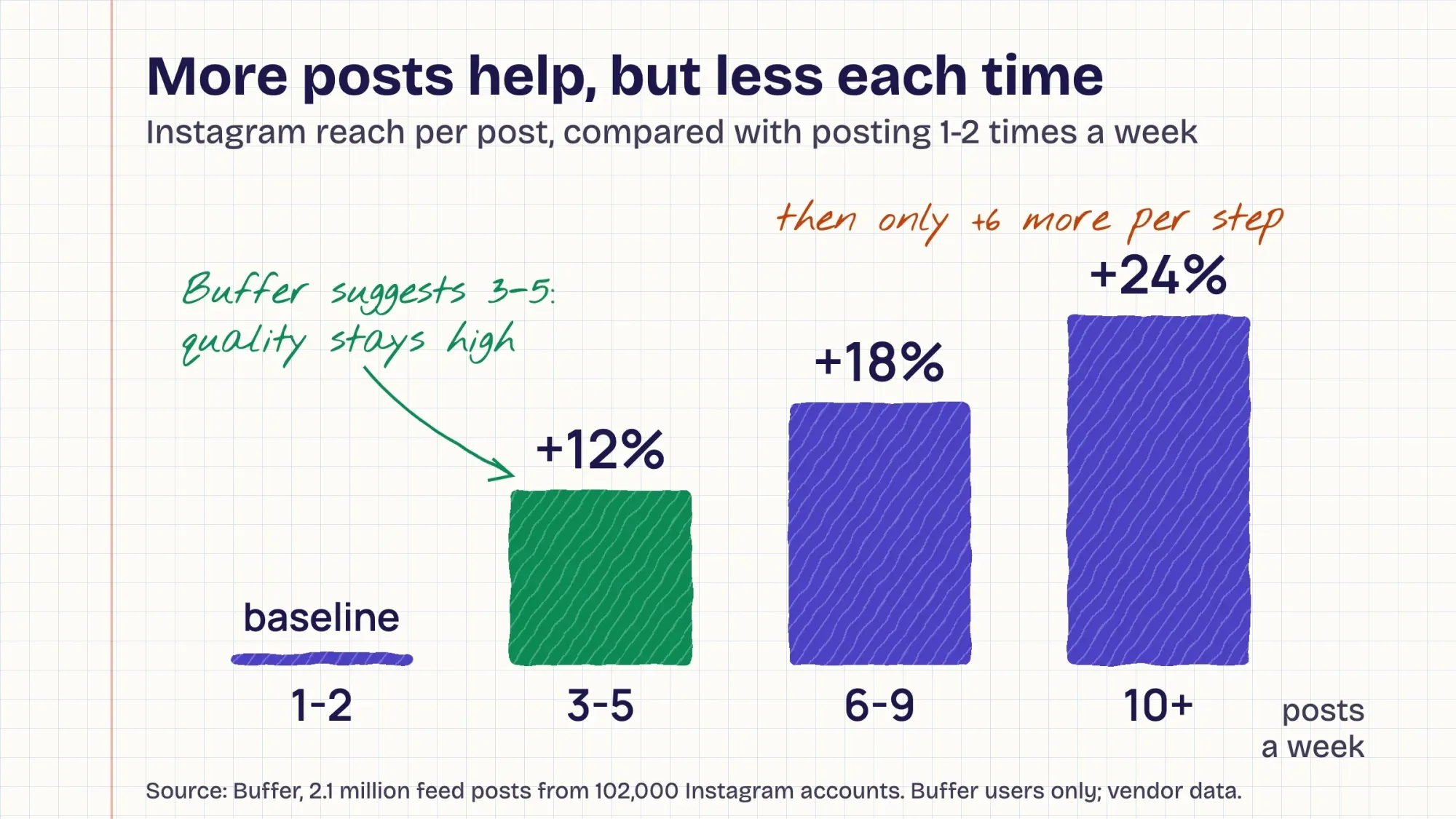 Source: Buffer, How often should you post on Instagram (2.1 million posts from 102,000 accounts). Vendor data from Buffer's own users; feed posts only.
| Platform | Starting pace | Where it comes from |
|---|---|---|
| Instagram feed and Reels | 3 to 5 a week | Buffer, 2.1 million posts; Buffer itself says "the returns are diminishing" |
| TikTok | 2 to 5 a week | Buffer, 11.4 million posts from over 150,000 accounts |
| 2 to 5 a week | Buffer, more than 2 million posts from 94,000+ accounts | |
| Facebook Page | 3 to 7 a week | Our recommendation; we found no current study with a stated method |
| Nextdoor | 1 or 2 a week | Our recommendation |
Be wary of bigger numbers with no data behind them. Hootsuite's frequency guide says its advice comes "from a theoretical approach" and gives no sample size.
Wondering what time of day to post? Our best time to post on Facebook guide compares what 5 studies and Meta say. It also shows how to find your own best hours in Insights.
What changed on social media in 2025 and 2026
These are the platform changes since late 2024 that matter for a small business, oldest first:
| When | What changed | What it means for you |
|---|---|---|
| Dec 10, 2024 | Instagram launched trial reels, shown to non-followers first | Test ideas without spamming followers. Business accounts need 200 followers. |
| Jan 2025 | Instagram Reels can run up to three minutes | Room for a full how-to, but keep the first seconds strong |
| Mid-2025 | Facebook cut reach for accounts that repost others' content | Post your own photos and video |
| Dec 2025 | Facebook tested a two-link limit for some Pages without Meta Verified | Don't build your Facebook plan around link posts. Since September 2026, some Pages can add links to only 2 posts or comments a month without Meta One Advanced. |
| Jan 23, 2026 | A US joint venture took over TikTok's US app | TikTok is operating legally in the US. Ads still run through TikTok's US business. |
| June 10, 2026 | Instagram's "Your Algorithm" controls reached Feed, Reels and Explore | Users choose topics. A clear topic focus helps people choose you. |
| July 29, 2026 | Meta reported 2 billion daily Instagram users and 500 million monthly Threads users | Threads is big globally, but only 8% of US adults used it in 2025 |
Meta's Q3 2025 content report, cited by TechCrunch, said more than 98% of US Facebook feed views come from posts without links. Use Facebook to be seen, and expect few clicks to your website. When you do share a link, such as a new blog post, our plan to promote your blog posts adds email and your Business Profile.
Who uses each platform has changed more slowly. Since 2021, Facebook has held at about 70% of US adults and Instagram rose from 40% to 51%. TikTok grew from 21% to 37%, while X slipped from 23% to 18%. If X still fits your buyers, our guide to Twitter marketing on X covers setup, prices and the FTC rules.
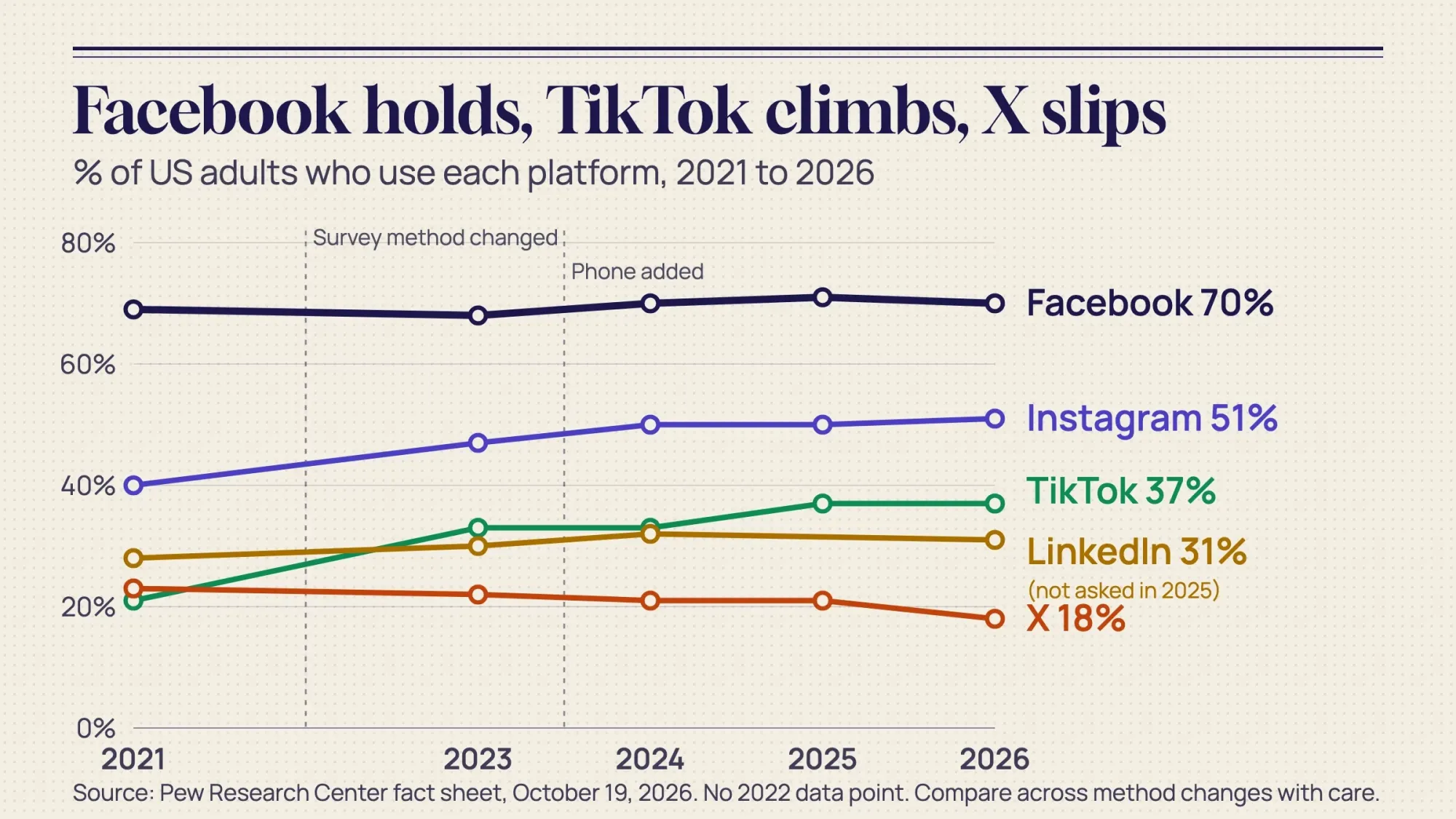 Source: Pew Research Center fact sheet, October 19, 2026. Pew changed survey methods after 2021 and again in 2024, so compare years with care. LinkedIn was not asked in 2025.
US rules for business social media posts
These rules apply to a one-person shop as much as to a national brand. This is plain-English guidance, not legal advice.
Paid, gifted and employee posts need a clear label
The FTC's Endorsement Guides (16 CFR Part 255) cover social posts, tags included. If you pay a creator, give free products or offer a prize for posting, the post should say so. The FTC wants the label clear and "unavoidable", not hidden behind "more".
A label at the start, such as "#ad" or "Thanks @yourshop for the free latte", does the job. The FTC's FAQ confirms "#ad" covers paid posts and free products alike. Add your own label even when the platform has a paid-partnership tool, as the FAQ advises.
Your staff count too. The FTC says people likely won't understand "#employee". "I work for XYZ" is clearer. Give staff a short written policy, and check the posts you asked them to make.
Inviting a local creator for a free meal or service? Agree in writing what they'll post, and that the post starts with "#ad" or a thank-you for the free product. Keep that message, as you would a customer's permission.
Never buy followers, likes or views
Since October 21, 2024, the FTC's consumer reviews rule bans buying fake "indicators of social media influence". The rule names followers, likes, views, shares and comments. Penalties reach $53,088 per violation, and the FTC kept that amount for 2026. Platforms also act: Meta took action on around 500,000 spammy or fake-engagement accounts in the first half of 2025.
Run giveaways by the rules
- Write official rules, and make entry free. "No purchase necessary" matters for prizes decided by chance.
- On Facebook, don't ask people to share, repost or tag friends to enter. Meta's Pages policy bans it.
- Entrants who post about you should use a hashtag with the word "contest" or "sweepstakes" in it, such as #YourShopContest.
- Prizes worth more than $5,000 in total? New York requires filing 30 days before the start, and Florida 7 days before.
- Don't trade contest entries for reviews. The FTC treats that as buying reviews.
A giveaway post that avoids those problems: "Comment your favorite drink to win a $25 gift card. No purchase necessary. Official rules at the link." Need the rules page too? Start from our free Facebook giveaway rules template.
Ask before you repost customers
Instagram says it "cannot advise you on whether consent is required for use of user content". So get permission yourself. A short DM works: "Love this! Can we share it on our page? We'll credit you." Screenshot the yes, credit the @handle and never edit their words.
Extra rules for lawyers and tax professionals
Lawyers and tax professionals have extra advertising rules. Lawyers follow their state's version of ABA Model Rule 7.1, which bans misleading claims, including results that suggest the same outcome for everyone. Tax practitioners follow Circular 230, section 10.30.
Social media marketing strategy examples: a coffee shop, a roofer and an accounting firm
These businesses are made up. The goals, budgets and posting paces are our suggestions. The platform figures and rules come from the sources at the end.
| Coffee shop, Portland, OR | Roofer, Dallas, TX | Accounting firm, Chicago, IL | |
|---|---|---|---|
| Goal | 20 more weekday-morning customers a month | 10 inspection requests a month | 5 discovery calls a month |
| Platforms | Instagram and Facebook; TikTok later | Facebook Page and Nextdoor; YouTube for longer videos | The founder's LinkedIn profile and a Company Page |
| Pillars | New drinks, barista spotlights, neighborhood events, offers | Before and after, storm prep, crew and safety, reviews | Tax deadlines explained, client stories without names, team, webinars |
| Weekly pace | 3 Reels or carousels, daily Stories, 1 Facebook event post | 3 Facebook posts, 1 Nextdoor post, 1 short video | 3 LinkedIn posts from the founder |
| Paid | $7 a day for 10 days behind the best Reel, within about 2 miles | Meta ads to a ZIP code radius after a storm | Optional LinkedIn ads from $10 a day; or sponsor one webinar post |
| Rule to watch | Creators who get free coffee start their post with "#ad" | Crew posting about jobs say they work there | No posts that promise results |
A free social media marketing plan template
Here's a social media marketing plan template you can copy without signing up for anything. Paste it into a doc and fill in the right column.
| Section | What to write | Example (Dallas roofer) |
|---|---|---|
| Goals | One or two goals with a number and a date | 10 inspection requests a month by March 31 |
| Customer | One paragraph: who, where, worries, when they buy | Suburban homeowners, 35 to 65, after storms or before selling |
| Platforms | One to three, and why | Facebook Page and Nextdoor, where our buyers are |
| Pillars | Three or four themes | Before and after, storm prep, crew, reviews |
| Voice | How you sound, in three words | Plain, local, honest |
| Calendar | Posts per week on each platform, and the batch day | 3 Facebook, 1 Nextdoor, 1 video; batch on Monday |
| Replies | Who answers, and how fast | Office manager, same business day |
| Budget | Tools and ads per month | $0 tools, $300 Meta ads after week four |
| Rules | Disclosure, giveaways, music, permissions | Crew say they work here; no share-to-enter |
| Measures | What you check monthly | Form leads with UTM tags, calls, cost per lead |
You're welcome to share or adapt this template. Please link back to this page if you do.
A 90-day plan for beginners
Your first 90 days of social media marketing
- Days 1-30: set up and start Write the one-page plan. Set up or clean up your business profiles with the same name, hours, phone and link. Connect Facebook and Instagram in Meta Business Suite and make a UTM naming sheet. Look at three local competitors: what they post and how fast they reply. Then post on your weekly calendar for four weeks and answer everything within a day.
- Days 31-60: learn what works Check which pillar got the most views, shares and messages. Try one trial reel a week once you have 200 followers. Start asking happy customers to tag you, and ask permission before reposting. Run your first small boost behind your best post for 7 to 14 days.
- Days 61-90: double down or drop Compare results with your goal: calls, bookings, leads and coupon codes, not likes. Keep the two best pillars and replace the weakest. Decide whether to add a second platform, raise the ad budget or hire help. Then write the plan for the next 90 days.
How long until it works? Nobody can honestly promise a date, and we found no study that measures it. Judge your plan at day 90 by your goal, not by one viral post.
How much does social media marketing cost per month in the US?
Social media marketing can cost a small business nothing but time, or a few hundred dollars a month for tools, ads or a freelancer. Here's what each level costs as of October 2026, from vendors' pricing pages:
| Option | Cost (USD) | What you get |
|---|---|---|
| Do it yourself, free | $0 plus 2 to 4 hours a week | Business profiles and Meta Business Suite are free; Buffer's free plan covers 3 channels |
| DIY with a tool | About $5 to $99 a month | Buffer from $5 a month per channel (billed yearly), Later from $25 a month, Hootsuite from $99 per user a month (billed yearly) |
| Small monthly ad budget | About $150 to $450 a month | $5 to $15 a day on Meta; TikTok needs more than $20 a day per ad group |
| Freelancer | About $140 to $700 a month for 10 to 20 hours | Upwork lists global median rates of $14 to $35 an hour; US-based freelancers may charge more |
| Agency | Get three written quotes | We found no reliable US price survey; ask what's included |
When you compare quotes, ask four things. How many posts a week? Who answers messages? Is ad management included? What does the monthly report show? If you'd rather hand it off, our social media marketing service covers the calendar, replies and ads.
Common social media mistakes small businesses make
Do not
- Open accounts on every platform at once
- Repost TikTok videos with the watermark to Reels
- Buy followers, likes or views
- Run "share and tag 3 friends to win" giveaways on Facebook
- Fill your Facebook Page with nothing but links
- Promise results if you're a lawyer or tax pro
Do
- Start with one or two platforms you can keep up
- Film your own clips and use licensed business music
- Answer every comment and message within a day
- Label paid, gifted and employee posts at the start
- Judge success by calls, bookings and sales
Frequently asked questions
Frequently asked
What is a social media marketing strategy?
A social media marketing strategy is a short written plan for using social media to reach a business goal. It covers your goal, customer, platforms, content, posting pace, replies, budget and the numbers you check each month.
How do I create a social media strategy for a small business?
Set one or two goals you can count. Describe your customer, pick one to three platforms from data, and choose three or four content pillars. Then build a weekly calendar, reply within a day, boost what works and review it monthly.
Which social media platform is best for a small business?
The one your customers use. In Pew's 2026 survey, Facebook reaches 78% of US adults aged 30 to 49 and Instagram 79% of those aged 18 to 29. LinkedIn suits professional services, and Nextdoor suits suburban home services.
How often should a small business post on social media?
Three to five posts a week on each main platform is a good start. Buffer's data shows more posts help, but each extra one helps less. Pick a pace you can keep for 90 days.
How much does social media marketing cost per month?
You can start for $0 with free business profiles and Meta Business Suite. Tools run about $5 to $99 a month. Ads at $5 to $15 a day add about $150 to $450 a month. Freelancers on Upwork list global median rates of $14 to $35 an hour.
What's the difference between a social media strategy and a content calendar?
The strategy says why you post, for whom and how you'll measure it. The content calendar is the weekly list of what goes out and when. Write the strategy first.
Do I have to label posts when I give an influencer free products?
Yes. Under the FTC's Endorsement Guides, a gift counts just like payment. The post should start with a clear label such as "#ad" or "Thanks @yourshop for the free product".
Is a "like, share and tag a friend" giveaway allowed?
Not on Facebook. Meta's Pages policy says a promotion must not require or reward sharing, reposting or tagging others. You also need official rules, and entry must be free.
How often should you update a social media strategy?
Check your numbers once a month and rewrite the plan every 90 days. Update it sooner when a platform changes its rules, as Facebook did with link limits for some Pages in September 2026.
Do I need a different strategy for each platform?
No. Keep one goal, one customer and the same content pillars everywhere. Change only the format: Reels and Stories on Instagram, longer videos on YouTube and text posts on LinkedIn.
How long does a social media strategy take to work?
We found no study that gives a reliable timeline. Give your plan 90 days, then judge it by your goal, such as calls, bookings or sales, not by likes.
How do I measure social media ROI?
Count the results tied to your goal, then divide your spend by them. If $300 in ads brings 10 form leads, each lead costs $30. Compare that with what a new customer is worth to you.
How we made this guide: we built it from Pew Research Center's 2026 survey, the FTC's rule text and the platforms' help pages. Vendor data comes from Buffer and Sprout Social. We checked every number against the source named next to it on October 21, 2026. Where we only had a vendor survey or a press report, we say so. Updated October 23, 2026: added key facts, an Instagram format table and a metrics-by-goal table with cost per lead. We also added profile and search tips, a voice row in the template, four FAQs and question-style headings. We linked our other social media guides too.
Sources
- Pew Research Center: Americans' Use of Social Media fact sheet (October 19, 2026)
- Pew Research Center: Americans' Social Media Use 2025 (November 20, 2025)
- 16 CFR Part 255: FTC Endorsement Guides
- FTC: FTC's Endorsement Guides: What People Are Asking
- 16 CFR Part 465: Rule on the Use of Consumer Reviews and Testimonials
- FTC notice on 2026 civil penalty amounts (September 15, 2026) and 16 CFR 1.98: FTC civil penalty amounts (checked October 23, 2026)
- Meta: Pages, Groups and Events Policies (promotions)
- Instagram: Promotion Guidelines
- New York General Business Law 369-e and Florida Statutes 849.094
- Instagram Help: Access to the licensed music library
- TikTok: How to use the Commercial Music Library
- Instagram: Instagram Ranking Explained and Recommendations and originality
- Facebook: Combating unoriginal content
- Meta: Trial reels (December 10, 2024)
- Instagram: Your Algorithm (update June 10, 2026)
- TechCrunch: Facebook tests a link posting limit (December 17, 2025) and Facebook Help: About links in organic Page posts and comments
- Meta: Second quarter 2026 results and prepared remarks (July 29, 2026)
- TikTok USDS Joint Venture established (January 23, 2026)
- Meta: Best practices for minimum budgets, TikTok Ads: Budget and LinkedIn: Maximize your budget
- Meta: About Insights in Meta Business Suite
- Buffer: How often to post on Instagram, on TikTok and on LinkedIn
- Hootsuite: How often to post on social media (April 18, 2025)
- Sprout Social Index 2025 and Sprout Social: customer service statistics (September 8, 2026)
- Buffer pricing, Later pricing, Hootsuite plans and Upwork: social media manager rates (checked October 21, 2026)
- ABA Model Rule 7.1 and Circular 230, 31 CFR 10.30
- Instagram Help: Share a post with multiple photos or videos and Instagram Help: Stories (checked October 23, 2026)
- Instagram: Search and Explore and How YouTube Works: Search (checked October 23, 2026)
- Facebook Help: Add an action button to your Page and Google Analytics Help: Mark events as key events (checked October 23, 2026)

Comments
No comments yet. Start the conversation below.