
Quick answer
PPC marketing, or pay-per-click marketing, means paying for ads that appear on Google, Bing or social media, and paying only when someone clicks. A small business sets a budget and picks the searches it wants to show up for. It wins ad spots in an auction based on its bid and the quality of its ad and landing page.
Key takeaways
- Google ranks ads by Ad Rank, which combines your bid with the quality of your ad and landing page. The highest bid doesn't always win.
- Google can spend up to twice your average daily budget on a given day. It caps a month at 30.4 times the daily budget for most campaigns.
- Whether PPC pays off comes down to simple math: cost per lead, how many leads you close, and the profit on each job.
- Set up conversion tracking before you spend a dollar; without it, automated bidding has nothing to learn from.
This guide is for owners of small US businesses thinking about ads on Google, including those who tried once and burned through a budget. It covers how pay-per-click works, what it costs in a few industries, whether it fits you and how to set up a first campaign.
What is PPC marketing?
PPC marketing is advertising where you pay each time someone clicks your ad, not each time it's shown. The best-known kind is search advertising: someone types "water heater repair near me" into Google, and the first results marked "Sponsored" are PPC ads. Click one, and the advertiser pays for that click.
Similar pay-per-click options run on Microsoft Advertising (Bing), Meta (Facebook and Instagram), LinkedIn, Amazon and more, though some of them charge per impression by default. In this guide we focus on Google search ads, because that's where most small businesses start, and we compare the others further down.
Note
PPC, paid search, SEM: same thing? Close. Paid search is PPC on search engines. SEM (search engine marketing) is used for paid search, and sometimes for paid search plus SEO together. PPC is the wider term for paid ads you're billed for per click, because it also covers social and shopping ads.
What are the types of PPC ads?
The main types of PPC ads are search, display, shopping, video and remarketing ads. Google Ads also offers app campaigns and Performance Max, which mixes several types. Google's campaign type guide says you choose one "based on your marketing goals, brand strategy, and how much time you can invest".
| Type | Where it shows | Good for a small business when |
|---|---|---|
| Search | Text ads on Google search results | People already search for your service |
| Display | Image ads on websites, apps and Google sites such as YouTube | You want reach and reminders beyond search |
| Shopping | Product listings on search results and the Google Shopping tab | You sell products online and have a Merchant Center account |
| Video | Video ads on YouTube and other websites | You have a short video and want awareness |
| Remarketing | Ads to people who visited your site or used your app, as they browse Google or partner sites | You get enough site visitors to follow up with |
| Performance Max | All Google Ads channels from one campaign | You already track conversions and have images and text ready |
| Social (Meta, LinkedIn) | Feeds on Facebook, Instagram or LinkedIn | You want to create demand with an audience you choose |
Remarketing lists are now called "your data" segments in Google Ads. For most local service businesses, search ads come first, because the person is already looking.
How does PPC work on Google?
Every time someone searches, Google runs a quick auction among the advertisers who want to appear for that search. Google's help page on the ad auction says the system decides "which ads are eligible to appear and in which order". Ad Rank, it says, is "a combination of bid amount, the quality of your ads and landing page". The competitiveness of the auction and the context of the search also count.
That's the part most owners don't expect. A bigger bid helps. Google says quality can also win you "a higher position -- at a lower price -- with high-quality ads and landing pages". A plumber with a clear ad and a fast, relevant page can sit above a national chain that bids more.
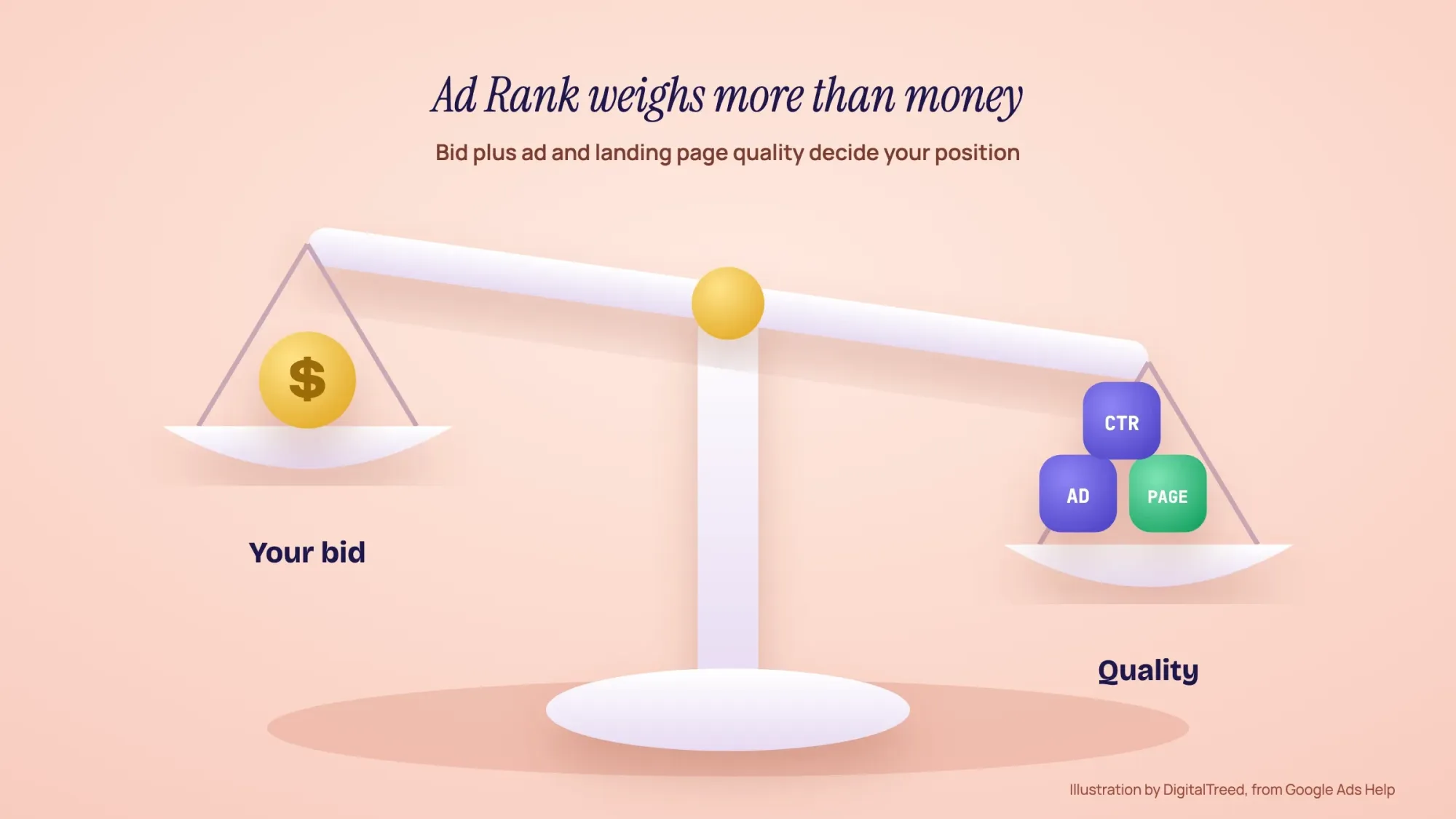 Illustration: Ad Rank weighs your bid together with ad and landing page quality, so the top bid doesn't always win. Based on Google Ads Help (The ad auction).
What Quality Score tells you (and what it doesn't)
Google Ads gives each keyword a Quality Score from 1 to 10. Google is direct about what it is: "Quality Score is a diagnostic tool", and "Quality Score is not an input in the ad auction". Think of it as a report card, not the exam. It looks at three things:
- Expected click-through rate: "The likelihood that your ad will be clicked when shown."
- Ad relevance: "How closely your ad matches the intent behind a user's search."
- Landing page experience: "How relevant and useful your landing page is to people who click your ad."
If one of the three shows "Below average", work there. Fix it with a sharper ad, a closer match between ad and keyword, or a better page. Our free website speed test checks a page's server response time and page weight.
How much does PPC advertising cost?
PPC advertising costs as much as you choose to spend. You set a budget, then pay for each click within it. In Google Ads you set an average daily budget. Google's budget rules, as of October 2026, work like this. On any day it may spend up to "two times your average daily budget for most campaigns". Over a month it won't spend more than "30.4 times your average daily budget for most campaigns". So to spend about $1,500 a month, you'd set roughly $49 a day. Some days will spend more and some less.
What each click costs depends on your industry and city. LocaliQ, a company that runs ads for small businesses, publishes yearly averages from its customers' Google and Microsoft Ads campaigns. Its 2026 numbers (as of June 2026) put the all-industry average at $5.42 per click and $66.69 per lead, with big differences between trades:
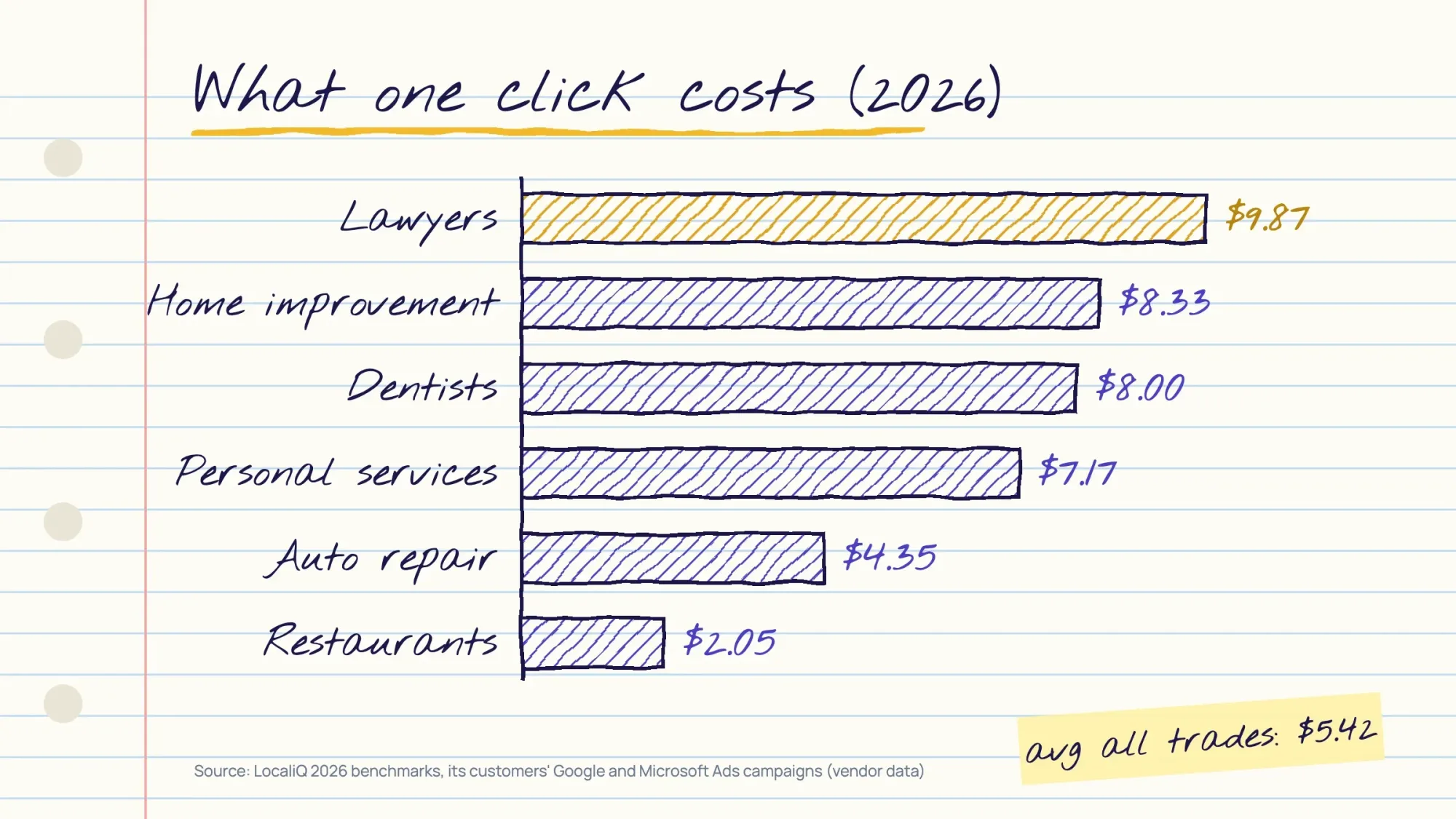 Average cost per click by industry, 2026. Source: LocaliQ Search Advertising Benchmarks, June 2026 (vendor data from its customers' Google and Microsoft Ads campaigns).
| Industry | Avg cost per click | Avg conversion rate | Avg cost per lead |
|---|---|---|---|
| Attorneys and legal services | $9.87 | 5.55% | $131.63 |
| Home and home improvement | $8.33 | 8.05% | $90.92 |
| Dentists and dental services | $8.00 | 10.67% | $72.97 |
| Personal services | $7.17 | 12.34% | $54.60 |
| Auto repair, service and parts | $4.35 | 15.51% | $29.96 |
| Restaurants and food | $2.05 | 8.05% | $30.57 |
Treat these as a starting point, not a quote. LocaliQ itself warns: "When you have a new account, face low-volume keywords, or have a small budget, these results aren't realistic". A big-city personal-injury lawyer will pay far more per click than the average; a dentist in a small town may pay less.
If you hire help, the management fee comes on top of the ad spend you pay Google. WebFX, a digital marketing agency, says management fees "typically range from 10% to 20% of your ad spend" (agency data, as of June 2026).
Is PPC worth it? Do the math before you spend
PPC is worth it when the profit from the customers it brings is higher than what you spend. You can check that before launch with four numbers: budget, cost per click, conversion rate and close rate. Here's the calculation to run before launching. It uses the benchmarks above, so the numbers are an example, not a promise.
PPC budget worksheet: plug in your own numbers
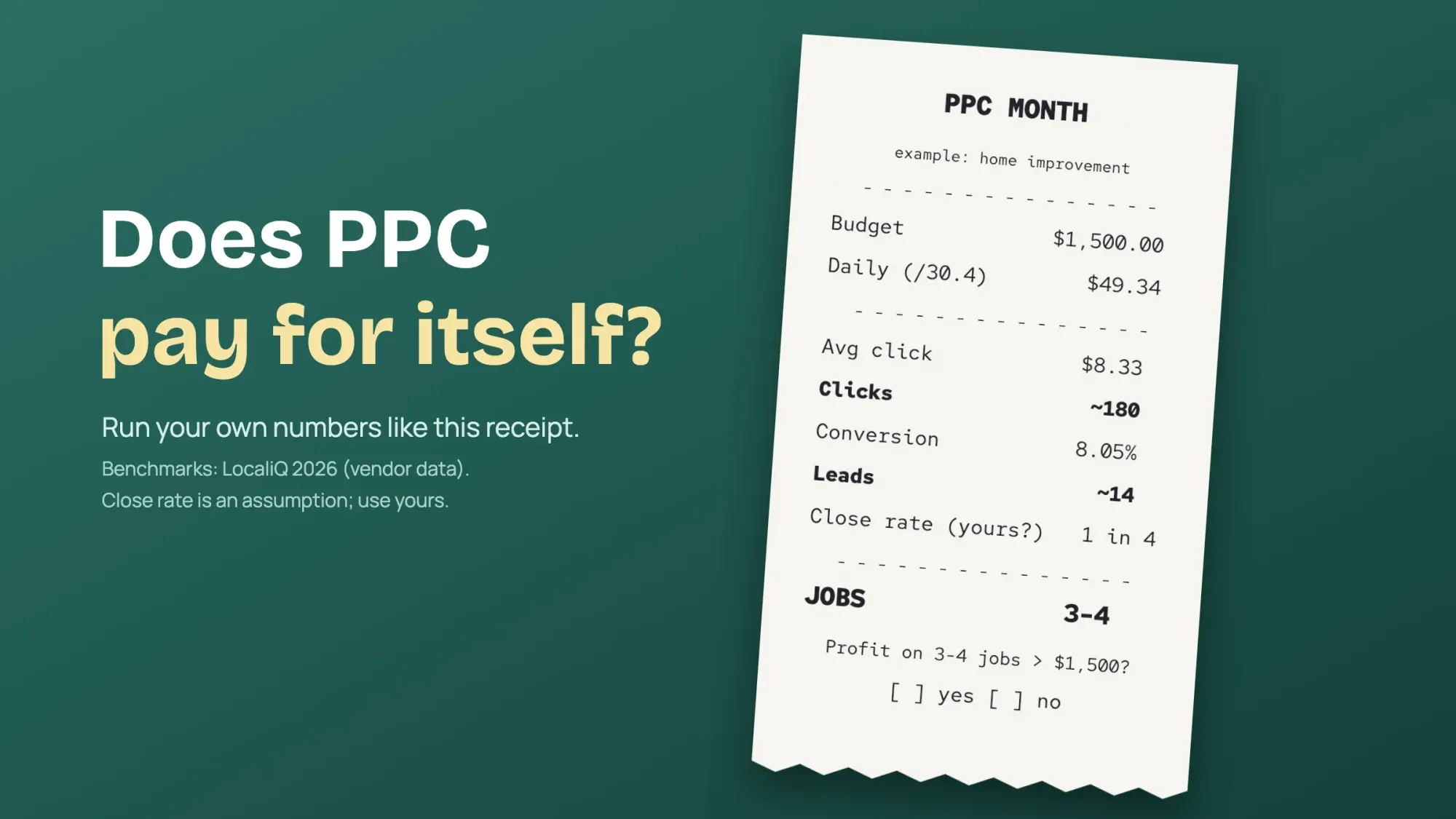 Illustration: example only, a home improvement contractor using LocaliQ's 2026 averages and an assumed close rate of 1 in 4. Use your own numbers.
| Step | Example: home improvement contractor | Your numbers |
|---|---|---|
| Monthly budget | $1,500 (about $49.34 a day) | ? |
| Clicks | $1,500 / $8.33 per click = about 180 | Budget / your cost per click |
| Leads | 180 x 8.05% = about 14 | Clicks x your conversion rate |
| Jobs | 14 leads, closing 1 in 4 = 3 or 4 jobs | Leads x your close rate |
| Worth it? | Only if profit on 3 or 4 jobs is well above $1,500 | Profit per job x jobs vs budget |
Run the same $1,500 for a lawyer, using LocaliQ's legal services averages as of June 2026: $9.87 a click and a 5.55% conversion rate. You get about 152 clicks and 8 leads. If one signed case is worth more than the monthly spend, that can still pay off. For a restaurant, cheap clicks still have to turn into enough covers to beat the spend. That's why there's no honest answer to "is PPC worth it?" without the owner's own numbers.
Warning
When PPC is probably not worth it (yet): watch for five signs. Your profit per job is smaller than your likely cost per customer. You can't keep a test running for one to three months. You have no page to send people to, or nobody answers the phone when ads run. Your service is in a restricted category you aren't certified for. Nobody searches for what you sell yet; that is a job for awareness ads, not search ads.
Pros and cons of PPC for a small business
| Pros | Cons |
|---|---|
| Ads can show the same day they're approved | Visits stop when you stop paying |
| You set the budget and pay only for clicks | Busy trades pay more per click, as the cost table shows |
| You can show ads only in the area you serve | It needs weekly checks of search terms and negatives |
| With conversion tracking, you see cost per lead | Without tracking, you can't tell what works |
| You can test offers and pages quickly | Competitors can bid on the same searches |
How to set up your first Google Ads campaign
This is the order we'd follow for a local service business. It's deliberately narrow: one campaign, a tight area, a few services, and tracking from day one.
Set up a first search campaign
- Set up conversion tracking first Track form submissions and phone calls as conversions. Google describes a conversion action as "a specific customer activity that is valuable to your business". Without it, you can't tell which keywords bring customers.
- Create one Search campaign Skip Performance Max for now (see below). A Search campaign shows text ads to people actively searching.
- Target only where you work Set the location to your real service area. Check that ads show to people in that area, not people who only show interest in it.
- Build ad groups by service Two to four ad groups, one per service, such as "kitchen remodel" and "bathroom remodel", each with a handful of closely related keywords.
- Start with phrase and exact match Broad match is Google's default; tighter matches keep a small budget on the searches you actually want.
- Add negative keywords before launch Block searches like jobs, DIY and free (list below).
- Write ads that match the search Repeat the service and city, give a reason to call (free estimate, same-day service), and add your phone number and location.
- Send clicks to a matching page Not your homepage: a page about that one service in that area.
- Choose bidding Start with a simple strategy; switch to Maximize conversions once conversions are being recorded, since Google says it needs conversion tracking set up.
If you'd rather hand the setup off, our Google search ads management service builds Search campaigns with conversion tracking. It runs them in your own ad account, so you keep control of spend. (DigitalTreed sells this service.)
Keyword match types, in Google's words
| Match type | How you write it | Google's definition |
|---|---|---|
| Broad | kitchen remodel | "Ads may show on searches that are related to your keyword" |
| Phrase | "kitchen remodel" | "Ads may show on searches that include the meaning of your keyword." |
| Exact | [kitchen remodel] | "Ads may show on searches that have the same meaning or same intent as the keyword." |
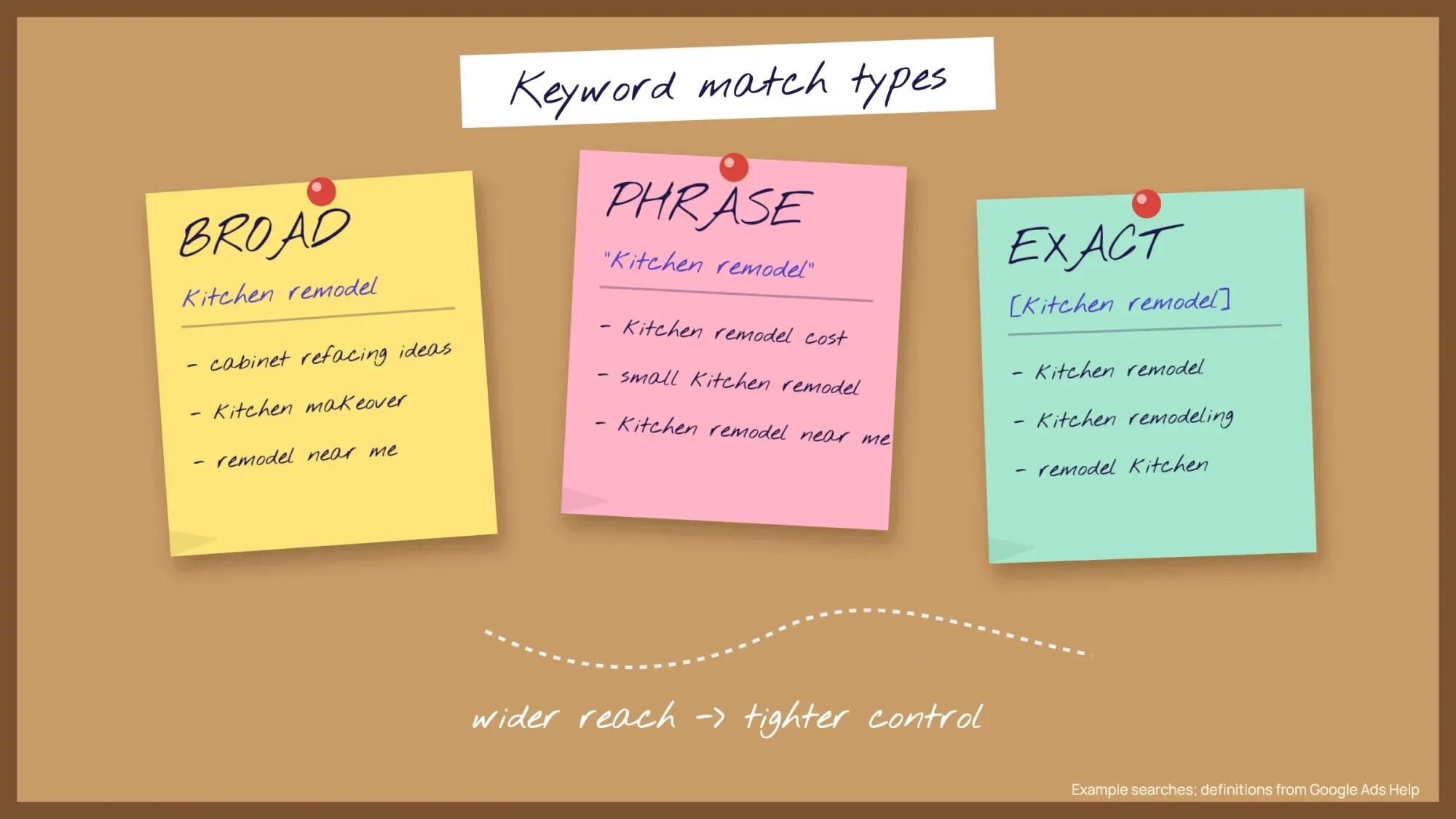 Illustration: broad reaches the most searches, exact the fewest. Example searches; match type definitions from Google Ads Help.
Free starter list of negative keywords for PPC
Negative keywords "let you exclude search terms from your campaigns". Google notes that they "won't match to close variants", so add plurals and synonyms yourself. Start with groups like these and add to them every week from your Search terms report:
| Who you're blocking | Example negatives |
|---|---|
| Job seekers | jobs, careers, hiring, salary, resume, internship |
| DIY and learners | how to, diy, tutorial, course, training, youtube |
| Price mismatch | free, cheap, used (only if you don't offer them) |
| Research only | definition, meaning, pdf, template |
Free PPC landing page checklist
- One page per service and area, with a headline that repeats what the person searched
- A tap-to-call phone number at the top on mobile
- A short form: name, phone, what they need
- Proof: reviews, license and insurance, real photos of your work
- A clear offer if it's true, such as a free estimate
- Loads fast on a phone, with no pop-up hiding the content
- Business hours that match when your ads run, and someone to answer the phone
Want to see which ads and pages bring visitors in Google Analytics too? Tag your links with UTM parameters. Our free UTM builder makes the tagged links for you.
Which PPC metrics should you track?
Track the numbers tied to money: cost per click, conversion rate, cost per conversion and, for online sales, return on ad spend (ROAS). Clicks and impressions alone don't tell you whether ads pay.
| Metric | What it tells you | How to work it out |
|---|---|---|
| Click-through rate (CTR) | How often people who see your ad click it | Clicks / impressions. Google's example: 5 clicks from 100 impressions is 5% |
| Cost per click (CPC) | What a click cost you; Google says you'll "often be charged less" than your max bid | Cost / clicks |
| Conversion rate | How many ad clicks became a lead or sale | Conversions / interactions. Google's example: 50 from 1,000 is 5% |
| Cost per conversion (CPA) | What one lead or sale cost | Cost / conversions |
| Return on ad spend (ROAS) | Sales value for each dollar of ads | Conversion value / cost. Google's example: $5 of sales per $1 is 500% |
| Impression share | How often your ads showed out of the times they could | Impressions / eligible impressions |
For a local service business, cost per conversion matters most. Once you know your close rate, turn it into cost per job. Calls count too, and our guide to call tracking shows how to tie phone calls to a campaign.
Impression share is the one owners skip. Google says impression share shows "whether your ads might reach more people if you increase your bid or budget". If you set up tracking tags yourself, our Google Tag Manager guide shows how to manage them in one place.
How to test PPC ads without guessing
Give each ad several headlines and descriptions. A responsive search ad takes up to 15 headlines and 4 descriptions, and Google tests the combinations for you. Google also suggests at least 2 responsive search ads in each ad group.
For a bigger change, such as a new bid strategy, set up a custom experiment. It shares your campaign's traffic and budget, so you can compare the change against the original. Change one thing at a time.
Local Services Ads: pay per lead, not per click
Look at Local Services Ads before regular search ads if you're a US plumber, electrician, HVAC company, roofer or other home or professional service. They appear at the top of some local searches. Google says that with them "you still only pay for valid leads (such as phone calls and messages) rather than ad clicks". Eligible businesses can show a Google Verified badge, which Google said would replace the older Google Guaranteed and Google Screened badges starting in October 2025.
They're also changing. Google says Local Services Ads are moving into Google Ads, starting in August 2026 "for select home and storefront service advertisers". Its timeline says the move widens to service-area businesses without storefronts in late 2026, then non-US accounts in 2027. They become "a specialized Performance Max campaign type optimized specifically for pay-per-lead goals". Google says manual bidding, such as a maximum cost per lead, and industry-level Target CPA are being phased out. Old performance reports don't carry over, so save them first. Google says a download page is coming and suggests screenshots in the meantime.
Your Google Business Profile matters for local ads too. Our Google Business Profile guide covers setting it up properly.
Performance Max and AI Max: read this before you switch them on
Google is pushing advertisers toward automation. Two features come up most:
- Performance Max is, in Google's words, "a goal-based campaign type that allows you to access all Google Ads inventory": YouTube, Display, Search, Discover, Gmail and Maps from one budget.
- AI Max for Search adds automated search term matching, text customization and final URL expansion to Search campaigns. Google says it moved out of beta in April 2026. Google says advertisers who turn it on "will typically see 14% more conversions or conversion value at a similar CPA/ROAS". That figure comes from its own 2025 data for non-retail advertisers.
Our opinion: both can work, but not on a tiny budget with no conversion data. Performance Max can spread money across channels you may not want, and AI Max widens the searches you match. Start with a tight Search campaign, collect a few weeks of real conversions, then test automation against it.
Google Ads, Microsoft Ads or Meta ads?
Start with Google search ads if people already search for what you sell. Add Microsoft Advertising for extra search reach, and use Meta ads to create demand with an audience you choose.
| Platform | Who sees your ad | Best for |
|---|---|---|
| Google Ads (search) | People actively searching for what you offer | Capturing demand that already exists: repairs, emergencies, "near me" searches |
| Microsoft Advertising | People searching on Bing and partner sites | An extra slice of search; it can import your Google Ads campaigns |
| Meta (Facebook, Instagram) | People who match an audience you choose, in their feeds | Creating demand: new products, offers, events, visual businesses |
Meta runs its own auction too. Its help page says the winner is "the ad with the highest total value". That value combines your bid, how likely people are to act, and ad quality. The difference is intent: on Google, the customer came looking; on Meta, you're interrupting their scroll. Most local service businesses should start with search.
PPC vs SEO: which is better for a small business?
Neither wins on its own. PPC buys visits now and stops when you stop paying, while SEO earns free visits that build up over months. Google's own guide suggests reframing the question from "SEO vs. PPC" to "SEO and PPC".
| Question | PPC | SEO |
|---|---|---|
| What do you pay? | Each click, from a budget you set | Nothing to Google; you pay in time or for help |
| How fast does it work? | Ads can show the same day they're approved | Usually months |
| What happens when you stop? | Visits stop with the budget | Pages that rank can keep bringing visits |
| Does one help the other? | Ads don't raise your free rankings | A useful, fast page also helps your ads' landing page experience |
| Best for | Leads now, testing offers, busy seasons | Steady leads over years and local map results |
Paying for ads won't lift your free results. Google's guide says Google Ads "won't improve your organic search rankings". It also says "There's no cost to appear in organic search results like Google's".
For a local business, the free side starts with your Business Profile and local SEO. Our guide to what local SEO is and how to start covers that work step by step.
Do you pay for fake or accidental clicks?
Mostly not, if Google catches them. Google defines invalid clicks as "clicks on your ads that don't represent a genuine interest in your business". These include accidental clicks and "clicks from automated tools, bots, or other deceptive software". It filters them out. If you were already billed, "you receive a credit on your next invoice where appropriate and possible". You can add an Invalid clicks column to your campaign reports to see how many Google filtered out. We haven't found a neutral source for how common click fraud is; most numbers come from companies selling click-fraud tools.
Mistakes that waste a PPC budget
Do not
- Turn on Maximize conversions with no conversion tracking
- Leave broad match running unchecked on a small budget
- Send every click to your homepage
- Chase the lowest cost per click; cheap clicks that don't convert cost more
- Set it and forget it
Do
- Track calls and forms before launch
- Read the Search terms report every week and add negatives
- Send each ad group to its own matching page
- Judge results by cost per lead and cost per job
- Run ads only when someone can answer the phone
On that fourth point, LocaliQ's Cliff Sizemore said: "Focusing too much on cost per click can lead you to cheaper clicks that don't convert."
What changed in Google Ads in 2025 and 2026
| When | Change |
|---|---|
| March 2025 | Enhanced CPC removed from Search and Display; campaigns still on it now run as Manual CPC |
| October 2025 | Google Verified began replacing the Google Guaranteed and Google Screened badges |
| 2026 | AI Max for Search left beta (April 2026) |
| June 2026 | Bid strategy labels renamed (for example, "Maximize conversions with a Target CPA" is now "Target CPA"); Google says the rename doesn't change bidding behavior (a separate Target CPA and Target ROAS update began August 17, 2026) |
| August 2026 | Local Services Ads begin moving into Google Ads as a pay-per-lead campaign type |
Key PPC facts for 2026
- Google may spend up to 2 times your daily budget on one day, and up to 30.4 times it in a month.
- Quality Score runs from 1 to 10, and Google calls it a diagnostic tool, not an input in the ad auction.
- Click-through rate is clicks divided by impressions, so 5 clicks from 100 impressions is a 5% CTR.
- A responsive search ad can hold up to 15 headlines and 4 descriptions.
- Google says advertisers who turn on AI Max typically see 14% more conversions or conversion value, based on its 2025 data for non-retail advertisers.
- Local Services Ads began moving into Google Ads in August 2026, and non-US accounts are due in 2027.
Frequently asked
What is PPC marketing in simple words?
It's advertising where you pay only when someone clicks your ad. On Google, your ad appears above or below the regular results for searches you choose.
How much should a small business spend on PPC?
Enough to get meaningful data, which depends on your cost per click. Work backward from the leads you need: budget = leads needed / conversion rate x cost per click. Google spreads a monthly amount as a daily budget, about the monthly figure divided by 30.4.
How long does PPC take to work?
Ads can show the same day they're approved. It usually takes weeks of data to know which keywords and ads bring customers. It takes longer if you use automated bidding that needs conversions to learn from.
Is PPC better than SEO for a small business?
They do different jobs. PPC brings visitors as soon as you pay and stops when you stop. SEO takes months but keeps working. Many local businesses use PPC for steady leads while their SEO and Google Business Profile build up.
What is a good cost per click?
One that leads to a profitable cost per customer. As of June 2026, LocaliQ's averages were $9.87 a click for legal services and $2.05 for restaurants and food. A $10 click can be cheap for a lawyer and expensive for a coffee shop. Compare your cost per lead and cost per job, not the click price.
Do I pay if a competitor clicks my ad?
Google filters clicks it considers invalid, such as bot clicks, accidental clicks and manual clicks meant to run up your costs. Where appropriate and possible, it credits you if it already billed for them. It can't read intent perfectly, so watch your invalid clicks column and search terms.
What is an example of PPC?
A dentist in Phoenix bids on "emergency dentist phoenix". When someone searches that, the dentist's ad appears marked Sponsored. If the person clicks, the dentist pays for the click; if they call from the ad, Google Ads can count it as a conversion.
Your next step: run the budget math above with your own cost per click, conversion rate and close rate. If the numbers work and you want a price for us to run the ads, get an instant quote from our estimator.
First published July 2020. Rewritten October 2026: 2026 click costs from LocaliQ, a budget example, the Local Services Ads move, Google Verified and AI Max.
How we made this guide: we built it from Google Ads Help pages and Google's own announcements, Microsoft Learn and Meta's Business Help Center. Click costs come from LocaliQ's 2026 benchmarks, which are vendor data from its customers' campaigns. Each source is linked where we use it. We checked every number against the source named next to it on October 22, 2026. Updated October 23, 2026: added the types of PPC ads, which metrics to track, how to test ads and PPC vs SEO. We also added agency fees, a pros and cons table and a key facts list. The fee range is WebFX's own agency data.
Sources
- Google Ads Help: The ad auction
- Google Ads Help: About Quality Score
- Google Ads Help: About average daily budgets
- Google Ads Help: About keyword matching options, plus Your guide to broad match
- Google Ads Help: About negative keywords
- Google Ads Help: About conversion measurement
- Google Ads Help: Maximize conversions
- Google Ads Help: Target CPA bidding
- Google Ads Help: Enhanced CPC
- Google Ads Help: About Performance Max
- Google Ads Help: AI Max for Search campaigns, plus Google: AI Max for Search campaigns announcement (May 2026)
- Google Ads Help: Choose the right campaign type
- Google Ads Help: About your data segments
- Google Ads Help: Clickthrough rate (CTR), Cost-per-click (CPC) and Conversion rate definitions
- Google Ads Help: About Target ROAS bidding
- Google Ads Help: About impression share
- Google Ads Help: About responsive search ads
- Google Ads Help: Set up a custom experiment
- Google Ads: SEO vs. PPC
- WebFX: PPC pricing (agency data, published June 2026)
- Google Ads Help: Local Services Ads moving to Google Ads
- Google blog: Google Verified (August 20, 2025)
- Google Ads Help: Invalid clicks: Definition, plus Google Ads Help: About invalid traffic
- Google Ads policies overview
- Microsoft Learn: Google Ads import
- Meta Business Help Center: About ad auctions
- LocaliQ: Search Advertising Benchmarks 2026 (vendor data, last updated June 1, 2026)

Comments
No comments yet. Start the conversation below.