

Quick answer
Retargeting ads show your ads to people who already visited your site, watched your videos or bought from you. On Google and Meta you add a tag or pixel, build audiences and choose how long people stay on them: up to 540 days on Google, 180 for Meta site visitors, as of October 2026.
The settings take an afternoon, but the rules take longer.
Consent, state privacy law and each platform's list of restricted businesses decide whether you can use retargeting at all. Most guides skip those parts. We read 47 of Google's and Meta's own help and policy pages for this guide, signed out, on October 26, 2026. Budgets and bidding live in our PPC marketing guide; this one is about the lists.
Key takeaways
- Build Meta website audiences on day one, because they don't backfill.
- Google lists can keep people up to 540 days; Meta website audiences, 180.
- Targeting a Google customer list needs over $50,000 in lifetime Google Ads spend.
- Health, gambling and alcohol advertisers can't use their own lists on Google.
- Turn off audience expansion and exclude buyers for true retargeting.
Retargeting shows ads to people who already know you
So what is it? Retargeting is advertising aimed at people who've already interacted with your business, such as visiting a product page and leaving. Google used to call it remarketing. Its help page on data segments now says "“remarketing” is now referred to as “your data”" in the menus.
Same idea, new label.
It works in three steps. A small piece of code on your site notes who visited. The platform adds those people to a list you define, such as "looked at outdoor sofas in the last 30 days." Then your ad shows to that list while they browse, search or scroll.
That's why retargeting suits businesses where people think before they buy: furniture, home services, courses, anything over a few hundred dollars. If your customers decide in one visit, you'll usually get more from reaching new people.
People get onto a list in three ways
So where do the people on those lists come from? Both platforms offer the same three sources, under different names.
The first is your website. Google's tag or Meta's Pixel records visits and actions, such as viewing a page or starting checkout. On Meta that's a website custom audience; on Google it's a website visitors segment. Stores with a product feed can go further with dynamic remarketing, where the ad shows the exact item someone viewed.
The second is a customer list: emails or phone numbers you collected yourself, uploaded and matched to accounts. Google calls it Customer Match. Meta hashes the list before matching. Its customer list help page warns that a list not updated in over 30 days shows as "Outdated," which "may impact ad delivery."
Lists go stale fast, so plan a monthly upload.
The third is engagement on the platform itself. Google can build lists from people who interacted with your YouTube channel. Its Google-engaged audiences also add people who reached your site "through clicks on either ads or search results." Meta can build audiences from your Facebook Page, Instagram account, videos and lead forms.
These need no code on your site, which makes them handy while the tag is still collecting its first visitors.
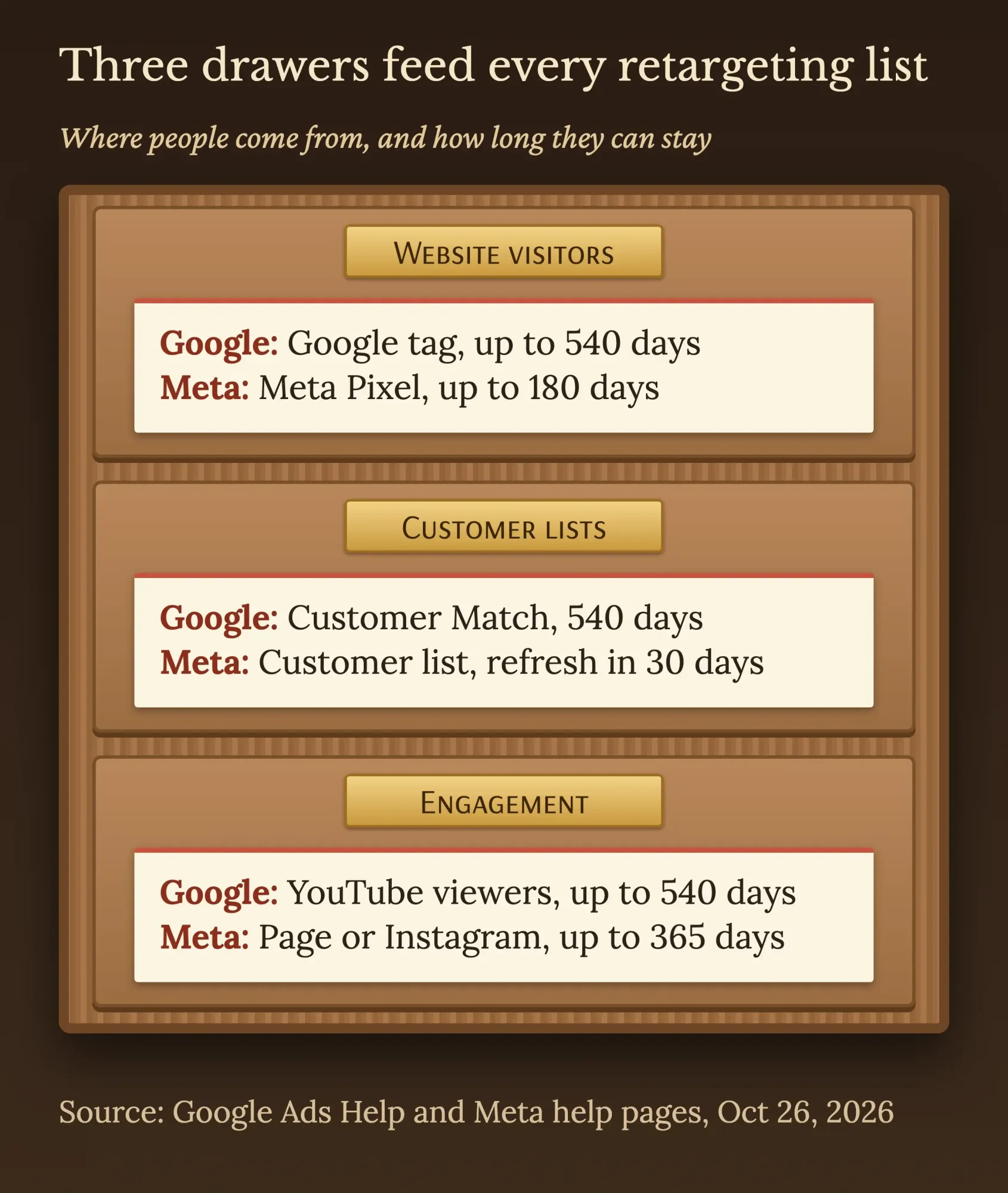 Diagram by DigitalTreed, October 2026, based on Google Ads Help and Meta Business Help Center pages read October 26, 2026.
Install the Google tag and the Meta Pixel before anything else
Once you know the sources, install the code first. Website lists only start filling once it's live, so the audiences come after.
On Google, that's the Google tag. Google's page on the Google tag calls it "a single tag you can add to your website," and the same code can feed Google Ads and Google Analytics. If you already run Google Tag Manager, add it there instead; our Google Tag Manager guide walks through the setup.
On Meta, it's the Meta Pixel. Its help page adds a rule many owners miss: your Pixel must not go "on websites that you do not own" without permission. A web designer's demo site or someone else's marketplace page doesn't count as yours.
Timing differs, too.
A new Google segment can pre-fill with matching visitors "from the previous 30 days," per Google's steps for website visitor segments. Meta works the other way. Its create page says a new website custom audience "starts populating from the time you create it (ie, it won't backfill)" for anyone. So build the Meta audiences on day one, even if the ads start later.
Then check what the code can see.
Meta says advertisers "shouldn't send information about people from web pages where visitors may log in and provide potentially sensitive information," and gives patient portals as the example. The same page warns that UTM parameters in a URL "may contain prohibited data" too. Keep the pixel off booking forms that ask about health or money, and keep personal details out of your URLs.
Build the audiences, Google first, then Meta
With that code in place, the audiences themselves take about ten minutes per platform. In Google Ads, the steps from the help page are:
- Open Tools, then Shared library, then Audience manager.
- In Segments, click the plus button and choose Website visitors.
- Name the segment so you'll recognize it later ("Viewed sofas, 30 days").
- Under Actions, pick the pages or events and enter the number of days people stay.
- Choose whether to pre-fill visitors from the previous 30 days, then click Create segment.
Customer lists on Google come with a catch that most small advertisers hit.
Google's Customer Match policy lets every policy-compliant account use a list "in the “Observation” setting and for Exclusions" only. Targeting a list directly needs "90 days of Google Ads history and more than USD $50,000 total lifetime spend," as of October 2026. Below that line, your email list can keep past buyers out of your ads, or show you how they behave.
It can't be the audience you aim at.
On Meta, open Audiences, then create a custom audience:
- Select Create audience, then Custom audience, then Website.
- Choose your Pixel as the source.
- Pick the events or pages, such as people who visited specific web pages.
- Set Audience retention in days.
- Add up to 5 include or exclude rules, name the audience and click Create audience.
Meta lets you keep up to 500 custom audiences per ad account, according to its custom audiences page, and you won't need more than five or six.
How long should someone stay on your list?
Someone should stay on your list for about as long as people take to decide. The membership duration "should be similar to the length of your sales cycle," says Google's page on how data segments work. Its default is 30 days and its maximum is 540, for both the Display Network and Google search.
Google's own example is useful: for Valentine's Day gifts, it suggests "a year plus a few days," so last February's shoppers see you again the following February.
Seasonal businesses can copy that.
Be careful when you change it later. A new duration "is applied to all current and future visitors or users on the segment," Google says. Cut 60 days to 30, and everyone who joined 31 to 60 days ago drops off.
Meta is shorter. Its website custom audiences reference lists website retention as "Between 1 and 180 days" for developers. Engagement audiences go further: Meta's Instagram audience page allows a "Maximum of 365 days" there. Customer Match memberships "expire after 540 days," says Google's Customer Match page.
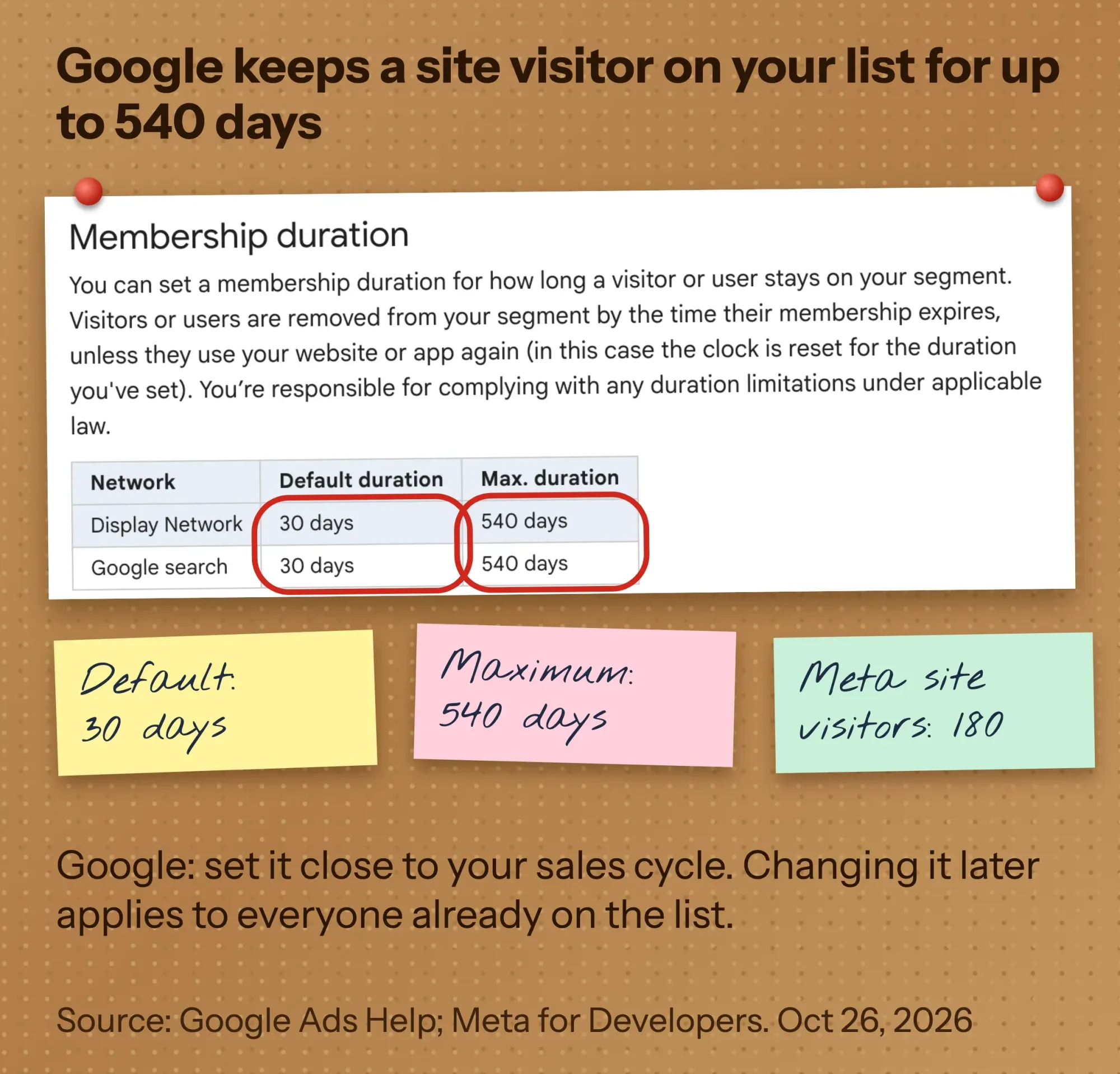 Screenshot: Google Ads Help, How your data segments work, read October 26, 2026 (public page, signed out).
Size matters as much as time, because a list that's too small simply won't serve.
Here's something we found while checking the numbers. Three Google pages, including the Audience manager page, ask for "a minimum of 100 active visitors or users within the last 30 days" on Display, Search or YouTube. Google's page on data segments for Search ads disagrees. Read the same morning, it still says a Search list "needs to have a minimum number of 1,000 cookies" before it works.
We went with 100 because three pages give it and name Search outright, while 1,000 sits on one page. The February 1, 2024 note on those pages covers customer lists only, so Google hasn't said when the website figure changed. If a Search list sits at "too small" with a few hundred people, that older line may explain it.
Meta gives no hard number. Its audience size troubleshooting page suggests "Waiting until you have several hundred people in your website custom audience before using it." Visitors only count if they're Meta users who haven't opted out of behavioral ads.
Example: a retargeting plan for a made-up patio store in Topeka
Those limits turn into a real plan quickly. Tallgrass Patio Supply is an example business we made up: an outdoor furniture store in Topeka, Kansas. Its sets cost real money and take weeks to decide on.
Say it has spent $6,000 on Google Ads in total, a made-up figure for this example. That's far under the Customer Match targeting line.
| Audience (example, as of October 2026) | Source | Days on list | How Tallgrass uses it |
|---|---|---|---|
| Viewed a furniture set, didn't buy | Google tag and Meta Pixel | 30 on both | Display, YouTube and Meta ads showing that collection |
| Started checkout, didn't buy | Checkout event on both | 14 on both | Search bids raised on Google; delivery-date ad on Meta |
| Visited during last spring's sale | Google tag only | 370 on Google (Meta stops at 180) | Spring launch ads a year later |
| Bought in the last 180 days | Purchase event on both | 180 on both | Excluded everywhere |
| Past customers on the email list | Customer Match and Meta customer list | 540 on Google; re-upload monthly on Meta | Google: exclusion and observation only; Meta: cushion and cover offers |
Notice the seasonal row: a visitor from last April can only be reached next spring through Google, because Meta drops website visitors after 180 days. On Meta, the email list does that job instead, as long as it's refreshed.
Our take: start with three audiences, not twelve. Product viewers, checkout starters and recent buyers to exclude cover most of the value, and each list stays big enough to serve. Split further only once a list holds well over the minimum.
One more check before launch. Run the pages the ads point to through our page speed checker, because a returning visitor shouldn't meet a slow page.
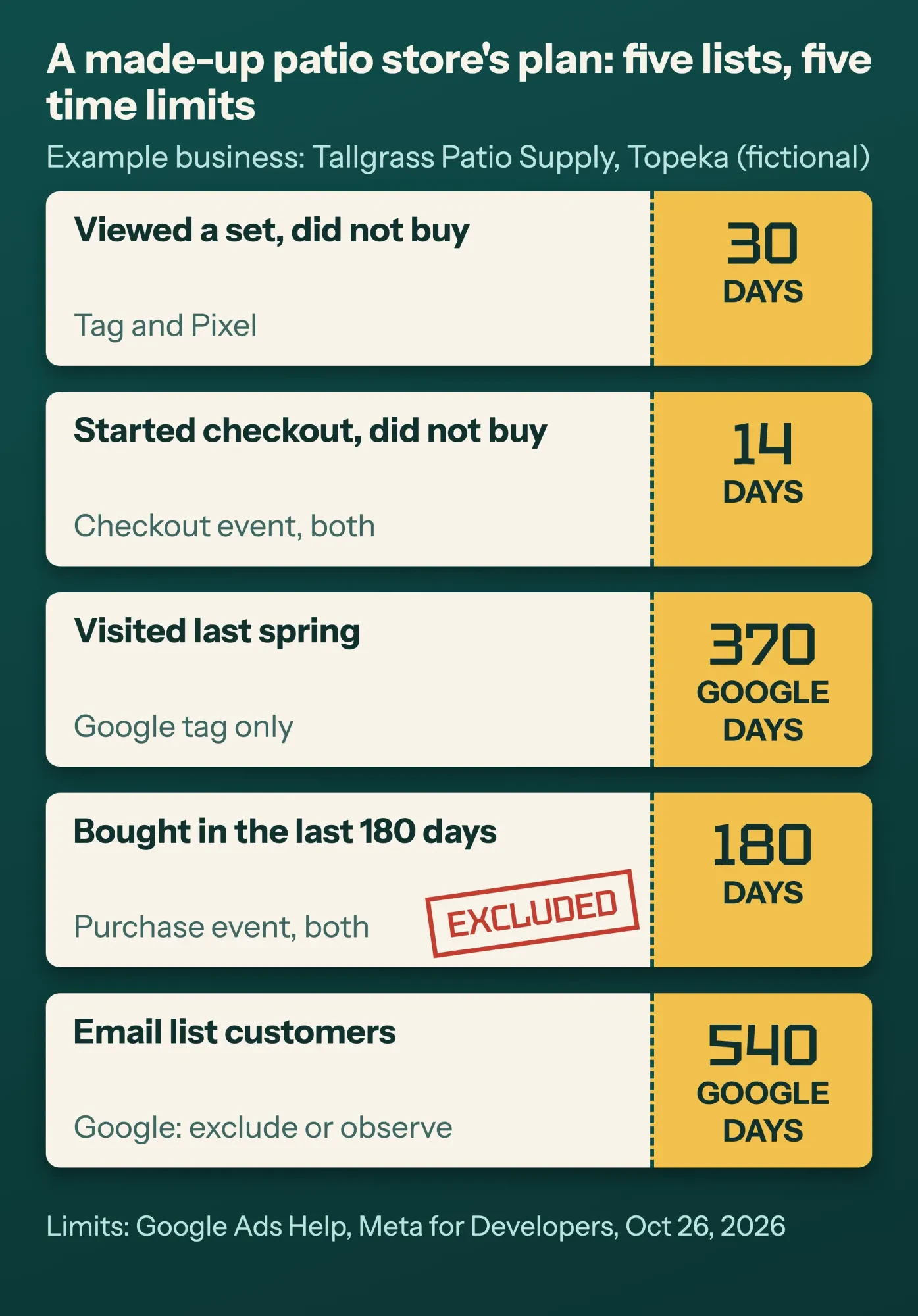 Diagram by DigitalTreed, October 2026. Tallgrass Patio Supply is a made-up example; limits from Google Ads Help and Meta for Developers.
Cap the repeats and keep the platforms from widening your list
Even a good plan can annoy people if the same ad follows them all week.
On Google, frequency capping "limits the number of times your Display or Video ads appear to the same person," per its definition page. Display caps can be set "per day, week, or month" on the campaign, ad group or ad, but video caps "can only be set on the campaign level."
Google gives no recommended number, so start low and raise it only if the list is large.
We couldn't find a public Meta help page on frequency caps today, only third-party posts, so we won't quote limits for Meta. Check the Frequency column in your own reports instead.
The bigger surprise is that both platforms will happily go beyond your list.
Google says that with optimized targeting, "your ads may reach people outside of your audience selections," and its data segments page adds that Performance Max uses only optimized targeting. Meta's Advantage+ custom audience "can enable our systems to deliver ads beyond the original selected audience," its help page says.
That can be fine for sales campaigns, but for true retargeting, switch these off where you can and add your buyers as an exclusion, so you don't pay to reach people who've already paid you.
Consent Mode and US privacy law: what you actually have to set
That covers your spend. Consent settings keep you on the right side of the platforms and the law.
This is the part that's easiest to skip.
Consent Mode is Google's way of passing a visitor's cookie choice to its tags. Google's help page is clear that "Consent mode doesn't provide a consent banner or widget" on its own. You still need a banner from your site builder or a consent tool.
There are two ways to run it. In basic mode, tags wait for a choice; if the visitor says no, "no data is transferred to Google at all." In advanced mode, tags load but send only "cookieless pings" while consent is denied.
A November 2023 update added two consent settings to the original two. Google's developer guide describes ad_user_data as consent "for sending user data related to advertising to Google" and ad_personalization as consent "for personalized advertising." The default must run "before any commands that send measurement data" on every page. Here's the shape of it, adapted from that guide, with the region set to California:
<script>
  window.dataLayer = window.dataLayer || [];
  function gtag(){dataLayer.push(arguments);}

  // 1. Before any config or event: deny ads storage and personalization for visitors in California
  gtag('consent', 'default', {
    'ad_storage': 'denied',
    'ad_user_data': 'denied',
    'ad_personalization': 'denied',
    'analytics_storage': 'denied',
    'region': ['US-CA']
  });

  // 2. Your banner calls this when the visitor makes a choice
  // gtag('consent', 'update', { 'ad_storage': 'granted', 'ad_user_data': 'granted', ... });
</script>
<!-- 3. Then the Google tag itself (gtag.js with your tag ID) -->
For US state laws, Google has a second switch. Its page on personalized advertising data describes restricted data processing, a Data manager checkbox for "all users located in applicable U.S. states." Turn it on and "users located in California won’t be added to your data segments" at all.
Your lists get smaller, and that's the trade.
Does California's law apply to you? The California Privacy Protection Agency's CCPA FAQ lists three tests for for-profit businesses that do business in California. One is "a gross annual revenue of $26.625 million or more (effective January 1, 2025)." Another is buying, selling or sharing the personal information of "100,000 or more California residents or households." The Attorney General's CCPA page still showed the older "over $25 million" figure on October 26, 2026, so check the CPPA's adjusted number first. Plenty of small businesses meet neither.
Retargeting is exactly what the law calls sharing, though. The Attorney General's CCPA page says "sharing refers specifically to sharing for cross-context behavioral advertising," and consumers can opt out "via a user-enabled global privacy control" in their browser.
Both platforms also require notice, whatever your size. Google's Advertising Features policy says your privacy policy must explain "How visitors can opt-out" of the features you use. Meta's Business Tools Terms ask for "a clear and prominent notice on each web page where our pixels are used" that links to the details. Our guide to website analytics tools covers the analytics side of the same banner.
We quote Google's and Meta's rules and California's official pages here word for word. That isn't legal advice for your business; a privacy lawyer in your state can tell you which laws reach you.
Some businesses can't use their own lists: restricted categories
Even with consent sorted, there's one more gate. Category rules decide whether you can use those lists at all, and they catch more small businesses than you'd expect.
Google's Personalized advertising policy names sensitive interest categories, including health, alcohol, gambling and relationship hardships. Advertisers in them "are unable to use advertiser-curated audiences," which include Customer Match and your data segments.
Health is broad. Google's Health category page includes "cosmetic surgery, surgical procedures, or injections" and counseling for mental health. So a med spa, a counseling practice or a CPAP supplier can't retarget its own site visitors on Google.
Housing, jobs and lending have a different limit.
In the US and Canada, Google's policy bars targeting those ads by gender, age, parental status, marital status or ZIP code. Radius targeting of at least 1 km is still allowed.
Meta goes further. US financial products and services campaigns must use the financial Special Ad Category, "Starting January 21, 2025," says its Special Ad Categories page. Housing, employment and financial ads then get limited or no access to "age, gender, ZIP code or postal code, exclusion targeting, lookalike audiences and saved audiences" in the US.
Meta also polices the data itself. Its page on restricted custom audiences bars "references to specific health conditions (e.g., arthritis) or financial status (e.g., credit score)" in your audiences. Flagged audiences can't run.
Our dermatology marketing guide shows how a medical practice can still advertise within these rules. Law firms have extra rules of their own, covered in our Google Ads for lawyers post.
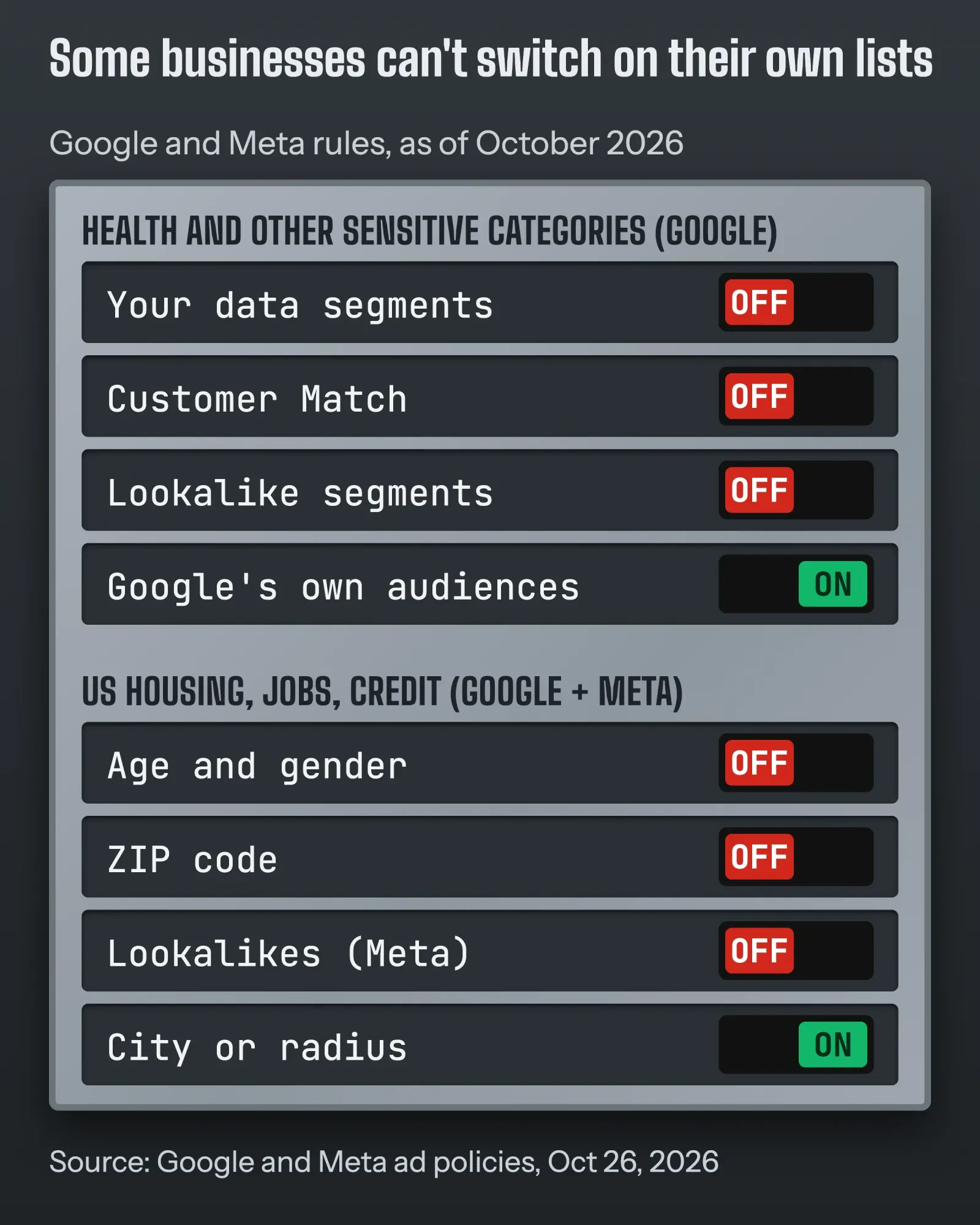 Diagram by DigitalTreed, October 2026, based on Google's Personalized advertising policy and Meta's Special Ad Categories page, read October 26, 2026.
Write the ad for where the person stopped
Now the ad itself, if your business is clear of those categories. Someone who viewed a sofa needs the sofa, the price and a reason to come back. Someone who started checkout needs the delivery date or the return policy, not a new pitch.
Just don't show what you know.
Meta's advertising standard on personal attributes says ads "must not contain content that asserts or implies personal attributes" about the viewer. You can still "Use “you/your” language without a personal attribute," it adds. Google's Customer Match policy also bans ad content "which implies knowledge of personally identifiable information" about customers.
"Still thinking about the Cedar sofa?" is fine. "We know you're moving house" isn't.
Google may also add its own label explaining why someone sees a personalized ad, and its policy says "You must not modify or obscure these notices" in any way.
For the wording itself, our guide to writing Google Ads copy covers headline limits and policy traps. Add campaign tags to every retargeting link with our UTM link tool, so returning visitors get their own row in Google Analytics 4.
No ad budget yet? Your email list is the free version of retargeting. Our list of free ways to advertise a small business covers the rest.
Want help setting this up inside your own accounts? We build Google search and remarketing campaigns and run Meta ads as part of social media marketing. We're paid when you hire us, so it's worth comparing one other quote.
How we made this guide: Aijaz Alam's rewrite was checked against the platforms' own pages on October 26, 2026. We read 25 Google help, policy and developer pages and 22 Meta help, terms and policy pages signed out. We also read California's CPPA and Attorney General pages, and copied every limit and rule word for word into our notes. Our own part is that cross-check, which found Google's Search pages disagreeing on the minimum list size, and the screenshot of Google's duration table. Sources are linked inline where each rule appears.
We didn't sign in to a Google Ads or Meta account or run a live campaign for this guide, so menu labels may differ slightly from the written steps. Aijaz Alam reads and signs off on every change to this page.
First published February 2024. Rewritten October 26, 2026: the old post was a general piece on multichannel advertising with a three-sentence remarketing section. The new one is a set-up guide for retargeting ads on Google and Meta. It covers audience sources, the tag and pixel, audiences step by step, list durations and sizes, a worked plan, frequency and expansion, Consent Mode, California privacy rules and restricted categories.
Frequently asked
Does retargeting still work in Chrome without third-party cookies?
Chrome hasn't dropped them. In an October 17, 2025 update, Google said Chrome will keep offering users a choice about third-party cookies. As of October 2026, the tag and pixel setup in this guide still applies in Chrome.
Can my retargeting budget go over my daily limit?
On Google, for a single day, yes. Google's overdelivery help page says a campaign may spend up to twice its average daily budget on one day. As of October 2026, a month's spend stays at no more than 30.4 times the daily budget. So plan the monthly total, not the daily one.
Can I upload an email list I bought?
Not to Google. Its Customer Match policy allows only data you collected in a first-party context, as of October 2026. That means your website, apps, stores, or places where customers shared details with you directly. A bought or rented list doesn't qualify.
Sources
- Google Ads Help: About your data segments
- Google Ads Help: Create an audience segment that includes your website visitors
- Google Ads Help: How your data segments work
- Google Ads Help: About audience segments in Audience manager
- Google Ads Help: About your data segments for Search ads
- Google Ads Help: Use your data segments to advertise on YouTube
- Google Ads Help: About Google-engaged audiences
- Google Ads Help: About Customer Match
- Advertising Policies Help: Customer Match policy
- Google Ads Help: Frequency capping: Definition
- Google Ads Help: About the Google tag
- Google Ads Help: Disable the collection of personalized advertising data
- Google Ads Help: About consent mode
- Google for Developers: Set up consent mode on websites
- Advertising Policies Help: Restricted targeting in Personalized advertising
- Advertising Policies Help: Health in personalized advertising
- Analytics Help: Policy requirements for Google Analytics Advertising Features
- Meta Business Help Center: About website custom audiences
- Meta Business Help Center: Create a website custom audience
- Meta Business Help Center: About custom audiences
- Meta for Developers: Website Custom Audiences
- Meta Business Help Center: Create an Instagram account custom audience
- Meta Business Help Center: Troubleshoot website custom audience size
- Meta Business Help Center: Create a customer list custom audience
- Meta Business Help Center: How to use Advantage+ custom audience
- Meta Business Help Center: About Meta Pixel
- Meta Business Help Center: About prohibited information
- Meta Business Help Center: Understand restrictions on certain custom audiences
- Meta Business Help Center: How to choose a Special Ad Category
- Meta Business Tools Terms
- Meta Transparency Center: Privacy violations and personal attributes
- California Privacy Protection Agency: Frequently Asked Questions
- California Attorney General: California Consumer Privacy Act (CCPA)

Comments
No comments yet. Start the conversation below.