
Quick answer
A private account is the one setting that can hide Instagram stories from all strangers at once. As of October 2026, Instagram shows a private account's posts only to logged-in followers you approve. Hide story from or a Close Friends story narrows any account further, and our rule table found Close Friends reached 1 of 9 viewer types.
Maybe a username you don't recognize keeps showing up in your viewer list. A story audience is the group of people who can open what you share to your story before it disappears. Instagram gives you five settings that shape it: a private account, Close Friends, Hide story from, a block and Stories to stories. We'd match each one to a person instead of locking everything down.
First up is what a private account changes for logged-out viewers, then Close Friends against Hide story from. After those: when to remove, restrict or block, your viewer list, resharing, our rule table, reporting, and a business account order.
Key takeaways
- Instagram Plus subscribers who preview your story are left out of your viewer list.
- A Close Friends story reached 1 of 9 viewer types in our table.
- Private posts show on the web only to approved, logged-in followers.
- Business profiles cannot go private, so they rely on Close Friends and hiding.
- Restrict changes comments and chats; its help page lists no story effect.
What a private account changes for logged-out viewers
Logged-out visitors are where most anonymous viewing starts. So the first question is what a private account keeps from them. Instagram's page on who can see your profile and photos on the web says anyone can open a public profile and its posts at instagram.com/[your username]. A private account's profile and posts are visible only "to people logged into Instagram who you've approved to follow you." That page names profiles and posts, yet it doesn't mention stories either way, so we read it as covering what it names and nothing more. The same rule holds on a computer, since Instagram says the privacy settings you set on mobile match your settings on the web.
Inside the app, the same switch puts a gate on following. Instagram's comparison of public and private accounts says only people you approve can follow a private account, and its photos and videos go to "Your followers" alone. Instagram's Manage privacy on Instagram page adds that anyone who wants to see those posts "will have to send you a follow request first." Teens start behind that gate: Instagram says accounts of people under 18 are private by default, and teens under 16 need a parent's permission to go public. Teens aged 16 and 17 can switch without permission, unless a parent or guardian has set up supervision.
Your bio stays public, though. The comparison page shows your photo, name, username and bio to "Anyone on or off Instagram" either way.
Switching takes five taps on an iPhone. The Make your Instagram account private page lists them in this order:
- Tap Profile or your profile picture in the bottom right.
- Tap Menu in the top right.
- Below Who can see your content, tap Account privacy.
- Tap the toggle next to Private account.
- Tap Switch to private to confirm.
Business profiles can't follow those steps. Instagram says they "aren't able to make their accounts private," and its fix is to switch back to a personal account first, then use the privacy toggle. Public accounts also carry a line most people never read. The comparison page warns that their content "may be accessible to third-parties who use our research tools." The comparison page also says anyone on Instagram can download a public account's reels unless you update your settings, while for a private account the answer is no one. Outside websites get the same split: the table says anyone on or off Instagram can embed a public account's photos and videos, and no one can embed a private one's.
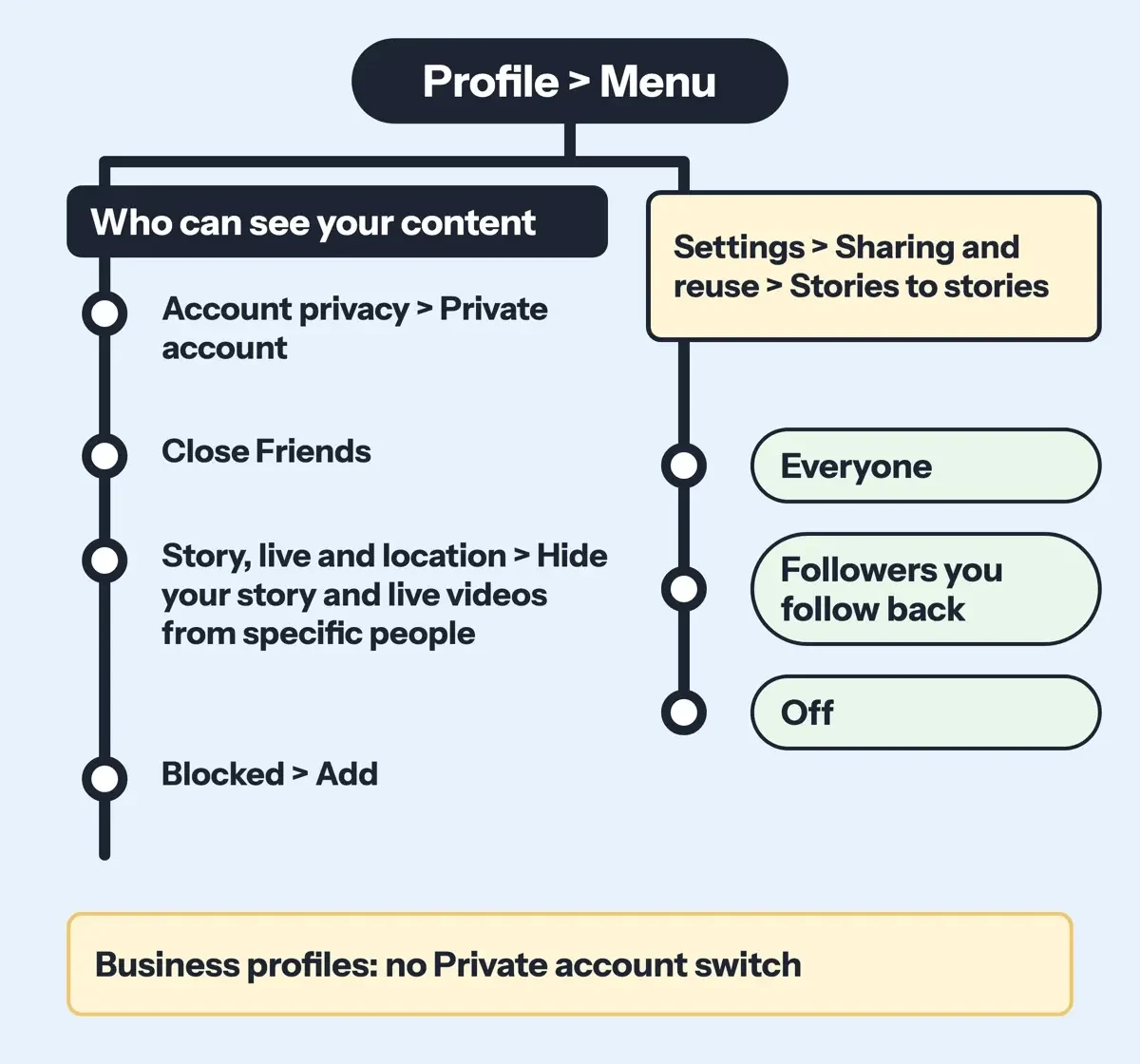 Drawn by us from the setting paths on the Instagram Help Center iPhone tab, read October 30, 2026. Not a real Instagram screen.
Close Friends or Hide story from: which one fits?
Next comes a per-story choice. Close Friends is an allow-list, so only the people you name can open that story. Hide story from works the other way. Everyone who could see your story still can, minus the names you pick. Take an example account with 800 followers and one former coworker to avoid: Hide fits that case, while a story meant for six relatives fits Close Friends.
Instagram's Close Friends list page puts the list under Profile, then Menu, then Close Friends below Who can see your content. You tap Select next to each person and tap Done to save. When you post, the Close Friends sharing page says to tap Close Friends at the bottom. Adding or removing someone sends no notice. Members "will know they're on it," though, from a Close friends label and sometimes a green ring.
Hide story from is our short name for a setting one row lower in the same menu. Instagram's page on hiding your story from someone starts at Story, live and location, below Who can see your content. There you tap the full label, Hide your story and live videos from specific people, pick the names and tap Done. That stops them "from seeing anything you add to your story in the future," and since the menu label names live videos, your broadcasts are covered too. It doesn't touch your profile and posts, which a block would. Here's how the two compare:
| Close Friends | Hide story from | |
| Who can open the story | Only people on your list | Your usual audience minus hidden people |
| Where it is set | Who can see your content > Close Friends | Who can see your content > Story, live and location |
| Chosen when | Each time you share | Once, for all future stories |
| What the person notices | Members see a Close friends label | Instagram Help names no sign |
Use Hide story from when one person is the issue, and a Close Friends story when most of your followers are, since that list is built once and reused. You can also hide someone straight from your viewer list: tap Options next to their name, select Hide your story, then tap Hide.
Remove, restrict or block someone who keeps watching
Hiding a story leaves the person in your followers. That suits a coworker but not someone you want gone, and Instagram has three stronger moves. Removing a follower only works "If your account is set to private," per Instagram's Remove a follower page. Open Followers on your profile, tap X next to the person and tap Remove. Instagram doesn't notify them. Restrict is softer. It's aimed at comments and chats. Instagram's Restrict page says the person can't see when you're online or whether you've read their messages. Nothing on that list mentions stories, so we wouldn't count on Restrict to keep anyone out of one. You'll find it under How others can interact with you, then Restricted.
Blocking is the full stop. Instagram's Block or unblock page puts it under Who can see your content, then Blocked, then Add. A block can also cover the person's other existing accounts and any new accounts they create later, which matters when someone keeps returning under a fresh username. People "aren't notified when you block them," says the page on what happens when you block someone. That article's summary in Instagram's help search goes further: the person "won't be able to find your profile, posts or story on Instagram." Group chats are the exception: if you stay in one with a blocked person, Instagram says you'll both still see each other's messages there.
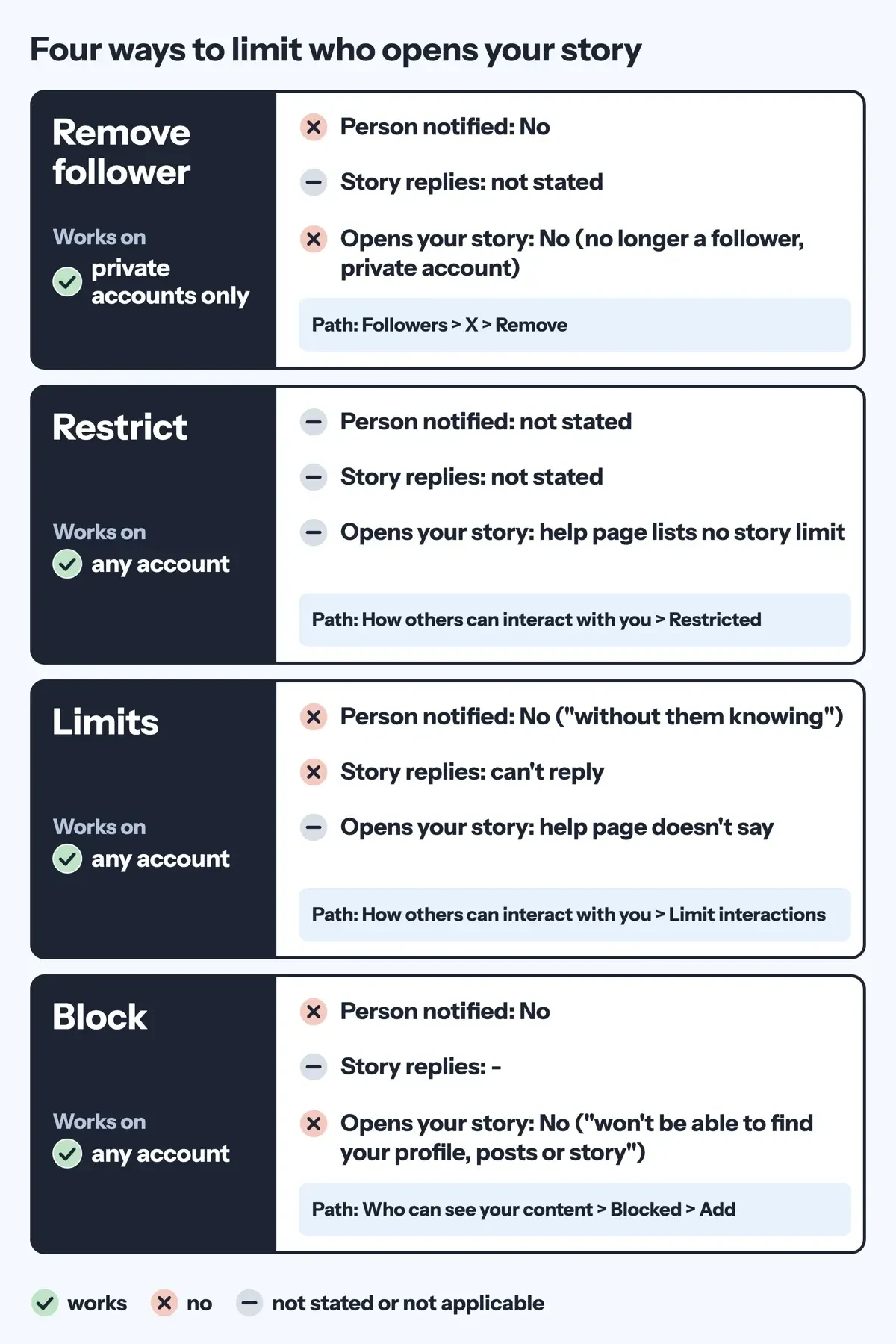 Diagram by DigitalTreed, from four Instagram Help Center pages on removing, restricting, limiting and blocking, read October 30, 2026.
Limits suit a rough week better than one person. Instagram's Limits page hides new chats and comments from "Recent followers" or from "Everyone but close friends." Limited accounts "won't be able to reply to your stories," though the page doesn't say they stop seeing them. Each limit lasts up to four weeks at a stretch, and Instagram lets you keep extending it for as long as you'd like.
Who shows up in your viewer list, and who doesn't
The viewer list is how most people notice a stranger. Instagram's page on who's seen your story says you open it by swiping up on your story. Only you can see it. Replays count toward the view number, so one account watching three times can push the count above the names. There's a newer gap, too. Instagram's help text says the list and view number "do not include the usernames of Instagram Plus subscribers who have previewed your story." Instagram Plus is a paid plan, and its launch post lists "Story Preview – Preview stories without the pressure to react." That post also says the regular app isn't changing and "will always be free."
Not everyone has it yet. Instagram's About Instagram Plus page reads "This feature is not available to everyone right now." Meta's Meta One announcement of September 15, 2026 lists Instagram Plus at "$3.99/mo," a price the page still showed on October 30, 2026. It also says "Plans, benefits, pricing, and availability may vary by region, by app, and by account."
So an empty list doesn't prove nobody looked. The hide page still covers "anything you add to your story," and neither it nor the Close Friends pages mention previews by name. Plus gives story owners tools as well. Its launch post lists Search Viewer List, and Meta says the plan added "notifications when certain people view your Story."
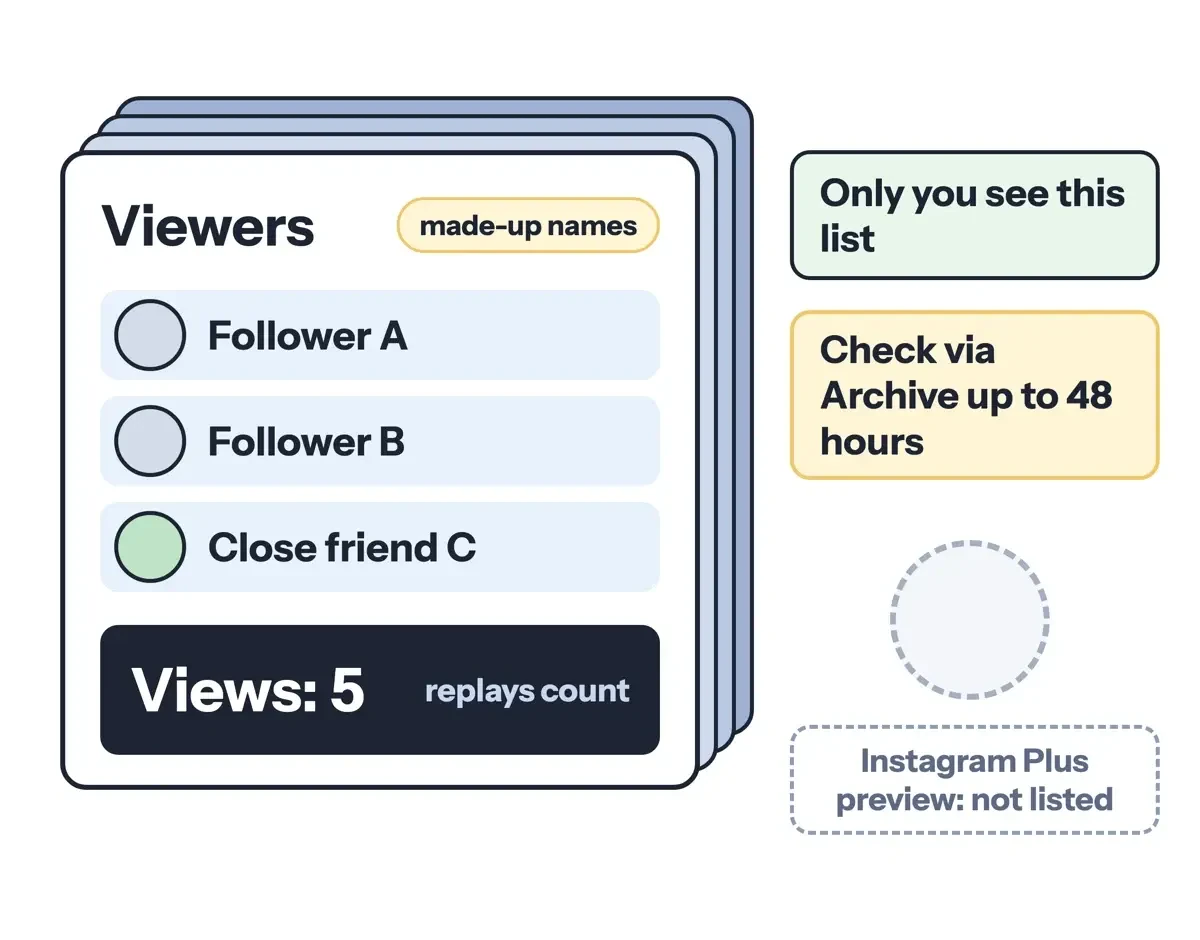 Diagram by DigitalTreed, from Instagram's who's seen your story page and the Instagram Plus launch post, read October 30, 2026.
Turn off resharing and other ways a story travels
Even with the right audience, a public story can travel past it. Instagram's page on where your story appears says a public story may also show in Search & Explore. It can also land in shared stories when you add a sticker tied to a large event, and on the Instagram map when you tag a location. Both routes depend on something you add, so skipping event stickers and location tags keeps a public story out of them.
Resharing is the setting most owners miss. Instagram's page on sharing a story to your own story says public accounts "are set to allow anyone to reshare your story by default." To change it, go to Settings, then Sharing and reuse, then Stories to stories. You get three choices there, Everyone, Followers you follow back, or Off, and for most personal accounts we'd pick Followers you follow back as the middle ground. Instagram's resharing page adds that anyone who views a reshare can see who originally posted it. They can open your account from there. Only public stories can be reshared at all, and reshared content "may be indexed and displayed in search engine results," per the where-it-appears page.
Highlights stretch the 24 hours. Instagram's Story Highlights page says a highlight stays "until you remove them." It adds that "those you've allowed to see your story can also see your highlights," so check that audience before you pin a highlight. Replies have their own switch, since by default "anyone who can see your story can reply," per the story replies page. If a story already reached the wrong people, take it down early; our guide to deleting a photo or video from an Instagram story has the taps.
What we tested
On October 30, 2026, we turned the quoted help lines into a rule table and ran it offline. Our script, test/who_sees.py, checks 9 viewer types against 3 story setups, citing one help page per cell. No real account is in it:
| Story setup | Can open it | Help pages silent |
| Public, to everyone | 5 of 9 | 1 (logged out) |
| Private, to followers | 4 of 9 | 0 |
| Close Friends | 1 of 9 | 0 |
The logged-out cell stays blank on purpose, since the web page names posts, not stories. Only the Plus preview row opens a story without a listed name.
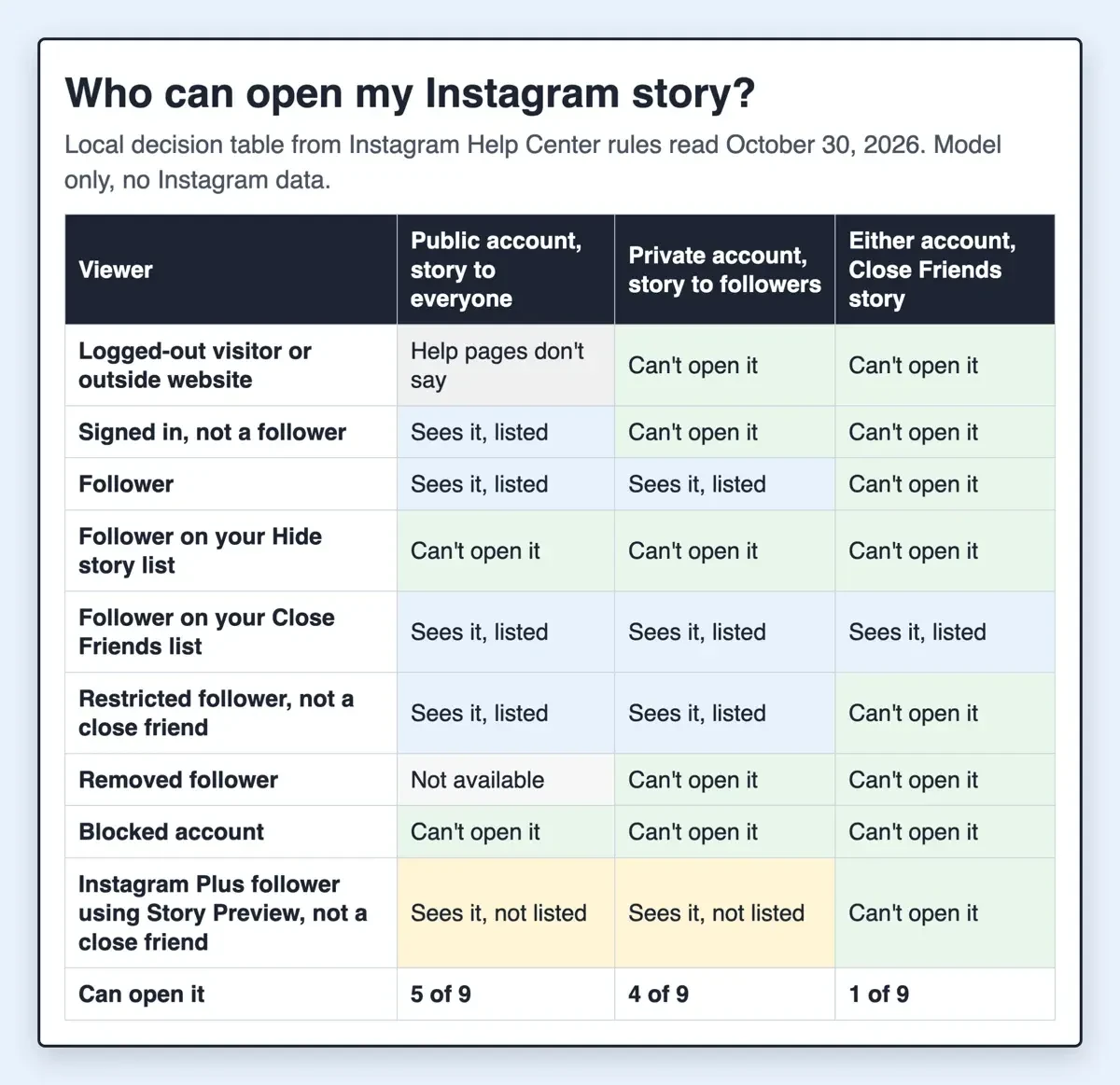 Screenshot: our who-sees rule table, a local HTML file built by test/who_sees.py on October 30, 2026. Model of help-page rules, no Instagram data.
Report a story that breaks the rules
Reporting is for a story that shouldn't be up at all. Instagram's page on reporting a story covers stories you believe break its Community Standards. Open the story, tap the icon above the photo or video, tap Report and follow the on-screen instructions. Reports are anonymous "except if you're reporting an intellectual property infringement," such as a copied photo.
The privacy tips page lists reporting beside unfollowing and blocking. Fake log-in pages are a separate problem, and our roundup of Instagram scams lists the common ones.
Our order for a business account that can't go private
Business profiles get the hardest version of this, since Instagram doesn't let them go private. This is the order we'd work through on one, using only the settings above:
- Set Stories to stories to Followers you follow back or Off.
- Move behind-the-scenes stories to a Close Friends list of staff and regulars.
- Add anyone you would rather not reach to Hide your story and live videos from specific people.
- Block accounts that harass you, since the block can reach their new accounts too.
- Check your highlights, which show to anyone allowed to see your stories.
If the account doesn't need business tools, switching to personal and then private does more than all five steps. Our take: Hide story from handles one name, Close Friends handles a story for a few, and a block is for someone you want gone. The viewer side is covered in our post on Instanavigation and anonymous story viewers.
If posting well and often is what you lack time for, DigitalTreed's paid social media management runs Instagram, Facebook, LinkedIn and YouTube accounts as paid work. Our 20 Instagram Story ideas for business and Instagram marketing strategy tips cover the public side.
Hiding Instagram stories: quick questions
Frequently asked
Can I see viewers after a story expires?
Yes, for 48 hours after posting, through Archive, per Instagram's who's seen page.
Can someone ask to join my Close Friends list?
No. Instagram's Close Friends page says no one can request to be added.
Are public stories used to improve AI at Meta?
Yes, unless you delete them from your archive or go private, says Instagram's page on how long stories stay visible.
Can strangers reshare a teen's story?
Not by default: Instagram's resharing page says teen accounts start with story-to-story sharing off.
How we made this guide: Every setting name and path above comes from the 20 Instagram Help Center pages in Sources (iPhone tab). We changed no account settings. Facts checked by the DigitalTreed team on October 30, 2026.
First published July 2025 with tricks for viewing stories unseen. Rewritten for account owners on October 30, 2026.
Sources
- Instagram Help Center: Make your Instagram account private
- Instagram Help Center: Differences between public and private accounts on Instagram
- Instagram Help Center: Who can see your Instagram profile and photos on the web
- Instagram Help Center: Manage privacy on Instagram
- Instagram Help Center: Create a Close Friends list on Instagram
- Instagram Help Center: Share a story with your Close Friends list on Instagram
- Instagram Help Center: Hide your Instagram story from someone
- Instagram Help Center: Remove a follower on Instagram
- Instagram Help Center: Restrict or unrestrict someone on Instagram
- Instagram Help Center: Block or unblock someone on Instagram
- Instagram Help Center: What happens when you block someone on Instagram
- Instagram Help Center: Temporarily limit people from interacting with you on Instagram
- Instagram Help Center: How to tell who's seen your Instagram story
- Instagram Help Center: About Instagram Plus
- Instagram: Introducing Instagram Plus
- Meta Newsroom: Introducing Meta One (September 15, 2026)
- Instagram Help Center: Where your Instagram story appears
- Instagram Help Center: Share someone's Instagram story to your own story
- Instagram Help Center: Add a story to your Story Highlights
- Instagram Help Center: Manage who can reply to your Instagram story with a message
- Instagram Help Center: How long Instagram stories remain visible
- Instagram Help Center: Report someone's Instagram story


Comments
No comments yet. Start the conversation below.