
Quick answer
Instanavigation and other anonymous story viewers can only show stories from public accounts, since Instagram keeps a private account's photos and videos for approved followers (as of October 2026). On a local mock we built to that rule, a logged-out fetch got 3 of 3 public stories and 0 of 2 private ones. Never type your Instagram log-in into such a site; the risks and the fix come next.
Maybe a friend mentioned Instanavigation, and now you're looking at a username box because you want to watch a story without landing in a viewer list. An anonymous story viewer is a third-party website that pulls Instagram content from outside the app for people who aren't signed in. We could not confirm who runs Instanavigation, so this guide covers such sites in general and links to none.
First: why these viewers only reach public accounts, and what Instagram's Terms of Use say about automated collection. Then whether your log-in is safe on a viewer site, plus the pop-ups, ads and downloads around them and five signs a page is asking for too much. What we tested comes next, followed by the person whose stories get viewed and what to do if your password already went in. Our view: no viewer site needs your password, so none should get it.
Key takeaways
- Instagram limits a private account's photos and videos to followers.
- Instagram bans automated collection without permission, logged in or not.
- A password typed into a viewer page goes wherever its owner chose.
- Changing your Instagram password logs out every device, including unknown ones.
- Instagram cannot remove copies posted outside Instagram or Threads.
Why these viewers only reach public accounts
A viewer site sees what a stranger's browser sees. So the account's privacy setting decides its reach. Instagram's table of public and private account differences spells this out row by row, as of October 2026. A public account's photos and videos go to "Anyone on Instagram." A private account's go to "Your followers." Profile details are the exception, since for both kinds the photo, name, username and bio are visible to "Anyone on or off Instagram."
Meta's rules for bots draw the same line. Its Automated Data Collection Terms, effective October 7, 2024, bar even approved collectors from taking "Personal Data that is not Publicly Available Personal Data." That term covers data a person has made available to the general public and "has not restricted" with a privacy setting in any Meta product. Four rows matter most here:
| What is shown | Public account | Private account |
| Photos and videos on the profile or in feed | Anyone on Instagram | Your followers |
| Profile photo, name, username and bio | Anyone on or off Instagram | Anyone on or off Instagram |
| Links to photos and videos in search engine results | Anyone off Instagram | No one |
| Embeds of photos and videos off Instagram | Anyone on or off Instagram | No one |
So a logged-out site can reach what a public account shows off Instagram, such as embeds and search links, and only the name, bio and photo of a private one. Our local mock, built to follow that table, got the same split: 3 of 3 public stories and 0 of 2 private ones. It tests the rule, not Instagram. The earlier post here said a viewer could open private accounts, and Instagram's table leaves no route for that.
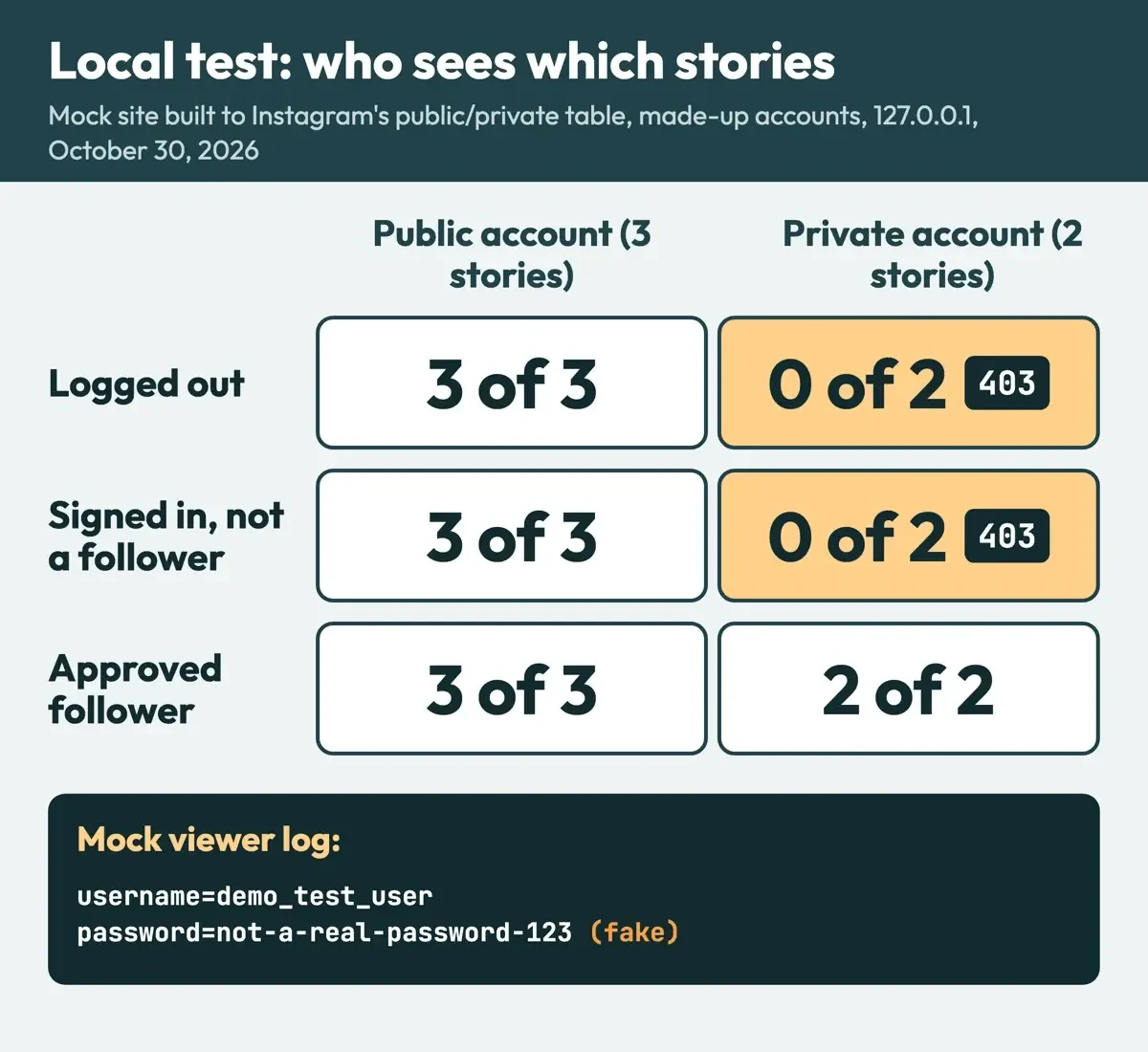 Diagram by DigitalTreed, from our local test results (test/results.json), October 30, 2026. Made-up accounts only.
What Instagram's Terms of Use say about automated collection
Still, public content comes with rules on how it's collected. Instagram's Terms of Use say: "You can't attempt to create accounts or access or collect information in unauthorized ways."
That covers collecting information "in an automated way without our express permission." It applies "regardless of whether such automated access or collection is undertaken while logged-in to an Instagram account." We read that wording on October 30, 2026. The page shows no revision date.
Meta's Automated Data Collection Terms apply across Meta's products. Item 2 begins: "You will not engage in Automated Data Collection without first obtaining Meta's express written permission". The definition names "web scrapers, bots, robots, spiders, crawlers" among the tools. Instagram's help page on data scraping is shorter and calls scraping "the automated access and collection of data from a website or app." Meta says it pushes back, too. Its April 15, 2021 newsroom post on scraping described an External Data Misuse team of "more than 100 people," plus rate limits and data limits. Meta's post listed the actions that can follow, from cease and desist letters and disabled accounts to lawsuits against scrapers "engaging in egregious behavior."
Even an approved collector gets no lasting promise. The Automated Data Collection Terms let Meta restrict collection "at any time for any reason," even after it has granted permission.
Approved crawlers must also use "IP addresses, user-agent strings, and other identifiers that identify your services," so the approved path makes a collector say who it is. Our test script did the same with the user agent DigitalTreed-check/1.0.
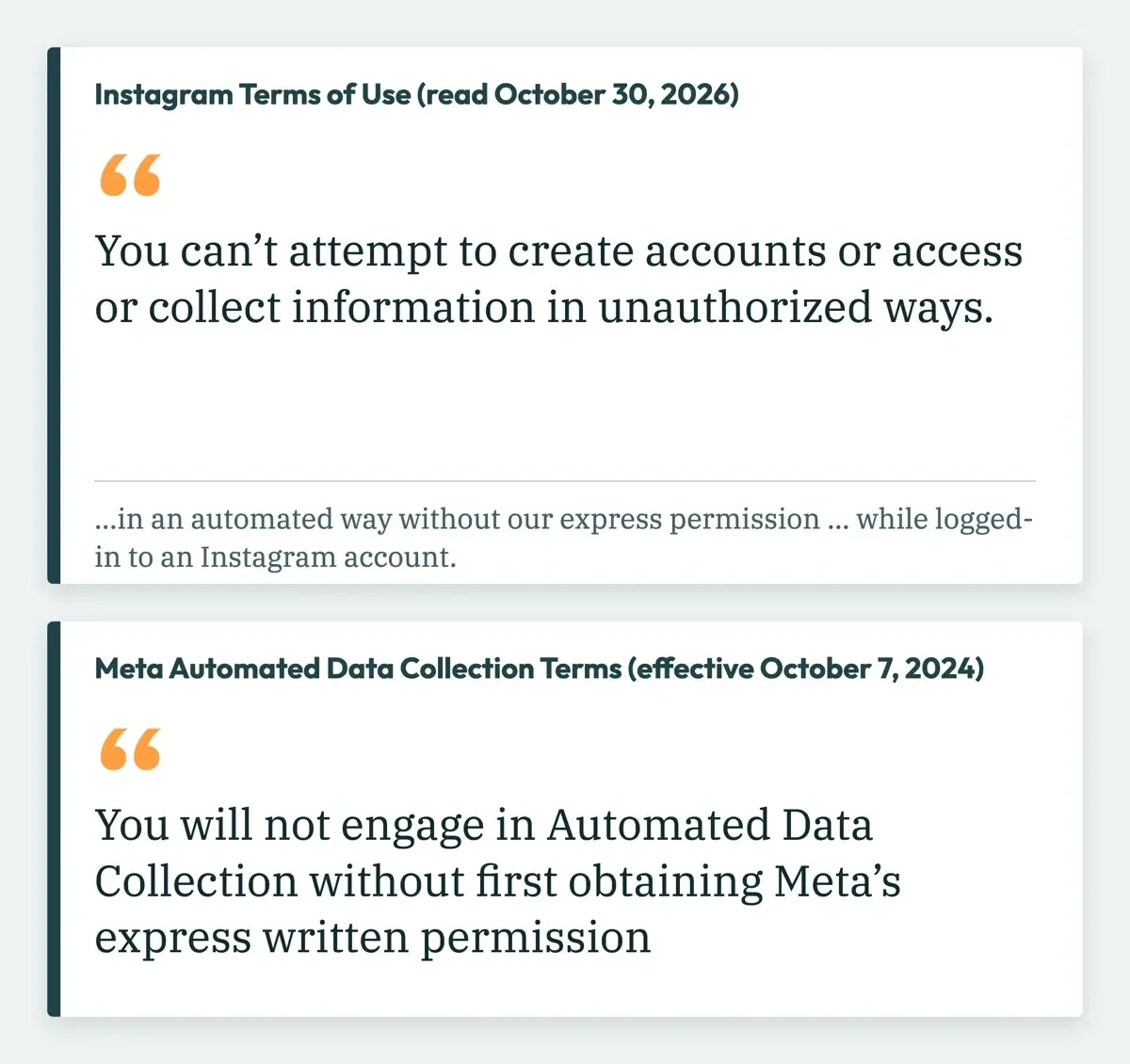 Drawn by us, quoting the Instagram Terms of Use and the Meta Automated Data Collection Terms (effective October 7, 2024), read October 30, 2026.
Is your log-in safe on a viewer site?
The risk moves to you once a page asks for your own username and password, because whoever runs that page then holds the key to your account. Instagram's account security page says an app with your log-in "can gain complete access to your account," whether it gets an access token or the password itself.
Its plainest line: "Never give your password to someone you don't know and trust."
Handing it over can also get your own account restricted. Instagram's scraping restriction page warns that an account "may have been restricted and flagged for further review" after activity that breaks its Terms of Use. It lists this as one cause: "You may have provided your username and password to a third-party app or website." Another is using "an app or service to interact with Instagram in unauthorized ways." The Terms of Use also ban attempts to "request or collect Instagram usernames, passwords, or misappropriate access tokens." Instagram doesn't vouch for outside tools either. Its terms say: "We also aren't responsible for services and features offered by other people or companies, even if you access them through our Service."
Our local test showed where a typed log-in goes. We served a made-up viewer page on 127.0.0.1 and had a script post demo_test_user and a fake password to the page's log-in address, as its form would. The viewer's server logged both fields. The password arrived in plain text. A real site's form sends what you type to whatever address its owner chose, and we could not confirm who owns Instanavigation.
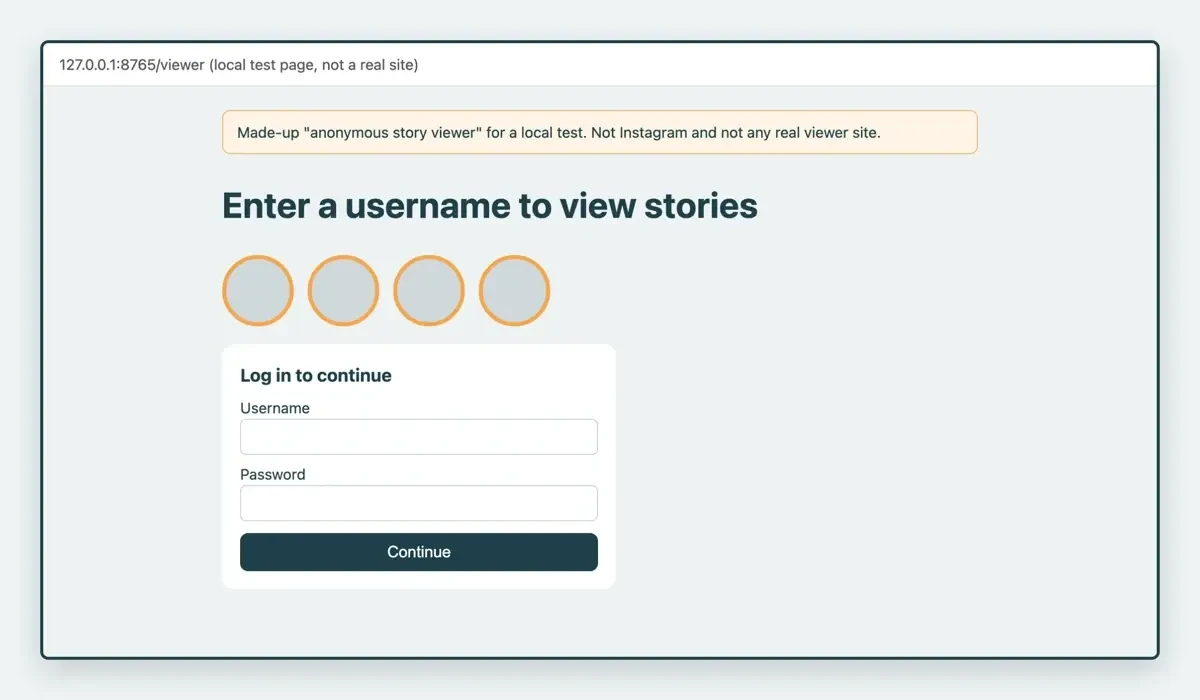 Screenshot: our made-up viewer page served on 127.0.0.1:8765 on October 30, 2026. Not Instagram and not a real viewer site.
A log-in box on an unknown site is also the classic phishing setup. Instagram's phishing help page gives the example of an email that links to "a strange looking website" asking for a username and password. The FTC's phishing guide says scammers "try to steal your passwords," and CISA's social engineering page adds that malicious websites "may look identical to a legitimate site." Our tips to avoid phishing and Instagram scams roundup list the usual lures.
Pop-ups, ads and downloads around viewer sites
Ad-funded free sites carry risks of their own. The FTC's malware guide says "Scammers place bogus ads for software on social media sites and on search engines." It also advises: "Don't use unfamiliar websites to download free stuff like music, movies, shows, or games." CISA's malicious code page says to "visit vendor sites directly rather than clicking on advertisements or email links." Its next tip is short: "Block pop-up advertisements."
We didn't open Instanavigation's pages, so we can't say what ads or files it serves.
The previous post told readers to download a viewer app, and that line is gone. The FTC's warning signs include new browser toolbars, add-on programs and "a lot of pop-up ads." Another sign on its list is a browser home page that "changes or automatically redirects you to sites you didn't intend to visit."
Five signs a viewer page is asking for too much
Those sources, lined up together, give a short check. Each sign below ties to a rule from Instagram's account security page, its privacy table, the FTC or CISA. Check any viewer page against them before you type anything:
- It wants your Instagram username and password. Instagram says an app holding them "can gain complete access to your account."
- It promises private stories. Instagram's own table limits a private account's photos and videos to "Your followers."
- It pushes an app, extension or file. The FTC warns against using unfamiliar websites "to download free stuff."
- It floods you with pop-ups or redirects. The FTC lists "a lot of pop-up ads" among the signs of malware.
- Its address is a near-copy of a known site. CISA says a malicious URL "may use a variation in spelling or a different domain."
Our mock viewer page from the test fails sign 1 on purpose: it asks for a username and password, and its server logged the fake password we typed. Sign 2 is what our logged-out fetch measured. Signs 3 to 5 need a live page, so we didn't check them on Instanavigation or any other viewer.
What we tested
On October 30, 2026, we built a made-up profile site on 127.0.0.1 that copies the rules in Instagram's public and private table. It held demo_open_profile (public, 3 stories) and demo_closed_profile (private, 2). A script asked for each three ways:
| Who asked (mock) | Public stories | Private stories |
| Logged out | 3 of 3 | 0 of 2 (403) |
| Signed in, not a follower | 3 of 3 | 0 of 2 (403) |
| Approved follower | 3 of 3 | 2 of 2 |
All 6 profile requests returned the name and bio. Our mock's viewer list logged signed-in views only, 3 in all, so it shows our design, not Instagram's count.
The risk for the person whose stories get viewed
For the person on the other end, the exposure comes from the setting. Instagram's help page on data scraping says "scrapers often target data that's public." It also says "By default, your Instagram account is public." A public account's photos and videos can also be embedded by "Anyone on or off Instagram," per the privacy table, which gives a public post one more way to travel. Teens start private. The make your account private page says, "If you're under 18, your Instagram account is private by default." A teen under 16 can't switch to public without a parent's or guardian's permission. Teens aged 16 and 17 can, unless a parent or guardian has set up supervision.
Business profiles can't go private at all. Instagram's help center says the owner would first switch back to a personal account.
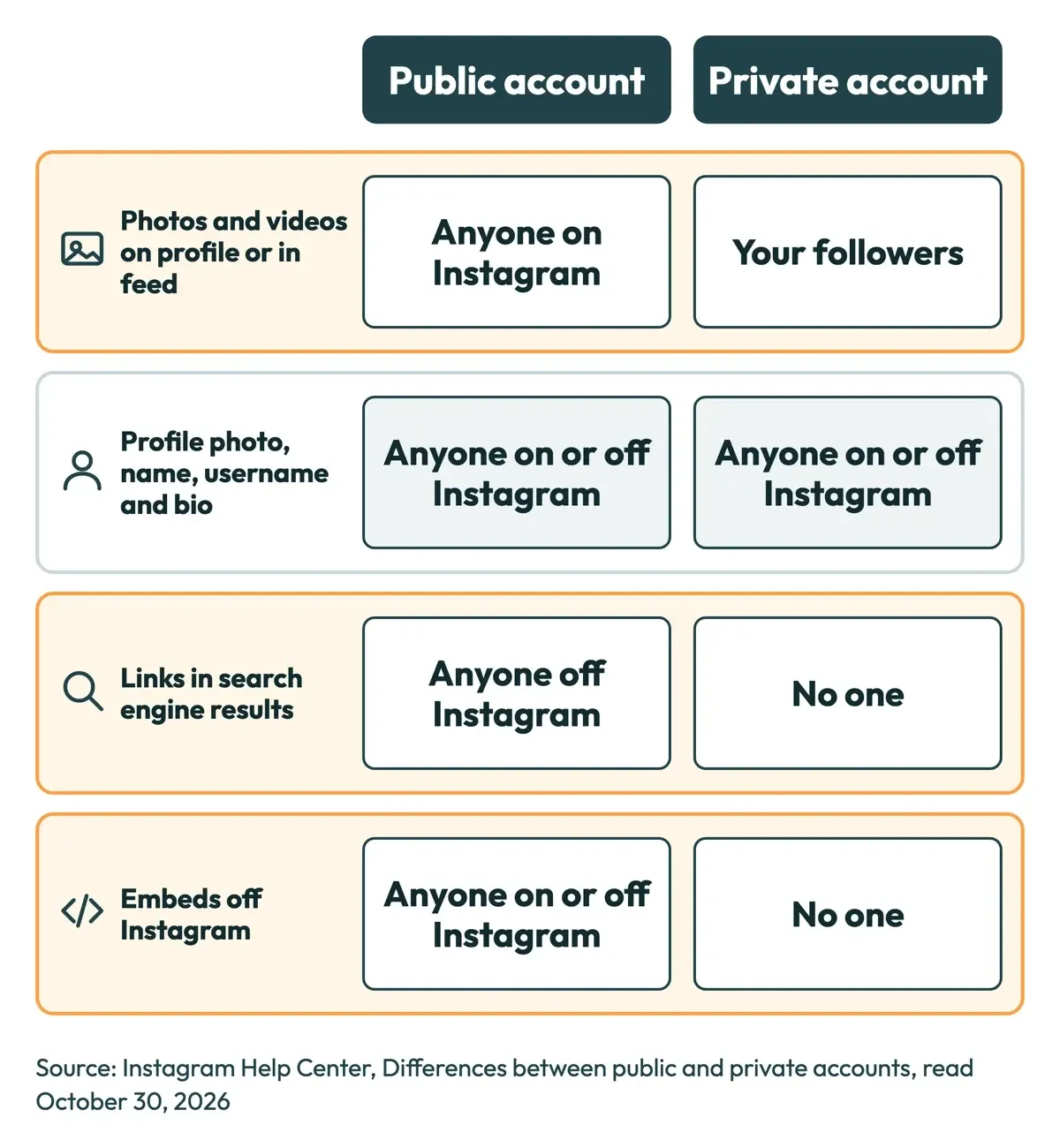 Diagram by DigitalTreed, from the Instagram Help Center table of public and private account differences, read October 30, 2026.
Copies are the harder part. Stories "disappear from your profile, Feed and messages after 24 hours, unless you add them to your profile as story highlights," per Instagram's Stories help hub. A copy saved somewhere else has no such clock. Instagram's exposed private information page says "we can't take down private information that's posted publicly somewhere other than Instagram or Threads." Meta's 2021 scraping post adds that scraped data sometimes surfaces "in online forums." If a copy turns up on Instagram itself, you can report it there. Reports are anonymous except for intellectual property claims: "The account you reported won't see who reported them."
If you post stories yourself, start with Instagram stories: how to stop anonymous viewers peeking without a peep, which covers a private account and hiding a single story from someone.
Deleting a story early removes it from Instagram, not from copies saved elsewhere. See our steps to delete a photo or video from an Instagram story. Likes follow separate privacy rules, covered in our explainer on who can see your Instagram likes.
If you already typed your password into one
If you've already typed it in, move fast, since the site may already hold a working log-in. Instagram's phishing help page warns that "someone else might be able to log in to your account," and these steps come from Instagram's help pages and the FTC:
- Change your Instagram password. The scraping page says this "will log you out of all logged in devices, including any suspicious logins."
- Check recent login activity and remove any logins you don't recognize.
- Remove access for any third-party app you didn't mean to approve.
- Turn on two-factor authentication, which Instagram's security page calls "the single most effective step to protect your account from hackers."
- Change the same password anywhere else you used it, since the FTC warns a stolen password can open "your email, bank, or other accounts."
Our free password generator makes long random passwords for the reset. Instagram's security page also suggests a third-party password manager to keep each password unique, and it says to log out on shared computers or phones. The FTC says multi-factor authentication "makes it harder for scammers to log in to your accounts if they do get your username and password." If the page pushed a download, the FTC says to update your security software, then "run a scan and remove anything it identifies as a problem." Our checklist for after a phishing link click covers phones and computers. Instagram takes reports of fake log-in emails at [email protected].
Our take: a public account's photos and videos are already open to "Anyone on Instagram," per Instagram's own table, while a private account's stay with "Your followers." Our advice is to skip viewer sites. Business owners can use these 20 measurable Instagram Story ideas to help their own stories earn views. DigitalTreed also sells social media marketing services, the one link here to something we charge for.
Anonymous story viewer questions
Frequently asked
Will someone know I viewed their Instagram story?
In the app, yes. Instagram's story viewer help page says: "When you see someone's story, they'll be able to tell that you've seen it."
Can search engines show a private account's photos?
No. Instagram's table answers "No one" for a private account's links in search engine results. Inside the app, its photos and videos also stay out of "search results, Explore, and hashtag and location pages."
Where do I report a fake page that asked for my Instagram password?
Send strange emails to [email protected], per Instagram's phishing page. Report malware ads or sites at ReportFraud.ftc.gov, as the FTC malware guide says.
How we made this guide: We read 11 Instagram and Meta pages and four FTC and CISA pages, signed out. The test used made-up accounts on 127.0.0.1. Facts checked by the DigitalTreed team on October 30, 2026.
First published March 2024 as a promotion of one viewer site, with steps and a download link. Rewritten October 30, 2026: the site is named only as the search term. The post now covers Instagram's privacy rules, its terms on automated collection, the log-in risk and a local test.
Sources
- Instagram Help Center: Terms of Use
- Meta: Automated Data Collection Terms (effective October 7, 2024)
- Instagram Help Center: Why your account has been restricted for data scraping
- Instagram Help Center: Differences between public and private accounts
- Instagram Help Center: Make your Instagram account private
- Instagram Help Center: Stories
- Instagram Help Center: Who can tell that you've seen their Instagram story
- Instagram Help Center: Secure your Instagram account
- Instagram Help Center: Protect yourself from phishing on Instagram
- Instagram Help Center: Exposed Private Information
- Meta Newsroom: How We Combat Scraping (April 15, 2021)
- FTC: How To Recognize and Avoid Phishing Scams
- FTC: Malware: How To Protect Against, Detect, and Remove It
- CISA: Avoiding Social Engineering and Phishing Attacks
- CISA: Protecting Against Malicious Code
Comments
No comments yet. Start the conversation below.