
Quick answer
As of November 12, 2026, we could not confirm Timbiguer as a real product. All 9 web addresses we tried return NXDOMAIN, and Apple's App Store, GitHub, npm and PyPI list nothing under the name. For remote work tools, check one federal rule first: short breaks of about 20 minutes or less count as paid hours.
Timbiguer is a name our January 2024 post called a remote work platform with 5 million daily users, and we can't back the platform or the user count today. The remote work is real, though: Gallup's hybrid work indicator says 25% of US employees with remote-capable jobs worked fully remote as of August 2026.
Pick the time tracker first. For a small remote team, its break and rounding settings decide whether pay follows the Fair Labor Standards Act (FLSA). In our made-up example week, those settings plus one unlogged chat message left four employees $186.00 short. The labor rules here are summaries, not legal advice, so an employment attorney should check your setup.
Key takeaways
- Short breaks of about 20 minutes or less are paid time under federal rules.
- No Timbiguer website, App Store app, registry record or code package turned up.
- Our made-up example week hid a $186 pay gap: $4,037 minus $3,851.
- Keep time cards 2 years and payroll records 3 years.
- Slack's free plan deletes messages and files older than one year.
Does Timbiguer exist anywhere we could check?
On November 12, 2026, DNS lookups for timbiguer.com, its www address and seven other endings, from .net and .org to .ai and .us, all came back NXDOMAIN. That is the answer for a domain that doesn't exist. Verisign's registry record lookup for timbiguer.com returned not found, and the .net, .org, .io and .app registries gave the same answer.
| Where we looked | How | Result (November 12, 2026) |
|---|---|---|
| timbiguer.com and www | DNS lookup and web request | NXDOMAIN; no web answer |
| .net, .org, .io, .co, .app, .ai, .us | DNS lookup | NXDOMAIN for all 7 |
| Registry records (RDAP) | .com, .net, .org, .io, .app | Not found (404) for all 5 |
| Apple App Store | US store lookup by name | 4 unrelated apps; 0 named Timbiguer |
| GitHub, npm, PyPI | Name search or project page | 0 repositories, 0 packages, no project |
| Wayback Machine | Captures of timbiguer.com | 0 captures |
| USPTO trademarks, Google Play | Not searched (search forms only) | Not checked |
Apple's US App Store lookup returned 4 apps: a petanque game, a tourism app, a ticketing app and a recycling app. None carried the name. GitHub and npm returned 0 results. PyPI had no project page, and the Wayback Machine held 0 captures of timbiguer.com. We didn't search the USPTO trademark database or Google Play. Both are search forms, and we send no scripted searches, so a trademark filing or an Android app using the name could exist there. You can look up any domain's record on ICANN Lookup.
The old post made 17 specific claims. None had a source. They included a 2016 founding, two named founders, a $500,000 seed round, a 2018 public launch and 5 million daily users around the world. It also claimed an 82% share of Fortune 100 companies and named famous brands as customers. There was nothing to check them against, with no website, registry record, app or code package behind the name. All 17 are cut from this version. If another page repeats the same founders or user numbers, treat them as unconfirmed too.
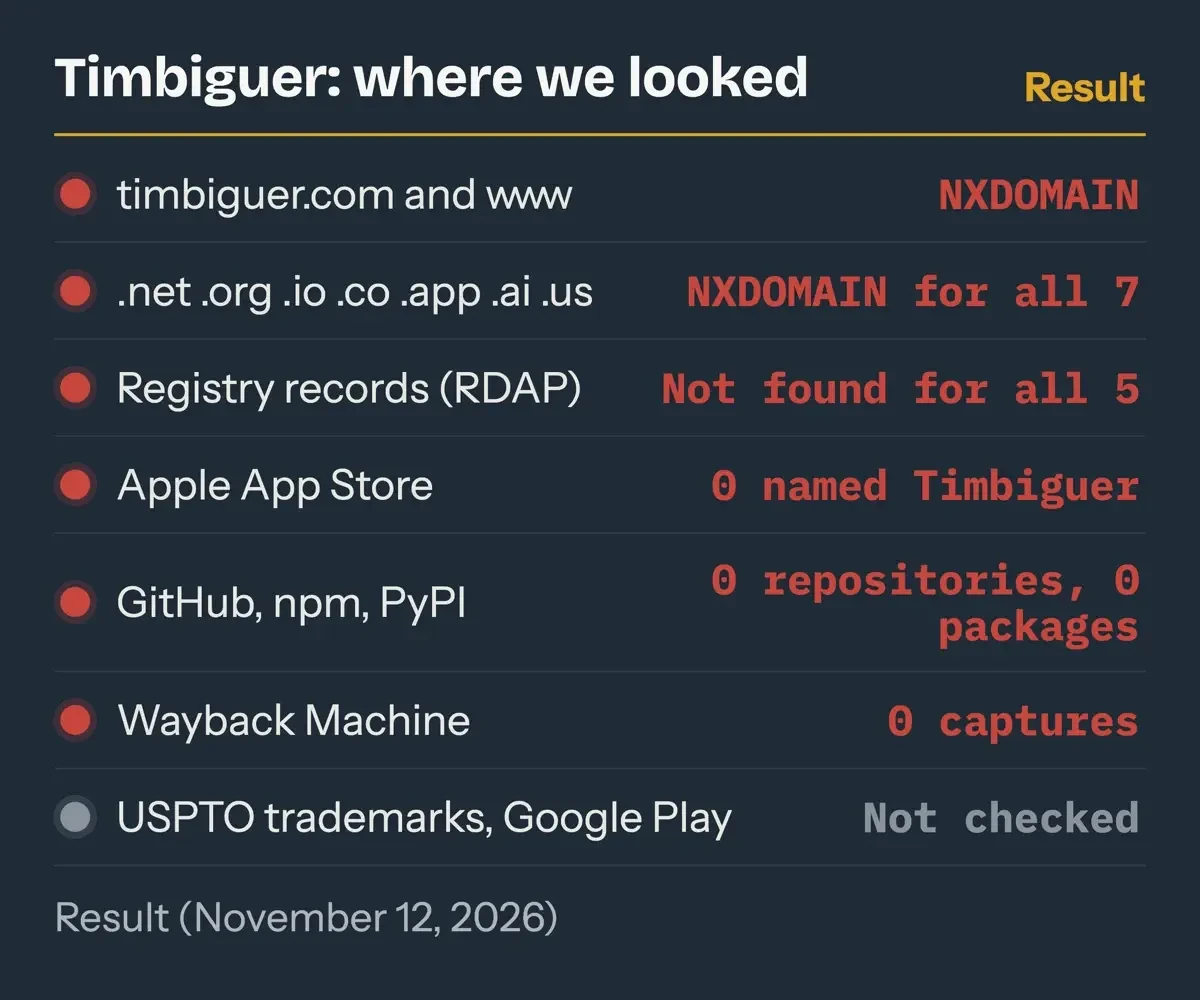 Diagram by DigitalTreed, from our DNS, registry, store and code checks on November 12, 2026.
What we tested
We ran two small scripts on November 12, 2026. The first made the checks in that table with plain requests that named us, and the second found 321 unpaid minutes in a made-up week of remote timesheets.
Hours-worked rules your time tracker has to handle
The DOL's telework bulletin 2023-1 says the federal pay rules apply "regardless of whether the work is performed at the employer's worksite, at the employee's home" or elsewhere. Short breaks are the first setting to check, because they're paid. Under 29 CFR 785.18, rest periods "running from 5 minutes to about 20 minutes" count as hours worked, and the DOL's Fact Sheet #22 on hours worked agrees. A remote worker who steps away three times for 10 minutes has worked those 30 minutes, but a meal break can be unpaid if the employee is fully off duty. The rule in 29 CFR 785.19 reads: "Ordinarily 30 minutes or more is long enough for a bona fide meal period."
Unrequested work counts too. Fact Sheet #22 calls it "work time that must be paid for by the employer." And 29 CFR 785.13 says management "cannot sit back and accept the benefits without compensating for them." For remote staff, the DOL's Field Assistance Bulletin 2020-5 names one way to show reasonable diligence. That way is "providing a reasonable reporting procedure for non-scheduled time" and then paying for every hour reported, even hours nobody asked for. In practice, that's a form or button where staff log the 40 minutes they spent fixing a file after dinner, and a manager who approves it that week.
29 CFR 785.48(b) accepts rounding to the nearest 5 minutes, tenth or quarter hour. But it can't fail "over a period of time" to pay staff for all the time they actually worked. A tracker that rounds 9:07 to 9:15 every morning and 5:58 to 5:45 every evening never evens out. Overtime is a separate check. The DOL's Fact Sheet #23 requires pay of at least time and one-half the regular rate for every hour over 40 in a workweek, wherever the work happens.
For records, the DOL's recordkeeping Fact Sheet #21 requires the day the workweek begins, hours worked each day and total hours each workweek. It adds that "Any timekeeping plan is acceptable as long as it is complete and accurate." An export with only weekly totals falls short, since daily hours are required too. The regulation at 29 CFR 516.2 sets the same hours fields, and payroll records stay at least 3 years under 516.5 and time cards 2 years under 516.6. Some salaried roles are exempt from overtime, and our executive assistant job description runs that test for one common role.
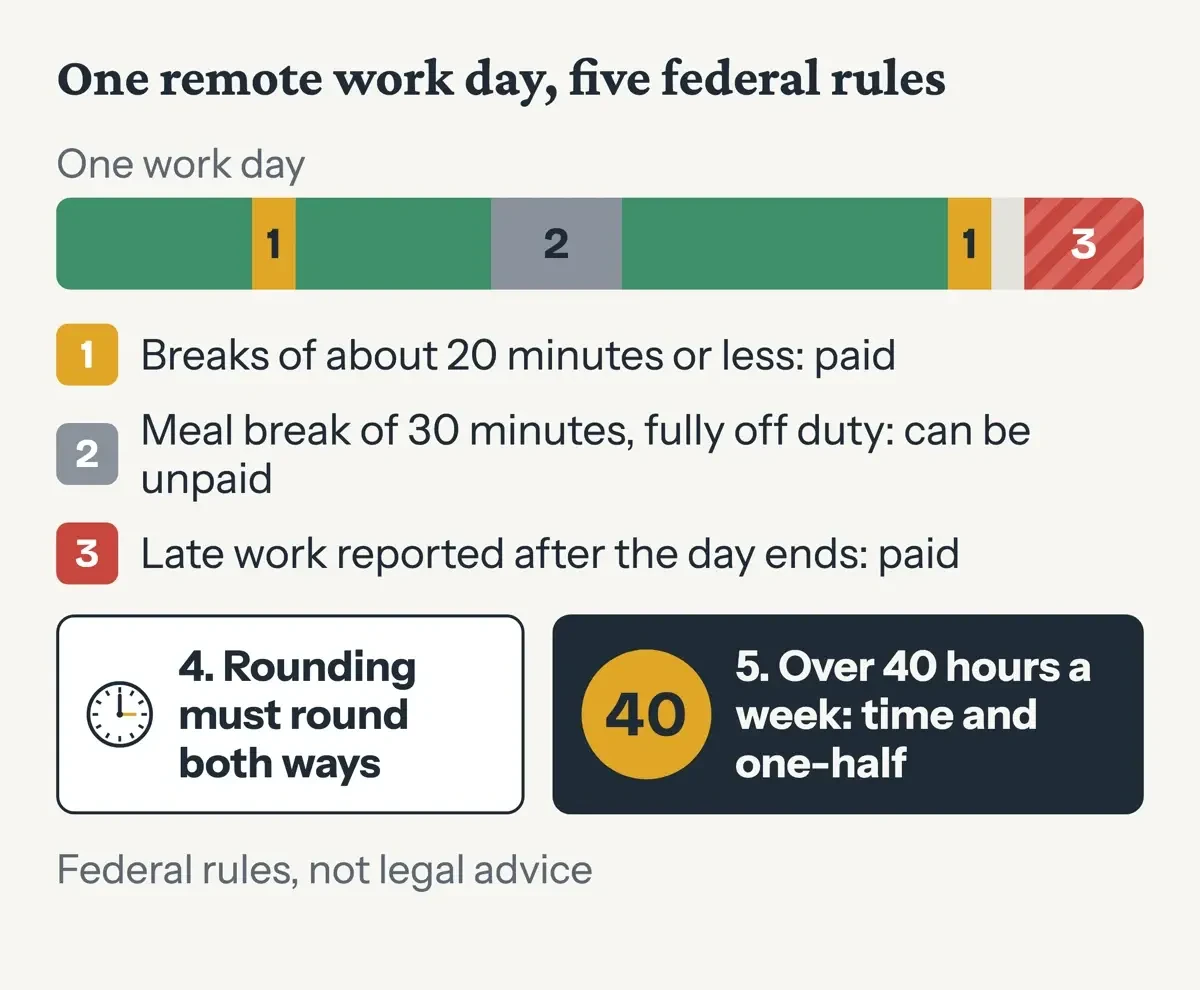 Diagram by DigitalTreed, from DOL fact sheets, bulletins 2020-5 and 2023-1, and 29 CFR parts 516 and 785.
A made-up week of timesheets, checked against the rules
We built a made-up example week for 4 hourly remote employees at an example pay rate of $24 an hour. The pretend tool subtracted every break marked unpaid and rounded to the quarter hour. Employee D also sent two late chat messages describing 70 minutes of work, with no time entry.
| Employee | Tool hours | Hours by the rules | Overtime by the rules | Example pay gap at $24/hour |
|---|---|---|---|---|
| Employee A (made up) | 38 | 37.88 | 0 | -$2.80 (overpaid) |
| Employee B (made up) | 39.33 | 40.5 | 0.5 | $34.00 |
| Employee C (made up) | 40.83 | 43.97 | 3.97 | $112.80 |
| Employee D (made up) | 41.25 | 42.42 | 2.42 | $42.00 |
The script raised 7 flags across employees B, C and D. B's 70 minutes of short breaks were marked unpaid. Counted correctly, B's week reached 40.5 hours. C lost the most. Short breaks took 100 minutes, and rounding that always cut the start and end times took 88 more. So C's 40.83 tool hours became 43.97, and $990.00 became $1,102.80, using pay = hours x $24 + hours over 40 x $12. D's chat work raised overtime from 1.25 to 2.42 hours, while A's rounding ran 7 minutes in A's favor, so A was overpaid $2.80. Across all four made-up employees, the tool's example week came up 321 minutes and $186.00 short: $4,037.00 by the rules minus $3,851.00.
A's 7 extra minutes and C's 88 lost minutes came from the same quarter-hour setting, applied to different clock-in and clock-out times.
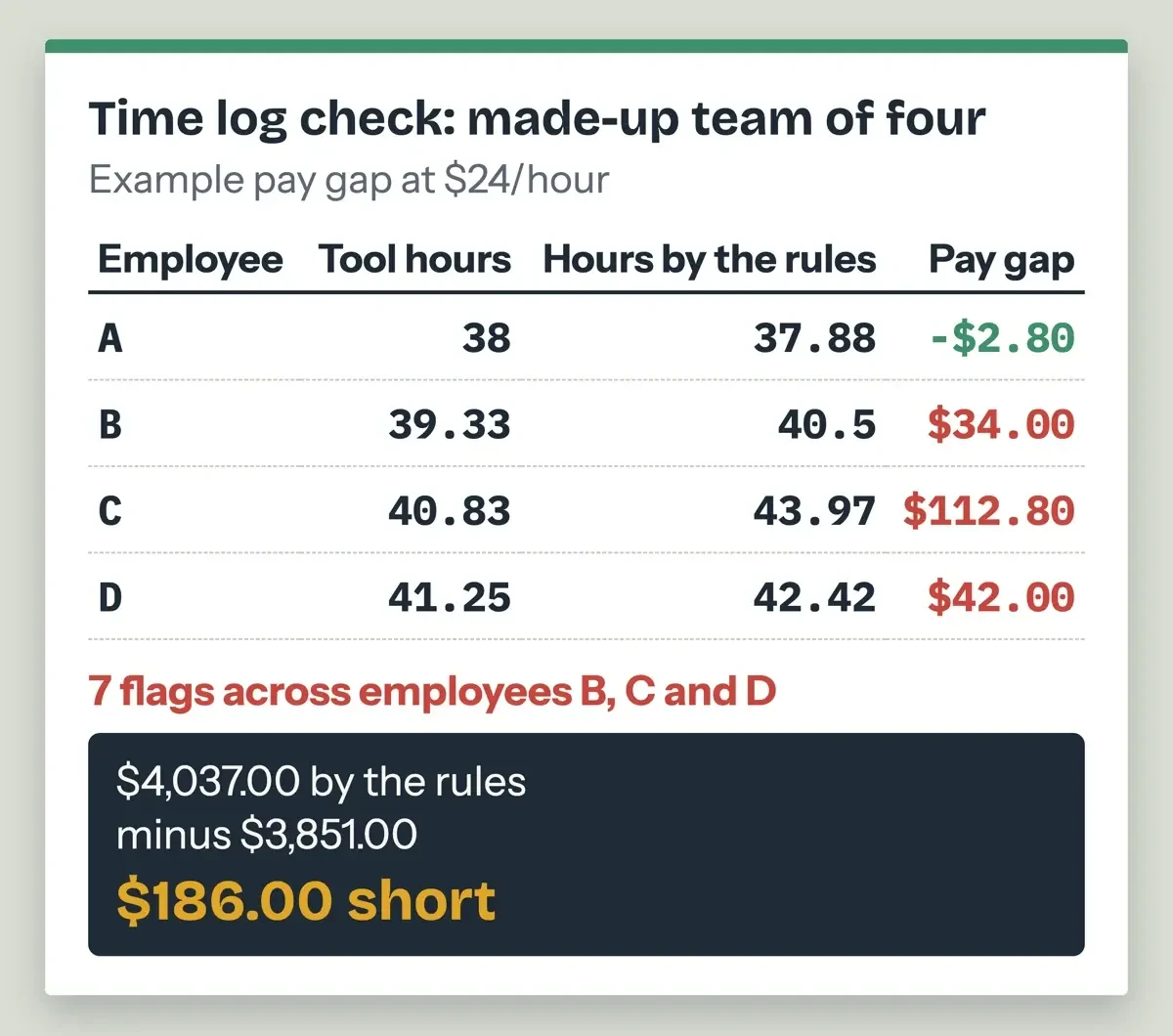 Drawn by us: results from our local test page at 127.0.0.1 with made-up data for four employees, November 12, 2026.
Three time trackers, from their own pricing pages
Each of the 7 flags maps to a tracker setting: breaks you can mark paid, rounding you can switch off, and a field for adding late time. We read three trackers' pricing pages on November 12, 2026, and didn't open accounts. The order in the table is not a ranking.
| Tool | Free plan | Lowest paid plan (USD) | Features listed that touch the rules above |
|---|---|---|---|
| Harvest | Free: 1 seat, 2 projects | $9 per seat/month billed annually ($108 per seat a year), as of November 2026 | Enterprise plan: timesheet approvals, activity log, SAML SSO |
| Toggl Track | Free for "a limited number of users" | Starter $9 per user/month billed annually, as of November 2026 | Premium plan: timesheet approvals, SSO; "No screenshots, no surveillance" |
| Clockify | Free for up to 5 users | Not listed here: prices shown vary by visitor location | Lock timesheets, breaks, GPS tracking, kiosk photo capture |
Clockify's pricing page lists "Lock timesheets" to stop users changing past entries, which protects records. A lock with no way to report late hours cuts against the reporting procedure in FAB 2020-5, though. Clockify's page also says it shows prices by your location, so we left its paid prices out.
Harvest's pricing page puts timesheet approvals and an activity log in its Enterprise plan. That plan costs $14 per seat a month billed annually as of November 2026, against $9 for its Teams plan, which lists no approvals. Toggl's pricing page lists approvals in Premium, priced at $16 for each user monthly, billed annually, as of November 2026. On both, approvals sit above the cheapest paid plan. For an example team of 10, the cheapest annual paid plan on either tool costs $9 x 10 x 12 = $1,080 a year, before any add-ons.
Clockify's page lists GPS tracking and kiosk photo capture, while Toggl's page says "No screenshots, no surveillance." Neither feature changes the pay math above.
State notice rules for electronic monitoring differ by state. Ask an employment attorney before you switch on location or photo features for remote staff. If you also plan shifts, our employee scheduling software roundup covers that side.
Chat history: where reported hours can disappear
Employee D reported late work only in chat, which turns chat history into a pay record. Slack's plan comparison gives its Free plan "90-day access" to message and file history, with huddles one-to-one only. Slack's next line is blunt: "Any content in your workspace more than a year old will be permanently deleted." Federal rules want time cards kept 2 years, so a free chat log can't serve as your time record. Copy any hours reported in chat into the time tracker that same week, and keep the manager's approval next to the entry so the record shows who knew.
Business phone service is bought separately from chat, and its 911 and robocall rules are covered in our Teltlk business calling guide.
Security checks for remote access and shared files
Each tool on the list adds a login per employee to payroll, client files or company chat. The FTC's cybersecurity page for small businesses says "A strong password is at least 12 characters." It adds, "the longer, the stronger." It also tells businesses to "Require multi-factor authentication to protect sensitive information." For home setups, the same page asks for routers using WPA2 or WPA3 encryption and full-disk encryption on any laptop that connects to company systems.
CISA's multifactor authentication page for small businesses wants MFA on "all remote access to the organization's network." It ranks security keys first and text or email codes last, as "the weakest protection." NIST's small business MFA page agrees: "Passwords alone are not effective in securing your most sensitive business assets."
Google's Drive help page gives each Google Account up to 15 GB free, shared across Drive, Gmail and Photos. A free account that already holds years of email and phone photos has less than that left for team files. Our cloud storage comparison and cloud backup explainer cover what paid storage costs a small team and how to keep a second copy of client files. For personal phones and laptops, NIST's SP 800-46 Rev. 2 telework guide says company and personal devices "should be secured against expected threats." Our security tips for remote workers turn that into daily habits.
The FTC's vendor advice is short: "Put it in writing" and "Don't just take their word for it." We'd send every tool on the shortlist these seven questions before a trial.
- Can each break type be set as paid or unpaid?
- Can rounding be turned off, and does it round both ways?
- Can staff add late or missed time after the day ends?
- Who can edit past entries, and is every edit logged?
- Can we export all time records for at least 3 years?
- Which MFA methods do you support, including security keys?
- How long do you keep our data after we cancel?
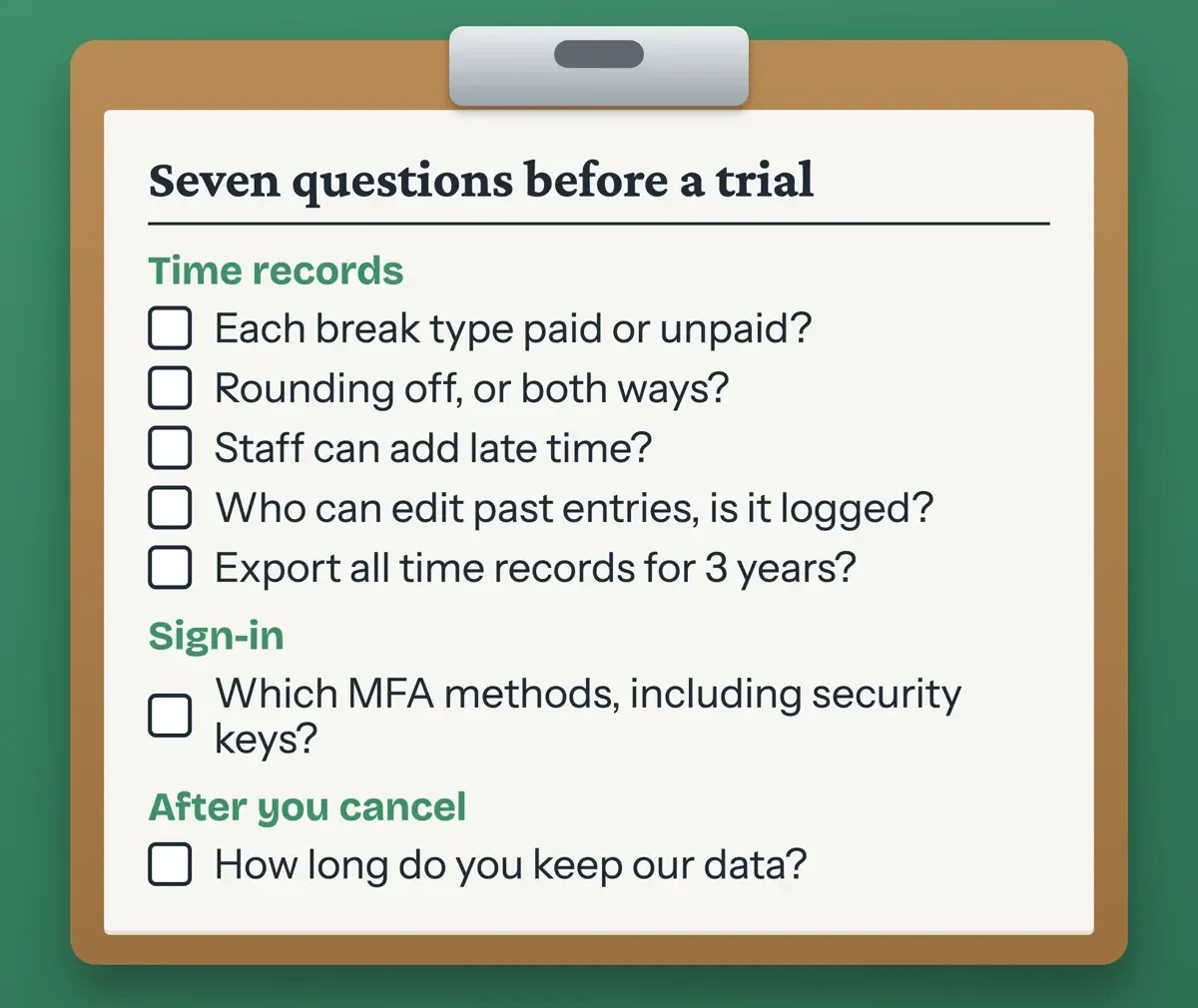 Drawn by us: seven vendor questions built from DOL, FTC and CISA guidance.
File the written answers next to your first payroll from the new tool, then compare them line by line to see whether breaks, rounding and late time came out right. Someone managing several remote staff can use our span of control guide to judge how many timesheets one manager can review each week.
Pay rules vary by state. Have an employment attorney or CPA review your setup before the first payroll.
Frequently asked
Is Timbiguer an app I can download?
We found none. Apple's US App Store lookup on November 12, 2026 returned 0 apps named Timbiguer; we didn't search Google Play. The name has no Verisign registry record either.
Does FMLA cover employees who work from home?
Yes, on the same terms as other staff. Per the DOL's bulletin 2023-1, the 75-mile employee count includes "employees who telework and report to or receive assignments from that worksite."
Can a remote employer refuse to pay for extra hours nobody approved?
Not when it knows about the work. 29 CFR 785.13 says "The mere promulgation of a rule against such work is not enough."
Can remote staff write down their own hours?
Yes. The DOL's Fact Sheet #21 says employers may "tell their workers to write their own times on the records."
How we made this guide: Name checks, a timesheet checker on made-up data at 127.0.0.1, and official and vendor pages saved as text. Facts checked by the DigitalTreed team on November 12, 2026.
First published January 2, 2024 as a profile of Timbiguer. Rewritten November 12, 2026 as an honest finding plus a vendor-neutral remote work tools guide.
Sources
- Gallup: Global Indicator, Hybrid Work
- Verisign RDAP: timbiguer.com lookup
- ICANN Lookup
- U.S. Department of Labor: Field Assistance Bulletin 2023-1, Telework Under the FLSA and FMLA
- U.S. Department of Labor: Field Assistance Bulletin 2020-5, tracking teleworking employees hours
- U.S. Department of Labor: Fact Sheet #22, Hours Worked Under the FLSA
- U.S. Department of Labor: Fact Sheet #21, Recordkeeping Requirements under the FLSA
- U.S. Department of Labor: Fact Sheet #23, Overtime Pay Requirements of the FLSA
- Cornell LII: 29 CFR 785.18, Rest
- Cornell LII: 29 CFR 785.19, Meal
- Cornell LII: 29 CFR 785.13, Duty of management
- Cornell LII: 29 CFR 785.48, Use of time clocks
- Cornell LII: 29 CFR 516.2, Employees subject to minimum wage or overtime provisions
- Cornell LII: 29 CFR 516.5, Records to be preserved 3 years
- Cornell LII: 29 CFR 516.6, Records to be preserved 2 years
- Harvest: Pricing
- Toggl Track: Pricing
- Clockify: Pricing
- Slack Help Center: Slack subscriptions and features
- Google Drive Help: Buy more Google storage
- FTC: Cybersecurity for Small Business
- CISA: Require Multifactor Authentication
- NIST Small Business Cybersecurity Corner: Multi-Factor Authentication
- NIST SP 800-46 Rev. 2: Guide to Enterprise Telework, Remote Access, and BYOD Security


Comments
No comments yet. Start the conversation below.