
Quick answer
Here's how to create a YouTube channel for business: sign in with a Google Account the business controls, open your channel list and click Create a new channel. That makes a Brand Account, which can have several owners and managers. It's free. Do the steps in order, because a few of them only the primary owner can do.
YouTube is the platform most Americans actually use: 84% of US adults say they use it, in Pew Research Center’s 2026 survey of 5,511 adults.
So the channel is worth setting up properly once.
This page used to tell you to set a custom URL and to sign up with a shared company email. Neither holds up now.
What's here instead is the setup order, the roles you can give people, the image sizes YouTube publishes today and the made-for-kids rule.
We read 18 YouTube Help pages for this guide, signed out, in late October 2026. We didn't create a test channel, so every click below comes from YouTube's own instructions.
Key takeaways
- Create the channel on a Brand Account, not a personal channel.
- Turn on 2-Step Verification on the Google Account the business controls.
- Verify a phone number to upload videos longer than 15 minutes.
- Give staff and agencies a channel role, never your password.
- Keep banner text inside the 1235 x 338 safe area.
Use a Brand Account, not your personal name
A business channel belongs on a Brand Account, because that choice decides who can own it later.
YouTube offers two kinds of channel, and only one suits a business.
A personal channel is one that "only you can manage," in the words of YouTube's Create a channel page. A channel on a Brand Account is the one built for "more than one manager or owner," and it can use a name that differs from your Google Account.
The difference shows up the day someone leaves.
On a channel that isn't on a Brand Account, YouTube's owners and managers page says "you can change channel managers, but not owners."
You can still add helpers with channel permissions, but to hand over ownership you'd first have to convert it to a Brand Account.
So if a staff member creates the channel on their own personal account, it stays tied to that person, and you can't take ownership until it's converted to a Brand Account.
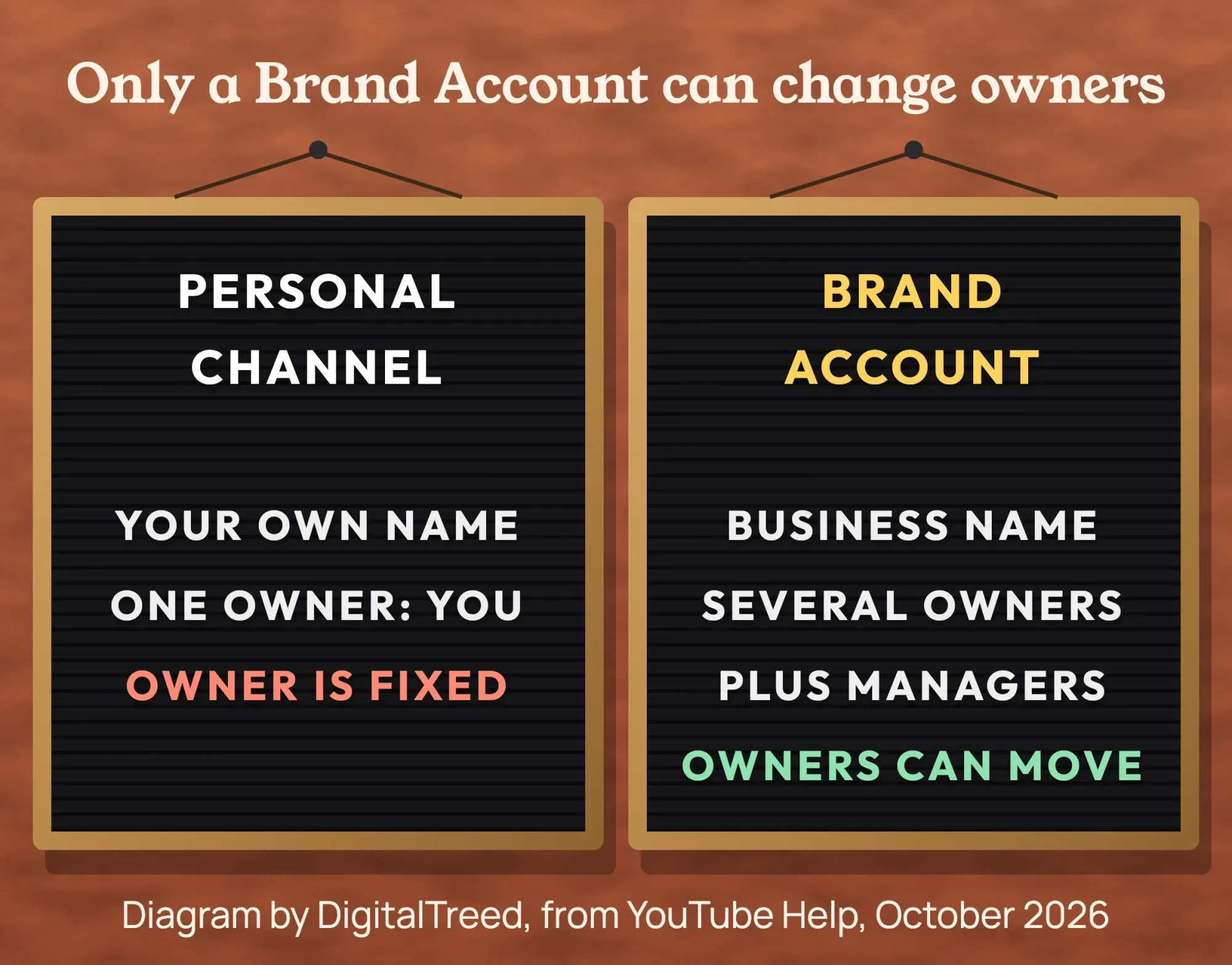 Diagram by DigitalTreed, based on YouTube Help pages 1646861 and 4628007, October 2026.
Start from a Google Account the business controls. It doesn't have to be Gmail: Google's account help says you can "use a non-Gmail email address" to create one.
If you don't have an address on your own domain yet, our guide to creating a business email covers that part.
A few Brand Account rules are worth knowing before you start. Since August 4, 2021, new Brand Accounts work only with YouTube, per the Brand Accounts page.
Each one must have one primary owner, and a Brand Account that already has a channel can't get a second one.
Turn on 2-Step Verification on that Google Account now.
You'll need it later for the Partner Program and the verified badge, and it's the cheapest protection a channel gets.
The setup order that avoids redoing steps
With the Google Account ready, the rest goes faster in a set order.
Some steps open up others, and some need the primary owner signed in.
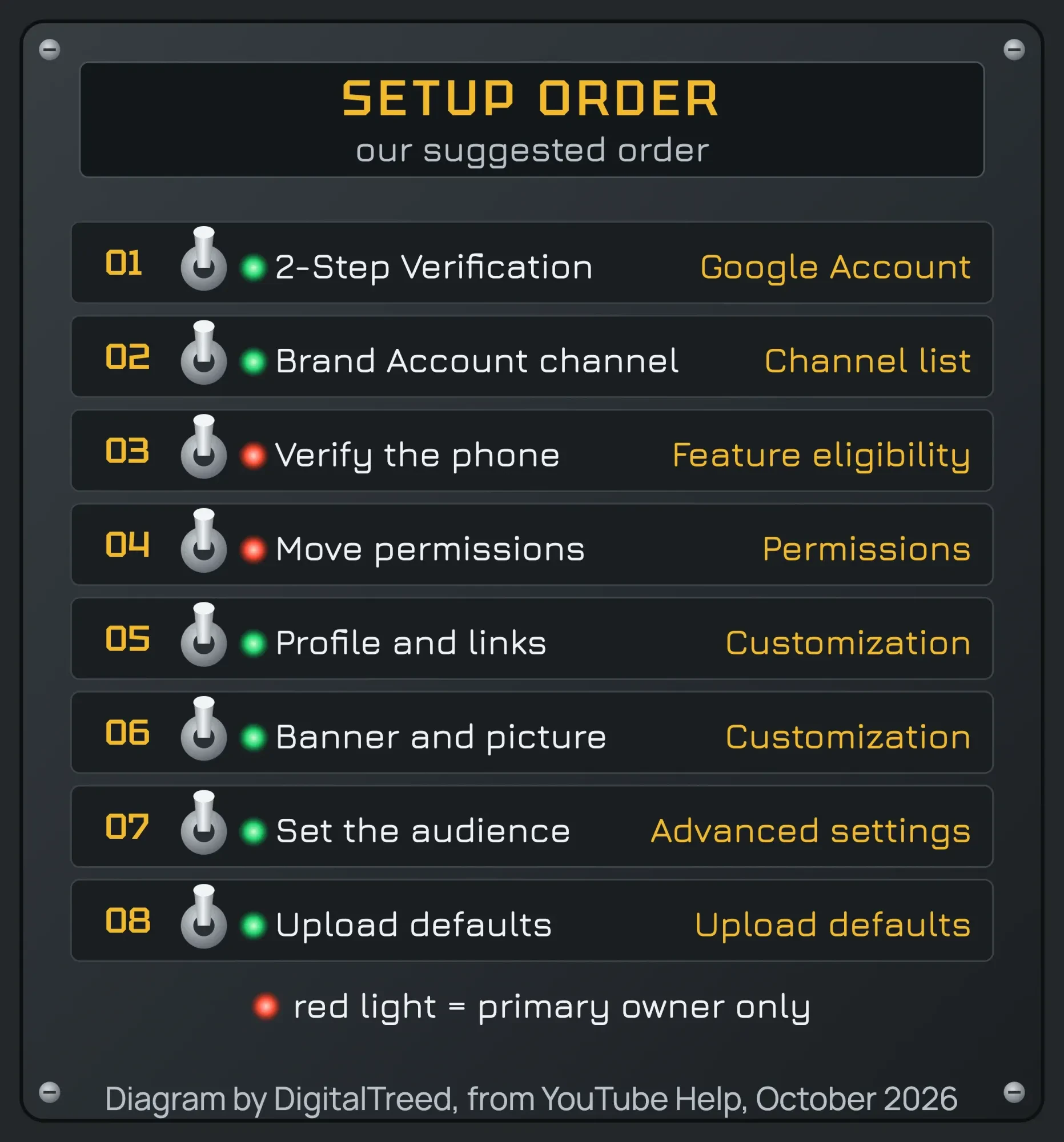 Diagram by DigitalTreed. Our suggested order, based on the prerequisites in YouTube Help, October 2026.
Creating the channel itself takes four steps, as the Help page lists them:
- Sign in to YouTube with the Google Account from the last step.
- Go to your channel list and click Create a new channel.
- Choose a profile picture, a name and a handle.
- Click Create channel. YouTube says this "creates a new Brand Account."
The name and the handle aren't the same thing.
A handle starts with @ and must be 3 to 30 characters, according to YouTube's handle rules. It "will also automatically become the new YouTube URL for your channel," and selling or transferring handles isn't allowed.
So pick one you'd print on a truck.
Don't look for a custom URL setting. YouTube's channel URL page says "New custom URLs can no longer be set up or changed," though old ones keep working.
You can change the name and the handle later, but only twice each within a 14-day period, per the profile help page.
Verify the phone number to lift the 15-minute cap
Once the channel exists, verify it.
A new channel is limited until you do.
Phone verification is a text or voice code. After it, YouTube's verification page says you can upload videos longer than 15 minutes, add custom thumbnails, live stream and appeal copyright claims.
You'll find it in Studio under Settings, then Channel, then Feature eligibility.
Only the primary owner can do it: the features page says "Only primary channel owners can verify their identity."
One number covers at most 2 channels per year, so use a phone the business keeps.
Custom thumbnails are the feature most businesses want first. Our guide to thumbnails that get clicks picks up from there.
Here's the catch with the word "verify."
The check mark next to a channel name is a separate program. YouTube's badge page asks for 100,000 subscribers, 2-Step Verification and a complete profile, and says "Verified channels don't get extra features."
Rename the channel later and the badge goes, though a new handle keeps it.
Give staff and agencies a role, never your password
Staff and agencies should get their own role on the channel, not your login.
Channel permissions let them work in YouTube Studio with their own Google Accounts.
YouTube's permissions page says granting a role "Is safer than sharing your password."
It also says a Brand Account "must first migrate to channel permissions."
That migration is one button. Signed in as the primary owner, open Studio, click Settings, then Permissions, then Move Permissions, as the migration page shows. After that, inviting someone takes three steps:
- In YouTube Studio, click Settings, then Permissions, then Invite.
- Enter the person's email address and pick a role in the Access menu.
- Click Done. YouTube says the invite expires after 30 days.
The roles differ more than their names suggest:
| Role | Can | Can't | Good fit (our suggestion) |
|---|---|---|---|
| Owner | Everything, including deleting the channel and managing permissions | Transfer ownership to other users | You, plus one co-owner |
| Manager | See all data, manage permissions, edit channel details, upload and delete content | Delete the channel | A trusted marketing lead |
| Editor | Edit everything, upload and publish | Delete the channel or published content, manage permissions, enter into contracts | An agency or video editor |
| Editor (Limited) | Same as Editor | Same as Editor, plus no revenue data | A freelancer who doesn't need revenue |
| Subtitle Editor | Add, edit, publish and delete subtitles | Anything else, including revenue data | A caption vendor |
| Viewer | View, but not edit, all channel details, including revenue | Edit anything, manage live streams | A bookkeeper |
| Viewer (Limited) | Same as Viewer | Same as Viewer, plus no revenue data | A partner who checks views |
Pick the smallest role that does the job.
Roles and limits are from YouTube's channel permissions table, read in October 2026.
Reading the Help pages closely turned up two things worth knowing. The permissions page opens by promising "five different levels of permissions," but the table under it lists seven roles, so trust the table. And the Help pages don't agree on one menu name: the channel URL page sends you to Customization, then Basic info, while the profile and branding pages say Customization, then Profile. We use the label from the more specific page each time, but expect Studio's wording to drift.
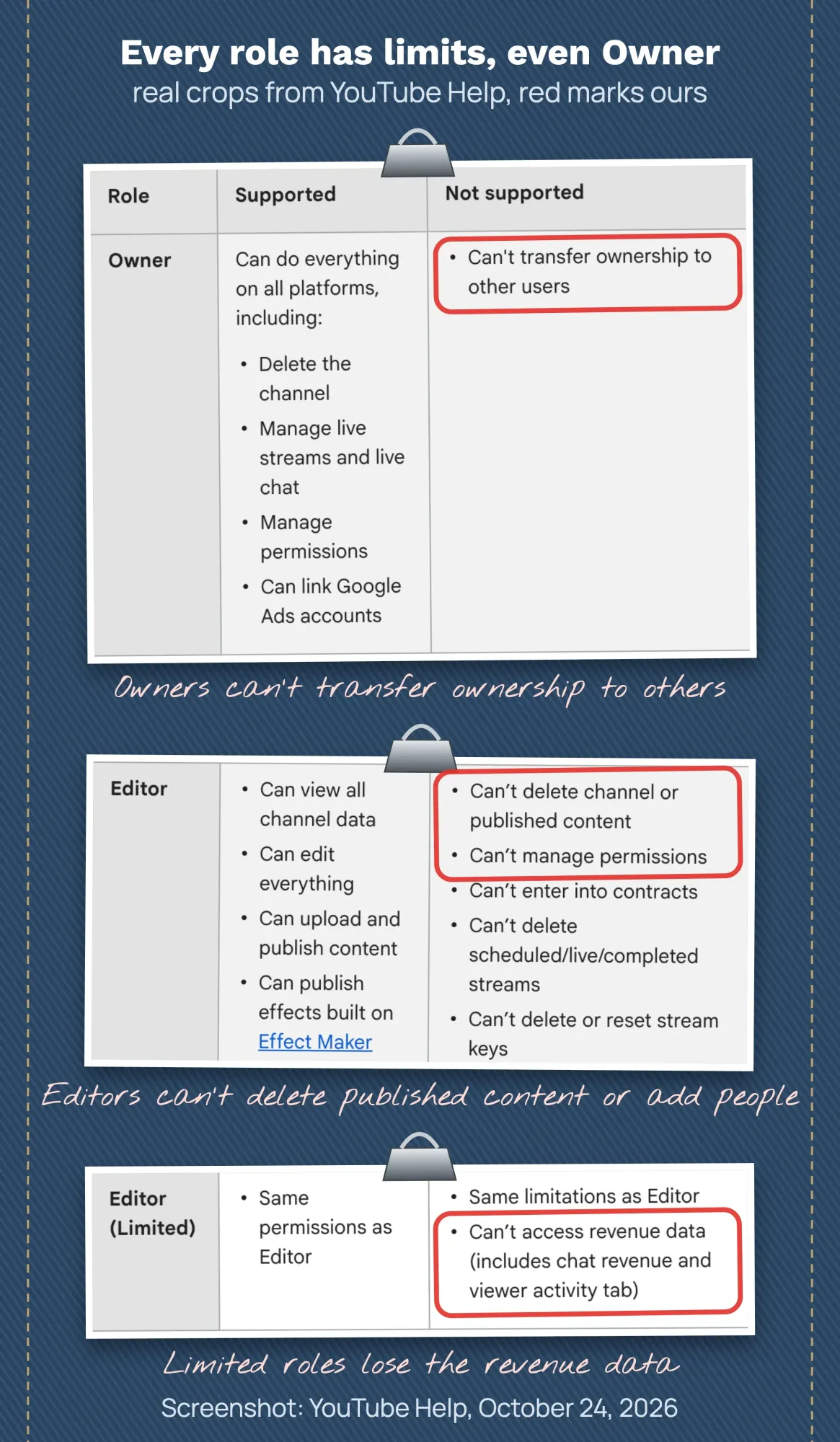 Screenshot: YouTube Help, "Add or remove access to your YouTube channel with channel permissions" (answer 9481328), October 24, 2026, annotated by DigitalTreed.
Add a second owner, too. If the primary owner's Google Account is deleted, "the channel will also be deleted," the owners page warns, and it recommends at least one other owner.
Example: Brightwater Pool Service is a made-up 5-person pool cleaning company in Henderson, Nevada. The owner creates the channel as a Brand Account, verifies her phone and moves the account to channel permissions. Her husband, who co-owns the company, becomes the second owner. The office manager gets Manager, the freelance video editor gets Editor (Limited), and the outside bookkeeper gets Viewer. When the editor's contract ends, the owner removes one role and nothing else changes.
Fill in the profile: description, links and contact email
Your profile holds the description, links and contact email viewers read first.
The profile is where a visitor checks that you're a real local business.
In Studio, the profile page puts the name, handle, description, links and contact info under Customization, then Profile. Write the description for a customer: what you do, where you work and how to book.
You can show up to 14 links on the channel, and "Your first link will be prominently displayed" near the subscribe button.
Make that first one your website.
Run the website link through our UTM builder first, so YouTube visits show up as their own line in your analytics.
Rather send people to one page with all your links? Our guide to link-in-bio pages weighs that option.
Add a business email in the contact field as well, so press and partners don't have to hunt for it.
A channel trailer and featured sections can wait until you've got three or four videos to feature.
Banner, profile picture and watermark sizes
YouTube publishes exact sizes for the banner, profile picture and watermark, and the banner is the one to get right.
The banner is cropped differently on TVs, computers and phones.
YouTube's branding guidelines list these specs, as of October 2026:
- Profile picture: JPG, GIF, BMP or PNG, no animated GIFs, up to 15 MB, shown at 98 x 98 pixels.
- Banner: at least 2048 x 1152 pixels at 16:9, 6 MB or smaller; 2560 x 1440 is recommended, especially for TV.
- Banner safe area: 1235 x 338 pixels at the minimum size, for text and logos.
- Watermark: at least 150 x 150 pixels, a square image under 1 MB.
YouTube notes that the same banner image is used across computer, mobile and TV displays but shows differently on each, and the banner "will get cropped on certain views and devices," so text belongs in the safe area. Once the channel has a few months of data, the Audience tab numbers feed a one-page media kit.
The safe area trips people up, because the figure is tied to the 2048 x 1152 canvas.
If you design at the recommended 2560 x 1440, everything is 1.25 times bigger, so the same safe area works out to about 1544 x 423 pixels.
That's our arithmetic, not a YouTube number, and it's likely where the 1546 x 423 figure on other sites comes from.
Either way, keep the business name and phone number in the middle strip.
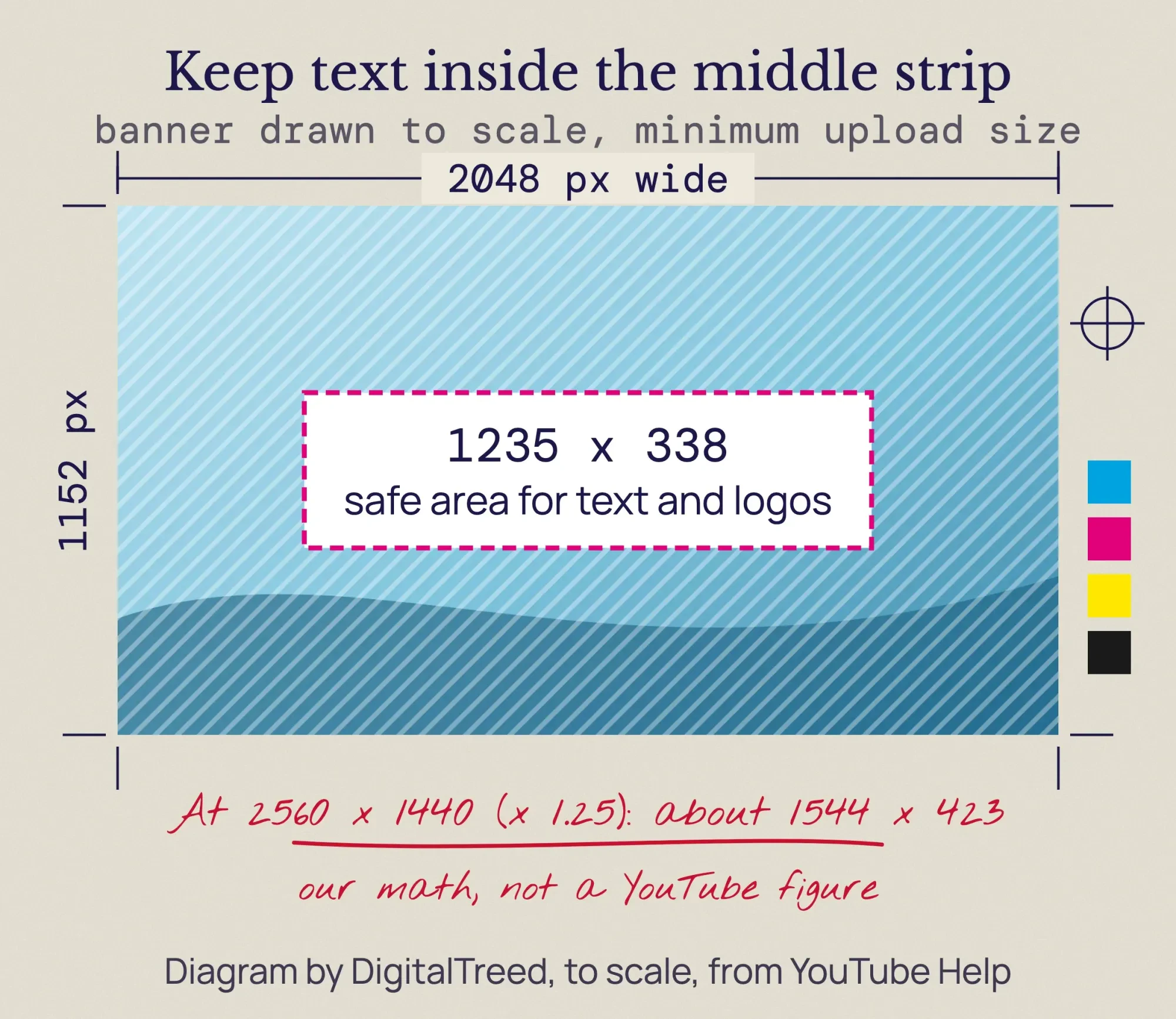 Diagram by DigitalTreed, drawn to scale from YouTube Help 10456525, October 2026. The 1544 x 423 figure is our own calculation.
Need a starting layout? Our roundup of banner makers with ready layouts lists free template tools; check each one against the sizes above.
We make channel art and videos for small businesses, so take this as the sales line it is: if you'd rather not fight the crop, our graphics and video team can do the banner, picture and watermark as a set.
Is your business channel made for kids?
Usually not, and you still have to answer.
Every channel has to set its audience, and most business channels should answer no.
The setting exists because of the law. YouTube's audience page says it's required "as part of a settlement with the US Federal Trade Commission (FTC) and NY Attorney General," and that it helps creators comply with the Children's Online Privacy Protection Act (COPPA).
Google and YouTube agreed to pay a record $170 million to settle that case, according to the FTC’s September 2019 announcement.
The FTC’s 2019 note to channel owners says COPPA "applies in the same way it would if the channel owner had its own website or app." It also says content isn't "directed to children" just because some children may see it.
If your intended audience is kids under 13, you're covered by the COPPA Rule.
The penalties are real money.
The FTC’s COPPA FAQ says a court can hold operators liable for civil penalties "of up to $53,088 per violation." A Federal Register notice of September 15, 2026 says the FTC's 2025 penalty levels stay unchanged during 2026.
To set it, open Studio, click Settings, then Channel, then the Advanced Settings tab, per the same YouTube page.
A pool company, a law firm or a dentist will usually pick "No, set this channel as not made for kids." A toy store or a kids' swim school should read YouTube's made-for-kids guidance first.
Getting it wrong costs features too. YouTube's branding page says video watermarks aren't available on videos set as made for kids.
We're describing what YouTube and the FTC publish, not giving legal advice; YouTube itself says it "cannot provide legal advice." If children are part of your audience, ask a lawyer who handles COPPA before you choose.
Upload defaults save retyping, then post the first video
With the audience set, you can save yourself typing on every upload.
Upload defaults fill in each new video's details for you.
Go to Settings, then Upload defaults. YouTube's defaults page covers privacy, category, title, tags, comments and language. Put your website, phone number and booking link in the default description, and every video gets them.
There's one limit.
The defaults "only affect videos uploaded through your browser on youtube.com/upload."
Uploads from the phone app skip them.
To post a video, click Create, then Upload videos. YouTube's upload page says you can upload up to 15 videos at a time, and that adults' videos default to public.
Set the first one to private or unlisted until you've checked it.
Titles can run 100 characters and descriptions 5,000, according to the video details page.
What to put in them is a topic of its own: our YouTube SEO guide covers titles, descriptions, chapters and playlists.
For title wording, our free keyword suggestions tool shows the phrases people search.
Partner Program thresholds come later
Those first uploads won't earn ad money yet, and for most businesses that's fine.
The YouTube Partner Program has entry thresholds.
As of October 2026, YouTube's Partner Program page asks for 1,000 subscribers with 4,000 qualified watch hours in the last 12 months, or 1,000 subscribers with 10 million qualified Shorts views in the last 90 days. You also need 2-Step Verification and advanced features access.
That's a high bar. Review usually takes about a month, the page says.
Two dates are worth a note. Starting February 1, 2027, updated Partner Program terms apply, and YouTube asks members to accept them in Studio by January 31, 2027.
YouTube may also turn off monetization on channels that haven't uploaded or posted for 6 months or more.
Our take: treat the channel as a place customers check you out, not as income.
A business that posts steady, useful videos gets value long before 4,000 hours. Our YouTube marketing strategy plans the first 90 days of what to post, and our social media strategy guide helps you decide where YouTube fits.
Want help with the setup, the art or the first videos? Ask us for a quote and we'll tell you what it would take.
How we made this guide: The DigitalTreed team read each YouTube Help page cited here, signed out and in US English, and checked the COPPA penalty against the FTC and the Federal Register. That check ran Saturday, October 24, 2026. We took the permissions screenshot ourselves and worked out the 2560 x 1440 safe area by hand. We didn't create or sign in to a test channel, so Studio menu names come from Help text. Each link sits in the sentence it supports.
First published May 2020. Rewritten Saturday, October 24, 2026: the old custom URL and shared-login advice is gone. New: Brand Account setup, phone verification, channel roles, current image sizes and safe area, the made-for-kids setting with the FTC rules, upload defaults and Partner Program thresholds.
Frequently asked
How do I get YouTube's advanced features on a new business channel?
Phone verification only opens the intermediate features. As of October 2026, YouTube's feature access page says channels with enough channel history will likely qualify for advanced features automatically. To get them right away, you can verify your identity with a valid ID or a video. YouTube notes that ID and video checks aren't available to every creator.
Can I move my business channel to a different Brand Account?
Yes, if both Brand Accounts belong to the same Google Account. As of October 2026, YouTube's channel transfer page warns that the channel on the receiving Brand Account is deleted, with its videos, playlists and badge. You must also remove anyone you gave channel permissions before you start.
Can I link my YouTube channel to my Google Business Profile?
Yes. As of October 2026, Google's help page on social media links lists YouTube among the platforms a Business Profile can show. You can add one link per platform, so pick the channel customers should see. You add it under Edit profile on your Business Profile.
Sources
- YouTube Help: Create a YouTube channel
- YouTube Help: Manage your Brand Account
- YouTube Help: Change channel owners and managers with a Brand Account
- YouTube Help: Add or remove access to your YouTube channel with channel permissions
- YouTube Help: Migrate from Brand Account user access to channel permissions
- YouTube Help: Verify your YouTube account
- YouTube Help: Get access to intermediate and advanced features
- YouTube Help: Verification badges on channels
- YouTube Help: Learn about YouTube handles
- YouTube Help: Understand your YouTube channel’s URLs
- YouTube Help: Manage your YouTube channel’s profile
- YouTube Help: Manage your channel branding
- YouTube Help: Set default upload settings
- YouTube Help: Upload YouTube videos
- YouTube Help: Edit video settings
- YouTube Help: Set your channel or video’s audience
- YouTube Help: Determining if your content is “made for kids”
- YouTube Help: YouTube Partner Program overview and eligibility
- Google Account Help: Create a Google Account
- FTC Business Blog: YouTube channel owners: Is your content directed to children? (November 2019)
- FTC: Google and YouTube Will Pay Record $170 Million for Alleged Violations of Children's Privacy Law (September 2019)
- FTC: Complying with COPPA: Frequently asked questions
- Federal Register: Civil penalty inflation adjustments (FTC, September 15, 2026)
- eCFR: 16 CFR Part 312, Children’s Online Privacy Protection Rule
- Pew Research Center: Americans’ Use of Social Media in 2026 (fact sheet)

Comments
No comments yet. Start the conversation below.