
Quick answer
Yes, as of October 28, 2026, a registered Photoshop CS6 license can still activate through Adobe's new sign-in, though Adobe's Creative Suite support ended May 31, 2019. Your computer changes the answer: CS6's list stops at Windows 8 and Intel Macs, and Photoshop by subscription costs $22.99 a month. Compare your computer with Adobe's CS6 list in this guide before you reinstall anything.
Maybe you bought Photoshop CS6 years ago, and the computer it lives on is getting old. Move it, or pay Adobe monthly? Photoshop CS6 is the Creative Suite 6 version of Photoshop that you paid for once, released around 2012 by our reading of Adobe's support matrix. Photoshop CC is the same app sold only through a Creative Cloud subscription, and that split is the Photoshop CS6 vs CC question.
Below, we cover whether you can still use CS6, a side-by-side table, activation, and which computer each version lists. Then come when support ended, what CS6 is missing, what Creative Cloud costs, and when to keep or subscribe. In our list check, 2 of 4 machines (3 made up) missed the CS6 list.
Key takeaways
- Registered CS6 licenses still activate, but only through Adobe's new QR sign-in.
- The Photoshop CS6 system list stops at Windows 8 and Intel Macs.
- Adobe's extended support for Creative Suite apps ended May 31, 2019.
- From macOS 28, Apple's Rosetta covers only certain older games.
- At October 2026 prices, Photography costs $36 a year less than Photoshop.
Can you still use Photoshop CS6 in 2026?
Mostly yes, if three things line up. The license has to be registered to an Adobe account you can open. The app has to activate through Adobe's new sign-in, and the computer has to run one of the older systems named on Adobe's own Photoshop CS6 requirements page. Adobe's page on activating legacy apps names "Creative Suite 6 and earlier" among apps that lost the old sign-in method. Its heading warns that legacy Adobe apps "can't be reinstalled on a new device," yet the steps under it say they can be reactivated or reinstalled with the new sign-in.
The license itself doesn't expire, but everything around it has moved on, and Adobe has done this before. Its Creative Suite archive says Creative Suite 2, 3 and 4 can't be reinstalled, even from the original discs, because the activation servers for those older versions were retired.
Nothing on Adobe's pages today says CS6 is next. Still, that history is why we wouldn't run a business on a CS6 install you couldn't replace.
CS6 and Creative Cloud side by side
Four rows matter most: how you pay, how each one activates, which systems are listed and what still gets updated. Each comes from Adobe, Microsoft or Apple pages read October 28, 2026.
| Photoshop CS6 | Photoshop on Creative Cloud | |
|---|---|---|
| How you pay | Paid once, years ago; Adobe sells no outright license now | Monthly or yearly subscription |
| Price today, as of October 28, 2026 | $0 if you already own it | $22.99 a month, or $19.99 in the Photography plan |
| Activation | Internet activation with a serial number, plus the new Adobe sign-in | Adobe sign-in; Internet needed for activation and subscription checks |
| Systems on the list | Windows XP SP3, 7 SP1 and 8; Intel Macs on OS X 10.6.8 to 10.8 | Windows 11 24H2 and 23H2, Windows 10 22H2 and 21H2 LTSC; macOS 14, 15, 26, and 27 confirmed |
| Adobe support | Creative Suite extended support ended May 31, 2019 | Current version with ongoing updates |
| Generative Fill | Not included | Included, paid with generative credits |
| Where files are saved | Local files | Local files or cloud documents |
Price is the only row CS6 wins outright: $0, against $22.99 monthly for Photoshop on Adobe's plans page, read October 28, 2026.
That $0 holds only while two checks pass: the license activates, and your computer appears on Adobe's CS6 list. Activation is the first check, and Adobe has changed how legacy apps sign in.
Activation now runs through an Adobe sign-in
CS6 has always needed the Internet to activate. Adobe's CS6 system requirements say the software doesn't run without activation. They add that "Phone activation is not available," so a computer that never goes online can't activate a fresh CS6 install. The sign-in step is newer. Per Adobe's legacy sign-in steps, you launch the app and scan the QR code on its sign-in screen with your phone or tablet. You type your email on the phone, finish the steps Adobe shows there, and the CS6 app on your desktop then signs in by itself. In practice, the CS6 license has to sit in an Adobe account whose email and password you still control.
Getting the installer works through that account too. Adobe's page on downloading older apps says only registered apps can be downloaded, and that you need a serial number to activate, reinstall or upgrade the product. Bought CS6 in a store? Register the serial first, then look for the download link. When no link shows up, Adobe says the app is no longer available to you.
Then there's the two-computer rule in Adobe's CS6 install instructions. One person may install a single license on two machines, as long as both aren't used at the same time. A third install means choosing Help > Deactivate on one of the first two. Do that on your old computer before you retire it, while it still starts up. Put together, moving CS6 to another computer runs in this order. The fourth step is easy to miss: the same Adobe download page says to pick the installer matching the language and operating system you originally bought. Your serial number only works with that version.
- On the old computer, choose Help > Deactivate.
- Sign in to your Adobe account and confirm CS6 is listed under registered products. If it isn't, register the serial number.
- Check the new computer against the CS6 system list in the next section.
- Download the installer for the language and operating system you bought.
- Install it, launch Photoshop, and finish the QR sign-in on your phone.
If step 3 fails, stop there. A Windows 11 PC or an Apple silicon Mac isn't on Adobe's CS6 list, and installing anyway puts business files on an unsupported setup.
Your computer decides more than your license
An activated license still needs a computer that Adobe lists. Adobe's Photoshop CS6 requirements list Windows XP with Service Pack 3, Windows 7 with Service Pack 1 and Windows 8 for PCs. For Macs, they list OS X 10.6.8 or 10.7, plus 10.8 on Intel-based systems, with a multicore Intel processor. Windows 10, Windows 11 and Macs with Apple silicon aren't on that list.
The Windows versions on it are all retired. Microsoft's end-of-support table puts Windows XP at April 8, 2014, Windows 8 at January 12, 2016 and Windows 7 at January 14, 2020. Microsoft adds that an unsupported version doesn't get security updates, which matters on a design computer that opens client files, email attachments and downloaded fonts all week. Today's Photoshop asks for Windows 11 24H2 or 23H2, Windows 10 22H2 or 21H2 LTSC, or macOS 26, 15 or 14, per Adobe's Photoshop technical requirements for version 27.x. Adobe's macOS compatibility page also confirms Photoshop 27.x on macOS 27.
Apple silicon is where Mac owners get stuck. Apple's Rosetta support page says Rosetta translates Intel-based apps on Apple silicon Macs through macOS 27, and from macOS 28 only certain older, unmaintained games. Adobe's Apple silicon compatibility page doesn't name any Creative Suite app among native or Rosetta apps.
So we can't say CS6 runs on an M-series Mac, only that neither Adobe list includes it. To see how the lists play out, we turned them into a small check.
 Source: our test output (test/output.txt), word for word, rendered as a terminal page, October 28, 2026
What we tested
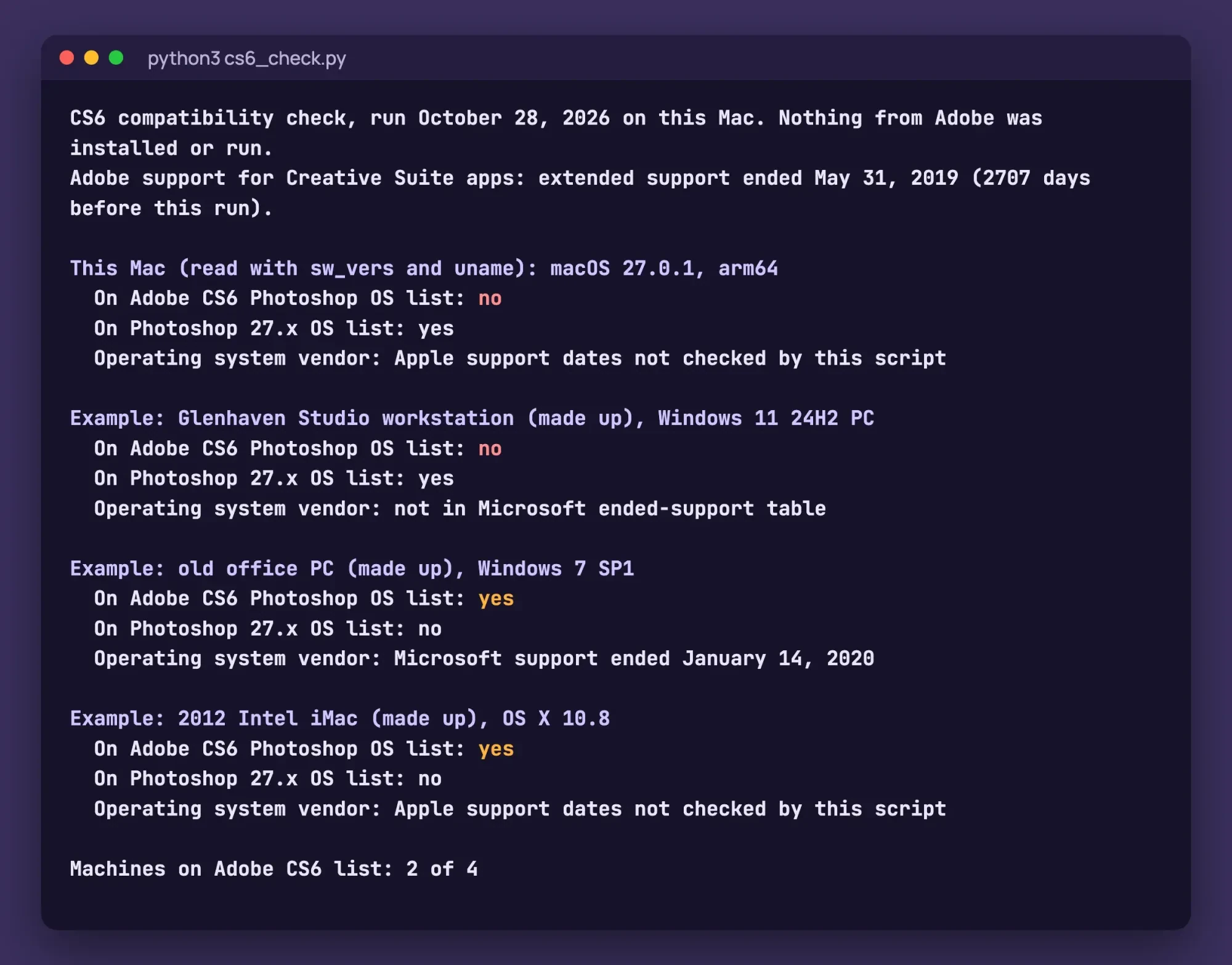
Our script, cs6_check.py, checks one machine at a time against those lists. On October 28, 2026 we ran it on an Apple M4 Mac with macOS 27.0.1 and on three made-up machines. It installed and ran neither CS6 nor Photoshop 27.x, so it's a list check, not a launch test.
Our Mac was off the CS6 list and on the 27.x list, as was the Glenhaven Studio workstation, a made-up Windows 11 24H2 PC. Two other made-up machines, a Windows 7 SP1 PC and a 2012 Intel iMac on OS X 10.8, were on the CS6 list only. That's 2 of 4. Its built-in Microsoft table dates the end of Windows 7 to January 14, 2020. It doesn't list Windows 11 24H2 as ended and holds no Apple dates.
Adobe's Creative Suite support has already ended
Even on a computer that's on the list, nothing new is coming for CS6, because Adobe's own support periods for the Creative Suite have already run out. Adobe's support periods matrix has one row for Creative Suite apps and suites, generally available May 7, 2012. There's no row named CS6, so we infer the 2012 date for CS6 from that shared row. Core support for that row ended May 31, 2017, and extended support ended May 31, 2019, which our script counted as 2,707 days before its own run.
The matrix doesn't list security fixes by app, so it can't tell you when CS6 got its last patch. It does show that Adobe's support for that row is over. Microsoft's end-of-support page for Windows 10, 8.1 and 7 describes the trade-off for an old PC. You can keep using it, but without security updates it's at greater risk. We'd treat a CS6 computer the same way, which means keeping it off email and the open web and copying finished client files to another drive often.
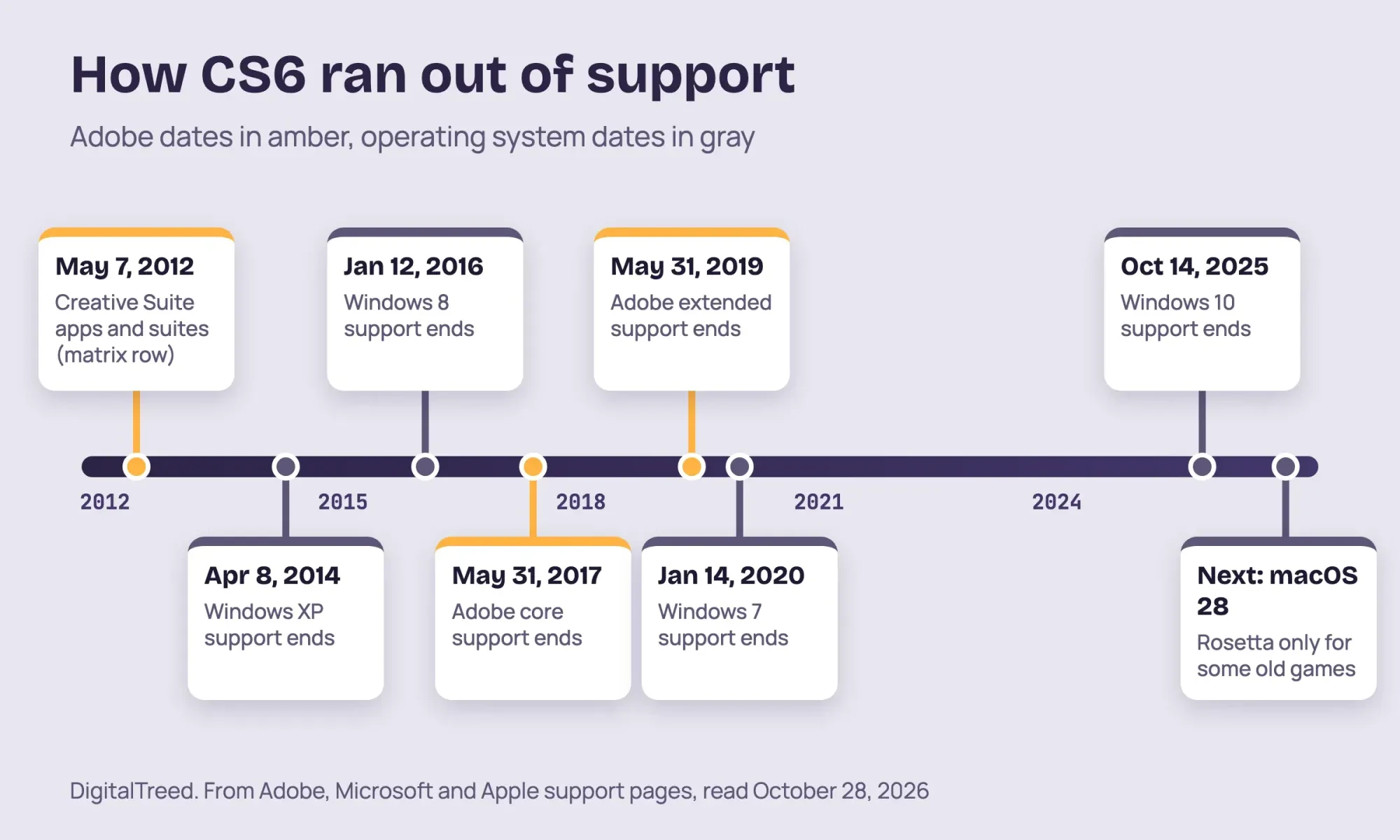 Diagram by DigitalTreed, from Adobe, Microsoft and Apple support pages read October 28, 2026
What CS6 is missing next to today's Photoshop
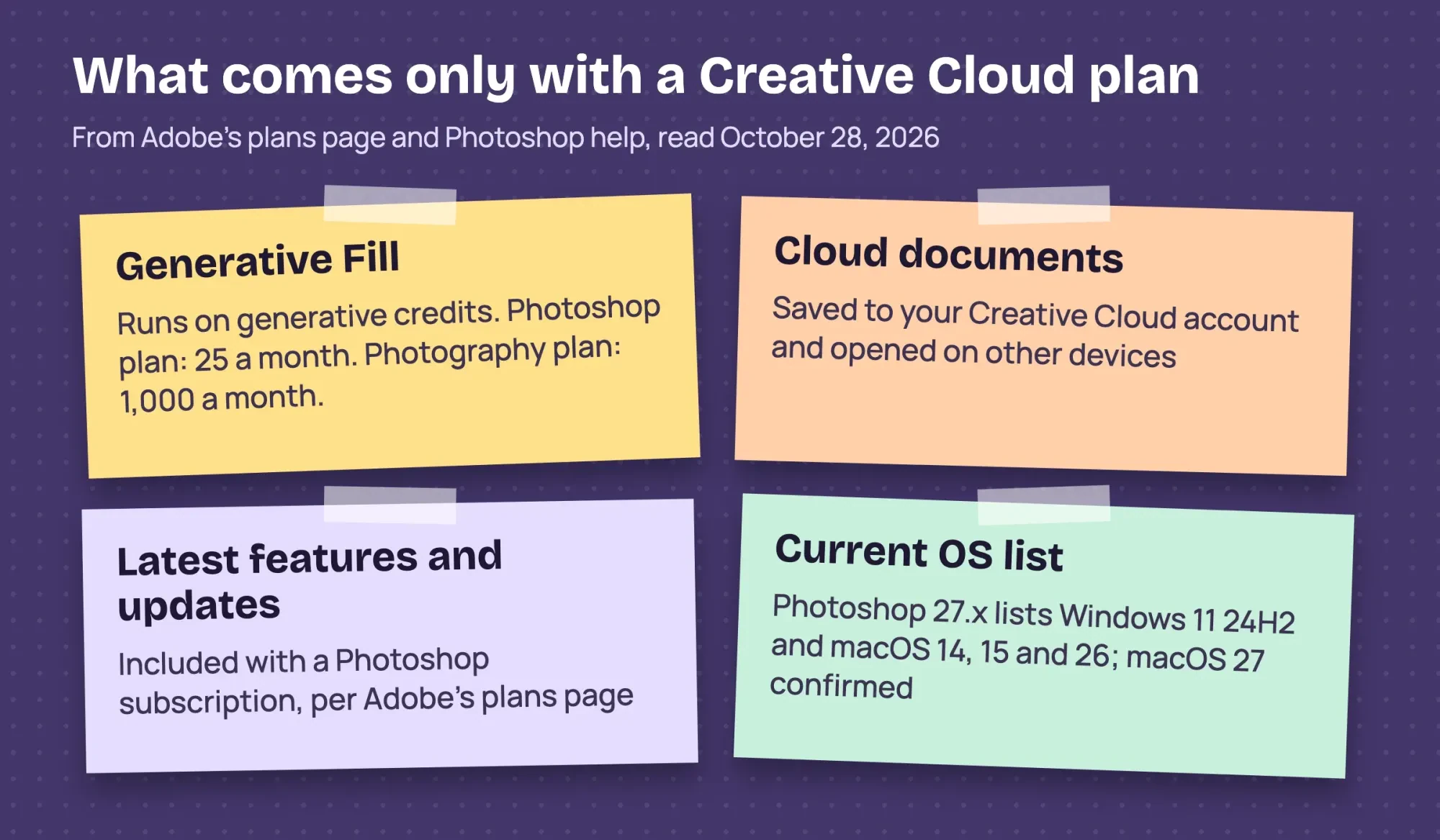
The feature gap is the other half of the choice, and much of it now runs through your Adobe plan. Generative Fill is one example. In current Photoshop you select an area, type a prompt or leave it blank, and pick from generated versions, per Adobe's Generative Fill help. It spends generative credits, which Adobe's credits overview says come as a monthly allocation with Creative Cloud plans. How many you get depends on the plan. Adobe's Photoshop plans page lists 25 a month on the Photoshop plan and 1,000 on the Photography plan, as of October 28, 2026.
The same plans page promises the Photoshop plan "access to all the latest Photoshop features and updates." CS6 has no Generative Fill and no generative credits, and a license you already own won't add them.
Cloud documents are the other piece. Adobe's cloud documents FAQ calls them its cloud-native file format, saved through the cloud and opened on other devices, and on desktop you can still pick a local file instead. CS6 saves local files only, so moving work between two computers means copying files yourself, by drive or by your own shared folder.
If you mostly crop, resize and fix exposure, you may not miss much of this. Product photos with busy backgrounds are where the gap shows, and our free background remover handles that single job without either version of Photoshop.
 Drawn by us from Adobe plans page and Photoshop help pages, read October 28, 2026
What Creative Cloud costs as of October 2026
If you do move over, Adobe's plans page lists these US prices for individuals as of October 28, 2026. Its FAQ also says Photoshop can't be bought outright anymore, only by subscription paid monthly or yearly.
| Plan, prices as of October 28, 2026 | What's included | Price | One year, formula |
|---|---|---|---|
| Photoshop | Photoshop on desktop, web and mobile; 100GB; 25 credits a month | $22.99 a month, annual billed monthly | $275.88 ($22.99 x 12) |
| Photoshop, prepaid | Same as above | $263.88 a year | $263.88 ($263.88 x 1) |
| Photography | Lightroom, Lightroom Classic and Photoshop on desktop and mobile; 1TB; 1,000 credits a month | $19.99 a month, annual billed monthly | $239.88 ($19.99 x 12) |
| Creative Cloud Pro | Photoshop and 20+ apps; 100GB; 4,000 credits a month | $69.99 a month at the regular price | $839.88 ($69.99 x 12) |
By those formulas, at prices as of October 2026, the Photography plan costs $36 a year less than the Photoshop plan ($275.88 - $239.88). It also adds Lightroom and Lightroom Classic, plus 1TB of cloud storage instead of 100GB, so it's the plan we'd pick for a shop that shoots its own product photos. Prepaying the Photoshop plan trims the yearly bill by $12 ($275.88 - $263.88). Over an example 3 years at today's prices, that's $719.64 for the Photography plan against $827.64 for the Photoshop plan billed monthly ($239.88 x 3 and $275.88 x 3). Adobe doesn't promise prices will stay put.
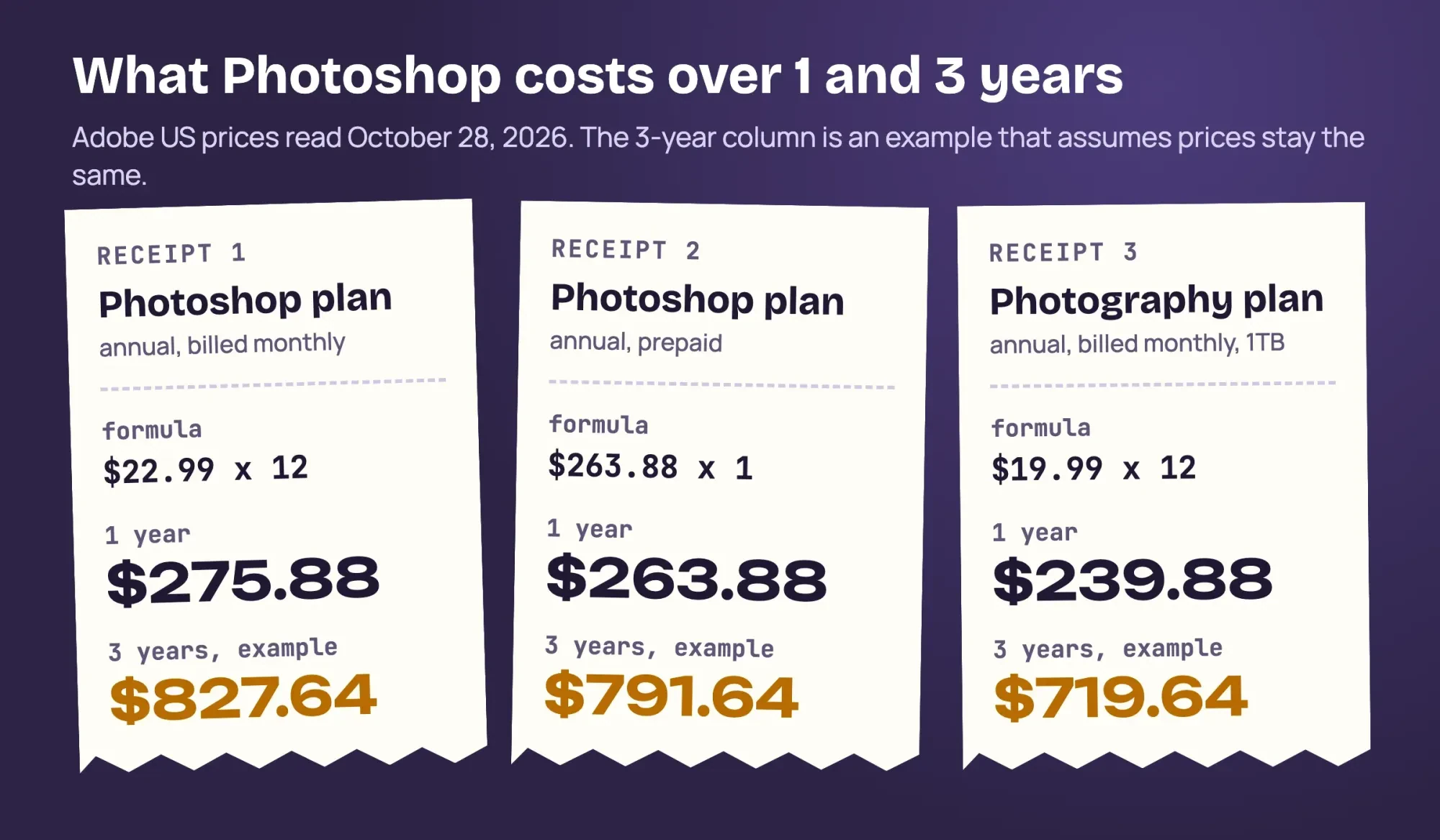 Diagram by DigitalTreed from Adobe US prices read October 28, 2026; the 3-year column is an example at unchanged prices
When to keep CS6 and when to subscribe
Here's how we'd decide from the lists and prices above:
- Keep CS6 if it's registered, already installed on a listed computer, and its tools still cover your work. Deactivate it before that computer fails.
- Choose the Photography plan, at $19.99 a month, if you're buying a new PC or Mac and you edit photos.
- Choose the Photoshop plan, at $22.99 a month, if you want Photoshop on the web and don't need Lightroom.
- Choose neither if your work is mostly social posts and flyers; see our Photoshop vs Canva comparison or our free photo editors roundup.
Our take: CS6 is fine to finish out on the computer it already runs on, but don't buy new hardware around it. Write the serial number down next to the Adobe login that holds it, because the reinstall steps above need both. A shop whose work is mostly logos and signs may need a vector tool instead, which our Illustrator vs Photoshop guide explains. Big exports slow a product page whichever version made them, so shrink them with our image compressor first. And if hiring out costs less than a year of Photoshop, our graphic designer cost guide lists US rates, with layout basics in our graphic design tips.
DigitalTreed designs social posts, ads and product images for clients as a paid graphics and video service. Skipping the software is an option too. Send a quote request with the job, then compare our price with a freelancer's or a year of Photoshop.
Frequently asked
Can I still download Photoshop CS6?
Only if you bought it from Adobe or registered it. Adobe's download availability page says registered Creative Suite 5, 5.5 and 6 downloads come from your account.
Can I try Photoshop before paying?
Adobe's plans FAQ offers a 7-day free trial that turns paid unless you cancel.
What else does Photoshop CS6 need on a PC?
Adobe's CS6 requirements list 1 GB of RAM, an OpenGL 2.0-capable system and a DVD-ROM drive.
Does current Photoshop need the Internet?
Yes, for activation and subscription checks, per Adobe's technical requirements, which also list 8 GB of RAM as the minimum.
How we made this guide: Each fact traces to a page opened October 28, 2026: Adobe's CS6 help, support matrix and plans page, and Microsoft and Apple OS pages. Our script checked our Mac and three made-up machines against those lists without installing either Photoshop. Facts checked by the DigitalTreed team on October 28, 2026.
First published July 2020. Rewritten October 28, 2026 to answer whether CS6 still activates and runs, with current Creative Cloud prices.
Sources
- Adobe: Download and install Creative Suite 6
- Adobe: Creative Suite 6 system requirements
- Adobe: Unable to activate or reinstall legacy Adobe apps
- Adobe: Download previous versions of non-subscription apps
- Adobe: Creative Suite archive
- Adobe: Available versions of Adobe apps for download
- Adobe: Products and technical support periods
- Adobe: Photoshop on desktop technical requirements
- Adobe: Adobe apps compatibility with macOS
- Adobe: Adobe apps compatibility on Mac computers with Apple silicon
- Adobe: Photoshop plans and pricing
- Adobe: Edit images with Generative Fill
- Adobe: Generative credits overview
- Adobe: Photoshop cloud documents FAQ
- Microsoft: What does it mean if Windows isn't supported?
- Microsoft: End of support for Windows 10, Windows 8.1, and Windows 7
- Apple: If you need to install Rosetta on your Mac
Comments
No comments yet. Start the conversation below.