
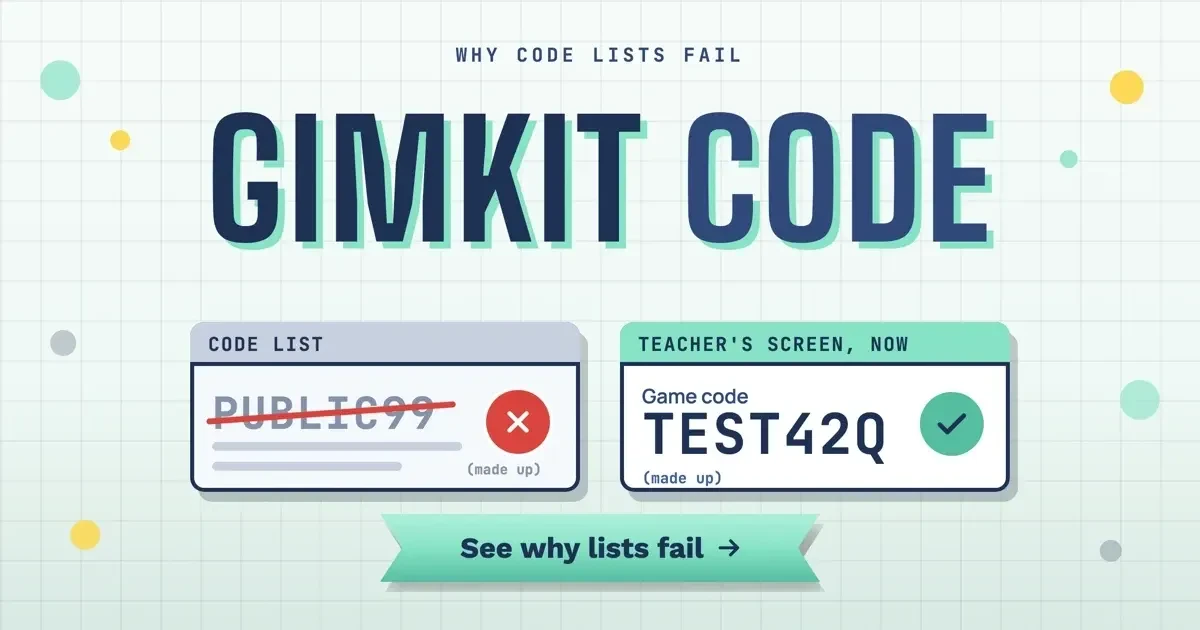
Quick answer
To use a Gimkit code, go to gimkit.com/join and type the game code shown on your teacher's screen, as of November 2026. If your teacher hosts with classes and you're logged in, Gimkit says you join automatically. Skip public code lists, since each code belongs to one teacher's open lobby.
Your teacher has a review game on the projector, half the class is in the lobby, and your screen shows an empty box. A Gimkit code is the game code shown on the host's screen when a teacher opens a live game lobby.
A student needs two things to fill that box: the code on the projector and gimkit.com/join. Teachers have a longer routine. Hosting live, sending an assignment or connecting a class each changes who can get into the lobby.
Key takeaways
- Type the code from your teacher's screen at gimkit.com/join, nothing else.
- Gimkit's help describes no bonus codes, so code lists have nothing official behind them.
- A live game takes up to 500 students, or 60 in 2D modes.
- Hosting with classes skips the code and keeps student names clean.
- If nobody can connect, run gimkit.com/check before blaming the code.
What a Gimkit code is and where it comes from
A Gimkit code doesn't exist until a teacher sets up a game. Gimkit's Host a live game page lists the host's steps: pick a kit, pick a game mode, set the game options, then share the code and start. Once the options are saved, "A new Lobby tab will open with your game code," and that tab is what you see on the projector while classmates trickle in.
That lobby has three doors. The host page puts it plainly: "Students can join your game using the game's QR code, join link, or game code." Hovering over the code pulls up the QR, according to Gimkit's QR Codes article, and a pasted join link lets students "skip the code and QR code." So a phone can scan, a laptop can click, and anyone can type. The lobby looks different by mode, too. In 2D modes, the host page says "you'll see your character in the lobby and more characters will join as students join." Teachers there can join as a player or just watch as a spectator.
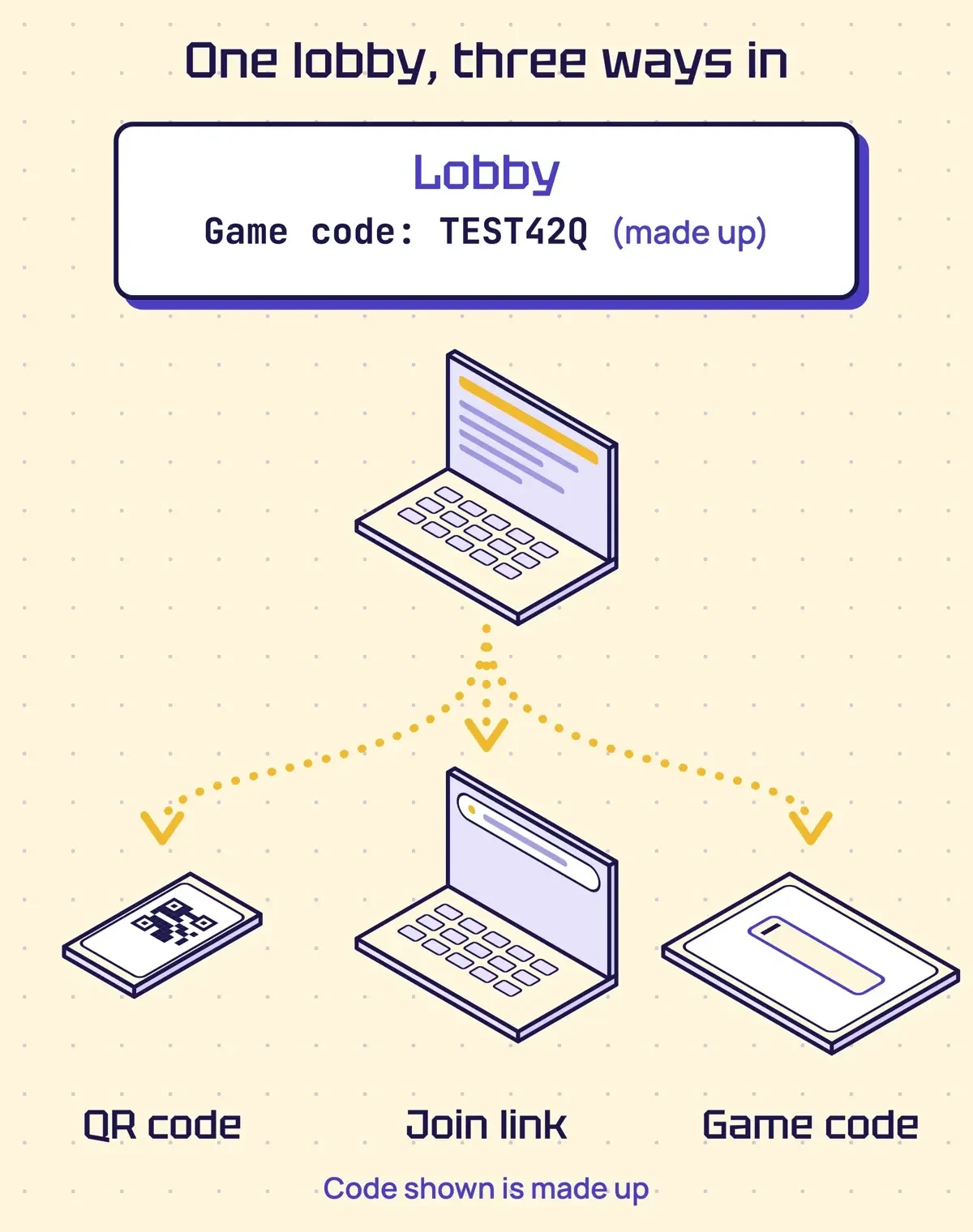 Drawn by us: the three ways into one live game, from Gimkit's Host a live game and QR Codes help pages. The code shown is made up.
How to join a Gimkit game with a code
Gimkit's Join a live game help page (last updated March 14, 2024) lists five steps. None needs an account, since Gimkit's Account FAQ says students can play live games without one:
- Find the game code or QR code on your teacher's screen, or open the join link if one was shared.
- Go to gimkit.com/join.
- Type the game code from the screen.
- Enter your name, or approve the nickname you're given.
- You're in: wait in the lobby until your teacher starts the game.
Step 3 is the one that changes from class to class. "If your teacher is using classes & you're logged into Gimkit, you'll join the game automatically," the join page says. In that case your name comes from the class list, and Gimkit's How/When To Use Classes page says that name is what shows on the leaderboard. Without classes, your name might still not be up to you. With the Nickname Generator on, students "won't be able to edit or enter their name" and get a random one instead. "They can spin up to three times before they're locked in," so don't burn all three on a joke name.
Blooket has its own join screen and its own codes. Our Blooket join guide lists that game's steps.
Why do public Gimkit code lists not work?
Pages that promise working Gimkit codes offer something Gimkit's own help never mentions. Our May 2025 take on this page did it too, with codes said to add bonus cash, extra lives and power-ups. None of the 27 help articles we read describes a bonus, promo or redeem code, so that list is gone and nothing replaces it here.
The bigger reason is how a code is made. Each one comes from a lobby that one teacher opened for one game, and it shows on that teacher's host screen, next to the QR and join link. The host page says that game "will end when you reach the game goal you set up, usually a time limit for 2D games." A teacher can also stop it early with the End Game button. So, for example, a code copied at 9 a.m. may point to a game that ended at 9:20.
Gimkit's help gives no code lifetime, length or format, so this page prints no sample code.
Even a code that's still open can shut you out, since the Join in late setting is on by default, but a teacher can switch it off. That choice sticks, because "Your Join in Late selection will save from game to game." There's also a hard ceiling. Gimkit's Player maximums page says "Our hard limit for the number of students that can join a live game of Gimkit is 500 students." The 2D modes have their own cap: "We have a separate hard limit of 60 students for all 2D game modes."
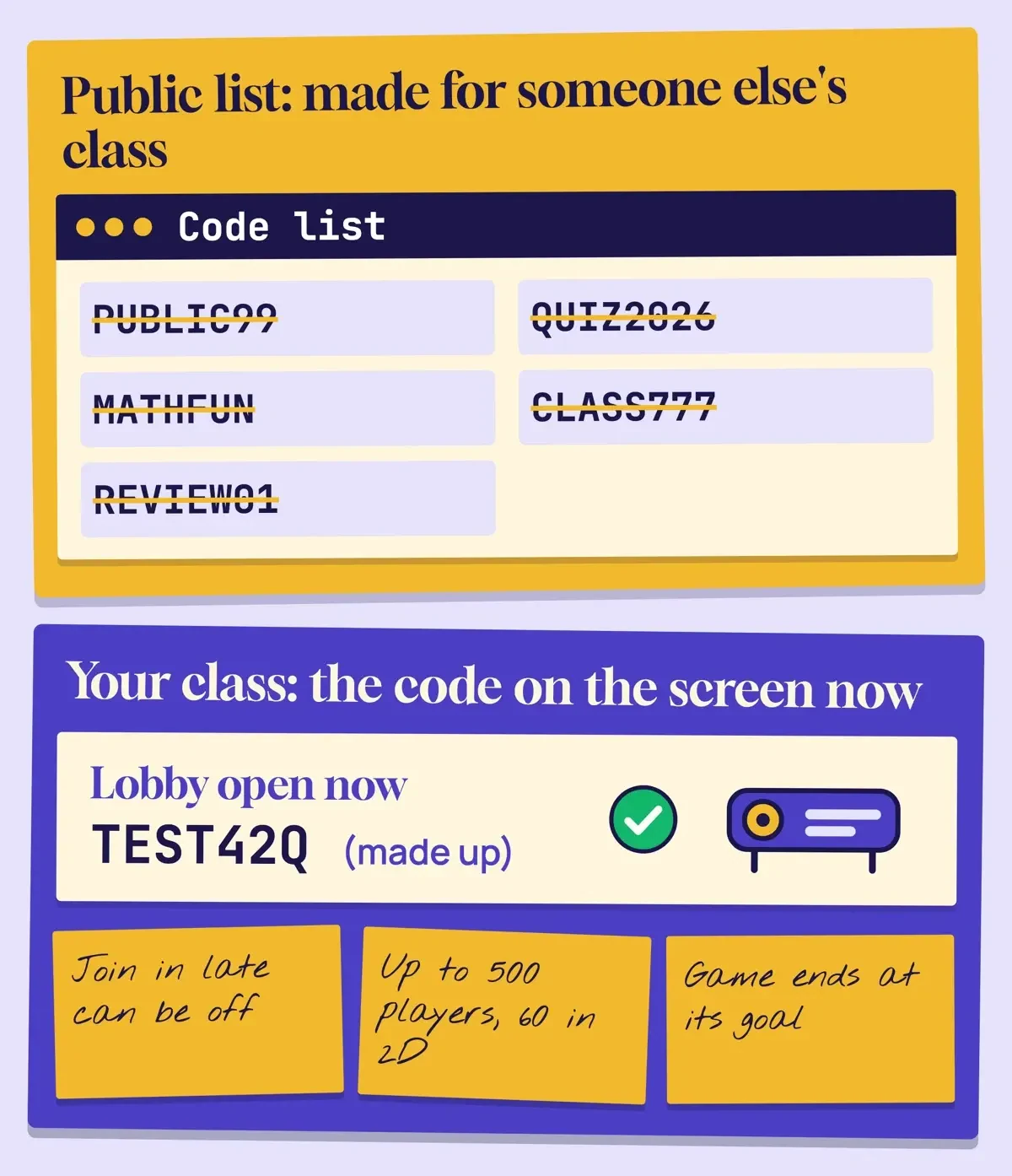 Drawn by us: a code from a public list versus the lobby open in your class. All codes shown are made up.
Some sites go further, offering bots that flood a game with fake players or scripts that answer for you. We don't name or link them. Anything that joins a live game still needs that game's code or link, so those tools are aimed at a real class in session. Gimkit's Hacking and Cheating page calls cheating "pretty rare in Gimkit." For live games, the page points teachers to per-student reports, where a question breakdown shows how often each student got questions right or wrong. If a lobby fills with names nobody recognizes, we'd end that game and host a fresh one with a class connected.
What we tested
Those quotes come from 27 Gimkit help articles we saved and searched on November 2, 2026, without signing in or joining a game. The term game code appeared on 3 pages and join link on 4, while searches for digit, numeric, reuse, same code, promo, bonus code and redeem found 0 pages. The word expire hit 2 pages, about a Pro trial and price quotes.
Next came a typo checker. On a Mac, it compared 10 made-up entries with a made-up screen code, TEST42Q. It doesn't judge format: Gimkit's help gives none, so the mix of letters and digits in TEST42Q is ours. TEST42Q matched. The lowercase test42q differed only in case. Copies with spaces at both ends or inside matched once spaces were removed. TE5T42Q and TEST42O were look-alike slips, TEST4Q was one character short and TSET42Q had two letters swapped. A pasted made-up link was flagged as a link, and PUBLIC99, our stand-in for a list code, matched nothing.
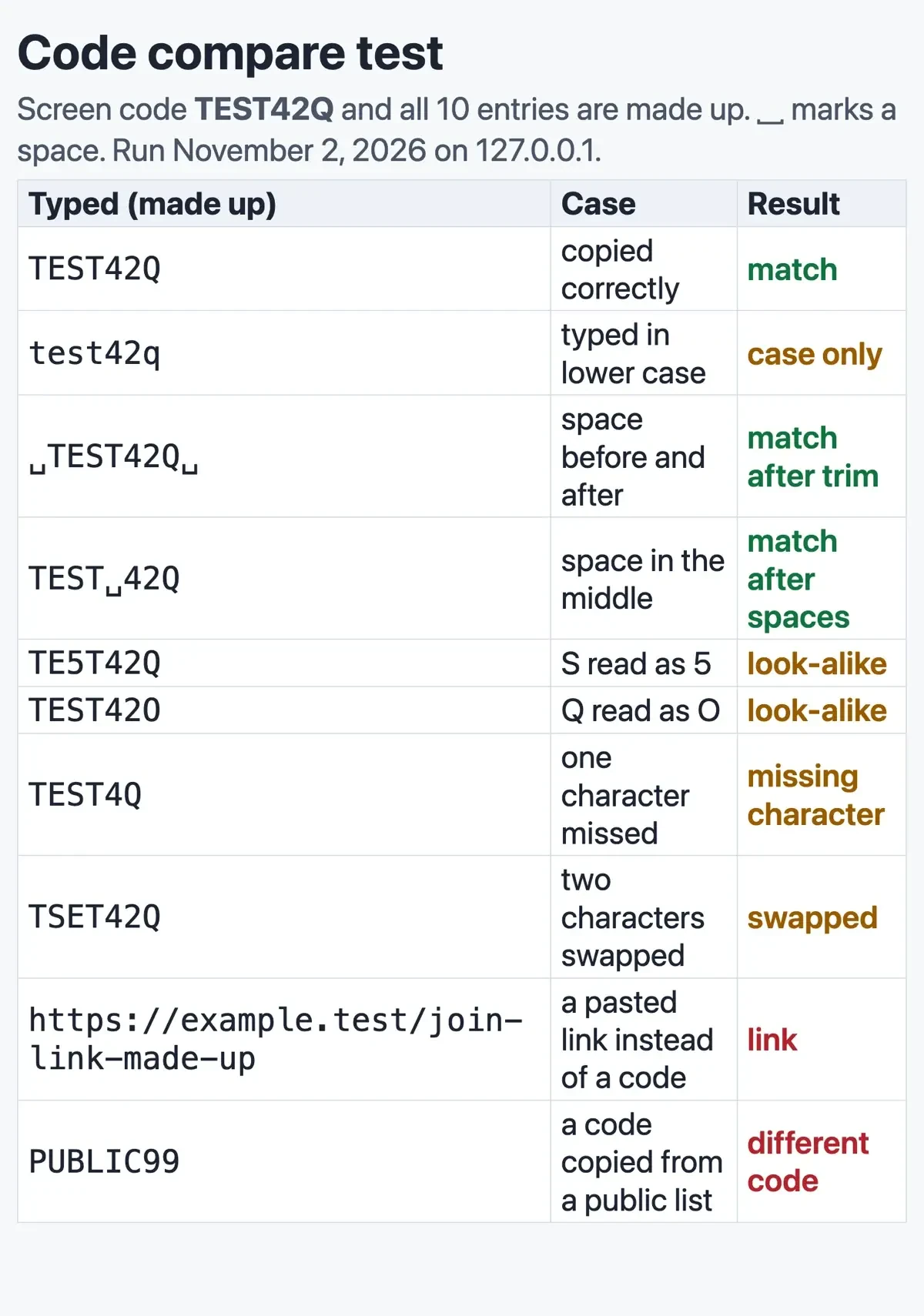 Screenshot: our local code compare test at 127.0.0.1, made-up data, November 2, 2026.
Hosting tips for teachers: live games, assignments and classes
Teachers pick the route before anyone types a code, and each route sets who can get in and which plan it needs. The table draws on the Assignments explained page and the host page:
| Route | Who can get in | Plan needed | Gimkit suggests it for |
|---|---|---|---|
| Live game code, QR or link | Anyone with the code while the lobby takes players | Free educator account | Review games in class |
| Assignment link | Anyone who opens the link | Gimkit Pro (paid) | Distance learning, homework |
| Practice link | Anyone with the link | Not stated; Practice button in any kit | Practice without scores |
Assignment links work differently from a lobby code. Gimkit's Share and manage assignments page says "Anyone who visits an assignment link will be able to play that assignment." A link pasted into a public post is open to strangers. Set the goals before sharing, too. Students finish by reaching the cash goal or an optional question goal, whichever comes first, per Gimkit's Complete an assignment page. Those goals "cannot be changed later," and the share page says assignment settings can't be edited either. A practice link is the looser option, letting students "practice anytime without scoring, game mechanics, modes, or reporting."
Connecting a class changes both who can join and which names appear. Gimkit's Classes Explained page admits its language filter "doesn't catch everything" and says "Classes ensure that students will show up in live games with appropriate names only." Students join through your class link, sign in with Google or email, and with Auto-Accept off, each waits for your approval, per How to have students join your class. Someone slips in anyway? The Remove a player article gives two spots: the lobby, or the leaderboard mid-game, with Team Mode the exception, since "You cannot remove players mid-game in Team Mode."
For repeat visitors, the Game options explained page is blunt: "If you're having trouble with game-crashers, you'll want to turn off the join late option."
Student privacy: COPPA and what Gimkit collects
Two federal laws matter when a school game collects student data: COPPA, for children under 13, and FERPA, for education records.
The FTC's COPPA FAQ says "The Rule was designed to protect children under age 13." Its COPPA rule page covers sites "directed to children under 13 years of age," plus other sites that know they collect personal information from a child under 13. Schools have a role, too: a school can consent for parents, but "the school's ability to consent for the parent is limited to the educational context." Names count as well. Personal information under COPPA "includes a kid's full name," per the FTC's privacy guide for parents, along with an address and photos.
Because a full name counts, we'd have students leave it out of any live game played without a class. Parents sizing up other kids' games can start with our post on Wordle Junior and kids word games.
Gimkit keeps the student side light. Its Account FAQ says "Students can play your live games and assignments without needing an account or logging into Gimkit." Accounts only come in for classes, XP and cosmetics. The page also states, "We've decided not to allow ads in Gimkit or raise money from outside investors."
Behind the scenes, Gimkit's Third Parties Gimkit Uses page (last updated July 30, 2025) lists 16 providers. They range from Digital Ocean "for hosting and operating Gimkit's game servers" to Google Analytics "for analytics on our website." Stripe handles payments, Mailjet sends account emails, and Crisp runs the help desk and event tracking, per the same list. Account holders can see their own data by clicking "Information Gimkit has collected on me" in Settings, per View information Gimkit has collected. The Gimkit privacy policy loads with JavaScript, which our plain-text check couldn't read, so open it in a browser before your district signs off.
If your district uses Google sign-in for students under 18, Gimkit's Google Workspace article says an admin has to mark Gimkit as trusted. Until then, students can still play without logging in. Records fall under FERPA, which the Education Department's FERPA page explains as parents' rights over education records. At 18, its online services guidance notes, "all rights under FERPA transfer from the parent to the student."
Limits on a family iPhone or iPad are set at home, not by the school. Forgot the Screen Time passcode behind them? Our Screen Time passcode guide covers getting back in.
When a Gimkit code does not work
Start by asking whether one student is stuck or the whole room is, since the fixes differ. The first row below comes from our typo test; the other causes come from Gimkit's help pages:
| What you see | Likely cause | What to do |
|---|---|---|
| One student stuck, others in | Typo or old code | Retype it, one character at a time |
| Nobody new gets in after the start | Join in late is off | Turn it on next game |
| Lobby stops taking players | Player cap: 500, 60 or 5 | Split the class or switch modes |
| Whole room can't connect | Gimkit down or school network block | Status page, gimkit.com/check, then IT |
| 2D mode won't load | WebGL off or old browser | Update; turn on graphics acceleration |
| Cash or power-ups freeze mid-game | Packet loss on busy Wi-Fi | Fewer devices on Wi-Fi |
For the first row, retype the code from the screen and compare it one character at a time before raising a hand. Gimkit gives no code format. Our typo test above only shows the kinds of slip to look for: a look-alike, a missing character, a swapped pair.
The player cap row hides two smaller limits. Gimkit's player maximums page says "Gimkit Pro Exclusive modes are limited to 5 players for Gimkit Basic members." Students can host too, but "If you have a student log in, you'll be limited to hosting a maximum of 5 players in your games." So a free-plan teacher in a Pro Exclusive mode, or a student host, sees the lobby stop at 5. Gimkit adds that featured and Pro Exclusive modes rotate every few weeks, so a mode that took the whole class last month can hit the 5-player limit today.
The whole-room case goes to IT. Gimkit's Trouble connecting article starts with its server status page, then the compatibility test at gimkit.com/check. It asks schools to allow the wildcard gimkitconnect.com domain on ports 80 and 443, and notes that some school proxies break the secure WebSockets its games need. The List of domains to unblock adds gimkit.com for the main site and pexels.com for cover photos.
The last two rows are device problems. "WebGL is a technology required to run our 2D game modes," says the WebGL help page. For Chrome, it says to update first, then turn on the graphics acceleration setting. For lag, Gimkit's Midgame Issues page blames packet loss and says "having students playing on mobile phones use their cellular data can help."
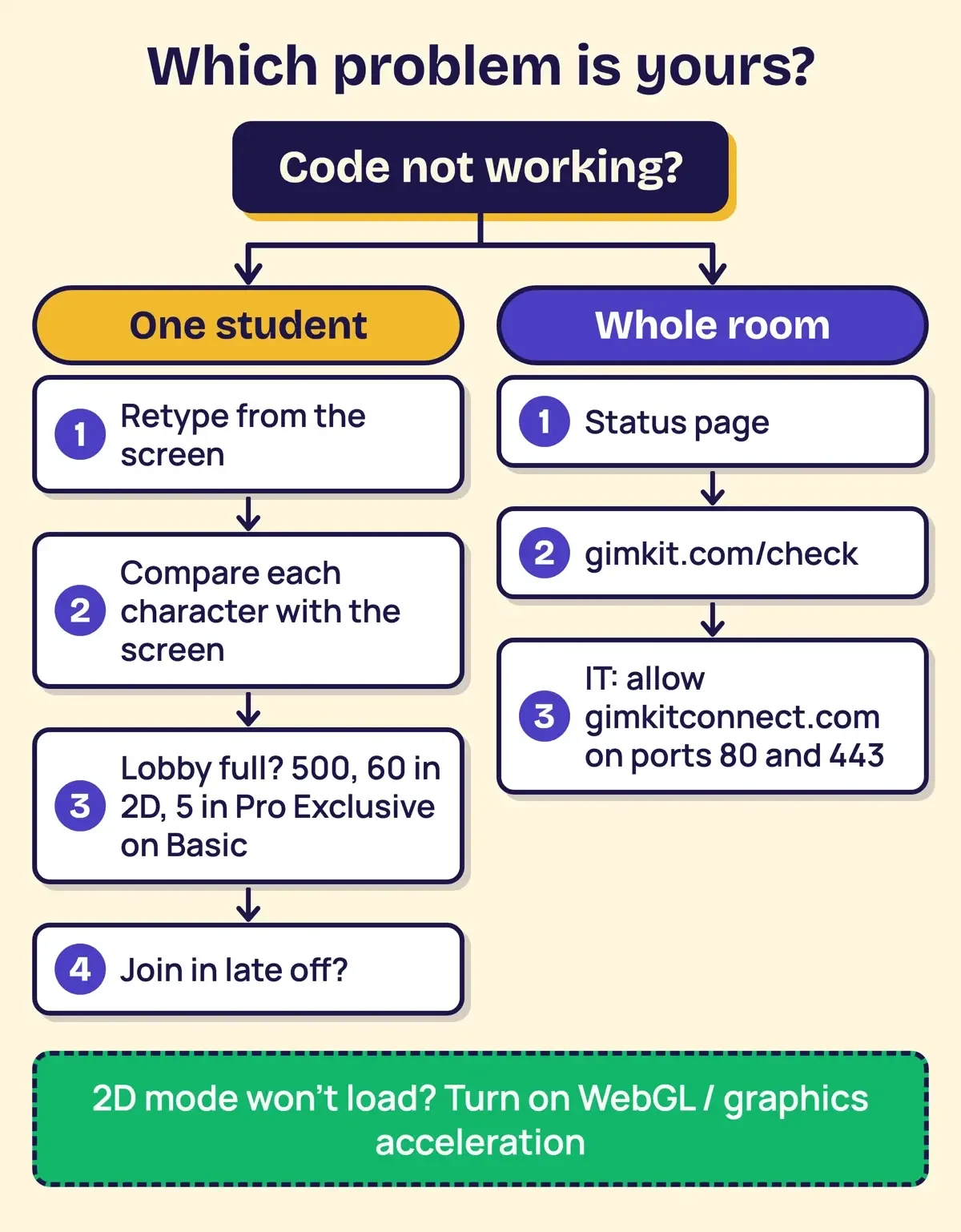 Diagram by DigitalTreed: which Gimkit code problem is yours, based on Gimkit's troubleshooting and hosting help pages.
Our game-day routine
So if we were hosting Friday's review game, most of the setup would happen the day before. We'd create a class once, share the class link and connect it in the game options, so names come from accounts instead of whatever students type. Without a class, the Nickname Generator goes on. We'd also open gimkit.com/check on one student device, so network trouble shows up before the bell. On the day, the code and QR stay on the projector, and no join or assignment link gets posted publicly. If uninvited players showed up last time, join late goes off. The class link stays private too, since with Auto-Accept on, anyone who signs in through it joins.
A student's routine is shorter: type the code on the screen, check each character against it, and tell the teacher if the lobby still won't take it.
If the review game ends early, our guides to the Google memory game and the Poeltl NBA guessing game cover two more quick games. Teachers buying their own prizes or supplies for review days can check our Teacher Appreciation Week discounts roundup.
Gimkit code questions
Frequently asked
Does a teacher need a Gimkit account to host?
Yes. Gimkit's Create an account page says "You need a Gimkit account to create kits and host games."
Is Gimkit free for teachers?
Gimkit Basic is free. "New Educator accounts start with a 14-day free trial of Gimkit Pro," per the Account FAQ.
How do I end a Gimkit game early?
Click the end game button in the upper right of the host screen, per End a game early.
Can a teacher add time to a live game?
Yes: "click on the time left to add one minute (up to 59 minutes total)," per the host page.
How we made this guide: We saved 27 Gimkit help articles, three FTC pages and two Education Department pages on November 2, 2026, and each step here comes from them. Our local tests were a term search over the 27 Gimkit pages and a typo checker over made-up codes. Facts checked by the DigitalTreed team on November 2, 2026.
First published May 2025 with a list of codes said to add bonus cash, extra lives and power-ups, which Gimkit's help doesn't describe. Rewritten November 2, 2026 from Gimkit's help center and the FTC's COPPA pages.
Sources
- Gimkit Help: Join a live game
- Gimkit Help: Host a live game
- Gimkit Help: QR Codes
- Gimkit Help: Join in late
- Gimkit Help: Player maximums
- Gimkit Help: Nickname Generator
- Gimkit Help: Remove a player
- Gimkit Help: Game options explained
- Gimkit Help: End a game early
- Gimkit Help: Hacking and Cheating
- Gimkit Help: Assignments explained
- Gimkit Help: Share and manage assignments
- Gimkit Help: Complete an assignment
- Gimkit Help: Classes Explained
- Gimkit Help: How to have students join your class
- Gimkit Help: How/When To Use Classes
- Gimkit Help: Account FAQ
- Gimkit Help: Create an account
- Gimkit Help: Third Parties Gimkit Uses
- Gimkit Help: View information Gimkit has collected
- Gimkit Help: Mark Gimkit as trusted in Google Workspace for Education
- Gimkit Help: Trouble connecting to Gimkit's game servers
- Gimkit Help: List of domains to unblock
- Gimkit Help: How to enable WebGL
- Gimkit Help: Midgame Issues
- Gimkit server status page
- Gimkit Privacy Policy (loads with JavaScript)
- FTC: Complying with COPPA, Frequently Asked Questions
- FTC: Children's Online Privacy Protection Rule (COPPA)
- FTC Consumer Advice: Protecting Your Child's Privacy Online
- U.S. Department of Education: FERPA
- U.S. Department of Education: Protecting Student Privacy While Using Online Educational Services
Comments
No comments yet. Start the conversation below.