

Quick answer
A medical practice website needs 12 must-haves, from tap-to-call hours and online booking to a posted Notice of Privacy Practices. If you're a HIPAA covered entity and your booking or intake pages collect patient details, a vendor handling that data for you generally needs a business associate agreement. Start with the booking page and privacy notice, then work down the list.
Say you run a small US practice with two providers and a busy front desk. A medical practice website is a practice's public site where patients find you, compare providers and book or start a visit. It also answers to HIPAA, ADA and FTC rules a bakery's site doesn't, so we'd get booking and privacy right before any design work.
We start with what a medical practice website should include. The 12 must-haves follow in three groups: picking your practice, booking, forms and telehealth, and the privacy notice, tracking, access and reviews. What we tested and the order we'd build it in come last.
Key takeaways
- HHS says a cookie banner is no HIPAA authorization.
- Covered practices must post their privacy notice prominently online.
- Booking pages without a login can expose PHI to trackers.
- HHS gave funding recipients an extra year for WCAG 2.1 AA.
- Our flawed test page failed all 11 checks; the fixed one passed.
What should a medical practice website include?
Patients meet your site in a fixed order, so the list follows it. First they decide whether you're the right practice. Then they'll try to book. Here's each must-have next to the problem it solves and the page that backs it.
| # | Must-have | What it fixes | Backed by |
| 1 | Location, hours, tap-to-call | Calls asking "are you open?" | schema.org MedicalClinic |
| 2 | Provider bios | Patients picking a clinician | Your own credentials |
| 3 | Insurance and self-pay estimates | "Do you take my plan?" | CMS good faith estimate rules |
| 4 | Fast pages on a phone | Visitors leaving a slow page | Google Core Web Vitals |
| 5 | Booking on every page | Phone-only booking | Google Business Profile links |
| 6 | A request form that works | Form errors, missing fields | ADA.gov, W3C |
| 7 | Intake forms with a BAA | Patient data at a vendor | HHS business associate FAQ |
| 8 | A telehealth page | Confused first video visits | HHS telehealth resource |
| 9 | Privacy notice posted | A missing required notice | HHS privacy notice page |
| 10 | Tracking checked | Pixels on booking pages | HHS tracking bulletin |
| 11 | Accessible pages | Barriers for disabled visitors | ADA.gov, HHS Section 504 |
| 12 | Honest reviews | Fake or edited testimonials | FTC reviews rule |
Use it as a punch list: mark each row done, missing or unsure, and send the unsure rows to whoever runs your site. Rows 7, 10 and 11 usually need a vendor or an attorney to answer, since they turn on vendor contracts and on whether federal rules reach your practice at all. No site yet? Start with whether you need one and the seven build stages.
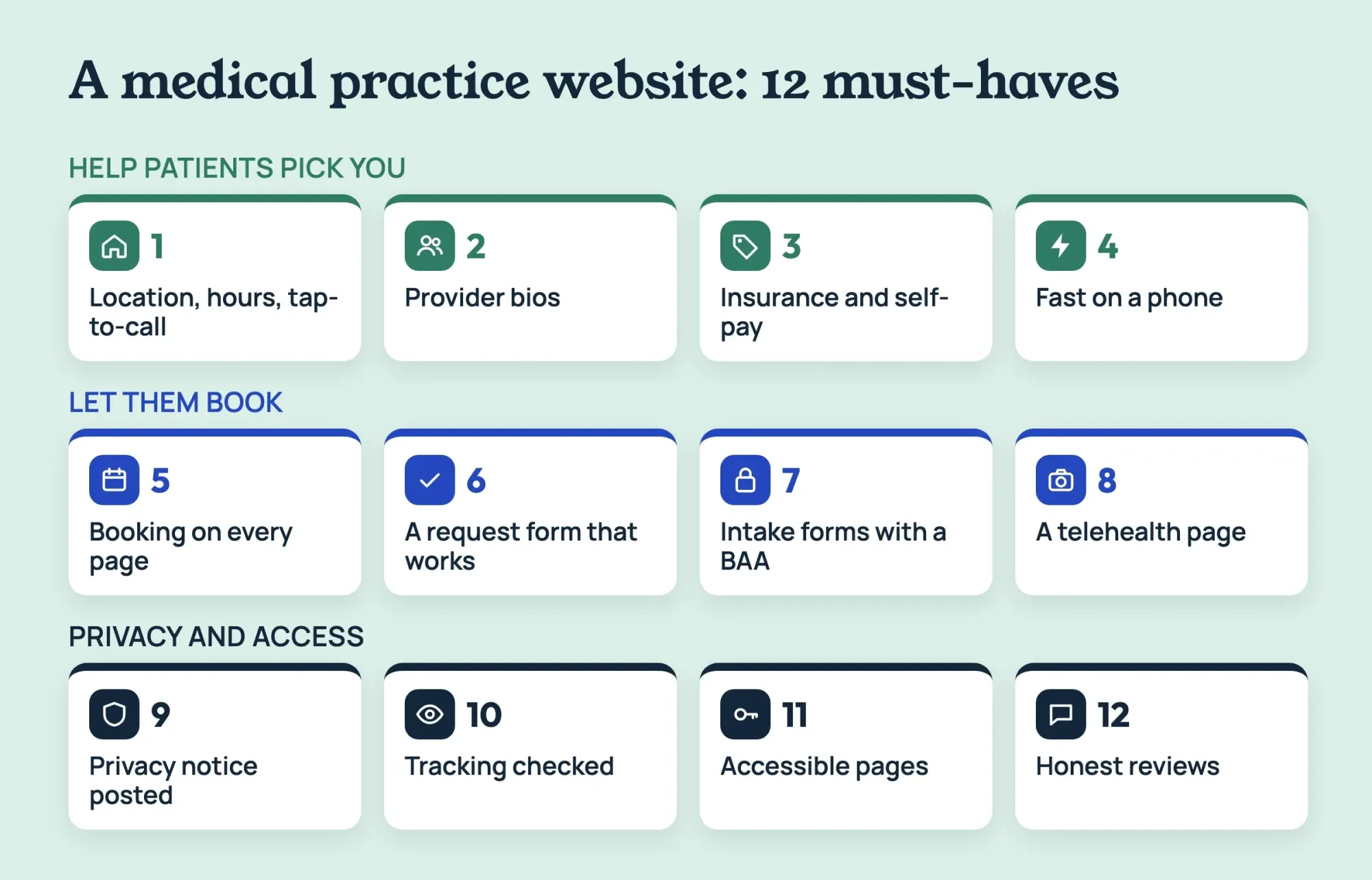 Diagram by DigitalTreed. The 12 must-haves from this guide, grouped the way a patient meets them.
Must-haves 1-4: help patients pick your practice
These four decide whether a patient calls you or the next practice in the results. None of them collect patient data, so you can fix them without a new vendor contract or a BAA.
1. Location, hours and a phone number that dials
Put the address, hours and phone number in plain text on every page, usually in the footer, and wrap the number in a tap-to-call link. Text inside a picture can't be tapped, and screen readers only get whatever alt text you wrote.
For search, describe the practice with structured data. The schema.org MedicalClinic type has properties such as isAcceptingNewPatients, medicalSpecialty and healthPlanNetworkId. They're the first questions patients ask. Our local SEO explainer covers the Google Business Profile side.
Hours need the same care, since they're the detail patients act on. List holiday closures and update them on the site and your Google profile on the same day, and note the date you changed them.
2. Provider bios a patient can check
The bio page is where a patient picks a clinician. Give each provider a page with their full name and credential, board certification, languages spoken, locations, the plans they accept and whether they're taking new patients. A photo's fine, but keep every claim checkable, since anyone can look up a license on the state board's site. If a provider sees only certain ages or conditions, say so on the bio. Link each bio to the booking page, and spell each name the same way on both. Add hospital affiliations, if there are any, in the same plain list. Put a last-reviewed date on each bio and recheck it whenever a provider's plans or hours change.
3. Insurance plans and self-pay estimates
List the plans you accept by name, date the list and update it whenever a contract changes. Self-pay patients need their own path. CMS says on its good faith estimate page that providers usually must give uninsured or self-pay patients an estimate. That applies when they ask, or when they schedule at least 3 business days ahead. Care booked 3-9 business days out gets the estimate within 1 business day, and care booked 10 or more days out gets it within 3. A "Request a cost estimate" link beside your plan list shows those patients where to start. If you're out of network with a big local plan, say that too, since it'll save everyone a wasted call.
4. Fast pages on a phone
Check speed on a phone, not your office desktop, and try it on mobile data as well, since a fast office connection can hide a slow page. Don't skip the booking page. Google's Core Web Vitals page suggests the largest content appear within 2.5 seconds, with a reply to taps in under 200 milliseconds, plus a layout shift score under 0.1. Check your home page and booking page with our page speed checker, and shrink the biggest images first. Big hero photos, autoplay videos and chat widgets on every page are common weights, and you can test each one by removing it from a copy. If the booking page is the slowest one, fix it before the home page.
Must-haves 5-8: booking, forms and telehealth
From here on, the site handles names, birth dates and visit times. So each of these four comes with one privacy question: which vendor sees that data, and has it signed a BAA?
5. A booking button on every page
Put one booking button in the header so it follows the patient from the home page to the last bio they read. Point it at your scheduler, or at a request form if live slots aren't possible yet.
Google's Business Profile links page lets you add up to 10 links per category, booking included, and mark one as the "Business preferred" link. The same page allows a single link to a list of services, naming telemedicine or virtual visits as an example. Point that one at your telehealth page.
Live scheduling and a request form both work, and the choice usually comes down to your practice software. If your scheduling system offers an online booking module, its vendor will handle patient names and visit times, so it belongs on your BAA list. Ask that vendor for its BAA. A request form is slower for the patient, because someone's still got to call back, but it's simpler to keep private when it asks for little. We'd start with whichever one your front desk can answer within a business day. Whichever you choose, send a confirmation that gives only the date, time and place, never the reason for the visit, since a text preview can show on a locked phone.
6. A request form that works for everyone
Forms fail patients in small ways. The Justice Department's web accessibility guidance names inaccessible online forms as a barrier, pointing to missing labels that screen readers can convey, unclear instructions and missing error alerts. It also flags red text used alone to mark required fields. Add the autocomplete attribute too. WCAG success criterion 1.3.5 asks that software can tell a field's purpose, such as a birth date or phone number.
Error messages should name the field and say what's wrong, such as "Enter a 10-digit phone number," rather than just turning a box red. And put one plain line above the form: in a medical emergency, call 911.
Free-text boxes need care. The HHS bulletin on online tracking says trackers on a booking page might collect a person's "reason for seeking health care typed or selected" there. A form that asks only for a name, a phone number and a preferred time doesn't give them that, and your staff still gets what it needs to call back. Ask about symptoms by phone instead.
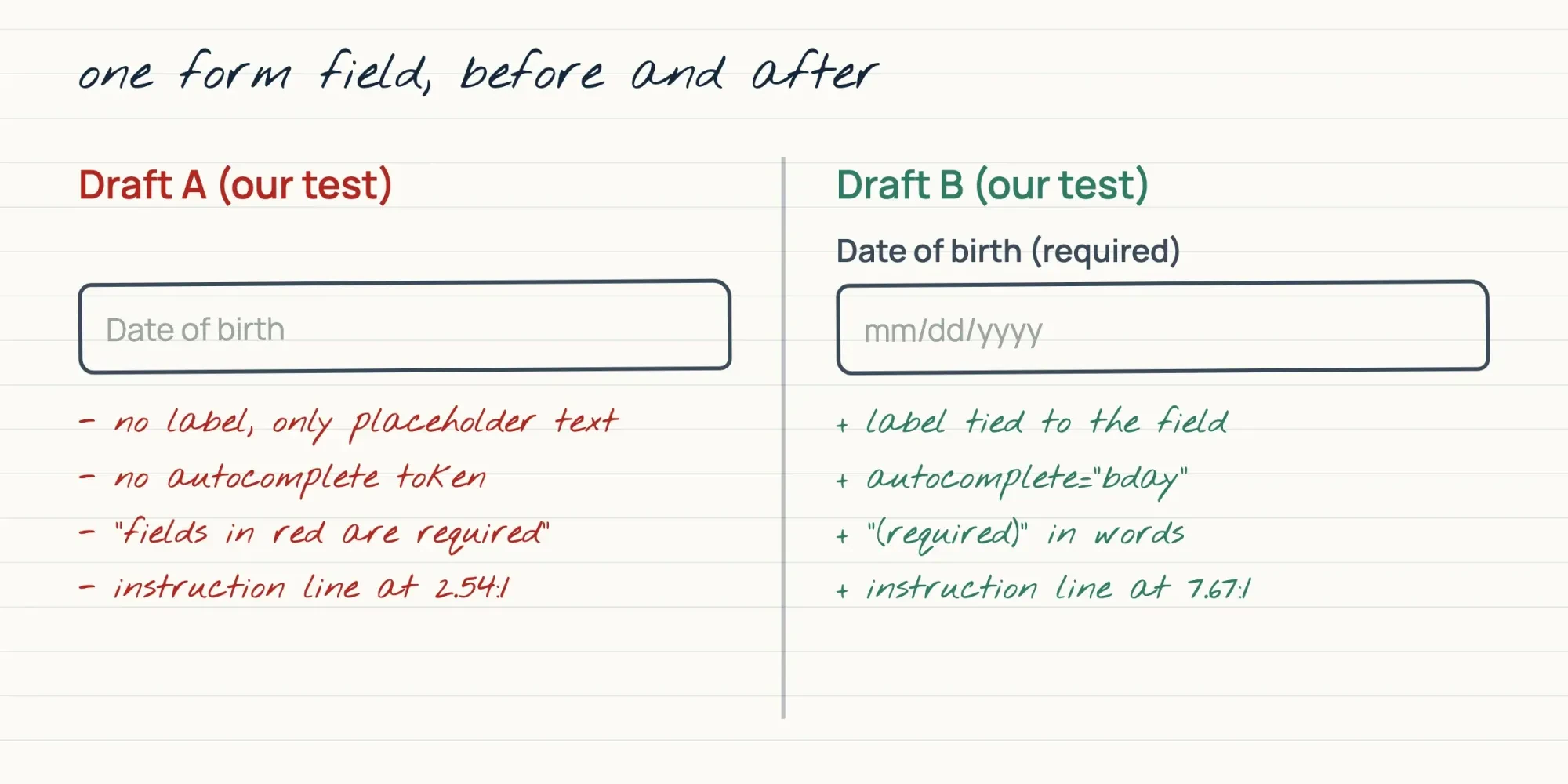 Drawn by us. Notes match our page_check.py results for two made-up drafts, October 28, 2026.
7. Intake forms from a vendor that signs a BAA
Intake forms, the questionnaires patients fill in before a first visit, hold far more detail than a booking request. So use a form or portal vendor that'll sign a business associate agreement (BAA). The HHS business associates FAQ lets a covered entity share health data with a vendor after getting "satisfactory assurances" in writing. Ask each vendor for that contract before the form goes live, and file the signed copy. Ask, too, where the data's stored and how long it's kept, since those answers belong in your own records.
Our test adds one basic: the form should send over https, never plain http. That's our own check, not a quoted HHS rule. Draft A's form posted to an http address and failed it, while Draft B's passed.
8. A telehealth page that explains the visit
First video visits go better when patients know what's coming. Name the video app you use and link its download page. There's an HHS resource on educating telehealth patients that suggests telling patients when and how you'll contact them. It also suggests sharing the email address or phone number messages will come from, and naming your vendors with a pointer to their privacy practices. One telehealth page can cover all three. Add a short test-your-device step and the number to call if the video drops. We'd keep the page to one phone screen and put that number at the top, where a patient who's lost the video can find it fast.
Must-haves 9-12: privacy notice, tracking, access and reviews
These four carry federal rules, so we've quoted the agencies where the wording matters. Read them with a healthcare attorney, since whether one reaches you depends on facts we can't see.
9. The Notice of Privacy Practices, posted where patients find it
HIPAA has limits worth knowing first. HHS's covered entities page says an entity that isn't a covered entity or business associate "does not have to comply with the HIPAA Rules" at all. Doctors and clinics count as covered entities "only if they transmit any information in an electronic form" in a standard transaction, such as an electronic insurance claim. If you're covered, the notice rule is specific. The HHS page on privacy notices says a covered entity "must prominently post and make available its notice on any web site it maintains" about its services or benefits. In practice, that's a link in every footer and on the patient forms page, which is where our test script looked for it.
10. Tracking tools checked page by page
Analytics tags, ad pixels and chat widgets can see what visitors type, and each one's sending data to a company you may never have signed anything with. The HHS tracking bulletin now opens with a notice about a Texas case. On June 20, 2024, the court set aside the part tying an IP address to a visit to a public page about health conditions or providers. HHS left the other parts posted. HHS says trackers on booking and symptom pages "may have access to PHI in certain circumstances" even without a login. Login or sign-up details typed on a portal page count as individually identifiable health information.
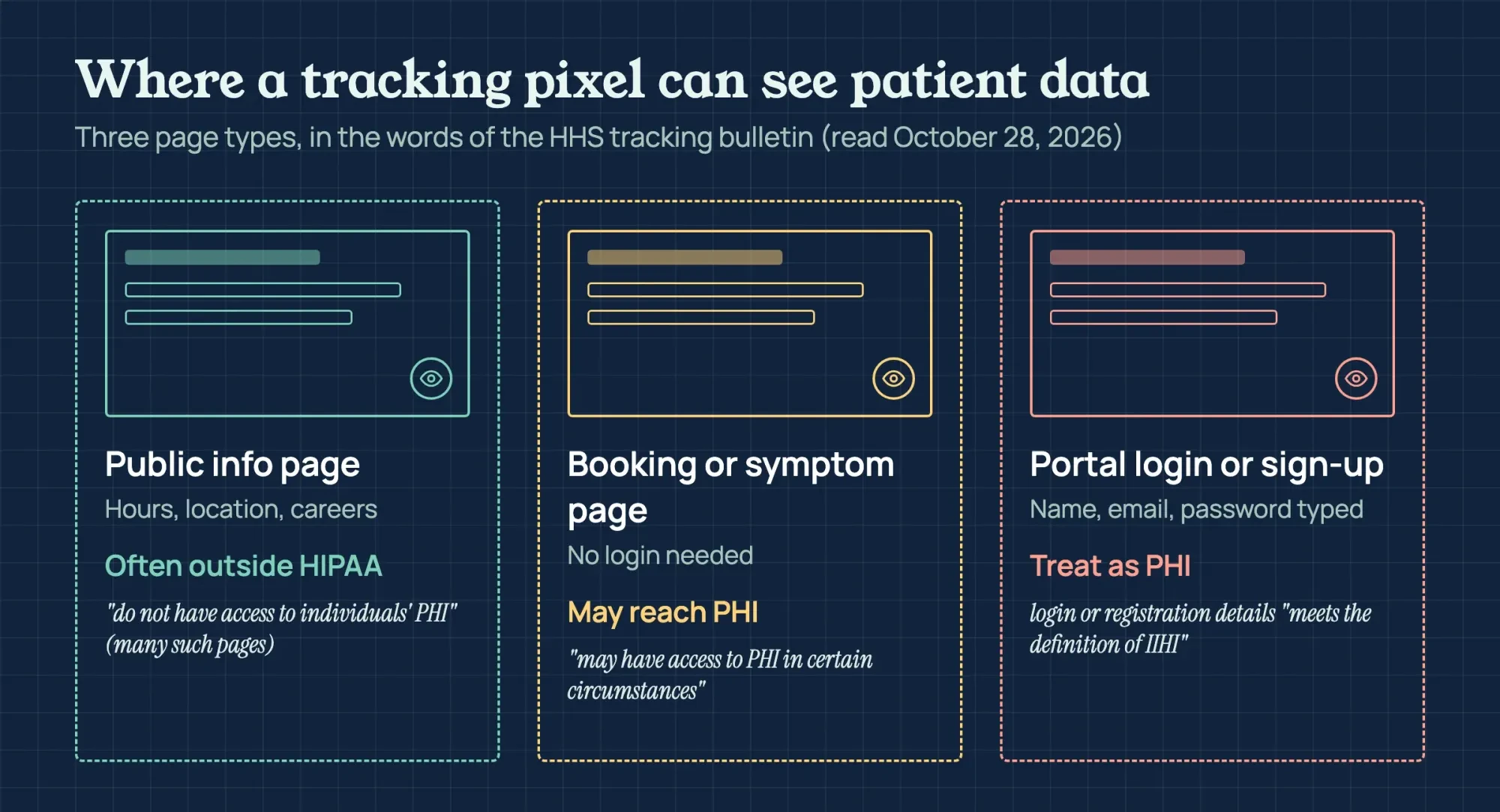 Diagram by DigitalTreed. Wording quoted from the HHS online tracking bulletin, read October 28, 2026.
Two more lines trip up practices. HHS says cookie banners that ask visitors to accept or reject tracking "do not constitute a valid HIPAA authorization" under its rules. It also says a tracking vendor that meets the definition of a business associate needs a signed BAA. If the vendor isn't a business associate, or no Privacy Rule permission applies, patients' HIPAA authorizations are required before PHI reaches it.
HHS adds that a vendor that fits the definition is a business associate "regardless of whether the required BAA is in place." An unsigned contract doesn't change the vendor's status.
So list every script on your booking, forms and portal pages, and drop any whose vendor won't sign. It's best to start with the booking page. Open it in Chrome, open the developer tools, pick the Network tab and reload, then filter by JS to see each script and the host serving it. Note each host beside its page. Repeat it on the forms and portal pages. Then ask the company behind each host two questions in writing: does it receive anything a visitor types, and will it sign a BAA? Anything nobody on your team can name comes off the page until someone can. Our dermatology marketing guide goes deeper on ad pixels and review replies for one specialty.
11. Pages people with disabilities can use
The DOJ web guidance gives businesses flexibility in how they meet the ADA, and it names WCAG and the Section 508 Standards as existing technical standards. There's a firmer target for practices that get HHS funding. HHS's Section 504 fact sheet sets WCAG 2.1 Level AA as the standard, and it says HHS extended the compliance dates by one year on May 7, 2026. The page gives two dates. Recipients "with 50 or more employees have until May 11, 2027 to comply," it says. Those "with fewer than 15 employees have until May 10, 2028" under the same rule. It doesn't give a date for 15 to 49 employees, so ask your healthcare attorney which date applies to your practice.
Meanwhile, fix what a patient with low vision or a screen reader hits first. WCAG success criterion 1.4.3 wants at least 4.5:1 contrast for normal text, and our image alt text checker lists images that don't have alt text. The DOJ's guidance also names videos without captions and pages you can't use without a mouse, so try your booking flow with the Tab key alone. HHS's telehealth resource adds that civil rights laws generally require communication with patients who have disabilities to be as effective as with others. It also says some patients may need a written translation or a qualified interpreter, which belongs on your telehealth page too.
12. Reviews and testimonials that stay honest
Patient stories sell a practice, and the FTC watches how they're used. Its reviews and testimonials rule took effect on October 21, 2024. Its Q&A notes that testimonials can appear "on a company website" as well as in ads. If you pay for reviews or reward people for writing them, the Q&A says those reviews count as testimonials under the rule. The Endorsement Guides Q&A adds that "Results not typical" won't change how a results claim is read. So either have proof the results shown are typical, or clearly say what patients can generally expect. Before a patient's story goes up, ask your attorney whether HIPAA needs that patient's written permission first.
What we tested
Our two test pages belong to Willowmere Family Clinic, a practice we made up. We checked them on October 28, 2026. Draft A carries 11 faults on purpose; Draft B fixes them. Our page_check.py script read both local files for a lang attribute, field labels and autocomplete tokens on 5 personal fields. It checked required fields for the required attribute plus "(required)" in words, then alt attributes, 4.5:1 contrast and an https form address. The rest counted scripts from other hosts and looked for a privacy notice link, a "call 911" line and a free-text reason box.
Draft A failed all 11: no lang attribute, 0 of 7 fields labelled, 0 of 5 autocomplete tokens, a red-only required note and 0 of 2 alt texts. It also had 2.54:1 contrast, an http form, 2 third-party scripts, no privacy notice link, no 911 line and a free-text reason box.
Draft B passed all 11. It's got a lang attribute, 6 of 6 fields labelled (it drops the reason box) and 5 of 5 autocomplete tokens. Its 4 required fields carry the required attribute and say "(required)" in words, and 2 of 2 images have alt text.
Its text reaches 12.1:1 and 7.67:1 contrast, and its form posts over https. It loads 0 third-party scripts and has both the notice link and the 911 line. Text checks like ours can't test keyboard use, screen readers or whether a vendor signed a BAA.
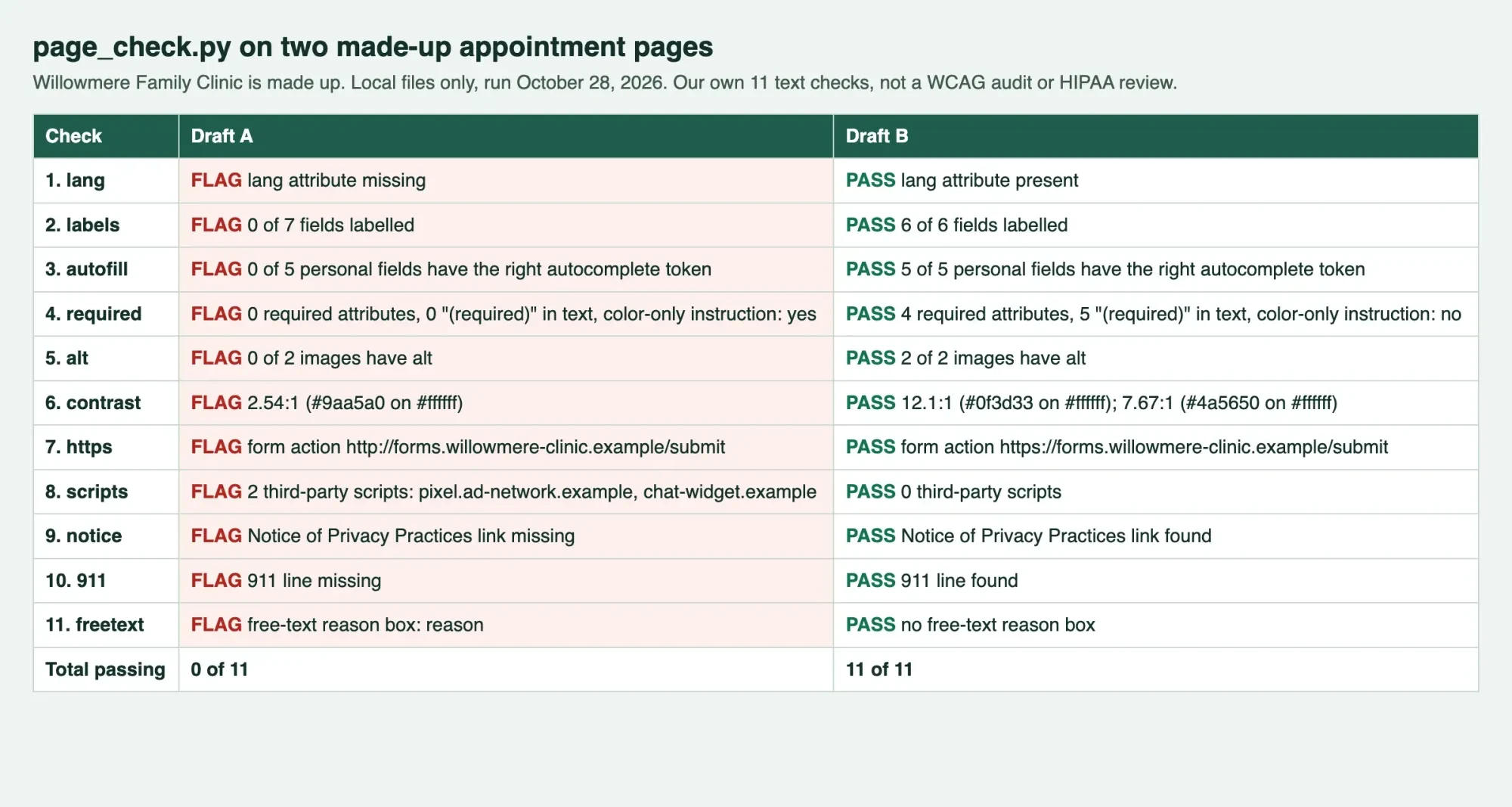 Screenshot of our local results page, October 28, 2026; clinic made up.
The order we'd build it in
A small practice rarely fixes all 12 at once, and it doesn't have to. We'd put the first three steps first because they deal with patient data that may already be leaving the site, while the last two improve pages that are merely weak:
- Post the privacy notice link and the 911 line on every page.
- List every script on booking, forms and portal pages, then get BAAs or remove them.
- Move intake forms to a vendor that signs a BAA, sending over https.
- Fix form labels, contrast and alt text, then book an accessibility audit.
- Add bios, insurance lists, the telehealth page and speed fixes.
Our take: a fast, pretty site with an ad pixel on the booking page is worse than a plain one without it. Our website audit tool flags the technical basics on any page you give it.
Website builds are paid work for DigitalTreed, which is why each rule above points to the agency page rather than to us. If you'd like our price anyway, see how our site builds work or request a quote with your page list and current vendors.
None of this is legal or medical advice. A healthcare attorney should confirm which rules reach your practice before you change vendors, forms or tracking.
Frequently asked
Does a medical practice website have to be HIPAA compliant?
Parts of it can be. The HHS tracking bulletin says identifiable health information collected on a covered practice's site "generally is PHI," even from people who aren't patients yet. A June 2024 court order set aside part of that bulletin.
Can we still use any video app for telehealth?
Not under the old COVID-era relief. HHS's HIPAA and telehealth page says those notices expired May 11, 2023, and the 90-day transition ended on August 9, 2023.
Is our web host a business associate?
It can be. HHS's cloud computing guidance says a cloud host storing patient data is a business associate even without a decryption key.
Does the ADA cover a doctor's office website?
ADA.gov's Title III page lists doctors' offices, and the DOJ's web guidance says the ADA covers what they offer online.
How we made this guide: Each rule comes from a Sources page read in a browser on October 28, 2026. Lines in quotation marks are exact; the rest are close paraphrases. Our page_check.py test ran that day on two made-up local pages. Facts checked by the DigitalTreed team on October 28, 2026.
First published June 2023 as an overview of digital technology in healthcare. Rewritten October 28, 2026: now a build guide for small US practices, with HIPAA, ADA and FTC website rules quoted from the agencies.
Sources
- HHS: Use of Online Tracking Technologies by HIPAA Covered Entities and Business Associates
- HHS: Covered Entities and Business Associates
- HHS: Notice of Privacy Practices for Protected Health Information
- HHS: HIPAA and Telehealth
- HHS: Resource for Health Care Providers on Educating Patients about Telehealth Privacy and Security Risks
- HHS: Business Associates FAQs
- HHS: Guidance on HIPAA and Cloud Computing
- HHS: Section 504 Final Rule, Section by Section Fact Sheet
- ADA.gov: Guidance on Web Accessibility and the ADA
- ADA.gov: Businesses That Are Open to the Public
- FTC: The Consumer Reviews and Testimonials Rule, Questions and Answers
- FTC: Endorsement Guides, What People Are Asking
- CMS: What is a good faith estimate?
- Google Search Central: Understanding Core Web Vitals
- Google Business Profile Help: Manage your local business links
- schema.org: MedicalClinic
- W3C: Understanding Success Criterion 1.4.3, Contrast (Minimum)
- W3C: Understanding Success Criterion 1.3.5, Identify Input Purpose


Comments
No comments yet. Start the conversation below.