
Quick answer
The website development process is the path a site takes from first brief to launch: discovery, contract, sitemap, design, content, build and testing, then launch. Agencies such as wpminds put a small-business site at 4 to 6 weeks; our example plan takes 8. Most delays come from decisions and late content, not code.
Think about a kitchen remodel. Nobody cuts a cabinet until you've approved the layout, picked the finishes and agreed on a price. If you change your mind about the sink after the plumbing is in, you pay for it twice.
Websites aren't any different.
The website development process is the order of decisions and work that turns "we need a new site" into a live, working website. Each stage ends with something you approve, and each approval makes the next stage cheaper to get right. This guide walks through the stages from the owner's side of the table: what you decide, what you hand over, what it costs in time or money, and the checks people skip.
Key takeaways
- The process runs in 7 stages, and each ends with something you approve.
- A copyright transfer is not valid unless it is in writing and signed.
- Keep staging behind a password or noindex tag, not a robots.txt block alone.
- Content is the usual reason a website launch slips.
- On a redesign, map every old URL to its new page before launch.
Seven stages, and what you sign off at each
Those stages run in much the same order on the small-business projects we see, even when the agency gives them different names. Some overlap, especially design and content. The table shows the owner's part of each one, with the weeks from the 8-week example plan later in this guide.
| Stage | You decide or approve | You hand over | Weeks (our plan) |
|---|---|---|---|
| 1. Discovery | Goals, must-have pages, budget | Logins you already have, sites you like | 1 |
| 2. Contract | Scope, price, who owns what | Signature, deposit | 1 |
| 3. Sitemap | The page list and layouts | Nothing new | 2 |
| 4. Design | The look, in 1 or 2 rounds | Logo, colors, photos | 3 to 4 |
| 5. Content | Every page's final text | Copy, facts, prices | 3 to 5 |
| 6. Build and test | Fixes after your phone check | Form test answers | 5 to 7 |
| 7. Launch | The go-ahead | Domain access for the switch | 8 |
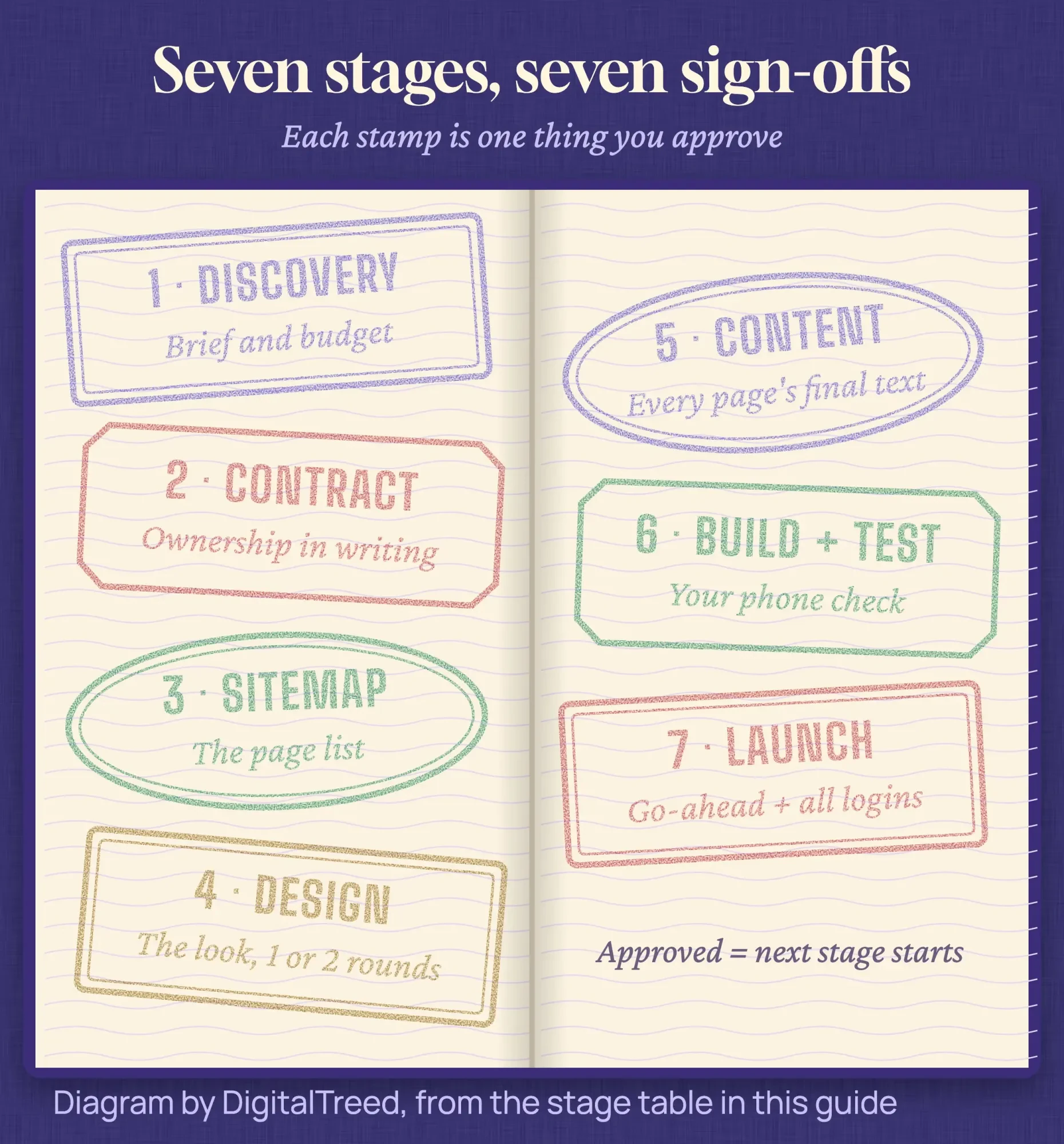 Diagram by DigitalTreed: the seven stages and the owner sign-off that closes each one.
Discovery decides most of what you'll pay
So the first stage, discovery, is a meeting or two where you and the builder agree on what the site is for. That means who it serves, which pages it needs and what a visitor should do on it: call, book or buy. You also settle the budget and the deadline here, because both shape every later choice.
The biggest decision in this stage is how the site gets built. A builder like Squarespace, WordPress with a theme, or custom code each changes the price, the timeline and how much you can edit later. We compare those routes in our guide to no-code vs custom development, so we won't repeat the tables here.
Google's own advice on hiring help says "a great time to hire is when you're considering a site redesign (the earlier, the better), or planning to launch a new site," in its page Do you need an SEO?. We'd say the same about any specialist: bring them in at discovery, not after launch.
What it costs you: mostly time. Our estimate is 2 to 4 hours of the owner's time for a small site, including gathering logins and a short list of sites you like.
Bring a real deadline, not a hopeful one. Every later stage gets planned backward from it.
Get ownership in writing before design starts
Then the contract turns those discovery notes into scope, price, payment dates and the number of design rounds included. It's also where you settle who owns the finished work, and that part is easy to miss.
Under U.S. law, a transfer of copyright "is not valid unless" it's in writing and signed, per 17 U.S.C. 204(a). The Copyright Office's Circular 30 on works made for hire adds that commissioned work only counts as "made for hire" in set categories, and "The agreement must be signed by all parties."
A handshake and a paid invoice don't make the design, code or copy yours, because copyright "vests initially in the author" under 17 U.S.C. 201(a).
Ask for a clause that assigns the design, code and copy to you on final payment, and lists any theme or plugin licenses that stay with their makers. Our guide to hiring a website designer covers the clauses and questions in more depth.
We build websites for a living; we aren't lawyers. The law notes in this guide show you what to ask about, and a business attorney should read any contract or privacy notice before you rely on it.
The sitemap fixes the page list, and late pages cost the most
Once the contract's signed, the builder draws a sitemap: the list of pages and how they link. For a local service business it might be six pages, like the example later in this guide. Wireframes come next. They're plain gray boxes showing what sits where on each key page, before any colors or photos.
It's the cheapest moment you'll get to change your mind.
Adding a page in week 6 means designing, building and testing it out of order. Say that takes a developer 4 hours (our estimate for a simple page). At the BLS median pay for web developers of $47.85 an hour in 2025, that's about $191 in wages alone, before any agency markup. Approve the page list once and stick to it unless the business changes.
Design rounds are where timelines slip first
After the page list, design is where the site starts to look like yours. Most builders design the home page first, ask for feedback, then roll that look out to the other pages. Your job is to send logo files, brand colors and photos early, and to answer each round within a few days.
Here's the catch with open-ended rounds. Every "can we try one more version?" pushes everything behind it. Your contract should say how many rounds are included and what an extra one costs.
Gather feedback from everyone who has a say, then send it as one list.
People often ask how design differs from development. Design decides how the site looks and how a visitor moves through it. Development builds that design into working pages, forms and settings. On small projects one person may do both, but they're still two separate sign-offs.
Content is the stage owners underestimate
Then there's content: the words, photos, prices and facts on every page. Most small-business owners write at least some of it, and it's the usual reason a launch slips. The agency wpminds says in its website development process guide that delays "typically occur due to unclear scope or content readiness rather than technical difficulty."
Writing a page you know well still isn't quick. Our estimate is 1 to 2 hours per page to draft, then a round of edits, so a 6-page site can eat 6 to 12 hours of your evenings. Start in week 2, not when the design is done.
A rough draft the builder can shape beats a perfect page that arrives in week 7.
Two pages get forgotten here: the privacy notice and the thank-you page after a form. We'll come back to the privacy notice below, because it has to match what the site really collects.
Build on a hidden copy, then test on your own phone
Once the design and most of the content are approved, the developer builds the real site on a staging copy. Build errors on the staging copy are normal; a developer who meets one like the JavaScript module error should fix it there, before launch. That's a private version at a test address, where changes can break things without anyone seeing.
That staging copy should stay out of Google. Google's noindex documentation explains the trap: a page must not be blocked by robots.txt for the noindex rule to work, because "the crawler will never see the noindex rule, and the page can still appear in search results."
That's why staging belongs behind a password or a noindex tag, and a robots.txt block alone won't do.
Testing means opening every page on your own phone, sending every form, and checking speed. web.dev's Web Vitals guide sets the targets most developers use. The largest content should show within 2.5 seconds, a tap should get a response in 200 milliseconds or less, and layout shift should stay at 0.1 or less. You can run a staging page through our website speed test if it's reachable, or read our guide to PageSpeed Insights to make sense of the numbers.
If you sell products, this stage grows. Payments, shipping rates and sales tax all need testing with real orders, and our ecommerce website guide covers those extra steps.
Ownership, privacy and accessibility get missed
Those three get missed because none of them shows up in a design mockup. They still decide whether you control the site, whether your promises to visitors are true, and whether customers with disabilities can use it.
Start with logins. The domain should be registered in your name, with your email on the account. You should also hold admin access to the hosting, the site's dashboard, the Business Profile on Google and the analytics account.
Ask for them at launch, not when a dispute starts.
Next, the privacy notice. The FTC's privacy and security guidance tells businesses to reread their privacy policy "to make sure you're honoring the promises you've pledged." A notice copied from another site often promises things yours doesn't do. The FTC's guide to protecting personal information also says to "Keep only what you need for your business," so a booking form shouldn't ask for a birth date it never uses.
California's privacy law, the CCPA, only reaches businesses that pass a size or data test. The California Privacy Protection Agency's CPI adjustment notice sets the revenue test at $26,625,000 a year, effective January 1, 2025. The Attorney General's CCPA page still shows the older $25 million figure, alongside the other two tests for companies that trade in personal data.
Then accessibility. The Justice Department's guidance on web accessibility and the ADA is dated March 18, 2022. It says the ADA applies to businesses open to the public, including what they offer "on the web." It gives businesses flexibility in how they comply and points to WCAG among the existing standards. It also warns that "A 'clean' report does not necessarily mean everything is accessible." Asking for WCAG 2.2 level AA in the contract is our advice, not a rule the DOJ sets for businesses.
Launch-day checks take an afternoon
Now the launch itself: the moment the domain points at the new site. Most of the work is a short list of checks, and skipping them is how a finished site ends up invisible or slow.
We tested two of those checks on October 24, 2026. We built a one-page copy of a made-up Raleigh pet groomer and served it from our own machine the way rushed launches go out. The staging noindex tag was still in the page, and the hero photo was uploaded at 3,000 pixels wide. Lighthouse 13.5.0 on simulated mobile scored it 63 for SEO, flagged "Page is blocked from indexing", and measured the largest content at 12.0 seconds. That's nearly five times web.dev's 2.5-second target. Then we removed the tag and saved the photo as a 1,200-pixel WebP with its size and load priority set: SEO went to 100, and the largest content showed in 1.7 seconds.
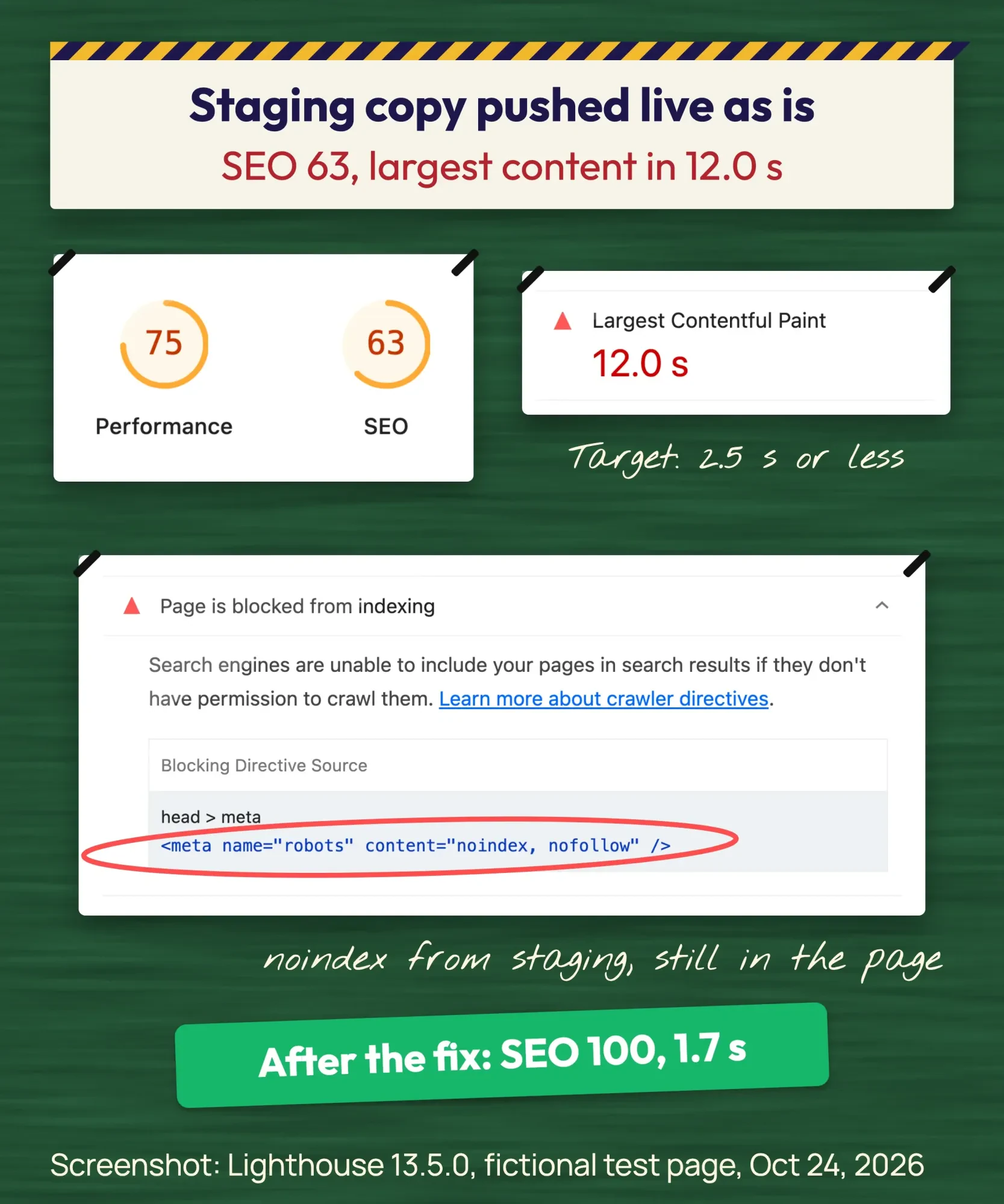 Screenshot: Lighthouse 13.5.0 report for our fictional test page (staging copy), October 24, 2026.
Here's the list we'd run on any small-business launch:
- The noindex tag from staging is gone from every live page.
- The site loads on https, with and without www, and one redirects to the other.
- Every form sends to the right inbox, and the thank-you page appears.
- No broken links or missing images on the main pages.
- The home page passes a speed check on mobile.
- Google Search Console is set up, and the sitemap is submitted.
- You hold every login: domain, hosting, site admin, analytics.
Our noindex tag checker reads a page's robots meta tag, HTTP header and robots.txt, which covers the first item in seconds. After that, it's a waiting game. The SEO Starter Guide from Google says some changes show "in a few hours, others could take several months," and suggests a site: search to see whether you're in the index.
A redesign adds one job: map every old URL
That list assumes a brand-new site. A redesign adds work a new site doesn't have. Your old pages already have links and search traffic pointing at them, and those visitors land on errors if the addresses change.
Google's site move guide tells you to "Prepare a URL mapping from the current URLs to their corresponding new format," then redirect old to new. It adds that "301 and other permanent redirects don't cause a loss in PageRank," and that medium-sized sites can take "a few weeks or more" to show the new URLs. Build the map in the sitemap stage, not on launch night.
After launch, spot-check a handful of old addresses with our redirect checker. You want a single 301 hop to the matching new page, not a chain or a 404. The migration chapter of our advanced SEO guide goes deeper on bigger moves.
How this maps to the software development life cycle
These stages borrow from an older, more formal model: the software development life cycle (SDLC). It's the general model software teams use: requirements, design, building, testing, deployment and maintenance. A website project is a small version of that same cycle, with friendlier names and shorter loops.
Requirements are your discovery and contract. Design covers the sitemap, wireframes and visual design. Building and testing happen on the staging copy, deployment is launch day, and maintenance is everything after. Frameworks have end dates too; AngularJS reached end of life in 2021, and apps built on it now need a plan. Agile and waterfall are two ways of running those phases, in short repeated loops or one pass, and most small sites use a bit of both.
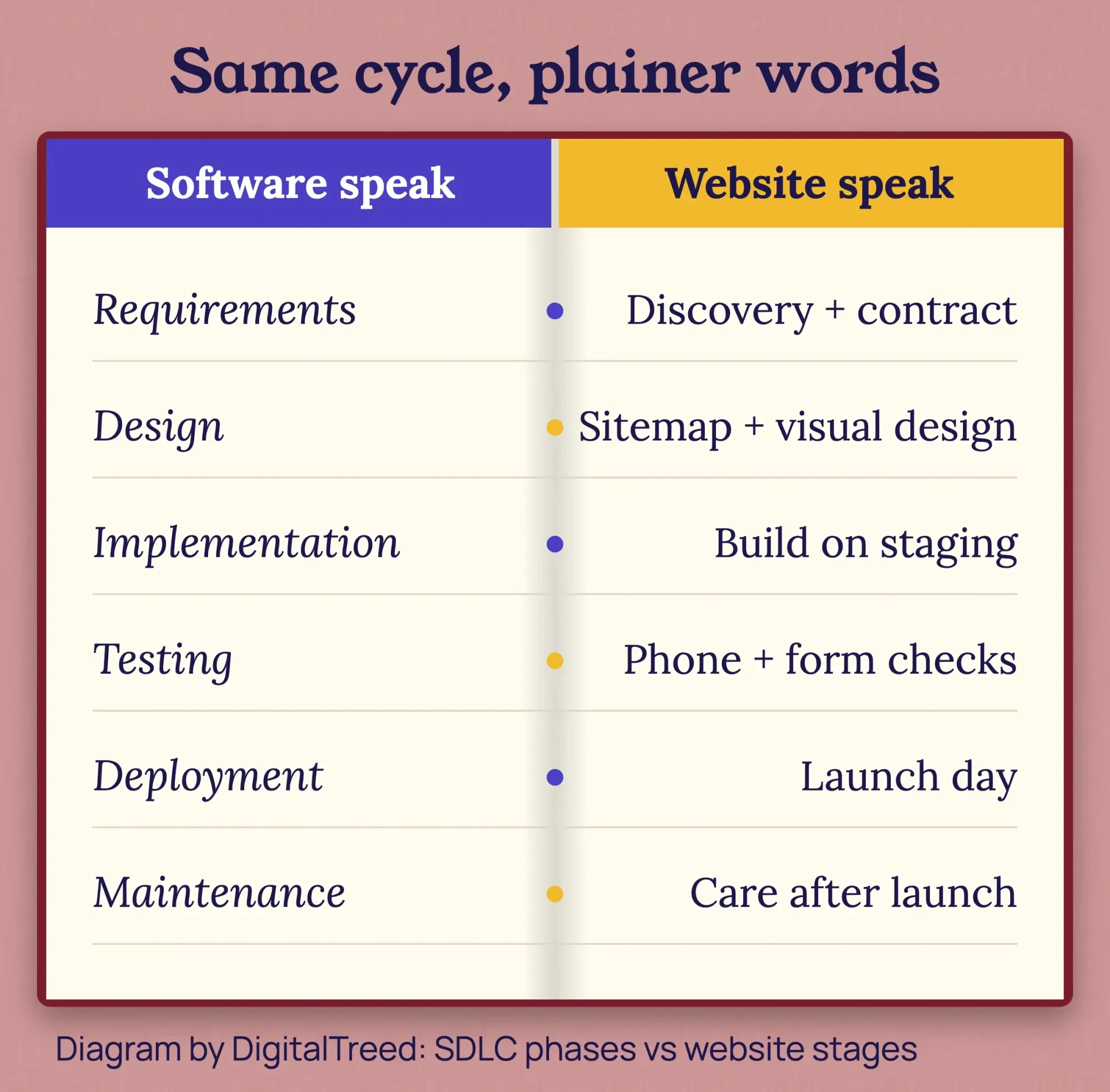 Diagram by DigitalTreed: classic SDLC phases next to the website stages they match.
If a developer mentions "the SDLC", they're talking about the stages in this guide.
How long does it take to build a website?
Vendor estimates for a small-business website run from a few days to about 6 weeks. The wpminds guide gives 4 to 6 weeks for small business sites, 6 to 10 for mid-size service sites, and 10 to 16 or more for complex or ecommerce builds. Wix's website development guide (September 21, 2026) says a simple five-page site takes "a few days to a couple of weeks."
They're vendor numbers, not measured averages, and there's no government source that tracks build time. In our experience the clock is set by how fast decisions and content come back, not by how fast anyone codes.
Example: an 8-week plan for a Raleigh pet groomer
Those ranges are easier to judge against a real calendar, so here's one.
Example: Northside Pet Grooming is a fictional four-groomer shop in Raleigh, North Carolina. It wants six pages (home, services and prices, booking request, about, contact, privacy), a booking form and no online store. The plan below is ours, written to show how the stages fit together. It isn't a client project or a measured result.
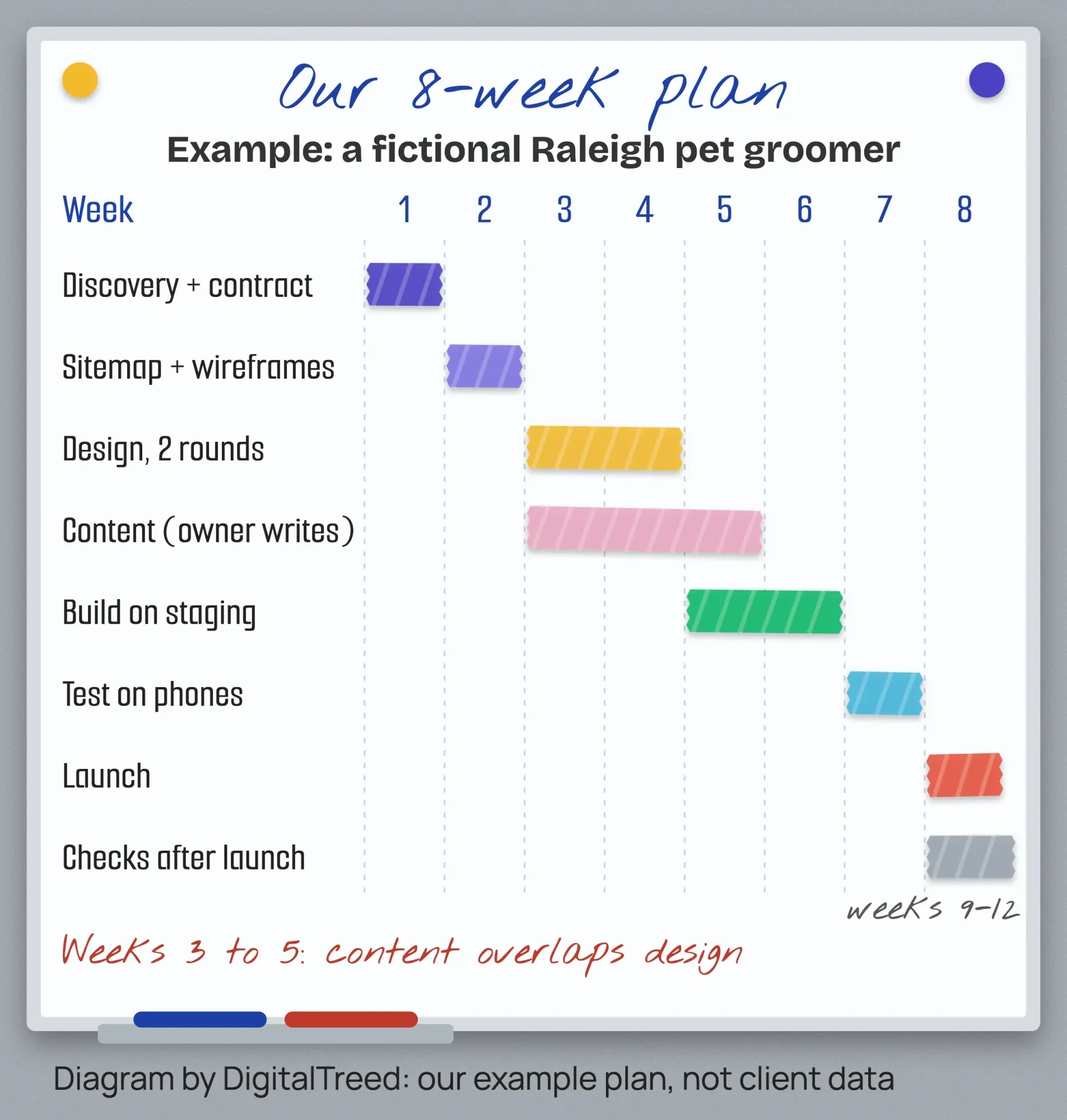 Diagram by DigitalTreed: our 8-week example plan for a fictional business, not client data.
Week 1 covers discovery and the signed contract. Week 2 is the sitemap and wireframes, and the owner starts writing the services page that same week. Design takes weeks 3 and 4, with two rounds. Content runs from week 3 to week 5 alongside it, because the owner writes in the evenings and we edit.
The build happens on staging in weeks 5 and 6. Week 7 is for testing on real phones, fixing the booking form and a final read of every page. Launch lands in week 8, followed by a month of light checks.
Why 8 weeks and not 5? Content. If the owner had every page written before week 3, the same site could launch in about 6.
After launch, the site still needs care
Plugins and themes need updates, backups need testing, and prices and hours change. Hosting or a builder plan is the main running cost. As of October 24, 2026, Squarespace Basic is $19 a month and Shopify Basic $29 a month on yearly billing, and Webflow Basic is $15 a month on an annual plan.
Prefer to run it yourself? Our WordPress tutorial walks through setup and what the first and second years cost.
Either way, you'll want to check Search Console every few weeks for the first three months.
Frequently asked
Can I move my new domain to another registrar right away?
Not always. ICANN's FAQ for domain name holders says a registrar may deny a transfer within 60 days of first registration, as of October 2026. Changing the registrant name, organization or email also starts a 60-day lock. So put the domain in your own name early.
How do I get the code to transfer my domain?
Ask your current registrar, or create it in their dashboard if they offer that. ICANN's FAQ for domain name holders calls it an Auth-Code, also known as a transfer code. As of October 2026, the registrar must give it to you within 5 calendar days of your request.
How long does Google take to find a new website?
Often days to weeks. Google's recrawl help page says crawling can take anywhere from a few days to a few weeks. Owners of the Search Console property can request indexing for a few pages with the URL Inspection tool. Asking again for the same page won't speed it up.
First steps this week
So start this week. Write down the one job your site has to do, the pages you can't live without, your budget and your real deadline. Then make a folder with your logo, photos and every login you already own.
Our take: code is rarely what makes a website late. Decisions are, so make yours early and don't scatter them across ten email threads.
If you want a team to run this process with you, our web development service builds small-business sites, and you can get a quote with your page list. (That's our paid work, so weigh it like any other offer.)
How we made this guide: Our editors checked every law, figure and quote against its original source on Saturday, October 24, 2026. That included the Copyright Office, the FTC, California's privacy agency and Attorney General, the Justice Department, the W3C, Google Search Central, web.dev and the BLS. The launch test is ours. It ran on a fictional one-page site served from an Apple Mac in India, with Chrome 155 and Lighthouse 13.5.0 on simulated mobile, three runs per version, and we report the medians. Each source is linked inline where its fact appears.
First published August 2020. Rewritten October 24, 2026: the old software-team text is gone. The guide now follows a website project from the owner's side, with sign-offs, costs, US law, launch checks, our own test and an 8-week example.
Sources
- wpminds: Website development process guide
- Wix Blog: Website development (September 21, 2026)
- Google Search Central: Do you need an SEO?
- Google Search Central: SEO Starter Guide
- Google Search Central: Site moves with URL changes
- Google Search Central: Block search indexing with noindex
- web.dev: Web Vitals
- 17 U.S.C. 201: Ownership of copyright
- W3C: Web Content Accessibility Guidelines (WCAG) 2.2
- U.S. Department of Justice: Guidance on web accessibility and the ADA (March 2022)
- FTC: Privacy and security business guidance
- FTC: Protecting personal information, a guide for business
- California Attorney General: California Consumer Privacy Act
- California Privacy Protection Agency: CPI adjustments (effective January 1, 2025)
- U.S. Copyright Office: Circular 30, Works made for hire
- 17 U.S.C. 204, Execution of transfers of copyright ownership
- U.S. Bureau of Labor Statistics: Web developers and digital designers
- Squarespace: Pricing (October 2026)
- Shopify: Pricing (October 2026)
- Webflow: Pricing (October 2026)

Comments
No comments yet. Start the conversation below.