
Quick answer
As of October 29, 2026, Google Business Profile websites are gone: Google turned them off on March 5, 2024. Visitors went to the profile until June 10, 2024, and old business.site addresses now show an error. Replace the site with a simple website, one-page builder or link-in-bio page, then paste its final https:// address into the Website field.
If the website link on your Google listing goes nowhere, the old business.site page is the likely cause. A Google Business Profile website was a small site made inside Business Profile, at an address ending in business.site or negocio.site. Our example, Larkspur Lawn Care, is a lawn service we made up.
Below are the two shutdown dates from Google's archived notice and what the profile still shows. Then come three replacement routes with the one US price we could confirm, and our 9-entry test of the Website field.
Key takeaways
- Paste the final https:// address, the one your browser lands on.
- Google turned Business Profile websites off on March 5, 2024.
- The old business.site address we checked returned 404 on October 29, 2026.
- Carrd Pro Standard, with custom domains, was $19 a year on October 29, 2026.
- Only 1 of our 9 test Website entries passed all six checks.
What happened to Google Business Profile websites?
Google didn't shut them down in one go. The live help notice now redirects to another article, so we read it through an archived copy of Google's shutdown notice. It says that as of March 5, 2024, the sites were "no longer available" and visitors went to the Business Profile instead. That redirect ran "until June 10, 2024." After that, Google wrote, customers "will get a “Page not found” error" when they try to visit. For just over three months, then, a customer typing the old address still reached the shop's profile. Both dates have passed.
The shutdown reached into the profile, too. Google says domains ending in business.site and negocio.site "have been removed from the website field," so a blank field you never cleared has a simple explanation.
Printed addresses are the part that's harder to fix. Google's notice gave owners a way to forward a custom domain, but none for a business.site address itself. So any truck wrap, flyer, invoice footer or yard sign that shows one now leads nowhere, and it's worth a walk around the shop and the trucks to find them. Business cards count too. Count them before ordering new ones, since every reprint is a cost the shutdown pushed onto you. A domain you own can point at whatever site you build next. If a sign can't be replaced yet, a sticker with the new address over the old one buys time.
We checked where things stand with one plain request to each of three addresses on October 29, 2026. The business.site home page answers with a 301 redirect to a Google Business page. The business.site address from the 2020 screenshot in this post's earlier edition returns 404, the same error a customer holding an old flyer would hit today. Google's notice URL forwards to its Edit your Business Profile article, which is why we link the archive. We didn't follow any redirects, so each result is the first answer the server gave. To rerun that test on your old address, paste it into the HTTP status checker we built.
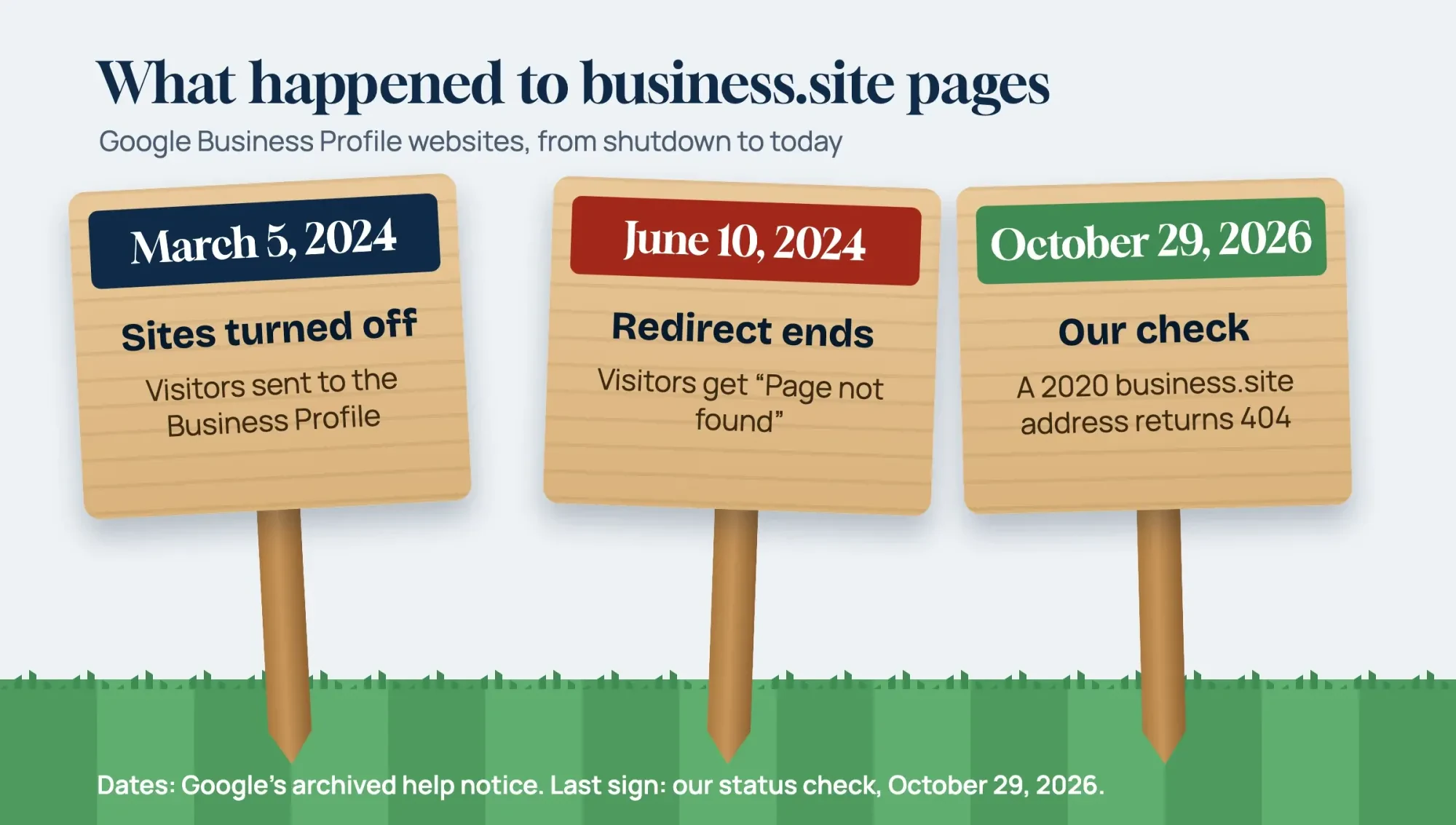 Diagram by DigitalTreed. Dates from Google's archived help notice; the 404 comes from our status check on October 29, 2026.
Your profile still works without the old site
That's the good news. Google's US Business Profile page still says that "creating a Business Profile and listing your business on Google is free." Google's notice said that, apart from the website, Business Profiles "aren’t affected." Google's Edit your Business Profile guide covers hours, special hours, photos, videos and a service area set by cities or zip codes. You can list up to 2 more phone numbers beside the main one, and the description runs to 750 characters, with no URLs or HTML code allowed. Keep that description current, because until the new site goes live, it's the closest thing to a home page your profile has left to offer a customer.
For Larkspur Lawn Care, the mowing area, the spring hours and the crew photos from last season are fine as they are, and nobody needs to touch them. The gap is the Website field.
Someone who wants a price list or a quote form has nowhere to tap. The trip ends on the profile. How the profile ranks in map results is a separate job, covered in the local SEO guide on our blog.
Three ways to replace the old site
Google's notice pointed owners to site builders and named nine: Wix, Squarespace, GoDaddy, Google Sites, Shopify, Durable, Weebly, Strikingly and WordPress. For a small service business, those tools boil down to three routes. Here's how they compare on what a customer gets and what we could price from a US-dollar page:
| Route | What it gives a customer | Price we found (USD, October 29, 2026) | Where it fits |
| Simple website | A page per service, your service area and a contact or quote form | Varies by builder; none quoted here | You want to be found for each service you sell |
| One-page builder | One scrolling page with hours, phone, photos and one button | Carrd: free account; Pro Standard with custom domains $19 a year | You need something live this week on a domain you own |
| Link-in-bio page | A short list of links to booking, reviews and social pages | Linktree: Free plan listed; paid prices showed in rupees, so none here | A stopgap while the real site gets built |
A simple website is the closest match to what you lost. It's the route we'd pick for most service businesses, because it can hold a page per service and a page per town. The Squarespace and Wix pricing pages we opened showed Indian prices, since our office is in India, and GoDaddy's page blocked our request. So we left builder prices out instead of guessing at what US customers pay. Google Sites, one of the nine, follows the steps on Google's Sites help page: pick a template, edit it, then select Publish. It's the only builder of the nine whose steps we read on a Google help page, so it's the one we can describe without guessing.
Rather hand the build to a pro? Read our notes on hiring a website designer first, and ask who will own the domain. A designer can build the same thing on WordPress or any builder on Google's list, and the address stays yours whichever tool ends up running behind it later.
A one-page builder means writing one page instead of several. Carrd's Pro page offers a free account. Its Pro Standard plan, the lowest tier that lists custom domains, costs $19 a year, a price we read on October 29, 2026. The $9-a-year Pro Lite plan doesn't include them. For a lawn crew, one page with the service list, the towns served, a phone button and a quote form does most of what the business.site page did. Carrd's page also says you can "automatically renew yearly or simply pay as you go," so note which one you chose before the next charge lands.
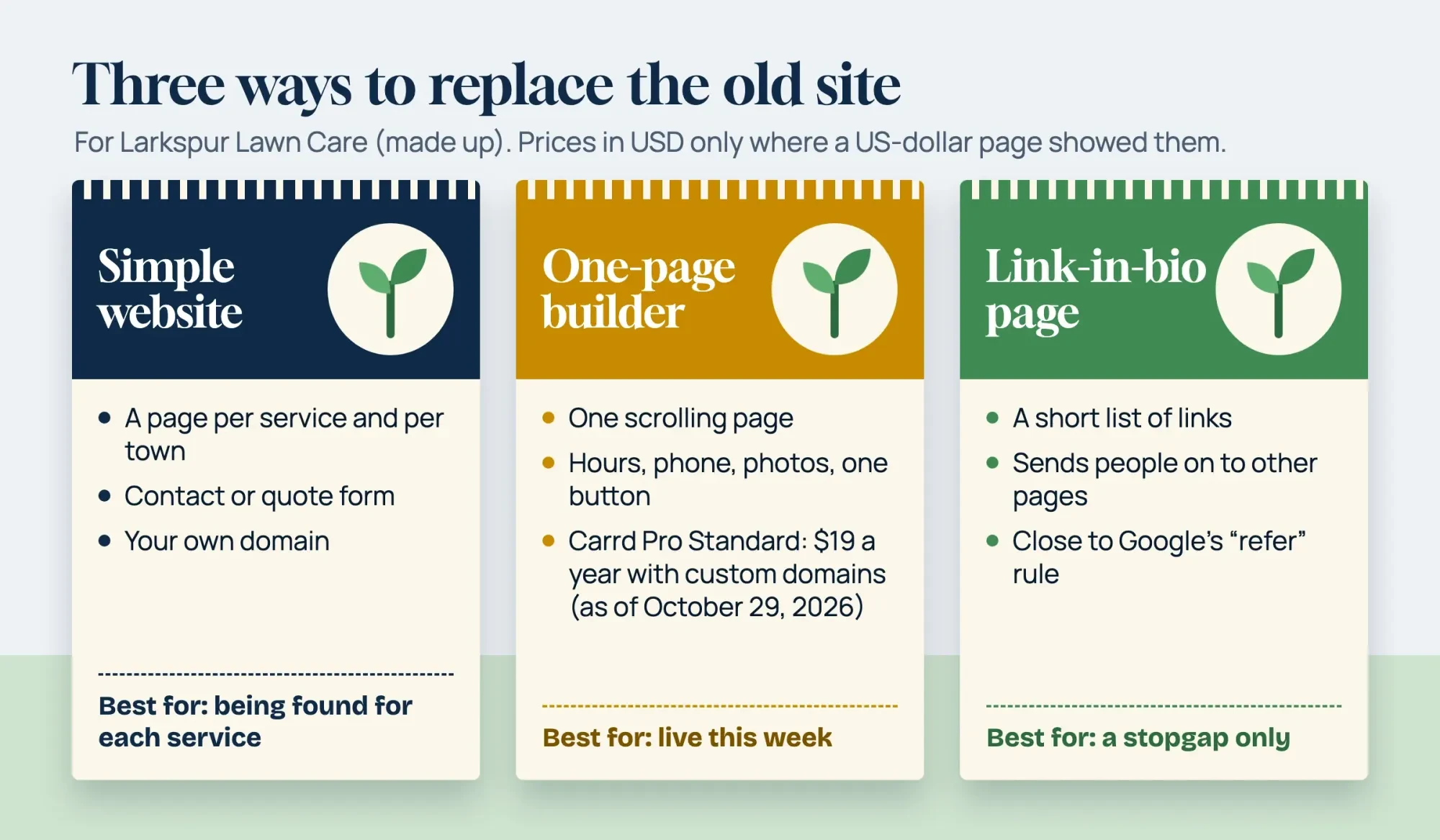 Drawn by us. Carrd price from carrd.com/pro, read October 29, 2026; Larkspur Lawn Care is made up.
A link-in-bio page is the weakest fit for the Website field. Google's business guidelines warn against URLs that "redirect or ‘refer’ users" to pages "other than those of the actual business, including pages created on social media sites." A page that only sends people onward sits close to that line. Linktree's pricing page lists a Free plan, but its paid plans showed in rupees for us, so we don't quote one. The same page pitches Linktree as a link in bio for creators, which suits a social profile better than a lawn crew's Website field. We'd skip it unless you need a stopgap.
Whatever you pick, match the page to the profile. The same guidelines want the business name used "consistently on your storefront, website, stationery," and a phone number "under the direct control of the business." So the new page needs the same name, phone and towns as the profile.
Not sure the business needs more than a profile? Our post on whether your business needs a website covers that first.
Put the new address in the Website field
Once the new page is live, the edit itself is short. Sign in with the Google Account linked to the profile, select Edit profile, change the website, and select Save.
Format is where most mistakes happen. Google's instruction is to "enter the full URL" with http:// or https:// at the front. Its business links policies, written for booking and order links, list the usual errors: spaces, symbols, backslashes and "a duplicate http://". This post's 2020 edition had a link with words and spaces after its http://, the first error on that list. That policy page also bars booking links from blocking a crawler called Google-BusinessLinkVerification. For the Website field, Google simply asks that Googlebot isn't blocked on your site. If you copied the address out of an email or a text, paste it into a plain note first, since a stray space can ride along unseen.
Custom domains need a look too. If you pointed one at the old page, check it now. Google's notice said those domains would forward to the profile only until June 10, 2024, and it told owners to set a redirect at their hosting company. Still forwarding to business.site? Change that redirect to point at the new site. Google's redirect guide for Search prefers a server-side 301 or 308 for a permanent move. Its crawler status code page says Google's crawlers follow up to 10 redirect hops by default.
One hop is plenty. Skip a 302 here, since Google treats it as temporary and keeps the old address in its results. Ask your host for a 301.
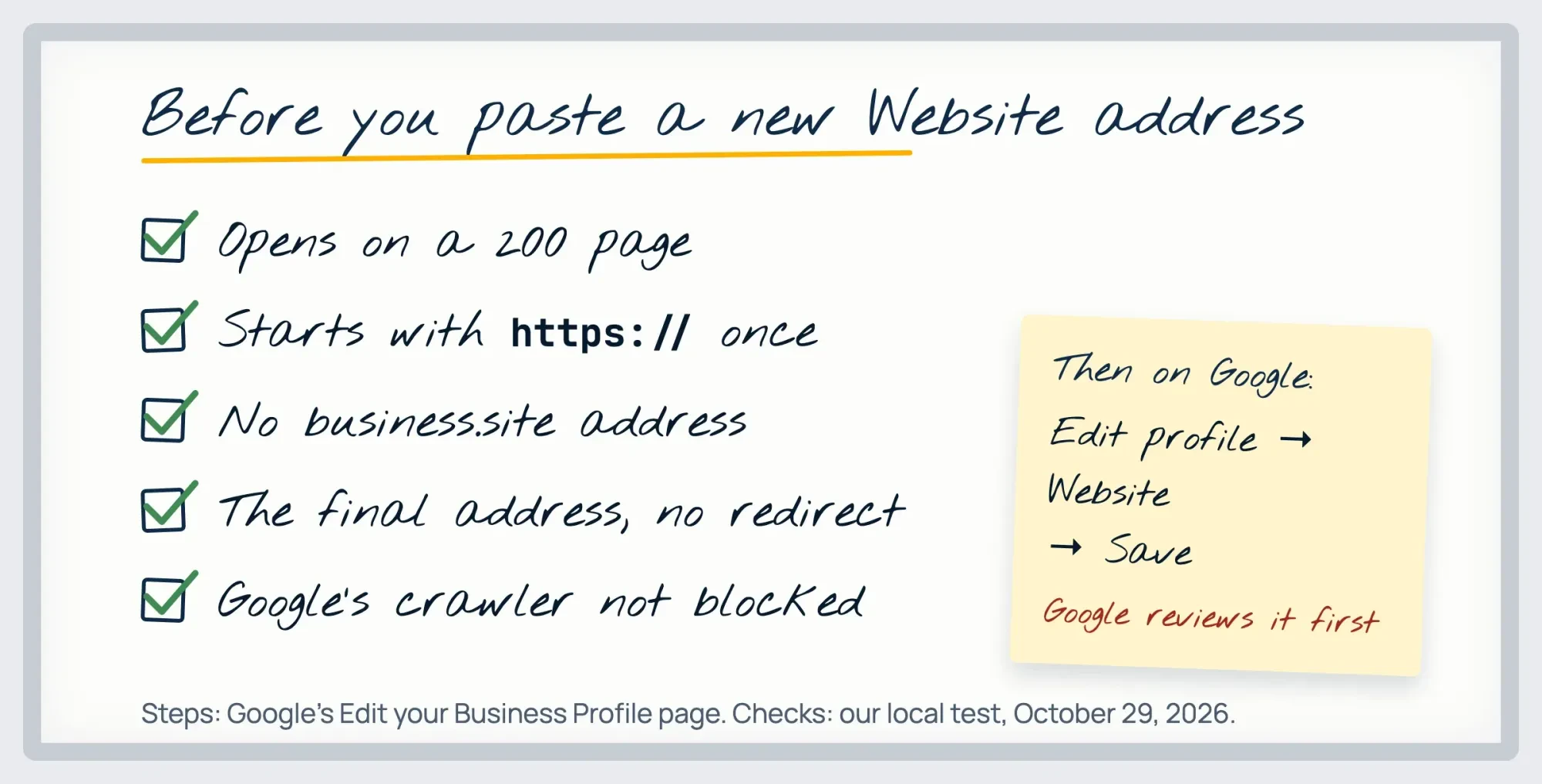 Diagram by DigitalTreed. Steps from Google's Edit your Business Profile page and the checks in our test, October 29, 2026.
Before you paste, run the address through our redirect checker to see every hop. Then copy the address your browser shows at the end, and paste that one instead of the short version you'd type from memory or read off a business card.
Google reviews changes before they show, so don't panic if the new link takes a while to show up on Search and in the Maps app. After the review, look at the profile the way a customer would. Search the business name on a phone, tap Website, and check that it opens the page you meant. Google's edit guide also says it may text or call the verified number in select regions, and answers "may be used to update your profile." It lists that collected info under Edit profile, so glance there if the link ever changes on its own. Then tap it again next month.
What we tested
On October 29, 2026, we served 9 made-up Website entries for Larkspur Lawn Care from a mock server at 127.0.0.1. A Python script checked each one six ways. It looked at URL format, a final 200 page, redirect hops, any stop on business.site, and whether the page sat on the business's own domain. It also compared a browser's answer with the answer to a request using Google's link-checker name. The hop and domain rules are ours. Of 54 checks, 31 passed, 4 warned, 7 failed and 12 were skipped.
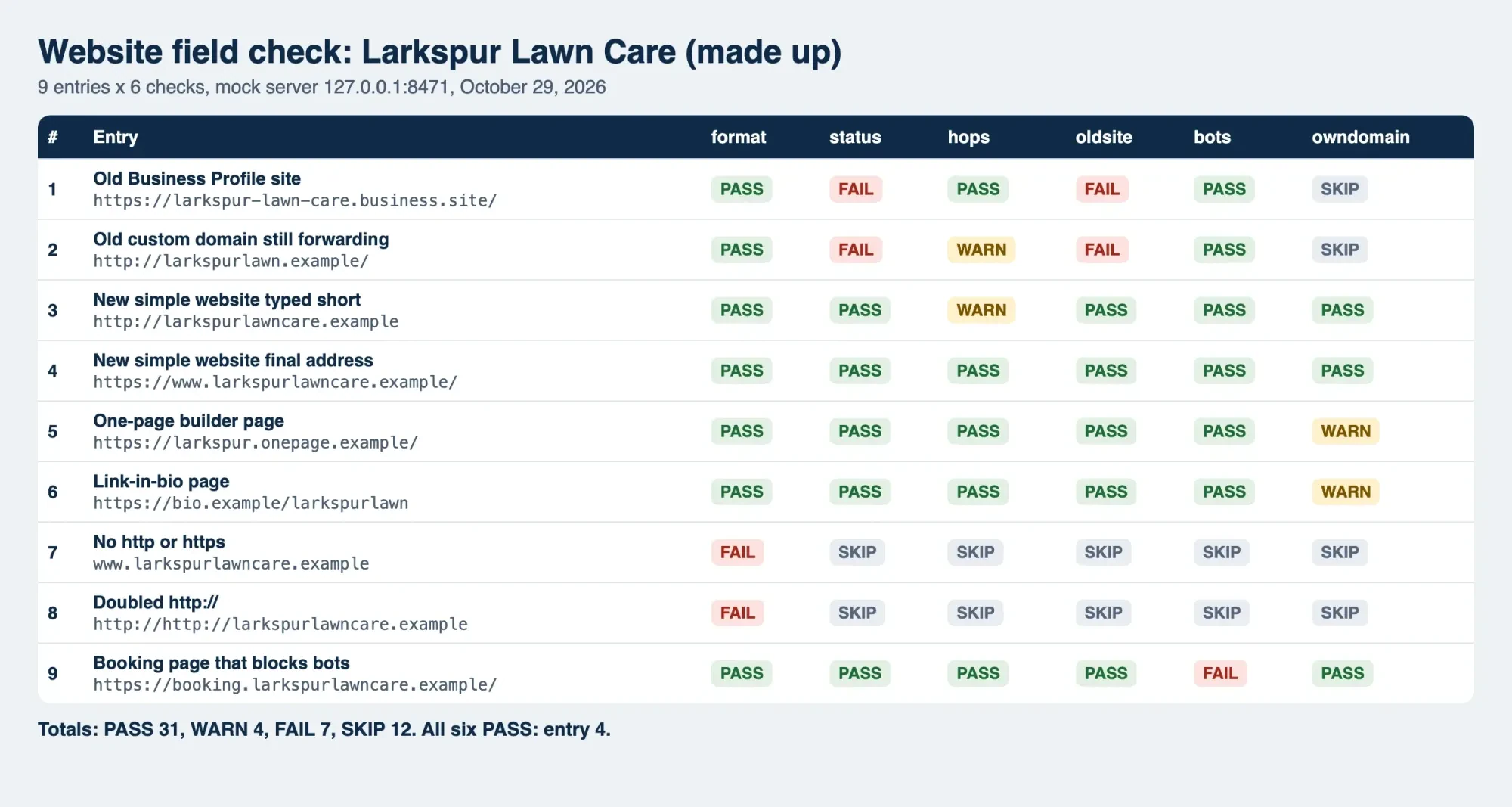 Screenshot: our Website-field check on 127.0.0.1, October 29, 2026.
Start with an address you will keep
Only entry 4, the final https://www address, passed all six checks. Every other entry tripped at least one, and together they show why we'd start from an address you'll keep. The old business.site address and an old domain still forwarding to it both ended on a 404 and failed the business.site check. The forwarding domain also warned on hops with 1 redirect, and both skipped the own-domain check.
The short http:// address worked but warned on hops, with 2 redirects. That's two extra hops on every visit. The one-page builder and link-in-bio pages loaded, but they sat on someone else's host, so our own-domain check warned on each. One entry with no https:// and one with a doubled http:// failed on format and skipped the rest. The booking page loaded for a browser but returned 403 to the crawler agent. Entries 1, 2, 5 and 6 all end on an address that Google or another company controls, not on the business's own domain.
Our take: own the address. The business.site shutdown shows what happens when someone else does. A one-page builder on a domain you control is a single page to publish, on an address that's yours from day one. A simple website can replace it later at the same address, so the profile never needs another edit. Keep a link-in-bio page only for the days before the one-page site is up. Domains renew at the registrar, so put that renewal on the same calendar as your truck insurance, because a lapsed domain breaks the profile link too. For Larkspur Lawn Care, we'd launch the one-page site this week and add a page per service once the spring rush ends.
If you want the whole fix in one sitting, here's the sequence for Larkspur Lawn Care, from the domain to the last flyer:
- Buy the domain, or confirm you still control the one you have.
- Publish a one-page site with the profile's name, phone, towns and a quote form.
- Point any old forwarding domain at the new site with a 301.
- Open the site in a browser and copy the final https:// address.
- Paste it into the Website field, select Save and wait for Google's review.
- Reprint the cards, flyers and signs that still show business.site.
When the site's up, the DigitalTreed website audit tool flags broken links and missing page titles before customers trip over them. We also build small business sites through DigitalTreed's web development service and handle map rankings through its SEO service.
We earn from that work, so weigh our quote against a builder's plan. Get both in writing. None of the six steps needs a paid service from us.
Questions owners ask after the business.site shutdown
Frequently asked
Will Google Ads linked to the old site keep running?
Not reliably. Google's archived notice said ads linked to these sites "may be disapproved and stop running" from March 5, 2024.
Can I add my Facebook page to my Business Profile?
Yes, in select regions. Google's social media links page allows one link per platform across seven, including Facebook and Instagram.
How many booking links can a profile have?
Google's two pages differ. Its local business links page says up to 10 links per category, while its business links rules say a maximum of 20 per transaction type.
Can Google Sites use my own domain?
Yes. Google's custom domain page for Sites allows up to five custom domains per site and says changes may take up to 48 hours.
How we made this guide: We saved eleven Google pages and five builder pricing pages as text (GoDaddy's returned 403) and read the retired notice in an archive. We also sent one status request each to three addresses. The test ran on a local mock server; no Business Profile was opened or edited. Facts checked by the DigitalTreed team on October 29, 2026.
First published July 2020 as steps for building a Google My Business website. Rewritten October 29, 2026: that builder is gone, so this version covers the shutdown, three replacement routes and the Website field.
Sources
- Google Business Profile Help (archived December 17, 2024): Websites made with Google Business Profiles are turned off
- Google: Business Profile (US)
- Google Business Profile Help: Edit your Business Profile
- Google Business Profile Help: Guidelines for representing your business
- Google Business Profile Help: Business links policies and guidelines
- Google Business Profile Help: Manage your local business links
- Google Business Profile Help: Manage your social media links
- Google Sites Help: How to use Google Sites
- Google Sites Help: Use a custom domain for your site
- Google Search Central: Redirects and Google Search
- Google crawling docs: HTTP status codes
- Carrd: Go Pro (plans and prices)
- Linktree: Pricing

Comments
No comments yet. Start the conversation below.