

What Google Business Profile is, who it's for, and who can't have one
This guide is part of our "SEO tools explained" path. It's written for owners of local businesses and the people who run their profiles: a sweet shop in Lucknow, a dentist in Delhi, a coaching centre in Pune, and the freelancers and junior SEOs who set these up for clients. You don't need a website to start, though you'll get more from the profile if you have one.
By the end you'll be able to set up and verify a profile, choose categories and hours the way Google's guidelines expect, add photos, services and posts, ask for and answer reviews without breaking the rules, read the Performance report, add managers safely and appeal a suspension.
There are seven chapters, about 45 minutes in all. Chapter 1 says who can have a profile and who can't. Chapters 2 to 4 follow the order you'd set one up: verify, fill in the details, then photos, services and posts. Chapter 5 is reviews, chapter 6 is Performance and local ranking, and chapter 7 covers several locations, managers, suspensions, paid tools and alternatives. Guide 2's local SEO chapter covers the basics in brief; this guide goes deeper into the tool itself. The profile is free. Paid tools around it were checked on their own pricing pages on 16 October 2026.
Quick answer
Google Business Profile is a free listing that shows your business on Google Search and Maps, with hours, phone, location, photos and reviews. You can have one only if you meet customers in person, at your address or at theirs. Online-only shops, virtual offices and lead-generation businesses aren't eligible.
Search "sweet shop near me" in Lucknow and Google shows a map with a few shops on it, each with stars, opening hours and a Call button. Each of those listings is a Business Profile. The owner controls most of what it says. Google fills the gaps from other sources, and customers add photos and reviews.
Creating a profile costs nothing.[1] With it you can show your hours, website, phone number and location, post photos and videos, collect and reply to reviews, and send people to your website or booking links.[2] Guide 1, chapter 9 explains why this matters for local search in three minutes. This guide is about the tool.
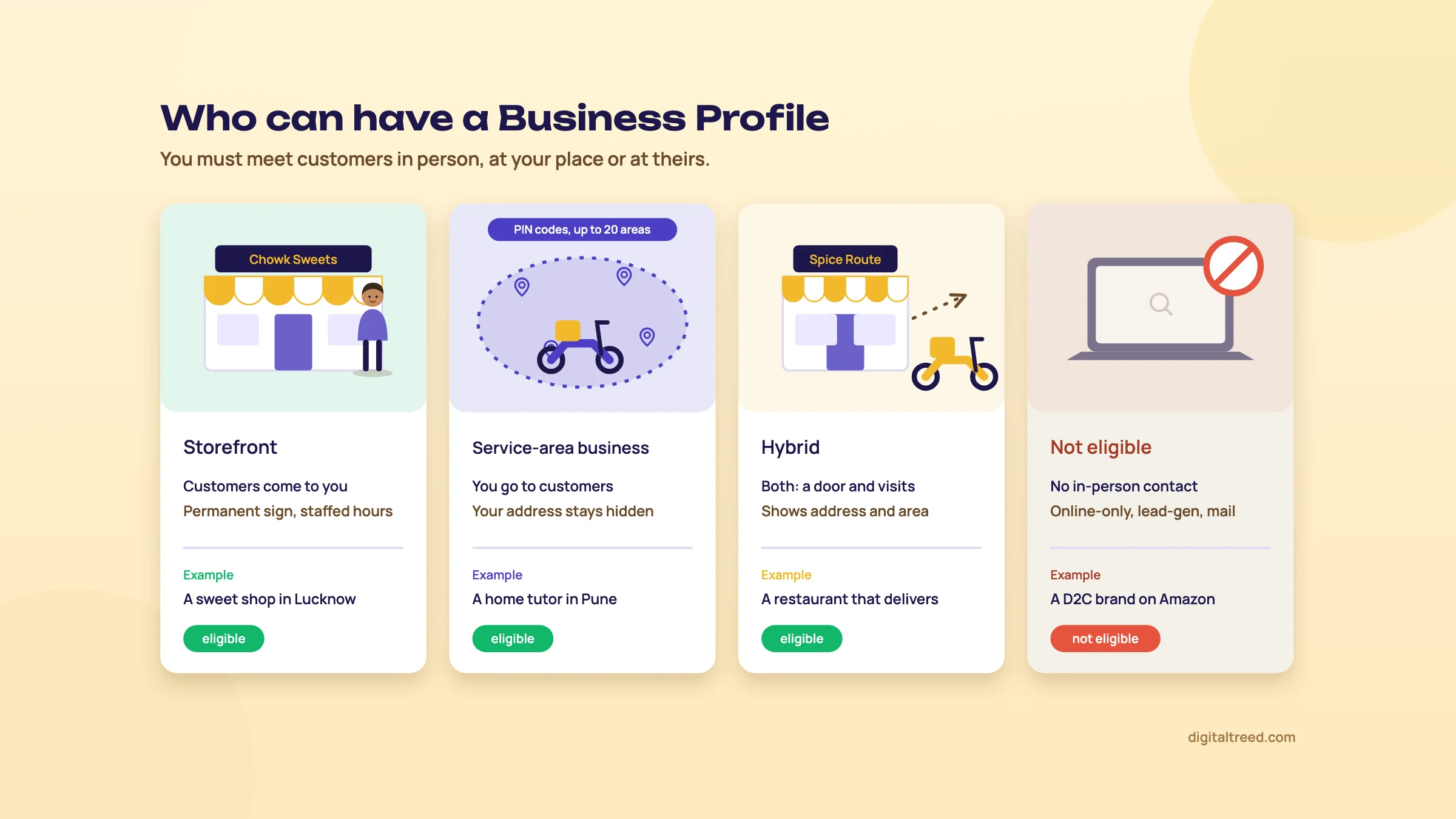 Eligible means you meet customers in person, at your place or theirs. Drawn by us.
Who can have a profile
Google's rule is short: to qualify, a business "must make in-person contact with customers during its stated hours."[3] That gives three kinds of business, and you'll pick one during set-up.
| Type | What it means | Indian example |
|---|---|---|
| Storefront | Customers come to your address during business hours, and the place has permanent signage | A sweet shop in Aminabad, Lucknow |
| Service-area business | You go to customers or deliver to them, and don't serve them at your own address. The address is hidden | A home tutor in Pune, a plumber, a pest-control firm |
| Hybrid | Customers come to you, and you also visit or deliver to them | A Delhi dental clinic that also does home visits for elderly patients; a restaurant that delivers |
The three definitions are Google's, from its verification and service-area help pages.[4] One detail catches people out. If your place has no permanent sign outside, Google says list it as a service-area business, not a storefront.[5]
Who can't
Google's eligibility page lists businesses that don't qualify. These are the ones most likely to matter in India:[3]
- Online-only businesses, such as a D2C brand that sells only through its website, Amazon and Flipkart
- Lead-generation agents, for example a site that takes enquiries and sells them on to plumbers
- Rental or for-sale properties, such as a flat for rent (a sales or leasing office can qualify)
- A class or service held at a place you don't own or represent, such as a yoga batch in a society clubhouse
- Any business whose address is a P.O. box
The guidelines add two more traps. A virtual office, an address you rent only for mail, isn't eligible. And a desk in a co-working space only counts if it has clear signage, receives customers and is staffed during business hours.[6]
Warning
Don't create a profile for an ineligible business "just to be on the map". Google's eligibility page says that breaking these policies can get the profile or the Google Account suspended.[3] Chapter 7 covers what that looks like and how hard it is to undo.
When you don't need it, and what to use instead
If you aren't eligible, Google's own advice for online-only businesses is Google Ads.[2] For organic search, an online store needs its website, Search Console and, if it sells products, Merchant Center. Our Search Console guide starts there. A brand with no local customers gets nothing from a profile that it can't get from its website.
If you are eligible, we think there's no case for skipping it. The profile is free, it is the source of the map listings, and Google points local businesses to Business Profile rather than a knowledge panel[7] (Guide 3, chapter 7).
Where Justdial and IndiaMART fit
Indian customers also search Justdial, IndiaMART and Sulekha. Those listings bring calls of their own and repeat your name, address and phone on other sites. They don't replace a Business Profile, and the profile doesn't replace them. Guide 2, chapter 10 compares the three and explains NAP consistency, so we won't repeat it here.
What the profile can't do
It can't buy you a better position. Google states that "There's no way to request or pay for a better local ranking on Google."[8] Chapter 6 explains what does decide it. And it can't fix a slow or confusing website; the profile sends people there, so check the site before you send traffic to it.
If your business qualifies, chapter 2 creates or claims the profile and gets it verified.
Create or claim your profile, and get it verified
Quick answer
Search for your business on Google Maps first. If a profile exists, claim it or request ownership; if not, add one at business.google.com/add. Google then picks your verification methods: phone or SMS, email, a live video call, a postcard or a recorded video. Review can take up to five business days.
Many set-up problems start in the first ten minutes: a second profile made because nobody searched for the first, or a profile verified on a staff member's Gmail. Do these steps in order and you avoid both.
Step 1: use an account the business owns
You need a Google Account to sign up. It can be a Gmail address or any email address you already use, including one on your own domain.[9] We'd use an address the business controls, such as [email protected], and add people later as managers (chapter 7). When the person who set up the profile leaves, the profile stays with you.
Step 2: search before you create anything
Google, customers and old directory data often create a listing before the owner does. Search your business name and city on Google Maps. You'll land in one of three places:
| What you find | What to do |
|---|---|
| No listing | Go to business.google.com/add, select Add your business to Google, fill in the details on screen, then choose a verification option[1] |
| A listing nobody has verified | On a computer, open the listing in Google Maps and select Claim this business, then Manage now. In the Maps app it's under About. Then verify[1] |
| A listing someone else verified | Request ownership (below). Don't make a second profile |
A second profile is a duplicate, and Google says a profile it treats as a duplicate won't show on Search or Maps.[10]
When someone else already owns it
A typical case: a former manager, a web designer or an agency verified the listing years ago, and nobody has the login. Go to business.google.com/add, enter the name and address, choose your business, then select Request Access and fill in the form.[11] The current owner gets an email and has three days to reply.
- Approved: you can manage the profile.
- Denied: you can suggest edits or appeal.
- No reply after three days: you may get the option to claim it through the link in your confirmation email, but Google says this "isn't always available".[11]
For a service-area business with no shop, Google asks you to contact support instead and choose "Transfer ownership of listing".[11]
Step 3: verification, and the methods Google offers
Verifying is what lets you edit the profile and reply to customers.[9] You don't choose the method. Google's help page says methods "are automatically determined by Google and can't be changed", based on your business type, public information, region and hours, and some businesses need more than one.[9]
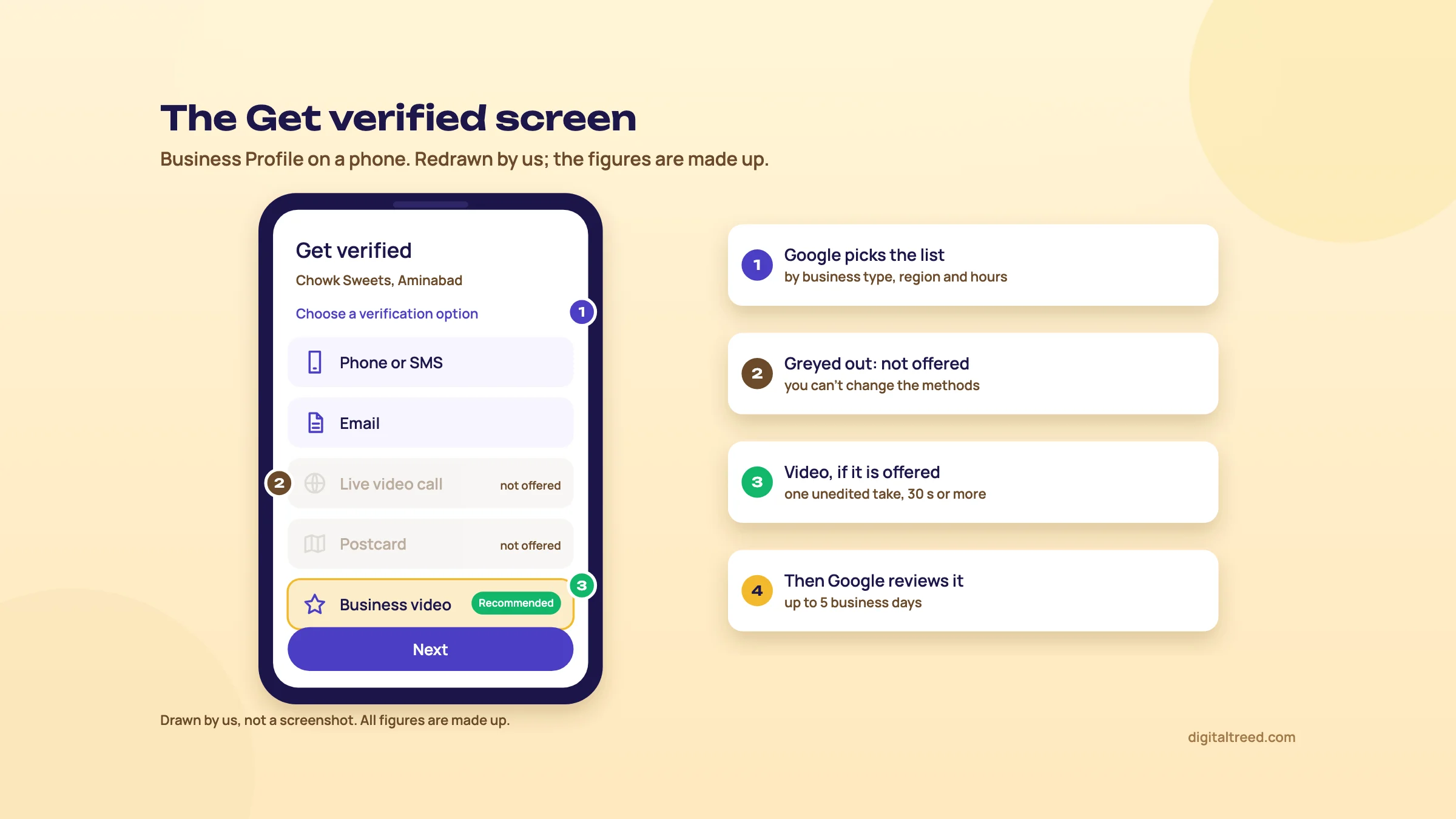 You don't pick the methods; Google does. Drawn by us; the figures are made up.
| Method | How it works | Watch out for |
|---|---|---|
| Phone or SMS | A code by call or text to the business number; you enter it on the profile | An IVR menu won't receive the code, so be ready to answer the call yourself |
| Follow the steps in an email sent to the address shown | You must be able to open that inbox | |
| Live video call | A support representative watches as you show the place on camera | Only during your business hours, and not offered to every business |
| Postcard | A 5-digit code by post; most arrive within 14 days and codes expire after 30 | While you wait, don't edit the name, address or category, and don't request a new code |
| Recorded video | A single unedited clip of at least 30 seconds, recorded in the profile on a phone | No pre-recorded or edited footage; see the steps below |
All details in the table are from Google's verification help page,[9] and the video rules from its video recording page.[5] Google also says that if your business is eligible for video verification, it recommends that option.[9]
After you finish, Google reviews what you sent, which takes up to five business days, and on rare occasions longer. Sometimes it verifies instantly, for example when you've already verified your website in Search Console.[9] One more reason to set up Search Console first; our Search Console guide shows how.
Recording a verification video that passes
The video is the easiest method to get wrong, because Google wants specific things on camera: three kinds of proof, and they differ by business type.[5]
| Proof | Storefront or hybrid | Service-area business |
|---|---|---|
| Where you are | Street signs, building numbers, nearby businesses or familiar places | Street signs or landmarks near your business address; avoid empty land |
| That the business exists | Your storefront and signboard, with the name matching the profile | Your tools, equipment, products, business cards or branded clothing |
| That you run it | Something only staff can open: the cash counter, kitchen or store room | You doing the work, opening a branded vehicle, or a permit, invoice or utility bill in the business name |
The video must not show bank account, tax or ID numbers, private information or other people's faces.[5] That means filming the counter before customers arrive.
Verify a Lucknow sweet shop with a video recording
- Plan the shot list Write three lines on paper: "street and neighbours", "signboard and front", "inside the counter". Plan to film before opening time, so no customer's face is in the shot.
- Check the name matches The name on the signboard must match the name on the profile.[5] If the board says "Chowk Sweets" (a made-up name), the profile can't say "Chowk Sweets Best Mithai Lucknow".
- Start from the profile On your phone, open your Business Profile, tap Get verified, then Business video, then Next. Read the requirements and allow camera, microphone and location access when asked.[5]
- Film the street Start outside: the road sign, the shop next door, a landmark people know. Walk towards the shop without stopping the recording.
- Film the signboard and front Hold on the board for a few seconds so the name can be read, then the display of sweets.
- Prove you run it Open the shutter or the cash drawer, then the store room, or show the kitchen where the sweets are made. Keep going until the clip passes 30 seconds; one unbroken take.
- Review and upload Watch it back, tap Try again if anything is missing, then Upload video.[5]
- If it's rejected Tap Review issues on the profile. Google lists what was missing, for example "Business name not visible on storefront". Record a new video with everything from the first one plus the missing part.[5]
Tip
Work from home as a tutor or electrician? You can still verify by video. Google says a home-based service-area business can film landmarks and signs in its immediate neighbourhood, then show its tools and a document in the business name.[5] Keep your home address hidden on the profile (chapter 3).
If verification fails or comes back
If the Get verified button reappears, Google couldn't fully verify you; try again, or try another method if more than one is offered. You may also be asked to re-verify after changing important details.[9] Google's help pages say a new name or address can mean verifying again,[12] and so can a change of category.[13] So finish those fields before you verify and leave them alone afterwards unless the business really changed.
Guide 2's planned set-up video (Guide 2, chapter 10) walks through these steps on screen. Once you're verified, chapter 3 fills in the profile.
Name, categories, address, hours and the other details
Quick answer
Use your real signboard name with nothing added, one specific primary category plus a few more that are true, a precise address or up to 20 service areas, and real customer-facing hours with special hours for festivals. Then add phone, website, a WhatsApp or text link, attributes and a description of up to 750 characters.
Everything in this chapter lives under Edit profile, on Google Search or in the Maps app under Business.[12] Google reviews each change before it goes live, so don't panic if an edit takes a while to show.
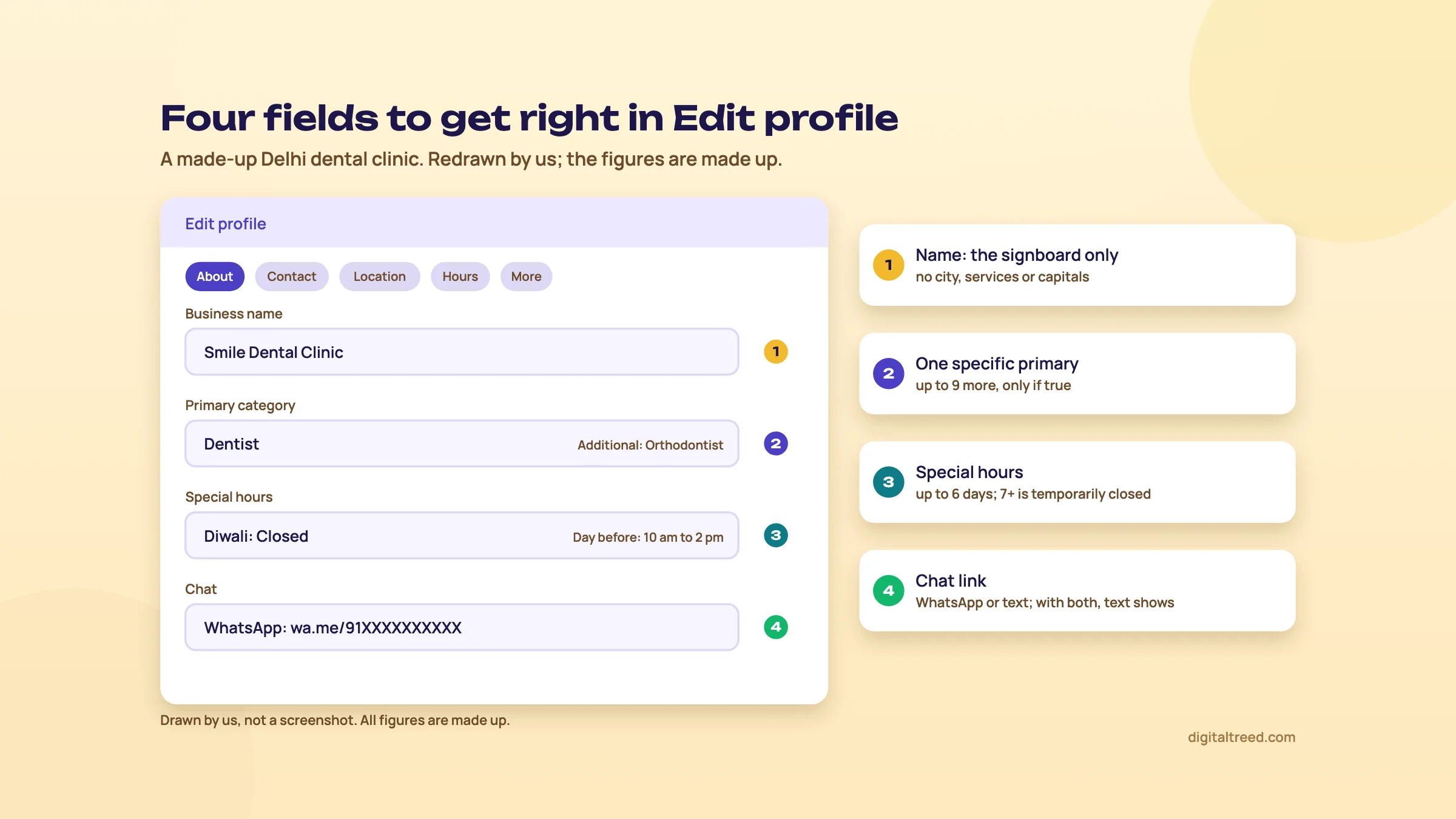 Name, category, special hours and chat: the four fields people most often get wrong. Drawn by us; the figures are made up.
Business name: the signboard, nothing else
Your name should match how the business appears on its signboard, stationery and website.[6] Google's guidelines list what you can't add: taglines, store codes, ® signs, words in all capitals, opening hours, phone numbers or URLs, service or product words, location words, and the same name repeated in two scripts.[6] That last one matters in India, where boards often carry the name in Hindi and English. Pick one.
Adding keywords to the name can also cost you the profile. Google says unnecessary information in the name "could result in the suspension of your Business Profile."[6]
Do not
- Chowk Sweets Best Mithai Shop Lucknow
- SMILE DENTAL CLINIC - Root Canal Specialist
- Pinnacle Classes Kothrud (JEE NEET Coaching)
Do
- Chowk Sweets
- Smile Dental Clinic
- Pinnacle Classes
The names are made up. The keywords you wanted in the name belong in the categories, services and description.
Categories: "This business IS a ..."
You get one primary category and up to 9 more.[12] Google says the categories you choose affect your local ranking,[13] so this is the field that deserves the most thought. Its guidelines give three rules:[6]
- Pick categories that complete "This business IS a", not "This business HAS a".
- Use as few as it takes, as specific as possible. Google adds the general ones itself.
- Don't use categories as keywords, and don't add the category of a business inside yours or next door.
For a Delhi dental clinic, the primary category is the dentist or dental clinic category you find in the list, and secondaries are only for real departments, such as orthodontics if an orthodontist practises there. For the Lucknow shop, a sweet shop category beats a general store. You can't type your own category; you pick from Google's list.[13] Search the list for the most specific match, and look at what the top three in your local pack use.
Doctors, lawyers and other practitioners
Google treats doctors, dentists, lawyers and similar professionals as individual practitioners, and their names may include titles such as Dr.[6] If a Delhi clinic has three public-facing dentists, the guidelines say the clinic gets its own profile, and each dentist may have a profile with only their own name. Support staff shouldn't have one, and one practitioner shouldn't have several profiles for different specialities.[6]
Our view: a practitioner profile makes sense for a dentist patients ask for by name. For a junior who rotates between branches, we'd leave it.
Address or service area
Use the precise address where customers come, with shop or floor numbers on line 2. In regions where the official address doesn't pinpoint the place, Google allows nearby landmarks and cross-streets.[6] In many Indian lanes that applies, so "near Hanuman Mandir" is fine. If the address can't be found, you can drop a pin on the map.[6]
If customers don't come to you, remove the address and set a service area instead.[4] The rules, from Google's service-area page:[4]
- Up to 20 service areas, by city, postal code (in India, PIN code) or other area. No radius around your address.
- The whole area shouldn't be more than about two hours' drive from your base.
- Edit it under Edit profile, Location, then Service area. Approved changes can take up to 48 hours to show.
A Pune home tutor might list Kothrud, Karve Nagar, Warje and three nearby PIN codes. Listing all of Pune, Pimpri-Chinchwad and Mumbai would break the two-hour rule and doesn't describe where you work.
Hours, special hours and temporary closure
Enter the hours customers can actually reach you.[6] Then set special hours for festivals. Google's special hours cover changes or closures of up to 6 days in a row. For 7 days or more, or an unknown period, mark the business Temporarily closed.[14] Google also suggests confirming your hours for official holidays even when they don't change, so customers can trust them.[14]
Set Diwali hours for a Lucknow sweet shop
- Open the hours Go to your Business Profile, select Edit profile, then Hours. Next to Special hours, select Edit.[14]
- Pick the dates Review the suggested holiday dates or select Add a date for each festival day.
- Enter the hours For longer hours before Diwali, uncheck Closed and enter them. For the day after, if you close, leave Closed ticked.
- Add a split day if you need it Use More, then Add hours, for a day with a break in the afternoon.
- Save, then check Select Save. Special hours only show if the business is set to "Open with main hours".[14]
Some businesses shouldn't show hours at all. Google lists businesses with varied hours, such as class schedules, and those that work only by appointment.[6] For a Pune coaching centre, that rules out entering batch timings as business hours. If the front office is open for walk-in enquiries at fixed times, those are customer-facing hours, and we'd enter those.
Phone, website and chat
Give one main number plus up to two more, mobile or landline.[12] Use a local number that reaches this location. Premium-rate numbers aren't allowed at all, and Google asks you to avoid a central call-centre number whenever possible.[6] Google's help page notes that in India it may double-check your phone number.[12]
For the website, link the page for this location, not always the home page, with UTM tags so the visits show separately in GA4. Guide 2, chapter 11 has the exact tags, and our GA4 guide shows where they appear.
The chat option lets customers message you on WhatsApp or by text from the profile, where it's available in your region. Under Edit profile, Contact, Chat, pick WhatsApp and paste your WhatsApp click-to-chat link, or pick Text message and add a number.[15] If you add both, Google shows only the text option, so for most Indian businesses we'd add WhatsApp alone.
Attributes, description and the rest
Attributes are yes-or-no facts: Wi-Fi, payment options, wheelchair-accessible entrance, women-owned and others, depending on your category and country. Add them under Edit profile, More. Google says a review of the edit usually takes about 10 minutes but can take up to 30 days, and that attributes can help you appear in searches for them.[16] Answer them honestly: "wheelchair-accessible entrance" has a definition (an entrance at least one metre wide with no steps, or a ramp over any steps).
The description can be up to 750 characters, with no links,[12] and it shouldn't focus on offers, prices or sales.[6] Say what you offer, what's different and how long you've been open.
Tip
A description for the made-up Delhi clinic: "Smile Dental Clinic has treated families in Lajpat Nagar since 2009. Dr. A. Kapoor and two associate dentists offer check-ups, fillings, root canal treatment, braces and children's dentistry, with digital X-rays on site. Evening appointments until 8 pm on weekdays. Hindi, English and Punjabi spoken." About 300 characters, no keyword stuffing, all checkable.
Also fill in social media links (one per platform, where offered) and the opening date, month and year.[12] Then open Profile Strength on a verified profile; it lists what's still missing.[17]
Google can change your details too
Google updates profiles from user reports, licensed data and other sources.[2] In some regions it may also call, text or WhatsApp the verified number to confirm details, and you can see what it collected under Edit profile, Collected info.[12] Check the profile once a month from a private window, as a customer would see it.
The details are done. Chapter 4 adds what makes people choose you: photos, services and posts.
Photos, videos, services, posts, and what happened to Q&A and chat
Quick answer
Add real, unfiltered photos (at least three each of the outside, inside, work and team) and short videos. List your services in customers' words. Use Update, Offer and Event posts to keep the profile current. Q&A is now limited to some categories and regions, Google's own chat ended in 2024, and WhatsApp links replace it.
Chapter 3 made the profile correct. This chapter makes it worth choosing. A customer comparing three sweet shops on a phone looks at the photos and reviews long before the description.
Photos and videos
Photos and videos appear only once the profile is verified, and Google reviews each one; it can take 24 to 48 hours to show.[18] The specifications from Google's help page:[18]
| Photos | Videos | |
|---|---|---|
| Format and size | JPG or PNG, 10 KB to 5 MB | Up to 75 MB |
| Resolution | 720 x 720 px recommended, 250 x 250 px minimum | 720p or higher |
| Length | - | Up to 30 seconds |
| Quality | In focus, well lit, no heavy filters | - |
Google's category photo tips go further: the image should "represent reality", without excessive filters "or AI".[19] They also suggest a minimum of three photos of each type that applies to you: outside, inside, products, at work and team.[19] For the outside, Google suggests one from each direction customers approach. In an Indian market lane, that's the shot that stops people walking past your shop.
| Business | Photos we'd add first |
|---|---|
| Lucknow sweet shop | Signboard from the road, from both ends of the lane; the counter; trays of the bestsellers; the karigar at work; the festive gift boxes |
| Delhi dentist | The building entrance and the clinic door; reception; a treatment room; the X-ray unit; the dentists (with their consent) |
| Pune coaching centre | The building and floor sign; a classroom; the library or study area; faculty; results boards only if they're real and current |
Set a logo and a cover photo from Photos on Search or Maps on a computer. Google doesn't promise the cover photo shows first, and it may pick a customer's photo instead if yours is low quality.[18]
Services and menus
The services editor lets you pick suggested services for your category and add custom ones, grouped by category, with a description and price if you want.[20] Name each service the way customers say it: "root canal treatment", "teeth whitening", "JEE foundation for class 9". Google rejects custom service names with prices, phone numbers or gibberish in them, so put the price in its own field.[20] Food and drink businesses get a menu editor instead.[12]
Products: not for shops in India yet
Google can show a shop's in-store products on its profile, fed by the Local Inventory app (formerly Pointy) or the Product Editor. On the day we checked, Google's product page listed eligible merchants in the US, Canada, UK, Ireland and Australia only.[21] Its page on editing your profile lists four of those countries.[12] Either way, India isn't on the list. An Indian shop can still photograph its bestsellers and describe them in posts.
Posts
Posts appear on your profile on Search and Maps, in the Updates or Overview tab on mobile and under "From the owner" on a computer.[22] There are three types:[22]
- Update: news, with a photo or video and an action button that links to your site, for example to book or learn more.
- Offer: needs a title and dates; you can add a coupon code and terms.
- Event: needs a title and start and end dates.
To add one, go to your profile and select Posts, then Add post. You can schedule a post or set it to repeat weekly or monthly, and post to several profiles at once. Posts older than 6 months are archived unless they have a date range, and a phone number in the text can get a post rejected if Google can't link it to the business.[22]
Our view on posts: they're for the customer reading the profile, not for ranking. Google's list of what improves local ranking doesn't mention posts.[8] A coaching centre posting its new batch dates, or a sweet shop posting Diwali box prices with an order button, is useful. A daily keyword-stuffed post is not.
Post a new batch for a Pune coaching centre
- Choose Event Go to your Business Profile, select Posts, then Add post, then Event.[22]
- Title and dates "Class 9 JEE foundation batch: demo week", with the start and end dates of the demo classes and the times.
- Description Two or three lines: who it's for, batch size, what the demo covers, how to book. No phone number in the text.
- Photo A real classroom photo, not a stock image.
- Button Add an action button that links to the batch page on your site, with UTM tags.
- Post, then check the status Live means it's public; Pending or Not approved means it isn't. A question mark next to Not approved shows which policy it broke.[22]
Q&A today, and Ask Maps
Profiles used to have a public questions-and-answers box. Google discontinued the Q&A API for developers on 3 November 2025.[23] Its help page now says Q&A "is available only for select business categories and regions" and that its look and function may change.[12] So you may or may not see it on your profile.
Meanwhile, Google Maps is rolling out Ask Maps, a Gemini-powered way to ask questions about places, in the US and India on Android and iOS since March 2026.[24] Google says Maps draws on information from over 300 million places, including reviews from more than 500 million contributors.[24] Google hasn't said exactly which profile fields Ask Maps reads. Our advice is the same either way. Put the answers people want (parking, fees, timings, "do you make sugar-free sweets?") in your description, services, attributes and posts, where any system can find them.
Chat: Google's own chat ended in 2024
Google switched off Business Profile chat and call history on 31 July 2024.[25] New chats had stopped on 15 July, as Social Media Today reported when Google announced it in May.[26] The chat option you see today is different: a link to your WhatsApp or a number for text messages (chapter 3).[15] Messages go to your WhatsApp, not to Google, so whoever answers the shop's WhatsApp now answers the profile too.
Managing the profile with Gemini
If you own or manage exactly one verified profile, you can connect it to the Gemini web app at gemini.google.com and ask it to change hours, draft review replies, create posts or show your search keywords.[27] It needs a personal Google Account (not a work or school one), Keep Activity switched on, and you must be 18 or over.[27] It's handy for a busy owner. Read every reply it drafts before posting; a wrong promise in a public reply is yours, not Gemini's.
Next, chapter 5: the part of the profile you don't write yourself, reviews.
Reviews: asking, replying, reporting, and the fake-review rules
Quick answer
Ask every customer for a review with Google's own link or QR code, never in exchange for anything. Reply to reviews politely and briefly. Report only reviews that break Google's policies, using the profile or the Reviews Management Tool, with one appeal allowed. Fake or incentivised reviews get removed and can freeze your reviews or show a warning.
Reviews are the one part of the profile you can't write, and the part customers read most. Google lists replying to reviews among its tips for local ranking, and says more reviews and positive ratings can help.[8] Guide 2, chapter 10 has the survey numbers and two request messages you can copy. This chapter covers the tool: links, replies, reports, appeals and penalties.
Get your review link and QR code
On a computer, go to your Business Profile and select Read reviews, then Get more reviews. Copy the link, or right-click the QR code and save it. Google says the QR code can only be made in a computer browser, not on a phone.[28] Google suggests putting the link on receipts, in thank-you emails and at the end of a chat, and printing the QR code for your shop. It says you can also send requests by email, WhatsApp or a Facebook post.[28]
Customers need a Google Account to leave a review, though it doesn't have to be Gmail.[29] If a customer isn't sure they're signed in, showing them on their own phone takes ten seconds.
The rules for asking
Google's Maps content policy is specific about what a business may and may not do when it asks for reviews.[30] We've put it in plain words:
Do not
- Offer payment, a discount, free goods or a free service for a review, or for changing or removing one
- Ask only the customers you think are happy
- Discourage or forbid negative reviews
- Pressure people to review while they're still in the shop
- Tell people what to write, or ask them to name a staff member
- Set staff a number of reviews to collect
- Post reviews yourself, from family accounts or from several accounts
- Review a competitor to hurt them
Do
- Ask every customer the same way
- Share the link or QR code, with no reward attached
- Let people write what they want, good or bad
- Leave a QR card on the counter for those who want it
- Reply to everyone
Every item on the left comes from the fake engagement and rating manipulation sections of the policy.[30] Two of them are easy to break without noticing. "Leave a review and get 10% off your next visit" is an incentive, even if the discount is small. And a clinic receptionist saying "please mention Dr. Kapoor's name" is asking for specific content.
Warning
Pune coaching centres, note this. Google has removed and disabled reviews for profiles whose primary category is a general education school for students aged 6 to 18. Universities, day care centres and swim schools aren't affected.[31] Pick the category that truly describes you (chapter 3). If you're a coaching centre, don't choose a school category; if you're a school, expect no reviews.
Set up review requests for a Pune coaching centre
- Make the link and QR code On a computer: profile, Read reviews, Get more reviews. Copy the link and save the QR image.[28]
- Pick one moment Choose one point every student or parent passes: the end of the demo week, or the day results come out. Ask everyone at that point, not just toppers.
- Write one message "Thank you for studying with us this term. If you'd like to tell other parents about your experience, you can review us on Google here: [link]. Good or bad, we read every review." No offer, no suggested wording.
- Send it the same way to everyone WhatsApp broadcast to the whole batch, or the same email. Note the date you sent it.
- Print the QR code Put it on the notice board with one line, "Review us on Google". Don't ask students to scan it in class.
- Brief the staff No targets, no names in reviews, no rewards. Show them this chapter's Don't list.
Reply to reviews, good and bad
To reply, go to your profile, select Read reviews, then Reply under the review.[32] Replies are checked against Google's policies before they go live. That usually takes up to 10 minutes, but can take up to 30 days. The reply shows as the business, not your personal name. The reviewer is notified and can change the review afterwards.[32]
Google's reply tips:[29] be polite and short, don't send everyone the same "thank you", and don't use a reply to promote deals. For a negative review, protect the reviewer's privacy, admit real mistakes without taking the blame for what you couldn't control, apologise where it's due, use their name and reply promptly.
Tip
A reply to a two-star review of the made-up Delhi clinic, "Waited 50 minutes past my appointment": "Hello Ritu, you're right, and we're sorry. An emergency patient took longer than planned that evening, and we should have messaged you before you left home. We now text patients when the doctor is running more than 15 minutes late. If you'd like to talk about your visit, please call the clinic and ask for me. Anjali, practice manager." It names the cause without making excuses, says what changed, and moves the rest of the conversation off Google.
Never put a patient's treatment details in a reply, even if they mentioned it first. Google's policy bars posting another person's medical or other personal information without consent.[30]
Report a review that breaks the rules
You can report any review, but only those that break Google's policies are removed. Google says not to report a review just because you disagree with it, and that it doesn't step into disputes between businesses and customers.[33] Reviews worth reporting are spam, off-topic, conflict-of-interest (a competitor or ex-employee), offensive, or carry personal information; the policy covers each of these.[30]
- Report it: profile, Read reviews, Report next to the review, choose the reason (for example Spam), Send report. Evaluation typically takes several days.[33]
- Track it in the Reviews Management Tool. The statuses are Decision pending; Report reviewed - no policy violation; and Escalated - check your email for updates.[33]
- Appeal once: if a report is turned down, the same tool lets you make a one-time appeal, for up to 10 reviews at a time. You get the result by email.[33]
Google also uses automated spam detection, and says it can occasionally remove a genuine review by mistake; if that happens, contact support.[33] Reviews removed for policy reasons won't be restored.[31]
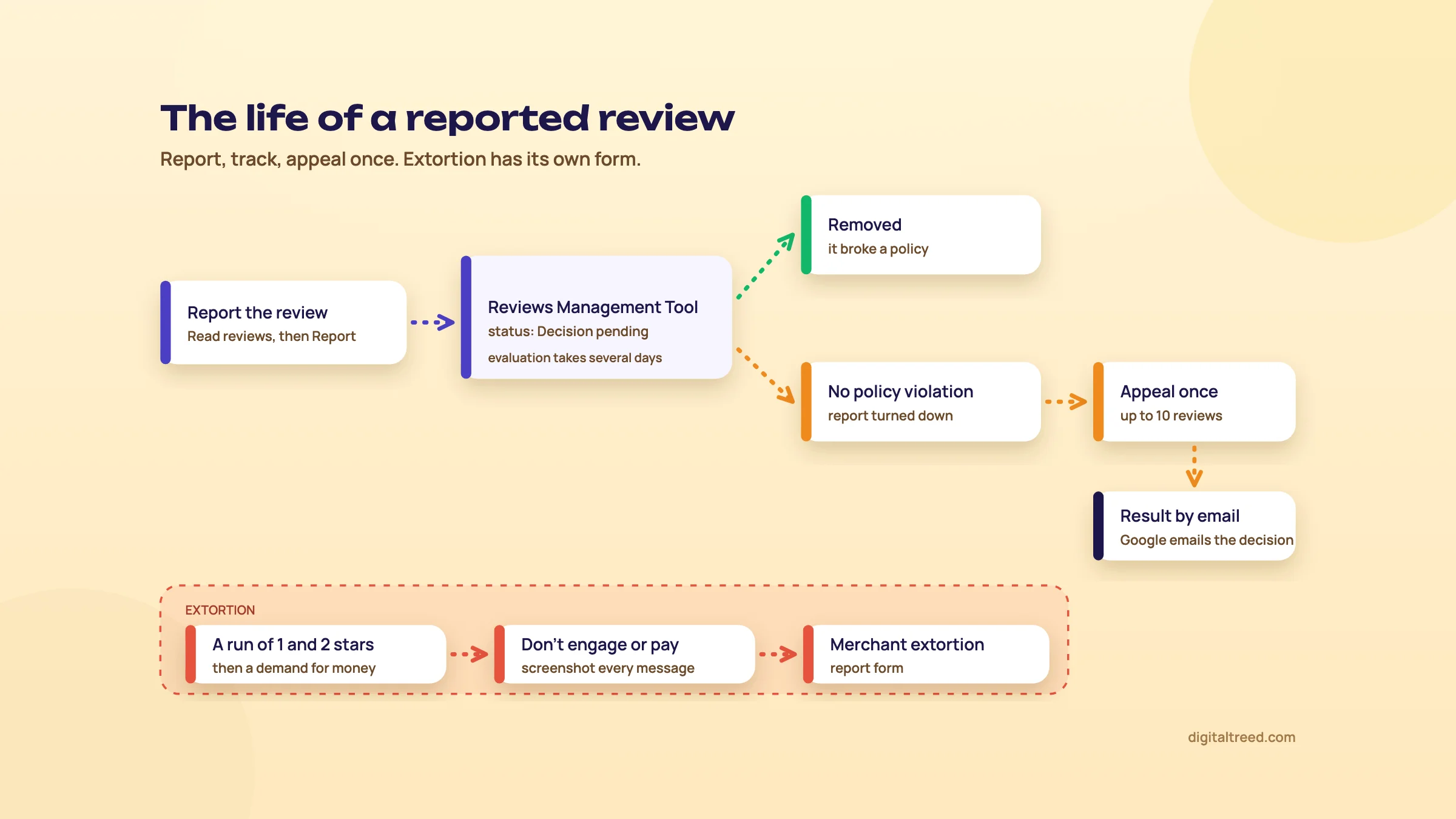 Report, track, appeal once; extortion goes to its own form. Drawn by us.
Review extortion: don't pay, report
Google describes a scam where a profile suddenly gets a run of one- and two-star reviews, followed by a demand for money, goods or services to remove them. Its advice: don't engage or pay, collect evidence at once, and report it on the merchant extortion report form.[34] Google names WhatsApp and Telegram among the channels to screenshot. Capture the date, time and sender's number or handle, plus links to each suspicious review.
What happens to a business that fakes reviews
Google removes fake and incentivised reviews.[30] If it decides the owner broke the fake engagement policy, it can also restrict the profile. Its examples: no new reviews for a set period, existing reviews unpublished for a set period, or a warning to customers that fake reviews were removed.[35] Google says it emails the owner first, and the business can appeal.[35] A warning banner on a clinic's profile costs far more than the reviews ever brought in.
India has its own standard too. In November 2022 the Department of Consumer Affairs launched IS 19000:2022, a Bureau of Indian Standards framework for collecting, moderating and publishing online consumer reviews. It applies to every online platform that publishes consumer reviews, and compliance was voluntary at launch.[36] It doesn't change Google's rules, but it shows Indian regulators take fake reviews seriously too.
Write down your number of reviews and average rating each month. Chapter 6 puts them next to calls and direction requests in the Performance report.
Performance insights, and how local ranking works
Quick answer
Performance shows the searches that found you, profile views, calls, direction requests, website clicks and more, for verified profiles only, and it includes Google Ads activity. Google says local ranking rests mainly on relevance, distance and prominence, and that no one can pay for a better place. Track calls, directions, reviews and rating monthly.
A sweet shop owner doesn't need rankings. They need to know whether the phone rang and whether people walked in. The Performance report is the closest Google gets to telling you.
Open the Performance report
Performance data is only available for verified profiles, signed in with the account that manages them.[37] On Search, go to your Business Profile, click Performance, choose a time period and click Apply. In the Maps app, tap Business, then See more next to Performance.[37]
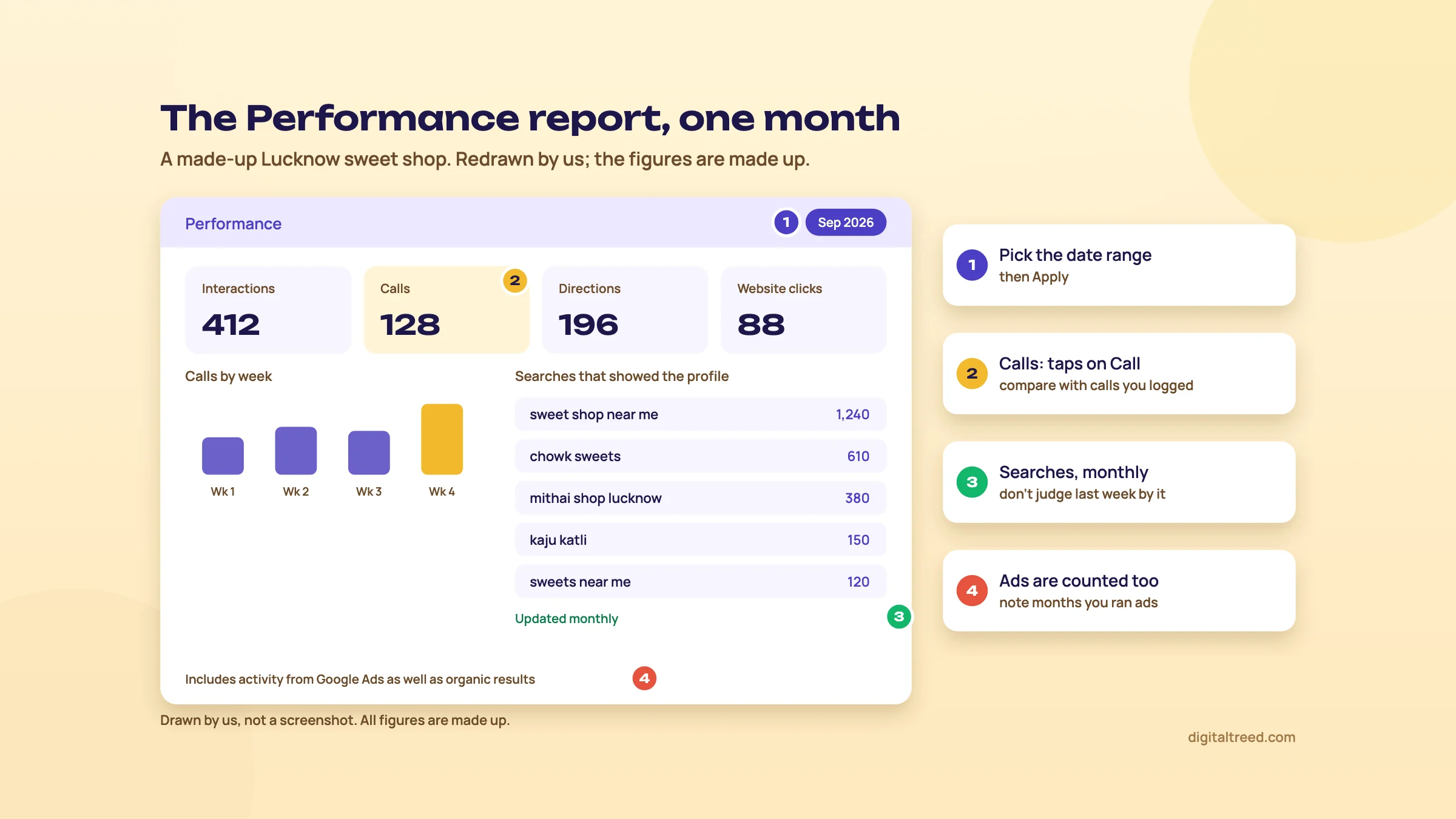 Calls and directions matter most for a shop; remember ads are counted too. Drawn by us; the figures are made up.
What each number means
| Metric | What Google counts | What to do with it |
|---|---|---|
| Searches | The search terms people used when your profile appeared. Updated at the start of each month; can take up to 5 days to show | Check that your services and categories cover the terms. You can't edit this list directly |
| Views | Unique people who viewed the profile on Search and Maps, each counted at most once a day | Watch the trend, not the number. It's lower than view counts you may see elsewhere |
| Calls | Taps on the Call button. Needs a phone number on the profile | Compare with calls your staff actually logged |
| Directions | Direction requests, with repeat taps, cancellations and spam filtered out | The best sign of walk-ins for a storefront |
| Website clicks | Clicks on the website link | Match with your GA4 sessions from the UTM-tagged link |
| Messages, bookings, menus, offers, products | Shown only if they apply to your business | Bookings need a booking provider; product views apply to in-store products |
All definitions are from Google's Performance help page.[37] Two points on that page are easy to miss. First, the data includes views, searches and actions from both organic results and Google Ads. If you run local ads, a jump in calls may be the ads, not your profile work. Second, the searches list is monthly, so don't judge last week's changes by it.
Note
From our work: a lesson from teaching SEO. When I taught SEO, my students were already doing client work, and most local business sites they handled ran on WordPress with shared hosting. The problem they met most was a slow site. A profile can win the click and still lose the customer if the page behind it takes ten seconds to load on a phone. Test the page your profile links to.
Download the data, or send it to GA4
For several locations, the Business Profile Manager lets you download a spreadsheet: tick the profiles, then Actions, Insights, choose the timeframe and Download Report.[37] If you see "***" in the columns, the profile isn't enabled for downloads yet.
You can also link the profile to GA4. In GA4, go to Admin, Product links, Google Business Profile links, then Link, and pick the profiles. You need the Administrator or Editor role in GA4 and to be an owner or manager of the profile. Performance data such as interactions, website clicks, calls, directions, messages, bookings and menu clicks is then shared with the GA4 property, and one property can link to several profiles.[38] Our GA4 guide covers reporting from there. We'd still tag the website link with UTM parameters, because that shows what those visitors did on your site.
How local ranking works, per Google
Google says local results are based mainly on three factors. Its summary line calls the third one "popularity", but the section that defines it is still headed "Prominence":[8]
- Relevance: how well a profile matches what the person searched. Complete, detailed information helps Google match you.
- Distance: how far the business is from the searcher, or from the location Google infers if they don't share one.
- Prominence: how well-known the business is, based partly on how many websites link to it and how many reviews it has. More reviews and positive ratings can help.
On the same page, Google states again that you can't request or pay for a better local ranking, and keeps the details confidential.[8] Its own list of what improves local ranking is: verify, keep information complete and accurate (address, hours, category, attributes), reply to reviews, add photos and videos, and add in-store products where eligible.[8] Separately, its category page says the categories you choose affect your local ranking.[13]
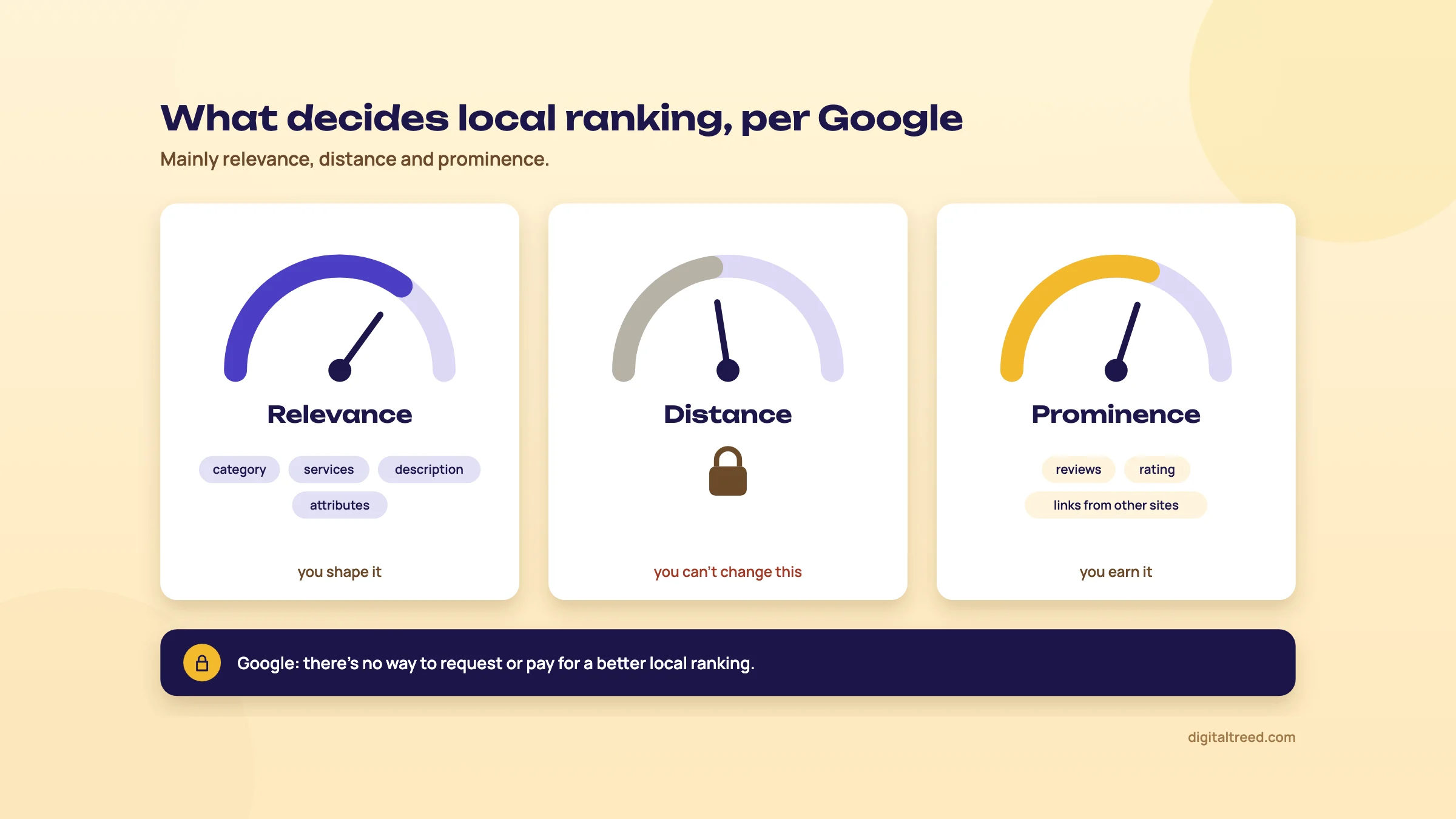 Google names three main factors; you can only work on two of them. Drawn by us.
What that means for each of our examples:
- Lucknow sweet shop: distance is fixed by the shop's location, so customers far across the city will see shops nearer to them. Win the neighbourhood first: exact category, real photos, festival hours, a steady stream of reviews.
- Delhi dentist: relevance comes from services in patients' words ("root canal treatment", "braces for adults") and a correct primary category. Prominence comes from reviews and links, for example from a dental association or a local news story.
- Pune coaching centre: parents search by area and exam. Services and posts should name the exams and classes you actually teach.
Google Maps' new Ask Maps feature, rolling out in India since March 2026, answers questions using information from places and their reviews.[24] Google hasn't published how it picks places. A complete, accurate profile with real reviews is still the only input you control. Guide 5, chapter 5 covers keeping your details consistent for AI answers.
A 15-minute monthly check for a Lucknow sweet shop
- Open Performance Set the date range to last month and click Apply.[37]
- Write down four numbers Calls, direction requests, total reviews and average rating, in one row of a sheet. Add website clicks if you have a site.
- Read the searches list Look for terms you don't serve and terms you do serve that aren't in your services. Add the missing services.
- Check for ad influence If you ran Google Ads that month, note it next to the row.
- Look at the profile as a customer Open it in a private window. Are the hours right? Did someone add a wrong photo or a suggested edit?
- Plan one change One new set of photos, a festival post, or replies to unanswered reviews. Compare the row next month.
Compare month with month, and this month with the same month last year. Diwali and wedding season make sweet shop numbers jump every year; that's not your profile work. Chapter 7 deals with more than one location, more than one person managing the profile, and what to do if it gets suspended.
Managers, many locations, suspensions, pricing and alternatives
Quick answer
Add staff and agencies as managers, never share your password, and keep primary ownership yourself. Ten or more locations can be verified in bulk. A suspended profile is appealed once in Google's appeals tool, with documents. The profile is free; paid tools such as BrightLocal (from US$41 a month) and Local Falcon add tracking and review tools.
Owners and managers
A profile can have several owners but one primary owner, plus managers. Managers can do almost everything an owner can, including editing details, replying to reviews and publishing posts. What they can't do is add or remove users or remove the profile.[39] To add someone, go to your profile, then More, Business Profile settings, People and access, select Add, enter their email and pick Owner or Manager.[39]
- Give each person their own Google Account; Google says this is how to share access without sharing a password.[39]
- A new owner or manager waits 7 days before they can delete the profile, remove other users or transfer primary ownership.[39]
- Removed users lose access, but their past review replies and posts stay on the profile.[39]
- If the business is sold, transfer primary ownership to the new owner, so the reviews stay with the profile.[40]
Agencies and freelancers: the rules for you
Google calls anyone managing a profile they don't own an authorised representative, and names SEO companies as an example.[3] Its rules are clear. Never claim a profile without the owner's express consent. Work with the owner to verify. Keep them informed. Use the business's own phone number and website. Hand ownership back immediately when asked. Wherever possible, the owner should own the profile and add you as a manager.[3] Breaking these can get the profile or your Google Account suspended.
If you're a freelancer, our advice is to ask the client to add you as a manager from day one. That protects them, and it protects you from being blamed when something changes later.
Several locations
Each real location gets its own profile; a moved business updates its address instead of opening a new profile, and services don't each get a profile.[10] Chains keep the same name and the same primary category across locations, unless a location consistently uses a different name in the real world.[6] A Delhi dental chain with five clinics would be "Smile Dental Clinic" five times, each with its own address, hours, photos and reviews.
Google's policy overview adds one exception on moving. For businesses whose location is part of the experience, such as restaurants, hotels and entertainment venues, Google rejects address edits. You mark the old profile permanently closed and create a new one.[41] For everyone else, update the address and expect to verify again.[12]
For two or more profiles, Google recommends a business group, which is like a shared folder for profiles that several people can manage.[42] With 10 or more locations of the same business, you can add them by spreadsheet in Business Profile Manager and request bulk verification under Verifications, then Chain.[43] Bulk verification isn't open to service-area businesses, or to agencies with several different businesses in one account.[43]
Suspended or disabled: what to do
Google may suspend or disable profiles that don't follow its guidelines.[44] From its policy pages, the usual reasons are an ineligible business, a P.O. box or virtual office, a business Google decides doesn't exist at that address, extra words in the name,[6] or an account with a pattern of policy breaches.[41] If an account is restricted, every profile on it is suspended.[41]
Appeal a suspended profile
- Don't create a new profile Google's suspension page[44] and appeal page both say so.[45] A second profile makes things worse.
- Fix the cause first Read the guidelines against your profile: name, address, category, eligibility. Remove keywords from the name, hide the address if you're a service-area business.
- Gather evidence Google lists official business registration, a business licence, tax certificates and utility bills (electricity, phone, water, internet). The name and address on each must match the profile.[44] Signboard photos help explain the name.
- Open the appeals tool Sign in with the account that manages the profile, confirm, select the profile and the decision. The tool shows the date, the reason, the policy and whether it can be appealed.[44]
- Submit once Attach the files, explain briefly in the text box, tick the confirmation box and select Submit appeal. Appeals can only be submitted once, so don't rush it.[44]
- Wait for the email Appeal reviews can take up to 5 business days; don't send several appeals for the same issue.[45] If it's denied, you may be able to ask for an additional review with new evidence.[44]
If your Google Account itself is restricted, appeal that first on the My accounts page, then appeal the profile.[44] Rejected edits to your name, category, address, phone or website, and rejected photos or posts, are appealed through Google's contact form for businesses outside the UK and EEA, not the appeals tool.[45]
Warning
Some agencies sell reinstatement services; Whitespark, for one, lists a GBP Reinstatement Service.[46] The appeals tool is free, and Google doesn't say a paid service gets a different review. If the cause was a keyword-stuffed name or an ineligible address, no service can make the profile eligible.
Pricing: free, and the paid tools around it
The profile itself costs nothing to create or claim.[1] The paid tools below add things Google doesn't give you: rank tracking on a map grid, review requests by SMS and email, listing management across many sites. None of them can change how Google ranks you.
All prices were read from each vendor's own pricing page on 16 October 2026 and are in US dollars; none showed a rupee price. We give rupees at ₹96 to US$1, the X-Rates monthly average for 1 to 16 October 2026.[47]
| Tool and plan | Price (USD) | About ₹ | What it adds |
|---|---|---|---|
| Google Business Profile | Free | 0 | Everything in chapters 2 to 6 |
| BrightLocal Track (1 location) | $41 a month, or $369 a year | ₹3,936 a month, ₹35,424 a year | Local rank tracking up to 100 keywords, geo-grid for 5 keywords, citation monitoring, profile audit, local AI visibility tracking[48] |
| BrightLocal Manage (1 location) | $54 a month, or $485 a year | ₹5,184 a month, ₹46,560 a year | Track, plus listing sync and scheduled Business Profile posts[48] |
| BrightLocal Grow (1 location) | $65 a month, or $584 a year | ₹6,240 a month, ₹56,064 a year | Manage, plus review monitoring and review requests by email, SMS and in-store[48] |
| Local Falcon Starter | $24.99 a month (7,500 credits) | ₹2,399 a month | Geo-grid rank scans; one credit is one map point, so a 5 x 5 grid uses 25[49] |
| Local Falcon Basic / Pro | $49.99 / $99.99 a month | ₹4,799 / ₹9,599 a month | More credits (15,150 and 31,250 a month) and more report types[49] |
| Whitespark Local Ranking Grids | From $10 a month | From ₹960 a month | Grid rank tracking[46] |
| Whitespark Reputation Builder | $79 a month per location | ₹7,584 a month | Review requests and review management[46] |
BrightLocal offers a 14-day free trial without a card,[48] and Local Falcon gives 100 free credits on sign-up.[49] Both pages also list annual prices and prices for more locations or credits. Check the tax at checkout; we didn't see it stated on the pages.
Our view: a single sweet shop or clinic doesn't need any of these. The Performance report, Google's review link and a monthly check cover it. A paid grid tracker earns its cost when you manage many locations or clients and need to show where on the map each one appears.
Pros
- Free to create, claim and manage
- It is the source of Google's map listings and local pack
- Reviews, photos, hours, chat link and posts in one place
- Verification by video works for home-based and service-area businesses
- Performance data and a GA4 link at no cost
Cons
- Strict, sometimes surprising guidelines; a name or address mistake can mean suspension
- An appeal can be sent only once (a denied one may get one more review), and support is limited
- No rank tracking, and ranking rules are confidential
- Products and some features aren't available in India
- Google and customers can change your details
Alternatives, and which one when
Nothing replaces a Business Profile for Google Maps. The alternatives are the other places your customers search, and the tools that check your website side of local SEO. Our free tools first:
- Free Website Audit: includes local SEO checks for a Google Business link, LocalBusiness schema and the same phone number everywhere
- Schema Markup Validator: checks the JSON-LD on your location page, with a required-fields check for LocalBusiness
- Meta Tag Analyzer: the title and description of the page your profile links to
- HTTP Status Checker: confirms the UTM-tagged website link reaches the page without a redirect chain
| Situation | Our pick | Why |
|---|---|---|
| Any eligible local business | Google Business Profile | Free, and it is the map listing |
| Online-only brand | Search Console, Merchant Center, Google Ads | Not eligible for a profile; see our Search Console guide |
| Customers who use Bing or iPhones | Bing Places and Apple Business, free | Same details, more maps; Guide 2, chapter 10 and our Bing guide |
| Customers who search directories | Justdial, IndiaMART, Sulekha | Calls of their own and consistent NAP (Guide 2, chapter 10) |
| Agency with many local clients | BrightLocal or Local Falcon | Grid rank tracking and reports across clients |
| Checking the website side | Our Free Website Audit and Schema Markup Validator | Free, and they read the live page |
Want help setting up or fixing a profile? Our SEO service covers Business Profiles, reviews and location pages, and you can get a quote online. For the rest of the free toolkit, see best free SEO tools.
Test yourself
Ten questions on the whole guide. Pick an answer, check it, and see your score at the end.
You got 0 of 10 right.
Frequently asked questions
Frequently asked
Is Google Business Profile free?
Yes. Adding, claiming, verifying and managing a profile costs nothing. You pay only if you choose Google Ads or outside tools such as BrightLocal or Local Falcon, which add rank tracking and review tools. Be wary of anyone charging for a "verified" or "top-ranked" listing; Google says you can't pay for a better local ranking.
How long does Google Business Profile verification take?
After you complete a method, Google says its review can take up to five business days. Postcards add waiting time: most codes arrive within 14 days and expire after 30. Phone, SMS and email can be quicker, and Google sometimes verifies instantly, for example when your website is already verified in Search Console.
Why was my verification video rejected?
Usually something Google asked for is missing: the business name on a permanent sign, the street or nearby places, or proof that you manage the business. The clip must be one live, unedited take of at least 30 seconds, recorded in the profile on a phone. Tap Review issues to see the reasons, then record again with everything from the first video plus the missing part.
Can I have a Business Profile without a shop or office?
Yes, if you visit customers or deliver to them, as a tutor, plumber or caterer does. Set it up as a service-area business, hide your address and list up to 20 cities or PIN codes you serve. An online-only business that never meets customers in person isn't eligible.
Can I add keywords to my business name on Google?
No. Google's guidelines say the name must match your real-world signboard and stationery, and that adding service, location or marketing words isn't permitted and can get the profile suspended. Put those words in your categories, services and description instead.
How do I get a link for customers to review my business on Google?
On a computer, open your Business Profile, select Read reviews, then Get more reviews. Copy the link or save the QR code; Google says the QR code can only be made in a computer browser. Share it on WhatsApp, receipts, emails and a counter card. Never offer anything in return for a review.
Can I delete a bad Google review?
Not yourself. You can report a review that breaks Google's policies, such as spam, conflict of interest or offensive content, and Google decides. If the report is rejected, you get one appeal in the Reviews Management Tool. A genuine negative review stays; a calm, specific reply is your best answer to it.
Does Google Business Profile still have Q&A and chat?
Q&A is now available only for select categories and regions, and Google ended the Q&A API in November 2025. Google's own chat ended in July 2024. Today's chat option is a WhatsApp or text message link on the profile, where available. Google Maps is also rolling out Ask Maps, which answers questions about places using Gemini.
How do I rank higher on Google Maps?
Google says local ranking is based mainly on relevance, distance and prominence, and that you can't pay for it. You can't change distance. For relevance, choose the right primary category and list your real services. For prominence, earn genuine reviews, reply to them, and get mentioned and linked by other local sites. Keep hours and details accurate.
Why was my Google Business Profile suspended, and how do I get it back?
Common causes are keywords in the name, a virtual office or P.O. box address, an ineligible business or an address Google can't confirm. Fix the cause, then use the appeals tool once, with documents such as a business registration or a utility bill matching the profile's name and address. Don't create a new profile for the same business.
Sources
References
- Add or claim your Business Profile, Google Business Profile Help, accessed 16 Oct 2026
- Get started with Google Business Profile, Google Business Profile Help, accessed 16 Oct 2026
- Business eligibility and ownership guidelines, Google Business Profile Help, accessed 16 Oct 2026
- Manage your service areas for service-area & hybrid businesses, Google Business Profile Help, accessed 16 Oct 2026
- Verify your business with a video recording, Google Business Profile Help, accessed 16 Oct 2026
- Guidelines for representing your business on Google, Google Business Profile Help, accessed 16 Oct 2026
- Get verified on Google (claim a knowledge panel), Knowledge Panel Help, accessed 16 Oct 2026
- Tips to improve your local ranking on Google, Google Business Profile Help, accessed 16 Oct 2026
- Verify your business on Google, Google Business Profile Help, accessed 16 Oct 2026
- Resolve duplicate profiles & ownership issues, Google Business Profile Help, accessed 16 Oct 2026
- Request ownership of a Business Profile, Google Business Profile Help, accessed 16 Oct 2026
- Edit your Business Profile, Google Business Profile Help, accessed 16 Oct 2026
- Manage your business category, Google Business Profile Help, accessed 16 Oct 2026
- How to set Special hours, Google Business Profile Help, accessed 16 Oct 2026
- Chat with customers from your Business Profile, Google Business Profile Help, accessed 16 Oct 2026
- Manage your business attributes, Google Business Profile Help, accessed 16 Oct 2026
- Manage your Profile Strength, Google Business Profile Help, accessed 16 Oct 2026
- Manage your Business Profile photos & videos, Google Business Profile Help, accessed 16 Oct 2026
- Tips for business-specific photos on your Business Profile, Google Business Profile Help, accessed 16 Oct 2026
- Manage your services on your Business Profile, Google Business Profile Help, accessed 16 Oct 2026
- In-store products on Google Search & Maps, Google Business Profile Help, accessed 16 Oct 2026
- Create & manage posts on your Business Profile, Google Business Profile Help, accessed 16 Oct 2026
- Deprecation schedule (My Business Q&A API discontinued on November 3, 2025), Google for Developers, Business Profile APIs, accessed 16 Oct 2026
- How we're reimagining Maps with Gemini, Google The Keyword blog, Miriam Daniel, 12 Mar 2026, accessed 16 Oct 2026
- Changes to Google Business Profile chat and call history, Google Business Profile Help, accessed 18 Oct 2026
- Google Is Removing Its Chat Option From Business Listings, Social Media Today, Andrew Hutchinson, 29 May 2024, accessed 16 Oct 2026
- Manage your Business Profile on Google with the Gemini web app, Google Business Profile Help, accessed 16 Oct 2026
- Create a Google link or QR code to request reviews, Google Business Profile Help, accessed 16 Oct 2026
- Tips to get more reviews, Google Business Profile Help, accessed 16 Oct 2026
- Prohibited & restricted content (fake engagement, rating manipulation, personal information), Maps User Generated Content Policy Help, accessed 16 Oct 2026
- About missing or delayed reviews, Google Business Profile Help, accessed 16 Oct 2026
- Manage customer reviews, Google Business Profile Help, accessed 16 Oct 2026
- Report inappropriate reviews on your Business Profile, Google Business Profile Help, accessed 16 Oct 2026
- Report negative review extortion scams on your Business Profile, Google Business Profile Help, accessed 16 Oct 2026
- Business Profile restrictions for policy violations, Google Business Profile Help, accessed 16 Oct 2026
- Centre launches framework for safeguarding and protecting consumer interest from fake and deceptive reviews in e-commerce, Press Information Bureau, Ministry of Consumer Affairs, 21 Nov 2022, accessed 16 Oct 2026
- Understand your Business Profile performance & insights, Google Business Profile Help, accessed 16 Oct 2026
- Connect your Business Profile to Google Analytics, Google Business Profile Help, accessed 16 Oct 2026
- Manage your Business Profile owners & managers, Google Business Profile Help, accessed 16 Oct 2026
- Transfer primary ownership of a Business Profile, Google Business Profile Help, accessed 16 Oct 2026
- Overview of Google Business Profile policies, Google Business Profile Help, accessed 16 Oct 2026
- Create & manage business groups, Google Business Profile Help, accessed 16 Oct 2026
- Verify Business Profiles in bulk, Google Business Profile Help, accessed 16 Oct 2026
- Fix suspended or disabled profiles, Google Business Profile Help, accessed 16 Oct 2026
- Appeal Business Profile content & profile restrictions, Google Business Profile Help, accessed 16 Oct 2026
- Pricing: How much do Whitespark software and services cost?, Whitespark, accessed 16 Oct 2026
- US dollar to Indian rupee, monthly average 2026, X-Rates, accessed 16 Oct 2026
- BrightLocal pricing, plans and local SEO packages, BrightLocal, accessed 16 Oct 2026
- Local Falcon pricing, Local Falcon, accessed 16 Oct 2026
Get the free checklist
Every step of this guide on one page, to print or tick off. We email you the PDF link.