
Quick answer
As of October 28, 2026, you can publish a short story on Amazon KDP as a Kindle eBook, and an example $2.99 price earns $2.09 a US sale at 70%. Price it at $0.99 and only the 35% option applies, paying $0.35 a sale. Start with the Word file and Amazon's formatting rules, then the cover.
You've finished one short story and want it on sale at Amazon. Kindle Direct Publishing (KDP) is a self-publishing service run by Amazon, where you upload a book, set its price and collect a royalty per sale. This guide follows that one file to a live listing.
First we cover whether a story is long enough for Kindle, and what replaced Vella. Then come the manuscript, the Word file's format, the cover and the price, with royalty math at Amazon's rates as of October 2026. KDP Select and the listing close it out. Our view: a story that stands alone belongs at $2.99 on the 70% option.
Key takeaways
- Our draft Word file failed 11 of 14 checks built from Amazon's KDP pages.
- Amazon.com's 70% royalty band runs $2.99 to $12.99 from July 7, 2026.
- A $0.99 story earns $0.35 a sale on the 35% option.
- KDP Select makes the eBook Kindle-only for each 90-day term.
- Kindle Vella closed February 26, 2025, so serial stories now go out as eBooks.
Is a short story long enough for Kindle?
Yes, going by Amazon's own pages. None of the KDP help pages we read on October 28, 2026 sets a word minimum for a Kindle eBook.
What Amazon has is a quality rule. Amazon's Guide to Kindle Content Quality lists "Content that is too short" as disappointing content, with no number attached. We read that as a promise to the buyer rather than a word count, so we'd state the length in the description, like "a 5,000-word short story." The same goes for a 1,000-word flash piece: say the length plainly, and the reader knows what they're paying for. The same list names "Bonus content that appears before a book's primary content," which is one more reason to keep a short story's opening pages lean.
Serial fiction had its own home, and it's gone. Amazon's Kindle Vella update page says Amazon decided "to wind down Kindle Vella effective February 26, 2025," and it urges Vella authors to republish as eBooks. For one story on KDP today, that means an eBook manuscript.
Put the manuscript together before you open KDP
An eBook route starts with one manuscript file. Amazon's eBook Manuscript Formatting Guide says an eBook should open with a title page naming the book and the author. Front matter can add a dedication or a copyright page. Back matter can hold an "About the Author" page. For a story of a few thousand words, we'd keep the front to the title page alone, so the first screen a buyer sees is your opening line. Amazon's Read Sample page sets an eBook's sample at 10% of the manuscript, so a 5,000-word story previews about 500 words (5,000 x 0.10). That sample appears 7-8 business days after an eBook goes live, per Amazon.
Then choose the file type and finish the words. Amazon's supported formats page recommends DOC or DOCX, KPF files from Kindle Create, and EPUB, and we used DOCX for a story with no pictures.
Get the words final before formatting, since each later fix means a new upload. Our book editing cost guide prices a copyedit, and our which vs that guide settles a common slip.
One rule trips people at this stage. The Create a Book page says the title, author name and other details in your file "must match the details you enter during title setup." Our made-up draft put "J. Vale" on its title page while the listing said Juniper Vale, and our match check flagged that mismatch before anything went near KDP. Pick one form of your pen name now and use it everywhere: the file, the cover, the listing and any author page. Amazon also links an eBook to its paperback automatically if both editions' author name and title match exactly, so one spelling pays off twice.
Format the Word file the way Kindle reads it
Formatting the manuscript for Kindle means dropping print habits, since Kindle text reflows to fit each screen and font size. Amazon's guide says page numbers and page count don't apply to eBooks, and it lists the settings that do:
- A first-line indent of 0.2 inches in the Normal style, since Tab spacing doesn't convert.
- Spacing of 0 pt before and after, with single line spacing.
- Heading 1 on the story title, centered.
- A page break after the title page, not a run of Enter presses.
- Enter pressed only to start a new paragraph, never to end a line.
- Track Changes off, and no cover, page numbers, headers, footers or text boxes.
Our draft broke most of that list on purpose. Two of its mistakes hide well. Five hard returns split one paragraph into six, the kind you get when you paste a story out of an email or an old blog post. One tracked insertion also sat in the file. Neither shows up in Word's normal view unless markup is on, which is why we'd trust a script or a previewer over a quick scroll through the document. You'd otherwise find them in the converted book, after the upload. Our fixed copy undid each planted mistake, from the Normal style down to the page-number footer, and left the story's wording alone.
Amazon's guide points to Kindle Previewer, which it calls "a free desktop standalone application," to show the converted book on tablets, phones and E Ink readers. Amazon's guide adds that you can do one final check in the Online Previewer when you upload. We didn't install the desktop app or upload anything, so our results come only from our own script.
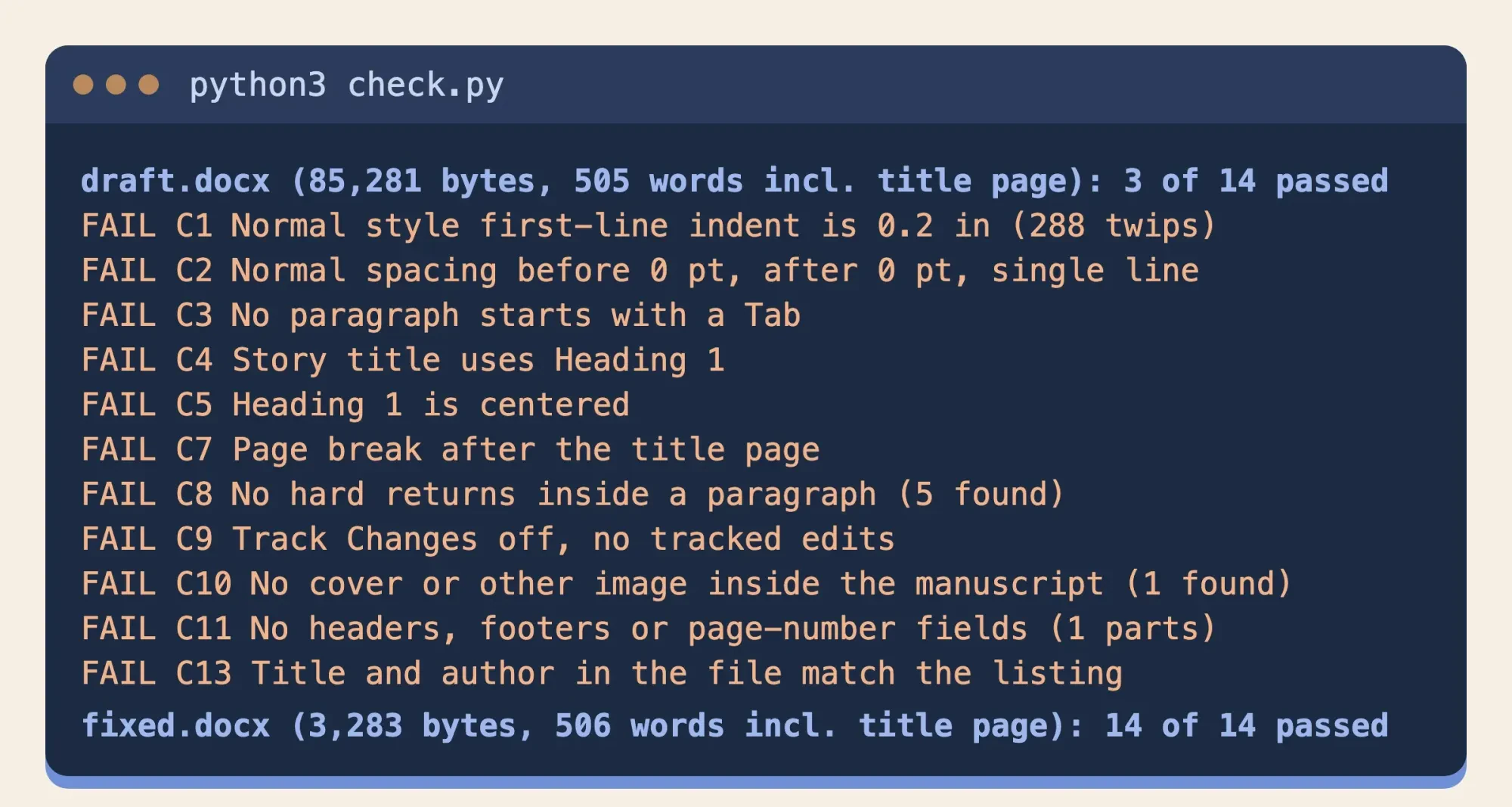 Source: test/output.txt, October 28, 2026: all 11 draft failures and both file totals; the 17 passing lines are not shown
What we tested
On October 28, 2026, our script built a made-up 498-word story, "The Salt Road" by Juniper Vale, as a draft and a fixed Word file. It ran 14 checks from Amazon's pages on each. The draft passed 3 (title and author lines, no text boxes, DOCX type) and failed 11. The fixed file passed 14, and macOS textutil opened both. Two covers scored 4 of 6 and 6 of 6. Nothing went to KDP.
Make a cover that passes Amazon's checks
The cover is a separate file, uploaded on its own. Amazon's eBook cover page asks for JPEG or TIFF, ideally 2,560 pixels tall by 1,600 wide. The minimum is 1,000 by 625. No side may pass 10,000 pixels. Amazon calls a height at least 1.6 times the width ideal, and asks for RGB color under 50MB. For the best results, it says, images should have at least 300 PPI. Amazon's Cover Creator tool is there if you'd rather build it inside KDP. Whichever route you take, check the title at phone-thumbnail size, and for pale art add the narrow 3-4 pixel medium gray border Amazon's cover page suggests.
We made two covers to see where a rushed job fails. The first was a square 1,200 by 1,200 PNG. It passed 4 of our 6 cover checks and failed on format and on our shape check, at a ratio of 1.00 against Amazon's ideal of 1.6. The second, a 1,600 by 2,560 JPEG in RGB, passed all 6 at exactly 1.60. Our draft manuscript also had that cover pasted on its last page, which Amazon's formatting guide says to leave out, because KDP adds the uploaded cover itself. The quickest test is the ratio: divide height by width. A result under 1.6 misses Amazon's ideal, so start a new canvas rather than stretch the old art.
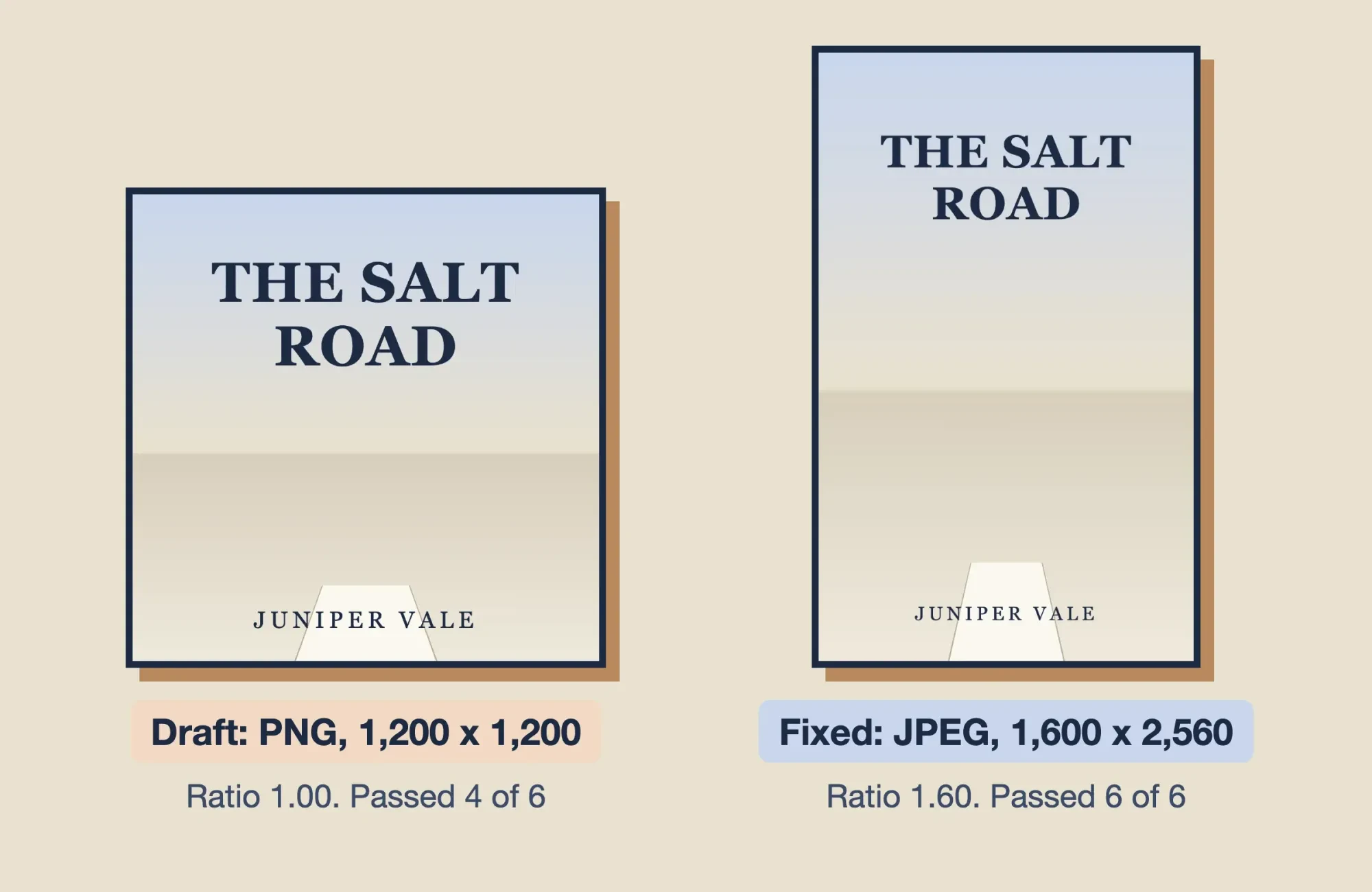 Source: our two test cover files from October 28, 2026, shown side by side with their check results
Pick a price inside the right royalty band
Price and royalty sit on one screen. Amazon's eBook royalties page sets two rates: 35% of the list price without VAT, or 70% of it less delivery costs for buyers in the 70% territories.
The band moved this year. Amazon's list price requirements say: "Effective July 7, 2026, the 70% royalty option price band is $2.99-$12.99 on Amazon.com." The old $9.99 cap had stood since 2007.
Under the 35% option, a file under 3 MB can sell for $0.99 to $200.00, as of October 2026, and it pays no delivery cost. Delivery costs on the 70% option come from the Digital Book Pricing Page. It sets Amazon.com's rate at $0.15 per MB as of October 2026, rounds file sizes up to the kilobyte, and charges at least $0.01. Amazon charges on the file size it determines, not your Word file's size. Our example assumes 4 KB, our fixed DOCX's 3,283 bytes rounded up, so the $0.01 minimum applies. That minimum holds up to about 0.067 MB ($0.01 / $0.15). Here's what the example file earns per US sale as of October 2026:
| Example list price | 35% option: 0.35 x price | 70% option: 0.70 x (price - $0.01) |
|---|---|---|
| $0.99 | $0.35 | Not allowed (below $2.99) |
| $1.99 | $0.70 | Not allowed (below $2.99) |
| $2.99 | $1.05 | $2.09 |
| $3.99 | $1.40 | $2.79 |
| $12.99 | $4.55 | $9.09 |
| $13.99 | $4.90 | Not allowed (above $12.99) |
Read the $0.99 and $2.99 example rows together, at Amazon's US rates as of October 2026: about 6 sales at $0.99 match one at $2.99 (2.09 / 0.35 = 5.97). So we'd start a single story there. A $1.99 price is a weak middle ground, earning $0.70 on the 35% option, about a third of what $2.99 pays at 70% ($0.70 / $2.09 = 0.33). At $3.99 the gap grows to $1.39 a sale ($2.79 - $1.40), and the 35% option never loses money to delivery, since Amazon deducts none there. Pictures change the math. A 2 MB file would cost $0.30 a sale to deliver ($0.15 x 2), which takes the $2.99 royalty down to $1.88 (0.70 x ($2.99 - $0.30)).
Not every sale on the 70% option pays 70%, either. Buyers outside the 70% territories earn you 35%, which is why Amazon's royalties page says a Bookshelf can show both rates for one book on Amazon.com. The pricing page adds two more limits. A 70% eBook must be priced at least 20% below any print edition on Amazon. Public domain works only get 35%. Miss a rule and Amazon's terms let it pay that book at 35% and adjust royalties it's already reported. If Amazon price-matches a cheaper copy elsewhere, the royalty is figured on Amazon's lower sale price. With the price chosen, decide on KDP Select.
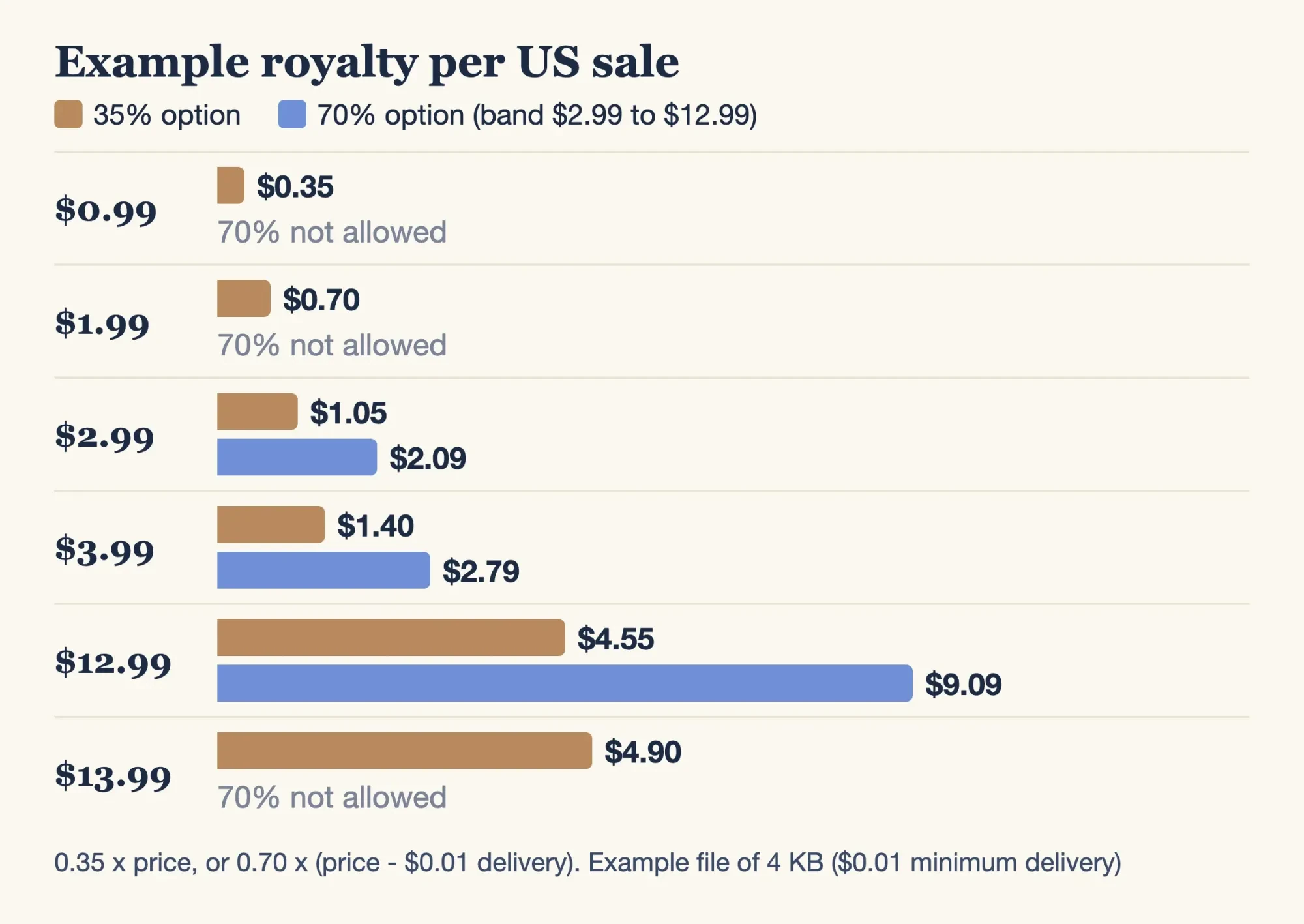 Diagram by DigitalTreed from Amazon KDP's US royalty formulas and price band, read October 28, 2026, applied to a 4 KB example file with $0.01 delivery
KDP Select ties the story to Amazon for 90 days
KDP Select is a yes-or-no choice about exclusivity. Amazon's KDP Select page calls it a free 90-day program, and enrolled eBooks join Kindle+, Amazon's reading subscription. The enrollment page gives the catch: "During the 90-day enrollment period, the Kindle eBook can only be distributed through KDP and public libraries." Enrolling doesn't change how the eBook is sold on Amazon, says the Kindle+ page. Print editions can still sell elsewhere, and terms renew on their own unless you switch renewal off. You get three days from the start of a term to cancel. After that, plans to sell the same eBook on other stores wait until the term ends.
Kindle+ pays by the page, not the sale. None of Amazon's pages publishes a per-page rate, so nobody can tell you ahead of time what one borrow of your story will earn.
Royalties in Kindle+ come from the KDP Select Global Fund, split by each book's share of pages read. Pages are counted in Kindle Edition Normalized Pages (KENP). You're paid the first time a subscriber reads each one, and a return visit to that page earns nothing more. A short story has few pages, so each borrow pays for only those few.
Select also adds two price tools (terms as of October 2026), but each term allows only one type. Amazon's Countdown page says: "Only one type of promotion can be used during the KDP Select enrollment period." A Free Book Promotion gives the eBook away for up to 5 days per term, from day 2 at the earliest. That page says you won't receive royalties while the promotion runs. Kindle Countdown Deals need 30 days of enrollment and a $2.99 to $24.99 list price on Amazon.com. A deal runs up to 7 days and keeps 70% even below $2.99. You get one Countdown Deal per term, and it has to end at least 14 days before the term does.
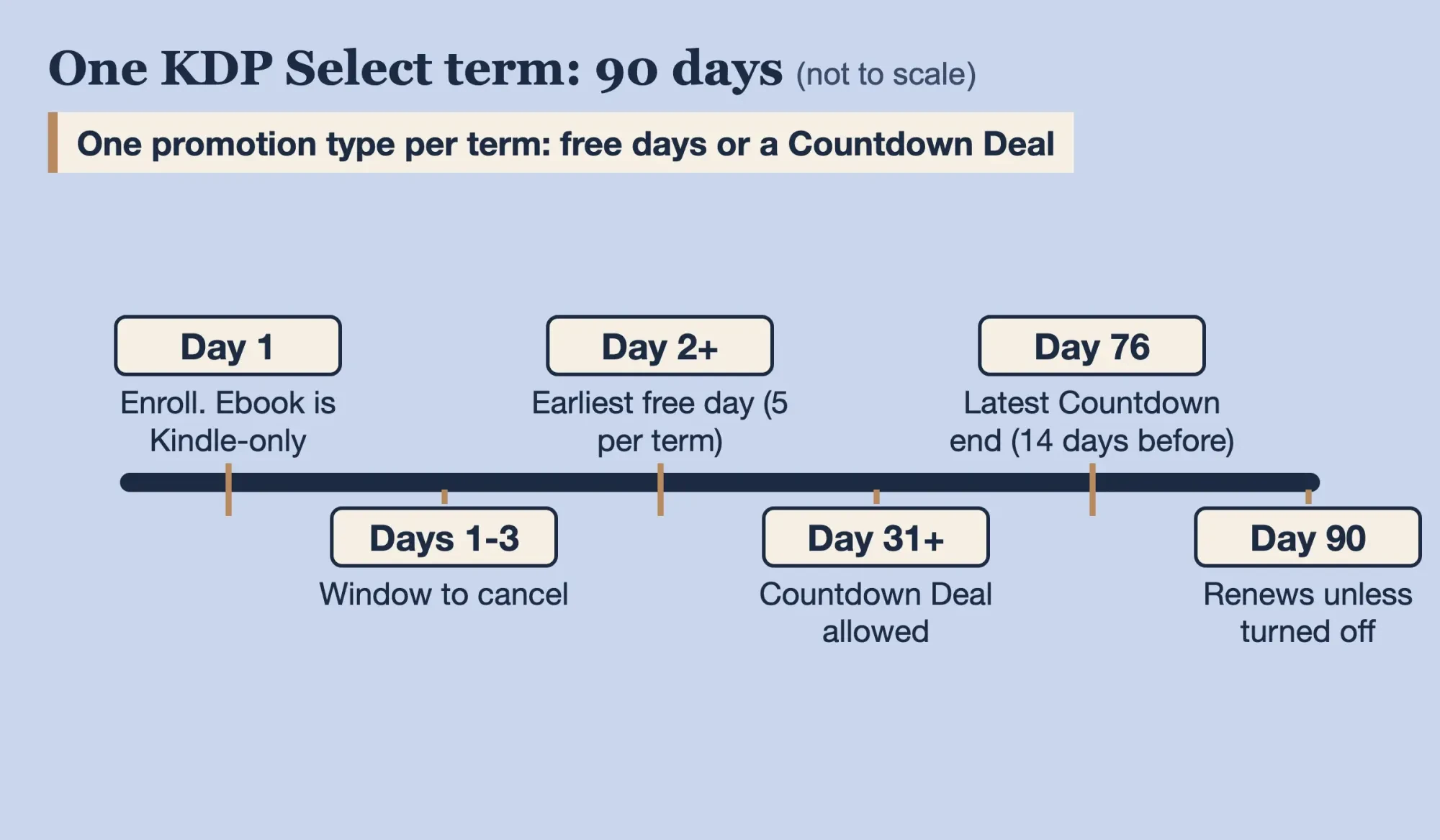 Drawn by us from Amazon KDP's Select, enrollment, Free Book Promotion and Countdown Deals pages, read October 28, 2026; not to scale
Our take: enroll a first story for one term and spend it on free days, not a Countdown Deal. Turn renewal off before day 90 if other stores are the plan.
Timing and price both favor free days. A deal can't start before day 31 and needs a list price of at least $2.99, as of October 2026. Free days can start on day 2 if you book them at least one day ahead on the Marketing tab.
Fill in the listing and submit
The listing is what you can write last, but KDP's setup steps ask for it first: book details, then content, then rights and pricing. So draft the description and keywords while you format, then paste them in.
Write the description to fit Amazon's limit. The book description page caps it at 4000 characters, counting HTML tags. Bold Amazon's sample word "test" and its 4 characters count as 11.
Keywords and categories decide where the story shows up. Amazon's keywords page says to use up to seven keywords or short phrases, and to search Amazon with them first to check that the results match your story. Our keyword suggestions tool gives phrases to try. The same Amazon page warns that customers tend to skim past titles over 60 characters, so keep the story's title tight. The categories page allows three categories per book, and new placements can take up to 72 hours to show. Amazon also updates its category list from time to time, so a placement you chose can disappear, and it's worth checking yours a week after launch.
Readers also need somewhere besides search to find the story. A small author site gives each new story a page to link to. Once the detail page is live, put the story's Amazon link there, under the same title and pen name you entered in KDP. Our pieces on starting a personal blog and how to write a blog post cover the setup. If you'd rather pay someone for the description, our post on hiring a freelance copywriter lists rates. A note on us: DigitalTreed is paid by businesses to write and edit under its content marketing service, and you can publish this story without hiring anyone.
Frequently asked
Can I sell a short story as a paperback too?
Only with enough pages. Amazon's trim size table sets a 24-page minimum for a 5 x 8 inch paperback on white paper.
How long does KDP take to publish a short story?
About 3 business days to go live, says Amazon's timelines page.
Can I turn off the Read Sample preview?
Only by asking. Amazon's Read Sample page says sample percentages can't be adjusted, but you can contact KDP to remove the feature.
Do Kindle+ readers need Amazon Prime?
No. Amazon's Kindle+ page says subscribers don't need Prime.
How we made this guide: Twenty-two kdp.amazon.com help pages, saved as text on October 28, 2026, are the source for every rule and US figure. The file test used a made-up story, our own script and two homemade covers on one Mac; no KDP account was opened and nothing was uploaded. Facts checked by the DigitalTreed team on October 28, 2026.
First published April 2024. Rewritten October 28, 2026 around one story's path through KDP, with the July 2026 price band, worked royalties and a local file test.
Sources
- Amazon KDP: Guide to Kindle Content Quality
- Amazon KDP: Kindle Vella Update FAQ
- Amazon KDP: eBook Manuscript Formatting Guide
- Amazon KDP: Supported eBook manuscript formats
- Amazon KDP: Create a Book
- Amazon KDP: Kindle Previewer
- Amazon KDP: eBook cover image criteria
- Amazon KDP: eBook Royalties
- Amazon KDP: eBook List Price Requirements
- Amazon KDP: Digital Book Pricing Page
- Amazon KDP: KDP Select
- Amazon KDP: KDP Select Enrollment
- Amazon KDP: Royalties in Kindle+
- Amazon KDP: Kindle+
- Amazon KDP: Free Book Promotions
- Amazon KDP: Kindle Countdown Deals
- Amazon KDP: Write a Book Description
- Amazon KDP: Make Your Book More Discoverable with Keywords
- Amazon KDP: KDP Categories
- Amazon KDP: Timelines
- Amazon KDP: Set Trim Size, Bleed, and Margins
- Amazon KDP: Read Sample (Look Inside the Book)
Comments
No comments yet. Start the conversation below.