
Quick answer
To write a blog post, pick one question your customers ask, fill in a simple template, write the answer first and back every point with your own facts. Then edit twice, write the title last and publish it under a real name. Plan on an afternoon: the average post took 3 hours 20 minutes in one 2026 survey.
That survey is Orbit Media’s 2026 blogger survey, published September 8, 2026. It's vendor data from 1,042 respondents, so treat it as a rough guide.
Writing posts like this is part of the content work we sell. Before this rewrite, on October 26, 2026, we read six of the US guides that rank for "how to write a blog post" and logged what each one gives you.
Their step counts ran from 7 to 12. Not one put a complete fill-in template on the page; the closest were sample outlines, a template shown as an image and a doc you have to go and get.
So this guide is the process plus the template, written for a business owner rather than a full-time blogger. If you're still deciding whether a blog earns its keep, read is blogging worth it first.
This page assumes you've said yes.
Key takeaways
- Pick one question a real customer asked you this month.
- Your own prices, timelines and job stories are what nobody can copy.
- Answer the question in the first sentence or two.
- Google allows AI help, but fact-check every AI-drafted line yourself.
- Edit in two passes: cut first, then read it out loud.
How to write a blog post in 8 steps
Here's the whole job in order. The sections below explain the why and the details.
- Pick one question a customer actually asked you.
- Look at what already ranks for it, so you know what the searcher expects.
- Gather your own facts: prices, timelines, photos, a real job.
- Fill in the template, one line per section.
- Write the answer first, then the sections.
- Edit in two passes: cut, then read it out loud.
- Write the title and meta description last.
- Publish with your name, alt text on images and one link onward to booking or contact.
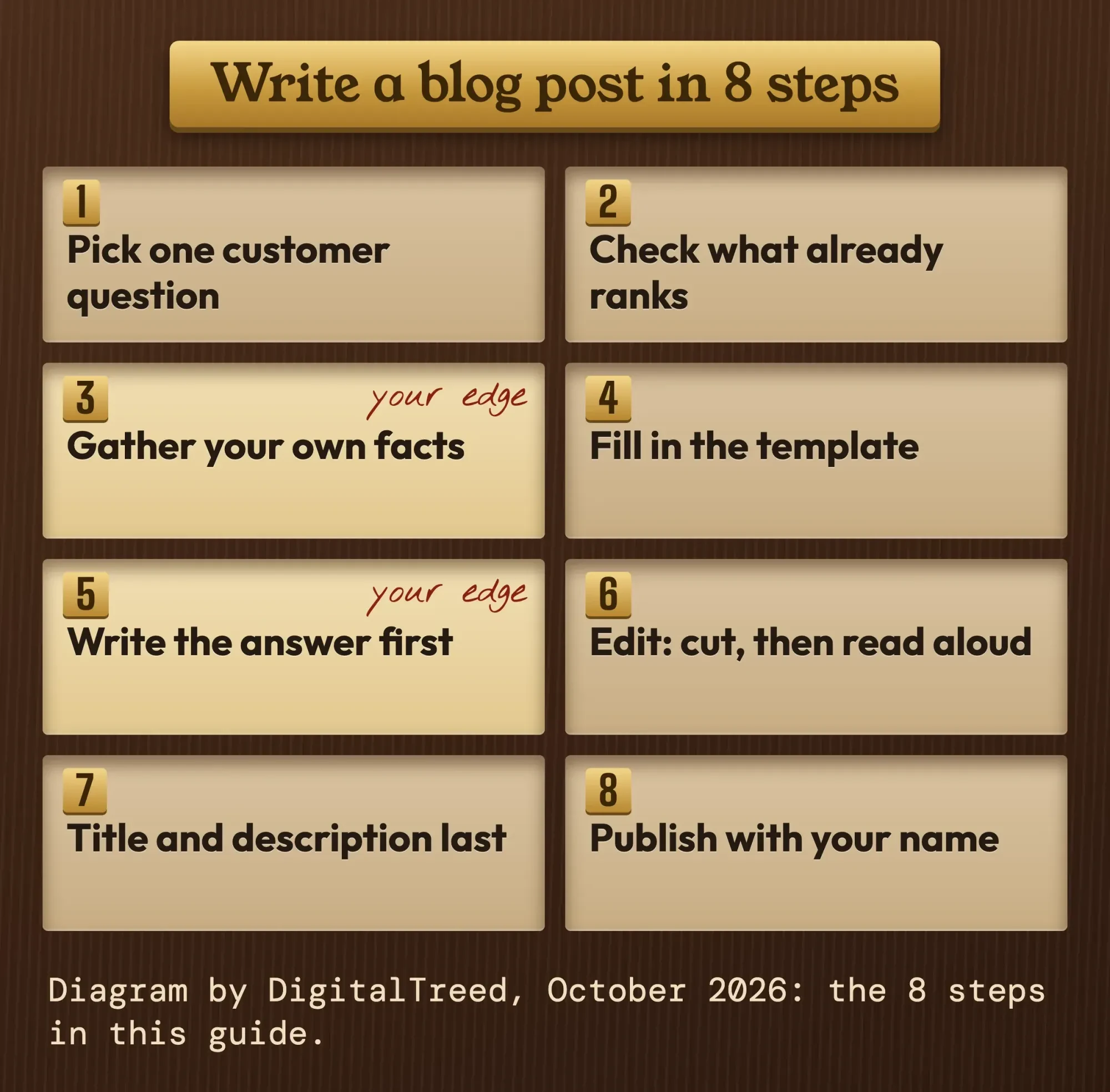 Diagram by DigitalTreed, October 2026: the 8 steps in this guide.
Steps 3 and 5 are where most business posts are won or lost. Skip your own facts and you end up with the same post as everyone else.
Start with one question a customer actually asked
Once you know the steps, the topic comes first, and the best topic for a business blog post is a question a real customer asked you this month.
It's already proven: someone cared enough to call, email or ask at the counter.
Open your inbox, your quote requests and your reviews. Write down the questions you answer again and again, word for word, in the customer's language. A dentist hears "does a crown hurt?", not "restorative dentistry options".
Google's own starter guide makes the same point about wording. People who know a topic "might use different keywords in their search queries than someone who is new to the topic." Write for the newcomer's words.
Next, check the phrase. Type it into our free keyword suggestions tool to see the related searches people type. If it opens on another country, switch it to the United States first.
Pick one question per post.
After that, look at what already ranks. If the top results are all step-by-step guides, a sales page won't compete; if they're price pages, your post needs a price range. Our Intermediate SEO guide on content briefs and search intent covers that check in more depth.
Last, picture one reader.
Make it the person who emailed you on Tuesday.
Your own facts are the part nobody can copy
Once you know the question and the reader, gather the facts only you have. Your own facts are what make a business post worth ranking.
Anyone can rewrite the top 10 results; only you know your prices, your turnaround times and what went wrong on last month's job.
Google's helpful content guidance asks it plainly: "Does the content provide original information, reporting, research, or analysis?" It also asks whether a page shows "first-hand expertise and a depth of knowledge."
So before you draft, collect three things.
One real job story, one number you can stand behind, and one or two photos you took. If you can't find all three, the topic may be too broad, or you may need to wait until you've done a few more of those jobs.
When you use an outside fact, link the page it came from, right at the claim. A government page or the platform's own help page beats a blog that quoted it.
And skip stats you can't trace. If a number has no original source, leave it out.
Photos: your own, licensed, or none
A photo you found online almost always belongs to someone. The U.S. Copyright Office's copyright FAQ says a work is protected "the moment it is created and fixed in a tangible form." Registration is voluntary, though you must register a US work before you can sue for infringement.
Use your own photos, stock you've licensed, or images whose owner has clearly given permission.
Your phone and a real job site beat a stock image of smiling models anyway.
A blog post template you can copy
With your facts in hand, it's time to fill in the template. This blog post template is the outline we recommend, built from the parts Google's own quality questions ask for. Copy the parts into a doc, fill in one line for each, and you have your outline before you write a full sentence.
| Part | What goes in it | Rough size |
|---|---|---|
| Title | The question or the result, in the reader's words. Plain, no hype. | One line |
| Opening answer | The direct answer with the main number, then one line of nuance or warning. | 2 to 4 sentences |
| Who this is for | The reader and their situation, so the wrong reader can leave fast. | 1 sentence |
| Sections (H2s) | Each heading states a point. Its first sentence answers it; the rest explains why and how. | 3 to 6 sections |
| Proof | Your own photo, price, timeline or job story, plus a source link at each outside fact. | In every section |
| Cost or time | Your real range with an "as of" date, if the reader will ask. | A short paragraph or table |
| Mistakes or questions | What customers get wrong, or the questions they ask next. | 2 to 5 items |
| Next step | One link: the service page, booking page or contact form. | 1 to 2 sentences |
| Byline and sources | Who wrote it, how you know, and the pages you used. | A few lines |
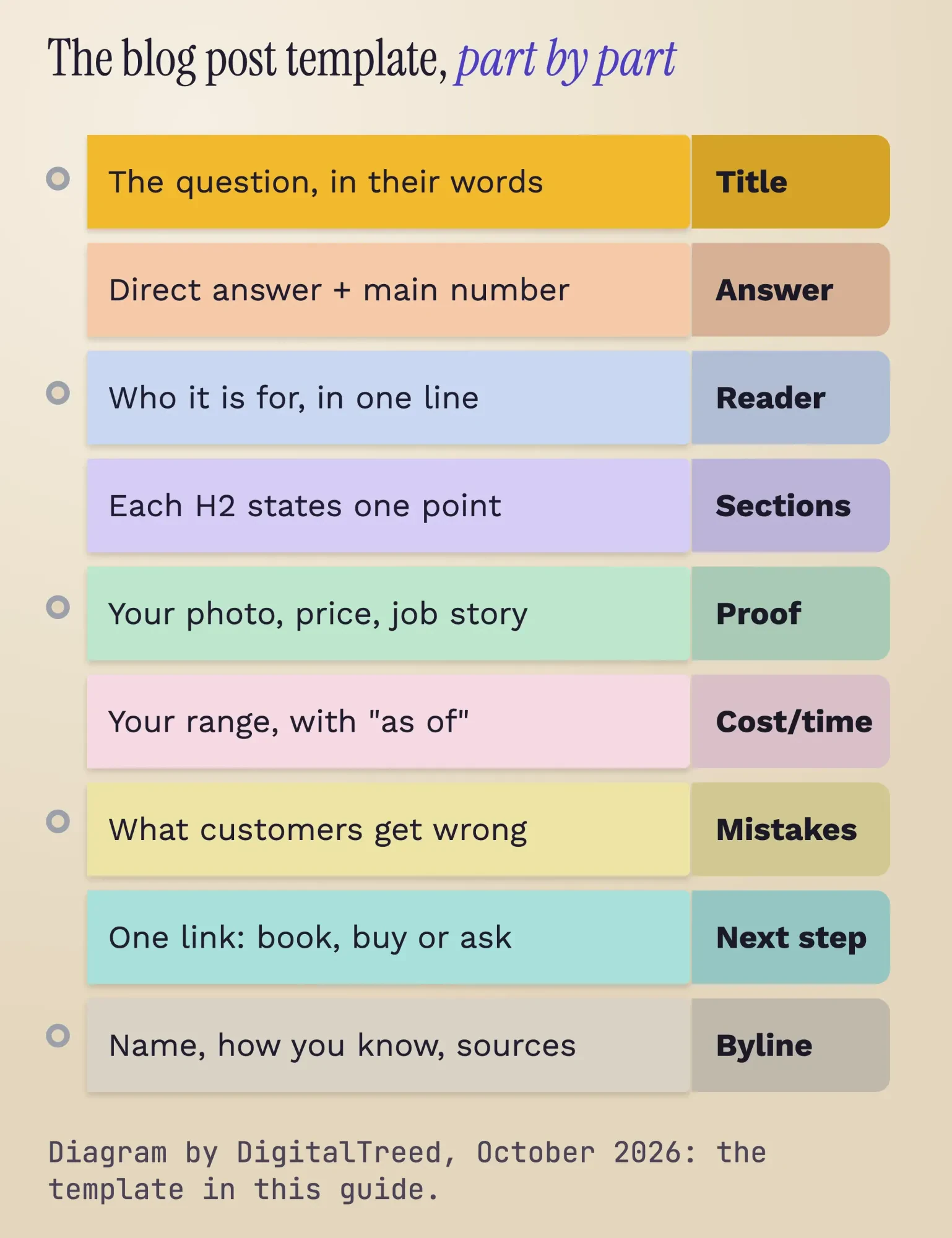 Diagram by DigitalTreed, October 2026: the template above as binder tabs.
Write the headings as statements. "Book alterations 8 to 12 weeks out" tells a skimmer more than "Timing".
How many headings? Google's starter guide says "there's also no magical, ideal amount of headings a given page should have." Use one per real point, and stop when you run out of points.
Write the answer first, then earn the rest
Once the template is filled in, write an opening that answers the question in the first sentence or two.
Why so blunt? Readers scan. In a classic 1997 study, the Nielsen Norman Group found "79 percent of our test users always scanned any new page they came across; only 16 percent read word-by-word."
That study is old. Google's starter guide gives today's version of the advice: break up long content and "provide headings to help users navigate your pages."
Here's a test we ran for this guide. We wrote the intro for our made-up example shop two ways, then measured both with a small script on October 26, 2026. The first version opened, "Planning a wedding can be stressful, and there are so many things to think about." It spent 65 words promising to cover "everything you need to know." It never said when to book.
The second version used the template: "Book wedding dress alterations 8 to 12 weeks before the wedding. That leaves time for the 2 or 3 fittings most gowns need at our shop." The full three-sentence version came in at 41 words with 4 numbers, and the answer landed in the first sentence.
Our script also put the second version at about grade 5 for reading level against about grade 7.6 for the first. That's a rough formula, not a verdict.
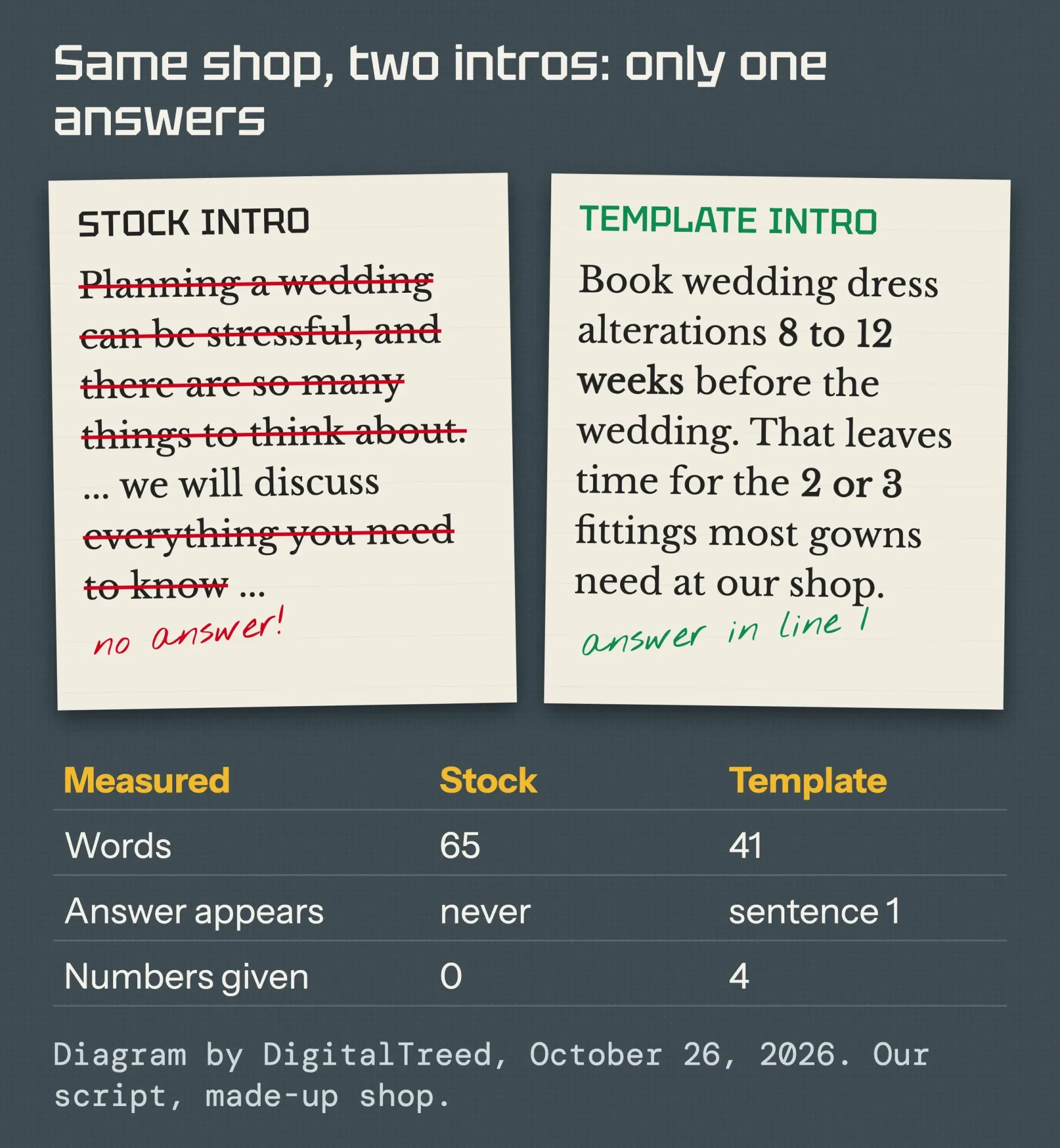 Diagram by DigitalTreed, October 2026, from our own measurement of two intros for a made-up shop.
Not a confident writer? Say the answer out loud as if a customer just asked it at the counter, then type what you said. That's usually your opening.
Can you use AI to write a blog post?
Yes, Google allows AI help, but it judges the result, not the tool. Its guidance on generative AI content says AI "can be particularly useful when researching a topic, and to add structure to original content."
That page also draws the line on volume. Using AI "to generate many pages without adding value for users may violate Google's spam policy on scaled content abuse." That spam policy covers unoriginal pages "no matter how it's created."
Google's 2023 post on the subject sums up its stance in one heading: Rewarding high-quality content, however it is produced.
Facts are the risk. Google warns that generative models "don't retrieve facts, but predict a likely sequence of words" based on their training data. So it calls it "critical to manually factcheck and review all AI-generated content" before publishing. That includes titles, meta descriptions and image alt text.
Ownership is the other catch. The U.S. Copyright Office's January 29, 2025 report says AI output can be protected "only where a human author has determined sufficient expressive elements." Prompts alone don't count: "not the mere provision of prompts." Your edits, arrangement and own material can still be protected.
Treat this section as background, not legal advice. A US copyright attorney can answer for your own posts and contracts.
Our take: use AI for the outline, a first rough draft or a critique, then rewrite it around your own facts. In Orbit Media's September 2026 survey, 92.4% of respondents said they use AI for blogging, and Orbit wrote that "it correlates with nothing." Your experience is the edge. Our guide to AI in digital marketing covers where else it helps.
If someone paid you for the post or you earn from its links, that's a separate disclosure question, covered in our sponsored blog posts guide.
Edit in two passes: cut, then read it out loud
Then edit twice, with a break between.
The first pass cuts. The second pass is for the ear, and it catches what spellcheck can't.
Pass one: delete any sentence that doesn't help the reader do the thing. Throat-clearing intros go first, then repeated points, then anything you can't back up.
Pass two: read it aloud. Where you trip, rewrite. The US government's plain language guide says "Active voice makes it clear who should do what." It also lists shorter words, short sections, active voice and present tense as what makes text easier to follow.
Watch the small stuff too. Google's own quality questions include "Does the content have any spelling or stylistic issues?" Our note on which vs that in business writing fixes one of the most common slips.
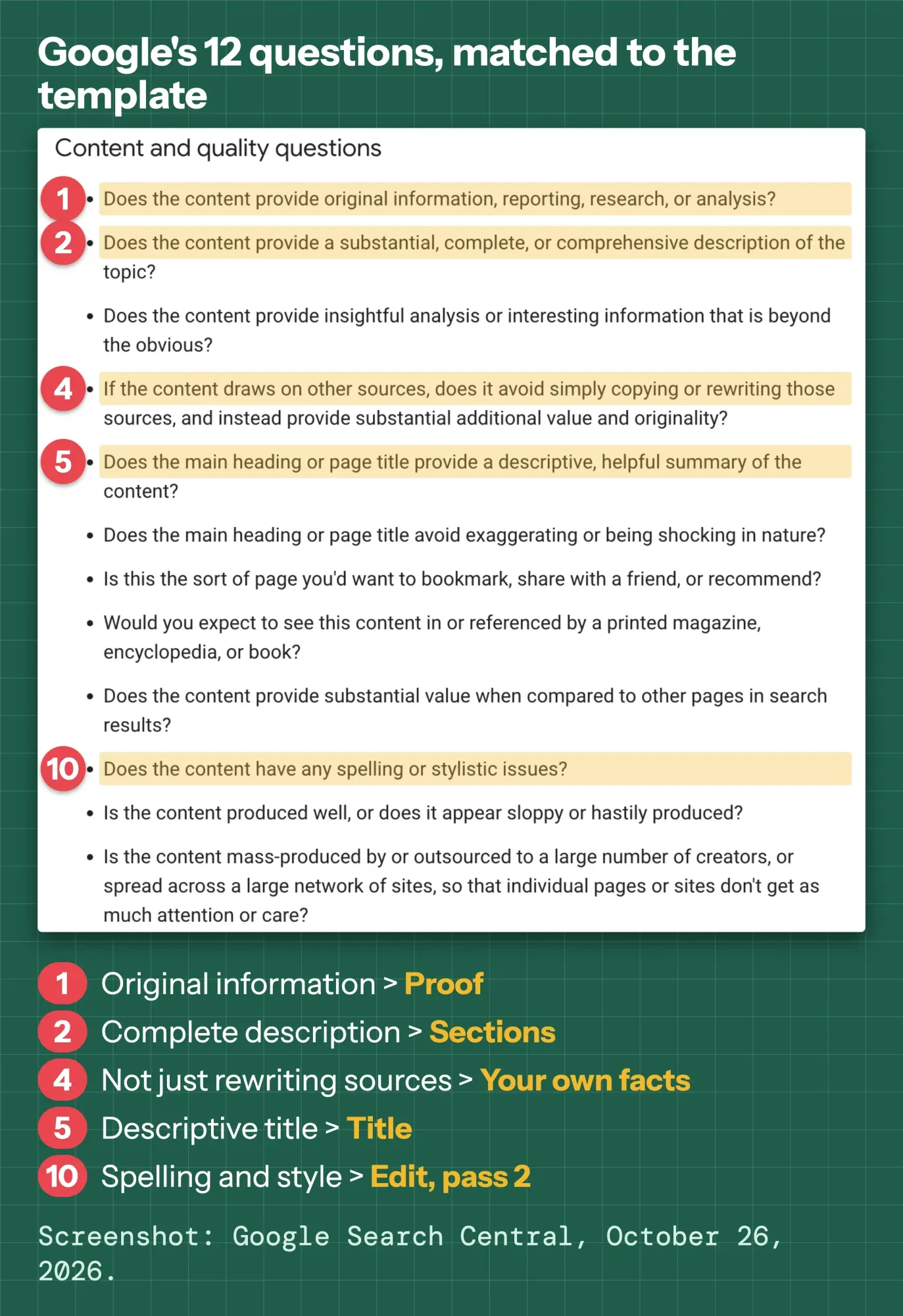 Screenshot: Google Search Central, "Creating helpful, reliable, people-first content", taken signed out on October 26, 2026, cropped to the content and quality questions. Annotations by DigitalTreed.
Last, check every fact, name, price and link against its source, AI-drafted lines most of all. Five minutes here saves an awkward call later.
Write the title and description last
After the edit, write the title, because only then do you know what the post delivers. Google's title link documentation asks for "descriptive and concise text."
Ignore hard character rules. That documentation says "there's no limit on how long a <title> element can be", and that long ones get cut "to fit the device width" in results. Its snippet documentation says the same about meta descriptions, which it calls "like a pitch."
So lead with the question or result, and put the detail that earns the click early. Paste both into our free SERP snippet preview to see where desktop and phone results would cut them.
The rest of on-page SEO (keyword placement, links and a 12-point pre-publish checklist) lives in our SEO content writing tips built on Google’s checklist, so we won't repeat it here.
Publish with your name on it, then give it a job
Before you hit publish, put a real author on the post. Google's helpful content page says, "We strongly encourage adding accurate authorship information, such as bylines to content where readers might expect it."
Give each image alt text that says what it shows. Google's image SEO guide says alt text helps it "understand the subject matter of the image", together with computer vision and the words around the image. A purely decorative image gets an empty alt attribute, per the W3C alt decision tree.
Then give the post a job: one clear link to the page where a reader can book, buy or ask.
A post with no next step is a dead end.
Publishing is half the work. Our plan to promote your blog posts covers email, social and your Business Profile.
Check it again at 30 and 90 days.
If people keep asking a question the post doesn't answer, add a section for it. That's an update with real new content, which is the kind worth putting a new date on.
Red Cedar Alterations fills in the template (a made-up example)
Example: Red Cedar Alterations is a made-up bridal alterations shop in Eau Claire, Wisconsin. Its owner keeps hearing one question in May: "How far ahead should I book?"
She pulls three things from her own records. They are her booking rule (8 to 12 weeks before the wedding), her usual number of fittings (2 or 3), and a photo of a bustle she finished last week. Those are her facts; no one else has them.
Her filled-in template gives her these headings:
- Title: How far ahead should you book wedding dress alterations?
- Opening answer: 8 to 12 weeks, with room for 2 or 3 fittings
- Bring your shoes and undergarments to the first fitting
- Hems and bustles take the longest
- What a rush job costs at our shop (with an "as of" date)
- Next step: book a fitting online
She drafts it in one sitting, reads it aloud the next morning, and adds her name and the bustle photo with alt text. The post links once, to her booking page.
Frequently asked
How long should a blog post be?
As long as it takes to answer the question well. Google's helpful content page asks whether you're writing to a word count and answers its own question: "(No, we don't.)" For reference, the average post in Orbit Media's survey, published September 8, 2026, was 1,312 words (vendor data).
How long does it take to write a blog post?
About an afternoon for most people. Orbit Media’s 2026 survey put the average at 3 hours 20 minutes, down from a peak of 4 hours 10 minutes in 2022 (self-reported vendor data, published September 8, 2026). Your first few will take longer.
Would you rather hand the writing off? Researched, edited posts are part of our content marketing service. We'd earn money if you hire us, so the template above is yours to use either way.
How we made this guide: on October 26, 2026, we read Google Search Central's pages on helpful content, generative AI, spam, titles, snippets and images. We also read the U.S. Copyright Office, digital.gov and W3C pages cited here. We read six US guides that rank for this topic and logged their steps, templates and sources, and we measured two versions of the example intro with our own script. The screenshot is from a public Google page. Every fact links to the page it came from.
We didn't publish a live test post for this guide, and the example shop and its numbers are made up. This version goes live only after our author, Eram N., has read it and signed off.
First published July 2020. Rewritten October 26, 2026: the old post was a short list of general blogging tips. This version is a step-by-step process for business owners with a copyable template, a measured intro example, Google's own words on AI and length, and US copyright basics.
Sources
- Google Search Central: Creating helpful, reliable, people-first content
- Google Search Central: Google Search's guidance on using generative AI content on your website
- Google Search Central: Spam policies for Google web search (scaled content abuse)
- Google Search Central: SEO Starter Guide
- Google Search Central: Influencing your title links in search results
- Google Search Central: How to write meta descriptions
- Google Search Central: Image SEO best practices
- Google Search Central Blog: Google Search's guidance about AI-generated content (February 2023)
- Nielsen Norman Group: How users read on the web (1997)
- digital.gov: Writing for understanding (Plain Language Guide Series)
- U.S. Copyright Office: Frequently asked questions about copyright
- U.S. Copyright Office: Copyright Office releases Part 2 of Artificial Intelligence Report (January 29, 2025)
- W3C Web Accessibility Initiative: An alt decision tree
- Orbit Media: blogging statistics, 2026 survey of 1,042 respondents (published September 8, 2026; vendor data)


Comments
No comments yet. Start the conversation below.