
Quick answer
You can start a personal blog today for $0 on WordPress.com's free plan, as of October 2026. If you want your own domain and no platform ads, its Personal plan costs $48 a year, billed yearly, with the domain free for the first year. Pick the platform first, then publish an About page and three posts before you share the link.
If you've wanted a place to write about your garden or the walk to work, you've probably opened a blogging site and closed the tab. A personal blog is a website where you write in your own voice for readers you choose. Here's how to start a personal blog in an afternoon, and how to keep it going.
We start with what a personal blog is and what you need. Then you pick the platform and a name, and set privacy rules backed by a photo test we ran. Next come the About page and three posts, a pace that survives a bad month, and what changes when money shows up. We end with what we'd do this week.
Key takeaways
- A sips resize kept a photo's GPS; cwebp's default dropped it.
- WordPress.com's Personal plan costs $48 a year with a first-year free domain.
- A private Blogger blog allows up to 100 members, readers included.
- Posts a year equals 52 divided by the weeks between posts.
- Affiliate links in reviews need a clear disclosure under FTC rules.
What is a personal blog, and what do you need to start one?
A personal blog is a small website you write for yourself first. It isn't a business blog, which exists to bring in customers. It isn't a social feed either, where the platform decides who sees each post. On a blog you own the archive, and a new reader can scroll back through years of posts in order, which no feed lets them do. To get there, you need four things before the first post goes live: a platform, a name, an About page and a few posts, in that order.
You don't need a logo, a niche or a content calendar on day one, and waiting until you have them is an easy way to never start at all.
The order matters. Your platform decides which addresses you can have, and the address shapes the name. A name can give away where you live, which is why privacy rules come right after it.
Pick the platform by how much you want to own
So the platform comes first. For a personal blog, ask how much of the site you want to own and look after, because each of the three common paths trades money for control.
The fastest path skips a paid plan. WordPress.com's pricing page lists a free plan with "a WordPress.com subdomain, 1 GB of storage, unlimited pages and posts." The same page warns that "Free sites display WordPress.com ads to visitors." Blogger, Google's blogging service, offers "a blogspot.com domain or buy a custom domain," and its about page lists no plan fee. Either one gets a blog online the same day, at an address like yourname.wordpress.com or yourname.blogspot.com, with nothing to install or update. That's why we'd point a nervous first-timer here. If the blog dies after a month, there's no plan to cancel.
The middle path costs a little. WordPress.com's Personal plan is $9 a month paid monthly, or $4 a month billed every 12 months, as of October 28, 2026, per the same plan table. Paid yearly, that's $4 x 12 = $48 a year before tax. Paid month by month, it's $9 x 12 = $108. The plan includes a free domain for one year and turns off the platform ads, which is the main reason to pay if strangers will read your posts. The page also says the plan auto-renews, so set a reminder a month before the year ends.
The third path is self-hosted WordPress. WordPress.org calls the software "open source" and "licensed under the GPLv2," so the software itself costs nothing. You pay for hosting and a domain, though, and you run the updates yourself. That setup is laid out step by step in a WordPress website guide we wrote.
This table puts the three paths side by side. Read it by the column that worries you most: cost, ads or upkeep.
| Path | Cost as of October 2026 | Your address | Ads shown to readers | Upkeep |
| WordPress.com free | $0 | yourname.wordpress.com | Yes, WordPress.com ads | None |
| Blogger | No plan fee listed | yourname.blogspot.com or a domain you buy | Only if you add them | None |
| WordPress.com Personal | $48 a year, billed yearly | Your own domain (free for year 1) | No | None |
| Self-hosted WordPress | Hosting + domain | Your own domain | Only if you add them | Updates, backups, security |
Our take: if you aren't sure you'll still be writing in three months, start on WordPress.com's free plan and move later.
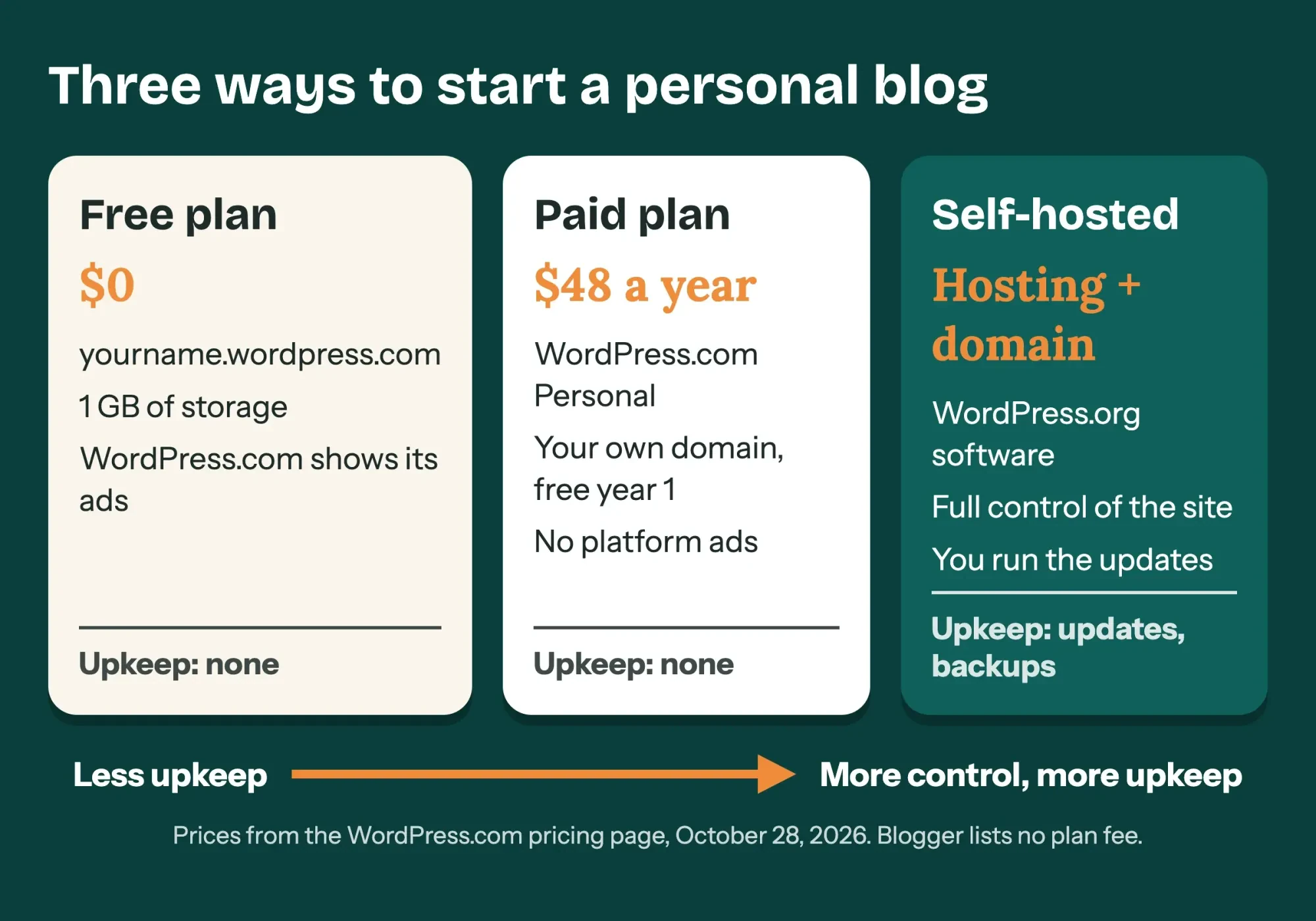 Diagram by DigitalTreed. Prices from the WordPress.com pricing page, October 28, 2026.
For a closer look at WordPress.com's free plan and Blogger, our Blogger vs WordPress comparison covers cost, speed and design. It also explains why owning the platform and the domain decides how hard a later move will be, which matters more than any theme.
Pick a name you can live with for years
Once you know the platform, the name is next, because Blogger asks for it on the first screen. Its create-a-blog steps read: "Enter a name for your blog. Click Next . Choose a blog address or URL." That's two big choices in about ten seconds. Decide before you sign up.
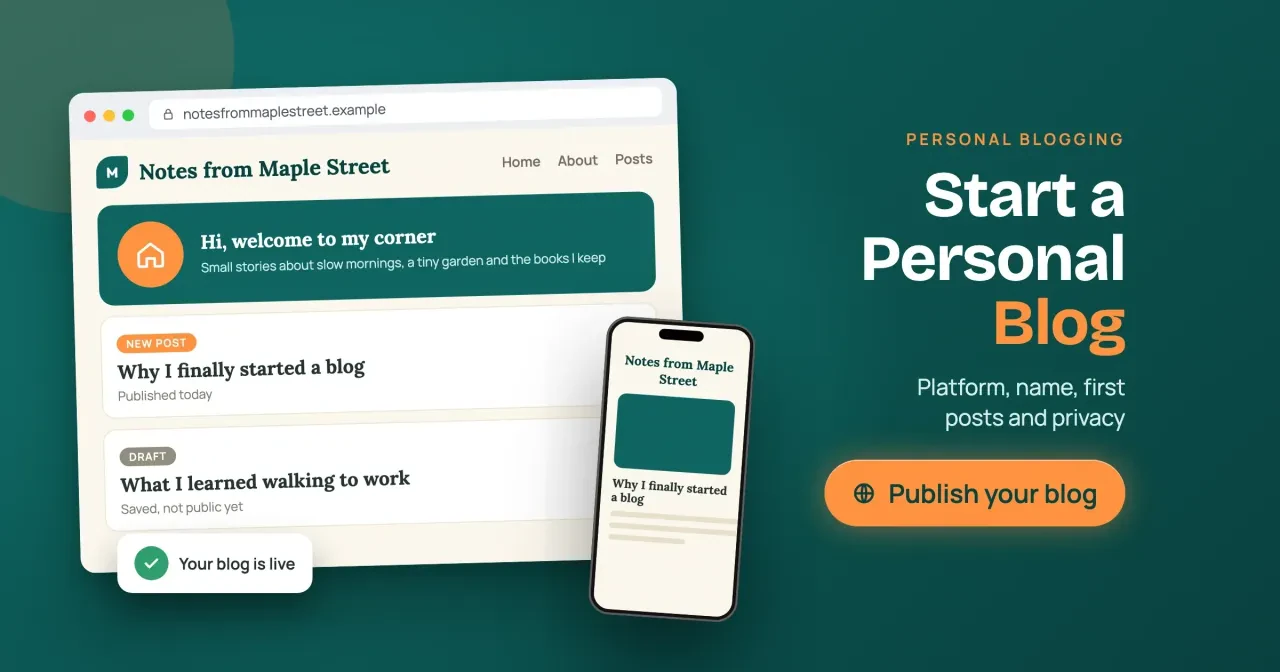
A good personal blog name is easy to say out loud and still fits if your topics drift. Take "Notes from Maple Street," a made-up blog from our featured image. It sounds personal, and it would still work if the garden posts turned into book posts. A name tied to one hobby, like a single tomato variety, boxes you in. You'll feel it by the second year.
The catch is that a name can give away more than you meant.
Your real street, your kids' names, your employer and your town are enough, together, for a stranger to find your door. If the street in your blog's name is your real one, you've handed over half of that list in the header. Writing under your own name is fine, but pick it on purpose, not after a neighbor or a boss has quietly read a year of posts. A simple test is whether you'd be comfortable seeing the name on a coworker's screen.
Your own domain adds one more privacy step. Domain records list a contact, and ICANN's Registration Data Policy says registrars "MUST" hide personal data where law requires it. Otherwise they "MAY" if they have a "commercially reasonable purpose to do so." So read the registrar's own promise before you pay. Cloudflare Registrar, for example, says its "Free WHOIS redaction keeps your personal contact details out of public records." A domain also lets you give the blog its own email address, and a separate contact address keeps reader mail away from your bank alerts. The steps for creating an email address with a domain you own are in a separate post.
Set your privacy rules before the first post
Set your privacy rules next, while there's nothing to clean up. Fixing fifty old posts later can eat a weekend, and copies of those pages may already be out there.
These are the four rules we'd write on a sticky note. They cover the leaks that are easiest to miss: places, people, photos and timing.
- No home address, street name or school name, in words or in photos.
- No full names of family or friends without their OK; use initials or nicknames.
- Strip the location from every photo before you upload it.
- Post about trips after you're home, not while the house is empty.
Photos are the easiest leak to miss, because nothing in the picture itself shows where it was taken, even when the file carries coordinates precise enough to find a house.
Google Photos Help explains why in its page on photo locations: "Your photo may have a location if your device's camera saves your location with the photo." That location travels inside the file to anyone who downloads it from your blog, and our test below shows how little effort it takes to read it back out.
While you're still building, you can hide the whole blog. WordPress.com's site visibility settings offer "Coming Soon," where "Your site is hidden from visitors while you're working on it." There's also "Private," where "Your site is only visible to you and any users you approve." Blogger's reader access settings have a "Custom readers" option for invited readers only.
To keep one page out of Google but open to people with the link, use noindex. That's handy for a page you only send to family, like a reunion plan or a wedding weekend schedule. Google's noindex documentation explains that it's a meta tag or HTTP header that stops search engines from indexing the page. Don't also block that page in robots.txt, an easy mistake when you turn on every privacy switch you can find at once. Google says the crawler has to reach the page to see the rule, or the page "can still appear in search results."
Once a month, search your own name too, in a private browser window, along with your blog's name and any nickname you use in posts. Google's Results about you tool shows whether your "home address, phone number, or email address shows up in search results," and lets you ask for removals. Google says some features are still rolling out to adults in certain regions.
What we tested
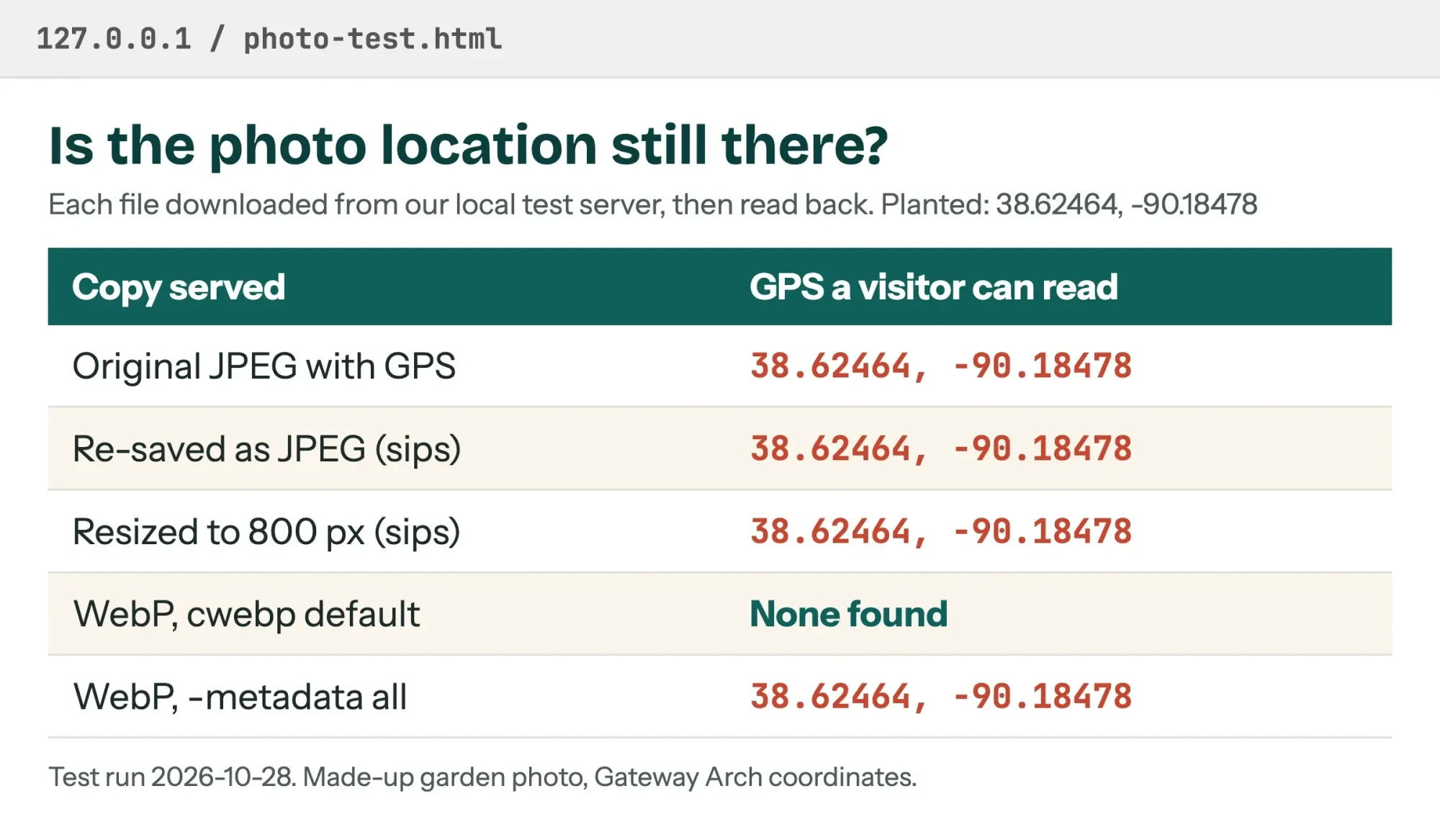
We wanted to know if everyday photo prep removes the location. On October 28, 2026, we made a test JPEG of a made-up garden and added GPS tags the way a phone camera can save them. The location was the Gateway Arch in St. Louis, standing in for a home address.
We made four copies a new blogger might upload and served all five files from a test server on 127.0.0.1. Then we downloaded each one as a visitor would. A plain re-save in macOS's sips tool kept the location. So did a resize to 800 pixels. Google's cwebp converter dropped it, which matches its documentation: "The default is none." Adding "-metadata all" brought it back.
 Screenshot: our photo-location test page on 127.0.0.1, October 28, 2026.
So in our test, resizing with sips didn't remove the location. Check one exported file before you trust a habit, and don't count on the blog platform to strip it, because we didn't test any platform's upload.
Write the About page and three posts before you share the link
With privacy settled, you can write. A first visitor has two quick questions: who's writing, and whether there's more than one post. So the About page and three posts are the minimum we'd have live before you share the address.
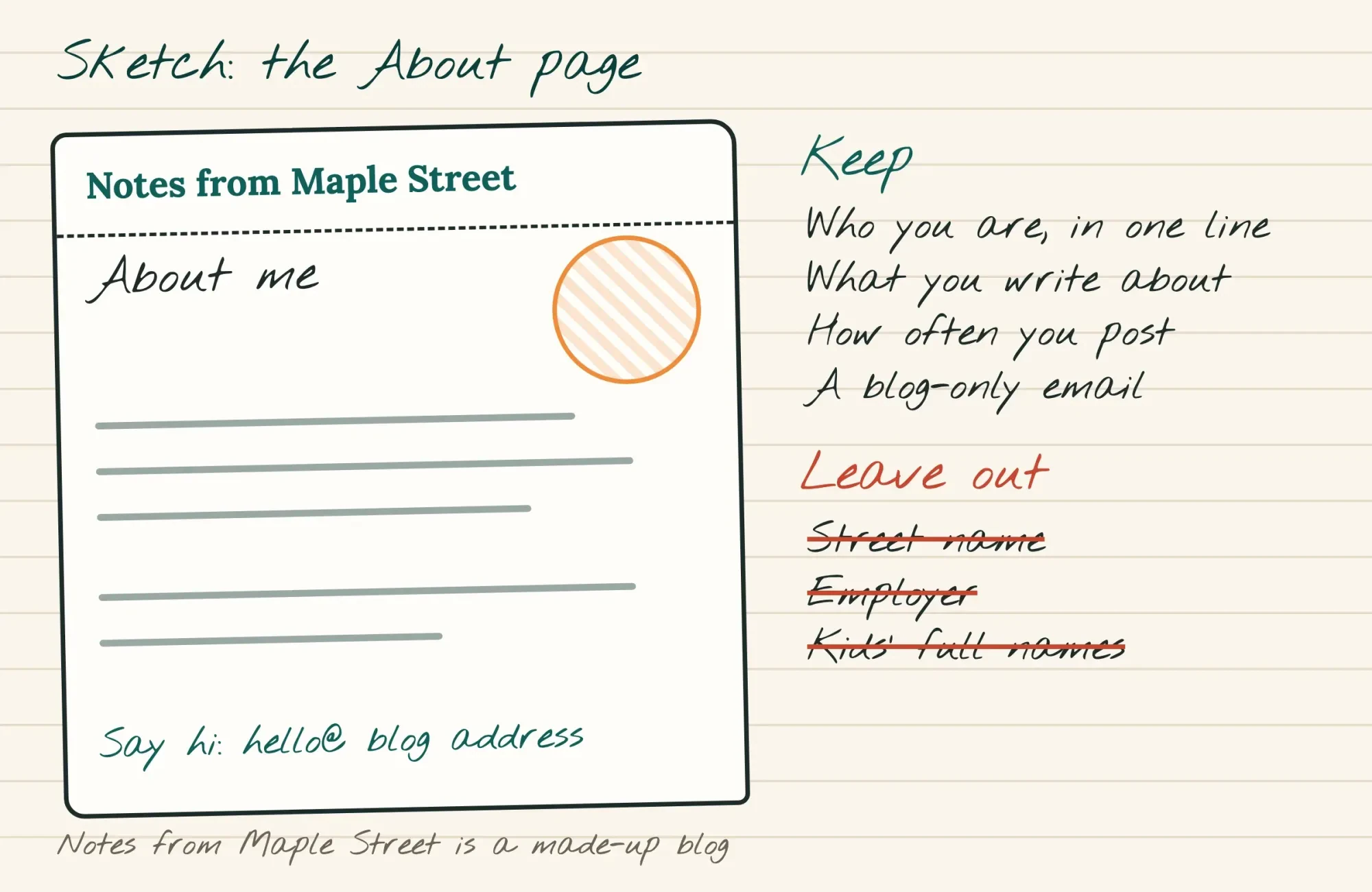
Your About page answers three questions in plain words: who you are, what you write about and how often you post. Keep it under 200 words. If you'd like to stay private, show a photo of something you love instead of your face, and list a contact address that isn't your personal inbox. You can stay vague on details and still sound like a person. A made-up line like "I'm a hospital scheduler in Ohio who grows tomatoes in a yard the size of a parking spot" says plenty. Nobody can find a street from it. Update the page once a year, because your topics and your pace will have changed by then.
 Drawn by us. Notes from Maple Street is a made-up blog.
For the three posts, write one of each kind below. A new reader gets a feel for your range, and you find out which kind you like writing. On the made-up Notes from Maple Street, they could look like this:
- A why post: "Why I finally started a blog," short and honest.
- A story post: "What I learned walking to work," one real moment told well.
- A useful post: one thing you know that a stranger could use, like a seed-starting log.
The useful post is the one strangers will find through search, so give it a plain, specific title. Our free SERP snippet preview shows how that title will look in Google before you publish, which tells you whether it gets cut off on a phone. For structure, the 8-step blog post guide has a template you can copy. You can skip the parts meant for businesses.
Three decent posts that sound like you beat one polished essay stuck in drafts, and you'll rewrite the early ones later anyway.
Keep writing at a pace that survives a bad month
That gets you live, which is the easy half. A schedule built for a good month is the one that breaks first. Pick a pace you could keep during a busy one, and treat anything extra as a bonus.
The math is simple: posts a year = 52 / weeks between posts. One post every 2 weeks is 52 / 2 = 26 posts a year. Weekly is 52, and every 4 weeks is 52 / 4 = 13. For a personal blog next to a day job, every 2 weeks is where we'd start, since one lost weekend doesn't break it. Weekly sounds better on paper, but it leaves no room for a sick kid, a double shift or a week when you simply have nothing to say. You can always speed up in month three if drafts pile up, which feels far better than slowing down after promising readers a post every Monday.
Then bank a small buffer before you go live. Weeks covered = drafts banked x weeks between posts, so 3 finished drafts at a 2-week pace cover 3 x 2 = 6 weeks. That's enough to ride out a cold, a work crunch or a week away without the blog going quiet, and without a rushed post written at midnight.
Scheduling makes the buffer run on its own. In Blogger, the post settings let you "Set date and time" before you publish, so a finished draft goes out on its day while you're busy.
Write when you have energy, and let the schedule cover the slow weeks.
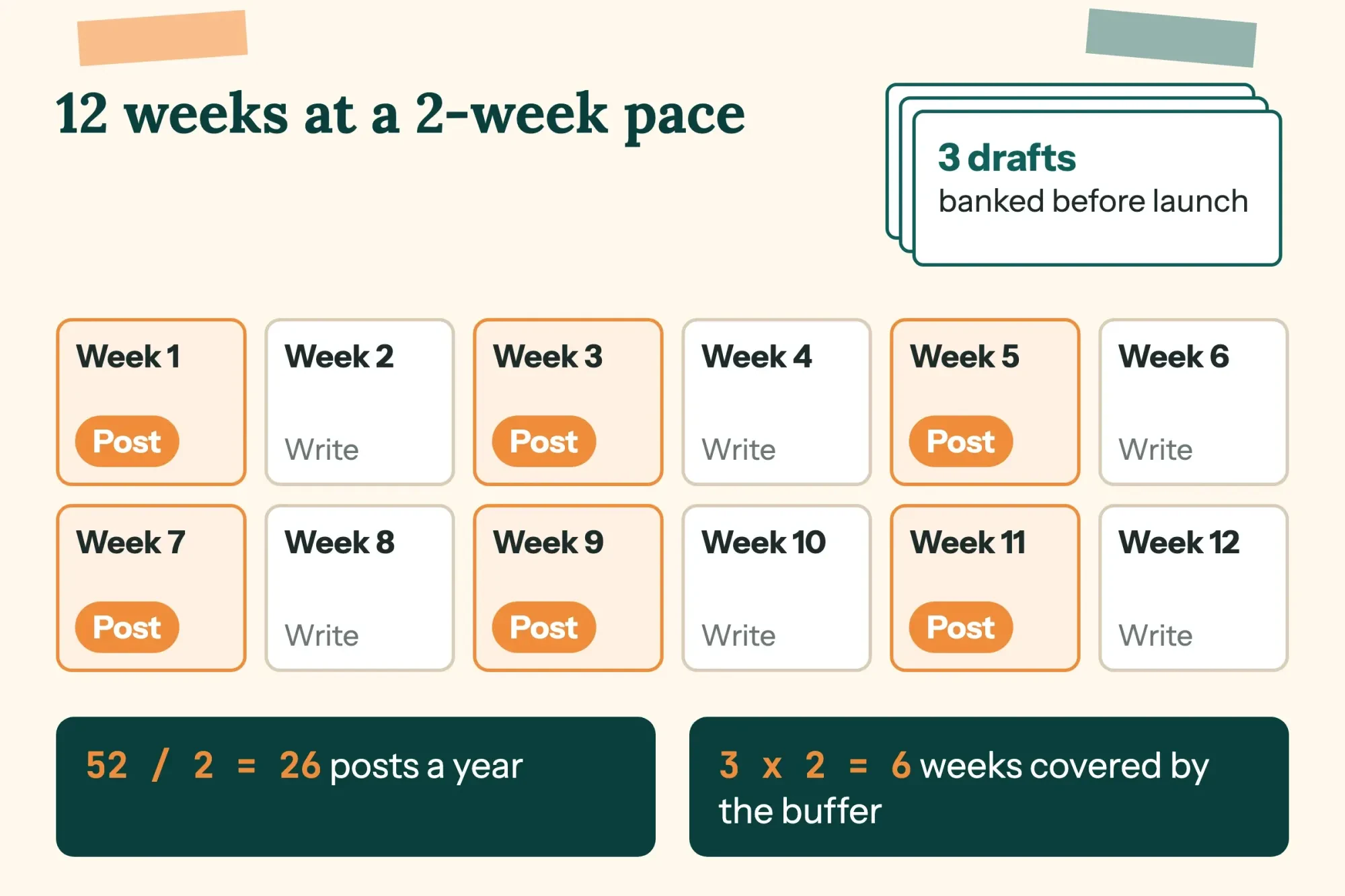 Diagram by DigitalTreed. A 2-week pace with a 3-draft buffer.
Last, give each post one small push so it doesn't vanish. Send it to two people who'd care, or share it once where your readers already hang out, like a neighborhood group or a hobby forum you already post in. Our plan for promoting blog posts is written for businesses, but its first-day steps work for a personal blog too.
What changes when money shows up?
Once a blog has regular readers, a money offer may show up, such as an affiliate link. That's where federal rules come in. The FTC's rules on endorsements, at 16 CFR 255.5, use a blogger as Example 11: "A coffee lover creates a blog that reviews coffee makers."
In that example, the blogger earns a cut through affiliate links, so "the reviews should clearly and conspicuously disclose the compensation." In plain words, say it in the post's opening lines where nobody can miss it, every time.
We aren't lawyers, so if a brand sends a contract, have one read it before you sign anything that tells you what to write.
Your own words and photos are protected from the start. The U.S. Copyright Office FAQ says "Your work is under copyright protection the moment it is created and fixed in a tangible form." That's one more reason to post your own photos, since whoever took a photo you found in a search owns it the same way you own yours.
If the blog grows past a hobby, two of our posts pick up from here. One covers how bloggers make money, and one asks whether blogging is worth it for a business, with the time cost worked out.
What we'd do this week
So if we were starting a personal blog on Monday, this is how the week would go. Monday, pick the platform and the name, and switch on Coming Soon or private mode. Tuesday, write the About page. Wednesday through Saturday, write three posts and one spare draft, and strip the location from every photo. Sunday, read it all once on a phone, make the blog public and send the link to two people. Then schedule the spare draft for two weeks out. If a day slips, push the rest back a day. Order beats dates.
If you'd like someone else to build it, DigitalTreed's web development service does that work. We'd earn from it, so weigh it against the do-it-yourself paths above.
Frequently asked questions
Frequently asked
Can I keep my personal blog private?
Yes. Blogger's access settings let you add "up to 100 total members including authors, administrators, or readers."
Can I move from blogspot.com to my own domain later?
Yes. Blogger's custom domain help says the redirect from blogspot.com "may take up to 24 hours."
Do I need to register the copyright for my blog?
Not to be protected. The Copyright Office says you must register "if you wish to bring a lawsuit for infringement of a U.S. work."
Is WordPress really free?
The software is. Its GPLv2 license gives "The freedom to run the program for any purpose," per WordPress.org.
How we made this guide: We read each platform's pricing and help pages and the federal pages behind the legal points. We ran the photo test locally. Facts checked by the DigitalTreed team on October 28, 2026.
First published July 2020. Rewritten October 28, 2026: the post now covers platform costs, a name, privacy rules with a local photo test, first posts and a writing pace.
Sources
- WordPress.com: Pricing
- WordPress.com Support: Control your WordPress site visibility
- WordPress.org: About
- Blogger: About
- Blogger Help: Create a blog
- Blogger Help: Control access to your blog
- Blogger Help: Create, edit, manage, or delete a post
- Blogger Help: Set up a custom domain
- ICANN: Registration Data Policy
- Cloudflare: Registrar
- Google Photos Help: Understand, find and edit your photos' locations
- Google for Developers: cwebp
- Google Search Central: Block Search indexing with noindex
- Google Search Help: Find and remove personal info in Google Search results
- U.S. Copyright Office: Copyright in General (FAQ)
- eCFR: 16 CFR 255.5, Disclosure of material connections


Comments
No comments yet. Start the conversation below.