

Quick answer
PeopleTools ATT isn't a name in Oracle's PeopleTools books: on November 5, 2026 we searched all 45 PeopleTools 8.63 PeopleBooks and found it 0 times. For testing PeopleSoft, Oracle's tool is PeopleSoft Test Framework (PTF), a 64-bit Windows client that records and replays tests. Check Integration Broker and PTF roles first, then install the client.
If your team lead asked you to "set up PeopleTools ATT" before the next patch, you've likely found no Oracle install guide. That's expected, and we'd stop looking. PeopleTools is the technology layer Oracle uses to build and run every PeopleSoft application, and its testing tool is PeopleSoft Test Framework.
Each step below cites an Oracle 8.63 Test Framework page, read November 5, 2026. The old "ATT" feature list describes PeopleTools itself.
Key takeaways
- Oracle's PeopleTools 8.63 books never use the name PeopleTools ATT.
- PeopleSoft Test Framework is Oracle's record-and-playback testing tool for PeopleSoft.
- The PTF client needs 64-bit Windows, .NET, and Chrome or Edge to record.
- Test and test case names stop at 30 characters and start with a letter.
- Our check of a made-up outline found 8 naming and step errors before recording.
Is PeopleTools ATT an Oracle product?
No page we could read says it is. Oracle keeps its manuals in the PeopleTools documentation library. The PeopleTools 8.63 page links 45 PDF books, from the Accessibility Guide to Workflow Technology. On November 5, 2026 we downloaded all 45 and searched 27.5 million characters of their text. The phrase PeopleTools ATT came up 0 times. So did Application Technology Tools, the long form our old text printed.
The word ATT on its own showed up 4 times. None of them is a product. One hit is a field type in Application Designer. Oracle's field definition page lists "Attachment (Att)" as a field that "maps to a BLOB database type to hold the contents of a file attachment." The other three are a sample folder path, c:/temp/att, in the Multichannel Framework book. Outside Oracle's books, the trail is just as empty. GitHub's repository and issue search for the exact phrase returned 0 results, and AT&T's site search found nothing for PeopleTools.
| Where we looked | How | Result |
|---|---|---|
| All 45 PeopleTools 8.63 PeopleBooks (PDF), 27.5 million characters | Full-text search of our saved copies | 0 hits for "PeopleTools ATT" |
| Same 45 books | Search for "Application Technology Tools" | 0 hits |
| Same 45 books | ATT as a whole word | 4 hits: the Attachment (Att) field type and a c:/temp/att folder path |
| GitHub repository and issue search | Exact phrase | 0 results each |
| AT&T site search | "PeopleTools" | No matching results |
| My Oracle Support, GitHub code search | Needs sign-in | Not checked |
| Oracle PeopleSoft blog, oracle.com search | Answered our plain request with HTTP 403 | Not checked |
Four places stayed unread. My Oracle Support, where Oracle's support notes sit, and GitHub code search both sent us to a sign-in page. Oracle's PeopleSoft blog and oracle.com search returned HTTP 403.
A support note we couldn't see might still use the phrase. If you find one, the PTF steps below still apply, since Oracle's current manual is the PeopleTools 8.63 Test Framework book, dated July 2026.
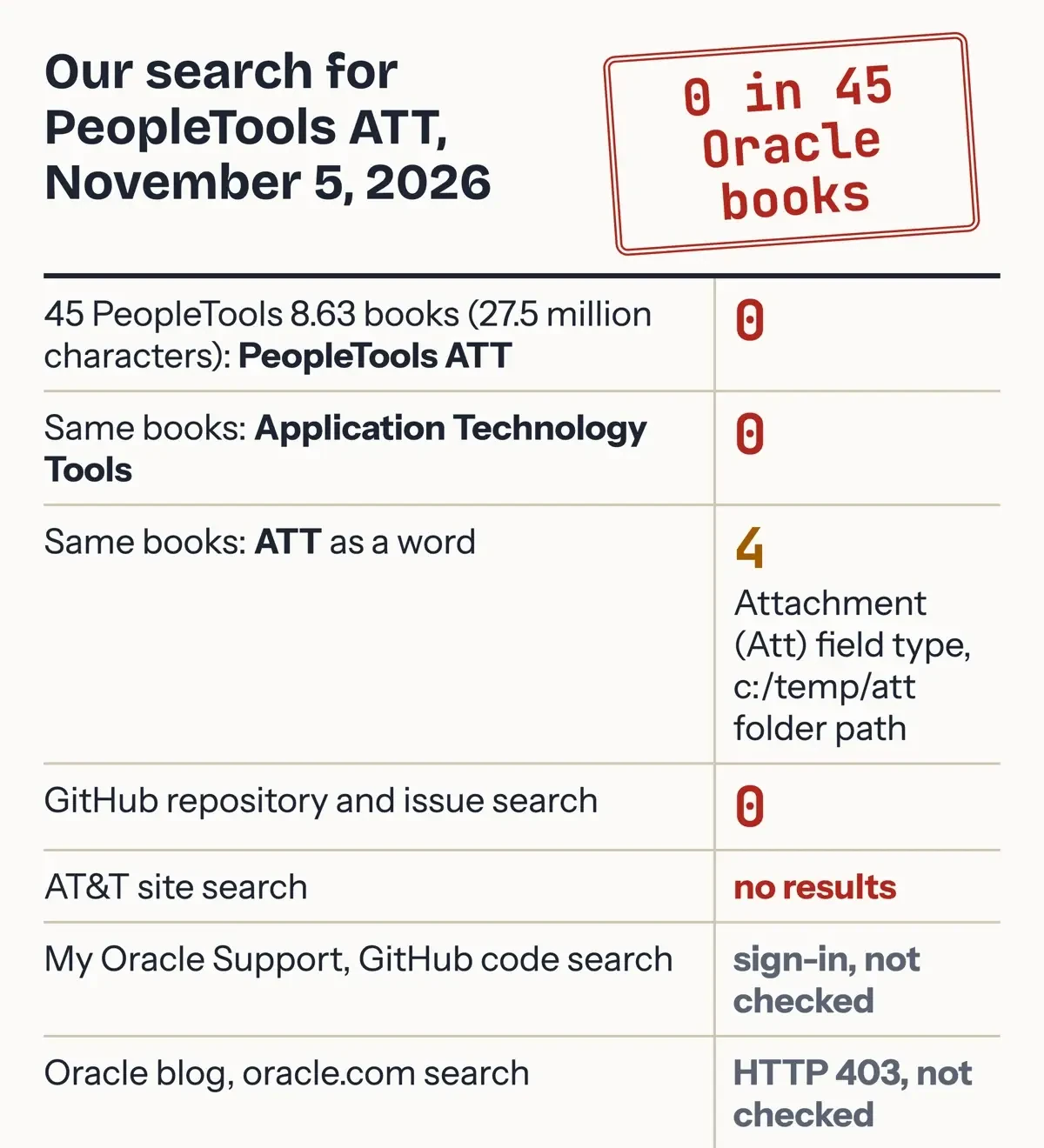 Diagram by DigitalTreed, from our search of the PeopleTools 8.63 books, GitHub and AT&T on November 5, 2026.
What the old "ATT" feature list describes
We couldn't trace where the name came from, but the old list is easy to place. Building pages and menus, writing PeopleCode, running Application Engine, Integration Broker, Query and Data Mover are all PeopleTools itself.
Oracle's PeopleTools overview says "PeopleTools provides the underlying technology for PeopleSoft applications." The same page counts "over 40 tools, utilities, and technologies" in five groups: development, administration, analytic, integration and lifecycle management. The development, integration and administration items on the old list all fit those groups, while none of the 45 books describes a separate ATT layer to install on top. For testing screens and business processes, the PeopleTools part to use is PeopleSoft Test Framework. If the terms are new, our guide to verification and validation in software testing explains the two checks PTF helps with.
What Oracle's testing tool, PeopleSoft Test Framework, does
PeopleSoft Test Framework is a tool that automates tests against PeopleSoft's browser pages. Oracle's Getting Started summary of Test Framework calls it "a tool that automates various tasks within the PeopleSoft application – primarily functional testing." The PTF overview page gives the method: "Users can record manual test procedures and save them within the framework." You replay them after an upgrade or a patch. Your tests don't sit in files on a laptop. Oracle says "Test assets (tests and test cases) are stored in a database as Application Designer objects." That's why they move between environments with other PeopleTools objects.
Oracle also lists what PTF does that generic record-and-playback tools don't. It offers "The ability to validate recorded objects against PeopleSoft object metadata definitions." It has "Functionality that automates numerous PeopleSoft-specific functions, such as running processes through Process Scheduler." It also "interfaces with other PeopleSoft automation tools, such as Data Mover and PsQuery," which lets a test load data or check results with a query. And it has features to "manipulate data within the PeopleSoft rowset-oriented data structure," which covers grids and scroll areas. Oracle is just as plain about the limits: PTF isn't built to "Be a load testing tool; it replicates the experience of a single user running the application."
Oracle adds that it's "a functional test tool rather than a user interface or browser testing tool," so layout checks and stress tests need other tools. PTF runs black-box checks of business steps: hire a person, approve a voucher, run a process. Code-level checks belong to white-box testing techniques, which PTF doesn't do.
Before you install: Integration Broker and PTF roles
The client talks to PeopleSoft through web services, so Oracle's Integration Broker check for PTF starts at PeopleTools, Integration Broker, Configuration, Integration Gateways. There you "Click the Ping Gateway button. Verify that the message returns a status of ACTIVE." If the ping fails, it's a job for your Integration Broker administrator.
Oracle's PTF security page defines three roles: PTF User, PTF Editor and PTF Administrator. All three can run tests and edit test cases. The role table marks creating, changing and deleting tests as No for a PTF User, and only an Administrator can create runtime options or use Log Manager. The default user ID for the ANONYMOUS node needs "as a minimum, a PTF User role," or the client sign-in can fail with a user ID and password error.
How do you install the PTF client?
With the server ready, the client goes on a tester's PC. Oracle's PTF requirements page lists "Microsoft Windows operating system" and says "PTF requires a 64 Bit OS environment." Recording needs Chrome or Microsoft Edge, and playback also runs in Firefox. You'll need Microsoft .NET Framework and read and write access to C:\Program Files\PeopleSoft\PeopleSoft Test Framework. Oracle's PTF client install page then offers two routes. Route one is the PeopleTools Client deployment package, where running SetupPTClient.bat -t asks "Do you want to install PeopleSoft Test Framework? [Y/N]:" and then asks for a folder. The second is a silent install from the PeopleSoft home folder:
cd PS_HOME\setup\PsTestFramework
setup.bat -f resp_file.txt -p <Path>
The silent route has no configuration step, so Oracle says to open PTF afterward and configure it there. Watch the path, too. Oracle warns: "Silent install deletes all content present in the <Path> location."
The PeopleTools 8.62 install chapter lists the same two routes for release 8.62. After either install, you open the client and follow the connection setup page. It wants the server as machine name and HTTPS port, like us.example.com:443, and Oracle notes that at the default port of 443 you can leave the port off.
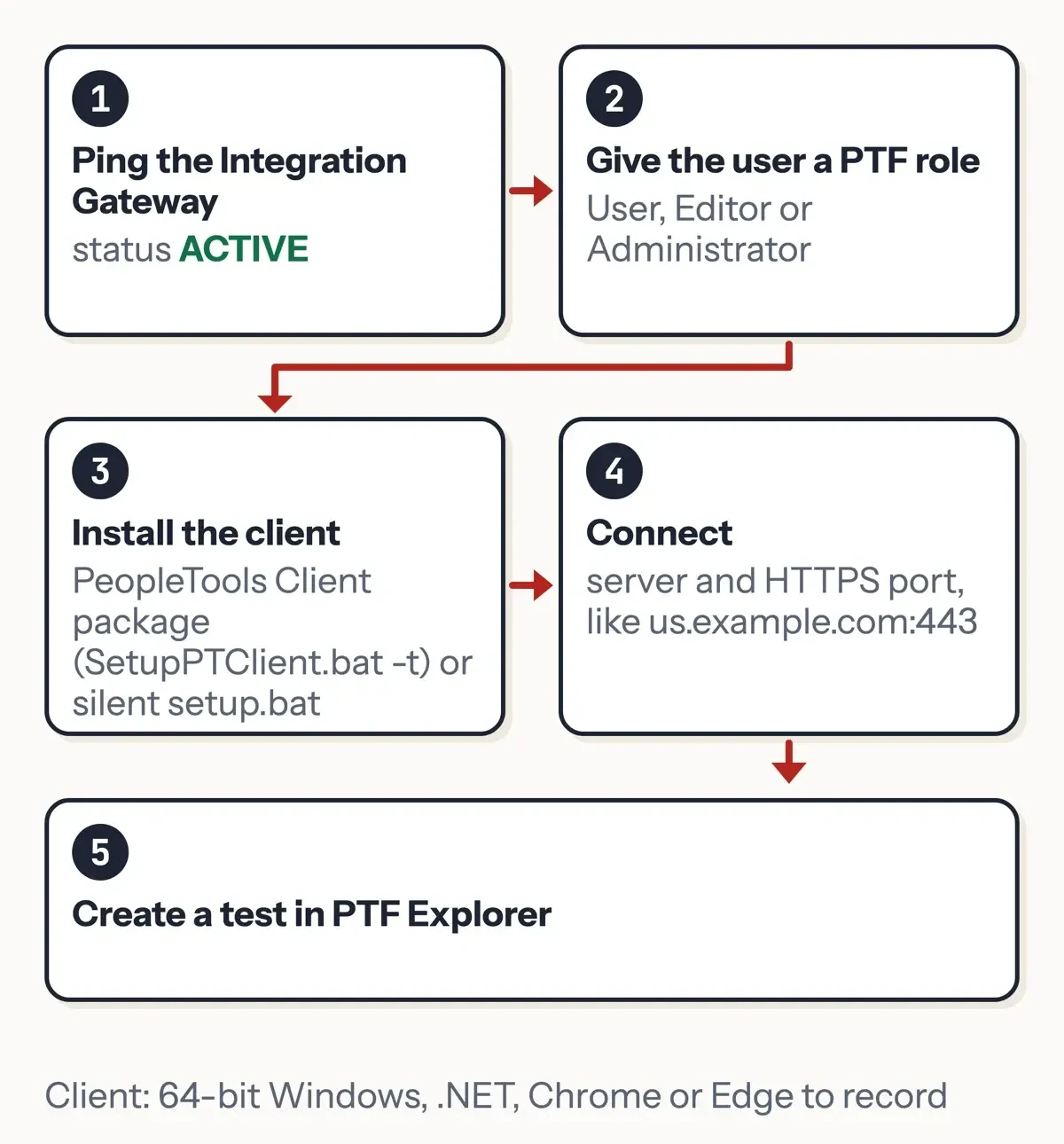 Diagram by DigitalTreed, from Oracle's PeopleTools 8.63 Test Framework pages, read November 5, 2026.
Creating your first test and test case
Once you're connected, you build the test in PTF Explorer. Oracle's folder page and new test page give the order: highlight a folder, choose Create, Test, add a description, then save and name it. The recording page says step 1 defaults to Browser.Start or Browser.Start_Login, and "recording typically begins at Step 2." Recording happens in the PTF Recorder, where you hook a browser with the Start Web Client icon, click Start Recording, and work through the page as a user would. Each action becomes a row with the fields on Oracle's test step fields page: Type, Action, Recognition, Parameters and Value.
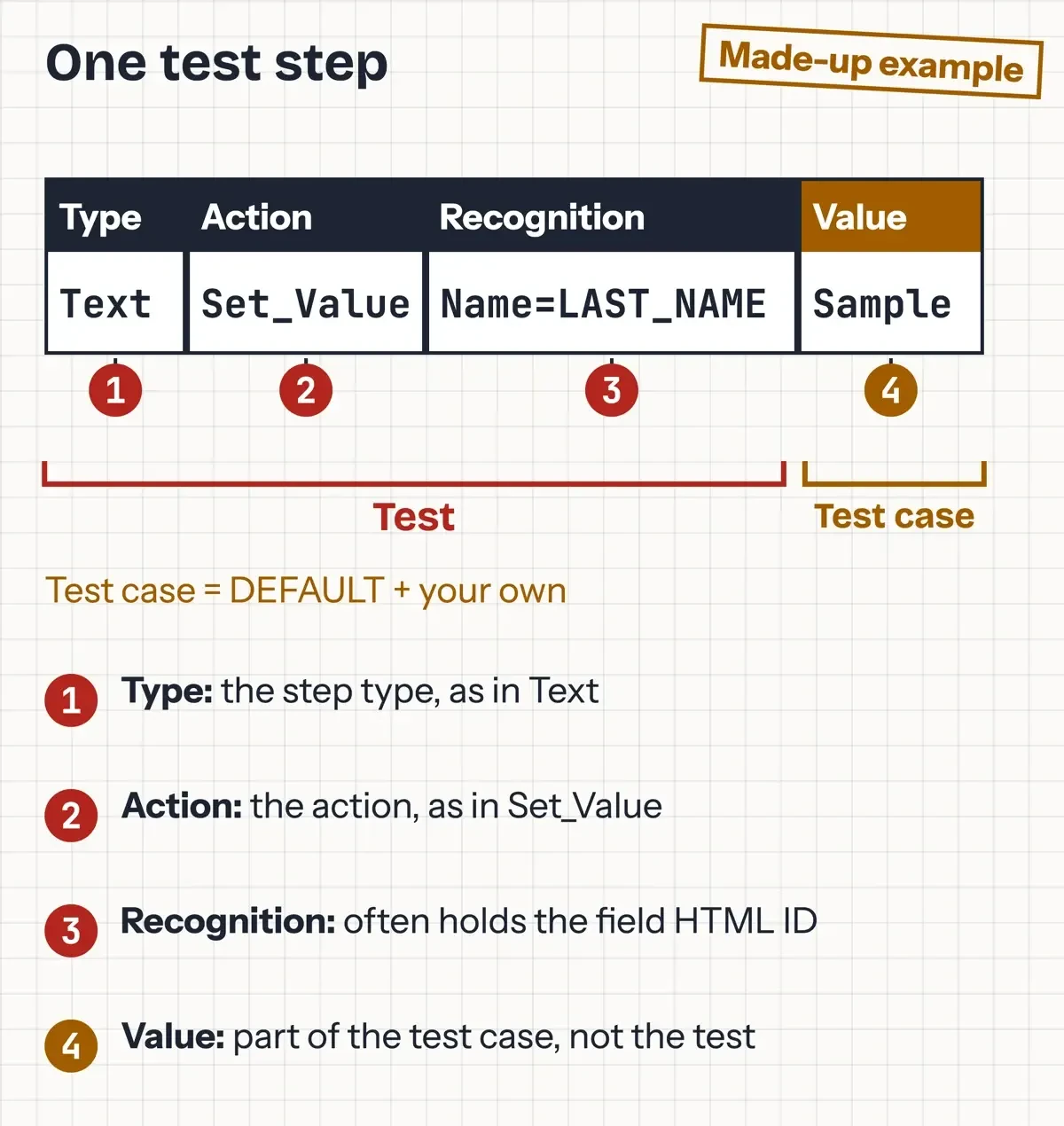 Drawn by us from Oracle's test step fields page. The step and its values are made up.
Typing a last name, for example, records Type Text and Action Set_Value, and Recognition often holds the field's HTML ID. Plan the Value column before you record more. Oracle says "Value is part of the test case, not the test itself," so one recorded test can run with many data sets. The test case values page adds that "Every test has one test case named DEFAULT." For a second set, the new test case page has you click New beside the Test Case field. Name it, fill the empty Value fields and save. To run, Oracle's running a test page says select Test, Run, or press F5, and the log opens in the Log Viewer.
Don't touch Caps Lock or Num Lock mid-run. PTF turns them off, and later steps can fail.
Naming rules PTF enforces
Oracle calls tests and test cases PeopleTools managed objects, stored in the application database, so their names follow database rules. Oracle's naming page sets four rules, shown below with the folder rule and our made-up examples.
| Rule | What Oracle's pages say | Example from our made-up outline |
|---|---|---|
| Length | Up to 30 characters for test and test case names | ap_vendor_address_check_all_us_states (37) fails |
| Characters | Letters, numbers and underscores, starting with a letter | 2_VENDOR_ADDRESS and US-WEST fail |
| Case | PTF converts names to uppercase | hr_p1_01_add_person is stored as HR_P1_01_ADD_PERSON |
| Uniqueness | No two tests in one database share a name, across folders | hr_p1_01_add_person clashes with HR_P1_01_ADD_PERSON |
| Folders | No space, &, ?, /, \, *, <, >, apostrophe or quote | HR SMOKE TESTS fails on the spaces |
Oracle's naming conventions page repeats the same limits and adds a pattern. It packs function, priority and run order into the name, as in WRKFRC_P1_01_HIRE_REQD_FLDS. Oracle prefers this to folders alone, because "folder names are often not visible to the tester" and don't appear on some PTF reports. Because "PTF Explorer sorts tests alphabetically within each folder," the 01, 02, 03 part keeps tests in run order. Oracle's Check Syntax page says the built-in check skips "File and folder names" and "Missing values," so it's worth checking names in your plan.
What we tested
On November 5, 2026 we checked a made-up PTF plan with our own Python script, which tests a JSON outline against 10 rules quoted from Oracle's saved pages. It reads 40 step types and 211 actions from the Test Framework PDF's contents. On our outline of 4 tests and 17 steps, the script found 8 errors, 2 warnings and 2 info notes, and only HR_P1_01_ADD_PERSON passed. It caught a folder with spaces, a name starting with 2, a 37-character name, US-WEST's hyphen, an uppercase duplicate, Text.Click, a TextBox step and an unclosed If_Then. It can't see PeopleSoft. Field IDs go unchecked.
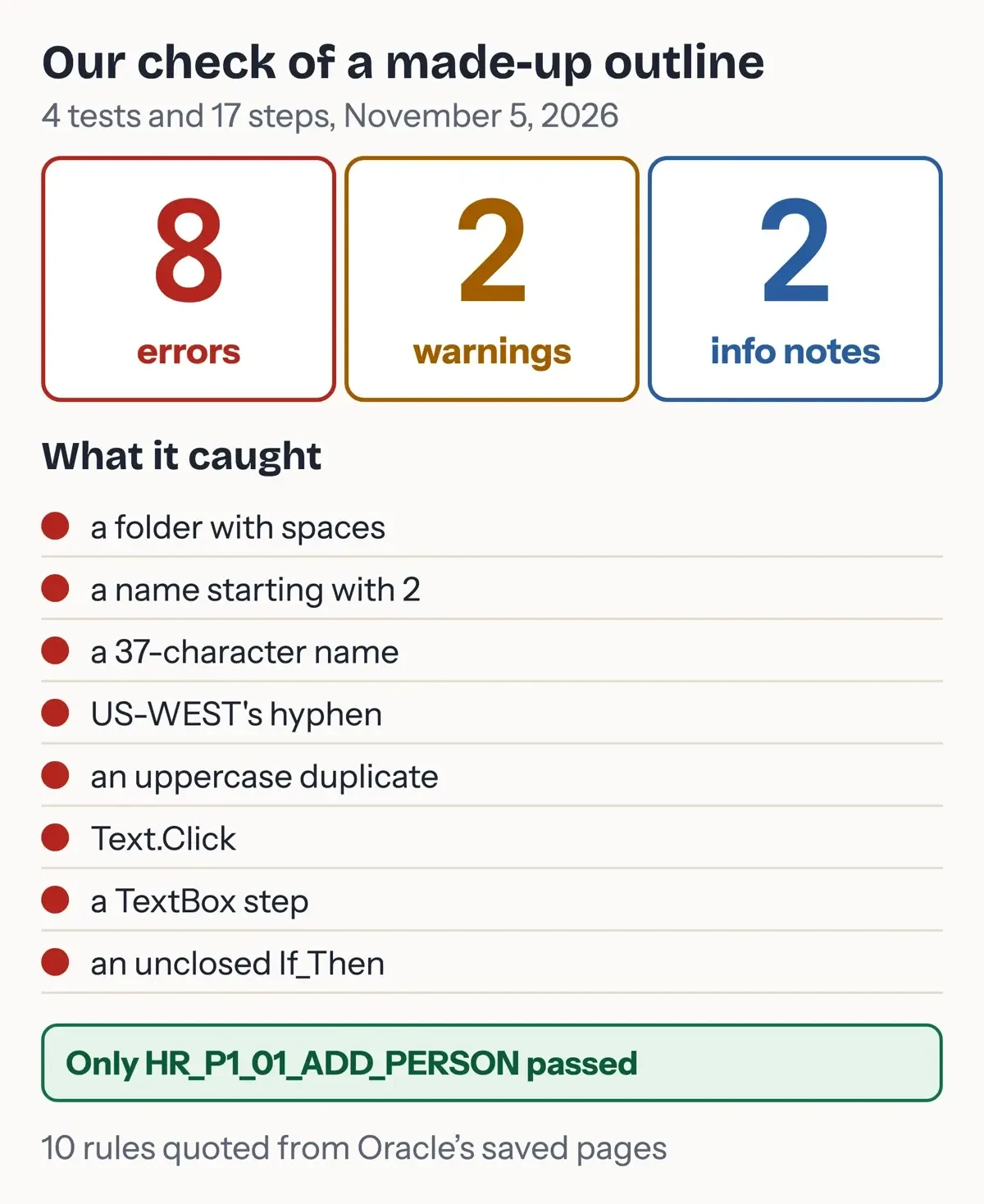 Drawn by us from our PTF outline check of a made-up outline, November 5, 2026.
Other PeopleTools testing utilities
PTF covers pages, but integrations have their own tools. Oracle's integration testing tools list names the Send Master utility, Simple Post, automated integration point testing, the Transformation Test utility, Handler Tester and Schema Tester.
The Integration Broker testing utilities overview says Send Master lets you "post any data format" to web and application servers over HTTP and HTTPS. Simple Post wraps XML from a third-party system in the PeopleSoft wrapper and posts it to the HTTP listening connector. Oracle notes it "reads ASCII, UTF-8 and UTF-16 file formats" for incoming messages. Handler Tester lets you "test handlers by populating a service operation and executing the handler." Say a hire saved on a page PTF tests also goes out as a service operation. Handler Tester can run that operation's handler on its own.
Automated integration point testing works with service operations, component interfaces, flat files and staging tables. Oracle describes it as suitable to "unit test, perform cross-application business process testing, or regression test integration points," which is the same regression job PTF does for pages.
Start small. Get the gateway to ACTIVE and give one tester the PTF Editor role. Record one smoke test with a clean name, then add test cases before adding tests. Our software development life cycle guide shows where those regression runs sit in a release, and new testers can start with our software engineering tutorial. PTF doesn't check layout. A page that must work on a phone needs another method, such as the browser checks in how to test a mobile app in the browser. For a wider test stack, see our checklist for choosing an automated testing platform, and teams leaving PeopleSoft can compare options in our cloud ERP platform roundup.
Frequently asked
Can PeopleSoft Test Framework do load testing?
No. Oracle's PTF overview says it isn't designed to "Be a load testing tool."
Does Check Syntax look at inactive steps?
No. Oracle's Check Syntax page says "Check syntax validates only active steps. Only syntax is validated, not data."
Can I run a PTF test from the command line?
Yes. Oracle's command line page uses the PsTestFW command, with -TST for the test and -TC=DEFAULT for the test case.
Can PTF run on a second monitor?
No. Oracle's requirements page says "PTF must be run in the primary display" on a dual monitor system.
How we made this guide: We searched 45 Oracle books for the name and tied each quote to a saved Oracle page. Facts checked by the DigitalTreed team on November 5, 2026.
First published April 2024 as a guide to "PeopleTools ATT (Application Technology Tools)", a name none of the 45 PeopleTools 8.63 books uses. Rewritten November 5, 2026 around Oracle's PeopleSoft Test Framework documentation.
Sources
- Oracle: PeopleSoft PeopleTools documentation library
- Oracle: PeopleTools 8.63 books
- Oracle: PeopleTools Overview (Getting Started with PeopleTools 8.63)
- Oracle: Test Framework (Getting Started with PeopleTools 8.63)
- Oracle: Understanding PeopleSoft Test Framework (8.63)
- Oracle: PeopleSoft PeopleTools 8.63 Test Framework, G47473-01 (PDF)
- Oracle PTF 8.63: Verifying Requirements
- Oracle PTF 8.63: Installing the PTF Client Software
- Oracle PTF 8.62: Installing a PTF Client
- Oracle PTF 8.63: Verifying Integration Broker Setup
- Oracle PTF 8.63: Setting Up Security
- Oracle PTF 8.63: Creating a Connection to a PTF Environment
- Oracle PTF 8.63: Creating a New Folder
- Oracle PTF 8.63: Creating a New Test
- Oracle PTF 8.63: Recording a Test
- Oracle PTF 8.63: Test Step Fields
- Oracle PTF 8.63: Creating a Test Case With Values
- Oracle PTF 8.63: Creating a New Test Case
- Oracle PTF 8.63: Running a Test
- Oracle PTF 8.63: Running a Test from the Command Line
- Oracle PTF 8.63: Naming Tests
- Oracle PTF 8.63: Adopt Naming Conventions
- Oracle PTF 8.63: Syntax Check
- Oracle: Integration Testing Tools (Getting Started with PeopleTools 8.63)
- Oracle: PeopleSoft Integration Testing Utilities and Tools Overview (8.63)
- Oracle Application Designer 8.63: Creating a New Field Definition

Comments
No comments yet. Start the conversation below.