

Quick answer
Jarfix is a free Windows program that points .jar files back at Java's javaw.exe after another program, usually an archive tool, takes them over. As of November 2026, its author's page lists version 3.0.0 from January 27, 2019, a 73,482-byte file. It can't help when Java is missing or the jar is broken. Run java -jar in Command Prompt first to see which problem you have.
You double-clicked a .jar file, maybe a Minecraft mod installer like the one in our OptiFine install guide, and got an archive window full of folders. A forum reply said to grab Jarfix. Jarfix is a small Windows program by Johann N. Löfflmann that resets which program opens .jar files. We'd still try the built-in fixes first, since they take a few minutes and need no download.
One line in Command Prompt, java -jar and the file's path, tells you whether the link, the file or Java is broken. Only a broken link is Jarfix's job, and Windows can fix that itself through the .jar choice in Settings or the assoc and ftype commands. If you still want Jarfix, its author publishes a SHA-256 you can compare with your download before you run it.
Key takeaways
- Run java -jar on the file first; its error tells you what's broken.
- Jarfix 3.0.0 is 73,482 bytes, released January 27, 2019, per its author.
- A per-user default app beats the machine-wide assoc and ftype setting.
- Temurin and Microsoft OpenJDK installers link .jar files to Java by default.
- Compare Get-FileHash output with the author's SHA-256 before running any copy.
Why does a .jar open as a ZIP folder?
An archive window usually means the jar itself is fine. Oracle's JAR File Specification describes a JAR as a file format "based on the popular ZIP file format" that bundles many files into one. Any ZIP tool can open it. Python's zipfile module opened both real jars in our test as ordinary ZIP archives, and both began with the ZIP header bytes 50 4B 03 04.
The Jarfix author's page explains what goes wrong after that. When you first install Java, the jar file type goes to javaw.exe, but "on Windows any program can steal a file type at any time." The page says ZIP programs often do it, because a jar is stored in the .zip format. They then ignore the extra information inside the jar that tells Java what to run, so you get a list of folders and class files instead of the app.
And javaw.exe is the right target for a double-click. Oracle's java command page says javaw is like java, "except that with javaw there's no associated console window," and that it shows an error dialog when a launch fails. When the .jar link is right, a double-click on any jar gives you either the running app or a Java error box, and never a list of folders.
Windows stores that link in two places. Microsoft's HKEY_CLASSES_ROOT page puts the settings for everyone on the PC under HKEY_LOCAL_MACHINE\Software\Classes. Settings for one user sit under HKEY_CURRENT_USER\Software\Classes. Per that page, "The user-specific settings have priority over the default settings." So a machine-wide repair can look right and still lose to an old choice saved in your own account.
Run java -jar first to find the real problem
Oracle's tutorial on running JAR-packaged software gives the basic command, java -jar followed by the jar file's name. Before it runs, the jar's manifest file has to name the class that starts the app with a Main-Class header, as Oracle's entry point lesson explains. Open Command Prompt, type java -jar and a space, then the full path to your .jar in quotes, and press Enter. If Command Prompt can't find java, Java isn't installed or isn't on your PATH. Each of the four results below points to a different fix.
| What you see | What it means | What to do |
|---|---|---|
| The app starts from the command but not on a double-click | Java and the jar are fine; the .jar link is wrong | Fix the link: Settings, assoc and ftype, or Jarfix |
| "Invalid or corrupt jarfile" | The file is not a jar at all | Download it again from the maker |
| "Failed to load Main-Class manifest attribute" | The jar is not an executable jar | Follow the maker's install steps; no link fix helps |
| Command Prompt cannot find java | No Java on the PATH | Install Java with an installer (section below) |
The Jarfix FAQ reads both error messages the same way. Each one is produced by javaw.exe, it says, which shows that "the .jar association with javaw.exe is correct" on your computer. Neither Jarfix nor any other link repair can change those two results. Only the first row is a link problem.
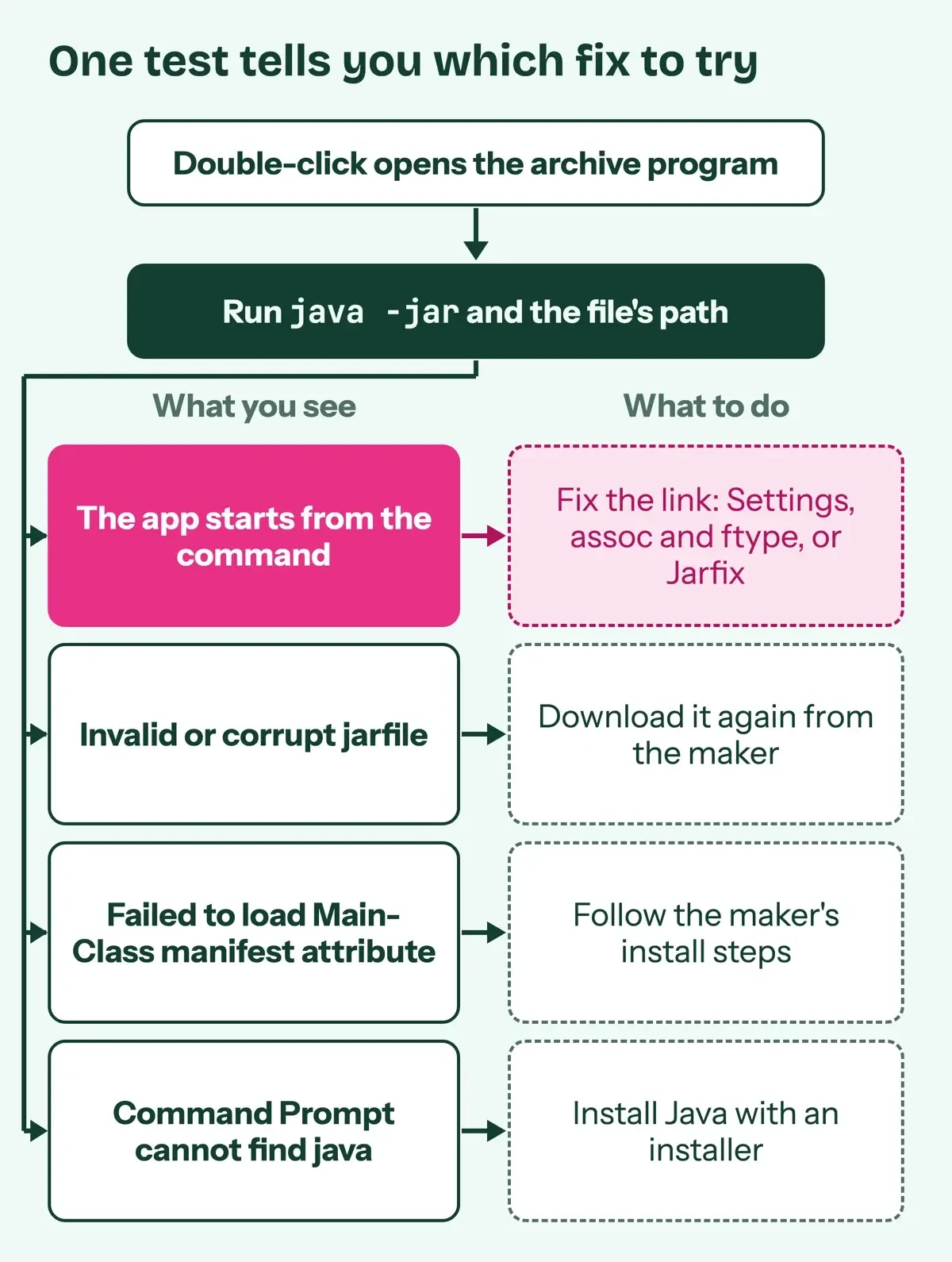 Diagram by DigitalTreed: how the java -jar result tells you which fix to try, from the Oracle tutorial and the Jarfix FAQ.
What we tested
On November 11, 2026, our Python script built three made-up jar files. The test Mac had no Java, so nothing ran. One jar named a Main-Class, one was a library without it, and one was a saved 404 page renamed to .jar. The renamed page landed in the invalid-jarfile row and the library in the Main-Class row, while only the first jar fits the row where the link alone is at fault.
What Jarfix changes, from its author's page
Everything here comes from the author's Jarfix page and official hash list, both read November 11, 2026. We didn't download or run the program.
The page says a double-click on jarfix.exe restores the .jar link to javaw.exe. Version 3.0.0 came out January 27, 2019. On 64-bit Windows with Java 9 or later, it looks in the Windows Registry for a JDK first, then for a JRE. That way, a JDK 11 or later isn't missed when an older JRE is also installed. The release notes give the reason: from Java 11, Oracle stopped shipping a separate JRE and offered only a JDK. The download section lists jarfix.exe at 73,482 bytes, about 72 KB (73,482 / 1,024 = 71.8), with MD5, SHA-1 and SHA-256 values. The hash list repeats them and goes back to the first version, a 374-byte registry file from May 1, 2002.
The site footer shows a last update of November 23, 2024, and no release after 3.0.0 appears as of November 2026.
Jarfix runs with no options. The page lists a few switches you can add after the file name:
| Option | What the author's page says it does |
|---|---|
| /u | Fixes the link for the current user only, for when you don't have admin rights |
| /64 | Looks only for a 64-bit Java when both 32-bit and 64-bit are installed |
| /k | Looks only for a JDK and skips any JRE |
| /s | Runs silently, with no dialogs |
| /x | Extracts jartest.jar, a tiny test program, plus the licenses and a sample .ini file |
The page adds that /u also suits an admin who wants a different Java than other users.
When Jarfix seems to do nothing, the FAQ says to run it with admin rights first, then again under the account of any user who still has the problem.
Jarfix is freeware, not open source. The page says the program "was never released under the terms of the GPL," and the FAQ answers no when someone asks the author for the source code. Its requirements list Windows 95 through Windows 10, with no mention of Windows 11.
The page also points to Oracle bug 4912211, a request to restore hijacked .jar and .jnlp extensions; the OpenJDK bug page lists it as Closed, "Won't Fix".
The manual fix with assoc and ftype
Two built-in Command Prompt commands do the machine-wide part of Jarfix's job. Microsoft's assoc page says the command displays or changes file name extension associations, needs administrator privileges to change one, and works only in cmd.exe, not PowerShell. Its partner sets what opens the file. Microsoft's ftype page says ftype holds the open command string for a file type, in which %1 stands for the file being opened and %* for all the parameters. The page's own example pairs assoc .pl=PerlScript with ftype PerlScript=perl.exe %1 %*. For a jar, you add the -jar flag from Oracle's tutorial.
Open Command Prompt as administrator and run these three lines in order. The folder in the third line is an example. Use the bin folder of your own Java. Temurin, for one, installs under C:\Program Files\Eclipse Adoptium in a folder named for the package.
- assoc .jar
- assoc .jar=jarfile
- ftype jarfile="C:\Program Files\Eclipse Adoptium\jdk-21-hotspot\bin\javaw.exe" -jar "%1" %*
The first line shows what .jar points to now. The next two take it back for Java. Typing assoc .jar= with nothing after the equals sign deletes the link entirely. Microsoft's page uses exactly that as its example. Don't stop at that line by mistake. And don't type the angle brackets from the syntax line, which cmd.exe reads as redirection.
If a double-click still opens the archive program after these lines, the per-user layer is overriding them. Microsoft's page on changing default apps gives the per-user route on Windows 11 and 10: Settings, then Apps, then Default apps. Type .jar in the search bar, select the result, and choose your Java from the list.
On a home PC, we'd do this step first, since it needs no admin rights and it's the layer that wins.
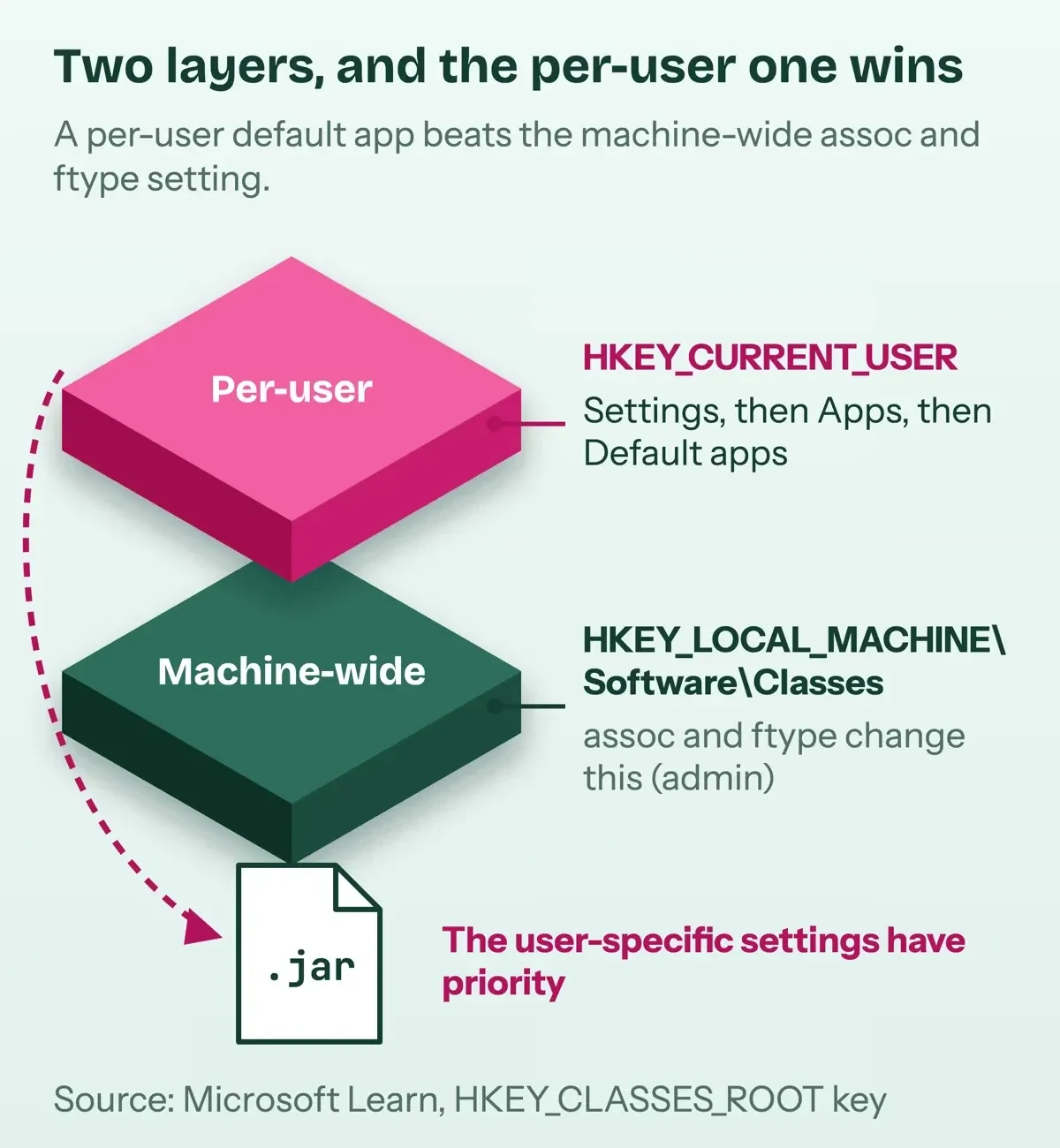 Diagram by DigitalTreed: why a per-user choice beats assoc and ftype, from Microsoft documentation on HKEY_CLASSES_ROOT.
Reinstall Java with the .jar box checked
If java -jar couldn't find Java, or ftype points at a folder you've deleted, reinstall Java with an installer that sets the .jar link. Java.com serves people who still need Java for desktop apps built for Java 8, and its What is Java page says it installs the Java Runtime Environment version 8. It's free for personal use. The manual download page lists Windows 11 and Windows 10 and says you need administrator access to install. If the app needs a newer Java than 8, use one of the OpenJDK builds below.
Two OpenJDK builds document the .jar link directly. Adoptium's Windows installer page lists "Associate .jar files with Java applications" among the features Temurin installs by default. Microsoft's Build of OpenJDK install page marks the same feature, FeatureJarFileRunWith, as a default too. Both also add Java to your PATH by default, which is what makes java -jar work from any folder. Microsoft lists EXE, MSI and ZIP as install methods, and only the installers carry the .jar link feature. According to the Jarfix page, OpenJDK without an installer can leave .jar files unlinked too. So unzipped Java leaves you with the assoc and ftype route above.
Microsoft's page also says to use only one install method at a time for each JDK version, and to uninstall the old one first if you switch methods.
Keep whichever Java you install up to date. CISA's page on patches and software updates says to install updates as soon as possible, because attackers may target known flaws for months or even years. Our online security basics cover turning on automatic updates for the rest of your PC.
How to check a Jarfix download before you run it
If you go with Jarfix, start with where your copy comes from. The FTC's malware advice says not to click ads to download software and to go to the website by typing in the address instead. It also warns against unfamiliar websites offering free downloads. For copies found on other sites, the Jarfix FAQ says to run jarfix /h to see the version, or to hash your download and compare it with the official list. We'd do the hash check, because it doesn't require running the file.
PowerShell's Get-FileHash uses SHA256 by default, and Microsoft's page says two files with the same hash have the same contents. As of November 2026, the SHA-256 the author publishes for version 3.0.0 starts 3a00c5b8 and ends eaae2. The size should read 73,482 bytes.
In PowerShell, from the folder holding the file, these three lines print the hash, compare it with the published one, and show the file's digital signature details:
- (Get-FileHash .\jarfix.exe).Hash
- (Get-FileHash .\jarfix.exe).Hash -eq "3a00c5b808954e9dca76418506eacec9cb1cb0fd844318a896ebae787f5eaae2"
- Get-AuthenticodeSignature .\jarfix.exe
A True from the second line means your file matches what the author published.
That proves it's the same file, not that the program is harmless. Microsoft's Get-AuthenticodeSignature page says the signature fields come back blank if a file isn't signed, and since we didn't download jarfix.exe, we can't say which result you'll see.
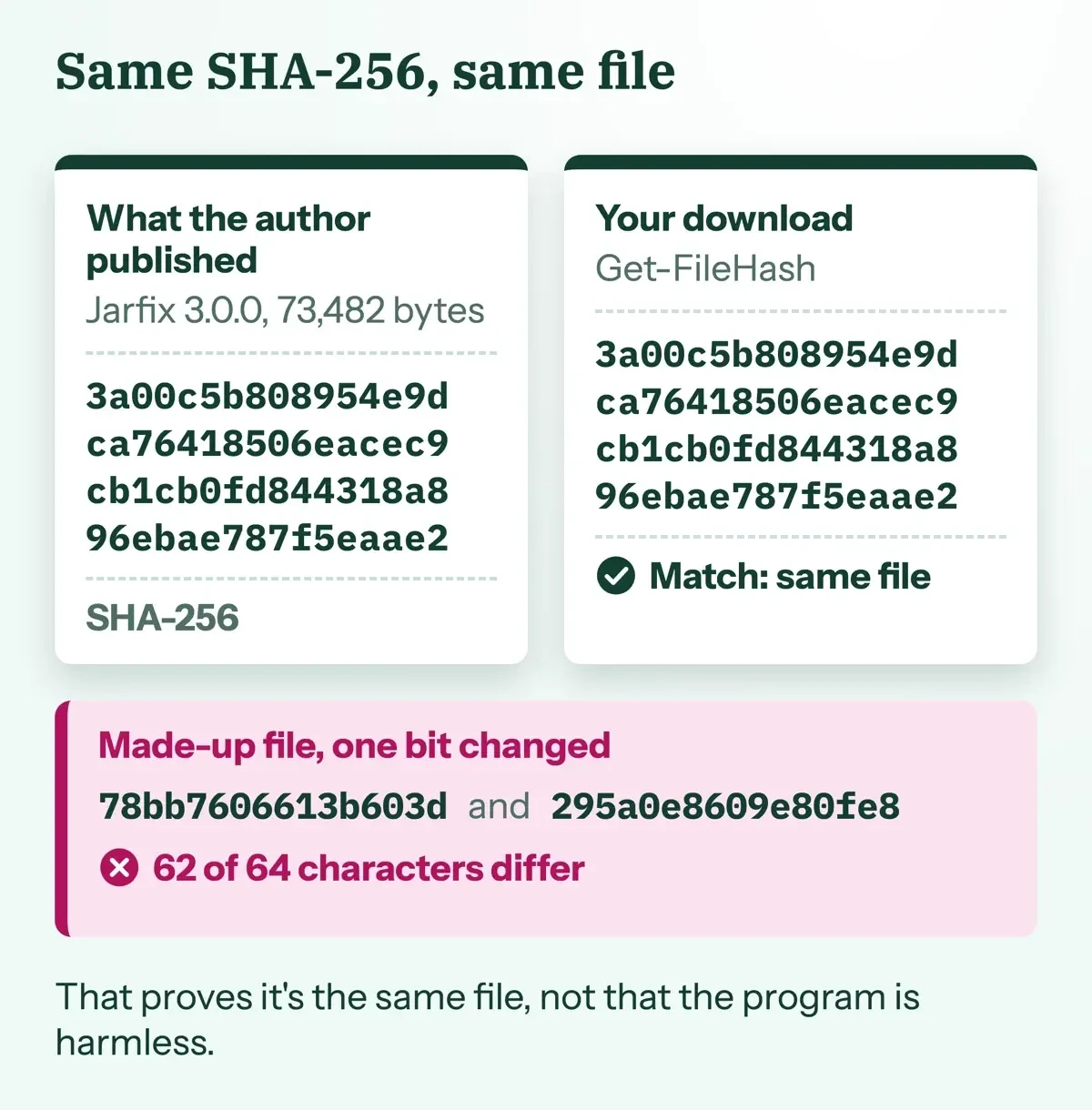 Diagram by DigitalTreed: comparing a download with the published Jarfix 3.0.0 SHA-256 from the author's hash list.
Windows may still warn you. Microsoft Defender SmartScreen checks downloads against a list of well-known, often downloaded files, and a file missing from that list gets a caution warning before it runs. The Jarfix FAQ suggests stripping the zone marker that Windows adds to files from the internet, which is what triggers its publisher warning. Microsoft's Unblock-File page says the cmdlet removes that same Zone.Identifier stream, and to review the file and its source first. We'd only clear it after the hash matches and a scan comes back clean. Our guide to free antivirus for Windows covers Microsoft Defender's built-in scan.
Already ran a file you now doubt? Our phishing link recovery steps cover what to do next. On a work laptop, ask IT first. Our page on malware entry points in business networks covers how infections reach office PCs. For Android apps, our APK verification guide checks a SHA-256 signer fingerprint instead.
Our test: three jars, four links, one hash list
To check the diagnosis table against real files, we wrote test/jarcheck.py and ran it on November 11, 2026. Every jar and Windows output in it is made up. The hash list is the author's real one, saved as text. Nothing was downloaded, and no Windows registry was touched.
| File (made up) | Size | Is it a ZIP? | Main-Class | What Java would report |
|---|---|---|---|---|
| a-desktop-tool.jar | 378 bytes | Yes | demo.DesktopTool | Nothing; it would start if the class were real |
| b-library.jar | 348 bytes | Yes | None | Failed to load Main-Class manifest attribute |
| c-saved-error-page.jar | 92 bytes | No | None | Invalid or corrupt jarfile |
File A's class is placeholder bytes, so it wouldn't actually start; the script reads only the manifest. File C is the case we'd watch for. A broken download link can save an error page under the .jar name you expected, and no link fix will open it. Next, the script read four made-up assoc and ftype outputs. It flagged three faults: an archive program's file type (ArchiverX.Jar, made up), a missing link, and an ftype line pointing at a Java 8 folder our made-up PC lacked. The fourth, a correct jarfile line, came back as "machine-wide association looks right". That sends you to the per-user setting and then to the jar itself.
Last, it read the saved hash list. Version 3.0.0's size and SHA-256 matched the download page exactly. Then we flipped one bit in a 2,200-byte made-up file. Of the 64 characters in its SHA-256, 62 changed. The hash went from 78bb7606613b603d to 295a0e8609e80fe8 in its first 16 characters, so even the short start of a hash gives a changed file away.
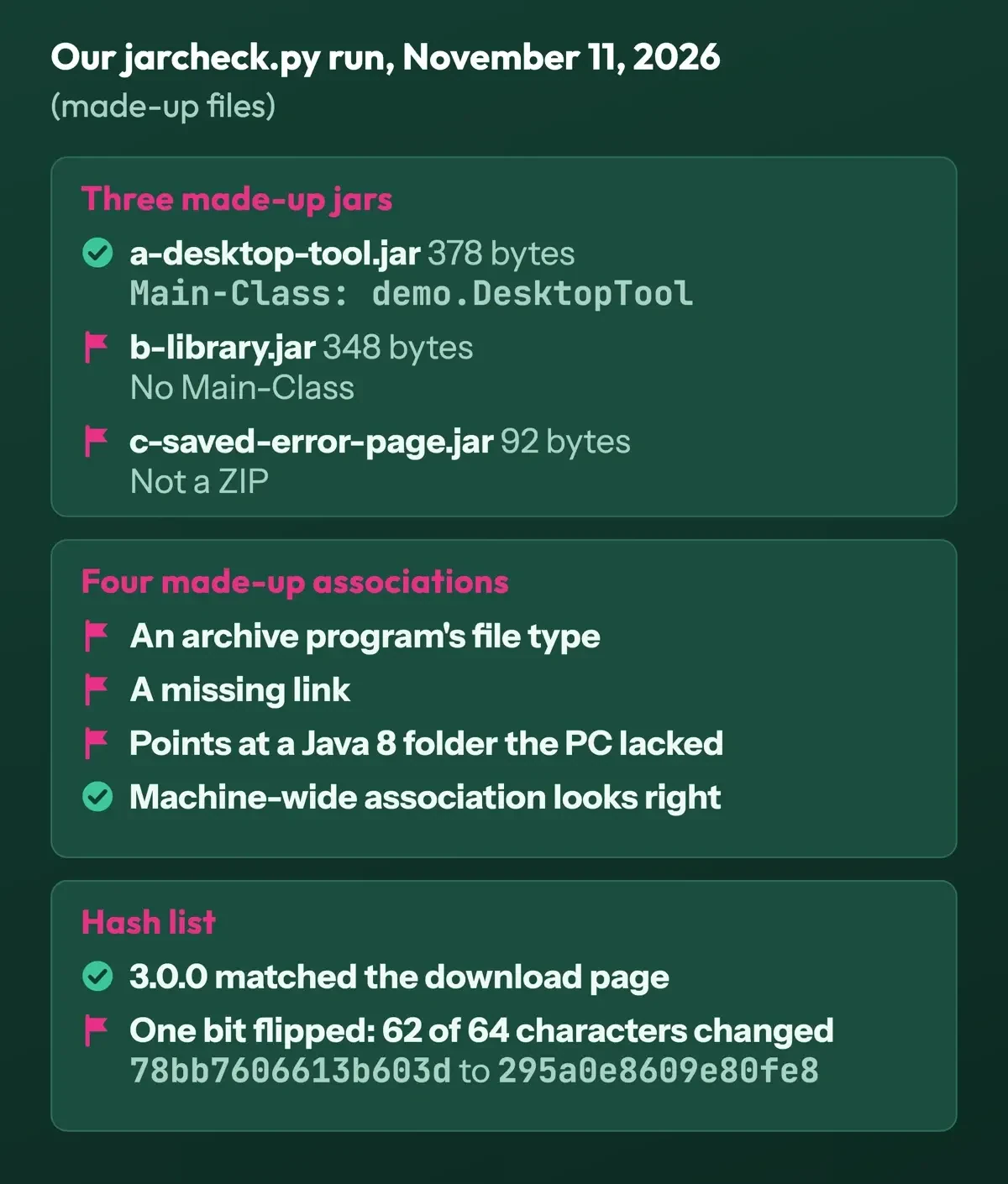 Diagram by DigitalTreed: results of our jarcheck.py run on November 11, 2026, on made-up files.
So start with java -jar, then the .jar choice in Settings, and use Jarfix only if both fail and its hash matches.
Frequently asked
Does Jarfix work on Windows 11?
Its author's page lists Windows 95 through 10. Microsoft's assoc page lists Windows 11, so the manual fix covers it.
Is there a Jarfix for Mac?
No; it needs "A Windows based operating system". On a Mac, Oracle's java command runs a jar with java -jar.
Is Jarfix open source?
No. Its FAQ calls it freeware with no source code, but says you may bundle it with a commercial program.
Do I need admin rights to fix .jar files?
Not for Settings or Jarfix's /u option. Changing assoc needs administrator privileges, per Microsoft.
How we made this guide: We saved the 20 pages in Sources as text on November 11, 2026 and checked each quote against them. The OpenJDK bug page refused our script, so its status was read in a browser. Our test script ran on made-up files only; we didn't download or run Jarfix. Facts checked by the DigitalTreed team on November 11, 2026.
First published September 2021 as a short Jarfix summary with no sources. Rewritten November 2026 around the fix itself: diagnosis, manual commands, Java installers and download checks. Claims we couldn't source, including a list of alternatives and a safety verdict, were cut.
Sources
- Johann N. Löfflmann: Jarfix, fix the jar association on Windows
- Johann N. Löfflmann: Official Jarfix hashes
- Oracle: JAR File Specification (Java SE 21)
- Oracle: The java command (JDK 21)
- Oracle Java Tutorials: Running JAR-packaged software
- Oracle Java Tutorials: Setting an application's entry point
- Microsoft Learn: assoc
- Microsoft Learn: ftype
- Microsoft Learn: HKEY_CLASSES_ROOT key
- Microsoft Support: Change default apps in Windows
- Adoptium: Windows MSI installer packages
- Microsoft Learn: Install the Microsoft Build of OpenJDK
- Java.com: What is Java and why do I need it?
- Java.com: How do I manually download and install Java for my Windows computer?
- Microsoft Learn: Get-FileHash
- Microsoft Learn: Get-AuthenticodeSignature
- Microsoft Learn: Microsoft Defender SmartScreen
- Microsoft Learn: Unblock-File
- FTC Consumer Advice: Malware, how to protect against, detect and remove it
- CISA: Understanding patches and software updates

Comments
No comments yet. Start the conversation below.