
Quick answer
As of November 2026, Comcast's support pages tie xFi Complete to a leased Xfinity Gateway and no overage fees on 1.2 TB legacy plans. They also link it to CyberSecure on the go and, for pre-2025 subscribers, a newer gateway after three years. New plans include the gateway and unlimited data at no extra cost. No Xfinity page we could open prints the add-on's price.
This Xfinity xFi Complete review is built only on Comcast's own pages. Xfinity xFi Complete is an add-on to Xfinity Internet that those pages tie to a leased gateway. It changes the most on older plans with a 1.2 TB monthly data limit. Check which plan you're on when it shows up on a bill or an agent offers it during a plan change.
Our view, from Comcast's pages read November 5, 2026: on a legacy plan, the add-on can stop overage fees of up to $100 a month. Two of those pages disagree on who gets CyberSecure, and none prints the add-on's price.
Key takeaways
- New Xfinity plans already include the gateway and unlimited data at no extra cost.
- On legacy 1.2 TB plans, xFi Complete stops overage charges of up to $100.
- Your own modem cannot run CyberSecure, the new name for Advanced Security.
- No Xfinity page we could open prints an xFi Complete price.
- Example: $270 of your gear breaks even in 18 months at $15 a month.
What Comcast's pages say xFi Complete includes
Comcast's own xFi Complete page returned 403 Access Denied to our plain request on November 5, 2026. That's a bot block. The page still loads in a regular browser. Every feature below comes from Xfinity support and hub pages. Only five of the pages we saved that day name the add-on at all, and together they tie it to four things:
- No overage charges on a legacy data plan. The Xfinity data plan FAQ says "If you have Unlimited Data or xFi Complete, you won't pay overage charges."
- A leased gateway. The Xfinity Tech Upgrade terms ask xFi Complete customers to "Lease an Xfinity Gateway or modem" to qualify.
- A newer gateway three years in, for customers who added xFi Complete before December 31, 2024 (same terms page).
- CyberSecure on the go for phones. Xfinity's CyberSecure on the go page lists "All Xfinity Internet customers who subscribe to xFi Complete" as eligible.
No page we could open ties WiFi Extenders or an equipment warranty to xFi Complete. The extender pages describe a purchase at prices covered further down, and the only warranty we found covers extenders bought from or provided by Comcast, for one year. The Tech Upgrade terms promise a newer gateway, not repairs. If an agent says either comes with the add-on, ask which line on your account shows it.
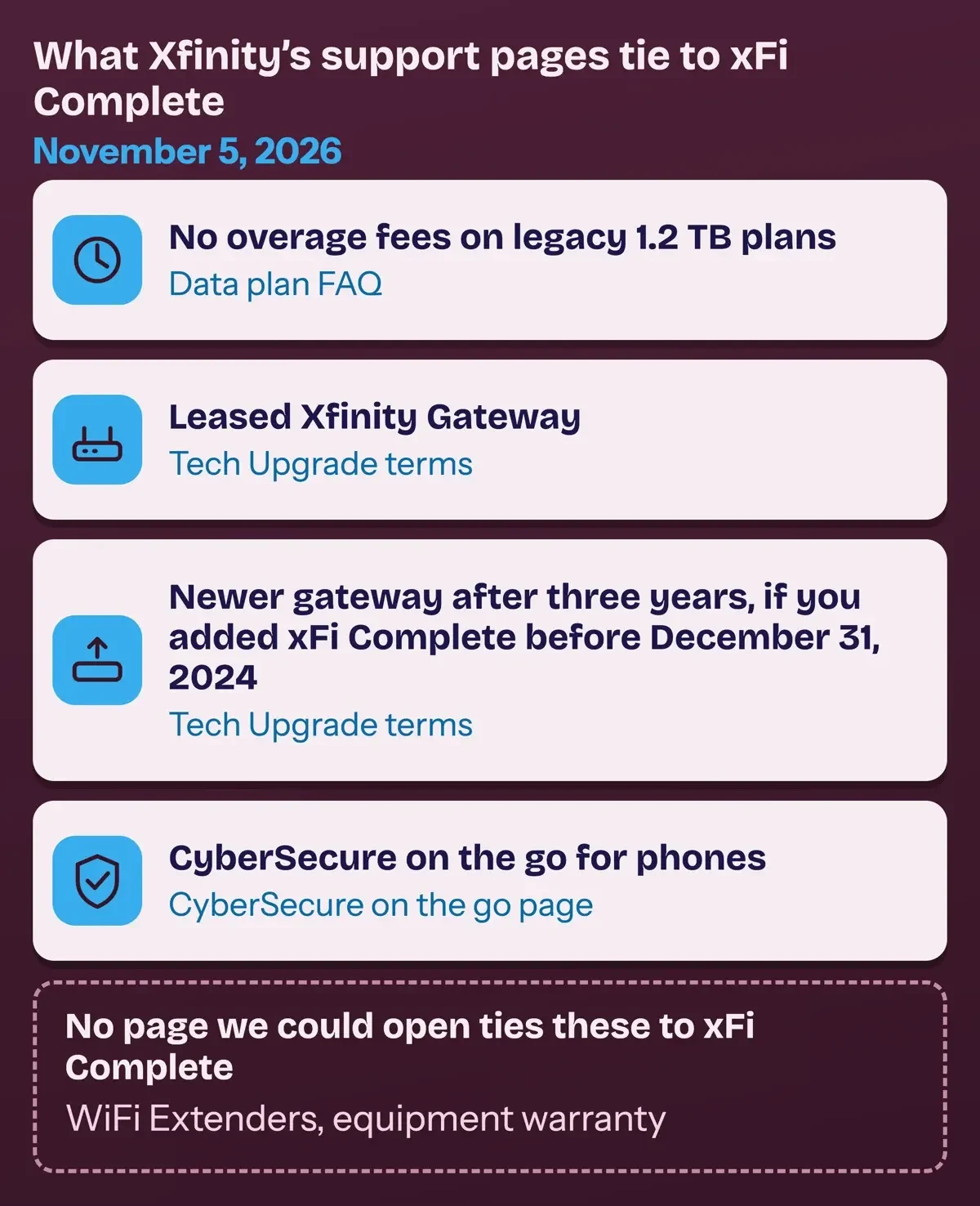 Diagram by DigitalTreed, from Xfinity's data plan FAQ, Tech Upgrade terms and CyberSecure on the go page, read November 5, 2026.
Does xFi Complete still matter on the new Xfinity plans?
Three Comcast pages answer it for new customers. The Xfinity page on using your own modem says "The latest Xfinity Internet plans include the Xfinity Gateway at no extra cost." The data plan FAQ adds: "New Xfinity Internet plans include unlimited data and equipment at no extra cost." Xfinity's 5-Year Price Guarantee page lists "WiFi equipment at no additional cost" among what its plans include, as of November 2026.
The data plan FAQ says "The 1.2 TB data limit only applies to older (legacy) internet plans," and Xfinity's data caps page tells long-time customers the same thing. The first overage in a 12-month period is a courtesy month with no charge, and the FAQ notes that this policy is subject to change. After that, the FAQ lists "$10 for each 50 GB over the limit. Up to $100 per month." Emails arrive at 75% of the limit. Emails plus texts follow at 90% and 100%. The FAQ's fix is to "switch to a plan with unlimited data or add xFi Complete (where available)."
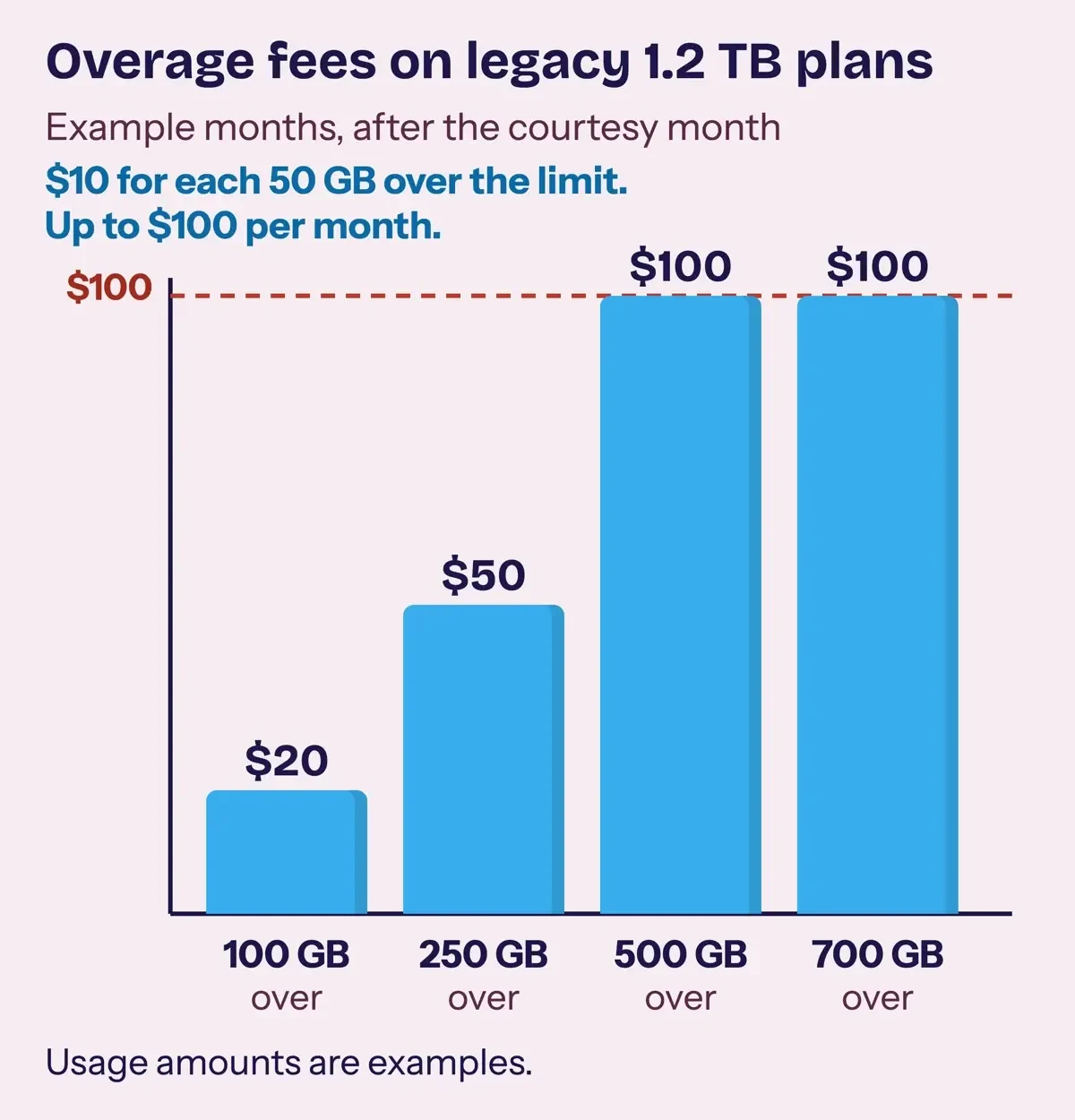 Drawn by us from the rates in Xfinity's 1.2 TB data plan FAQ, November 5, 2026. The usage amounts are examples.
In an example month 100 GB over, after the courtesy month, that's two 50 GB blocks, or $20. At 500 GB over, the fee hits the $100 ceiling.
The FAQ also says the 1.2 TB plan doesn't apply to legacy plans in 12 states and Washington, D.C., or in parts of North Carolina and Ohio. There, the add-on's data benefit has no limit to remove. If you're weighing cable against fiber or 5G instead, our guide to broadband types compares them.
CyberSecure, formerly Advanced Security
Xfinity's getting-started page says "Xfinity CyberSecure is the new name for Advanced Security."
It runs on the gateway and "Helps block risky websites, phishing attempts, malware, and other online threats" for devices on your home WiFi. The app's dashboard shows risks from the past seven days.
Who gets it depends on the page you read. A footnote on Xfinity's equipment page says "Advanced Security Requires Xfinity Internet with xFi Complete and a compatible Xfinity leased Gateway." Xfinity's newer CyberSecure page describes WiFi Shield, the bundle CyberSecure belongs to, in looser terms. It calls WiFi Shield "available to new and existing Xfinity Internet members with a compatible Xfinity WiFi Gateway, regardless of internet speed tier." Both pages were live on November 5, 2026. The same CyberSecure page also lists WiFi Shield as protection features "included with Xfinity Internet." We can't confirm which rule Comcast applies to your account. Ask before keeping the add-on for security.
Two limits appear on the CyberSecure pages themselves. "Customers who use their own modem are not eligible to use CyberSecure," and Bridge Mode switches it off.
The phone version, CyberSecure on the go, covers xFi Complete customers plus Mobile Plus and Premium Unlimited lines. It needs Android 10 or iOS 14 and later, skips iPads, and is built for unsecured WiFi away from home, the kind our McDonald's WiFi guide covers. If CyberSecure blocks a site you trust, Xfinity's page on using CyberSecure lets you tap Allow Access for up to one hour. A review request at spa.xfinity.com typically gets an answer within three business days, but blocking at the network level won't clean a laptop that's already carrying malware. Our free antivirus for Windows guide covers device protection, and our steps after a phishing click cover a block that came too late.
WiFi Extenders and the gateway upgrade program
Extenders are a separate purchase. As of November 2026, Xfinity's WiFi Extenders FAQ says eligible customers can buy "One Xfinity WiFi Extender for $119. Two Xfinity WiFi Extenders for $199."
Online orders add shipping and handling, and the purchase lands on your next bill under the name Xfinity WiFi Extenders, the FAQ says. They need a compatible Xfinity Gateway, and the FAQ says they "do not increase your internet speed," only coverage.
For sizing, the FAQ says one second-generation extender "works well for many homes with three to four bedrooms and multiple floors."
Xfinity's extenders page adds that Xfinity Pro customers "may qualify to receive up to two WiFi Extenders from Xfinity at no additional cost." That offer follows a WiFi health check in the app, and it belongs to Xfinity Pro, which no page we read ties to xFi Complete.
Xfinity's Tech Upgrade terms cover only customers who "subscribed to xFi Complete prior to December 31, 2024" and lease an Xfinity Advanced Gateway. You get one upgrade, claimed in a three-month window. That window opens three years after you added the service or received your current gateway, whichever came later, and the upgrade is lost once it closes. The terms give their own example: add the service on April 1, 2022, and redeem between April 1, 2025 and June 30, 2025. Comcast says it will notify you by email or other means when the upgrade is ready.
Three conditions cut it down further. "If you're eligible for an upgrade and your then current Gateway is Comcast's XB8 model or newer, the Gateway will not be upgraded." Comcast "may in its discretion use new or refurbished equipment," and it can end the program "with or without notice." With an XB8 or newer gateway already in place, this benefit gives you nothing.
xFi Complete price: why we print no number
No Xfinity page we could open on November 5, 2026 prints the add-on's price. Our script searched the five saved pages that mention xFi Complete and found no dollar amount within 120 characters of the name. The one page named for the add-on returned 403 to our checker. Xfinity's Broadband Facts labels site, where plan prices live, starts with "Enter an address to get started." We entered no address. A figure from a reseller or an old review could be years out of date or tied to another market, so we left the number out. Xfinity's labels FAQ adds that the machine-readable label file "doesn't include geographical info," so a plan listed there may not reach your address.
The labels come from a federal rule. Under 47 CFR 8.1, a provider "shall create and display an accurate broadband consumer label" for each stand-alone service it sells. Xfinity's labels FAQ says its labels launched on April 10, 2024, the deadline for large providers; smaller ones with 100,000 or fewer lines had until October 10, 2024. Every US provider must post them, Spectrum included; our Spectrum WiFi plans guide covers that provider.
A label still won't show the whole bill, since Xfinity's labels FAQ says it leaves out both multi-product discounts and the AutoPay and paperless discount. It also skips "additional internet equipment beyond the gateway," such as WiFi Boost Pods and Storm-Ready WiFi, along with any Xfinity Mobile device payment plan on the account. Xfinity's broadband disclosures add that "Additional fees, such as for equipment rental, installation, and early termination, may apply."
Rent or buy: the break-even math
If an equipment rental fee applies to you, owning your gear can replace it. Break-even months equal the upfront cost of your own modem and router divided by the monthly charge you stop paying.
Every input below is an example, since the Xfinity pages we could read print neither a monthly gateway rental fee nor a dollar price for xFi Complete. With an example $150 modem and $120 router, or $270 upfront, the result swings on the monthly charge:
| Monthly charge you stop paying (example) | Break-even | Net after 36 months (example) |
|---|---|---|
| $0.00 | Never | -$270.00 |
| $10.00 | 27 months | $90.00 |
| $15.00 | 18 months | $270.00 |
| $25.00 | 11 months | $630.00 |
On a new plan that includes the gateway "at no extra cost," the first row applies. Your own gear saves nothing monthly. It never pays back. It also costs features: Xfinity says "xFi is not compatible with third-party equipment," and your own modem can't run CyberSecure. On a legacy plan with a real rental charge, the example $15 pays back in 18 months, halfway through a 36-month span. At an example $10 a month the wait stretches to 27 months, and you're only $90 ahead after 36 months, the span this example uses.
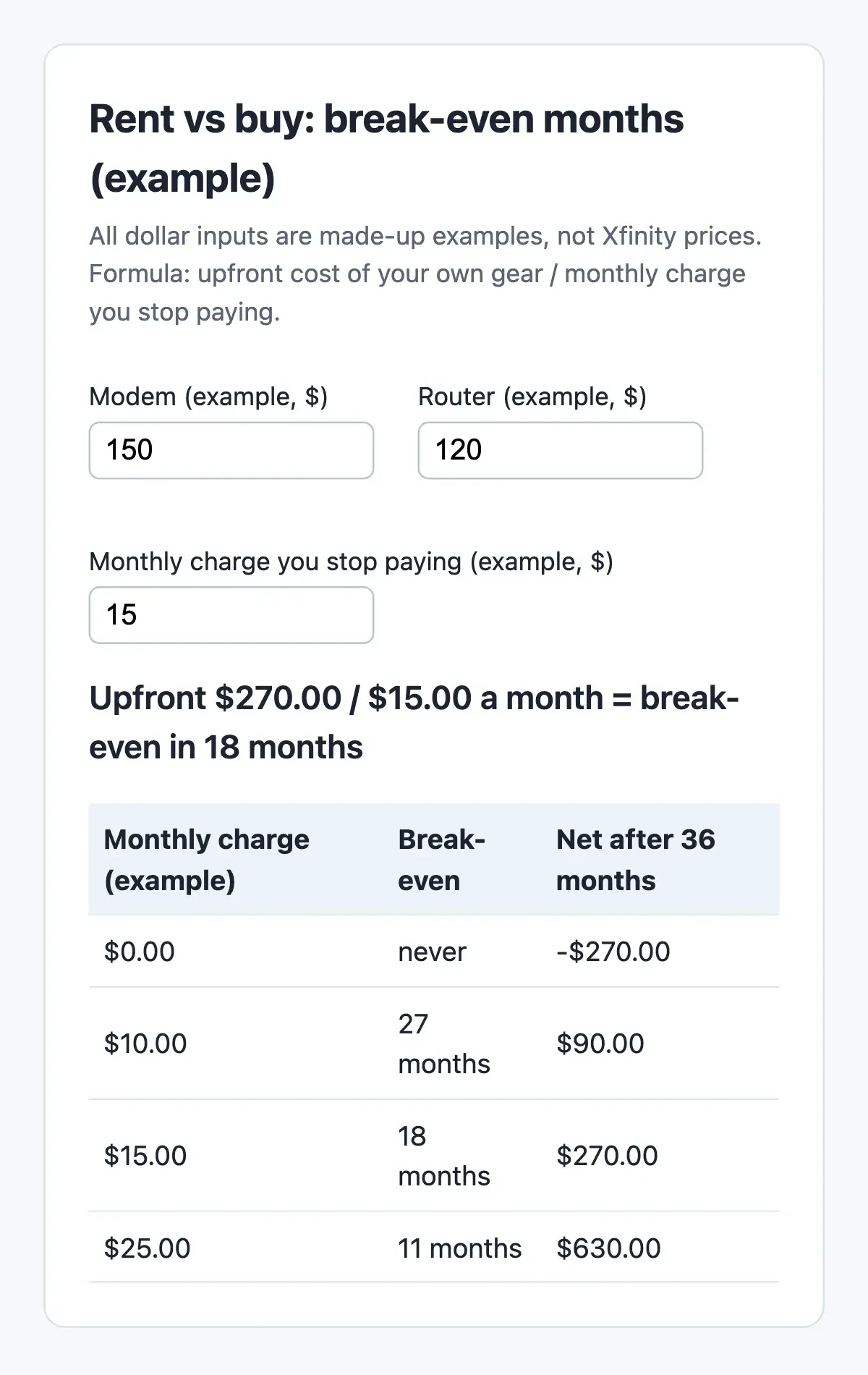 Screenshot: our rent vs buy calculator served on 127.0.0.1, November 5, 2026. All dollar inputs are examples, not Xfinity prices.
What we tested
On November 5, 2026 we saved 28 Xfinity and federal pages with plain requests under a named DigitalTreed checker and ran a Python script over the saved copies. It found the 12 key lines it checks, word for word, and no dollar amount near the add-on's name on the five pages that mention it. The same script built the table above, and our calculator on 127.0.0.1 shows the same four rows.
Before you drop xFi Complete or return the gateway
Dropping the add-on and returning the gateway are two separate steps, and before you buy a modem, Xfinity's own-modem page asks you to check the device in My Device Info. That page also puts updates, security and troubleshooting on you. Devices Xfinity lists as end of life are a dead end: "Xfinity won't install, activate, or recommend these devices." Keeping the gateway and adding your own router means turning on Bridge Mode. The Xfinity WiFi Home Hotspot keeps running on gateways that have it, since it has its own switch, but three things change:
- Only one device can plug into the gateway.
- You can't manage your network in the Xfinity app or use WiFi Extenders.
- CyberSecure stops, and Bridge Mode won't turn on while extenders are active.
Bridge Mode also takes away the parent tools. Xfinity's page on renting a gateway says the app lets you "set parental controls and even pause WiFi during dinner or bedtime." Our guide to protecting children online covers other ways to do that.
Router screens differ by provider, and our PLDT Home WiFi settings guide shows one ISP's admin steps.
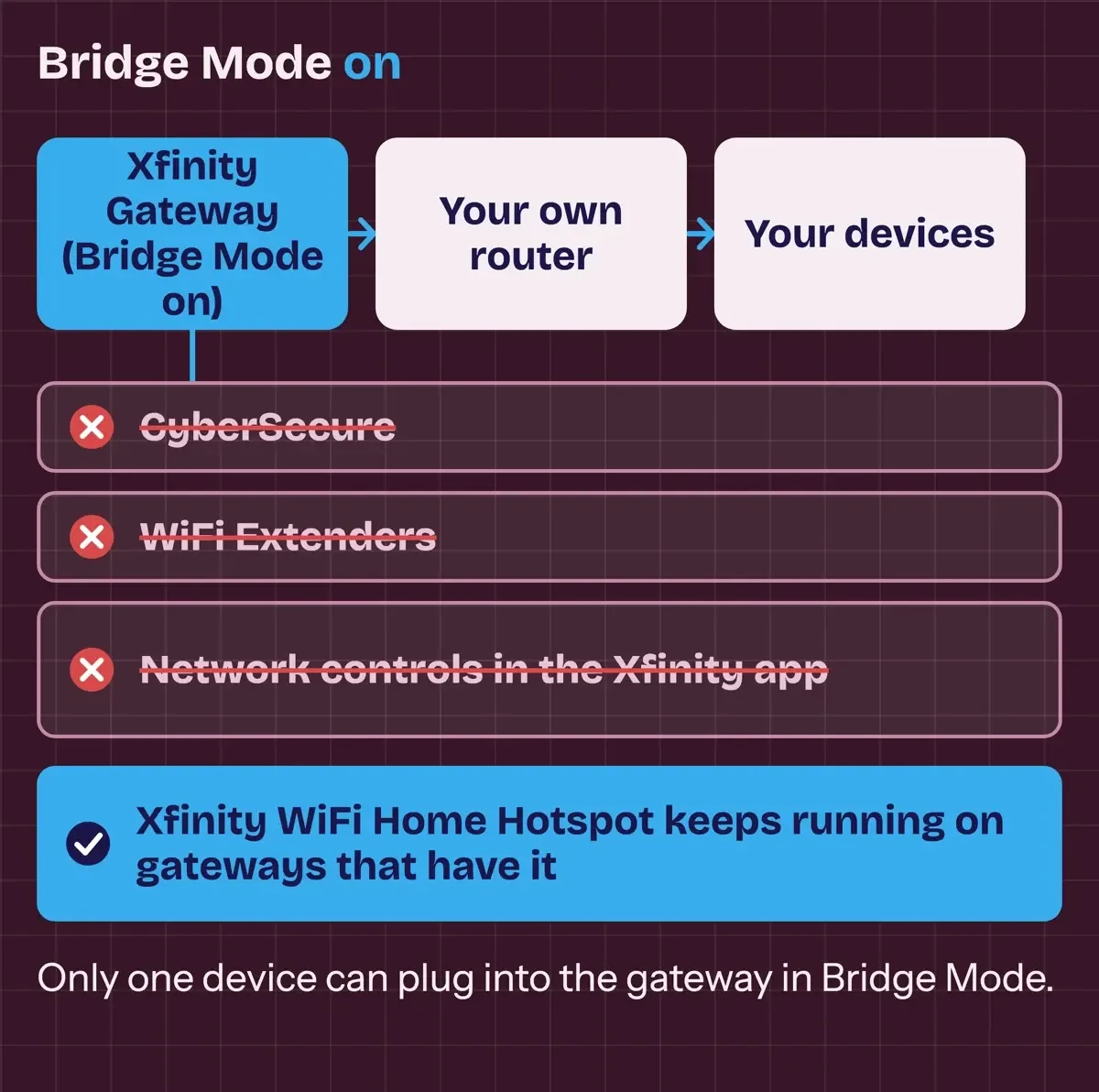 Diagram by DigitalTreed, from Xfinity's Bridge Mode and CyberSecure pages, read November 5, 2026.
Xfinity's residential services agreement says you may not "sell, lease, abandon, or give away the Xfinity Equipment," and it defines an Unreturned Equipment Fee for gear that never comes back. Returns go to an Xfinity store or a UPS drop-off, and Xfinity's returns page asks you to "allow up to two weeks" for the return to post. Keep the store receipt or the UPS label's tracking stub as proof the device went back.
On a 1.2 TB legacy plan, we'd put the add-on's bill line next to a current plan's label. The new plan wins if its price is close, since data and the gateway come included.
On a current plan, the pages we could open leave an extra xFi Complete charge just two benefits. One is CyberSecure on the go for phones. The other, for pre-2025 subscribers, is the Tech Upgrade.
Xfinity xFi Complete questions
Frequently asked
Which states have no 1.2 TB data limit on legacy plans?
The data plan FAQ lists Connecticut, Delaware, Massachusetts, Maryland, Maine, New Hampshire, New Jersey, New York, Pennsylvania, Virginia, Vermont, West Virginia and Washington, D.C.
What warranty comes with Xfinity WiFi Extenders?
One year from receipt, with claims due within 30 days of a failure, per the extender warranty. The return page allows full-refund returns at a store within 30 days.
How do I see the broadband label for my current plan?
In the Xfinity app, open Account, Your plan, then Internet & Mobile facts, says the labels FAQ. Plans off sale before April 10, 2024 may have none.
What does the 5-Year Price Guarantee require?
Paperless billing and AutoPay from a stored bank account, or you "pay an additional $10/month," per the guarantee page. Taxes and fees aren't locked.
How we made this guide: Comcast's support, policy and hub pages and the FCC label rule were saved on November 5, 2026. A script matched 12 key quotes; the rest were checked against the same copies. No account, address or subscription was used. Facts checked by the DigitalTreed team on November 5, 2026.
First published November 2023 with plan speeds, a market-share figure and a data cap on all plans that no Xfinity page supports today. Rewritten November 5, 2026 from Comcast's own pages and the FCC label rule.
Sources
- Xfinity: Xfinity Internet 1.2 TB data plan FAQs
- Xfinity: Does Xfinity Internet Have Data Caps?
- Xfinity: Using your own modem, router, or gateway with Xfinity
- Xfinity: Technology Upgrade Program Terms and Conditions
- Xfinity: Getting started with Xfinity CyberSecure
- Xfinity: Use Xfinity CyberSecure
- Xfinity: CyberSecure on the go
- Xfinity: CyberSecure, Why Device Security Starts with Your Network
- Xfinity: Keep All Your Devices Connected with Xfinity Equipment
- Xfinity: WiFi Extenders FAQs
- Xfinity: WiFi Extender Limited Warranty
- Xfinity: Return or exchange your WiFi Extenders
- Xfinity: Boosting Your Home Network with WiFi Extenders
- Xfinity: Benefits of renting an Xfinity Gateway
- Xfinity: Use Bridge Mode on your wireless gateway
- Xfinity: Upgrade end-of-life and unsupported equipment
- Xfinity: How to return your Xfinity equipment
- Xfinity: Broadband and Mobile Facts labels
- Xfinity: Broadband and Mobile Facts
- Xfinity: Internet broadband disclosures
- Xfinity: What to Know About the New 5-Year Price Guarantee
- Xfinity Residential Services Agreement
- eCFR: 47 CFR 8.1, Transparency
Comments
No comments yet. Start the conversation below.