

Quick answer
A US shop can pick from five types of broadband internet: fiber, cable, 5G home, fixed wireless and satellite. On March 14, 2024, the FCC set its fixed broadband benchmark at 100 Mbps down and 20 Mbps up. When video calls and backups run all day, upload and lag decide it, and geostationary satellite can't meet the FCC's 100 ms lag line. Check your address on the FCC map first.
Say the internet contract at your repair shop is up for renewal, and the card reader froze twice last month. Broadband is a high-speed internet connection that's always on. The FCC calls it access at "significantly higher speeds" than dial-up (FCC Getting Broadband Q&A). Sales pages lead with download speed. But a shop running payments, video calls and cloud backups lives on upload speed and lag.
We cover the five connection types that can reach a US shop, then set fiber, cable, 5G home, fixed wireless and satellite side by side. After that come upload speed, whether satellite is fast enough for video calls, and how business plans and home plans differ. We end with how to check your address on the FCC National Broadband Map and pick the line with the most upload. Our view: pay for upload first.
Key takeaways
- A geostationary satellite's lag floor is 477.5 ms, nearly 5 times the FCC line.
- In March 2024 the FCC set its fixed broadband benchmark at 100/20 Mbps.
- A 5 GB example backup takes 33.3 minutes at 20 Mbps upload.
- Two people in video meetings use 5 Mbps up at Teams' recommended rate.
- The FCC map has a Business view apart from its default Residential view.
Five connection types can reach a US shop
Every type of broadband carries data between your building and the internet. Each takes a different path, though. The FCC lists DSL, cable modem, fiber, wireless and satellite in its broadband Q&A for consumers. Wireless now covers two kinds of service a shop can buy, so we count five types, plus the old copper line. Fiber sends data as light through glass strands "about the diameter of a human hair". The FCC says it runs at speeds "far exceeding" DSL or cable. Cable rides the coaxial line that brings TV into the building, and its speed varies with the modem, the network and the "traffic load".
DSL still shows up on the map as copper, riding old phone wires, but we wouldn't pick it where cable or fiber reaches.
Wireless splits in two. Fixed wireless uses "longer range directional equipment": an antenna at your building, pointed at a provider's tower. The FCC says it can serve remote or sparsely populated areas where other broadband would cost too much to build. And unlike fiber, it doesn't need a trench dug to your door. 5G home internet is the kind mobile carriers sell, with a receiver that picks up their 5G network. Satellite's different. It needs a dish with a clear line of sight to the sky. That dish is the part weather can get to.
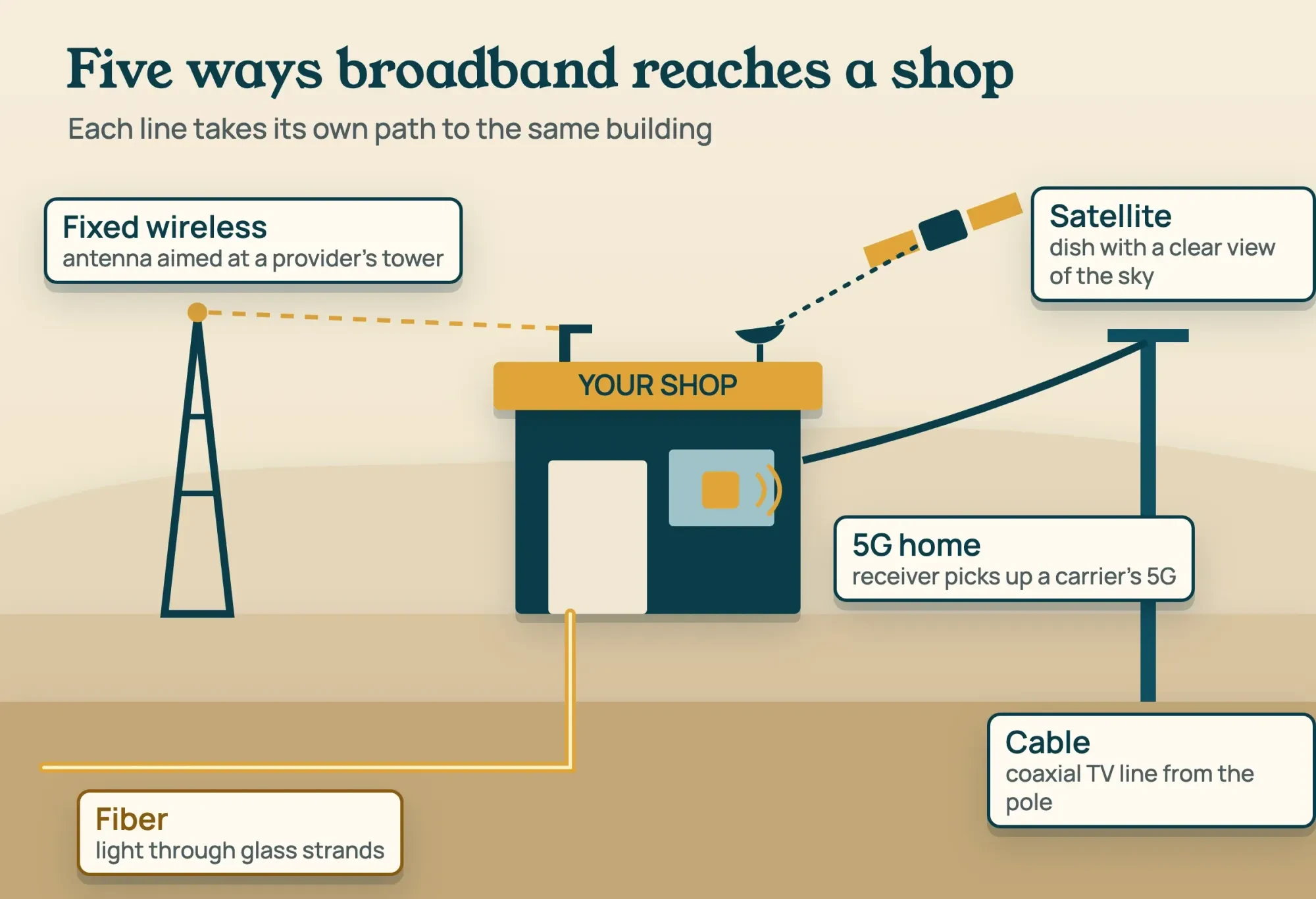 Diagram by DigitalTreed from the FCC Getting Broadband Q&A and FCC map settings, read October 29, 2026
Two of those paths are wired into the building and three need a clear radio path, and that split decides what can slow your line.
Fiber, cable, 5G home, fixed wireless and satellite side by side
Compare what carries the signal, how the FCC National Broadband Map labels it, what sits at your building and what slows it. We've left speed numbers out on purpose. They change by provider and address, and we didn't read any provider's plan pages.
| Type | What carries it | Listed on the FCC map as | At your building | What can slow it |
|---|---|---|---|---|
| Fiber | Light through glass strands | Fiber | Fiber run into the building | How close to you the provider brings the fiber |
| Cable | Coaxial TV cable | Cable | A cable modem | Traffic load on the shared network |
| 5G home | A mobile carrier's 5G network | No fixed category of its own | A receiver for the carrier signal | Walls, so test the receiver indoors |
| Fixed wireless | Radio link from a provider's tower | Licensed or Unlicensed Fixed Wireless | A directional antenna | Anything in the path to the tower |
| Satellite | Radio link to an orbiting satellite | GSO or NGSO Satellite | A dish and a satellite modem | Weather, line of sight, and distance for GSO |
The last column's the one sales pages skip. A cable line can slow at busy hours, and a satellite dish needs a view of the sky that no tree will grow into. The table can't fill in the two numbers that matter most for a shop: the upload speed and the lag a provider promises at your address.
Upload speed decides how a shop's internet feels
Upload speed is how fast data leaves your building. The FCC's broadband label glossary says it affects "photo uploads and video conferencing". On March 14, 2024, the FCC set its fixed benchmark at 100 Mbps download and 20 Mbps upload (FCC news release on the speed benchmark). It replaced the 25/3 benchmark from 2015. A shop's download needs aren't big. The FCC Broadband Speed Guide lists 1 Mbps for browsing and email and 6 Mbps for HD video teleconferencing, one activity at a time. Upload's where shared use adds up. As of October 29, 2026, Microsoft's Teams network guidance recommends 2,500 kbps up and 4,000 kbps down per person in a video meeting.
Take our made-up shop, Pellridge Bike Repair, with two video meetings running and three devices browsing. That's 5.0 Mbps up (2 x 2.5) and 11.0 Mbps down (2 x 4.0 + 3 x 1). On a 20 Mbps upload line, the meetings use 25% and leave 15.0 Mbps free. That's comfortable. On the old 3 Mbps upload benchmark, they'd need 167% of the line by themselves. Microsoft says Teams puts audio ahead of video when bandwidth runs short, so the video quality is the part that'd drop. Our comparison of video call apps covers the meeting tools.
Then there's the backup, which is where a slow upload hurts most. We've timed two example files at four upload speeds with one formula: GB x 8,000 / Mbps / 60. That's minutes on an ideal line with no overhead.
| Example file | 3 Mbps up | 20 Mbps up | 100 Mbps up | 500 Mbps up |
|---|---|---|---|---|
| 1 GB video file | 44.4 min | 6.7 min | 1.3 min | 0.3 min |
| 5 GB nightly backup | 222.2 min | 33.3 min | 6.7 min | 1.3 min |
The 3 and 20 are the upload halves of the FCC's 2015 and 2024 benchmarks, so check the FCC site for a newer figure before you quote 20. 500 is the upload half of the 1 Gbps/500 Mbps long-term goal it set in 2024, and 100 is an example of a plan with matched speeds. During those two meetings, the 5 GB backup on a 20 Mbps line takes 44.4 minutes, since only 15.0 Mbps is free (5 x 8,000 / 15 / 60). Run backups at night and 20 Mbps up is enough for this example. If staff upload video during the day, extra upload is where we'd spend first. Our cloud storage comparison covers where those backups go.
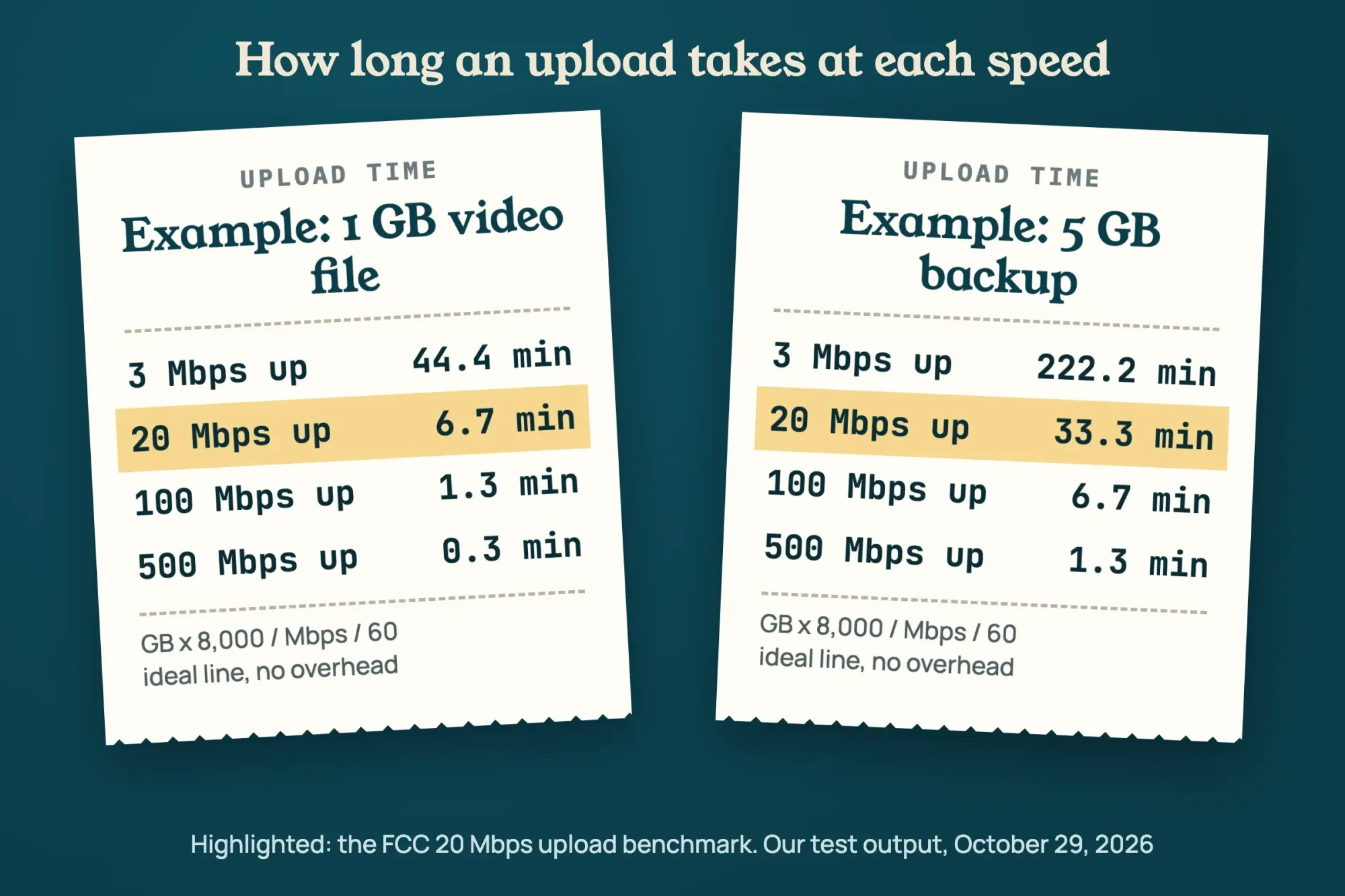 Diagram by DigitalTreed from our arithmetic test with example file sizes, October 29, 2026
Is satellite fast enough for video calls?
That comes down to which satellites serve you, because distance sets a floor on lag.
Latency is the round-trip time of data, in milliseconds. The FCC's 2024 broadband deployment report says it affects real-time uses "including voice over Internet Protocol (VoIP), video calling". For networks it funds, the FCC's standard is that 95% or more of peak-period round trips come in at or below 100 ms. Geostationary satellites, shown as GSO on the FCC map, sit 35,786 km up. Low Earth orbit is anything under 2,000 km, per ESA on types of orbits. A signal climbs and falls twice in one round trip. So the shortest possible lag is 4 x altitude divided by the speed of light, which NIST gives as 299,792,458 meters per second.
For a geostationary satellite straight overhead, the floor is 477.5 ms (4 x 35,786 / 299,792.458 x 1,000). That's almost 5 times the FCC's 100 ms line, and equipment and routing only add to it. At the 2,000 km top of low Earth orbit, the floor is 26.7 ms, well under the line. That gap is pure distance. So a low-orbit service, filed under NGSO (non-geostationary) on the map, can handle video calls. A geostationary plan can't escape the distance on any round trip.
The FCC has no newer per-type lag table to quote, which is why we did the math. Its Measuring Broadband America program ran from 2011 to 2023 and is "currently not collecting additional data".
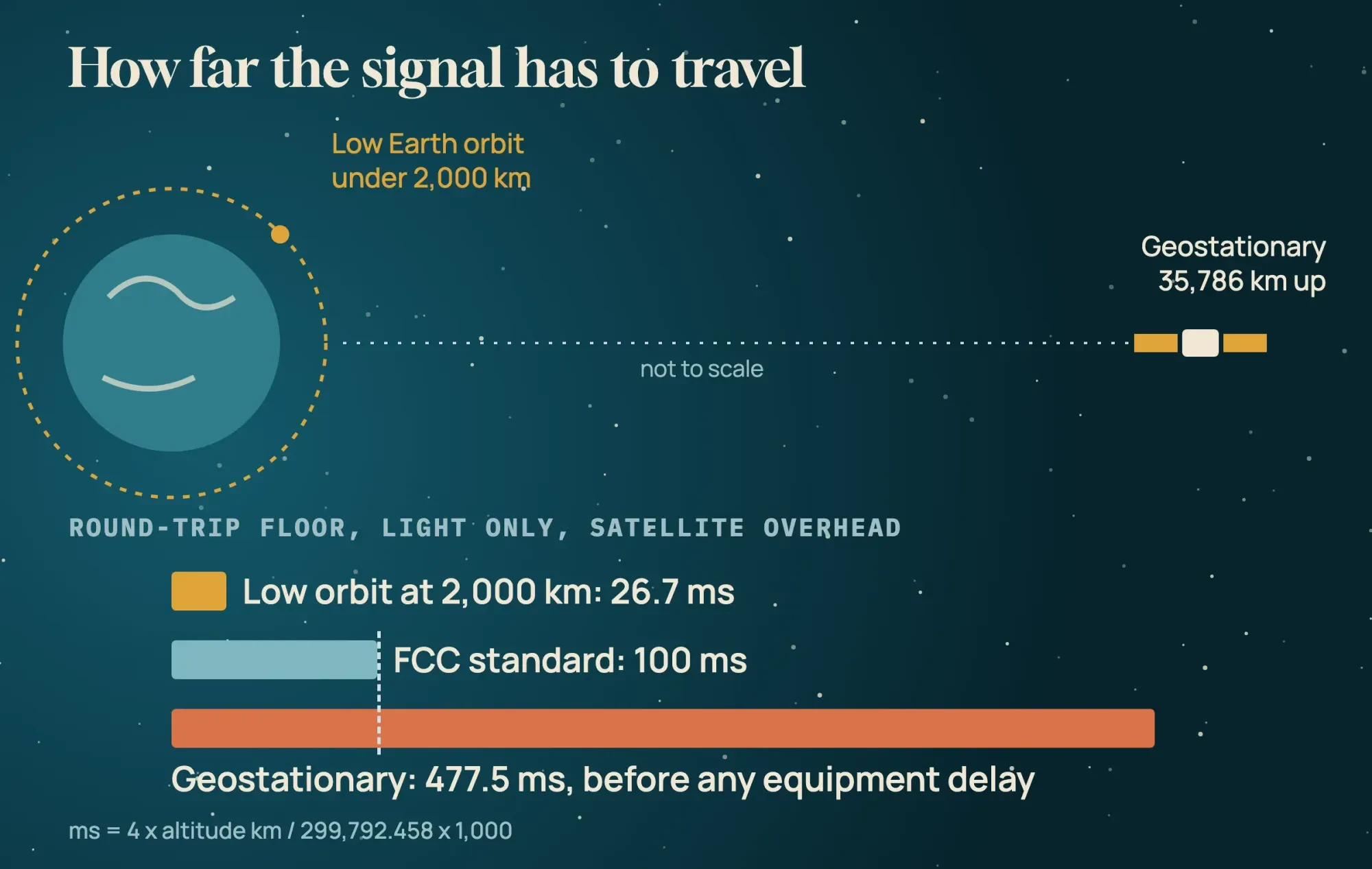 Diagram by DigitalTreed from ESA orbit altitudes, the NIST speed of light and the FCC 100 ms standard, October 29, 2026
What we tested
We ran test/planner.py on October 29, 2026, on an Apple Mac with macOS 27.0.1 and Python 3.9.6. It's arithmetic only. It sent no traffic and measured no real line. All three of its results appear in this guide: the upload table, the shop's 5.0 Mbps meeting load, and the satellite floors of 477.5 ms and 26.7 ms.
Business plans and home plans are listed separately
Once you know how much upload you need, look at how plans are sold, because the FCC map keeps business plans and home plans in two separate views. It opens on Residential. Switch to Business, since a provider listed for homes on your block may not be listed for businesses.
Broadband labels help on the home side. The FCC says providers of "home, or fixed, internet services, or mobile broadband plans" need a label for each standalone plan (FCC broadband labels). They'll show prices, introductory rates, data allowances and speeds.
The label rule in 47 CFR 8.1 covers every stand-alone mass-market plan, not only home plans. It leaves out offers "customized for the customer through individually negotiated agreements", so a negotiated business contract may come without one.
A label also lists typical upload speed and typical latency, per the glossary, so ask a business sales rep for those two numbers in writing. An introductory rate is the other line worth reading. The glossary says a label shows how long the rate lasts and the monthly price after it. Ask for the same on a business quote, on paper. Ask, too, whether the contract has a written repair-time promise, and a fixed IP address if cameras or a server need one. Internet is one line in a wider set of tools, and our small business tech stack guide covers the rest.
Check your address on the FCC National Broadband Map
Before you call any provider, check what reaches your address on the map, because it lists each provider that reported service there, with its technology and speeds. Providers serving fixed locations "such as homes and small businesses" report service location by location, per the National Broadband Map About page. Work through it in this order:
- Open the National Broadband Map and type the shop's street address into Search by Address.
- Read the list of providers, technologies and speeds shown for that location.
- In the map's settings, switch Residential to Business and filter by technology or by a speed tier such as 100/20.
- Note the data date: as of October 29, 2026, the newest data set is labeled December 30, 2025, last updated October 1, 2026.
- If a listed provider says it can't serve you, file an Availability Challenge from the map.
The map's a starting list, not a promise. There's no 5G home box in its fixed settings. So look for the carrier's name in the provider list, and test a 5G home receiver inside the shop before you sign. Call the two or three providers it lists. Ask each for typical upload speed and latency at your address, and keep the answers.
The data date matters more than it looks. Providers report what they offered as of June 30 and December 31, with filings due September 1 and March 1. So a fiber line laid last month won't be on the map yet. If a neighbor already has a service the map doesn't show at your address, ask that provider directly. And if you're comparing two possible sites for a second shop, run both addresses before you sign a lease, since the lists can differ from one block to the next.
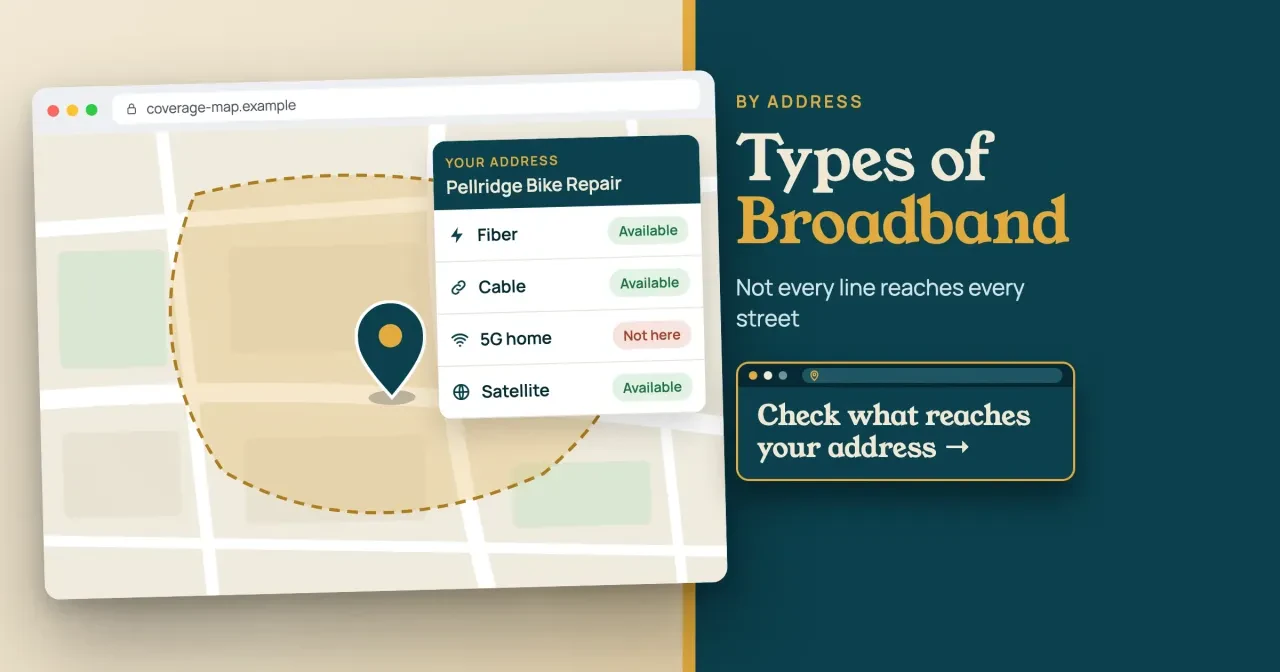
Given fiber, cable and satellite but no 5G home, our made-up Pellridge Bike Repair would call the fiber and cable providers first. Satellite's its last resort.
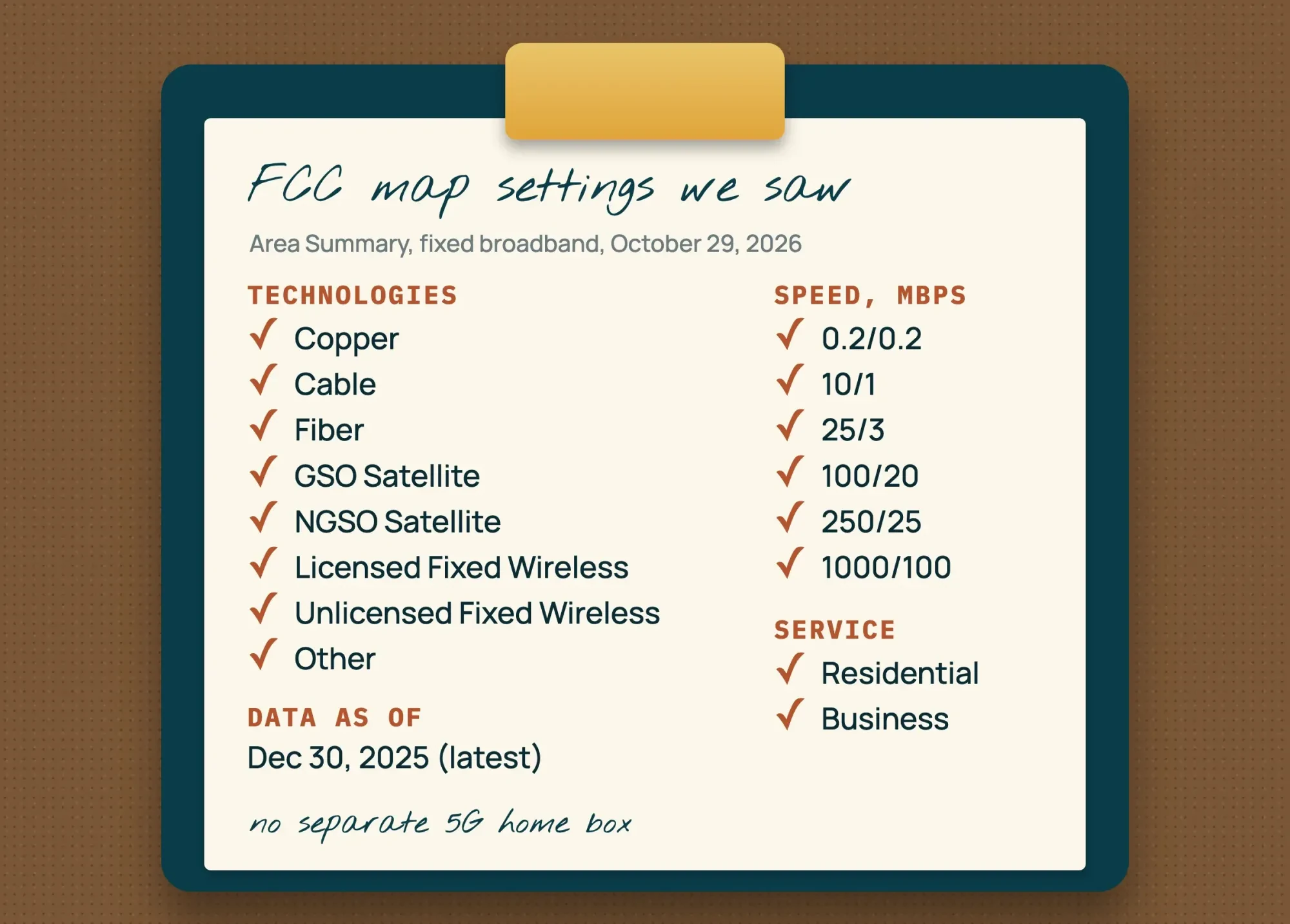 Drawn by us from the FCC National Broadband Map settings panel, viewed October 29, 2026
Pick the line with the most upload that reaches you
With the address list in hand, here's how we'd narrow the choice to one or two types for a small shop:
- Choose fiber if it reaches the building, since the FCC puts its speeds far above DSL and cable.
- Choose cable if fiber doesn't reach, and ask for the typical upload speed at busy hours.
- Choose 5G home or fixed wireless if no wire reaches you, and test the signal inside before signing.
- Choose a low-orbit satellite service if nothing else reaches, and skip GSO plans when staff live on video calls.
- Keep a second type as backup if card payments can't stop, such as a wired main line and a wireless spare.
A backup line doesn't need to match the main one. It only has to keep the card reader, the phones and maybe one laptop going until the main line's back, which is a far smaller load than two video meetings. That's why we'd pair a wired main line with a wireless spare of a different type. One cut cable or one storm then can't take both down at once.
Our take: pay for upload before download, because upload runs short first. In our example, the shop used 25% of a 20 Mbps upload but 11% of a 100 Mbps download. If a provider won't put typical upload speed and latency in writing, we'd treat that as a reason to call the next name on the map list. People often mix up one thing. Your shop's line doesn't change how fast your website loads for customers, since that runs on your host. To check that side, run your homepage through the website speed test on our site, then read the PageSpeed Insights guide for fixes. Our website uptime monitoring guide sets up alerts for when the site goes down.
If your site or online store needs looking after while you sort out the connection, the web development work we sell covers that for a fee. That link ends in an invoice from us, so get a second price from someone else before you choose.
Frequently asked
Does the FCC use the same speed benchmark for mobile 5G?
No. The same March 14, 2024 report measured mobile 5G-NR coverage at minimum speeds of 35/3 Mbps, apart from the 100/20 fixed benchmark (FCC news release).
What if the FCC map shows my shop in the wrong place?
File a Location Challenge from the map. The map About page says it covers a location point that's wrong or missing.
How much speed does a VoIP phone line need?
Very little. The FCC Broadband Speed Guide lists VoIP calls at less than 0.5 Mbps of download, one call at a time.
Is DSL still an option for a shop?
Sometimes. The FCC Q&A says symmetrical DSL, with equal upload and download, is "used typically by businesses".
How we made this guide: Each speed and lag figure traces to an FCC, ESA, NIST or Microsoft page read on October 29, 2026. We read no provider's plan or price pages, so none is named. Our test was local arithmetic, not a line measurement. Facts checked by the DigitalTreed team on October 29, 2026.
First published January 2022. Rewritten October 29, 2026 as a comparison of broadband types for a US shop, with no provider named.
Sources
- FCC: Getting Broadband Q&A
- FCC: Broadband Speed Guide
- FCC: FCC Increases Broadband Speed Benchmark (March 14, 2024)
- FCC: 2024 Section 706 Report (FCC 24-27)
- FCC: Broadband Consumer Labels
- FCC: Glossary of terms used for broadband labels
- FCC: National Broadband Map
- FCC: National Broadband Map, About
- FCC: Measuring Broadband America
- ESA: Types of orbits
- NIST: Speed of light in vacuum
- eCFR: 47 CFR 8.1, Broadband consumer labels
- Microsoft Learn: Prepare your organization's network for Teams


Comments
No comments yet. Start the conversation below.